1
Quick Start Manual
NX10
FOR TECHNICAL SUPPORT, PLEASE CALL 1-800-SAMSUNG (726-7864)
For more information, refer to
the User Manual included on the
supplied CD-ROM.
This Quick Start Manual has been specially designed to guide you
through the basic functions and features of your device.
Please read the Quick Start Manual and User Manual carefully to
ensure safe and correct use.
ENG
Health and safety information
Always comply with the following precautions and usage tips to avoid dangerous situations and ensure peak
performance of your camera.
Handle and dispose of batteries and chargers with care
Warning—situations that could cause injury to
UÊ Use only Samsung-approved batteries and chargers.
yourself or others
Incompatible batteries and chargers can cause serious injuries
Caution—situations that could cause damage to your
camera or other equipment
Note—notes, usage tips, or additional information
or damage to your camera.
UÊ Never dispose of batteries in a fire. Follow all local regulations
when disposing of used batteries.
UÊ Never place batteries or cameras on or in heating devices,
such as microwave ovens, stoves, or radiators. Batteries may
explode when overheated.
Safety precautions
Safety warnings
Handle and store your camera carefully and sensibly
Do not use your camera near flammable or explosive gases
and liquids
Do not use your camera near fuels, combustibles, or flammable
chemicals. Do not store or carry flammable liquids, gases, or
explosive materials in the same compartment as the camera or
its accessories.
Keep your camera away from small children and pets
Keep your camera and all accessories out of the reach of small
children and animals. Small parts may cause choking or serious
injury if swallowed. Moving parts and accessories may present
physical dangers as well.
Prevent damage to subjects’ eyesight
Do not use the flash in close proximity (closer than 1 m/3 ft) to
people or animals. Using the flash too close to your subject’s
eyes can cause temporary or permanent damage.
2
UÊ Do not allow your camera to get wet—liquids can cause serious
damage. Do not handle your camera with wet hands. Water
damage to your camera can void your manufacturer’s warranty.
UÊ Do not expose the camera to direct sunlight or high
temperatures for an extended period of time. Prolonged
exposure to sunlight or extreme temperatures can cause
permanent damage to your camera’s internal components.
UÊ Avoid using or storing your camera in dusty, dirty, humid, or
poorly-ventilated areas to prevent damage to moving parts and
internal components.
UÊ Remove the batteries from your camera when storing it for an
extended period of time. Installed batteries may leak or corrode
over time and cause serious damage to your camera.
UÊ Protect your camera from sand and dirt when using it on
beaches or in other similar areas.
UÊ Protect your camera from impact, shock, bending, or press of
heavy goods when you connect either cable or power cord. It may
damage your camera or cable or cause by electric shock or fire.
UÊ Exercise caution when connecting cables or adaptors and
installing batteries and memory cards. Forcing the connectors,
improperly connecting cables, or improperly installing batteries and
memory cards can damage ports, connectors, and accessories.
UÊ Do not insert foreign objects into any of your camera’s
compartments, slots, or access points. Damage due to
improper use may not be covered by your warranty.
UÊ Do not use broken power cord, plug, or wall-outlet. It may
cause by electric shock or fire.
Protect batteries, chargers, and memory cards from damage
UÊ Avoid exposing batteries or memory cards to very cold or very
hot temperatures (below 0º C/32º F or above 40º C/104º F).
Extreme temperatures can reduce the charging capacity of
your batteries and can cause memory cards to malfunction.
UÊ Prevent batteries from making contact with metal objects, as this
can create a connection between the + and – terminals of your
battery and lead to temporary or permanent battery damage.
UÊ Prevent memory cards from making contact with liquids, dirt, or
foreign substances. If dirty, wipe the memory card clean with a
soft cloth before inserting in your camera.
UÊ Turn off the camera when inserting or removing the memory card.
UÊ Do not bend, drop, or subject memory cards to heavy impact
or pressure.
UÊ Do not use memory cards that have been formatted by other
cameras or by a computer. Reformat the memory card with
your camera.
UÊ Never use a damaged charger, battery, or memory card.
Use only Samsung-approved accessories
Using incompatible accessories may damage your camera,
cause injury, or void your warranty.
Protect your camera’s lens
UÊ Do not expose the lens to direct sunlight, as this may discolor
the image sensor or cause it to malfunction.
UÊ Protect your lens from fingerprints and scratches. Clean your
lens with a soft, clean, debris-free lens cloth.
Important usage information
Allow only qualified personnel to service your camera
Do not allow unqualified personnel to service the camera or
attempt to service the camera yourself. Any damage that results
from unqualified service is not covered by your warranty.
Ensure maximum battery and charger life
UÊ Overcharging batteries may shorten battery life. After charging
is finished, disconnect the cable from your camera.
UÊ Over time, unused batteries will discharge and must be
recharged before use.
UÊ Disconnect chargers from power sources when not in use.
UÊ Use batteries only for their intended purpose.
Exercise caution when using the camera in humid
environments
When transferring the camera from a cold environment to a warm
and humid one, condensation can form on the delicate electronic
circuitry and memory card. In this situation, wait for at least 1
hour until all moisture has evaporated before using the camera.
Check that the camera is operating properly before use
The manufacturer takes no responsibility for any loss of files or
damage that may result from camera malfunction or improper use.
©2009 Samsung Electronics America, Inc.
Camera specifications or contents of this manual may be changed
without prior notice due to upgrade of camera functions.
Regarding the Open Source License, see the "OpenSourceInfo.
pdf" in the provided CD-ROM.
Copyright information
UÊ Microsoft Windows and the Windows logo are registered
trademarks of the Microsoft Corporation.
UÊ HDMI, the HDMI logo and the term "High Definition Multimedia
Interface" are trademarks or registered trademarks of HDMI
Licencing LLC.
UÊ QuickTime® and QuickTime® logo are trademarks or registered
trademarks of Apple Computer, Inc., used under licence.
3
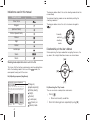
Indications used in this manual
Shooting mode
The diagram below reflects the actual shooting mode dial on the
camera body.
Marking
Smart Auto
Your desired shooting mode can be selected by rotating the
shooting mode dial.
Program
The diagram below shows the status has been changed to
(
).
Aperture Priority
Shutter Speed Priority
Currently
selected
shooting
mode
Manual
Night
Portrait
Directional Keys in the User's Manual
Landscape
When explaining the steps needed for navigating the menu, the
up, down, left and right directional arrows are shown below.
Scene
Movie
[]
Shooting mode explanation shown next to the title
AF MF
This shows that the functions explained can only be selected from
within the shooting mode. In the case of the
mode, this
corresponds to only part of the scene.
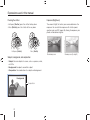
[ ]
The images can be taken bright or dark according to the
amount of light. In this case, appropriate adjustment can
be made by controlling the amount of light entered into
the lens.
Applying -
0
4
Applying +
WB
[]
ISO
Ex) Adjusting exposure (brightness)
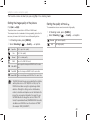
Adjusting the exposure (brightness)
OK
(Program),
(Aperture priority),
(Shutter priority),
(Night),
(Portrait),
(Landscape),
(Scene), or
(Movie) mode.
[]
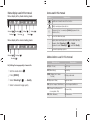
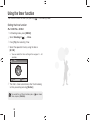
Ex) Executing the 'Play' mode
The user can check saved pictures and movies.
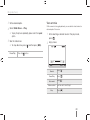
1 Press [
]
UÊ -
ÜÊÃÌÊÀiViÌÞÊÃ>Ûi`ÊwÊið
2 Check the following pictures sequentially by using [].
Menu display used in this manual
Icons used in this manual
Menu display of the photo shooting mode
1
2
3
1
1
2
Symbol
Explanation
Additional information about the function
3
Safety warnings and precautions
Shooting 1(
1)
Shooting 2(
Shooting 3(
2)
3)
User setup (
Setting 1(
1)
Setting 3(
Setting 2(
1)
3)
[ ]
Camera buttons; for example: [Shutter] (represents the
shutter button)
( )
Shows the reference page
→
Display when selecting a menu or option within the step
Example: Select Shooting 1 ( 1) → Quality.
(represents select Shooting 1 ( 1), and then Quality)
2)
Menu display of the movie shooting mode
1
Shooting 1(
2
3
1
1
2
3
*
1)
Shooting 2(
Shooting 3(
3)
Comment explaining symbols
Abbreviations used in this manual
2)
Abbreviations
Explanation
Ex) Setting the image quality of movie file
AF (Auto Focus)
Auto focus
1 Set the mode dial to
BKT (Bracketing)
Bracketing
DPOF (Digital Print Order
Format)
Printing order mark
EV (Exposure Value)
Exposure value
.
2 Press [MENU]
3 Select Shooting1 (
1)
→ Quality
4 Select a desired image quality
OIS (Optical Image Stabilization) Optical image stabilization
ISO (International Standard for
color negative film)
Film sensitivity
WB (White Balance)
White balance
5
Expressions used in this manual
Pressing the shutter
Exposure (Brightness)
UÊHalf-press [Shutter]: press the shutter halfway down
UÊ Press [Shutter]: press the shutter all the way down
The amount of light that enters your camera determines the
exposure. You can alter the exposure with shutter speed,
aperture value, and ISO speed. By altering the exposure, your
photos will be darker or lighter.
Half-press [Shutter]
Press [Shutter]
Normal exposure
Subject, background, and composition
噝Subject: the main object of a scene, such as a person, animal,
or still life
噝Background: the objects around the subject
噝Composition: the combination of a subject and background
Background
Composition
Subject
6
Overexposure (too bright)
Contents
Unpacking............................................................... 9
Title and role of each part...................................... 10
Diopter adjustment dial/Eye-cup/Status lamp.... 12
Description for each part of the lens .................. 13
Preparations before shooting ................................ 14
Charging the battery .......................................... 14
Installing the battery ........................................... 15
Installing the memory card ................................. 16
Mounting/dismounting the lens.......................... 17
Connecting the strap ......................................... 18
Turning on the power and initialization ................... 19
Icons.................................................................. 21
Option/menu selection method ............................. 22
Using the dial ..................................................... 22
Using [Fn] ......................................................... 23
Changing the display type ..................................... 24
Changing the display type ................................. 24
Setting user display ........................................... 24
Simple picture-taking method ............................... 25
Tips for getting a clearer photo ............................. 26
Holding your camera correctly ........................... 26
Image stabilization ............................................. 26
Half-pressing the shutter button ........................ 26
Preventing your subject from being out of focus 27
Setting the automatic/manual focus function ..... 28
Zooming ........................................................... 28
Optical Image Stabilization (OIS) ........................ 29
Using the OIS in the menu option ...................... 29
Depth preview ................................................... 30
Using the Smart Auto mode.................................. 31
Using the Program mode ...................................... 32
Using the Aperture Priority, Shutter Priority,
or Manual mode .................................................... 33
Using the Aperture Priority mode ....................... 33
Aperture value ................................................... 33
Using the Shutter Priority mode ......................... 34
Shutter speed .................................................... 34
Using the Manual mode..................................... 35
Using the Night/Portrait/Landscape mode ............ 36
Using the night mode ........................................ 36
Using the portrait mode ..................................... 36
Using the landscape mode ................................ 36
Using the Scene mode.......................................... 37
Using the Beauty Shot mode ............................ 38
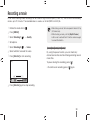
Recording a movie ................................................ 39
Finding more about the basic shooting function .... 41
Setting the resolution and quality .......................... 42
Setting a resolution ........................................... 42
Setting the image quality of the picture ............. 43
Setting the quality of movie ............................... 43
Using the timer function ........................................ 44
Setting the timer function ................................... 44
7
Contents
Taking a picture in a dark place ............................. 45
Using the flash popup button ............................ 45
Setting the flash option ..................................... 45
Using the red-eye fix function ............................ 46
1st Curtain, 2nd Curtain .................................... 46
Adjusting the ISO sensitivity .............................. 46
Adjusting the amount of flash light .................... 47
Focusing methods ................................................ 48
Changing the Focusing methods ....................... 48
Changing the focus area.................................... 48
Setting the focus of the selected area ............... 49
Face detection ...................................................... 50
Normal face detection ...................................... 50
Self-portrait face detection................................. 51
Brightness and color adjustment of picture ........... 52
Adjusting the exposure (brightness) ................... 52
Setting the white balance .................................. 53
Changing the shooting method ............................. 54
Successive shooting method and timer setup ... 54
Special effect/photo retouching............................. 55
Picture wizard .................................................... 55
Finding more about the extended shooting
function ................................................................. 56
Play (picture/movie) ............................................... 58
Viewing pictures in the play mode ..................... 58
8
View files in the smart album by category .......... 60
Converting into the thumbnail view .................... 60
File protection .................................................... 61
Deleting a file ..................................................... 61
Enlargement/reduction ...................................... 62
View a movie ..................................................... 63
Transferring files to your computer ........................ 65
For Windows users............................................ 65
Using Samsung Master ..................................... 68
Using the Samsung RAW Converter ..................... 69
Printing photos with a photo printer (PictBridge) ... 70
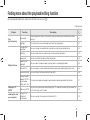
Finding more about the playback/
editing function...................................................... 71
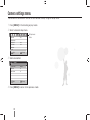
Camera settings menu .......................................... 72
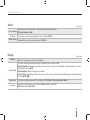
Sound................................................................ 73
Display ............................................................... 73
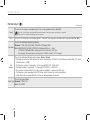
Normal setup 1 .................................................. 74
Normal setup 2 .................................................. 75
Normal setup 3 .................................................. 76
Error messages ..................................................... 77
Before contacting a service center ........................ 78
Camera specifications ........................................... 81
Lens specifications ................................................ 85
Index ..................................................................... 86
Unpacking
Check your product box for the following items.
Camera (Body cap,
eye-cup, Hot-shoe cover
included)
USB cable
(AD39-00174A)
Quick Start Manual
(AD68-04529A)
Charger(AD44-00157A)/
AC power cable
(AD81-00681A)
Battery
(AD43-00192A)
Strap
(AD63-04468A)
Software installation
CD (including user's manual)
(AD46-00298A)
The image of components or optional parts can differ from that of actual products.
For more information about optional items, see “Accessories(optional items).” (CD-ROM User manual, page 120)
9
Title and role of each part
For more detailed information, refer to the CD-ROM User manual (
).
Mode dial
Drive mode button
Hot-shoe cover
Green button*
Hot-shoe
Dial
Shutter button
Diopter adjustment dial
Built-in flash
Power switch
AF-assist light /
timer lamp
Flash button
Lens mount index
Strap holder
Depth preview button
Lens removal button
Lens mount
Body cap
Image Sensor
DC-IN port
HDMI port
* Use the green button [
].
The following setup values are initialized if the button
is pushed once in the standby
state for shooting.
Program shift / Detailed setup of picture wizard / Fine tuning of white balance / Color
Temp. setting value / Adjusting the colors of screen menu / Timer / Flash EV / When
selecting or setting AF, shift the changed focus area to the center / Bracketing setup
10
Shutter release
connection port
USB/AV OUT Port
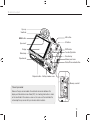
Title and role of each part
Eye-cup
Viewfinder
AEL button
MENU button
EV button
Eye sensor*
Display
DISP button
Function(Fn) button
Status lamp
Direction key
Memory card cover
Delete/Picture wizard button
Tripod mount
Playback button
Battery chamber cover
Memory card slot
*Use of eye sensor
Because the eye sensor enables the automatic conversion between the
display and the electronic view-finder (EVF), the shooting information is shown
on the viewfinder of the camera as soon as the user uses the viewfinder. Do
not overlap the eye sensor with your hands or other materials.
11
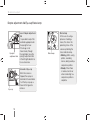
Title and role of each part
Diopter adjustment dial/Eye-cup/Status lamp
Eyesight
adjustment dial
Use of Diopter adjustment
dial
It is possible to adjust the
viewfinder appropriate for
the eyesight of user.
If the image is not
shown clearly through
the viewfinder, move the
eyesight adjustment dial
in the left/right direction to
have a clear view.
Removal of Eye-cup
When the camera is
shipped, the eyecup is
attached to the viewfinder.
Push the Eye-cup up as
shown in the figure for
removal.
Eye-cup
12
Status lamp
Status lamp
In the case of saving a
picture or shooting a
movie, this shows the
operating status of the
camera by blinking the
status indicator lamp.
UÊ Blinking: When saving
photos, recording
movies, being read by a
computer or printer.
UÊ Steady: When there
is no data transfer or
when connecting to a
computer or printer is
complete.
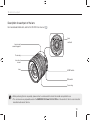
Title and role of each part
Description for each part of the lens
For more detailed information, refer to the CD-ROM User manual (
).
Lens
contacts
Lens mount
connecting point
Zoom ring
Lens hood
mount
Lens
AF/MF switch
OIS switch
Focus ring
UÊ When purchasing the lens separately, please contact a service center to check the models compatible for use.
UÊ This user manual was prepared based on the SAMSUNG 18-55mm F3.5-5.6 OIS lens. Please refer to the lens user manual for
more information about the lens.
13
Preparations before shooting
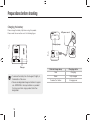
Charging the battery
Please charge the battery fully before using this product.
CHARGE
Please make the connections as in the following figure.
AC power cord
INSERT
1
Charging lamp
INSERT
2
Charger
UÊ To remove the battery from the charger, lift slightly in
the direction of the arrow.
UÊ Please use designated charger or batteries for proper
use. SAMSUNG is not responsible for any accident
that may occur from using a product other than
designated.
14
INSERT
Color of charge lamp
Charging status
Red
Charging
Green
Fully charged
Turned off, or Yellow
Charging error
Preparations before shooting
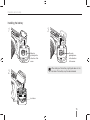
Installing the battery
1
3
Open by
pushing in the
direction of the
arrow
Close by
pushing down
in the direction
of the arrow.
When taking out the battery, slightly pull down on the
lock lever. The battery may then be removed.
2
Lock lever
15
Preparations before shooting
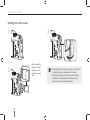
Installing the memory card
1
3
After checking the
direction of metal
terminal, you can
insert the memory
card.
2
16
UÊ When taking out the memory card, you can remove it
by slightly pushing in the direction of insertion.
UÊ Please do not remove the memory card or battery
while the status indicator lamp is blinking. It may
cause loss or data or product damage.
Preparations before shooting
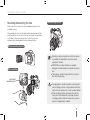
Mounting/dismounting the lens
Dismounting the lens
Please remove the lens mount cover and body cap prior to the
installation of lens.
After matching the lens mount index (red) of camera body with the
point (red) of lens mount, join the lens by turning the lens clockwise
until it clicks. When removing the lens, turn the lens counter
clockwise while holding down the lens dismount button.
Before mounting the lens
Lens mounting
Lens mount
connecting point
Mounting or dismounting the lens while the camera
is powered off is desirable to ensure the stable
operation of the lens.
SAMSUNG is not responsible for any accident,
damage or trouble caused by using other company's
lens.
The body cap protects the product from scratch or
dust while transporting.
Changing lenses should be made in an environment
clean of foreign particles. Foreign particles within the
body or lens of camera may cause a product defect.
When mounting the lens, please do not touch the
inner part of the camera with your finger. Any dust
or foreign particles within the camera may cause an
impact on image quality or defect.
17
Preparations before shooting
Connecting the strap
By connecting the strap to the body, the user can conveniently carry the camera.
18
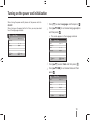
Turning on the power and initialization
When turning the power on/off, please set the power switch to
ON/OFF.
When turning on the power for the first time, you may be asked
to set the language and date.
2
Date
Date & Time
1 Press [] to select Language and then press [ ].
2 Press [///] to set desired language option
and then press [ ].
UÊ /
iÊÃVÀiiÊ>««i>ÀÃÊÊÌ
iÊ>}Õ>}iÊÃiiVÌi`°
2009 1 1
Date & Time
2
Time Zone
2009 1 1
Time
00 : 00
Date
Language
English
Time Zone
MENU Exit
OK
Time
00 : 00
Language
English
Change
MENU
Exit
OK
Change
3 Press [/] to select Date and then press [ ].
4 Press [///] to set desired date and then
press [ ].
2
Date
Date & Time
2009 1 1
Time Zone
Time
00 : 00
Language
English
MENU Exit
OK
Change
19
Turning on the power and initialization
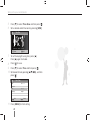
5
6
Press [] to select Time Zone and then press [ ].
Set a desired world time zone by pressing [/].
Time Zone
2
London
[GMT +00:00]
2009/01/01
01:10 AM
MENU Back
7
DST
To set the daylight saving time, press [].
Press [] again to disable.
8 Press [ ] to save.
9 Press [] to select Time and then press [ ].
10 Set desired time by pressing [///], and then
press [ ].
Date & Time
2
2009 1 1
Date
Time Zone
Time
00 : 00
Language
English
MENU
Exit
OK
Change
11 Press [MENU] to finish setting.
20
Turning on the power and initialization
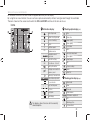
All the details shown on the view finder will appear identically on the display.
By using the live view function, the user can take a picture conveniently without having to look through the viewfinder.
The icons shown on the screen are for when the OIS and AF/MF switches on the lens are in use.
Icons
A Information display
12:00AM
AM 2010.01.01
14M
B
C
SF
Shooting mode
B Shooting option display (left)
14M
Movie shooting mode
Focus checking
ISO
RGB
SF
Flash
Shutter speed
15
OIS
15 F3.5
3
2
1
0
1
2
+
3 AEL
AFL
0001
A
F3.5
3
2
1
0
1
0001
2
+
3
Aperture value
Adjusted value of
exposure
AEL/AFL setting
Possible no. of shots
RGB
OIS
Battery information
Displays no-insertion of
memory card
Size
Movie size
Image quality
Movie quality
Focus area
Flash
Flash light adjustment
Color space
Smart range
OIS
Voice recording
Fader
Wind Cut
Warning of camera shake
12:00AM 2010.01.01 Time, date and year info
C Shooting option display (right)
Focus indicator
Spot metering area
AF zone
Histogram
Grid display
ISO
The display shows the icons for the currently
selected option.
Drive mode
Timer
AF mode
White balance
White balance adjustment
ISO
Metering option
Picture wizard
21
Option/menu selection method
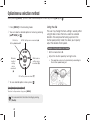
When pressing [MENU], you can select a desired option or menu by pushing [/] or [ ].
1 Press [MENU] in the shooting mode.
2 You can select a desired option or menu by pressing
[///] or [ ].
OK button,
AF/MF setting, menu movement ()
Setting Selection AF
Using the dial
The user may change the menu setting's value by either
using the dial or move the menu screen to a desired
direction. For example when taking a picture in the
shutter speed priority mode, this allows you to quickly
adjust the desired shutter speed.
Example. Using the dial in the S mode
AF MF
Metering
method
setting,
menu
movement
()
OK
WB
ISO
White balance
setting, menu
movement ()
ISO setting, menu movment ()
3 To save selected option or menu, press [ ].
Return to the previous step.
To return to the previous step, press [MENU].
The user can return to the state of shooting by pressing
[Shutter].
22
1 Set the mode dial to S.
2 Adjust the shutter speed by turning the dial.
UÊ /
iÊ>«iÀÌÕÀiÊÛ>ÕiÊÃÊÃiÌÊ>ÕÌ>ÌV>ÞÊ>VVÀ`}ÊÌÊ
the shutter speed being set.
Option/menu selection method
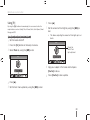
Using [Fn]
6 Press [].
By using the [Fn] function of camera body, the user can enter into the
major functions such as Quality, Size, AF area, Flash, Color Space, Smart
Range, and OIS.
7 Set the amount of flash light by using the [/] or
Example. Flash setting in the P mode
1 Set the mode dial to P.
2 Press the [Fn] button on the body of camera.
dial.
UÊ /
ÃÊ>ÜÃÊ>`ÕÃÌ}ÊÌ
iÊ>ÕÌÊvÊyÊ>Ã
Ê}
ÌÊÕ«ÊÌÊ´ÓÊ
levels.
Fill in
Display the
level of flash
light adjustment
0
-1
3 Select Flash by using the [/] or dial.
-2
+1
+2
Flash
14M
0
-1
-2
+1
SF
RGB
OIS
+2
8 Align your subject in the frame and half-press
[Shutter] to focus.
14M
SF
RGB
OIS
9 Press [Shutter] to take a photo.
4 Press [].
5 Set the flash menu option by using the [/] or dial.
23
Changing the display type
Learn how to change the display options of your camera.
Changing the display type
Setting user display
You can select the display method of icons and option items shown
while in shooting and play mode.
You can set or remove the shooting information display.
Press [DISP] repeatedly.
1 Press [MENU] in the shooting mode.
2 Select User setup ( 1) → User Display → an
option.
DISP button
09:45 2009.01.01
14M
Grid
SFF
S
09:45 2009.01.01
14M
SF
Icon
DISP
ISO
RGB
ISO
RGB
AF - MF
WB
OIS
ISO
20 F3.7
3
2
1
0
1
2
+
3
0001
OIS
20 F3.7
Shooting
mode
UÊ Display all the shooting information except for User
Display setting values.
UÊ Display all the shooting modes set by user.
UÊ Hide all the information except for shooting mode,
shutter speed, aperture value, exposure, number of
available shots, battery information.
Playback
mode
UÊ Display the meta information for shooting.
UÊ Display the RGB histogram, currently selected option
and date set.
UÊ Display the information regarding to shutter speed,
aperture value, ISO, file in play and total number of
files saved.
24
3
2
1
0
1
2
+
3
0001
Histogram
Icon
About histogram
Histogram refers to the graph that shows the brightness distribution
of picture. This represents a dark picture if the graph is inclined
to the left and if the graph is leaning to the right, this represents a
bright picture. The height of graph is related to the color information
and the graph gets higher if a specific color is distributed more.
▲ Insufficient exposure
▲ Relevant exposure
▲ Excessive exposure
Simple picture-taking method
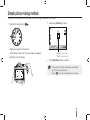
The user can take a picture conveniently by minimizing the need of user setup.
1 Rotate the mode dial to
.
3 Half-press [Shutter] to focus.
14M
SMART
RGB
OIS
2 Align your subject in the frame.
All the details shown on the view finder will appear
identically on the display.
SMART
WHITE
●
●
0001
Green: Focus is set.
Red: Focus is not set.
4 Press [Shutter] to take a photo.
UÊ Please refer to the "Tips for getting a clearer photo"
(p. 26) to take a clear picture.
UÊ Press [
] to see the saved images on the screen.
14M
RGB
SMART
WHITE
0001
25
Tips for getting a clearer photo
Holding your camera correctly
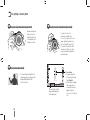
Half-pressing the shutter button
Please make sure
that your hand,
hair and strap do
not interfere with
the lens or flash.
In order to check in
advance whether the
focus of composition is set
appropriately, please use
the half-shutter function. If
you press the shutter halfway down, the focus and
exposure will be adjusted
automatically.
14M
Image stabilization
UÊ To avoid the blurring effect of
camera shake, set the optical
Image Stabilization(OIS)
function.(p.29)
SF
ISO
RGB
OIS
125 F3.5
3
2
1
0
1
2
Showing the shutter
speed and aperture
value being set
26
+
3
0001
Focus frame
UÊ If green, take the
picture by pressing
the [Shutter].
UÊ If red, either change
the composition
or adjust the focus
again since the
focus is not correctly
set.
Preventing your subject from being out of focus
Under the following circumstances, it may be difficult to get your subject in focus when.
UÊ When the color contrast is not clear
(when someone is wearing clothes similar in color to the background)
UÊ When the subject is in front of a strong backlight
UÊ When the subject generates strong reflected light
UÊ When there is a horizontally repeated line pattern like a window blinds
UÊ When the subject is not located in the center
UÊ When there is a flat white wall which does not include the specific patterns
UÊ When there is a fast moving subject
UÊ When the subject is too close to the camera
Please try to use the focus lock function.
Adjust the focus by using the half-shutter function where the focus can
be made easily. Then, simply press the [Shutter] button after moving
the camera to a desired composition. Keep pressing and holding
down the half-shutter until you actually make a photo shot.
Using the manual focus
When the auto focus function does not operate normally due to the
environmental factors, the focus can be adjusted manually by setting
the focus method to Manual Focus.
For user convenience, this product shows the image expanded
on the screen while user turns the focus ring in the photo shooting
mode. If the focus is adjusted by using the expanded image, the
focus can be adjusted more accurately. When pressing half of the
shutter, the screen comes back to normal screen in the state of
adjusted focus.
UÊ ÞÊÕÃ}ÊÌ
iÊVÌÀÊiÛiÊvÊ[AF/MF], the focus
can be adjusted manually.
UÊ vÊÌ
iÊiÃÊ`iýÌÊ
>ÛiÊÉÊÃÜÌV
]ÊÞÕÊV>Ê
set Manual Focus option in the AF mode menu.
UÊ /
iÊÃiiVÌ>LiÊ«ÌÊ>ÞÊ`vviÀÊ>VVÀ`}ÊÌÊÌ
iÊ
lens in use.
UÊ 7
iÊ>`ÕÃÌ}ÊÌ
iÊvVÕÃÊ>Õ>Þ]ÊÌ
iÊ«VÌÕÀiÊ
may appear blurred if the focus not set accurately.
Please take a picture after setting the focus
accurately.
UÊ 7
iÊÕÃ}ÊÌ
iÊ>Õ>ÊvVÕÃÊvÕVÌ]ÊÌ
iÊ
AF Area is not available to use.
UÊ ÊÌ
iÊÛiÊÃ
Ì}Ê`i]ÊÞÕÊV>ÊÌÊÃiÌÊÌ
iÊ
focus by using the expanded image.
Under the half-shutter state, press the [AEL] button of the camera
to fix the exposure value and focus information at the same time
according to the setting. To cancel the function, press the [AEL]
button once more. (CD-ROM User manual, page 75)
27
Setting the automatic/manual focus function
The focus can be adjusted automatically or
manually by using the AF/MF switch on the side of
the lens.
1 Use of automatic focus
Set the AF/MF switch of the camera to AF. The
focus is adjusted automatically if pressing half of the
shutter button.
2
Use of manual focus
Set the AF/MF switch of the lens to MF. The focus
can be adjusted manually by turning the focus ring.
Zooming
Using the zoom ring, you can enlarge (telephoto
angle) or reduce (wide angle) the size of an image
by changing the focal length value of the camera
lens.
Adjust it to the desired size and take the picture.
1 Turn the zoom ring to the left/right after checking the
focus to the subject.
According to the changed focal length, the subject may
appear enlarged or reduced.
2 Half-press [Shutter] to focus.
3 Press [Shutter] to take a photo.
There may be lens models that do not have the AF/MF
switch. Please consider when purchasing lens. (P.48)
Since the focus can be slightly changed when zooming in
or out, it is recommended to adjust the focus again prior to
taking a picture.
28
Optical Image Stabilization (OIS)
When using the optical image stabilization (OIS)
function in taking pictures, the user can accurately
focus pictures since this function minimizes
camera shaking.
Using the OIS switch of lens
The OIS function can be used only in the case that the lens in use
has the OIS function.
Using the OIS in the menu option
After setting the OIS switch, select the OIS
function in the menu option
1 In Shooting mode, press [MENU].
2 Select Shooting3 ( 3/ 3) → OIS → an option.
OIS
To use this function, please set [OIS] to ON.
OIS
OIS
ON
OFF
Mode 1
The OIS function is applied only when pressing
the shutter in full or half.
Mode 2 The OIS function is always applied.
UÊ The OIS function may not be applied well in the following
cases.
- When taking a picture while tracing a moving object
- When a big vibration occurs beyond the range of
stabilization
- When the shutter speed is too slow due to a circumstance
like night shooting
- When the battery capacity is not sufficient
- When having a close-up shot
UÊ When using a tripod, please disable the OIS function since
the image can be shaken due to the vibration of OIS function.
UÊ If the camera is shocked when taking a picture, the display
can be shaken. In this case, the camera may operate
normally if the camera is powered off and on again.
UÊ Since the battery consumption can increase along with the
use of OIS function, it is recommended to use the function
only if needed.
UÊ To set the OIS function by using the menu, set [OIS] of lens
to ON. This function may not operate depending on the lens
model.
UÊ The function can be set directly by pressing [Fn] in the
shooting mode.
29
Depth preview
When you are not using the depth preview function, you can only see the subject through the camera in the condition of the
maximum aperture (minimum f-number) in the shooting mode. If you use the depth of field checking function before taking
picture, you can conveniently check the depth of field in advance.
1 Press the [Depth Preview] in the shooting mode.
What is the depth of field?
When you focus on a specific subject, there is a range in which
objects closer and further away will also be in focus. This focused
range is called the depth of field.
The wider the wide-angle lens, the higher the aperture value, the
greater the depth of field.
For example, the aperture stop, f 11 is higher than f 2.8.
Depth
preview
button
2 You can check the depth of field result actually taken
Current position of the subject
10 meters
6 meters
4 meters
2 meters
1 meters
through the display and viewfinder.
This refer to an appropriate range of
focus when the depth of field is deep.
You can set the function of a button differently by using the Key
Mapping menu option. (CD-ROM User manual, page 75)
Current position of the subject
10 meters
6 meters
4 meters
2 meters
1 meters
This refer to an appropriate range of
focus when the depth of field is shallow.
30
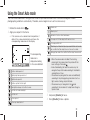
Using the Smart Auto mode
The smart auto mode allows taking pictures under an optimized condition since the camera recognizes various
photographing conditions automatically. Therefore, even a beginner can use the camera easily.
.
1 Rotate the mode dial to
2 Align your subject in the frame.
Sunset shot
Blue sky shot
UÊ vÊÌ
iÊV>iÀ>ÊÃiÌÃÊ>Ê`iÃÀi`ÊÃ
ÌÊV«ÃÌ]ÊÌÊ
detects the scene automatically and shows the
corresponding mode icon on the display.
14M
14M
Close-up shot for the subject with various colors
Close-up portrait shot
After fixing to a fixture like tripod, proceed with the shot under
the condition that the subject does not move for a while.
SMART
RGB
SMART
Nature shot such as forest and leaves
WHITE
0001
The corresponding
mode icon is
displayed according
to the scene detected.
Outdoor landscape shot
Highly bright background shot
Night landscape shot
Outdoor portrait shot at night
Backlight landscape shot without a man
Portrait shot under backlight
Portrait shot
Close-up shot
Taking pictures under the condition that the subject moves much
UÊ When the camera does not detect the shooting
environment, the camera takes the picture with the
basic settings of the mode .
UÊ Even after detecting the face, the camera may not
recognize the portrait mode according to the direction
and brightness of face.
UÊ The camera may recognize the same scene differently
according to the photographing environment such as
light, camera shaking, subject distance.
UÊ The camera may not recognize in the mode
according to the movement of subject even though a
tripod is used.
3 Half-press [Shutter] to focus.
4 Press [Shutter] to take a photo.
Close-up character shot
31
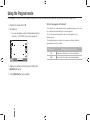
Using the Program mode
In the program mode, the shutter speed and aperture value are automatically adjusted maintaining the correct brightness.
1 Rotate the mode dial to P.
2 Set options.
UÊ ÀÊ>ÊÃÌÊvÊ«ÌÃ]ÊÀiviÀÊÌʺÝÌi`i`ÊÃ
Ì}Ê
functions.” (CD-ROM User manual, page 49)
What is the program shift method?
If this function is used, desired shutter speed and aperture value can
be selected while maintaining the same brightness.
The shutter speed and aperture value are changed as in the
following rules.
The available aperture numbers for exposure setting is different
depending on the lens model.
14M
SF
ISO
RGB
OIS
15 F3.5
3
2
1
0
1
2
+
3
0001
3 Align your subject in the frame and half-press
[Shutter] to focus.
4 Press [Shutter] to take a photo.
32
Dial direction
Changing the exposure value
Left
Decreased shutter speed + increased aperture
Right
Increased shutter speed + decreased aperture
Using the Aperture Priority, Shutter Priority, or Manual mode
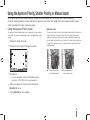
By using the aperture value of adjusting light volume and shutter speed, you can take pictures of desired exposure.
As for the shooting modes that allows adjusting the aperture value and shutter speed, there are the aperture priority mode,
shutter speed priority mode, and manual mode.
Using the Aperture Priority mode
Aperture value
The Aperture Priority mode allows you to manually set the aperture
value while the camera automatically selects an appropriate shutter
speed.
The aperture value of a lens can be adjusted to control the amount
of light reaching the image sensor. When opening the aperture
(reduce the aperture value), objects closer and further away than
the focused subject will be out of focus. When closing the aperture
(increase the aperture value), the range in focus expands forward
and backward.
1 Rotate the mode dial to A.
2 Rotate the dial to adjust the aperture value.
14M
SF
ISO
RGB
OIS
A
20 F4
3
2
1
0
1
2
+
3
0001
3 Set options.
▲ Increased aperture
value (narrow open)
▲ Reduced aperture
value (wide open)
UÊ ÀÊ>ÊÃÌÊvÊ«ÌÃ]ÊÀiviÀÊÌʺÝÌi`i`ÊÃ
Ì}Ê
functions.” (CD-ROM User manual, page 49)
4 Align your subject in the frame and half-press
[Shutter] to focus.
5 Press [Shutter] to take a photo.
33
Using the Aperture Priority, Shutter Priority, or Manual mode
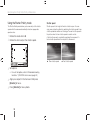
Using the Shutter Priority mode
Shutter speed
The Shutter Priority mode allows you to manually set the shutter
speed while the camera automatically selects an appropriate
aperture value.
Shutter speed is the length of time the shutter is open. You can
enjoy many interesting effects by adjusting the shutter speed. A low
shutter speed blurs motion on the image. You can feel the speed in
the picture when the low shutter speed is used for a shot.
A fast shutter speed is essential for capturing the movement. A
faster shutter speed froze the subject in its movement.
1 Rotate the mode dial to S.
2 Rotate the dial to adjust the shutter speed.
14M
SF
ISO
RGB
▲ Slow shutter speed
OIS
S
250 F3.7
3
2
1
0
1
2
+
3
0001
3 Set options.
UÊ ÀÊ>ÊÃÌÊvÊ«ÌÃ]ÊÀiviÀÊÌʺÝÌi`i`ÊÃ
Ì}Ê
functions.” (CD-ROM User manual, page 49)
4 Align your subject in the frame and half-press
[Shutter] to focus.
5 Press [Shutter] to take a photo.
34
▲ Fast shutter speed
Using the Aperture Priority, Shutter Priority, or Manual mode
Using the Manual mode
In the manual mode, you can take pictures by setting various shot
options directly including the shutter speed and aperture value.
1 Rotate the mode dial to M.
2 Rotate the dial to adjust the shutter speed.
3 Rotate the dial to adjust the aperture value while
press and hold the [EV].
4 Setting desired shooting option
UÊ ÀÊ>ÊÃÌÊvÊ«ÌÃ]ÊÀiviÀÊÌʺÝÌi`i`ÊÃ
Ì}Ê
functions.” (CD-ROM User manual, page 49)
5 Align your subject in the frame and half-press
[Shutter] to focus.
Dial
EV button
6 Press [Shutter] to take a photo.
UÊ ÊV>ÃiÊvÊ*Ê«À}À>®]Ê-ÊÃ
ÕÌÌiÀÊ«ÀÀÌÞ®]ÊÀÊÊ>«iÀÌÕÀiÊ
priority) mode, the display is shown in red for each part
beyond the range of expousre.
P mode: The red sign is shown for the shutter speed
and aperture value.
S mode: The red sign is shown for the shutter speed.
A mode: The red sign is shown for the aperture value.
UÊ /
iÊ-"Êëii`ÊV>ÌÊLiÊÃiÌÊ>ÕÌ>ÌV>ÞÊÊÌ
iÊ
M(manual) mode.
35
Using the Night/Portrait/Landscape mode
Using the night mode
Using the portrait mode
When using the night mode, you can use the optimal exposure
value for a dark environment.
In the portrait mode, the optimal effect can be obtained when taking
a portrait shot.
1 Rotate the mode dial to .
2 Align your subject in the frame and half-press
1 Rotate the mode dial to .
2 Align your subject in the frame and half-press
[Shutter] to focus.
3 Press [Shutter] to take a photo.
In the night mode, it is recommended to use a
tripod, shutter release or Timer function to minimize
camera shaking (purchased separately).
[Shutter] to focus.
3 Press [Shutter] to take a photo.
In the portrait mode, the focus area is automatically
set to the face as it is set to the Face Detection AF
mode automatically.
Using the landscape mode
This mode can be useful when a clear focus for a natural landscape
is needed.
1 Rotate the mode dial to .
2 Align your subject in the frame and half-press
[Shutter] to focus.
3 Press [Shutter] to take a photo.
In the landscape mode, the shutter speed is adjusted
automatically according to the aperture value.
It is recommended to use a tripod in the case of a
slow shutter speed setting.
36
Using the Scene mode
Since an appropriate option is set in advance by the scene, the shot can be taken conveniently by selecting a scene
appropriate for the situation.
1 Rotate the mode dial to
2 Select a scene.
Press [MENU] to select a scene. You can select a
desired scene.
For the Beauty Shot mode, see “Using the Beauty
Shot mode.”
1
Beauty Shot
MENU Back
3
.
OK
Set
Align your subject in the frame and half-press
[Shutter] to focus.
4 Press [Shutter] to take a photo.
When the camera is set to standby mode while the mode dial
is set to
, you can directly select a desired scene by
pressing [Fn].
37
Using the scene mode
Using the Beauty Shot mode
In the beauty shot mode, you can take pictures by retouching the
skin smooth and blemish-free.
.
1 Rotate the mode dial to
Press
[MENU].
2
3 Select Shooting1 ( 1) → SCENE → Beauty
Shot.
4 Select Shooting3 (
3)
→ Face Tone.
7 Set options.
Select a higher setting to make skin tone appear
lighter.
1
2
2
3
1
1
2
Face Tone
Level 1
Face Retouch
Level 2
3
Face Retouch
Level 1
OK
6 Select Shooting3 (
38
2
3
Level 2
MENU Back
OK
Set
8 Align your subject in the frame and half-press
[Shutter] to focus.
9 Press [Shutter] to take a photo.
Level 3
MENU Back
1
Level 3
Select a higher setting to make skin tone appear
lighter.
1
1
Level 1
5 Set options.
3
Face Tone
In the Beauty Shot mode, AF area is set to Face
Detection AF or Self-Portrait AF.
Set
3)
→ Face Retouch.
Recording a movie
In the movie shooting mode, recordings can be saved in High Definition quality (1280x720). You can continue recording
movies up to 25 minutes. The recorded video is saved as an H.264 (MPEG-4.AVC) file.
1 Rotate the mode dial to
.
2 Press [MENU].
3 Select Shooting1 (
1)
→ Quality.
3)
→ Voice.
4 Set options.
5 Select Shooting3 (
6 Select whether to record the voice.
7 Press [Shutter] to start recording.
REC
UÊ When taking a movie, the frame speed is fixed at 30 fps
(30 frames/sec).
UÊ While shooting a movie, push the [Depth Preview]
button once to activate the AF function and once again
to cancel the function.
Pause while recording a movie
By using the pause function, you can shoot only
desired scenes into one file without generating several
movie files.
To pause during the recording, press [ ].
UÊTo continue on recording, press [ ] again.
00:01
F3.5
01:00
3
2
1
0
1
2
+
3
01:00
8 Press [Shutter] again to stop recording.
39
Recording a movie
UÊ H.264 (MPEG-4 part10/AVC) is the latest video
coding format established in 2003 collaboratively
by ISO-IEC and ITU-T. Since this format uses a high
compression rate, more amount of data can be saved
to the same storage media.
UÊ When using a slow writing memory card, your movie's
recording can be interrupted since it can not process
at the rate the video is being saved.
In this case, you can solve this problem either by
replacing with a faster memory card or by reducing the
video size.
UÊ When the image stabilizer option is set in shooting a
movie, the image stabilizer sound can be recorded.
UÊ When the capacity of one file in recording exceeds
4GB, the movie recording will be stopped
automatically. In this case, the recording can be
continued by starting new recording.
UÊ When formatting a memory card, it is always
recommended to format by using this camera.
When the format is run in other product or PC, it is
possible to damage images or to cause a change in
the capacity of memory card.
40
UÊ If the camera lens is removed while recording a movie,
the recording will be interrupted. Do not change the
lens while recording.
UÊ When taking a movie, please be careful since the
operational sounds such as zoom sound and button
sound can be recorded.
UÊ When changing the shooting angle of camera is
suddenly changed while in shooting a movie, it may
not be possible to take the images accurately. When
recording movies, it is recommended to use tripod. In
that way, you can minimize the camera shake.
UÊ When shooting a movie, only the Multi AF function
is supported. Hence, it is not possible to use a focus
area setting function like Face Detection AF.
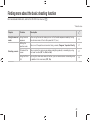
Finding more about the basic shooting function
For more detailed information, refer to the CD-ROM User manual (
).
* Default value
Chapter
Function
Description
Using the manual
mode
Using the bulb
exposure
When using the manual mode, you can set to the bulb exposure mode by turning
the dial once more at the shutter speed of 30" (sec.).
43
Setting the
aperture value
You can set the aperture value when taking a movie. (Program*, Aperture Priority)
47
To fade out the
screen
You can make the movie screen darker or brighter gradually in recording by using
the fader function.(Off*, In, Out, In-Out)
47
Using the Wind
Cut
By using the wind noise removal function, you can remove some surrounding noise
in addition to the wind noise.(Off*, On)
48
Shooting a movie
41
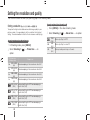
Setting the resolution and quality
The function can be set directly by pressing [Fn] in the shooting mode.
Setting the resolution of video
Setting a resolution
To capture the high level of detail and excellent image quality in your
picture or video, it is a good idea to set the resolution to the highest
setting. The main drawback is that the file size becomes relatively big.
1 Press [MENU] in the video shooting mode.
2 Select Shooting 1 (
Setting the resolution of picture
1
In Shooting mode, press [MENU].
2 Select Shooting 1 (
1)
→ Photo Size → an
option.
Picture size
(display ratio)
4592 x 3056
14M
(3:2)
3872 x 2592
10M
(3:2)
3008 x 2000
6M
(3:2)
1920 x 1280
2M
(3:2)
Proper use
When developing in the maximum size of A1
When developing in the maximum size of A2
When developing in the maximum size of A3
When developing in the maximum size of A5
4592 x 2584 When outputting to HDTV or developing in
(16:9)
the A1 size (16:9)
3872 x 2176 When outputting to HDTV or developing in
(16:9)
the A3 size (16:9)
3008 x 1688 When outputting to HDTV or developing in
(16:9)
the A4 size (16:9)
1920 x 1080 When outputting to HDTV or developing in
(16:9)
the A5 size (16:9)
42
640
320
1280
(16:9)
640
(4:3)
320
(4:3)
1)
→ Movie Size → an option.
When outputting to HDTV
When outputting to normal TV
When uploading and using on the web
Setting the resolution and picture quality
The function can be set directly by pressing [Fn] in the shooting mode.
Setting the image quality of the picture
Setting the quality of movie
The recorded movies are saved as normal or high quality.
The picture taken is saved either in JPEG or in RAW format.
The compression ratio is reduced as the image quality gets better. It is
necessary to increase the file size to have a better quality picture.
1 In Shooting mode, press [MENU].
2 Select Shooting 1 ( 1) → Quality → an option.
SF
Super Fine
F
Fine
N
Normal
RAW
RAW
RAW
S.FINE
S.Fine+RAW
RAW
FINE
RAW
NORMAL
Fine+RAW
1 In Shooting mode, press [MENU].
2 Select Shooting 1 ( 2) → Quality → an option.
Normal
HQ
Set normal quality
Set high quality
Set to super fine quality
Set to fine quality
Set to normal quality
Save in the RAW file format
Save super-fine image and RAW file at the same
time
Save fine image and RAW file at the same time
Normal+RAW Save normal image and RAW file at the same time
UÊ /
iÊ,7ÊwiÊvÀ>ÌÊ>}iÃÊ>ÀiÊÃ>Ûi`ÊÜÌ
ÕÌÊÃÃÊvÊ`>Ì>]Ê
and the photo size is set to 14M(4592 x 3056) only. The
RAW file format allows saving the original image without
data loss. Although the settings such as white balance,
contrast, saturation and sharpness are not reflected on the
image, they are saved as information. If you want to save
the RAW data into the image files such as JPEG or TIFF
format, the provided software (SAMSUNG RAW Converter)
should be used. RAW files have the extension of “SRW.”
(For example: “SAM_9999.SRW”)
43
Using the timer function
The function can be set directly by pressing [
] in the shooting mode.
Setting the timer function
1 In Shooting mode, press [MENU].
2 Select Shooting 2 (
2)
→ Drive.
3 Press [Fn] after selecting Timer.
4 Select the operation time by using the dial or
[ / ].
UÊ 9ÕÊV>ÊÃiiVÌÊÌ
iÊÌiÀÊÃiÌÌ}ÊÊÌ
iÊÀ>}iÊvÊÓÊHÊÎäÊ
seconds.
2
Timer
2
MENU Back
10
30
Reset
5 The shot is taken automatically after the time being
set has passed by pressing [Shutter].
To cancel the self timer function, press [
time, or press [Shutter].
44
] one more
Taking a picture in a dark place
The function can be set directly by pressing [Fn] in the shooting mode.
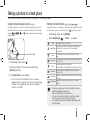
Using the flash popup button
Setting the flash option
The flash operates when the built-in flash is opened by using the
flash button. When the flash is closed, it will not burst out the light
,
,
and modes support automatic popup
and the
and flash light.
If a picture is taken in a dark place, the picture may appear to be dark
since the light source is not sufficient. Press [ ] to pop up the flash.
1 In Shooting mode, press [MENU].
2 Select Shooting 2 ( 2) → Flash → an option.
Off
SMART
Flash button
1 In Shooting mode, press [ ].
2 Align your subject in the frame and half-press
[Shutter] to focus.
3 Press [Shutter] to take a photo.
UÊ ÛiÊÊÌ
iÊV>ÃiÊÌ
>ÌÊÌ
iÊLÕÌÊy>Ã
ÊÃÊ>Ài>`ÞÊ
popped out by using the 'Flash' button, the bursting
function is not supported when the flash option of
menu is set to Off.
Smart Flash
Auto
Auto+Red
Fill in
Fill-in Red
1st Curtain
2nd Curtain
The flash light doesn't operate.
The amount of flash light is adjusted automatically
according to the exposure in the surrounding
environment.
The flash light operates automatically in the dark
place.
The flash light operates automatically and prevents the
red-eye effect.
UÊÊÜ>ÞÃÊ«iÀ>ÌiÃÊÌ
iÊy>Ã
Ê}
Ì°
UÊÊThe brightness of flash light is automatically controlled.
Always operates the flash light, and prevents the
red-eye effect.
Operates the flash light immediately after the opening
of shutter
Operates the flash light just before the closing of
shutter
UÊ /
iÊ«VÌÕÀiÊV>ÊLiÊÌ>iÊLiÌÌiÀÊvÊÌ
iÊÃÕLiVÌÊÃÊV>Ìi`Ê
within the applicable range of flash.
(Refer to the Guide No in “Specification.”)
UÊ 9ÕÊV>ÊÃiÌÊÌ
iÊ>ÕÌÊy>Ã
Ê«ÌÊÞÊÜÌ
ÊÌ
iÊiÝÌiÀ>Ê
flash for exclusive use by the NX-series model.
UÊ /
iÊ>Û>>LiÊy>Ã
Ê«ÌÃÊ>ÀiÊ`vviÀiÌÊ`i«i`}ÊÊÌ
iÊ
shooting modes.
45
Taking a picture in a dark place
Using the red-eye fix function
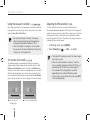
Adjusting the ISO sensitivity
When taking a portrait shot in a dark place, the red-eye effect can
occur with the burst of flash light. In this case, please set the flash
option to Auto+Red or Fill-in Red.
The ISO sensitivity, as the film sensitivity established by the
international standards organization (ISO), represents the degree of
reaction when camera receives light. Since it reacts more sensitively
with greater ISO value, a natural shot can be obtained in a dark
place by raising the ISO value. This reduces the degree of camera
shaking with faster shutter speed.
UÊ ÞÊÕÃ}ÊÌ
iÊÀi`iÞiÊwÝÊvÕVÌ]ÊÌ
iÊÀi`iÞiÊ
effect can be removed through the preliminary
flashing function prior to the burst of flash.
UÊ 7
iÊÌ
iÊÃÕLiVÌÊÃÊÛ}ÊÀÊÃÊv>ÀÊ>Ü>ÞÊvÀÊ
the camera at the time of preliminary flashing, the
function may not function well.
1st Curtain, 2nd Curtain
The following images were obtained by taking the pictures of
straight-moving subject along with the respective options of 1st
Curtain and 2nd Curtain. In case of using the 1st Curtain flash
function, the front part of action is remained clearly since the flash
will burst light immediately upon shutter opening. Since the flash
bursts the light at a later time when having used the 2nd Curtain
option, the picture expresses the last image of the subject clearly.
Ball moving direction
Use of early 1st
Curtain option
46
Ball moving direction
Use of 2nd Curtain option
1 In Shooting mode, press [MENU].
2 Select Shooting 1 (
1)
→ ISO → an option.
UÊ /
iÊ
}
iÀÊ-"Êëii`ÊÞÕÊÃiiVÌ]ÊÌ
iÊÀiÊ>}iÊ
noise you may get.
UÊ 7
iÊÌ
iÊÃiÊÀi`ÕVÌÊvÕVÌÊÃÊÕÃi`]ÊÌ
iÊ
noise caused by the high-sensitive ISO(3200) can
be reduced. (CD-ROM User manual, page 52)
UÊ /
iÊ>Û>>LiÊ-"ÊÃiÌÌ}Ê«ÌÃÊ>ÞÊ`vviÀÊ
depending on the selected Shooting mode.
UÊ /
iÊvÕVÌÊV>ÊLiÊÃiÌÊ`ÀiVÌÞÊLÞÊ«ÀiÃÃ}ÊQISO]
in the shooting mode.
Taking a picture in a dark place
Adjusting the amount of flash light
When setting the flash option, you can adjust the desired amount
of flash light.
UÊ 7
iÊÌ
iÊÃÕLiVÌÊÃÊÌÊVÃi]ÊÌ
iÊ-"ÊÃiÃÌÛÌÞÊ
is high, or the exposure value is too large or
small, the adjustment effect will be reduced even
by controlling the amount of flash light.
1 In Shooting mode, press [MENU].
UÊ `ÕÃÌ}ÊÌ
iÊ>ÕÌÊvÊy>Ã
Ê}
ÌÊÃÊÌÊ>Û>>LiÊ
for some shooting modes.
2 Select Shooting 2 (
2)
→ Flash.
3 Press the [Fn] button after selecting a desired item.
4 Adjust the amount of flash light by using the dial or
[ / ].
UÊ /
ÃÊ>ÜÃÊ>`ÕÃÌ}ÊÌ
iÊ>ÕÌÊvÊy>Ã
Ê}
ÌÊÕ«ÊÌÊ
´ÓÊiÛið
1
Flash Exposure Value
0
MENU Back
-1
+1
-2
+2
Display
the level of
flash light
adjustment
UÊ 7
iÊ>ÊiÝÌiÀ>Êy>Ã
ÊÕÌÊ
>ÃÊÌ
iÊy>Ã
ÊVÌÀÊ
function, the light control value of external flash is
applied when connecting to the camera.
UÊ vÊÌ
iÊ`ÃÌ>ViÊvÀÊÌ
iÊÃÕLiVÌÊÃʵÕÌiÊVÃiÊ
when taking images by using the built-in flash,
part of the images may appear dark as the lens
is interfered with the flash light. Please check
the distance between camera and subject when
taking pictures. The distance interfered with flash
light may vary by the type of lens in use.
UÊ 7
iÊÃÌ>}ÊÌ
iÊiÃÊ
`]ÊÌ
iÊ}
ÌÊvÊLÕÌÊ
flash can be intercepted by the hood. Please
remove the lens hood when using the built-in
flash.
Reset
47
Focusing methods
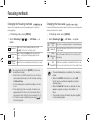
Changing the Focusing methods
Changing the focus area
Various focus methods can be set according to the subject of
photographing.
A clear and vivid picture can be taken if the focus area is changed in
relative position to the subject.
1 In Shooting mode, press [MENU].
1 In Shooting mode, press [MENU].
2
2 Select Shooting 2 (
Select Shooting 2 (
option.
2/
2) → AF Mode → an
If the focus is set by pressing half-way of the
[shutter], fix the focus to that position.
While holding the [shutter] half-way down, the
Continuous
focus is continuously fixed appropriate for the
AF
subject.
Manual
Adjust the focus manually by turning the focus ring.
Focus
Single AF
UÊ ÞÊÕÃ}ÊÌ
iÊVÌÀÊiÛiÊvÊ[AF/MF], the focus can
be adjusted manually.
UÊ 7
iÊÌ
iÀiÊÃÊÊÉÊÃÜÌV
ÊÊÌ
iÊiÃ]ÊÌ
iÊvVÕÃÊ
can be adjusted manually in the AF mode by selecting
the Manual Focus.
UÊ /
iÊÃiiVÌ>LiÊ«ÌÊ>ÞÊ`vviÀÊ>VVÀ`}ÊÌÊÌ
iÊiÃÊ
in use.
UÊ 7
iÊ>`ÕÃÌ}ÊÌ
iÊvVÕÃÊ>Õ>Þ]ÊÌ
iÊ«VÌÕÀiÊ>ÞÊ
appear blurred if the focus not set accurately. Please
take a picture after setting the focus accurately. (P. 27)
] in
UÊ /
iÊvÕVÌÊV>ÊLiÊÃiÌÊ`ÀiVÌÞÊLÞÊ«ÀiÃÃ}Ê[
the shooting mode.
48
2)
→ AF Area → an option.
Selection
The focus is set appropriately for the selected area.
AF
Shows all the places that the focus is set correctly
Multi AF
in the display.
Face
Shows the areas that the focus is correctly set in
Detection
the display.
AF
When the sound effect is heard at the time of selfSelfPortrait AF shot, you can check the position of the subject's face.
UÊ /
iÊÃiiVÌ>LiÊ«ÌÊ>ÞÊ`vviÀÊLÞÊÌ
iÊÃ
Ì}Ê
mode.
UÊ 7
iÊÌ
iÊAF/MF switch of lens is set to MF,
the AF area can not be changed by using the
shooting menu.
UÊ 7
iÊÌ
iÊMulti AF function is selected, AF area
appears in green as long as the subject is in
focus.
UÊ /
iÊvÕVÌÊV>ÊLiÊÃiÌÊ`ÀiVÌÞÊLÞÊ«ÀiÃÃ}ÊQFn]
in the shooting mode.
Focus change
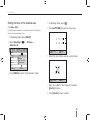
Setting the focus of the selected area
In the shooting composition, a shot may be taken by setting the
focus to the area desired by user.
4 In Shooting mode, press [ ].
5 Press [///] to move the focus area.
1 In Shooting mode, press [MENU].
2 Select Shooting 2 (
2)
→ AF Area →
Selection AF.
1
2
3
1
1
2
3
AF Zoom
AF Mode
AF Area
Selection AF
AF Priority
Multi AF
Drive
Face Detection AF
Metering
Self-Portrait AF
6
Move
Adjust the size of focus area by using the dial.
Flash
MENU Back
OK
Set
3 Press [MENU] to return to the previous mode.
AF Zoom
Move
7 Align your subject in the frame and half-press
[Shutter] to focus.
8 Press [Shutter] to take a photo.
49
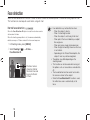
Face detection
When the face detection AF function is used, the focus can be set around a person's face when taking a portrait shot.
This function can also be quite useful when using self-shot.
Normal face detection
When the Face Detection AF option is used, the auto focus can be
set based on the face.
When the shooting composition is set, the camera automatically
detects as many as 10 faces and sets the focus and exposure.
1 In Shooting mode, press [MENU].
2 Select Shooting 2 (
2)
→ AF Area →
Face Detection AF.
The focus frame is
shown by white for
the closest face and
by gray for the rest
of faces.
50
UÊ >ViÊ`iÌiVÌÊ>ÞÊÌÊLiÊivviVÌÛiÊÜ
i\
- When the subject is too far
- When it is too bright or dark
- When the subject is not facing to the front
- When part of the face is hidden by an object
like sunglasses.
- When one makes a large facial expression
- When the light or backlight shown on the face
is not uniform
- Depending on the Picture Wizard option, the
subject’s face may not be recognized.
UÊ /
iÊ«ÌÃÊ>ÞÊ`vviÀÊ`i«i`}ÊÊÌ
iÊ
shooting mode.
UÊ /
ÃÊvÕVÌÊV>ÊÌÊLiÊÕÃi`ÊÜ
iÊ
>Û}ÊÃiÌÊ
the options such as manual focus and selection
AF.
UÊ /
iÊv>ViÊ`iÌiVÌÊvÕVÌÊÜÀÃÊv>ÃÌiÀÊÜ
iÊ
the camera is closer to the subject.
UÊ 7
iÊÌ
iÊFace Detection AF function is used,
the white focus area is automatically set to
focus.
Face detection
Self-portrait face detection
When taking a self shot, the focal distance is fixed to make a
close-up shot possible. If the face is detected in the center, it rings a
sound to take a shot.
1 In Shooting mode, press [MENU].
2 Select Shooting 2 (
2)
→ AF Area →
Self-Portrait AF.
3 Press [Shutter] if having an info sound of shooting.
The face is positioned in the center with
the info sound (ringing).
51
Brightness and color adjustment of picture
Adjusting the exposure (brightness)
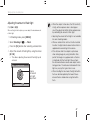
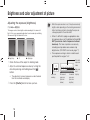
The images can be taken bright or dark according to the amount of
light. In this case, appropriate adjustment can be made by controlling
the amount of light entered into the lens.
Applying -
0
Applying +
52
3
2
3
2
1
0
1
2
+
3
]
UÊ /
iÊ>`ÕÃÌiÌÊÛ>ÕiÊvÊiÝ«ÃÕÀiÊV>ÊLiÊV
iVi`Ê
from the viewfinder and display.
3 Press the [Shutter] button to take a picture.
UÊ 7
iÊÌÊÃÊ`vwVÕÌÊÌÊÕ`}iÊ>Ê>««À«À>ÌiÊÛ>ÕiÊ
of exposure, please set the detailed setting of AE
BKT (successive shots of exposure increase/
decrease). This takes 3 pictures successively,
including one step darker one and one step
brighter one. (CD-ROM User manual, page 71)
UÊ /
iÊiÝ«ÃÕÀiÊÜ>À}ÊÃÊÃ
ÜÊÊÀi`ÊvÀÊi>V
Ê
«>ÀÌÊLiÞ`ÊÌ
iÊÀ>}iÊvʺ´Î»°
1 Check the focus of the subject in shooting mode
2 Adjust to a desired exposure value by turning the
dial while pressing and holding down the [
button.
UÊ When the exposure value is set, it may be excessively
bright or dark depending on the shooting environment.
Adjust and take a picture by changing the exposure
value appropriate for the environment.
Exposure
warning
Decreased
exposure
(become
darker)
Increased
exposure
(become
brighter)
Standard
exposure
index
Exposure
level
display
Brightness and color adjustment of picture
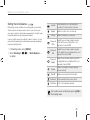
Setting the white balance
Different light sources will affect the resulting color of your picture.
To take a picture with colors close to what is seen with our own
eyes, please select the white balance appropriate for the light source
or manually adjust the color temperature desired.
Auto WB
The optimal light source is automatically set
according to the light conditions of camera.
Daylight
Suitable for outdoor shot on a clear day
Cloudy
Suitable for shadows on a cloudy day
In case of a light source that is difficult to take in to effect, the shot
can be taken by adjusting the white balance manually according to
the picture-taking situation.
Fluorescent
White
Daylight, fluorescent lamp, suitable especially
for the white fluorescent light with the color
temperature of about 4200K
1 In Shooting mode, press [MENU].
2 Select Shooting 1 ( 1/ 1) → White Balance →
Fluorescent
NW
Daylight, fluorescent lamp, suitable especially
for the daylight fluorescent lighting with the color
temperature of about 5,000K
Fluorescent
Daylight
Daylight, fluorescent lamp, suitable especially for
the daylight-like fluorescent lighting with the color
temperature of about 6,500K
an option.
Tungsten
Suitable for the lighting of halogen lamp and
incandescent bulb
Flash WB
Suitable when using the built-in flash light
Custom Set Set by measuring the light source directly
Color Temp. Set the color temperature manually
The function can be set directly by pressing [WB] in
the shooting mode.
53
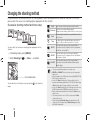
Changing the shooting method
It may be difficult to take a picture of a fast moving object, quick facial expression or motion of a person. In this case,
please select the successive shooting option appropriate for the situation.
Successive shooting method and timer setup
You can select the successive shooting option appropriate for the
situation.
1 In Shooting mode, press [MENU].
2 Select Shooting 2 ( 2) → Drive → an option.
Drive mode button
You can directly set this options by pressing the [
mode.
54
] in the shooting
Single
Take one photo shot whenever pressing the shutter.
Take shots successively while pressing and
Continuous
holding down the shutter, possible to take 3 shots per second
After pressing the shutter, the camera will take up to 30
Burst
shots in a row.
The timer functions automatically takes a picture in the
Timer
range of 2-30 seconds (in increments of 1 second).
When the shutter is pressed, the camera will take 3
AE BKT consecutive shots; the original, th next one step darker,
and the last one step lighter.
When the shutter is pressed the camera will take 3
WB BKT consecutive shots, the original and 2 more with different
white balance settings.
When the shutter is pressed, the camera will take 3
P Wiz BKT consecutive shots; all three will have different picture
wizard settings.
UÊ /
iÊ«ÌÃÊ>ÞÊ`vviÀÊ`i«i`}ÊÊÌ
iÊÃ
Ì}Ê`i°
UÊ WB BKT and P Wiz BKT is the function that corrects the image after
taking a shot.
UÊ vÊÌ
iʫ
ÌʵÕ>ÌÞÊÃÊÃiÌÊÌÊ,7ÊvÀ>Ì]ÊÌ
iÊLÀ>ViÌ}Ê7Ê/]Ê*Ê7âÊ
BKT) set options cannot be used.
UÊ ÊV>ÃiÊvÊÌ
iÊBurst shooting option, it is not possible to select the
image size and the image quality is fixed to 1472x976. Also when taking
a Burst shooting option, the image saving time can be extended.
UÊ ÊV>ÃiÊvÊÌ
iÊBurst shooting option, the shot images can not be saved
in RAW file format, and the ISO 100 speed cannot be set by user.
UÊ Ì
ÊÌ
iÊLÕÌÊ>`ÊiÝÌiÀ>Êy>Ã
Ê`ÊÌÊwÀiÊÜ
iÊÌ
iÊBurst shooting
option is in use.
UÊ /
iÊÃ
ÕÌÌiÀÊëii`ÊV>ÊLiÊÃiÌÊÌÊ£ÉÎäÊ-iVÊÀÊv>ÃÌiÀÊÜ
iÊÌ
iÊBurst
shooting option is in use.
UÊ /
ÃÊ«À`ÕVÌÊÃÕ««ÀÌÃÊBurst Shooting mode which takes up to 30
shots per second. The images taken in Burst Shooting can be saved
with a little bit enlarged size.
Special effect/photo retouching
Picture wizard
You can choose the customize options and then save images in 3
different ways.
1 In Shooting mode, press [MENU].
2 Select Shooting 1 (
1)
→ Picture Wizard → an
option.
Vivid
Color
▒
Saturation
0
Sharpness
0
Contrast
0
V
MENU
Exit
P
L
F
R
Cool
CA
Move
3 Adjust the detailed items of picture wizard that were
selected by using [///].
UÊ 9ÕÊV>ÊVÌÀÊÌ
iÊVÀ]ÊÃ>ÌÕÀ>Ì]ÊÃ
>À«iÃÃÊ>`Ê
contrast.
4 Set to a desired value.
UÊ /
iÊ«ÌÊV>ÊLiÊÃiÌÊ`ÀiVÌÞÊLÞÊ«ÀiÃÃ}ÊÌ
iÊ
[ ] button of camera in the shooting mode.
55
Finding more about the extended shooting function
For more detailed information, refer to the CD-ROM User manual (
).
* Default value
Chapter
Function
Description
Setting the
resolution and
image quality
Noise reduction
Taking a picture in
the dark place
Using an external
The A-TTL auto flash mode can be used by using an external flash unit (SEF 20A or
flash
SEF 42A).
(optional item)
52
57
AF priority shot
The AF priority function is the function that the shutter does not work if the focus is
not set appropriately when the user sets the focus manually. (Off, On*)
59
AF assist light
You can use the auto focus function more accurately in the dark place by using the
AF lamp. (Off, On*)
60
Focus change
56
It can be set to reduce the noise of pictures. (High ISO NR, Long Term NR)
Finding more about the extended shooting function
* Default value
Chapter
Adjusting the
brightness and
color of picture
Function
Description
Exposure
adjustment
You can set the level (step) of exposure adjustment. (1/3*, 1/2)
64
Changing the
brightness
measurement
method
You can change the brightness measurement method .
(Spot, Center-weighted, Multi*)
65
Fine-adjustment
of white balance
You can fine-adjust the white balance.
67
User setup of
white balance
You can do the user setup of white balance.
67
Adjusting
the color
temperature
The user can set the white balance by adjusting the color temperature.
68
Color space
This allows setting the color space to use. (sRGB*, Adobe RGB)
69
70
Smart range
This smoothly corrects the loss of bright part that can occur due to the differences in
the shading of picture.(Off*, On)
Changing the
shooting method
Detailed bracket
setup
The details for the exposure, white balance and picture wizard of bracket shot can
be set. (AE BKT Set, WB BKT Set, P Wiz BKT Set)
72
Effect application/
picture correction
Custom picture
wizard setup
Please select the custom option to change the color desired by user.
74
Key Mapping setup
Key Mapping
setup
The function of camera button can be changed.
75
57
Play (picture/movie)
Viewing pictures in the play mode
The user can check saved pictures and movies.
1 Press [
Description about photo playback
The display information appears by pressing [DISP] in the play
mode.
].
UÊ -
ÜÊÃÌÊÀiViÌÞÊÃ>Ûi`Êwið
2 Check the pictures sequentially by using [/].
UÊ 7
iÊÌ
iÊ«>ÞL>VÊÃVÀiiÊÃÊÃiiVÌi`ÊÀiÊÌ
>Ê
once, the last shown picture or movie is selected to
be shown during playback.
RAW
1/250
6
58
100-0001
Mode
Metering
Flash
Focal Length
White balance
EVC
Picture wizard
Picture size
Date
F5.1
ISO
1
2
3
4
5
18mm
AWB
0.0
4592 X 3056
2010.01.01
100 00004/00009
7 8
9
1
RAW file indicator
2
File that includes development info
3
Protected file
4
File no.
5
Meta value of taken picture
6
Shutter speed info
7
Aperture value
8
ISO setup value info
9
File in play/total no. of files taken / battery information
Play (picture/movie)
Descriptions about movie playback
1
1
2
100-0001
R
2
3
G
B
Video size 1280 X 720
Date 2010.01.01
Y
18mm
2010.01.01
RAW
0.0
4
4592 X 3056
1/40
F3.5
ISO
3
8
00:00
OK
100 00004/00009
Play
7
Capture
6
1
Shot image
1
Volume control display
2
RGB histogram
2
Protected file
3
Shooting mode, metering, flash, white balance, picture
wizard, focal length
3
File no.
Shutter speed, aperture value, ISO, selected file/ total number
of files / battery information
4
Meta value of movie taken
5
Fast forward
6
Total play time of selected file
7
Current play time
8
Rewind
4
4
5
01:00
59
Play (picture/movie)
View files in the smart album by category
Converting into the thumbnail view
The files can be classified and shown by the file, date (day), date
(week), and type.
Since several files can be shown on one display, files can be
searched quickly.
To have a thumbnail view of 9 images,
press [ ] two times, or press [ ]
three times to have a thumbnail view of
20 images.
(Press [ ] to cancel)
1 In Playback mode, press [ ].
2 Press [MENU].
3 Select a desired playback method.
Type
Date
Week
19
25
MENU Filter
19
53
22
2010. 1. 1
Type
Classify by the saved file form
Date
Classify by the saved date
Week
Classify by the saved week
4 You can place the following items by turning the dial
or by using [/].
5 Press [ ] to return to the previous.
Executing the smart album or changing the category
upon execution, the time may be delayed according to
the volume of saved files. Please wait a moment until the
smart album can appear.
60
19
25
MENU Filter
19
53
2010. 1. 1
22
Play (picture/movie)
File protection
Deleting a file
Files can be protected from deletion.
Files can be selected and deleted in the play mode.
1 Press [AEL] in the play mode.
The function can be set by pressing [MENU] in the playback mode.
2
appears on the display.
3 Press [AEL] to cancel.
Deleting one picture
You can delete only one picture by selecting a desired file.
1 After selecting the file to be deleted in the play
mode, press [ ].
2 From the popup window, select Yes.
Deleting selected file
1 After selecting the file to be deleted in the play
mode, press [ ].
2 From the popup window, select Multiple Delete.
3 After selecting a file to be deleted, press [ ].
UÊ /ÊV>ViÊÞÕÀÊÃiiVÌ]Ê«ÀiÃÃÊQ
] again.
4 Press [ ]
5 From the popup window, select Yes.
Deleting all files
All the files saved in the memory card can be deleted at once.
1 In Playback mode, press [MENU].
2 Select Playback [ ] → Delete → All.
3 From the popup window, select Yes.
61
Play (picture/movie)
See the slide show
Enlargement/reduction
A picture can be enlarged when searching in play mode.
Pictures can be shown in a slide show by applying various effects
and music.
1 In Playback mode, press [MENU] → [
Enlargement
Press [
(Press [
] to enlarge.
] to reduce)
2
UÊ /Ê«>ÞÊÜÌ
ÕÌÊÃiÌÌ}Ê>Ê«Ì]ÊiÝiVÕÌiÊÌ
iÊstep 4.
Images
Select the pictures to be shown in the slide show.
UÊ All : View all the saved pictures in the slide show.
UÊ Date : See the pictures taken on a specific date
in the slide show.
UÊ Select : Select pictures and see them in the slide
show
Effect
UÊ -iiVÌÊÌ
iÊÃViiÊV
>}}ÊivviVÌÊLiÌÜiiÊ
pictures.
UÊ ÊÀ`iÀÊÌÊÌÊÕÃiÊÌ
iÊV
>}}ÊivviVÌ]ÊÃiiVÌÊÌ
iÊ
off option.
Magnified part
Magnification
(the maximum
magnification
may differ by the
resolution)
x1.7
OK
Full Image
Move to the
enlargement
Fn
Trim
Press [///].
Trim the enlarged Press the [Fn] button to select a portion of the
image
image to be cut.
62
].
Select a desired option
Interval
UÊ -iiVÌÊÌ
iÊÃViiÊV
>}}ÊÌi
Music
Execute the background music
Play (picture/movie)
3 Set to a desired option.
View a movie
4 Select Slide Show → Play.
While a movie is being played back, you are able to select and cut a
desired part of the scene.
UÊ To play the pictures repeatedly, please select the repeat
option.
5 See the slide show
UÊ To stop slide show, press [ ] and then press [/].
Pause/Play
Press the [
1 After selecting a desired movie in the play mode,
press [ ].
2 Enjoy movie.
100-0001
] button.
00:04
OK
01:00
Pause
Rewind
Stop
Press []
Pause/Play
Press [
Fast rewind
Press []
Volume control
Stop
].
Turn the dial to the left/right
Press []
63
Play (picture/movie)
Capturing a picture
You can capture a desired part of movie in the form of a picture
while playing back the movie.
1 Press [ ] in the play mode.
2 Press [ ] while playing a movie.
3 Press [] in the pause state.
UÊ /
iÊÀiÃÕÌÊvÊV>«ÌÕÀi`Ê>}iÊÃÊÌ
iÊÃ>iÊ>ÃÊÌ
iÊ
movie resolution.
UÊ /
iÊV>«ÌÕÀi`ÊwiÊÃÊÃ>Ûi`ÊLÞÊÕÃ}ÊÌ
iÊ`vviÀiÌÊwiÊ
name.
Cutting part of a movie
1 Press [ ] in the play mode.
2 Select the start point to cut by pressing [ ] → [ ]
while playing a movie.
3 Select the end point of cutting by pressing
[ ] → [ ].
4 From the popup window, press Yes.
UÊ /
iÊVÕÌÊwiÊÃÊÃ>Ûi`ÊLÞÊÕÃ}Ê>Ê`vviÀiÌÊwiÊ>i°
64
Transferring files to your computer
For Windows users
Transfer files by connecting your camera to your PC.
Installing programs
Hardware and software requirements
Item
Requirements
CPU
Pentium III 500 MHz or better
(Pentium III 800 MHz or better recommended)
RAM
256 MB or more (512 MB or more recommended)
OS
Windows 2000/XP/Vista
Hard disk
capacity
250 MB or more (1 GB or more recommended)
Others
UÊ USB port
UÊ CD-ROM drive
UÊ 1024 x 768 pixels, 16-bit color display compatible
monitor (24-bit color display recommended)
UÊ Microsoft Direct X 9.0C or later
Requirements for QuickTime Player 7.6
UÊIntel Pentium 4, 3.2 GHz or higher/AMD Athlon™
64FX, 2.6 GHz or higher
UÊWindows XP service pack2 or Vista
UÊMinimum 512 MB RAM (1 GB and above
recommended)
UÊnVIDIA Geforce 7600GT or higher/ATI X1600 series
or higer recommended
UÊUsing a self-assembled PC or a PC and OS that are
not supported may void your warranty.
UÊThe programs may not work properly on 64-bit
Edition of Windows XP and Vista.
Programs contained on the CD
Program
Purpose
Samsung Master
Edit photos and videos.
QuickTime Player 7.6
View videos (H.264 (MPEG-4.AVC) files)
on a PC.
Samsung RAW
Converter
Convert RAW files into the desired file format.
Adobe Reader
View the user manual.
65
Transferring files to your computer
1
Insert the installation CD in a compatible CD-ROM
drive.
2
When the setup screen is displayed, click Samsung
Digital Camera Installer to start installation.
Transferring files to your PC
Once you connect the camera to your PC, the camera will be
recognised as a removable drive.
1
Connect your camera to your PC with the USB cable.
You must plug the end of the cable with the correct
connection port in your camera. If the cable is reversed, it
may damage your files. The manufacturer is not responsible
for any loss of data.
3
Select programs to install and follow the onscreen
instructions.
4
Click Exit to complete the installation and restart your
computer.
66
Transferring files to your computer
2
Turn on the camera.
Disconnecting the camera (for Windows XP)
UÊ ÊÌ
iÊ««Õ«ÊÜ`Ü]ÊÃiiVÌÊComputer.
The way to disconnect the USB cable for Windows 2000/Vista
is similar.
3
On your PC, select My Computer → Removable
Disk → DCIM → "XXXPHOTO," or select "XXX_
MMDD" folder.
1
It the status lamp on your camera is blinking, it means
the data transfer is in progress. Please wait until the
status lamp stops blinking.
4
Select the files you want and drag or save them to
your PC.
2
Click
on the tool bar at the bottom right of your PC
screen.
3
Click the pop-up message.
4
Remove the USB cable.
UÊ vÊÌ
iÊ`iÀÊ/Þ«iÊÃÊÃiÌÊÌÊ>Ìi]ÊÌ
iÊv`iÀÊ>iÊ>««i>ÀÃÊ
as "XXX_MMDD."
UÊ ÀÊiÝ>«i]ÊvÊÃ
ÌÊ>ÌÊ£ÃÌÊ>Õ>ÀÞ]ÊÌ
iÊv`iÀÊ>iÊ
appears "101_0101."
67
Transferring files to your computer
Using Samsung Master
Using the Samsung Master Interface
You can download files or edit photos or videos stored on your
PC. For details, see the Help menu.
This program does not support editing of video files
(H.264 (MPEG-4.AVC)) on the camera.
Downloading files using Samsung Master
When you connect the camera to the PC, a window for
downloading files automatically appears.
1
Select the files you want to download.
2
Click Next and follow the onscreen instructions.
Description
Toolbar
Preview information about the selected file.
No.
Description
Select a location for downloaded files.
Click to download the selected files.
Thumbnails of files; click an image to download.
68
No.
Menus
Click for more information about the program.
Click to enlarge or reduce the thumbnails in the list.
Change the mode.
UÊ : View mode
UÊ : Edit mode for photos
UÊ : Edit mode for videos
The photos in the selected folder; double-click to switch to
full-screen view.
Using the Samsung RAW Converter
Using the Samsung RAW Converter, you can develop RAW files
after editing them as you like. You can also edit JPEG or TIFF
files in the same way you edit the RAW files. This software is only
compatible with Windows XP and Vista.
UÊ Image edit functions are listed below.
Ì Menu bar
Í Image editing tools
To start the program, click [Start → All Programs → Samsung
RAW Converter → Samsung RAW Converter]
[Exposure bias]:
Compensates the exposure value.
[White balance]:
Adjusts the white balance value.
Developing the RAW files
[Color]:
Adjusts the color of the image.
[Tone]:
Changes the color tone.
①
[Sharpness/
Noise reduction]:
[Development]:
②
③
Highlight controller
④
Histogram
Adjusts the sharpness.
Previewing is available for the final
output.
Adjusts the saturation and highlights of the selected image.
Displays the color layers of the selected image.
⑤
Preview window
Displays the selected image.
Refer to the [Help] menu in Samsung RAW Converter
for further information.
69
Printing photos with a photo printer (PictBridge)
Print photos with a PictBridge-compatible printer by connecting your camera directly to the printer.
1
With the printer on, connect your camera to the
printer with the USB cable.
Configuring print settings
1
2
Images
One Photo
Size
Auto
Layout
Auto
Type
Auto
Auto
Quality
Auto
Date
Print
2
Turn on your camera.
UÊ Select Printer in the popup window.
Images
Size
UÊ If your printer has the mass storage feature, you must
first set the USB mode to Printer in the settings menu.
3
Press [/] to select a photo.
UÊ Press [MENU] to set printing options.
4
MENU Exit
Press [ ] to print.
Select whether to print the current photo or all photos.
Specify the size of the print.
Layout
Create thumbnail prints.
Type
Select the type of paper.
Quality
Date
File Name
Reset
Set the printing quality.
Set to print the date.
Set to print the name of the file.
Reset the print options.
Some options are not supported by some printers.
70
Finding more about the playback/editing function
For more detailed information, refer to the CD-ROM User manual (
).
* Default value
Chapter
Play
(picture/movie)
Editing Pictures
Function
Description
Auto rotate
Show the pictures taken in the vertical frame by rotating them automatically while in
playing.
81
Highlight
This informs the excessively bright part from the image taken.
81
Changing the
resolution
You can change the resolution of a picture by using the picture edit menu.
85
Rotating
You can rotate and save a picture by using the picture edit menu.
85
Red-eye fix
You can minimize the red-eye effect of pictures.
86
Adjusting the
backlight
You can adjust the dark side of a picture taken in the backlight mode.
86
Picture style
You can express various moods of emotional picture by selecting the picture style.
86
Face retouching
You can retouch the face of portrait shot softly.
86
Setting the print
options (DPOF) >
The size and number of copies to be printed can be designated for the picture.
no. of copies,
index, print size
87
Viewing in TV
(HDTV)
Viewing in HDTV
You can view a picture or movie through the TV screen by connecting the camera to
a TV while using an A/V cable.
90
Loading files into
your computer
Using in the
Macintosh
environment
You can connect the camera to a Macintosh PC.
94
71
Camera settings menu
The camera use environment can be set to a desired state by using the setup menu.
1 Press [MENU] in the shooting or play mode.
2 Select a desired setup menu
1
2
3
Quickview
1
2
1
1sec
3
Setup menu
items
Display Adjust
Display Save
3min
Power Save
1min
Date&Time
Sound
MENU Exit
OK
Change
3 Select a desired item
2
Sound
System Volume
Medium
AF Sound
On
Button Sound
On
MENU Exit
OK
Change
4 Press [MENU] to return to the previous mode.
72
Environment setup menu
Sound
System Volume
AF Sound
Button Sound
* Default value
The user can set the sound that is made when manipulating the camera.
(Off, Low, Medium*, High)
The sound can be set when operating in the AF mode. (Off, On*)
The operating sound of camera can be set. (Off, On*)
Display
Language
Display Adjust
Display Save
Quickview
* Default value
Select the language to be shown on the display.
This allows adjusting the display brightness, auto brightness setting and color.
Display Brightness: Depending on whether the user uses the screen or the viewfinder, the display brightness can be
adjusted by using the [/].
Auto Brightness: Adjust the brightness of screen.
Display Color : Depending on whether the user uses the screen or the viewfinder, the display color can be adjusted by
using the [///].
This allows setting the power-off time of display. (Off, 0.5min*, 1min, 3min, 5min, 10min)
This allows setting the quick view (view immediately upon a shot) time.
(Off, 1sec*, 3sec, 5sec, Hold)
73
Environment setup menu
Normal setup 1(
1
)
* Default value
This formats the memory card (deleting all the files including protected files). (Yes, No*)
Format
Reset
Error can occur if using a card formatted by another brand of camera, memory card reader or computer.
Please use the card after formatting it from the camera.
This resets the setup menu and shooting options. (The date, time, language, and video output value are kept.)(Yes, No*)
This sets the method of designating filename.
Standard* : SAM_XXXX.JPG(sRGB)/_SAMXXXX.JPG(Adobe RGB)
File Name DateÊ\Ê8888°*Ã,®ÉÚ8888°*`Li ,]Ê>°ÊHÊ-i«°®É
_ADDXXXX.JPG(Adobe RGB, indicating A for Oct, B for Nov, C for Dec)
For example, the image taken by setting Jan 01 sRGB is saved in "0101xxxx.jpg".
File
Number
This sets the method of designating file number. (Series*, Reset)
UÊ /
iÊv`iÀÊ>iÊÌ
>ÌÊ
>ÃÊÌ>iÊ«VÌÕÀiÃÊvÀÊÌ
iÊwÀÃÌÊÌiÊLiViÃÊ£ää*"/"Ê>`ÊÌ
iÊwi>iÊÜÊLiÊ-Úäää£ÊÜ
iÊ
the color space is sRGB).
UÊ /
iÊwi>iÊÕLiÀÊÃÊVÀi>Ãi`ÊLÞÊ£ÊÊÌ
iÊÀ>}iÊvÊ-Úäää£HÊ-Ú°
UÊ /
iÊv`iÀÊÕLiÀÊÃÊVÀi>Ãi`ÊLÞÊ£ÊÊÌ
iÊÀ>}iÊvÊ£ää*"/"ÊH*"/"°
UÊ /
iÊ>ÝÕÊÕLiÀÊvÊwiÃÊÌ
>ÌÊV>ÊLiÊÃ>Ûi`ÊÊiÊv`iÀÊÃÊ>Ê>ÝÕÊvÊÊÕÌð
UÊ /
iÊwi>iÊÃÊ}ÛiÊ>VVÀ`}ÊÌÊÌ
iÊ
ÊiÃ}ÊÀÕiÊvÀÊ
>iÀ>ÊiÊÃÞÃÌi®ÊëiVwV>Ì°
UÊ 7
iÊ>Êwi>iÊÃÊV
>}i`Ê>ÀLÌÀ>ÀÞ]ÊÌ
iÊwiÊ>ÞÊÌÊLiÊ«>Þi`ÊÊÌ
iÊV>iÀ>°
This sets the type of folder.
Folder Type Standard* : XXXPHOTO
Date : XXX_MMDD
74
Environment setup menu
Normal setup 2(
2
)
* Default value
Power
Save
Date &
Time
This sets the power turned off automatically if not being used for a while. (0.5 min, 1min*, 3min, 5min, 10min, 30min)
UÊ /
iÊ«ÜiÀvvÊÌiÊLi}ÊÃiÌÊÃÊi«ÌÊiÛiÊ>vÌiÀÊÀi«>V}ÊÌ
iÊL>ÌÌiÀÞ°
UÊ /
ÃÊ>ÞÊÌÊÜÀÊvÊ
>Û}ÊViVÌÊÌÊ>ÊV«ÕÌiÀ]Ê/6]ÊÀÊ«ÀÌiÀ]Ê«>Þ}Ê>ÊÃ`iÊÃ
ÜÊÀÊÛi°
This sets to indicate the date and time that has taken a picture.
(Type, Date, Time Zone, Time, Imprint)
UÊ /
iÊ`>ÌiÊ>`ÊÌiÊ>ÀiÊÃ
ÜÊÊÌ
iÊÜiÀÊÀ}
ÌÊÃ`iÊvÊÌ
iÊ«VÌÕÀiÊÊ«>Þ°
UÊ 7
iÊ«ÀÌ}Ê>Ê«VÌÕÀi]ÊÌ
iÊ`>ÌiÊ>ÞÊÌÊLiÊ«ÀÌi`Ê>««À«À>ÌiÞÊvÀÊViÀÌ>Ê>Õv>VÌÕÀiÀÊÀÊ«ÀÌiÀÊ`i°
75
Environment setup menu
Normal setup 3(
3
)
* Default value
Sensor Cleaning: Removes the dust of sensor when executing this menu
Start Up Action: If set, the dust of sensor is removed whenever turning on the power. (On, Off*)
Sensor
Cleaning
Since this product uses interchangeable lenses, the sensor may end up getting dust on it when changing lenses. This can lead to
dust particles showing up on pictures taken. It is recommended to not change lenses when in a particularly dusty area. Also make
sure to attach the lens cap onto the lens when not in use.
Video Out
Anynet+
(HDMICEC)
Select the output signal appropriate for the country when connecting the camera to an external device (like monitor or TV).
NTSC* : US, Canada, Japan, Korea, Taiwan, Mexico, etc.
PAL (supporting only the BDGHI method) : Australia, Austria, Belgium, China, Holland, Finland, Germany, England, Italy,
Kuwait, Malaysia, New Zealand, Singapore, Spain, Sweden, Switzerland, Thailand, Norway, etc.
When having connected to HDTV that supports Anynet+ (HDMI-CEC), the play function of camera can be controlled with the
TV remote controller (CD-ROM User manual, page 90).
On* : The play function of camera can be controlled with the TV remote controller.
Off : The play function of camera can NOT be controlled with the TV remote controller.
The resolution on an HDTV can be changed when using an HDMI cable.
(In case of NTSC method : Auto*, 1080i, 720p, 480p)
HDMI Size (In case of PAL method : Auto*, 1080i, 720p, 576p)
If the connected HDTV does not support the selected resolution, it is set to one level lower resolution.
Firmware
Update
This shows the version info of main body and lens and upgrades the firmware.
Body Firmware: This upgrades the firmware of camera body.
Lens Firmware: This upgrades the firmware of lens.
* You can upgrade the firmware by downloading it from www.samsung.com.
UÊ /
iÊÀÜ>ÀiÊÕ«`>ÌiÊV>ÌÊLiÊV«iÌi`ÊÜÌ
ÕÌÊvÕÞÊV
>À}}ÊÌ
iÊL>ÌÌiÀÞ°Ê
Please try updating the firmware by using a fully charged battery or adaptor(optional).
UÊ vÌiÀÊÕ«}À>`}ÊÌ
iÊwÀÜ>Ài]ÊÌ
iÊÕÃiÀÊVÕÃÌâi`Ê«ÌÃÊ>ÀiÊÀiÃiÌÊÌÊÌ
iÊ`iv>ÕÌÊÛ>Õi°Ê
(The date, time, language, and video output values are kept.)
76
Error messages
When the following error messages appear, try these remedies.
Error message
Suggested remedies
Card Error
s Turn off your camera and then turn it on again.
s Remove your memory card and insert it again.
s Format your memory card. (p. 74)
Card Locked
Unlock the memory card.
DCF Full Error
File names do not match the DCF standard.
Transfer the files on the memory card to your
computer and format the card. (p. 74)
File Error
Delete the damaged file or contact a service
center.
Low Battery
Insert a charged battery or recharge the battery.
Memory Full
Delete unnecessary files or insert a new memory
card.
No Image File
Take photos or insert a memory card that has
some photos.
Check the lens.
Check whether dust or foreign substances
between Lens contacts and Lens mount index.
Remove either dust or foreign substances if dirt or
foreign substances are appeared. Please be care
for avoid getting dirt foreign substances inside the
camera
Error 00
Turn off the camera and then remove the lens and
mount the lens again.
Error 01/02
Turn off the camera and then remove the battery
and insert it again.
77
Before contacting a service center
If you are having trouble with your camera, try these troubleshooting procedures before contacting a service center. If you have attempted
the troubleshooting solution and are still having problems with your device, contact your local dealer or service center.
Situation
Suggested remedies
Cannot turn on the camera
UÊ Make sure that the battery is inserted.
UÊ Make sure that the battery is inserted correctly.
UÊ Charge the battery.
The power turns off suddenly
UÊ Charge the battery.
UÊ Your camera may be in Power save mode. (p. 75)
UÊ The power automatically turns off to preven the camera from malfunctoning in the case that the unit overheats.
The camera is losing battery
power quickly
UÊ The battery may lose power more quickly in low temperatures (below 0° C). Keep the battery warm by putting it
into your pocket.
UÊ Using the flash or recording videos depletes the battery quickly. Recharge if needed.
UÊ Batteries are consumable parts that must be replaced over time. Get a new battery if the battery life is diminishing
quickly.
Cannot take photos
UÊ There is no space on the memory card. Delete unnecessary files or insert a new card.
UÊ Format the memory card. (p. 74)
UÊ The memory card is defective. Get a new memory card.
UÊ The memory card is locked. Unlock the card. (CD-ROM User manual, page 109)
UÊ Make sure that the camera is switched on.
UÊ Charge the battery.
UÊ Make sure that the battery is inserted correctly.
UÊ When the AF Priority function is used, you cannot take a picture without adjusting the correct focus on the
subject. Disable the AF Priority function, or se t the focus accurately.
The camera freezes
Remove the battery and insert it again.
The flash does not work
UÊ The flash option may be set to Off. (p. 45)
UÊ You cannot use the flash in the or some
The flash fires unexpectedly
The flash may fire due to static electricity.
This is not a malfunction of the camera.
78
modes..
Before contacting a service center
Situation
Suggested remedies
The date and time are
incorrect
Set the date and time in the Setting2 (
The display or buttons do
not work
Remove the battery and insert it again.
2 ) menu.
The memory card has an error The memory card has not been reset. Format the card. (p. 74)
Cannot play back files
If you change the name of a file, your camera may not play the file (the name of the file should meet the DCF
standard).
If you encounter this situation, play back files on your computer.
The photo is blurry
UÊ If the subject is out of focus, the photo may be blurry. Make a change to the shooting condition.
UÊ If the camera is shaken while shooting, the photo may be blurry. Use the tripod to avoid possible camera shake.
UÊ Make sure that the lens is clean. If not, clean the lens. (CD-ROM User manual, page 108)
The colors in the photo do not An incorrect white balance can create unrealistic color. Select the proper white balance option to suit the light
match the actual scene
source. (p. 53)
The photo is too bright
Your photo is overexposed.
UÊ Adjust the exposure value. (p. 52)
UÊ Adjust the aperture value or the shutter speed. (p. 33)
UÊ Turn off the flash. (p. 45)
UÊ Adjust the ISO speed. (p. 46)
The photo is too dark
Your photo is underexposed.
UÊ Adjust the exposure value. (p. 52)
UÊ Adjust the aperture value or the shutter speed. (p. 33)
UÊ Turn on the flash. (p. 45)
UÊ Adjust the ISO speed. (p. 46)
The photo is distorted
The wide-angle lens may create distortions on the image. This is the normal feature of the wide-angle lens.
79
Before contacting a service center
Situation
Suggested remedies
The TV does not display your
photos
UÊ Make sure that the camera is correctly connected to the external monitor with the A/V and HDMI cable.
UÊ Make sure that your memory card contains photos.
Your computer does not
recognize your camera
UÊ Make sure that the USB cable is connected correctly.
UÊ Make sure that your camera is switched on.
UÊ Make sure that you are using a supported operating system.
Your computer disconnects the
camera while transferring files
The file transmission may be interrupted by static electricity. Disconnect the USB cable and connect it again.
The codec installed in your computer may not be compatible with the video files you want to play. Use QuickTime®
Player or install Codec Pack Full.
Your computer cannot play
videos
噝 Using QuickTime® Player 7.6
1. Install QuickTime® Player 7.6 which supports MP4 (H.264 (MPEG-4.AVC)).
2. Play videos using QuickTime® Player.
噝 Using Codec Pack Full
1. Install the latest version of Codec Pack Full.
2. Play videos using the media player (Media Player Classic or Windows Media Player 11 recommended).
UÊ Install QuickTime® Player 7.6 or K-Lite Codec Pack Full on Windows XP SP2 or later.
UÊ Depending on your computer environment, the video playback may be intermittent.
80
Camera specifications
Specification
Image Sensor
Type
CMOS
Sensor size
23.4×15.6mm
Effective Pixel
Approx. 14.6 Mega-pixels
Total Pixel
Approx. 15.1 Mega-pixels
Specification
Focusing
Type
Contrast AF
Focusing point
Selection : 1point (Free selection)
Multi : Normal 15points, Close Up
35points
Face Detection : Max. 10faces
Color Filter
RGB primary color filter
Modes
Single AF, Continuous AF, MF
Lens
Mount
Samsung NX Mount
AF-assist lamp
Yes (Green LED)
Usable Lens
Samsung Lenses
Image
Stabilization
Type
Type
Lens Shift (depends on Lens)
Electronically controlled vertical-run
focal plane shutter
Dust Reduction
Type
Super sonic drive
Speed
Display
Type
AMOLED
ÕÌ\Ê£É{äääÃiV°ÊHÊÎäÃiV°
>Õ>\Ê£É{äääÃiV°ÊHÊÎäÃiV°Ê
(1/3EV or 1/2EV step)
Bulb (Limit time : 8 min)
Size
3.0”
Resolution
VGA (640x480) 614k dots (PenTile).
Viewfinder
Shutter
Exposure
TTL 247 (19x13) Block segment
Metering
System
Metering : Multi, Center-weighted,
Spot
Live view
Field of view : Approx. 100%
Type
EVF
Resolution
VGA (640x480) 921k dots
Field of View
Approx. 100%
Compensation
Magnification
Approx. 0.86x (APS-C, 50mm, -1m-1)
AE Lock
AEL button
Eyepoint
About 20.2mm
ISO Equivalent
Diopter
Adjustment
Auto, 100, 200, 400, 800, 1600,
3200 (1EV step)
««ÀÝ°Ê{°äÊHʳӰä-1
iÌiÀ}ÊÀ>}iÊ\Ê6äÊHÊ£nÊ
(ISO100·30mm F2.0)
´ÎÊ6Ê£ÉÓ6]Ê£ÉÎ6ÊÃÌi«®
81
Camera specifications
Specification
Drive Mode
Flash
82
Modes
Single, Continuous, Burst,
Self-timer, Bracket (AE, WB, PW)
Continuous
JPEG : 3fps up to 10shots, Burst
mode : 30fps, 30shots by 1 released
RAW : 3fps up to 3shots
Bracket
ÕÌÊÝ«ÃÕÀiÊÀ>ViÌÊ´Î6®]Ê7
ÌiÊ
>>ViÊÀ>ViÌÊ´ÎÃÌi«®]Ê*VÌÕÀiÊ
Wizard Bracket (Selectable 3modes)
Self-timer
2-30sec. (1sec. step)
Remote
controller
Wired : SR9NX01 (Optional)
Type
TTL Auto Pop-up flash
Modes
Smart Flash, Auto, Auto + Red-eye
reduction, Fill-in, Fill-in + Red-eye
reduction, 1st Curtain, 2nd Curtain,
OFF
Guide Number
11 (at ISO 100)
Angle of View
Coverage
28mm wide-angle (Equivalent to
35mm)
Sync. Speed
Less than 1/180sec.
Flash
Compensation
-2 - +2EV (0.5EV step)
External Flash
Samsung External Flash available
(SEF 42A, SEF 20A) (optional)
Synchro (Flash
attachment)
Hot Shoe
Specification
White
Balance
Modes
Auto, Daylight, Cloudy, Fluorescent
(W, N, D), Tungsten, Flash, Custom,
K(Manual)
Micro
adjustment
Each 7steps in Amber / Blue / Green
/ Magenta axis
Modes
Standard, Vivid, Portrait, Landscape,
Forest, Retro, Cool, Calm, Classic,
Custom (1-3)
Parameter
Contrast, Sharpness, Saturation,
Color tone
Picture Wizard
Camera specifications
Specification
Shooting
Modes
Smart Auto, Program, Shutter Priority
AE, Aperture Priority AE, Manual,
Night, Portrait, Landscape, Scene,
Movie
Scene Mode
Beauty shot, Children, Close Up,
Text, Sunset, Dawn, Backlight,
Fireworks, Beach & Snow
Image Size
JPEG (3:2):
14M (4592x3056),
10M (3872x2592),
6M (3008x2000),
2M (1920x1280),
1.4M (1472x976): Burst mode only
JPEG (16:9):
12M (4592x2584),
8M (3872x2176),
5M (3008x1688),
2M (1920x1080)
RAW: 14M (4592x3056)
Quality
Super fine , Fine, Normal
RAW Format
SRW
Color Space
sRGB, Adobe RGB
Specification
Movie
Image Play
Format
MP4 (H.264)
Compression
Movie : H.264 , Sound : AAC
Movie Clip
With Audio or without Audio
(user selectable, recording time :
25 minutes)
Image size
1280x720 , 640x480 , 320x240
Frame rate
30fps
Sound
Mono Sound
Movie Editing
Still Image Capture, Time Trimming
Type
Single image, Thumbnails (3/9/20
images), Slide show, Movie
Highlight
Warning
Available
Editing
Red eye fix, Back light comp., Photo
Style Selector, Resize, Rotate, Face
Retouch
Photo Style
Selector
Soft, Vivid, Forest, Autumn, Misty,
Gloomy, Classic,
83
Camera specifications
Specification
Storage
Media
84
External memory card(optional):
SD card (up to 4GB guaranteed),
SDHC card (up to 8GB guaranteed)
File Format
RAW (SRW), JPEG (EXIF 2.21),
DCF, DPOF 1.1, PictBridge 1.0
Capacity
(1GB)
14M : RAW 35
14M : Super Fine 142, Fine 278,
Normal 408
10M : Super Fine 197, Fine 382,
Normal 724
6M : Super Fine 322, Fine 615,
Normal 1128
2M : Super Fine 738, Fine 1334,
Normal 2238
Burst (1.4M) : Super Fine 1201, Fine
2092, Normal 3320
12M(W) : Super Fine 168, Fine 328,
Normal 630
8M(W) : Super Fine 234, Fine 454,
Normal 860
5M(W) : Super Fine 381, Fine 727,
Normal 1334
2M(W) : Super Fine 872, Fine 1573,
Normal 2638
Movie : 1280x720 : High Quality
15min., Normal 22min.
640x480 : High Quality
44min., Normal 66min.
320x240 : High Quality
145min., Normal 210min.
These figures are measured under
the Samsung standard
Specification
Direct Printing
Interface
PictBridge
Digital Output
Connector
USB 2.0 (HI-SPEED)
Video output
NTSC, PAL (user selectable)
HDMI 1.3 : (1080i, 720P, 576P /
480P)
External
Release
Yes
DC power input
Ê°ä6]Ê£°xÊ£ääÊHÊÓ{ä6®ÊÊ
connector
Power
Source
Physical
Specification
Type
Rechargeable battery : BP1310
(1300mAh)
Charger: BC1310
AC Adaptor : AD9NX01 (Optional)
* Included battery may vary
depending on sales region
Dimensions
(WxHxD)
123×87×39.8mm (excluding the
projecting parts of the camera)
Weight
353g (without batteries and card)
Operating
Temperature
äÊHÊ{äÊc
Operating
Humidity
xÊHÊnx¯
Application
Samsung Master,
Samsung RAW Converter,
QuickTime Player 7.6
Software
* Specifications are subject to change without prior notice
* All trademarks are the property of their respective owners
Lens specifications
Lens Name
SAMSUNG 30mm F2
SAMSUNG 18-55mm
F3.5-5.6 OIS
SAMSUNG 50-200mm
F4-5.6 ED OIS
Focal Length
30mm (equivalent to 46.2mm in
35mm format)
18 - 55mm (equivalent to
27.7 - 84.7mm in 35mm format)
50 - 200mm (equivalent to
77 - 308mm in 35mm format)
Elements in Groups
5 elements in 5 groups
(1 Aspherical lens included)
12 elements in 9 groups
(1 Aspherical lens included)
17 elements in 13 groups
(2 Extra-low Dispersion lens
included)
Angle of View
50.2°
75.9°- 28.7°
31.4°- 8.0°
Aperture
F2 (Min. F22), (Number of Blades
: 7 , Circular Aperture Diaphragm)
F3.5 - 5.6 (Min. F22), (Number
of Blades : 7 , Circular Aperture
Diaphragm)
F4 - 5.6 (Min. F22), (Number of
Blades : 7 , Circular Aperture
Diaphragm)
Mount Type
Samsung NX Mount
Samsung NX Mount
Samsung NX Mount
Optical Image Stabilizer
No
Yes
Yes
Minimum Focus Distance
ä°ÓxÊHÊ
ä°ÓnÊHÊ
ä°nÊHÊ
Maximum Magnification
Approx. 0.16X
Approx. 0.22X
Approx. 0.2X
Lens Hood
Optional
Included
Included
Filter Size
43mm
58mm
52mm
Max. Diameter x Length
61.5 x 21.5mm
63 x 65.1mm
70 x 100.5mm
Weight
Approx. 85g (without hood)
Approx. 198g (without hood)
Approx. 417g (without hood)
Operating Temperature
äÊHÊ{äc
äÊHÊ{äc
äÊHÊ{äc
Operating Humidity
xÊHÊnx¯
xÊHÊnx¯
xÊHÊnx¯
The lens provided may differ by the model.
85
Index
A
Adjusting exposure 52
AEL function 27
Automatic focus 28
Aperture priority mode
33
Aperture value 33
AF Priority 56
AF assist light 56
AE BKT 57
AF Sound 73
Anynet+ 76
B
Background 6
Battery 14
Bracket setup 57
Backlight adjustment 71
Button sound 73
C
Composition 6
Close-up 31
Continuous AF 48
86
Changing the shooting
method 54
Continuous shooting 54
Color temperature 57
Color space 57
Center-weighted metering
57
Camera specifications
81
D
Direction keys 4
Diopter adjustment dial
12
Display type 24
Depth Preview 30
Depth of field 30
Deleting a file 61
Display 73
Date&Time 75
External flash 56
Error message 77
F
Fn 23
Flash popup button 45
Focusing methods 48
Face detection 50
File protection 61
Face retouching 71
Format 74
File name 74
File number 74
Folder type 74
Firmware update 76
H
Half-shutter 26
HDTV 71
HDMI Size 76
E
I
Eye sensor 11
Eye-cup 12
EV button 35
Icons 21
Image stabilization 29
ISO sensitivity 46
Index printing 71
J
JPEG 43
K
Key mapping 57
L
Lens 13
Language 19
Landscape mode 36
Lens specifications 85
M
the lens 17
Mounting/dismounting
Manual mode 35
Manual focus 48
Multi AF 48
Multi-metering 57
N
Night mode 36
Noise reduction 56
Index
O
Option/menu selection
method 22
OIS 29
Red-eye reduction 46
RAW 69
Rotating 71
Reset 74
P
S
Program mode 32
Portrait mode 36
P Wiz BKT 54
Picture wizard 55
Playback 58
Photo printer 70
PictBridge 70
Picture editing 71
Picture style 71
Power save 75
Shooting mode 4
Subject 6
Status lamp 12
Strap 18
Smart Auto mode 31
Shutter Priority mode 34
Shutter speed 34
Scene mode 37
Self-portrait face Setting
the flash option 45
Single AF 48
Selection AF 48
detection 51
Shooting method 54
Spot metering 57
Smart range 57
Smart album 60
Slide show 62
Samsung Master 68
Q
Quality 43
QuickTime player 65
Quickview 73
R
Recording a movie 39
Resolution 42
Samsung Raw Converter
69
Sound 73
System volume 73
Sensor cleaning 76
T
Title and role of each part
10
Turning on the power 19
Tips 26
Timer 54
Thumbnail view 60
White balance 53
WB BKT 54
Windows users 65
Z
Zoom 28
1st Curtain 46
2nd curtain 46
U
Unpacking 9
Using the dial 22
User display 24
V
View a movie 63
Video Out 76
W
Wind Cut 41
87
Please refer to the warranty that came with your product or visit our website
http://www.samsung.com/ for after-sales service or inquiries.
AD68-04529A (1.0)