1
Troubleshooting
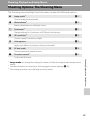
If the camera fails to function as expected, check the list of common problems
below before consulting your retailer or Nikon-authorized service representative.
Refer to the page numbers in the right-most column for more information.
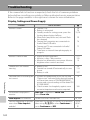
Display, Settings and Power Supply
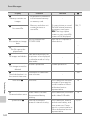
Problem
Monitor is blank
Cause/Solution
20
20
15, 24
Monitor is hard to read
• Adjust monitor brightness.
• Monitor is dirty. Clean monitor.
• Monitor has dimmed to save power. Monitor
brightens when controls are used.
111
128
15
Camera turns off without
warning
• Battery is low.
• Camera has turned off automatically to save
power.
• Battery is cold.
20
116
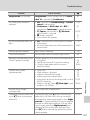
• Pictures recorded before clock was set, and
“Date not set” indicator blinks during shooting,
will have time stamp of “00/00/0000 00:00”;
movies and voice recordings will be dated “01/
01/2008 00:00.”
• Check camera clock regularly against more
accurate timepieces and reset as required.
16
Date and time of recording are
not correct
Technical Notes
No indicators displayed in
monitor
Hide info is selected for Photo info.
Select Show info.
Date imprint not available
Camera clock has not been set.
Date not appearing on pictures Date does not appear on movies or on pictures
even when Date imprint is
taken using d, l, p or when Continuous is
enabled
set to Continuous or BSS.
134
A
• Camera is off.
• Battery is exhausted.
• Standby mode for saving power: press the
shutter-release button halfway.
• When flash lamp blinks red, wait until flash
has charged.
• Camera and computer are connected via
Audio/Video/USB cable.
• Camera and TV are connected via Audio/
Video/USB cable.
• Time lapse or interval timer photography in
progress.
29
74
72
–
127
108
111
16, 108
36, 39,
40, 61,
91