1
the top of the detector stem) and loosen the fourth screw. Turn the cover to
the side. Insert the 10 batteries, in their correct alignments, into the plastic
holder and make sure that all the terminals have a good electrical contact.
Locate the battery holder into the compartment, ensuring the connecting
terminals of the battery holder are in good contact with the two electric
spring loaded terminals behind the recharge socket. Do not over-tighten the
plastic thumb screws when refitting.
If you wish to use headphones (highly recommended) connect your
available set to the 6 mm jack socket on the battery box. The Nexus
Standard MP has an internal loudspeaker so headphones are not
absolutely essential. For any headphones that have a volume control,
ensure that this is set to MAXIMUM and use the Nexus Standard MP
Volume knob on the control box to set the volume level.
Controls
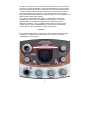
The Nexus Standard MP has eight rotary control knobs and three toggle
switches (two located on the front panel of the control box and one
underneath the control box)
5