1
Z O T PA D U S E R M A N U A L
Contents
3
Introduction
4
Getting started
User interface
Settings
6
15
Troubleshooting
19
21
Technical information
Acknowledgements
23
Introduction
ZotPad is an iPad/iPhone client for Zotero reference management
software. The purpose of ZotPad is to allow accessing Zotero libraries from mobile devices. Using Zotero can be divided into three
tasks, collecting articles and other material from the internet; reading,
organizing, and making notes of the collected material; and citing
the collected material in one’s own writing. The purpose of ZotPad
is to allow doing the reading, organizing, and note taking part on a
mobile device1 .
The version 1.1 of ZotPad is focused on working with attachment files. Files can be read with the built-in QuickLook viewer,
sent to other apps for annotating, and shared by email. The recommended way to synchronizing files between ZotPad and Zotero is to
use Zotero file storage service, but ZotPad also supports WebDAV
and Dropbox. ZotPad is designed to be always connected with the
Zotero server and does not need to be synchronized in the same way
as Zotero. If network connection becomes unavailable, ZotPad will
automatically start using a local cache instead.
1
During the summer 2012 Zotero developers announced a Zotero bookmarklet that can be used to add
items directly from mobile safari.
More information about the bookmarklet can be found on the Zotero
website athttps://www.zotero.org/
bookmarklet/bookmarklet.html
Getting started
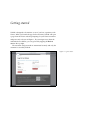
ZotPad is designed to be intuitive to use if you have experience with
Zotero. When you launch the app for the first time, ZotPad will open
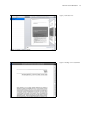
a page from the Zotero website prompting for your Zotero username
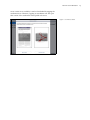
and password, as shown in Figure 1. If you navigate away from the
authentication workflow, you can go back by tapping the Back to
start on the top right.
The username and password are transmitted securely and only the
username is stored by ZotPad.
Figure 1: Log in to Zotero
zotpad user manual
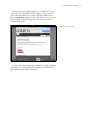
After you have successfully logged in, you are directed to a page
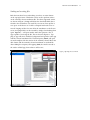
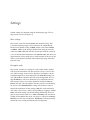
with a title "New Private Key" shown in Figure 2. This page will
create a key that ZotPad uses to access your Zotero library. Tapping Accept Defaults will give the key read and write access to your
personal library and all the groups that you belong to and is the
recommended option.
Figure 2: Create access key
If you are using Zotero file storage, ZotPad is now fully configured
and ready for use. Using WebDAV or Dropbox to synchronize your
files is described later in the user manual.
5
User interface
This chapter explains the ZotPad user interface and describes how
ZotPad is used.
Library and collection view
ZotPad is designed to be used mainly in the landscape orientation.
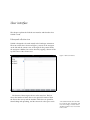
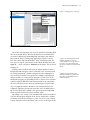
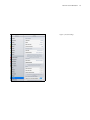
The main screen that is shown in Figure 3 consists of the navigator
on the left and the content view on the right. In the portrait mode,
the navigator is hidden, but can be shown by tapping a button on the
top left corner of the content view.
Figure 3: Main user interface
The bottom of the navigator shows cache status bar. This bar
shows the number of items that are are queued for retrieval from
the Zotero data server, and the number of files that are queud for
downloading and uploading, and the amount of cache space used2 .
2
The item downloads shows the number of toplevel items, attachments, and
notes. For example, an article with an
attachment and two notes is four items
in the counter.
zotpad user manual
Tapping the gear button will show the ZotPad log and support options. The log view is discussed later in the user manual.
Initially the navigator displays the list of libraries that you have
access to. Tapping a library activates that library and shows the
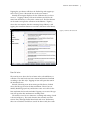
items from the library as a list in the content view. The blue buttons
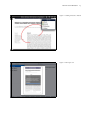
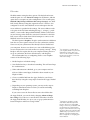
can be used to navigate the collections in the libraries. Figure 4
shows the user interface after the activating Group Library 1 and
tapping the round blue button to reveal the collections in the library.
Figure 4: Item list and collections
Item list view
The item list view shows the list of items in the selected library or
collection. The item list shows basic citation information formatted
according to the APA style. Tapping an item will open that item in
the item detail view.
Instead of showing icons about item types like Zotero, ZotPad
shows the file type icon for the first attachment. These icons are
initially disabled (grayed out) and become active once a file for the
first attachment has been downloaded. Tapping on an active file type
icon will open the first attachment in reading mode.
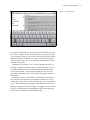
The item list view has two functions: searching and sorting. Search
is shown in Figure 5. The search function has currently two limitations: First, although ZotPad downloads and views attachments,
these are not indexed for full text search. In other words, the search
7
zotpad user manual
Figure 5: Searching item list
uses only the item fields, not content of the attachment files. Second,
the search is a phrase search. This means that if you type "nunnally
1978" (without the quotes), the search will match only items containing the exact phrase "nunnally 1978", but not items that match the
word "nunnally" and "1978" only separately. Both limitations will be
removed in the future.
Sometimes it is possible to see a search returning items that are
showing as loading from Zotero server, but then disappear. This is
caused by differences in how search is implemented in the Zotero
server and in ZotPad. A more detail description of why this happens can be found later in the user guide in the chapter "Technical
information".
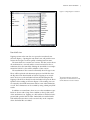
The item list can be sorted with the 6 buttons below the item list
view. The first four buttons are preconfigured with the most commonly used sorting criteria. Any of the buttons can be reconfigured
to use a different criterion by tapping and holding the button. Configuring sort buttons is shown in Figure 6. Tapping a button will sort
the list in ascending order and tapping the same button again will
switch between ascending and descending order.
8
zotpad user manual
9
Figure 6: Configuring the sort buttons
Item detail view
Tapping an item in the item list view opens the item detail view
shown in Figure 7. Opening the item detail view will push the item
list into the navigator to allow quickly switching between items.
The item detail view contains two sections. The first section shows
all attachments in a carousel and the second section below the attachments shows the item fields. Editing the item fields is not implemented in ZotPad 1.1, but will be added in a later version.
The attachments in the carousel will initially show file type icons.
These will be replaced with document previews for PDF files after
the files have been downloaded on ZotPad. Tapping on an attachment3 that is not yet downloaded will start downloading the file.
Tapping a file that has already been downloaded will open the file in
QuickLook for reading as shown in Figure 8. The reading view cannot currently show PDF annotations and has some other limitations
as well. These limitations can be avoided by using a third party PDF
reader.
In addition to normal items, there are two other attachment types.
Links are shown with a large arrow emblem on the top left corner
of the attachment icon. Tapping on a link will move ZotPad to background and open the link in Safari. Linked files are marked with a
lock emblem because these can be accessed only on the computer
where the linked file was added.
3
Both imported items and web site
snapshots are normal items that can be
downloaded and viewed on ZotPad.
zotpad user manual
10
Figure 7: Item detail view
Figure 8: Reading view for attachment
zotpad user manual
Sending and receiving files
Both the item detail view and reading view have an action button
on the top right corner. This button can be used to perform actions
on the currently chosen attachment file. The three supported actions
are shown in Figure 9. Purge will delete the downloaded file that is
related to the attachment. It is useful if you want to clean up files to
save space on the device or if a file is corrupted and needs to be removed. Purging an files does not affect the attachment on the Zotero
server, and purged files can be restored by simply downloading them
again. Open in. . . will open another menu that presents a list of
apps capable of receiving the file. This is shown in Figure 10. Tapping an app will move ZotPad to background and open the other app
with the selected attachment file. The third option, Email, will open
an email template with the citation of the currently selected file in the
APA format and the currently selected attachment as attached file.
After adding the recipient, and tapping Send, the email is moved to
the outbox of Mail app, from where it will be sent.
Figure 9: Opening the action menu
11
zotpad user manual
12
Figure 10: Sending a file to other app
One of the most important use cases for ZotPad is annotating PDF
files on the mobile device. Because ZotPad does not currently have
a feature for displaying and making PDF annotations, this must be
done with the help of a third party application4 . Figure 11 shows
how this is done with Adobe Reader5 . After annotating a PDF, the
next step is to tap the action button in the Adobe Reader, choose the
Open in. . . action, and choose ZotPad from the menu. This is shown
in Figure 11.
Sending a file to ZotPad will cause the Adobe Reader to move to
background and ZotPad to activate. If the file is not associated with
an existing attachment6 , ZotPad will ignore the file and display an
error message. If the file is recognized, it is added to upload queue
and presented as an overlay shown in Figure 12. This view can be
dismissed by tapping it. Uploading the file to Zotero server will then
continue in the background. If the upload could not be completed,
the view will show an error message explaining the reason for failure, so it might be useful to dismiss it only after the file has been
completely uploaded. If network connection is not available when a
file is received, the file is added to the upload queue and uploaded
when network connection becomes available again.
Uploading a new version of an attachment file results in conflict if
a file has already been changed on the server. ZotPad has a conflict
resolution screen shown in Figure 13. This view shows your version
version of the file on the left and the server vesion on the right. If the
4
Support for annotating PDFs inside
ZotPad is planned for version 1.3
5
Adobe Reader is a free app that can
be used to view and annotate PDF
files and is available for both iPad and
iPhone.
6
Adding new attachments using
ZotPad is currently not possible, but
this feature can be added if there is
sufficient demand.
zotpad user manual
13
Figure 11: Sending a file back to ZotPad
Figure 12: File import view
zotpad user manual
server version is not available, it can be downloaded by tapping the
attachment icon. Otherwise, tapping an attachment icon will open
that version of the attachment in the QuickLook viewer.
Figure 13: Conflict resolution
14
Settings
ZotPad settings are adjusted using the iPad Settings app. The settings screen is shown in Figure 14.
Basic settings
This section starts with the Username that ZotPad is using. This
is for informational purposes only and cannot be edited directly.
The first user editable setting is Mode, which can be either Online
or Offline. Offline mode prevents ZotPad from using the network
connection. Max cache size tells how much space ZotPad is allowed
to use for downloaded attachments and Current cache size shows an
approximation of how much space is used currently. If the size of the
cache exceeds the limit, ZotPad will automatically purge older files
from the cache.
Preemptive cache
This section contains two settings for cache. When online, ZotPad
will always download the data that it needs to show a view for the
user. These settings can be used to adjust how much data is downloaded preemptively in the background. The Item data setting controls which libraries ZotPad will cache in the background. The setting All libraries, will cause all libraries to be refreshed with new
data from the Zotero server when ZotPad is launched. Active libraries will only cache the libraries that the user has viewed during
the session. The Attachment files setting will tell Zotero when to
download attachments. If this setting is Off, files are downloaded
only when a user selects a file for downloading by tapping it. Active
items will automatically start downloading attachments when you
open an item in item detail view. Active collections will start downloading all attachment files when you choose a collection and Active
libraries does the same for libraries. All libraries will automatically
download every existing attachment in the background.
zotpad user manual
Figure 14: ZotPad settings
16
zotpad user manual
17
File service
The File service setting has three options. The default and recommended option is to use Zotero file storage for all libraries, and this
option does not require any other configuration. The second option,
WebDAV (My Library) and Zotero file storage (Groups), uses WebDAV for My Library. Using this requires that user’s Zotero is also
configured to use the same WebDAV server and requires that the
server address is specified in the settings. The server address needs
to be given in the full form including the http:// or https:// prefix
and the /zotero suffix. Misspecified WebDAV address will result in
an error message when ZotPad is activated. Username for the WebDAV server will be asked when ZotPad attempts to connect to the
WebDAV server for the first time.
The third option is Dropbox. Dropbox synchronization is different
from the two other options in that it does not synchronize with the
Zotero server, but synchronizes files directly between ZotPad and
your computer. In most cases there is no user visible difference, but
in some instances this can result in files not syncing correctly7 . Using
Dropbox will also require that the your computer running Zotero is
set up to synchronize the Zotero data directory with Dropbox.
The recommended way to configuring Zotero to use DropBox
consists of the following steps:
7
For example, if a you edit a file on
your computer, but do not sync Zotero,
ZotPad does not know that a new
version of a file would be available in
Dropbox because Zotero server is not
aware of this change.
1. Enable Dropbox in ZotPad settings.
2. Start ZotPad and try to download something. This will start Dropbox authentication.
3. When authentication is finished, go to your computer and verify that a folder named Apps/ZotPad has been created in your
Dropbox folder.
4. Create a symbolic link from the Apps/ZotPad to your Zotero
data directory using the setup scripts located in the Apps/ZotPad
folder.
5. Depending on your operating system, you may need to repeat
Dropbox authentication the next time you start downloading
something from Dropbox
If you want to store the Zotero files in some other folder than
the Apps/ZotPad, you can do this by changing Advanced Dropbox settings. If you choose to store the files somewhere else than
the Apps/ZotPad folder, it is up to you to set up synchronization
between Dropbox and Zotero storage folder8 .
8
Although it is possible to put the
entire Zotero data directory inside
Dropbox, this is not recommended.
Doing so will cause your database and
its journal file to be synchronized to
Dropbox cloud. This will create a large
amount of unnecessary network traffic.
Additionally, if you use Zotero on two
different computers with this setup,
there is a high risk of corrupting your
Zotero database.
zotpad user manual
Reset
The reset section contains two settings. Reset username will completely reset ZotPad and forces reauthentication with the Zotero
server. Reset data will delete all downloaded item data and attachment files. These settings take effect the next time ZotPad is started.
Error reports and usage statistics
The final setting, which is on by default, sends anonymous usage
statistis and error reports to ZotPad developers. This will help to
identify potential problems that can be fixed in future versions.
18
Troubleshooting
Log viewer and key settings
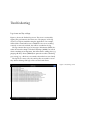
Figure 15 shows the ZotPad log viewer. This view is activated by
tapping the gear button in the main view. The purpose of the log
viewer is to help in troubleshooting the application. For example,
if files fail do download because a WebDAV server is not working
correctly or cannot be reached, this will be recorded in the log.
The log contains three types of messages. Information (INFO) describe the normal workign of ZotPad. Warnings (WARN) are issued
when something more important, but still normal is taking place (e.g.
purging old files). Errors (ERROR) are printed out when something
goes wrong (e.g. a file that you wanted to download was not found).
The log file is is reset every day and log files are stored for seven
days before deleting. Old logs can be accessed with iTunes.
Figure 15: ZotPad log viewer
zotpad user manual
The toolbar contains fourbuttons. The first button will show this
user manual and the second button will open the support pages
on the ZotPad website. These pages contain the most up to date
documentation and are complementary to this user manual. The
Email support button will open an email template that contains
information about your access key and the most recent log file.
Manage API key will open a key management page in Safari.
After you have logged in to zotero.org, this page can be used to adjust the permissions that the access key that ZotPad uses has. For
example, you can limit the key to only one particular group library,
remove write access from the key, or restrict the key so that it cannot
be used to access your notes.
General troubleshooting procedure
If you are experiencing problems with ZotPad, the first thing to do is
to open the log viewer to see if there are any error messages. Sometimes checking the application log is sufficient to diagnose a problem.
If the log does not contain any useful, or you do not understand
what the log says, the next troubleshooting step is to check the frequently asked questions section on the ZotPad website. If this does
not answer the problem, you should contact support by using the
email support feature.
20
Technical information
This chapter contains technical information about ZotPad. It might
not be useful for a typical user, but can contain useful or interesting
details for more technically oriented users.
Technical architecture
To understand how ZotPad works, you should consider it as an online viewer to your Zotero libraries, but with a cache. The way ZotPad works is somewhere between Zotero and the Zotero website. The
Zotero application will synchronize its data with the server periodically and then display this data to the user. The Zotero website loads
data only when needed and does this for each page view. ZotPad
is similar to Zotero website in that it always loads new data when a
user taps a library, a collection, or an item. ZotPad is also similar to
Zotero in that it uses locally stored copy of the data that it shows the
user. When a user navigates to a new library, collection, or item, this
will first trigger a request against the local cache. The cache is used
to present data for the user quickly while a request to the Zotero
server for fresh data runs in the background. When ZotPad receives
data from the Zotero server, this data are always written first in the
local cache, and then the cache is queried again to refresh the user
interface. Always presenting data from the cache guarantees that
searching and sorting will work consistently regardless of how the
source of the data. In addition to cacheing data that the user requests
directly, ZotPad will also preemptively cache data that it thinks it
will need in the future. The preemptive cache and the ad hoc data
retrieval are optimized to avoid unnecessary requests to the Zotero
server.
ZotPad stores all downloaded items in the application data directory, which can be accessed with iTunes file transfer. The attachment
files are named by appending an underscore (_) and an eight character identifier at the end of the body of the file name. Files that are
edited on the device are further appended with a dash (-). Locally
edited files are stored until they have been succesfully uploaded to
zotpad user manual
the Zotero server
Development of ZotPad
ZotPad develoment takes place at GitHub at https://github.com/
mronkko/ZotPad. The project is open for new developers who wish
to participate in making ZotPad better and earning some additional
income by doing so. The source code is available under the GNU
General Public Licence, version 3. This means that anyone can download the code and enhance it as long as the modified code is released
under the same license. Downloading the ZotPad code and relicensing it under the App Store license is not permitted. If any developer
wishes to use the ZotPad code as a part of their project, contacting
the ZotPad developers first is highly recommended.
All bugs and feature request are recorded in a tracker that at
GitHub: https://github.com/mronkko/ZotPad/issues. Feature
requests can also be submitted through the forums at the ZotPad
website at http://www.zotpad.com.
ZotPad aims to release a new version three to four times a year
and does maintenance releases if critical bugs are discovered. Each
major release is beta tested by actual users using the Testflight service. The beta testing is invitation only because each test deveice
needs to be registered with Apple, who allows only 100 new device
registrations per year. However, new testers are always welcome.
If you want to participate in the next beta, please email [email protected] and ask for further information.
Beta testing the next version (1.2) is expected to start in the early
fall 2012. This release will add support for notes and tags as well as
support for editing item data.
22
Acknowledgements
ZotPad uses the following third party software libraries that require attribution as part of the licence conditions:
iCarousel, Copyright ©2011 Charcoal Design. All rights reserved. License
ASIHTTPRequest, Copyright ©2007-2011 All-Seeing Interactive. All rights reserved. License
Redistribution and use in source and binary forms, with or without modification, are permitted provided that the following conditions are met:
• Redistributions of source code must retain the above copyright notice, this list of conditions and the following disclaimer.
• Redistributions in binary form must reproduce the above copyright notice, this list of conditions and the following disclaimer in the documentation
and/or other materials provided with the distribution.
• Neither the name of the All-Seeing Interactive nor the names of its contributors may be used to endorse or promote products derived from this
software without specific prior written permission.
THIS SOFTWARE IS PROVIDED BY All-Seeing Interactive ”AS IS” AND ANY EXPRESS OR IMPLIED WARRANTIES, INCLUDING, BUT NOT LIMITED TO, THE IMPLIED WARRANTIES OF MERCHANTABILITY AND FITNESS FOR A PARTICULAR PURPOSE ARE DISCLAIMED. IN NO EVENT
SHALL All-Seeing Interactive BE LIABLE FOR ANY DIRECT, INDIRECT, INCIDENTAL, SPECIAL, EXEMPLARY, OR CONSEQUENTIAL DAMAGES
(INCLUDING, BUT NOT LIMITED TO, PROCUREMENT OF SUBSTITUTE GOODS OR SERVICES; LOSS OF USE, DATA, OR PROFITS; OR BUSINESS
INTERRUPTION) HOWEVER CAUSED AND ON ANY THEORY OF LIABILITY, WHETHER IN CONTRACT, STRICT LIABILITY, OR TORT (INCLUDING NEGLIGENCE OR OTHERWISE) ARISING IN ANY WAY OUT OF THE USE OF THIS SOFTWARE, EVEN IF ADVISED OF THE POSSIBILITY OF
SUCH DAMAGE.
json-framework, Copyright ©2007-2011 Stig Brautaset. All rights reserved. License
Redistribution and use in source and binary forms, with or without modification, are permitted provided that the following conditions are met:
• Redistributions of source code must retain the above copyright notice, this list of conditions and the following disclaimer.
• Redistributions in binary form must reproduce the above copyright notice, this list of conditions and the following disclaimer in the documentation
and/or other materials provided with the distribution.
• Neither the name of the All-Seeing Interactive nor the names of its contributors may be used to endorse or promote products derived from this
software without specific prior written permission.
THIS SOFTWARE IS PROVIDED BY THE COPYRIGHT HOLDERS AND CONTRIBUTORS "AS IS" AND ANY EXPRESS OR IMPLIED WARRANTIES,
INCLUDING, BUT NOT LIMITED TO, THE IMPLIED WARRANTIES OF MERCHANTABILITY AND FITNESS FOR A PARTICULAR PURPOSE ARE
DISCLAIMED. IN NO EVENT SHALL THE COPYRIGHT OWNER OR CONTRIBUTORS BE LIABLE FOR ANY DIRECT, INDIRECT, INCIDENTAL,
SPECIAL, EXEMPLARY, OR CONSEQUENTIAL DAMAGES (INCLUDING, BUT NOT LIMITED TO, PROCUREMENT OF SUBSTITUTE GOODS
OR SERVICES; LOSS OF USE, DATA, OR PROFITS; OR BUSINESS INTERRUPTION) HOWEVER CAUSED AND ON ANY THEORY OF LIABILITY,
WHETHER IN CONTRACT, STRICT LIABILITY, OR TORT (INCLUDING NEGLIGENCE OR OTHERWISE) ARISING IN ANY WAY OUT OF THE USE
OF THIS SOFTWARE, EVEN IF ADVISED OF THE POSSIBILITY OF SUCH DAMAGE.
zotpad user manual
24
OAuthConsumer, Copyright ©2010-2012 Jonathan R. Crosby. All rights reserved. License
Permission is hereby granted, free of charge, to any person obtaining a copy of this software and associated documentation files (the "Software"), to deal
in the Software without restriction, including without limitation the rights to use, copy, modify, merge, publish, distribute, sublicense, and/or sell copies
of the Software, and to permit persons to whom the Software is furnished to do so, subject to the following conditions:
The above copyright notice and this permission notice shall be included in all copies or substantial portions of the Software.
DSActivityView, Copyright ©2009-2011 Dejal Systems, LLC. All rights reserved License
fmdb, Copyright ©2008 Flying Meat Inc. All rights reserved. License
Permission is hereby granted, free of charge, to any person obtaining a copy of this software and associated documentation files (the "Software"), to deal
in the Software without restriction, including without limitation the rights to use, copy, modify, merge, publish, distribute, sublicense, and/or sell copies
of the Software, and to permit persons to whom the Software is furnished to do so, subject to the following conditions:
The above copyright notice and this permission notice shall be included in all copies or substantial portions of the Software.
DTCoreText, Copyright ©2011, Oliver Drobnik All rights reserved. License
Redistribution and use in source and binary forms, with or without modification, are permitted provided that the following conditions are met:
• Redistributions of source code must retain the above copyright notice, this list of conditions and the following disclaimer.
• Redistributions in binary form must reproduce the above copyright notice, this list of conditions and the following disclaimer in the documentation
and/or other materials provided with the distribution.
THIS SOFTWARE IS PROVIDED BY THE COPYRIGHT HOLDERS AND CONTRIBUTORS "AS IS" AND ANY EXPRESS OR IMPLIED WARRANTIES,
INCLUDING, BUT NOT LIMITED TO, THE IMPLIED WARRANTIES OF MERCHANTABILITY AND FITNESS FOR A PARTICULAR PURPOSE ARE
DISCLAIMED. IN NO EVENT SHALL THE COPYRIGHT HOLDER OR CONTRIBUTORS BE LIABLE FOR ANY DIRECT, INDIRECT, INCIDENTAL,
SPECIAL, EXEMPLARY, OR CONSEQUENTIAL DAMAGES (INCLUDING, BUT NOT LIMITED TO, PROCUREMENT OF SUBSTITUTE GOODS
OR SERVICES; LOSS OF USE, DATA, OR PROFITS; OR BUSINESS INTERRUPTION) HOWEVER CAUSED AND ON ANY THEORY OF LIABILITY,
WHETHER IN CONTRACT, STRICT LIABILITY, OR TORT (INCLUDING NEGLIGENCE OR OTHERWISE) ARISING IN ANY WAY OUT OF THE USE
OF THIS SOFTWARE, EVEN IF ADVISED OF THE POSSIBILITY OF SUCH DAMAGE.
OAuthConsumer, Copyright ©2010-2012 Jonathan R. Crosby. All rights reserved. License
Permission is hereby granted, free of charge, to any person obtaining a copy of this software and associated documentation files (the "Software"), to deal
in the Software without restriction, including without limitation the rights to use, copy, modify, merge, publish, distribute, sublicense, and/or sell copies
of the Software, and to permit persons to whom the Software is furnished to do so, subject to the following conditions:
The above copyright notice and this permission notice shall be included in all copies or substantial portions of the Software.
Base64Transcoder Copyright ©2003 Toxic Software. All rights reserved. License
Permission is hereby granted, free of charge, to any person obtaining a copy of this software and associated documentation files (the "Software"), to deal
in the Software without restriction, including without limitation the rights to use, copy, modify, merge, publish, distribute, sublicense, and/or sell copies
of the Software, and to permit persons to whom the Software is furnished to do so, subject to the following conditions:
The above copyright notice and this permission notice shall be included in all copies or substantial portions of the Software.
THE SOFTWARE IS PROVIDED "AS IS", WITHOUT WARRANTY OF ANY KIND, EXPRESS OR IMPLIED, INCLUDING BUT NOT LIMITED TO THE
WARRANTIES OF MERCHANTABILITY, FITNESS FOR A PARTICULAR PURPOSE AND NONINFRINGEMENT. IN NO EVENT SHALL THE AUTHORS OR COPYRIGHT HOLDERS BE LIABLE FOR ANY CLAIM, DAMAGES OR OTHER LIABILITY, WHETHER IN AN ACTION OF CONTRACT,
TORT OR OTHERWISE, ARISING FROM, OUT OF OR IN CONNECTION WITH THE SOFTWARE OR THE USE OR OTHER DEALINGS IN THE
SOFTWARE.
DropboxSDK, Copyright ©2010-2012 Dropbox, Inc. All rights reserved. License
Permission is hereby granted, free of charge, to any person obtaining a copy of this software and associated documentation files (the "Software"), to deal
in the Software without restriction, including without limitation the rights to use, copy, modify, merge, publish, distribute, sublicense, and/or sell copies
of the Software, and to permit persons to whom the Software is furnished to do so, subject to the following conditions:
zotpad user manual
25
The above copyright notice and this permission notice shall be included in all copies or substantial portions of the Software.
THE SOFTWARE IS PROVIDED "AS IS", WITHOUT WARRANTY OF ANY KIND, EXPRESS OR IMPLIED, INCLUDING BUT NOT LIMITED TO THE
WARRANTIES OF MERCHANTABILITY, FITNESS FOR A PARTICULAR PURPOSE AND NONINFRINGEMENT. IN NO EVENT SHALL THE AUTHORS OR COPYRIGHT HOLDERS BE LIABLE FOR ANY CLAIM, DAMAGES OR OTHER LIABILITY, WHETHER IN AN ACTION OF CONTRACT,
TORT OR OTHERWISE, ARISING FROM, OUT OF OR IN CONNECTION WITH THE SOFTWARE OR THE USE OR OTHER DEALINGS IN THE
SOFTWARE.
CocoaLumberjack, Copyright ©2010, Deusty, LLC. All rights reserved. License
FileMD5Hash,Copyright ©2010 Joel Lopes Da Silva, All rights reserved. License
This software has been developed by Joel Lopes Da Silva (http://www.joel.lopes-da-silva.com/).
OHAttributedLabel, Copyright ©2010 Olivier Halligon. All rights reserved. License
Permission is hereby granted, free of charge, to any person obtaining a copy of this software and associated documentation files (the "Software"), to deal
in the Software without restriction, including without limitation the rights to use, copy, modify, merge, publish, distribute, sublicense, and/or sell copies
of the Software, and to permit persons to whom the Software is furnished to do so, subject to the following conditions:
The above copyright notice and this permission notice shall be included in all copies or substantial portions of the Software.
QSUtilities, Copyright ©2010 - 2011, Quasidea Development, LLC. All rights reserved. License
Permission is hereby granted, free of charge, to any person obtaining a copy of this software and associated documentation files (the "Software"), to deal
in the Software without restriction, including without limitation the rights to use, copy, modify, merge, publish, distribute, sublicense, and/or sell copies
of the Software, and to permit persons to whom the Software is furnished to do so, subject to the following conditions:
The above copyright notice and this permission notice shall be included in all copies or substantial portions of the Software.
Google Toolbox for the Mac (GTM). Copyright 2008 Google Inc. All rights reserved. License
Base64, Copyright ©1997-2010 The PHP Group. All Rights reserved. License
Redistribution and use in source and binary forms, with or without modification, is permitted provided that the following conditions are met:
1. Redistributions of source code must retain the above copyright notice, this list of conditions and the following disclaimer.
2. Redistributions in binary form must reproduce the above copyright notice, this list of conditions and the following disclaimer in the documentation
and/or other materials provided with the distribution.
3. The name "PHP" must not be used to endorse or promote products derived from this software without prior written permission. For written permission, please contact [email protected].
4. Products derived from this software may not be called "PHP", nor may "PHP" appear in their name, without prior written permission from
[email protected]. You may indicate that your software works in conjunction with PHP by saying "Foo for PHP" instead of calling it "PHP Foo" or
"phpfoo"
5. The PHP Group may publish revised and/or new versions of the license from time to time. Each version will be given a distinguishing version
number. Once covered code has been published under a particular version of the license, you may always continue to use it under the terms of that
version. You may also choose to use such covered code under the terms of any subsequent version of the license published by the PHP Group. No
one other than the PHP Group has the right to modify the terms applicable to covered code created under this License.
6. Redistributions of any form whatsoever must retain the following acknowledgment: "This product includes PHP software, freely available from
<http://www.php.net/software/>".
THIS SOFTWARE IS PROVIDED BY THE PHP DEVELOPMENT TEAM “AS IS” AND ANY EXPRESSED OR IMPLIED WARRANTIES, INCLUDING,
BUT NOT LIMITED TO, THE IMPLIED WARRANTIES OF MERCHANTABILITY AND FITNESS FOR A PARTICULAR PURPOSE ARE DISCLAIMED.
IN NO EVENT SHALL THE PHP DEVELOPMENT TEAM OR ITS CONTRIBUTORS BE LIABLE FOR ANY DIRECT, INDIRECT, INCIDENTAL,
SPECIAL, EXEMPLARY, OR CONSEQUENTIAL DAMAGES (INCLUDING, BUT NOT LIMITED TO, PROCUREMENT OF SUBSTITUTE GOODS
OR SERVICES; LOSS OF USE, DATA, OR PROFITS; OR BUSINESS INTERRUPTION) HOWEVER CAUSED AND ON ANY THEORY OF LIABILITY,
WHETHER IN CONTRACT, STRICT LIABILITY, OR TORT (INCLUDING NEGLIGENCE OR OTHERWISE) ARISING IN ANY WAY OUT OF THE USE
OF THIS SOFTWARE, EVEN IF ADVISED OF THE POSSIBILITY OF SUCH DAMAGE.
zotpad user manual
26
ZipArchive Copyright ©2008 Aish. All rights reserved. License
Permission is hereby granted, free of charge, to any person obtaining a copy of this software and associated documentation files (the "Software"), to deal
in the Software without restriction, including without limitation the rights to use, copy, modify, merge, publish, distribute, sublicense, and/or sell copies
of the Software, and to permit persons to whom the Software is furnished to do so, subject to the following conditions:
The above copyright notice and this permission notice shall be included in all copies or substantial portions of the Software.
THE SOFTWARE IS PROVIDED "AS IS", WITHOUT WARRANTY OF ANY KIND, EXPRESS OR IMPLIED, INCLUDING BUT NOT LIMITED TO THE
WARRANTIES OF MERCHANTABILITY, FITNESS FOR A PARTICULAR PURPOSE AND NONINFRINGEMENT. IN NO EVENT SHALL THE AUTHORS OR COPYRIGHT HOLDERS BE LIABLE FOR ANY CLAIM, DAMAGES OR OTHER LIABILITY, WHETHER IN AN ACTION OF CONTRACT,
TORT OR OTHERWISE, ARISING FROM, OUT OF OR IN CONNECTION WITH THE SOFTWARE OR THE USE OR OTHER DEALINGS IN THE
SOFTWARE.
InAppSettingsKit, Copyright ©2009-2010 Luc Vandal, Edovia Inc., http://www.edovia.com and Ortwin
Gentz, FutureTap GmbH, http://www.futuretap.com All rights reserved. License
It is appreciated but not required that you give credit to Luc Vandal and Ortwin Gentz, as the original authors of this code. You can give credit in a blog
post, a tweet or on a info page of your app. Also, the original authors appreciate letting them know if you use this code.
The above copyright notice and this permission notice shall be included in all copies or substantial portions of the Software.
This code is licensed under the BSD license that is available at: <http://www.opensource.org/licenses/bsd-license.php>