1
Lens identification
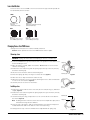
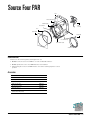
Lenses for the Source Four PAR come in four versions. The type or beam spread can
be identified by the lens texture.
VNSP
NSP
Very narrow spot
Clear glass
15° Round beam shape
Narrow spot
Stipple glass (slight diffuse texture)
19° Round beam shape
MFL
WFL
Medium flood
Fewer facets, sized 6 x 22mm
21° x 34° Oblong beam shape
Wide flood
Many facets, sized 6 x 12mm
30° x 51° Oblong beam shape
Changing Source Four PAR lenses
Change lenses if they become cracked or badly scratched.
Caution! Never operate the Source Four PAR without a lens in place.
Removing a lens
WARNING! Unplug the fixture before attempting to remove or install a lens.
1. Source Four PAR lenses get hot while the unit is in operation. Let the fixture cool
before handling the lens.
Spring clip
2. Place the fixture on a flat, stable work surface. Do not install or remove lenses
with the unit hanging.
3. Position the lens rotation ring with the spring clip at the top of the unit, directly
below the retaining clip.
4. Tilt the front of the fixture down at least 45 degrees.
Tab
Retaining clip
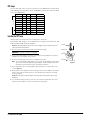
5. Press the spring clip with your finger to release the lens (Figure 2).
Figure 2
6. Allow the lens to drop forward from under the clip.
7. When the lens drops, remove your finger, allowing the lens to slide forward until
it rests on the lens catchers (Figure 3).
8. Carefully remove the lens from the fixture.
Installing a lens
Lens
catcher
1. Position the fixture with the front of the unit (the lens side) facing you, and tilted
slightly (Figure 2).
Figure 3
2. Position the lens rotation ring with the spring clip at the top of the fixture, directly
below the retaining clip.
3. Hold the lens by the edge, and position it so the convex side faces the back of
the fixture (Figure 4).
Retaining clip
Spring clip
Note: Installing the lens with the convex side out will not impair the optics, but it
will make removing the lens difficult.
4. From the top of the fixture, slide the lens behind the lens catchers and position
its base behind the tabs on the bottom of the lens rotation ring.
5. Gently push the top of the lens inward until it snaps behind the spring clip.
Tab
Figure 4
Source Four PAR • 3