1
MY ACCOUNT
User Guide
Viewing ACCOUNT
INFORMATION
MY ACCOUNT–
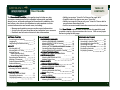
ACCOUNT –ACCOUNT INFORMATION is where you will find your Central Account Information. Your Central Account is the primary account associated
with all of your buyer accounts.
1
Viewing ACCOUNT INFORMATION
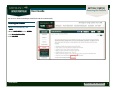
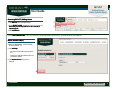
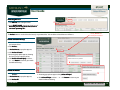
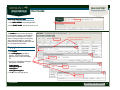
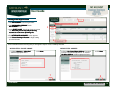
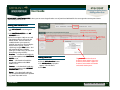
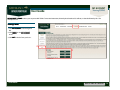
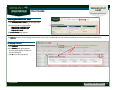
1. Click MY ACCOUNT on the Navigation
Bar.
2. Click ACCOUNT INFORMATION on the
MY ACCOUNT menu.
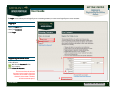
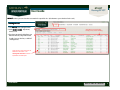
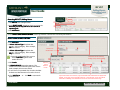
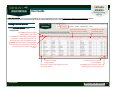
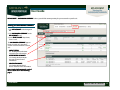
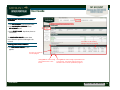
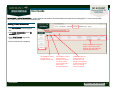
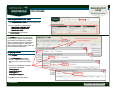
Your CENTRAL ACCOUNT INFORMATION
appears. It has three sections:
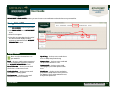
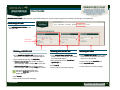
• The MAILING ADDRESS section shows
mailing addresses associated with your
central account. The default address is
designated by the selected radio button.
This default address will be use for
statements. Mailing addresses will be
used when you complete your catalog
subscription.
2
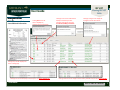
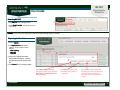
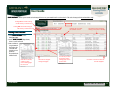
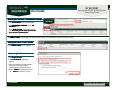
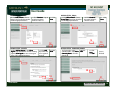
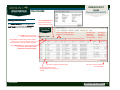
Click here to edit or
delete an address.
Click here to add a new address.
Click here to add a new phone number.
Click here to edit or
delete phone numbers.
Click here to add a new email address.
Click here to edit or
delete an email
address.
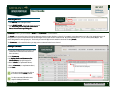
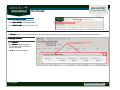
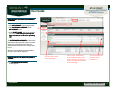
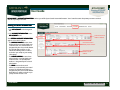
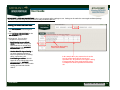
• The PHONE NUMBERS section shows
phone numbers associated with your
central account. The default phone
number is designated by the selected
radio button.
• The EMAIL section shows email
addresses associated with your central
account. The default email address is
designated by the selected radio button.
Email addresses will be used when you
specify email alerts to be sent.
Ver20140905
Back to TABLE OF CONTENTS
21