1
Matrix Switching System—User Manual
Table of Contents
1.0 Matrix System Overview ..........................................................................................................4
1.0.1 Introduction ....................................................................................................................4
1.0.2 Packing ...........................................................................................................................5
2.0 Features .....................................................................................................................................6
3.0 Specifications ............................................................................................................................6
4.0 Host Installation ........................................................................................................................7
5.0 Front/Rear Panels ......................................................................................................................7
5.0.1 Front Panel .....................................................................................................................7
5.0.2 Rear Panel ......................................................................................................................9
6.0 HDMI Matrix and Peripherals Connection ............................................................................. 11
6.0.1 Input/Output Connections ............................................................................................12
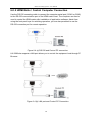
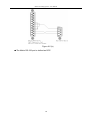
6.0.2 HDMI Matrix / Control Computer Connection............................................................13
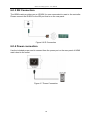
6.0.3 IR2 Connection ............................................................................................................16
6.0.4 Power connection .........................................................................................................16
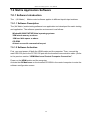
7.0 Matrix Application Software...................................................................................................17
7.0.1 Software Introduction...................................................................................................17
7.0.1.1 Software Description.........................................................................................17
7.0.1.2 Software Activation...........................................................................................17
7.0.2 RS-232 Software Configuration...................................................................................18
7.0.2.1 RS-232 Main Operation Interface .....................................................................19
7.0.2.2 Disconnect Function Keys ................................................................................21
7.0.2.3 Select all output, DeSelect all output Switching Functions ..............................22
7.0.2.4 Disconnect all Command ..................................................................................23
7.0.2.5 RS-232 Memory Function.................................................................................23
7.0.2.6 Options Function ...............................................................................................24
7.0.2.7 Other Application ..............................................................................................24
7.0.2.8 Communication Protocol/Control Command Code ..........................................24
7.0.3 LAN Web Configuration ..............................................................................................25
7.0.3.1 LAN Main Operation Interface .........................................................................26
7.0.3.2 LAN Memory Function.....................................................................................27
7.0.3.3 LAN IP Function ...............................................................................................28
7.0.3.4 Other Application ..............................................................................................29
8.0 Operation Examples ................................................................................................................30
9.0 Troubleshooting.......................................................................................................................33
2