1
4–12
Setting Up and Controlling the Counting
Monitoring Overflow and Resetting Flags
What is a Counting As mentioned earlier, the HSC counter can count UP to +8388607 maximum or
count DOWN to –8388608. If you pulse the counter beyond these two maximum
Overflow?
counts (and Ym+20 ,reset, is OFF), the following will happen:
S Counting UP past +8388607 will cause the count to wrap around and
start counting from –8388608 UP. (i.e. –8388608, –8388607, –8388606,
etc.)
S Counting DOWN past –8388608 will cause the count to wrap around
and start counting from +8388607 DOWN (i.e. 8388607, 8388606,
8388605, etc.).
If this happens, the overflow LED will come ON to let you know this has occurred. It
would remain ON until power is removed, or you manually reset it using by Ym+1.
Status Flag for
Overflow
In addition to turning on the OVF LED when there is a counting overflow, the HSC will
also mirror the status in Xn+3. This flag will stay ON until Ym+1 is turned ON or power
is removed. You can use this flag to sound an alarm, trigger other events, etc.
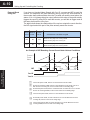
Tracking Overflows You may want to track the total number of overflows that occur. The program below
shows you some example logic that could accomplish this task.
Assuming that the HSC is
in Slot 0 of the base
X3
INC
V3000
X3 turns on when there is an overflow.
It will increment whatever is in V3000
by 1 everytime X3 goes HIGH.
Y1
Setting Up and
Controlling the Counting
OUT
Turn ON Y1 to reset X3 (Turn it OFF).
When Ym+1 goes HIGH, the overflow flag will not be set again until an overflow
occurs again.
Summary of Input The chart below summarizes the X and Y output assignments discussed above.
and Output Relays
for Overflow and
Function
X or Y
Flag Reset
No.
Xn+3
If ON, it means that you are in overflow. If OFF, it means you are not in overflow.
Ym+1
This output relay will reset (turn OFF) the overflow flag Xn+3 and the OVF LED.