1
STG ENG MAN 21.2.97_P.Script
8/5/99 12:58
Page 34
5. TACTICAL COMBAT
5. TACTICAL COMBAT
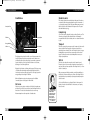
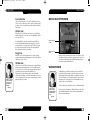
Propulsion controls your ship’s velocity. If damaged, Warp drive will
go off-line. Its indicator box is blue.
Power Generator controls the energy used to power the ship’s other
systems. If damaged, other systems will go off-line. Its indicator box is
bright yellow.
Computer Systems controls the accuracy of your ship’s weapons.
When damaged, weapons accuracy drops. Its indicator box is white.
Sensors controls the viewscreen and display windows. As it is
damaged, each of the screens will fail to display any sensor readings.
Its indicator box is bluish-grey.
Damage Control determines the rate at which repairs are conducted.
When it is destroyed, no other systems on the ship will be repaired.
Click on any damaged system’s indicator box to cut off its repairs.
Click again to restore repairs. Its indicator box is purple.
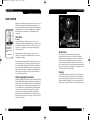
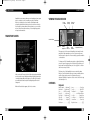
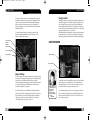
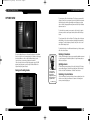
Each system is represented by an indicator bar with a coloured box at
the top of it. That bar shows the level of power supplied to the system
versus the full potential of that system. The yellow bar on the indicator
shows what the current level is, with the white outline indicating the
current setting. The blue bar on the indicator shows what the full
potential of that system is. A red bar on the indicator represents
damage to that specific system. The coloured box indicates which
system it is.
A red colour indicator box at the top of the bar denotes a destroyed
system. Destroyed systems are no longer usable until repaired.
Repairing destroyed systems requires more time than to repair systems
that have suffered only some damage. Repaired systems have their
indicator boxes outlined in white.
Shields
To increase the power to a system, click and hold down your mouse
button on the white outline to raise the yellow bar. Dragging on the
white outline while lowering it down the bar decreases power to a
system. The yellow bars slowly change to match the new level
established by the white outline. The horizontal readout bar for
Engineering indicates how much excess energy you have to increase
power to all of your ship’s systems.
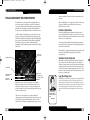
Besides being represented on the Enterprise Systems Panel, the ship’s
shields are indicated on the Enterprise Display by pale yellow outlines,
matching the colour of their indicator boxes. Each shield is
differentiated by a different shade of pale yellow. If they are damaged,
their outline will fade. When they are destroyed, their outline will
disappear.
As the main defense for a starship, the shields will stop Phasers and
Photon Torpedoes from damaging the ship, but in turn, will be damaged
by those weapons themselves.
The systems represented on the panel are:
Forward Shield measures the strength of your forward shield.
Port Shield measures the strength of your left-side shield.
Starboard Shield measures the strength of your right-side shield.
Aft Shield measures the strength of your rear shield.
Weapons Systems controls your Phasers and your Photon Torpedoes.
When damaged, some weapons will become inactive. When
destroyed, all weapons are off-line. Its system box is orange.
Life Support controls the starship’s life support systems. Life support
creates a comfortable environment for the crew to work in. When it is
damaged, the rates of repair procedures and torpedo loading are both
slowed down as the crew must deal with a harsher environment.
Should it be completely damaged, the emergency life support will
automatically engage. When it is destroyed, the ship’s environment
will soon be unable to support life and your crew will die, rendering all
systems inactive. Its system box is green.
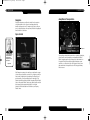
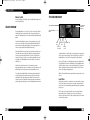
Phasers
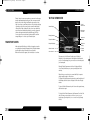
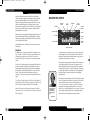
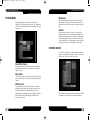
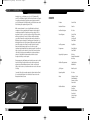
The Enterprise’ s Phaser banks are a more powerful version of a crew
member’s hand-held Phasers. These Type X Phasers are used as a
starship’s primary means of attack. To use them, target the enemy ship
and click on the Fire Phasers button or press SHIFT.
Phasers
Safety
Fire Phasers
Button
273
Phaser
Banks
Forward
Torpedoes
34
Photon
Safety
Fire
Photon
Torpedoes
Button
Aft
Torpedoes
Photon
Torpedo
Counter
35