1
GSE-615 User’s manual
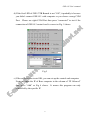
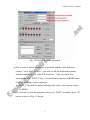
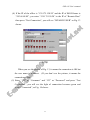
d) If the first LED of GSE-572B Branch is not “ON”, it probably is because
you didn’t connect GSE-615 with computer or you choose wrong COM
Port. Please use right COM Port then press “connected” to test if the
connection of GSE-615 control card is correct as Fig. 5 shows.
Fig 5
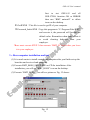
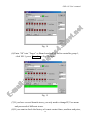
e) If the software was tested OK, you can set-up the control-end computer.
First, you enter the IP of Boss computer in the column of “IP Allowed”
then press “Add” as Fig 6 shows. It means this program can only
controlled by the specific IP
4