1
ABOUT
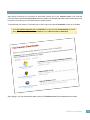
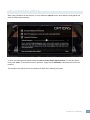
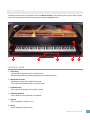
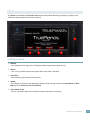
The About screen displays the licensee name and provides buttons that bring you directly to a page on the
TruePianos website (Internet Connection required).
5
1
2
3
4
INTERFACE USAGE
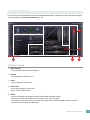
1. Website
- Click: Shows the front page of the TruePianos website (http://www.truepianos.com).
2. Demos
- Click: Let’s you listen to music other people have made using TruePianos.
3. Quick Tour
- Click: Shows a quick overview of the product.
4. Update
-Click: Brings you directly to the update page where you need to login using your e-mail address as User
Name and your reference code as Password
5. Close About screen
-Click on any location within the TruePianos interface where there is no button.
TruePianos User Manual
22