1
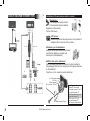
EN Object push Some telephones can require a particular setting of your hands-free kit before sending contacts. ( If your telephone does not display your kit in the list of devices to which contacts can be sent, activate the “Always active” option.) Warning: this configuration of your kit can cause poor functioning with certain telephones. We recommend that you return to “Automatic” mode as soon as you have sent your contacts. Software upgrade Activate this option when you install an upgrade by Bluetooth of your kit, from a personal computer. This option will be automatically disactivated when restarting your kit. Go to our website for more information : www.parrot.biz Demo mode Launch a demo of the hands-free kit. Restarting the carkit is necessary to deactivate this mode. GPS CK3300 - CK3500 The CK3300 and CK3500 kits load a GPS (Global Positioning System) module giving access to the current position of the vehicle. This information is available via Bluetooth on a channel accessible by the majority of PDAs and Smartphones. Connection to the GPS service If you have a navigation application on your PDA or smartphone, all you need do is pair this peripheral device with the CK3X00, and open a series connection to the GPS port. Certain navigation applications let you directly select as Bluetooth GPS source. On your device the GPS configuration to be selected is NMEA 0183v2 9600, in the event it is necessary to supply this information. Once connected, a GPS icon is visible on the screen of the CK3X00. Voice indications of your navigation Once the GPS service is connected the CK3X00 equipped with GPS module allows you to listen to the sound indications of your navigation software over the loud speakers of your vehicle. Your navigation will thus be carried out under optimal conditions (this functionality is available only with certain navigation software). To do this, from your PDA or smartphone open the service Ear phone/Headset, which is available on the car-kit. If you want to make a call or answer an incoming call, this service is automatically closed then reopened to allow you to use telephony functionality under the best conditions. GPS Menu In this heading you can fully disable the GPS service to prevent anyone from connecting to this service. The Information section specifies the GPS configuration and the peripheral device currently connected to this service if it is active. User’s guide 13