1
North Carolina Department of Health and Human Services
Division of Social Services
Economic Independence Section
FSIS User’s Manual
Change #3-2006
TRANSACTION TRACKING INQUIRY
B.
November 1, 2006
Transaction Tracking Inquiry By:
1.
Case ID
a.
Enter the 9 digit case ID number. You must enter the Start Date or the
Date Range (Start and End Date). You may enter the County Number
option(s) with the Case ID number keyed. If the Start Date is not
entered, the error message, *** DATE MANDATORY** is displayed.
b.
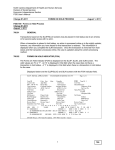
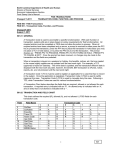
Press ENTER. The following FOOD STAMP INFORMATION SYSTEM
TRANSACTION TRACKING SELECTION SCREEN is displayed if there
are transaction records for the Case ID keyed. If there are more than
200 transactions for the Case ID number keyed, the message
***SLTRFPTH SELECTION EXCEEDS 200, is displayed; however, 200
transactions are displayed.
c.
If there is no transaction record for the Case ID number keyed, the error
message, ***SLTRFILE REC NOT FND, is displayed.
SLTR
FOOD STAMP INFORMATION SYSTEM
TRANSACTION TRACKING SELECTION SCREEN
CASE-ID
S
02/01/2001
123456789
SEL TC TRANS
DATE
8
6
8
6
DATE
05142001
04252001
04182001
04162001
TMP
TRANS REC WKR WKR USER
TIME
NO NO NO
ID
20:22:12
09:22:12
09:47:03
11:47:54
087
088
089
090
117
117
117
117
XXXXXXX
SLA144
XXXXXXX
XXXXXXX
XXXXXXX
ALLOT
SCRN
0222
0222
0222
0221
SLSE
BTCH
SLUP
SLUP
SLUP
ENTRY
DATE
05152001
ISS
AMT
0122
PF7 SCROOL BACKWARD, PF8 SCROLL FORWARD
ENTER PROCESS, PF3/CLEAR END
d.
SLUP
MASCHG
EXPED
SLNC
SLSE
BTCH
SARMC
The SCRN field on the Transaction Tracking Selection Screen may
display:
Transaction displayed due to SLUP action.
Transaction displayed due to a mass change in FSIS.
Transaction displayed due to automatic closure by FSIS.
Transaction displayed due to SLNC action.
Transaction displayed due to SLSE action.
Transaction displayed due to a nightly update (EPICS, DIRM
[Corrections], SLA144, or SLA 145). SLA144 and SLA145 are
Automated Food Stamp transactions.
Transaction displayed due to conversion from quarterly reporting to
semi-annual reporting.
To view a transaction, enter an ‘S’ to the left of the transaction. Press
ENTER.
2
1100