1
Version: 2008-04-02
10 minutes
ON
ON
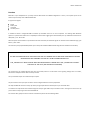
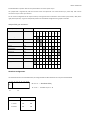
The DIP switches S1.1 - S1.2 set the shutdown delay. It can be set to 0, 1, 3 or 10 minutes, to allow even slower systems to shut
down before the ups shutdown is executed.
The switches S2.1 -S2.10 enable or disable the shutdown reception from port 1 - 10. To enable the shutdown function for one of
the ports, set the corresponding DIP switch to ON (switch down). If the DIP switch is in OFF position a shutdown signal at this port is
ignored and shutdown may be executed without waiting for a shutdown signal at this port.
Important note:
If one or more Multi XR are daisy chained via the extension port, at least one of the ports at the first device must have the
shutdown function enabled. Otherwise (all switches OFF) shutdown signals at the extension port are ignored. When daisy chaining
several Multi XR the shutdown delay must only be configured for the first device. Otherwise the delay times will be added up.
Display
- Power LED and 4 status LEDs for ups status at the front panel.
Quickstart
connect the Multi XR with the signal contact port of your ups, using the attached 9 pin cable.
connect the computers to the output ports.
Connect the external power supply to the Multi XR power input and a ups secured AC socket
start your ups and computers