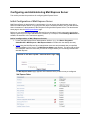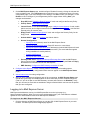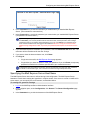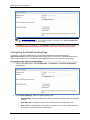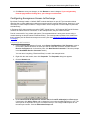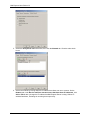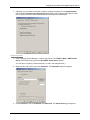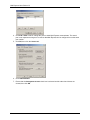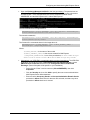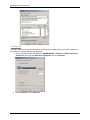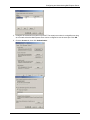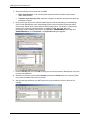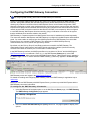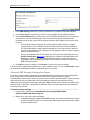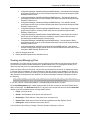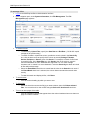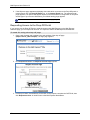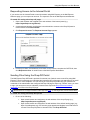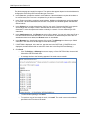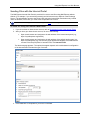
1
GlobalSCAPE® Mail Express™ User Guide Version 3.2 GlobalSCAPE, Inc. (GSB) Corporate Headquarters Address: 4500 Lockhill-Selma Road, Suite 150, San Antonio, TX (USA) 78249 Sales: (210) 308-8267 Sales (Toll Free): (800) 290-5054 Technical Support: (210) 366-3993 Web Support: http://www.globalscape.com/support/ © 2008-2012 GlobalSCAPE, Inc. All Rights Reserved November 1, 2012 Table of Contents Introduction to Mail Express™................................................................................................ 9 Mail Express Architecture ......................................................................................................10 Mail Express Quick Start ........................................................................................................13 What's New in Mail Express? .................................................................................................15 Installing and Uninstalling Mail Express ...............................................................................15 System Requirements and Prerequisites ................................................................................................ 15 Mail Express Server Requirements/Prerequisites ............................................................................... 15 SQL Server 2008 R2 Express Installation Requirements/Prerequisites ............................................. 17 Outlook Add-In Requirements/Prerequisites ....................................................................................... 17 Outlook Add-In Prerequisite Resources .............................................................................................. 18 Authentication Options for Connections to SQL Server 2008 R2 ........................................................... 20 Internal SQL Server 2008 R2 Express Instance ..................................................................................... 21 TCP/IP Settings ................................................................................................................................... 21 Additional Service Dependency ........................................................................................................... 21 External SQL Server 2008 R2 Instance .................................................................................................. 22 Installing Mail Express™ Server ............................................................................................................. 23 Silent Installation of Mail Express Server ................................................................................................ 33 Deploying the Outlook Add-In ................................................................................................................. 37 Installing the Outlook Add-In ................................................................................................................... 37 File/Configuration Locations ................................................................................................................ 41 Running the MSI Installer .................................................................................................................... 41 Viewing the Mail Express Outlook Add-In User Interface .................................................................... 44 Silent Installation of the Outlook Add-In .................................................................................................. 46 Installation Arguments ......................................................................................................................... 47 Generating the Installation Script ......................................................................................................... 47 Deployment .......................................................................................................................................... 48 Upgrading Mail Express Server ............................................................................................................... 48 Upgrading the Outlook Add-In ................................................................................................................. 50 Finalizing the Upgrade ......................................................................................................................... 51 Determining the Version of Mail Express Server .................................................................................... 51 Registering Mail Express ......................................................................................................................... 51 Licensing the Outlook Add-In .................................................................................................................. 53 Registering DMZ Gateway ...................................................................................................................... 53 Installation Logging .................................................................................................................................. 55 Debug Logging ..................................................................................................................................... 55 iii Mail Express User Guide v3.2 Installation Command-Line Parameters .................................................................................................. 56 Mail Express Server Database Utility ...................................................................................................... 61 Command Line Parameters for the Database Utility ........................................................................... 62 Modifying Mail Express Database Configuration .................................................................................... 66 Repairing the Mail Express Installation ................................................................................................... 67 Uninstalling Mail Express Server ............................................................................................................. 68 Configuring and Administering Mail Express Server ...........................................................69 Initial Configuration of Mail Express Server ............................................................................................ 69 Logging in to Mail Express Server ........................................................................................................... 70 Specifying the Mail Express Server Host Name...................................................................................... 71 Configuring the Default Landing Page .................................................................................................... 72 Specifying the System Notification Email Address .................................................................................. 73 Configuring Active Directory Authentication ............................................................................................ 74 Configuring Mail Express for Windows (Kerberos) Authentication.......................................................... 77 1. Configure Active Directory ............................................................................................................... 77 2. Configure Kerberos .......................................................................................................................... 77 3. Configure the Service Principal Names ........................................................................................... 77 4. Configure the Outlook Add-In .......................................................................................................... 78 Configuring Mail Express for Microsoft Exchange Server Communication ............................................. 78 Configuring Anonymous Access to Exchange ........................................................................................ 81 In Exchange 2007 and 2010 ............................................................................................................ 81 In Exchange 2003 ............................................................................................................................ 83 Configuring Mail Express with the New Module .................................................................................. 85 Configuring Authenticated Access to Exchange ..................................................................................... 87 Exchange 2007 and 2010 ................................................................................................................ 87 Exchange 2003 ................................................................................................................................ 90 Configuring Mail Express for Authenticated Access ............................................................................ 93 Testing the Configuration ........................................................................................................................ 94 Configuring File Storage and Purging ..................................................................................................... 95 Configuring Database Purging and Notifications .................................................................................... 97 Configuring the Drop-Off Portal ............................................................................................................... 98 Overview of the Add-In and Internal Web Portal ................................................................................... 100 Authenticating Outlook Users ................................................................................................................ 100 Manual Authentication ....................................................................................................................... 100 Single Sign On ................................................................................................................................... 101 Configuring the Add-In and Internal Web Portal.................................................................................... 101 Overview of Mail Express Invitations ..................................................................................................... 104 iv Table of Contents Custom URLs for the Drop-Off and Internal Portal ............................................................................... 105 Enabling the Pick-Up Portal................................................................................................................... 106 Enabling and Configuring the Reply Portal ........................................................................................... 107 Configuring the DMZ Gateway Connection .........................................................................109 Advanced DMZ Gateway Configuration Options ............................................................................... 110 Viewing and Managing Files ................................................................................................................. 111 Viewing and Managing Packages ......................................................................................................... 113 Viewing Mail Express Status ................................................................................................................. 115 Logging Mail Express Server Activities ................................................................................................. 116 Installation Logging ............................................................................................................................ 116 Mail Express Server Diagnostics Logging ......................................................................................... 116 Mail Express Server Service Diagnostics Logging ............................................................................ 116 Mail Express Server Event Viewer .................................................................................................... 117 Customizing Mail Express Pages and Notifications .............................................................................. 117 Email Templates ................................................................................................................................ 118 Common Template Data Structures............................................................................................... 118 Server Email Templates ................................................................................................................. 120 Outlook Add-In Email Templates ................................................................................................... 125 Web Portal Templates .................................................................................................................... 127 Misc Templates .............................................................................................................................. 128 Replacing the Mail Express Logo with Your Own .............................................................................. 129 Mail Express Security and SSL ............................................................................................129 Configuring the Default HTTPS Listener (Port 443) .............................................................................. 130 SSL Protocols .................................................................................................................................... 130 SSL Algorithms .................................................................................................................................. 131 SSL Certificates ................................................................................................................................. 131 Specifying an SSL Certificate ............................................................................................................ 132 Manually Configuring SSL Certificate/Key Options ........................................................................... 133 Resetting the Configuration of the SSL Certificate and Key ................................................................. 134 SSL Certificate Authority Certificate Chain Support .............................................................................. 135 What is the Mail Express Server Public Certificate/Private Key Pair? .............................................. 135 What is an SSL Certificate Authority Certificate Chain? .................................................................... 136 When do I need to specify an SSL Certificate Authority Certificate Chain? ...................................... 136 How is the SSL Certificate Authority Certificate Chain configured? .................................................. 136 Supported Certificate Chain Format .................................................................................................. 137 How do I know that it is working? ...................................................................................................... 137 Higher Security Settings ........................................................................................................................ 139 v Mail Express User Guide v3.2 Internet Explorer and High Security Settings ..................................................................................... 139 Alternative 1: Modify Client Configuration ...................................................................................... 140 Alternative 2: Modify Server Configuration .................................................................................... 141 Using Anti-Virus with Mail Express ........................................................................................................ 142 The DMZ Protocol Handler .................................................................................................................... 143 SSL Protocols .................................................................................................................................... 143 SSL Algorithms .................................................................................................................................. 143 SSL Certificates ................................................................................................................................. 143 Managing Administrator and User Accounts ......................................................................145 Managing Internal User Accounts ......................................................................................................... 147 Managing Drop-Off User Accounts ....................................................................................................... 149 Auditing and Reporting Mail Express Activity ....................................................................151 Generating Reports of Attachment Activity ........................................................................................... 151 Detailed Activity Report ......................................................................................................................... 153 Viewing Configuration History ............................................................................................................... 154 Viewing Audit Event History .................................................................................................................. 156 Viewing User History ............................................................................................................................. 157 Viewing Invite Activity ............................................................................................................................ 158 Audit Event Types ................................................................................................................................. 160 Mail Express Database Tables .............................................................................................................. 160 Using Mail Express in Outlook .............................................................................................161 Mail Express Outlook Add-In ................................................................................................................. 161 The Mail Express User Interface ........................................................................................................... 161 Email Message Buttons ..................................................................................................................... 163 Connecting to Mail Express Server ....................................................................................................... 164 Configuring Message Options ............................................................................................................... 165 Turning On or Off the Outlook Add-In ................................................................................................... 168 Sending Files with the Mail Express Outlook Add-In ............................................................................ 169 Viewing Mail Express Add-In Status ..................................................................................................... 170 Recovering an Email from "Unrecoverable Error" ................................................................................. 171 Cancelling Packages ......................................................................................................................... 172 Logging Mail Express Outlook Add-In Activities .................................................................................... 172 Changing the Message Format ............................................................................................................. 172 Changing the Message Format in Outlook 2010 ............................................................................... 172 Changing the Message Format in Outlook 2007 and 2003 ............................................................... 173 Mail Profiles with Multiple Accounts ................................................................................................... 173 Download Notifications ...................................................................................................................... 173 vi Table of Contents Using Mail Express in a Web Browser.................................................................................173 Connecting to the Web Portal ............................................................................................................... 173 Requesting Access to the Drop-Off Portal ............................................................................................ 174 Requesting Access to the Internal Portal .............................................................................................. 175 Sending Files Using the Drop-Off Portal ............................................................................................... 175 Sending Files with the Internal Portal .................................................................................................... 177 Sending Invites with the Internal Portal ................................................................................................. 179 Picking Up Files ..................................................................................................................................... 181 Recovering a Lost Password ................................................................................................................. 182 Maximum File Size for Browser-Based Uploads ................................................................................... 183 Viewing Unicode Filenames .................................................................................................................. 183 Configuring the Web Browser................................................................................................................ 184 Sending Files with the Reply Portal ....................................................................................................... 185 Using the Account Activation Portal ...................................................................................................... 186 Getting Help ..........................................................................................................................187 Finding Information in the Help ............................................................................................................. 188 Searching the Help File or globalscape.com ..................................................................................... 188 Printing a Help Topic.......................................................................................................................... 188 Sharing Topic Links ........................................................................................................................... 188 GlobalSCAPE® Support Center ............................................................................................................ 190 Using the Knowledgebase ..................................................................................................................... 191 Using Advanced Search .................................................................................................................... 193 Mail Express End-User License Agreement (EULA) ...........................................................195 Index ......................................................................................................................................201 vii Mail Express User Guide v3.2 viii Introduction to Mail Express™ Mail Express™ allows you to send large email file attachments to recipients inside or outside of your organization quickly, reliably, and securely, while reducing the load on your mail server. Mail Express also allows your recipients to send large email file attachments to you through a Web portal. You can send files using a Microsoft Outlook Add-In, a Web portal, or both, using secure authentication and auditing capabilities. The Mail Express system will offload file attachments to an independent server and can notify recipients that the files are available for pickup. You can configure the authentication scheme to change the way recipients authenticate against Mail Express Server to download their files. One authentication scheme allows users to access their files without providing any credentials; the other requires the recipient to type in a temporary password that is provided in out-of band communication with the recipient (e.g., phone call or email). By default the Mail Express System will retain attachments for 2 weeks, but you can increase or decrease this period based on corporate security, auditing, and usage requirements. When you send an attachment, the attachment is uploaded to Mail Express Server over HTTPS, and then the recipient receives an email with hyperlinks to download the files from the server. When the recipient clicks the hyperlink in the email notification, a Web page appears from which the recipient can download the attachment. All visits to the download page and file downloads are recorded in the database. Auditing to a database provides a detailed history of transfers showing senders and receivers, which files were transferred, and when they were transferred. When you allow Mail Express to manage email attachments sent via Microsoft Outlook, emails remain in the Outbox until the Mail Express processing is complete, and the attachments are completely uploaded. Normally, mail clients have a hard time managing large attachments and can often become unresponsive while these files are attached. Using Mail Express’ own Attach File button, very large files can be attached to an email, quickly reducing the time waiting for the mail client to become responsive again. When Mail Express manages an email, it uploads the attachments to the Mail Express Server, removes the attachments from the email, and inserts links into the email from which the recipient(s) can download the attachment(s). This process has the added benefit of end users not exceeding their email server's mailbox quota or attachment size limits, since the resulting email itself is normally quite small. The Ma i l E xp r e ss w o r kf l o w : 1. The Outlook user creates an email with attachments and clicks Send. 2. Mail Express: • Inserts links in the email in place of the attachments. • Stores the attachments on the Mail Express Server. • Sends the email. 3. The recipient opens the email. 4. The recipient clicks the links to download the attachments from the Mail Express Server. 9 Mail Express User Guide v3.2 Mail Express Architecture The Mail Express (ME) application is composed of the following components: • Server Applications—The Server applications of Mail Express are the "brains" of the system. Using settings and configuration defined by the Mail Express administrator, web server applications transfer, store, and manage all of the files processed by the system. A database application stores and provides data regarding all of the file transfers that pass through the system and the configuration changes that are requested by the administrator • Administration Portal—As with any enterprise level software, Mail Express provides an interface that allows the "owner" of the application access to system configuration and management, sender administration, and transaction auditing. Mail Express offers a web interface that an administrator (either an IT administrator or a business unit manager, depending on who within an organization owns the solution) can use to access all of the necessary management features and functions. • Outlook Add-In—The Microsoft Outlook Add-In provides the ability to automatically send files using Mail Express via the normal Outlook messaging workflow based either on predetermined use cases (either administrator or sender defined) or in an ad hoc manner using Mail Express tools that are integrated into the Outlook User Interfaces. No Mail Express-specific action will be required by the sender after the initial installation and configuration of the Add-In. • Internal Web Portal – Mail Express includes an Internal Portal, a web page from which internal parties can send files to recipients inside or outside the organization. The Internal Portal provides a web-based alternative to using the Outlook Add-In and is driven by a set of administrative settings that are shared with the Add-In. • Package Drop-off—Mail Express includes a Package Drop-off Portal, a web page from which external parties can send files to Mail Express customers. The Package Drop-off Portal provides a bi-directional flow of information between you and your partners. • Package Pick-up—Mail Express provides multiple options for recipients to download the files that have been sent to them. Recipients have the ability to download files instantly by clicking on the links provided in an email or by visiting the Package Pick-up Portal where files are listed for download. • Reply Portal—When an internal or external user receives an email from a Mail Express user, the email can contain a link to the Reply Portal in which recipients can respond to the email to return files to the sender. The following diagram illustrates how the components work together in the network 10 11 Mail Express User Guide v3.2 12 Mail Express Quick Start Provided below is a "quick start" check list to assist you in getting Mail Express installed and functional. Please click the links in each step to read the detailed procedures, complete with screen shots. • Additional configuration may be required, depending on your individual requirements. • All passwords must be at least 6 characters and contain at least 3 of the following types of characters: uppercase letters, lowercase letters, numbers, and special characters (e.g., #, %, ^). • If you print this checklist, please refer to the online help for screen shots and detailed procedures: http://help.globalscape.com/help/me3/index.htm#mail_express_quick_start.htm. Or print the PDF of the Mail Express user guide (approximately 200 pages), available at http://help.globalscape.com/help/guides/index.html. Server Installation: 1. Verify that prerequisites are installed and system requirements have been met. 2. Ensure that port 443 is available on the IP address designated for Mail Express Server. TIP: Use the following command to check against any conflicts: netstat -anop TCP NOTE: If there is any other process listening on port 443 (including the global 0.0.0.0 interface), please refer to Mail Express Knowledgebase article #10636 for more information. 3. Mail Relay should be turned on if you do not create an account on the Exchange Server for Mail Express Server to send emails. For information refer to http://exchangepedia.com/2007/01/exchange-server-2007how-to-allow-relaying.html. Refer to Configuring Anonymous Access to Exchange and Configuring Authenticated Access to Exchange for information about configuring Exchange. 4. Create a new service account on your Active Directory network for the Mail Express service. This account is required for Mail Express to perform Kerberos authentication for connecting clients and for LDAP queries, and it can also be used to allow authenticated relay through Exchange. 5. Ensure you have access to log into a Domain Controller with Domain Admin rights. This is required in order to enable Kerberos authentication in Mail Express. After installation and initial configuration have been completed, it is no longer required. 8. Install all available Windows Updates (required for security and compatibility) 9. Reboot the server computer. (required before the Mail Express installation can begin) 10. Download a copy of the Mail Express installer onto the Mail Express computer’s local hard drive. 11. Install Mail Express Server (run the executable); 32-bit or 64-bit depending on operating system. You will need the following information: • • • • Installation directory (Where to write installation files) Attachment storage directory (Any storage that can be accessed from server) Mail Express administrator username/password and email address If using an external database, database server connection parameters Server Configuration: 12. Specify the domain of Mail Express Server. This is the system name that will be used for portal and package URL information. For example, if the domain is set to "me.globalscape.com", the package links that recipients receive will look like "https://me.globalscape.com/pickup/<unique identifier>" 13. Specify System Notification addresses (Email address to which system notifications are sent; the email address provided at installation is used by default.) 14. Configure the Exchange connection 15. Enable attachment pickup 16. Create new Internal user for testing purposes 13 Mail Express User Guide v3.2 Outlook Installation and Configuration: 17. Install the Outlook Add-In on the client workstation(s), including Add-In prerequisites 18. Specify the host name, username, and password for the Internal user created during server setup 19. Enable the Mail Express User Interface in Outlook. 20. Enable the Status pane in Outlook to display the connection status between the Mail Express Add-In and Mail Express Server 21. Send a test email with an attachment using the Attach File icon on the Mail Express tool bar. 22. Pick up the package Advanced Features (can be setup after the initial configuration is completed and the basic system functionality has been verified. Not critical to the basic functionality of the system.) Specify a Mail Express SSL Certificate Enable Active Directory Authentication Enable Single Sign On using Kerberos Enable Drop-off Page Enable and configure Internal Portal Enable and configure the Reply Portal Enable attachment purging Enable database purging Silent installation of Outlook Add-In clients Install and configure DMZ Gateway Register the Server and DMZ Gateway in the Mail Express administration interface. 14 What's New in Mail Express? The following features were added for Mail Express version 3.2: • Connect to an external database (not installed by Mail Express) • Internal users can send invitations to external users to create a Drop-Off user account • Reply Portal allows recipients access to Mail Express when using the Reply link in email • File Management page (separate from the Package Management page) allows you to view and manage individual files that were sent • Enhanced package management, allowing you to expire packages and view package details, including download information, invitation status, and reply link usage • Invitation Activity report allows you to view when an invitation was sent, to whom it was sent, and so on • Specify initial administrator email address during installation • Create up to 25,000 accounts of each type of user (Admin, Internal, and Drop-Off) Installing and Uninstalling Mail Express Installing Mail Express includes installing Mail Express Server and then installing the Mail Express Outlook Add-In on users' workstations. These topics provide the system requirements, installation procedures, and activation instructions. System Requirements and Prerequisites GlobalSCAPE Quality Assurance (QA) tested and approved Mail Express for use with the programs and hardware described below. The minimum system requirements below are organized by Mail Express Server, SQL Server 2008 R2 Express, and Outlook Add-In requirements. The installer must be run by a user with administrative privileges on the computer. The installer/uninstaller will check for this at the beginning of execution. While it is possible for the Mail Express Server and Add-In to work on system configurations other than those listed below, programs and hardware not listed below were not tested and are not supported. Please review each of the requirements and prerequisites below and ensure that they are met before installing Mail Express. Ensure all Microsoft updates have been installed and the computer has been rebooted. If all of the prerequisites are not met, the installation will abort. You can print this page of the help and check off the requirements as you verify that they are installed/available. Mail Express Server Requirements/Prerequisites The table lists the system requirements/prerequisites on the computer on which Mail Express Server is installed. • For Outlook Add-In system requirements, refer to Outlook Add-In Requirements/Prerequisites, below. • For SQL Server 2008 R2 Express system requirements, refer to SQL Server 2008 R2 Express Installation Requirements/Prerequisites, below. (These are the requirements that the installer verifies; refer to the Microsoft link below for additional SQL Server system requirements.) • For SQL Server 2008 R2 system requirements, refer to http://www.microsoft.com/download/en/details.aspx?id=12548. • Mail Express "silently" installs Java Runtime Environment (JRE) version 1.6.0 build 25 or later and Apache Tomcat version 6.0.32 (web server); you do not need to update or maintain these applications. 15 Mail Express User Guide v3.2 Mail Express Server Requirement/Prerequisite Mail Express Server must be accessible from the Internet, either directly or via the DMZ Gateway, if applicable, so that recipients can browse the attachment links to pick up attachments (typically in the DMZ behind a firewall such as Microsoft ISA Server). Using GlobalSCAPE’s DMZ Gateway server, the Mail Express Server does not have to remain in the DMZ and can reside within the internal network. When deploying the Mail Express Server in a virtualized cluster environment, setting a static MAC address for the server is required. Ensure that port 443 is available to the Mail Express IP address (and that no port conflicts exist on that IP address). This port can be assigned to a specific IP address placed on the system for Mail Express expressly. If the firewall is enabled on the computer on which Mail Express Server is installed, you must create an exception for TCP port 443. Supports both 32-bit and 64-bit editions of the following operating systems: • • Microsoft Windows Server 2008 with SP1 or later Microsoft Windows Server 2003 with SP2 or later (The Active Directory Domain Controller on Windows 2003 Systems require the Windows 2003 SP2 32-bit Support Tools to be installed (download from Microsoft Download Center).) Microprocessors: • • 1 GHz x86-based processor or higher for 32-bit operating systems 1.4 GHz x86-based processor or higher for 64-bit operating systems 1 GB RAM or more Disk space: • Installation temporarily requires up to 125 MB free disk space on the system drive to accommodate temporary installation files. • Up to 500 MB of additional storage on the selected installation drive to accommodate Mail Express Server log files and temporary files • Adequate storage should be provided for uploaded attachments • Regular disk maintenance/management of resources. Mail Express administration requires a small amount of available disk space in order to service requests. When the disk is full, Mail Express may not function as expected. 1024x768 or higher resolution monitor Supported browsers (with latest OS/browser patches, with JavaScript and cookies enabled): • • • Internet Explorer 7 or later (Internet Explorer 8 recommended) Firefox 3.6 or later (Firefox 5 recommended) Safari 4 or later (Safari 5 recommended) Access to an Exchange Server: • • • Exchange Server 2003 Exchange Server 2007 Exchange Server 2010 Additional modules in Exchange Server that meet the specific needs of Mail Express. Refer to Configuring Anonymous Access to Exchange or Configuring Authenticated Access to Exchange for details. Service account in AD for Mail Express (Optional); Account is necessary for Kerberos authentication; an existing account can be used, if preferred. Access to a SQL Server 2008 R2 database (SQL Server Express, which can be installed with the Mail Express installer for evaluation, is not intended for production use.) See SQL Server 2008 R2 Express-specific requirements below. Anti-virus: (optional) The Mail Express Server computer should have a current anti-virus application installed so that attachments managed by Mail Express Server are free from malicious software. If slower-than-normal uploads are observed, ensure your antivirus software is properly configured. 16 Installing and Uninstalling Mail Express SQL Server 2008 R2 Express Installation Requirements/Prerequisites If you are installing SQL Server 2008 R2 Express (available in the Mail Express Server installer for evaluation purposes), ensure that the computer meets the requirements/prerequisites in the table below. When you choose to install SQL Server 2008 R2 Express with the Mail Express Server installer, the installer will verify that the proper prerequisites/requirements are available before installing. If the requirements are not met, the installation will abort. • Listed in the table below are the requirements that the installer verifies; refer to the Microsoft link below for additional SQL Server system requirements. • If you are connecting to an external SQL Server 2008 R2 database, refer to the SQL Server 2008 R2 requirements. SQL Server 2008 R2 Express Requirement/Prerequisite Microsoft .NET Framework v3.5.1 SP1 Microsoft Installer Service 4.5 or later (included in Windows 2008; for Windows 2003, download from Microsoft Download Center) The following privileges must be enabled for the administer account running the installer: • SeBackupPrivilege • SeDebugPrivilege • SeSecurityPrivilege Installation temporarily requires up to 3.6 GB of free space on the system drive Minimum of 500 MB on the system drive, consumed by SQL Server installation files and initial database 10 GB of additional storage on the system drive to accommodate database growth Outlook Add-In Requirements/Prerequisites The table below lists the system requirements/prerequisites on the computer on which the Outlook Add-In is installed. Outlook Add-In Requirement/Prerequisite Mail Express Server must be installed before installing the Outlook Add-In. Operating Systems: • • • Windows XP Pro Windows Vista Business Windows 7 Professional Outlook versions (refer to Microsoft documentation for Outlook requirements): o Outlook 2003 o Outlook 2007 o Outlook 2010, 32-bit or 64-bit Minimum system requirements o A single 1 GHz x86-based CPU or better o 1 GB of RAM or more o 1024x768 or higher resolution monitor Outlook Add-In prerequisites based on Microsoft Office version; Due to interdependencies among the following prerequisites they should be installed in the order listed. The prerequisites are available at the links listed below in Outlook Add-In Prerequisite Resources. 17 Mail Express User Guide v3.2 Outlook Add-In Requirement/Prerequisite • Prerequisites when using Office 2003: 1. Microsoft Windows Installer 3.1 or Later 2. Microsoft .NET Framework v3.5 SP1 3. Microsoft Office 2003 Primary Interop Assemblies 4. Microsoft Visual Studio 2005 Tools for Office Second Edition Runtime (build 8.0.50727.940) Prerequisites when using Office 2007: 1. Microsoft Windows Installer 3.1 or Later 2. Microsoft .NET Framework v3.5 SP1 3. Microsoft Office 2007 Primary Interop Assemblies 4. Microsoft Visual Studio Tools for the Microsoft Office System (version 3.0 Runtime) and Service Pack 1 Prerequisites when using Office 2010: 1. Microsoft Windows Installer 3.1 or Later 2. Microsoft .NET Framework 3.5 SP1 3. Microsoft Office 2010 Primary Interop Assemblies 4. Microsoft Visual Studio 2010 Tools for Office Runtime Outlook Add-In Prerequisite Resources The Outlook Add-in prerequisites (noted in the table above) can be obtained from the links listed below. Mi c r o sof t Win d o w s I n st al le r 3 .1 o r l at e r • Installation of the Mail Express Outlook Add-In and its other prerequisites requires Microsoft Windows Installer 3.1 or later. As of this writing the current version of the Microsoft Windows Installer is 4.5. Information for both resources is included below. • Microsoft Windows Installer 3.1 o Installer Name: Windows Installer 3.1 Redistributable (v2) o Installer File: WindowsInstaller-KB893803-v2-x86.exe o Download Page: http://www.microsoft.com/downloads/en/details.aspx?FamilyID=889482fc-5f56-4a38b838-de776fd4138c o Direct Download Link: http://go.microsoft.com/fwlink/?LinkId=49256 • Microsoft Windows Installer 4.5 o Installer Name: Windows Installer 4.5 Redistributable o Installer File: <Operating System Dependent> o Download Page: http://www.microsoft.com/downloads/en/details.aspx?FamilyID=5a58b56f-60b6-441295b9-54d056d6f9f4&displaylang=en Mi c r o sof t . NE T F r am ew o r k v3 . 5 S P 1 18 • Installer Name: Microsoft .NET Framework 3.5 Service Pack 1 • Installer File: dotnetfx35setup.exe • Download Page: http://www.microsoft.com/downloads/en/details.aspx?FamilyId=AB99342F5D1A-413D-8319-81DA479AB0D7&displaylang=en • Direct Download Link: http://go.microsoft.com/fwlink/?linkid=118076 Note: Installation may require reboot Installing and Uninstalling Mail Express Mi c r o sof t O f f i c e 2 00 3 P r im a ry In t e rop A s s emb li e s • Installer Name: Office 2003 Update: Redistributable Primary Interop Assemblies • Installer File: O2003PIA.MSI • Download Page: http://www.microsoft.com/downloads/en/details.aspx?familyid=3C9A983AAC14-4125-8BA0-D36D67E0F4AD&displaylang=en Note: The download file is named "O2003PIA.EXE". The "O2003PIA.MSI" installer file will be extracted from this executable when run. Mi c r o sof t O f f i c e 2 00 7 P r im a ry In t e rop A s s emb li e s • Installer Name: 2007 Microsoft Office System Update: Redistributable Primary Interop Assemblies • Installer File: o2007PIA.msi • Download Page: http://www.microsoft.com/downloads/en/details.aspx?FamilyID=59daebaabed4-4282-a28c-b864d8bfa513&DisplayLang=en Note: The download file is named "PrimaryInteropAssembly.exe". The "o2007PIA.msi" installer file will be extracted from this executable when run. Mi c r o sof t O f f i c e 2 01 0 P r im a ry In t e rop A s s emb li e s • Installer Name: Microsoft Office 2010: Primary Interop Assemblies Redistributable • Installer File: o2010PIA.msi • Download Page: http://www.microsoft.com/downloads/en/details.aspx?FamilyID=938fe8ad-583b4bd7-a345-23250dc15855 Note: The download file is named "PIARedist.exe". The "o2010PIA.msi" installer file will be extracted from this executable when run. Mi c r o sof t V i su al S t u d io 2 0 05 T o o l s f o r O f f ic e S e co n d Ed it io n Ru n t im e ( b u i ld 8. 0. 5 07 2 7. 9 40 ) • Installer Name: Microsoft Visual Studio 2005 Tools for Office Second Edition Runtime (build 8.0.50727.940) (x86) • Installer File: vstor.exe • Download Page: http://www.microsoft.com/downloads/en/details.aspx?FamilyID=8315654ba5ae-4108-b7fc-186402563f2b&displaylang=en Mi c r o sof t V i su al S t u d io T o o ls f o r t he Mi c ro sof t O f f i c e S y st e m ( ve r si on 3 .0 Runt im e ) an d S er vi c e P a ck 1 Note that this prerequisite consists of 2 separate installers. The main installer and a service pack upgrade installer. Both are detailed below. • Microsoft Visual Studio Tools for the Microsoft Office System (version 3.0 Runtime) o Installer Name: Microsoft Visual Studio Tools for the Microsoft Office system (version 3.0 Runtime) (x86) o Installer File: vstor30.exe o Download Page: http://www.microsoft.com/downloads/en/details.aspx?FamilyID=54eb3a5a-0e52-40f9a2d1-eecd7a092dcb&displaylang=en • Microsoft Visual Studio Tools for the Microsoft Office System Service Pack 1 o Installer Name: Microsoft Visual Studio Tools for the Microsoft Office System (version 3.0 Runtime) Service Pack 1 (x86) o Installer File: vstor30sp1-KB949258-x86.exe 19 Mail Express User Guide v3.2 o o Download Page: http://www.microsoft.com/downloads/en/details.aspx?FamilyID=D8EB4921-891A-4B5E973F-0B96E6CCF376 Direct Download Link: http://go.microsoft.com/fwlink/?LinkId=120187 Mi c r o sof t V i su al S t u d io 2 0 10 T o o l s f o r O f f ic e Run t im e • Installer Name: Microsoft Visual Studio 2010 Tools for Office Runtime (VSTOR 2010) Redistributable • Installer File: o For 32-bit editions of Microsoft Windows OS - vstor40_x86.exe Note: On 32-bit editions of Microsoft Windows OS, it is not strictly required to install this prerequisite prior to installing the Mail Express Outlook Add-In because Outlook 2010 will automatically install the Microsoft Visual Studio 2010 Tools for Office Runtime if it is not already installed. This occurs the first time that Outlook loads the Add-In and does not require the user to have administrative privileges on the computer. However, this will cause a slight delay the first time end-users start Outlook after the Add-In has been installed. Administrators wishing to provide a more streamlined end-user experience may want to go ahead and pre-install this prerequisite. o For 64-bit editions of Microsoft Windows OS - vstor40_x64.exe Note: On 64-bit editions of Microsoft Windows OS, this automatic installation does not function; therefore, the prerequisite must be manually installed. • Download Page: http://www.microsoft.com/downloads/en/details.aspx? • Direct Download Link: o For 32-bit editions of Microsoft Windows OS http://go.microsoft.com/fwlink/?LinkId=158917 o For 64-bit editions of Microsoft Windows OS http://go.microsoft.com/fwlink/?LinkId=158918 Authentication Options for Connections to SQL Server 2008 R2 The Mail Express Server installer and the Mail Express Server support the SQL Server Authentication and Windows Authentication options for connecting to the SQL Server 2008 R2 instance. • When using SQL Server Authentication, both a username and a password must be provided. • When using Windows Authentication the current user account for the process will be used when connecting:. o When the installer performs tasks that require connecting to the instance such as creating the database, database user, and database schema or when upgrading the schema it will use the credentials for the user account that launched the installer. o When the Mail Express Server connects to the database, it will use the credentials of the "Log on" account that is configured to run the Mail Express Server Windows service. To sp ec if y t h e a c co u n t t h at Ma i l E xp r es s S er v e r se r vi c e is t o l og on as 1. Click Start, click in the Start Search box, type the following text, then press ENTER: services.msc 2. In the details pane, right-click the Mail Express Server service, and then click Properties. 20 Installing and Uninstalling Mail Express 3. Click the Log On tab, and then do one of the following: • To specify that the service uses the Local System account, click Local System account. (Set by default.) • To specify that the service uses the Local Service account, click This account, and then type NT AUTHORITY\LocalService. • To specify that the service uses the Network Service account, click This account, and then type NT AUTHORITY\NetworkService. • To specify another account, click This account, click Browse, and then specify a user account in the Select User dialog box. When you are finished, click OK. • Type the password for the user account in the Password and Confirm password boxes and then click OK. If you select the Local Service account or Network Service account, do not type a password. To conf igu r e h o w a s er v ic e i s st art ed u si n g t h e co mm and l in e You can also manage services using the sc config command. For more information about the options available, open a command prompt and type sc config /?. For examples and detailed descriptions of the command-line options, see the command-line reference at http://go.microsoft.com/fwlink/?linkid=53528. Internal SQL Server 2008 R2 Express Instance For new installations you can use an internal evaluation SQL Server 2008 R2 Express database instance. When selected, the installer will automatically install the database instance with an instance name of "MailExpress" and a database name of "MAILEXPRESS". The initial Mail Express Server administrator password specified during installation will be used for the "sa" account password. Additionally, the installer will create a database user account for use by the Mail Express Server. The username and password for this account will match the initial Mail Express administrator password. Only the Database Engine and limited configuration tools are installed. The tools include the "SQL Server Configuration Manager." The following services are installed: • SQL Server (MAILEXPRESS) – The Mail Express Database Instance. • SQL Server Agent (MAILEXPRESS) – This service is disabled by default and not used by Mail Express. • SQL Server Browser – the browser service used to locate the MAILEXPRESS database instance when using dynamic TCP/IP ports. • SQL Server VSS Writer TCP/IP Settings The Mail Express Server uses Java Database Connectivity (JDBC) and the SQL Server JDBC driver to communicate with the database. This driver uses TCP/IP to connect to the database so the MAILEXPRESS SQL Server database instance is installed with TCP/IP support enabled. For enhanced security, the TCP/IP settings are configured to only listen for connections from the local machine, using the localhost interface (127.0.0.1). To allow remote connections or to modify the communications settings, use the SQL Server Configuration Manager. Additional Service Dependency When the internal evaluation database is used, the Mail Express Server installer will automatically create an additional service dependency for the Mail Express Server Windows service on the SQL Server Database instance Windows Service - "SQL Server (MAILEXPRESS)." 21 Mail Express User Guide v3.2 External SQL Server 2008 R2 Instance The installer allows you to configure the Mail Express Server to use a pre-existing external SQL Server 2008 R2 Instance. You can instruct the installer to either create a new database and user on an existing external instance or to use an existing database and database user. In this case, the installer will simple create the necessary database object and default data within the existing database. This option is provided for users that prefer more manual control over the database creation. Req ui r ed S et t in g s For proper operation the Mail Express Server requires the following attributes of the instance, database, and database user account used by the Mail Express Server: • The TCP/IP Protocol must be enabled for connections to the SQL Server instance • The database must use a case sensitive collation • The database "ALLOW_SNAPSHOT_ISOLATION" setting must be ON • The database "READ_COMMITTED_SNAPSHOT" setting must be ON • The database user’s default schema should be set to "dbo" • By default the database user’s "Database role membership" will be set to "dbowner"; however, because the Mail Express Server does not modify the database DDL during the course of operation, the "Database role membership" may be optionally locked down to "dbdatareader" and "dbdatawriter" after initial installation. Note, however, that during subsequent upgrades, the database user used during the upgrade must have permission to modify the database DDL. As such, provision is provided in the upgrade sequence of the installer to specify an alternate user to use for performing the actual upgrade. Alternatively, you may temporarily grant the normal Mail Express Server database user the right to modify the database DDL for the course of the upgrade. Dat ab a se C r eat io n E xa mp le The following sample SQL statements will create the database. The collation name should be adjusted depending on the desired database language. (Case-sensitive collation is required. Case-sensitive collations typically include "_BIN" (for Binary) or "_CS" (for Case Sensitive) in the collation identifier. You should avoid using collations whose identifier contains "_CI" (for Case Insensitive).) CREATE DATABASE "MAILEXPRESS" COLLATE SQL_Latin1_General_CP1_CS_AS ALTER DATABASE "MAILEXPRESS" SET ALLOW_SNAPSHOT_ISOLATION ON ALTER DATABASE "MAILEXPRESS" SET READ_COMMITTED_SNAPSHOT ON Dat ab a se U s er C r e at i o n E xa mp l e The following sample statements will create the database user: CREATE LOGIN "medatabase" WITH PASSWORD=' Hv2rKQ8n2NVM', DEFAULT_DATABASE="MAILEXPRESS", CHECK_EXPIRATION=OFF, CHECK_POLICY=OFF USE "MAILEXPRESS"; CREATE USER "medatabase" FOR LOGIN "medatabase" WITH DEFAULT_SCHEMA=dbo USE "MAILEXPRESS"; EXEC sp_addrolemember 'db_owner', "medatabase" 22 Installing and Uninstalling Mail Express Installing Mail Express™ Server This topic provides information about installing Mail Express Server. For information about installing the Outlook Add-In, refer to Installing the Outlook Add-In. Bef or e be g in n in g in s t al la t io n , p l e as e r e vi ew t h e f o llo w in g i mp o rt an t in f o r m at io n: • Mail Express version 3.0 and later do not support upgrading from Mail Express v2.2. The installer will abort the installation if it finds Mail Express 2.2 installed. You must uninstall Mail Express version 2.2 before continuing with installation of version 3.0. • Separate installers are provided for 32-bit and 64-bit installations. Please use the proper installer for your operating system. • mail-express-windows-x86-32.exe is the installer for use on 32-bit systems. • mail-express-windows-x86-64.exe is the installer for use on 64-bit systems. • You must run the installer with administrative privileges. When the installer is executed, it checks for permission and aborts the installation if you do not have the proper permission. • The installer installs Mail Express Server, the Java Runtime Environment (JRE), Apache Tomcat (webserver), and, optionally, SQL Server 2008 R2 Express. • If you are installing SQL Server 2008 R2 Express: o SQL Server 2008 R2 Express requires that .NET Framework 3.5 SP1 is already installed, as stated in the system requirements. The installer will not proceed with installation if the proper version of .NET Framework is not found and if the computer was not rebooted after .NET was installed. o SQL Server 2008 R2 Express uses TCP/IP to connect to the database so the MAILEXPRESS SQL Server database instance is installed with TCP/IP support enabled. For enhanced security, the TCP/IP settings are configured to listen for connections from the local computer only, using the localhost interface (127.0.0.1). To allow remote connections or to modify the communications settings, use the SQL Server Configuration Manager. A database instance with an instance name of MAILEXPRESS is created when you use the Mail Express installer to install the database. The installer creates the database and creates the Mail Express database user with the username and password supplied during installation. o Only the SQL Server Express Database Engine and limited configuration tools are installed, including the SQL Server Configuration Manager. o Installing SQL Server 2008 R2 Express is optional. SQL Server Express is offered only for evaluation purposes; it is not recommended for production. Service Dependencies: During installation, the installer will automatically create service dependencies for the Mail Express Server Windows service on "Afd – The Ancillary Function Driver for WinSock" and "Tcpip – The TCP/IP service." These service dependencies are created to ensure the Mail Express Server is not started until the networking layer or the operating system is operational. An in st a ll e r w iz ar d g u id es yo u t h ro u g h t h e in st a ll at io n p ro c e s s. Yo u w i ll n ee d t o p ro vid e t h e f o ll o w i n g i n f o rm at i o n : • Installation directory (default = \Program Files\GlobalSCAPE\Mail Express) • File store directory (default = \<Installation_Directory>\MailExpressAttachments). This directory will be used to store attachments, frequently, very large attachments. Ensure this location can provide adequate disk storage for uploaded attachments. 23 Mail Express User Guide v3.2 • Initial Mail Express administrator account username (1-128 characters) and password (6-128 characters). The password must contain at least three of the following types of characters: uppercase letters, lowercase letters, numbers, special characters (e.g., #, %, ^). This account will be used for the initial log in to the Mail Express Administration Portal and finalize the initial system configuration. • Do not use an Active Directory (AD) username as the Mail Express administrator account, as this may cause later collisions between internal Mail Express accounts and AD accounts. • Choose and type the password carefully--if you do not know your password at initial login, you will not be able to log in and will have to uninstall and then reinstall the application. After you log in to the server, you will have the opportunity to change the password and to create other administrator accounts. Using a UNC path to network locations requires running the Mail Express Server Windows service under a true user account instead of Local System. By default, Local System account does not have access to network paths, and giving it access is not recommended. • If you are connecting to a remote SQL Server database (supported in v3.2 and later), you will need the database connection information (host name, port, privileged user credentials). All other configuration, such as licensing, IP address/hostname, port, and so on is configured in the Web administration interface after installation. • Before installing, refer to System Requirements. If the system requirements are not met, the installer will fail. • • For instructions for uninstalling the server, refer to Uninstalling Mail Express Server. The SQL Server Express portion of the installation can be quite time consuming. T o i n st a ll Ma i l E xp r e ss Se r v er 1. Review the important information above before starting the installation. Not reading and heeding the information above could cause your installation to fail. 2. If Mail Express version 2.2 is installed, uninstall it before continuing with the installation of version 3.0 or later. 3. Double-click the installer. The Welcome page appears. 24 Installing and Uninstalling Mail Express 4. Click Next. The License Agreement appears. 5. Read the license agreement, then click I agree. The Choose Install Location page appears. 6. Specify a location for Mail Express Server, or keep the default of C:\Program Files\GlobalSCAPE\Mail Express. 7. Click Next. The Choose Attachment Folder page appears. 25 Mail Express User Guide v3.2 8. Specify a location in which to store file attachments, or keep the default of C:\Program Files\GlobalSCAPE\Mail Express\MailExpressAttachments. This folder potentially requires a large amount of available space. Using a UNC path to network locations requires running the Mail Express Server Windows service under a true user account instead of Local System. By default, Local System account does not have access to network paths, and giving it access is not recommended. Do not use a mapped drive for the file storage location. 9. Click Next. The Choose Start Menu Folder page appears. 10. Click Next. The Mail Express Server Administration Account page appears. 26 Installing and Uninstalling Mail Express • In the Username box, provide a username (1-128 characters) to use when administering and monitoring Mail Express Server. The username is case-sensitive. Do not use an Active Directory (AD) username as the Mail Express administrator account, as this may cause later collisions between internal Mail Express account s and AD accounts. • In the Password and Confirm Password box, provide a password (6-128 characters) to use when administering and monitoring Mail Express Server. The password is case sensitive, should be between 6 and 128 characters, and must contain at least three of the following types of characters: uppercase letters, lowercase letters, numbers, special characters (e.g., #, %, ^). If the password does not meet complexity requirements, an error message appears. Choose and type the password carefully; if you do not know your password at initial login, you will not be able to log in and will have to uninstall and then reinstall the application. After you log in to the server, you will have the opportunity to change the password and to create other administrator accounts. • In the Email Address box, provide the email address that will receive Mail Express administration email notifications. 11. Click Next. The Choose Database Server page appears. 27 Mail Express User Guide v3.2 12. Choose whether to install the evaluation database use an existing database, then follow one of the three procedures (a, b, or c) in the table below to install the evaluation database, use an existing database, or create a new database. Type of database to install Procedure a. Click Install SQL Server 2008 R2 Express Edition, then click Install. (The Next button changes to Install if you choose this option.) Evaluation database b. Existing database 1. Click Use an existing SQL Server or SQL Server Express, then click Next. The Choose New or Existing Database page appears. 2. Click Use an existing database. The Configure Database Server Connection Settings page appears. Use this option to have the installer initialize an existing database and configure the Mail Express Server to use the database. You should use this option if you have already manually created the database and database user account for use by the Mail Express Server, or if you have previously used the Mail Express Server Installer to create a database. You will need to provide the installer with the database connection information and user account credentials for the existing database and database user. 28 Installing and Uninstalling Mail Express Type of database to install Procedure 3. Provide the connection information: • Database server host name (255 characters is the maximum length for a SQL Server hostname) • Database server port: This option is disabled by default and the value defaults to 1433 (the default SQL Server listener port). When enabled, the port value is required and must be between 1 and 65535. If you are not running the SQL Server Browser Service and not using the default port, then you need to specify the port. • Database instance name: This option is enabled by default and the value defaults to "MSSQLSERVER." When enabled, the instance name is required and must be between 1 and 128 characters. If you have not specified a port but are running the SQL Server Browser service, then you need to specify the database instance name so that the browser service can be queried for the correct port. "MSSQLSERVER" is the default instance name for an SQL Server 2008 R2 installation. • Authentication mode: Use SQL Server authentication when connecting as the privileged user account, which is the default. When SQL Server authentication is selected, you must specify the username and password for the privileged user account to use when connecting to the database. When Windows authentication is selected, the installer will use the active Windows user account when connecting to the database. (The "active Windows user account" is the account running the installer.) • 4. 5. Login name and password: The credentials Mail Express is to use to log in to the database. When Windows authentication is selected these fields are disabled. (Optional) To verify that Mail Express will be able to connect to the database using these settings click Test. a. If the connection is successful, click OK to dismiss the success message. b. If the connection fails, click OK to dismiss the error message and then verify that you have entered the configuration correctly. Click Install. 29 Mail Express User Guide v3.2 Type of database to install Procedure c. Create a new database Use this option to have the installer create a new database and database user within an existing SQL Server Instance. The installer will also initialize the database and configure the Mail Express Server to use the newly created database user when connecting to the database. You will need to provide the installer with the SQL Server Instance connection information and user credentials for an account , such as the "sa" account, that has privileges to create the database and database user. The installer will use these credentials to create the new database, database user, and database objects. 1. Click Use an existing SQL Server or SQL Server Express, then click Next. The Choose New or Existing Database page appears. 2. Click Create a new database. The Configure Database Server Connection Settings page appears. 3. On the Configure Database Server Connection Settings page, provide the database instance connection information: 30 • Database server host name (255 characters is the maximum length for a SQL Server hostname) • Database server port: This option is disabled by default and the value defaults to 1433 (the default SQL Server listener port). When enabled, the port value is required and must be between 1 and 65535. If you are not running the SQL Server Browser Service and not using the default port, then you need to specify the port. • Database instance name: This option is enabled by default and the value defaults to "MSSQLSERVER." When enabled, the instance name is required and must be between 1 and 128 characters. If you have not specified a port but are running the SQL Server Browser service, then you need to specify the Installing and Uninstalling Mail Express Type of database to install Procedure database instance name so that the browser service can be queried for the correct port. "MSSQLSERVER" is the default instance name for an SQL Server 2008 R2 installation. • Authentication mode: Use SQL Server authentication when connecting as the privileged user account, which is the default. When SQL Server authentication is selected, you must specify the username and password for the privileged user account to use when connecting to the database. When Windows authentication is selected, the installer will use the active Windows user account when connecting to the database. (The "active Windows user account" is the account running the installer.) • 4. Privileged username and Privileged user password: The privileged database account, such as the "sa" account, has permission to connect to the database server, create users, and create or alter users. If the password does not meet complexity requirements, an error message appears. When Windows authentication is selected these fields are disabled. (Optional) To verify that Mail Express will be able to connect to the database using these settings, click Test. • • If the connection is successful, click OK to dismiss the success message. 5. If the connection fails, click OK to dismiss the error message and then verify that you have entered the configuration correctly. Click Next. The Configure Database Settings page appears. 6. Provide the database name and owner credentials: • • Database name: Name of the database; e.g., MAILEXPRESS Authentication mode: When SQL Server authentication is selected, you must specify the username and password for the user account to use when connecting to the database. When Windows authentication is selected, the installer will use the active Windows user account when connecting to the database. (The "active Windows user account" is the account running the installer.) • 7. Database owner username and Database owner password: The account credentials to be used by the Mail Express Server when connecting to the database. When Windows authentication is selected these fields are disabled. If the connection is successful, click Install. 13. Mail Express Server is installed, and then the Installation Complete page appears. 31 Mail Express User Guide v3.2 14. Click Next. The Finish page appears. 15. Before clicking Finish, select or clear the check boxes as needed: 32 • Create a desktop shortcut for the Administration Interface—This check box is selected by default. The shortcut allows you to connect to the administration interface in your default browser. • Show version history—This check box is cleared by default. If you select the check box, when you click Finish, a text file of the version history appears in your default text reader (typically Notepad). • Start the Mail Express Server service—This check box is selected by default. If you do not want the service to start yet, clear the check box. You will not be able to open the administration interface if the service is stopped. Installing and Uninstalling Mail Express The Mail Express Server service Log On Account is set to use the Local System account by default. If you want to run the service under a true user account, rather than the Local System account, clear the Start the Mail Express Server service check box and change the Logon Account prior to starting the service. • Start the Administration Interface—This check box is selected by default. If you have opted to start the Mail Express Server service, this option will launch your default web browser and open the Mail Express Administration Portal. 16. After you click Finish, if you chose to start the administration interface, the Welcome to Mail Express Administration page appears in your default web browser. Refer to Initial Configuration of Mail Express Server for instructions for initial setup. (Both the username and the password are case sensitive.) Silent Installation of Mail Express Server The Mail Express Server installer supports silent installation, maintenance, and removal. Installation proceeds without any prompts or visual indications to the user. The installer logging functionality may be used to verify the outcome and diagnose potential issues. To initiate a silent installation use the /S command-line parameter and provide additional parameters as described in Installation Command-Line Parameters. The sections below provide information on the required and optional command line parameters for each of the main functions or paths in the installer. New I nst a ll at i o n Us in g a n In t er n a l E v alu at i on D at ab a se This path will instruct the installer to install the Mail Express Server and the internal SQL Server 2008 R2 Express database instance, initialize the database, and set it for use by the Mail Express Server. This database instance is intended for evaluation purposes. Production environments should use an external SQL Server 2008 R2 database. This option is only applicable when the Mail Express Server is not already installed. Required Parameters • • • • • /DatabaseType="INTERNAL" /AdminUsername="<username>" /AdminPassword="<password>" /AdminEmail="<email>" Optional Parameters • • • • • • • • • • • • • • • • /S /debug /logfile="<file>" /InstallDirectory="<path>" /AttachmentDirectory="<path>" /StartMenuGroup="<group>" /SkipPrereqCheck /SkipDBUtilFirewallUpdate /SkipDesktopShortcut /SkipStartService /SkipSQLServerPrereqCheck /SkipSQLServerInstall /SkipSQLServerSettings /SkipSQLServerCreateDB /SkipSQLServerCreateDBUser /SkipSQLServerCreateSchema 33 Mail Express User Guide v3.2 New I nst a ll at i o n C re a t in g a N ew E xt e rn al Dat ab a se a nd D at a ba se U s e r This option installs the Mail Express Server and creates a database and database user on an external SQL Server database instance. This option is only applicable when the Mail Express Server is not already installed. Required Parameters • • • • • • • • • • • • /DatabaseType="EXTERNAL" /ExternalDatabaseMode="CREATE" /AdminUsername="<username>" /AdminPassword="<password>" /AdminEmail="<email>" /DatabaseServerName="<server>" /AuthenticationType="<type>" /LoginName="<username>" if /AuthenticationType="SQLSERVER" /LoginPassword="<username>" if /AuthenticationType="SQLSERVER" /DBOAuthenticationType="<type>" /DBOLoginName="<username>" /DBOPassword="<password>" if /DBOAuthenticationType="SQLSERVER" Optional Parameters • • • • • • • • • • • • • • • • /S /debug /logfile="<file>" /InstallDirectory="<path>" /AttachmentDirectory="<path>" /StartMenuGroup="<group>" /SkipPrereqCheck /SkipDBUtilFirewallUpdate /SkipDesktopShortcut /SkipStartService /SkipSQLServerCreateDB /SkipSQLServerCreateDBUser /SkipSQLServerCreateSchema /DatabasePort="<port>" /DatabaseInstanceName="<instance name>" /DatabaseName="<database name>" New I nst a ll at i o n Us in g a n E xi st i ng D at a ba se and D at a ba s e Us e r This option installs the Mail Express Server and uses an existing database and database user on an external SQL Server database instance. This option is only applicable when the Mail Express Server is not already installed. Required Parameters • • • • • • • • • /DatabaseType="EXTERNAL" /ExternalDatabaseMode="EXISTING" /AdminUsername="<username>" /AdminPassword="<password>" /AdminEmail="<email>" /DatabaseServerName="<server>" /AuthenticationType="<type>" /LoginName="<username>" if /AuthenticationType="SQLSERVER" /LoginPassword="<username>" if /AuthenticationType="SQLSERVER" Optional Parameters • • • • • • • • • • • • • • 34 /S /debug /logfile="<file>" /InstallDirectory="<path>" /AttachmentDirectory="<path>" /StartMenuGroup="<group>" /SkipPrereqCheck /SkipDBUtilFirewallUpdate /SkipDesktopShortcut /SkipStartService /SkipSQLServerCreateSchema /DatabasePort="<port>" /DatabaseInstanceName="<instance nane>" /DatabaseName="<database name>" Installing and Uninstalling Mail Express Re in st a ll This path will instruct the installer to reinstall the Mail Express Server software. This path is only applicable when the Mail Express Server is already installed and its version is the same as the installer. Required Parameters • Optional Parameters • • • • • • • /InstallerOperation=REINSTALL /S /debug /logfile="<file>" /SkipPrereqCheck /SkipDBUtilFirewallUpdate /SkipDesktopShortcut /SkipStartService Upg ra de This option upgrades an existing installation of the Mail Express Server software and associated database. This option is only applicable when an older version of the Mail Express Server is currently installed. Required Parameters • /InstallerOperation=UPGRADE Optional Parameters • • • • • /S /debug /logfile="<file>" /AuthenticationType="<type>" /LoginName="<username>" if /AuthenticationType="SQLSERVER" /LoginPassword="<username>" if /AuthenticationType="SQLSERVER" /SkipPrereqCheck /SkipDBUtilFirewallUpdate /SkipDesktopShortcut /SkipStartService /SkipSQLServerCreateSchema • • • • • • Unin st al l This option removes an existing installation of the Mail Express Server software. This option is only applicable when the Mail Express Server is already installed. Required Parameters • /InstallerOperation=UNINSTALL Optional Parameters • • • • /S /debug /logfile="<file>" /SkipSQLServerUninstall 35 Mail Express User Guide v3.2 Mo d if y t h e D at a b a s e Co n f ig u r at io n This option modifies the database settings currently in use by the Mail Express Server. This path is only applicable when the Mail Express Server is already installed and its version is the same as the installer. Required Parameters • • /InstallerOperation=DATABASE /DatabaseServerName="<server>" Optional Parameters • • • • • • • • • 36 /S /debug /logfile="<file>" /DatabasePort="<port>" /DatabaseInstanceName="<instance nane>" /DatabaseName="<database name>" /AuthenticationType="<type>" /LoginName="<username>" if /AuthenticationType="SQLSERVER" /LoginPassword="<username>" if /AuthenticationType="SQLSERVER" Installing and Uninstalling Mail Express Deploying the Outlook Add-In Listed below are different methods that you can use to install the Outlook Add-In to multiple desktops across the enterprise. The following are just general guidelines; the scenario that works best for your organization may differ. Deploying the Outlook Add-In includes installing the Outlook Add-In prerequisites based on Microsoft Office Version. Me t h o d s f o r d ep lo yin g t h e Ad d- In in cl ud e: • (Preferred method) Silently install the prerequisites and the Add-In. In this scenario, users are never asked to do anything to install the Add-In. Installation can be accomplished a variety of ways, such as with a logon script or group policy. • Silently install the prerequisites, then ask users to run the Add-In installer (.msi file) from a network location. • Silently install the prerequisites, then ask users to run a batch file in a network location to install the Add-In silently (or with minimal user interaction) using the installation arguments (described in Silent Installation of the Outlook Add-In). With a batch file, the user does not need to know about the Add-In installation arguments or how to use the command line. • Place the prerequisite installer bundle in a network location, then ask end users to manually install the Add-In using the bootstrapper, which will install the prerequisites and launch the .msi file. (The prerequisites and .msi file need to be in the same folder.) You will need to provide end users with instructions to connect to Mail Express Server and to configure message options. You can copy and paste instructions into an email directly from the help file or provide end users with an online link to the topics in Using Mail Express in Outlook. Installing the Outlook Add-In Refer to Deploying the Outlook Add-In to determine deployment method before installing. This topic covers each of the possible methods. For instructions for upgrading the Add-in, refer to Upgrading the Outlook Add-In. The Outlook Add-In installer is available from the Mail Express Server administration Outlook Add-In Installer page and in the Mail Express Server installation folder (by default, C:\Program Files\GlobalSCAPE\Mail Express). • Before installing the Outlook Add-In, be sure to review the system requirements. • You need administrator privileges to install its prerequisites; however, the Add-In installer does not require administrative privileges to run. • If .NET is not installed before you install the Add-In, you should reboot after completing the .NET installation. If you do not reboot after installing .NET, the Mail Express Add-In may not load properly in Outlook. • You should install and configure Mail Express Server before you install the Outlook Add-In. • If you will be using Kerberos authentication, you must create a domain account for the Mail Express Server for authenticating with the Kerberos Key Distribution Center (typically Active Directory) and to allow a Service Principal Name (SPN) to be associated with the account. (Refer to "To create the SPN" below.) 37 Mail Express User Guide v3.2 • Installers are provided in the Mail Express Server installation directory and, for access convenience, on the Outlook Add-In Installer page. These installers are for "proof of concept" non-silent installations and are not intended to be deployed across the enterprise. (Refer to Deploying the Outlook Add-In for more information.) The bootstrapper installers in the "Prerequisite Installer Bundles" require Internet connectivity in order to download the Add-In prerequisites and must be run by an account that has administrative privileges on the computer on which the Add-In is being installed. Also, the bootstrapper installers are not designed to be deployed through a deployment tool. They do not support installation in quiet/silent mode. Alternatively, each prerequisite item that the Add-In requires can be downloaded from Microsoft’s web site and each can be deployed and installed silently. "Silent mode" is the preferred method for deploying the Add-In’s prerequisites. The same MSI and bootstrapper used to deploy the 32bit Outlook Add-In are used to deploy the 64-bit Outlook Add-In. (64-bit Outlook Add-in support available in v3.2 and later.) To i nst a ll t h e O u t lo o k Ad d - In 1. Log in to the Mail Express Administration portal. 2. Before installing, review the Outlook Add-In's system requirements and ensure Outlook is updated with the latest service packs. 3. In the navigation pane, under System Information, click Add-In Installer. The Outlook Add-In Installer page appears. 4. Download the applicable installation file(s) from the Outlook Add-In Installer page (using the Download links in the top section of the page) or copy the installation files from the Mail Express Server installation directory (by default, C:\Program Files\GlobalSCAPE\Mail Express). 38 Installing and Uninstalling Mail Express o Mail Express Outlook Add-In Installer Only—(If the prerequisites are not yet installed, use one of the "Prerequisite Installer" bundles below instead of this installer.) Installs the Mail Express Outlook Add-In on workstations running Microsoft Office 2003, 2007, or 2010 when the prerequisite software has been pre-installed. This installer will simply install the Add-In; it will not install the prerequisite items that it requires. This installer supports silent installation mode and does not require administrative privileges to install. • Prerequisite Installer Bundle - Outlook 2003—(If the prerequisites are already installed, you do not need this bundle. Instead, use the "Mail Express Outlook Add-In Installer Only" above.) Zipped bundle containing the Mail Express Outlook Add-In and prerequisite software for installation on workstations running Microsoft Outlook 2003. This bundle can be used to install the prerequisite items that the Add-In requires plus the Add-In. Typically, you will run the bootstrapper installer in this bundle, which will install the Add-In prerequisites, and then afterwards it will run the Add-In Installer to install the Add-In. • Prerequisite Installer Bundle - Outlook 2007—(If the prerequisites are already installed, you do not need this bundle. Instead, use "Mail Express Outlook Add-In Installer Only" above.) Zipped bundle containing the Mail Express Outlook Add-In and prerequisite software for installation on workstations running Microsoft Outlook 2007. This bundle can be used to install the prerequisite items that the Add-In requires plus the Add-In. Typically, you will run the bootstrapper installer in this bundle, which will install the Add-In prerequisites, and then afterwards it will run the Add-In Installer to install the Add-In. • Prerequisite Installer Bundle - Outlook 2010—(If the prerequisites are already installed, you do not need this bundle. Instead, use the "Mail Express Outlook Add-In Installer Only" above.) Zipped bundle containing the Mail Express Outlook Add-In and prerequisite software for installation on workstations running Microsoft Outlook 2010. This bundle can be used to install the prerequisite items that the Add-In requires plus the Add-In. Typically, you will run the bootstrapper installer in this bundle, which will install the Add-In prerequisites, and then afterwards it will run the Add-In Installer to install the Add-In. 5. In the Outlook Add-In Installation Script area: a. For the Installation type options, specify whether the script is for a New/Upgrade or to Modify/Repair existing installation: Use the New/Upgrade option when installing the Add-In for the first time or when installing a new version of the Add-In for the first time (i.e. an upgrade). Use the Modify/Repair existing option when reinstalling the same version of the Add-In that is already on the computer either to repair it or to provide different values for the installation parameters. If you choose the wrong option, the Add-In may not install at all. b. In the Internal Mail Express server host box, specify the Mail Express Server hostname as recognized by internal workstations. (This may be different from the setting on the General Configuration page, which may be the host name of the fronting web server.) c. In the Internal Mail Express server port box, specify the port through which the Mail Express Server connects, if different than the default. (It will default to 443.) d. For the Login type options, specify Manual or Single sign-on. 39 Mail Express User Guide v3.2 • If you click Single sign-on, in the Service Principal Name (SPN) box, specify the service context. (e.g., <service type >/< mail express instance server host name >:< port number >/< service name >). For instance HTTP/meserver. The SPN is a name by which the Add-In can uniquely identify the Mail Express Server Service. • To create the SPNs, execute the following commands on the domain’s primary Active Directory server using the command console. In the commands below, substitute: <MailExpressServerHostName> with the host name of the Mail Express Server <MailExpressServerFullyQualifiedDomainName> with the fully qualified domain name of the Mail Express Server <PreAuthUsername> with the username of the pre auth user account. You will need to create a domain account for the Mail Express Server for participating in Kerberos authentication. This account is used by the Mail Express Server when authenticating with the Kerberos Key Distribution Center (typically Active Directory) and allows a Service Principal Name (SPN) to be associated with the account using the setspn command. setspn –A HTTP/<MailExpressServerHostName> <PreAuthUsername> setspn –A HTTP/<MailExpressServerFullyQualifiedDomainName> <PreAuthUsername> For example: setspn –A HTTP/meserver mepreauthuser setspn –A HTTP/meserver.globalscape.com mepreauthuser These SPNs should work regardless of the account the Mail Express Server Service is running as. To view the SPNs to verify that they were created successfully, run the following command, substituting <PreAuthUsername> with the username of the pre auth user account: setspn –l <PreAuthUsername> For example: setspn -1 mepreauthuser If the Outlook Add-In is installed silently, the SPN must be provided as an installation parameter. The installation parameter name is "SERVICEPRINCIPALNAME." d. Click Generate to create the installation script. The necessary script appears in the Installation script box. e. Click Download to save the script. 6. Save the script and the installation files in the same directory, or ensure that the script can access the installer. The command line parameters in the script are imperative for the proper operation of the Outlook Add-In. 7. Use one of the following methods to install the Add-In on users' desktops: 40 • Execute the script at each user's desktop to silently install the Add-In. • Install the Add-In manually on a user’s desktop by double-clicking on the Add-In MSI installer. Or, send an email instructing users to install the Add-In themselves and provide a walkthrough or screenshots to guide them through the installation wizard screens. • Deploy the Add-In across the enterprise using a deployment tool. For example, use a logon script to install the Add-In silently on workstations since the Add-In MSI does not require administrative privileges to install. Installing and Uninstalling Mail Express File/Configuration Locations • The log files for the Add-In are (by default) stored in %userprofile%\Application Data\GlobalSCAPE\Mail Express Outlook Addin\Logs\. • The default installation directory of the Add-In is %userprofile%\Application Data\GlobalSCAPE\Mail Express Outlook Addin. • Connection-based settings and settings configured by the installer are stored in the registry under the following key: HKEY_CURRENT_USER\Software\GlobalSCAPE\Mail Express Outlook Addin\Settings • General settings are saved in an XML file named settings.config, which will reside under the installation folder of the Add-In. Running the MSI Installer To run t h e O u t lo o k A d d - In i n st al l er ( m s i ) man u a ll y 1. Double-click the .msi file. The Welcome page appears. 2. Click Next. The Connection Settings page appears. • If prerequisites required to install the Add-In are not found on the system, an error message appears. Click OK to abort the installation, and install the prerequisites using the appropriate bootstrapper installer or download them from Microsoft’s website and installing them separately. Afterwards, restart the Add-In installation. 41 Mail Express User Guide v3.2 3. In the Mail Express Server Host box, provide the Host name or IP address of the Mail Express Server. 4. In the Port box, provide the port number used by Mail Express Server. (443 is the default.) 5. In the Login Type box, click the down arrow to specify Windows authentication (the default) or Manual authentication. • If you chose Windows Authentication, in the Mail Express Server Service Principal Name box, provide the SPN of the Mail Express Server service. (Refer to "To create the SPN" above.) • If you chose Manual Authentication, provide a valid username and password for an Internal Mail Express user. 6. Click Next. The Destination Folder page appears. 7. The folder defaults to %userprofile%\Application Data\GlobalSCAPE\Mail Express Outlook Addin\. To install to a different folder click Change and specify the location. 42 Installing and Uninstalling Mail Express 8. Click Next. The File Store Configuration appears. 9. The File Store location defaults to %userprofile%\Local Settings\Application Data\GlobalSCAPE\Mail Express Outlook Addin\. The Add-In will temporarily store attachments for emails that it is processing in this folder. To specify a different location, click Change and specify the location. 10. Click Next. The Ready to Install page appears. 11. Click Install to begin the installation. The Setup Wizard installs the application and the Completed page appears. 43 Mail Express User Guide v3.2 12. The Launch Outlook check box is selected by default. Clear it if you do not want to open Outlook. If Outlook is already open, you need to close it and then reopen it for the changes to take effect. If the computer has not yet been rebooted since the .NET Framework was installed, it is highly recommended that the computer is rebooted before trying to use the Add-In. 13. If you want to view the version history, select the Show version history check box. 14. Click Finish to close the wizard. Viewing the Mail Express Outlook Add-In User Interface When you open Outlook, the Add-In user interface is not visible by default, because it is designed to initially run transparent to the user. Use the procedure below, depending on your version of Outlook, to display the Mail Express Outlook Add-in user interface. In Microsoft Outlook 2003 or 2007: To display the toolbar, click View > Toolbars > Mail Express. 44 Installing and Uninstalling Mail Express To view the Mail Express Add-In's status, click Display Status on the Mail Express toolbar. In Outlook 2010, the Add-In uses a ribbon tab instead of a toolbar. To display the ribbon tab click File > Add-Ins > Display Mail Express User Interface. 45 Mail Express User Guide v3.2 To view the Mail Express Add-In’s status, click Display Status on the Mail Express tab. The Mail Express Add-In’s status is useful for determining whether or not the Add-In is connected to the Mail Express Server and includes information regarding attachments that are currently being managed by the Add-In. Silent Installation of the Outlook Add-In The bootstrapper installers are not designed to be deployed through a deployment tool or in silent mode. Each prerequisite that the bootstrapper installs can be downloaded from Microsoft's website and deployed/installed silently. The MailExpressOutlookAddinInstaller.msi can be deployed/installed silently. (Refer to Outlook Add-In prerequisites based on Microsoft Office Version for prerequisite details and download links.) Instructions for creating the silent install script are provided below. Deployment details are not provided here; it is assumed that a Windows administrator already knows how to install and deploy applications in silent mode. 46 Installing and Uninstalling Mail Express Installation Arguments The following are the installation arguments that can be provided to the installer when it is running in nonfull user interface mode. This provides a way for the Add-In installation to be configured and run without requiring any user interaction (for instance, if the Add-In is deployed in silent install mode). The Add-In Installer page of the web administration site assists administrators in generating a script with the appropriate arguments. Argument Name Description SERVERHOST The IP Address or Host Name of the Mail Express Server SERVERPORT Optional; allows you to specify a port other than 443. LOGINTYPE The type of authentication that the Outlook Add-In will use to authenticate with the Mail Express Server. MANUAL – for Manual Authentication WINDOWS – for Windows Authentication The default value is WINDOWS. SERVICEPRINCIPALNAME The service principal name defined for the Mail Express Server, if the login type is Windows authentication. (Refer to "To create the SPN" in the topic "Installing the Outlook Add-In.") MEUSERNAME The Mail Express username that the Add-In will use to authenticate with the Mail Express Server if the LOGINTYPE is MANUAL. MEPASSWORD The Mail Express password that the Add-In will use to authenticate with the Mail Express Server if the LOGINTYPE is MANUAL. INSTALLLOCATION The path to the folder where the Outlook Add-In will be installed. This defaults to "%userprofile%\Application Data\GlobalSCAPE\Mail Express Outlook Addin". FILESTORELOCATION The path to the folder where the Outlook Add-In will temporarily store attachments for emails that it is processing. This defaults to "%userprofile%\Local Settings\Application Data\GlobalSCAPE\Mail Express Outlook Addin". It is possible to install the Add-In silently without providing any installation arguments. In that case, the default values mentioned in the table above are used. In this case, end users will need to provide their connection information manually in Outlook so that the Add-In knows how to connect and authenticate with the Mail Express Server. Alternatively, an administrator can deploy the registry settings that the Add-In uses. (Refer to Connecting to Mail Express Server for more information about manual configuration in Outlook.) Generating the Installation Script Use the Mail Express Server Administration Site’s Add-In Installer page to generate the Add-In installation batch file script with the appropriate installation parameters. Under the Outlook Add-In Installation Script section, specify the Installation Type of either New/Upgrade or Modify/Repair existing. • New/Upgrade—The script will run on workstations that do not have the Outlook Add-In already installed, or the Add-In is already installed on these workstations but a newer version of the Add-In is being installed. • Modify/Repair—The script will run on workstations that already have the Add-In installed, but the version of the Add-In being installed has not changed. This method is useful when you want to change some of the Add-In’s settings like SERVERHOST or LOGINTYPE on workstations that already have this version of the Add-In installed. 47 Mail Express User Guide v3.2 Deployment The Outlook Add-In installer is a MSI to help ease deployment to workstations. The Add-In installer will deploy all files and settings to user-specific locations like HKCU and the user’s Windows profile area, so that the installer does not need to be run with administrative privileges. This further eases the deployment for organizations that have users with less privileged accounts. Thus, the installer could be launched directly from a Windows logon script without any problem. The installer (.msi) can be run in various UI modes: No UI, Basic UI, Reduced UI, or Full UI. The bootstrapper installers that install the Add-In’s prerequisites are not designed to be installed through a deployment tool and do not support installation in quiet/silent mode. They were intended to be run manually by users who have administrative rights on their computer to set up the Add-In quickly without using a corporate deployment tool. However, each prerequisite item that the Add-In requires can be downloaded from Microsoft’s website, and each can be deployed and installed silently. This is the preferred method for deploying the Add-In’s prerequisites. Upgrading Mail Express Server Mail Express version 3.0 and later do not support upgrading from Mail Express v2.2. The installer will abort the installation if it finds Mail Express 2.2 installed. You must uninstall Mail Express version 2.2 before continuing with installation of version 3.0 or later. During the Mail Express Server upgrade, the Mail Express Server Service will be stopped. When the Add-In tries to contact the Mail Express Server, the server will be unavailable, and the Add-In will be disconnected. Because of this, you should perform the upgrade during a normal maintenance window or when email activity is at a minimum. (Refer to Connecting to Mail Express Server for details of what happens when Mail Express Server is unavailable.) In addition to updating program files and the CRT and XML files, the upgrade also installs new templates. Any customized templates are backed up. Because the template format and variables have changed for version 3.1, you must migrate your customizations to the new templates rather than simply copying your old templates into the directory. Refer to Customizing Mail Express Pages and Notifications. To up gr ad e Ma i l E xp r es s S e r ve r 1. On the Internal Settings page (in version 3.0 and 3.0.1, the page is called Add-In Settings) of the Mail Express Server’s web administration site, clear the Add-In services enabled check box, then click Save. This will cause any Add-Ins to gracefully use the "Behavior when Mail Express Server is unavailable" preference. The Add-In services enabled check box should only be reselected after both the Mail Express Server and the Add-Ins have been upgraded. The Mail Express Server and the Add-Ins must have the same version number; otherwise they may not be compatible with each other. If the Add-In detects that its version is incompatible with the Mail Express Server version, the Add-In will display a "Version Mismatch" General Status on the "Mail Express Status" task pane, the Mail Express Attach File and Send Options buttons will be disabled and the Add-In will be disabled until it is upgraded. Users with disabled Add-Ins can still send emails with Outlook, but their emails will be ignored and not processed by the Add-In. 2. Execute the installer on the Mail Express Server computer. The Welcome page appears. 3. Click Next. The License Agreement appears. 4. Click I agree. The installer detects that an older version of Mail Express Server is installed. 48 Installing and Uninstalling Mail Express 5. Click Upgrade. The Database Upgrade Credentials page appears and indicates to which database it is connecting. 6. By default, the current credentials are used when upgrading. If you want to connect using an alternate account, clear the check box and then specify the new credentials. • The ability to specify an alternate set of database credentials is provided to handle the case in which Mail Express Server is currently configured to connect to the database as a user with limited database privileges. During upgrades the installer requires that the account used to connect to and upgrade the database have privileges to modify database objects. In cases such as this you should specify alternate credentials for a database account with higher privileges, such as an account with the “db_ddladmin” or “db_owner” database roles. • If specified, alternate credentials will be only be used by the installer to perform the upgrade. The credentials in use by the Mail Express Server will not be modified. 49 Mail Express User Guide v3.2 • For Authentication mode, use SQL Server authentication when connecting as the privileged user account. When SQL Server authentication is selected, you must specify the Database owner username and Database owner password for the privileged user account to use when connecting to the database. Or you can use Windows authentication to use the active Windows user account when connecting to the database. (The "active Windows user account" is the account running the installer.) 7. Click Test if you want to test the connection to the database before continuing or click Upgrade (which also tests the connection). 8. If the Mail Express Server service is running, you must stop the service before you can continue. If a message appears asking if you want to stop the Mail Express Server service, click Yes. The Mail Express Server Service is stopped and installation continues. (If you click No, the installation aborts.) During the Mail Express Server upgrade, the Mail Express Server Service will be stopped. When the Add-In tries to contact the Mail Express Server, the server will be unavailable, and the Add-In will be disconnected. Refer to Connecting to Mail Express Server for details of what happens when Mail Express Server is unavailable. 9. When installation is complete, click Next. The final page of the wizard appears. 10. Select or clear the check boxes as necessary: • If you want to view the version history, select the Show version history check box. • If you do not want to create a desktop shortcut for the administration interface, clear the Create a desktop shortcut check box. • If you do not want to start the Mail Express Server service, clear the Start the Mail Express Server service check box. • If you do not want to start the administration interface, clear the Start the Administration Interface check box. (The server service must be started to start the administration interface.) 11. Click Finish. When the upgraded Mail Express Server service is started, the previous version's Outlook Add-In will not connect. The Add-In will indicate a version mismatch in the Mail Express Status pane and display an exclamation point on the toolbar/ribbon. After you upgrade the Add-In, it will then connect successfully. 12. Upgrade the Mail Express Outlook Add-In. Refer to Upgrading the Outlook Add-In for details. Upgrading the Outlook Add-In Upgrading the Add-In is similar to installing the Add-In for the first time, except that because the Add-In’s prerequisites (Office PIA, VSTO Runtime, and .NET Framework 3.5 SP1) are already installed, only the new Add-In MSI (MailExpressOutlookAddinInstaller.msi) needs to be run to upgrade an Add-In. When running the Add-In MSI silently, the same installation parameters used to install the Add-In initially can be provided, but is not required. The Outlook Add-In Installer page of the web administration site can be used to generate the appropriate installation script, if needed. If the user will perform the upgrade manually via the installation wizard, they will be guided quickly through the upgrade process. When the upgraded Mail Express Server service is started, the previous version's Outlook Add-In will not connect. The Add-In will indicate a version mismatch in the Mail Express Status pane and display an exclamation point on the toolbar/ribbon. After you upgrade the Add-In, it will then connect successfully. 50 Installing and Uninstalling Mail Express Finalizing the Upgrade After upgrading the Mail Express Server and the Outlook Add-Ins in your organization, launch the Mail Express Server’s web administration site, navigate to the Internal Settings page, select the Add-In services enabled check box, and then click Save. (You should have disabled the Add-In services before upgrading the server.) This will allow the Add-Ins to detect that the Mail Express Server is available. Any Add-Ins that were not upgraded will remain disabled with a "Version Mismatch General Status" on the Mail Express Status pane until they are upgraded. Users with Add-Ins in this state can still send emails with Outlook, they just will not be processed by the Add-In. Refer to Deploying the Outlook Add-In for details of how to deploy the Add-In in general. Determining the Version of Mail Express Server If you need to determine which version number of Mail Express Server is installed, you can do so on the General Configuration page of the Mail Express Server administration portal. The version is also displayed on the Mail Express Status page. (If the Mail Express Server is not running, the version number can be viewed in the file <Installation Directory>\Version.txt. To conf igu r e g en e ra l set t in g s 1. Log in to the Mail Express Server Administration Interface. 2. In the navigation pane, under Configuration, click General. The General Settings page appears. 3. The Software version area displays the installed version. To go to the Mail Express Support Center Web page to see what the latest available version is, click Check Version. Registering Mail Express Register Mail Express using the web administration interface. In the web administration interface, you can view the current activation status of the product (trial, fully registered, or expired), and the number of client access licenses (CAL) that are allowed based upon the current license. When you provide a serial number, the system contacts the GlobalSCAPE registration server to validate the serial number and update the licensing accordingly. Mail Express uses a Client Access License (CAL) to define the number of active connections allowed to the server. The CAL applies to the number of internal senders that may use the Outlook Add-In concurrently. The server maintains a list of consumed licenses that include the username, IP address, host name, date and time of the connection, and most recent activity date and time. The server expires the consumed CALs automatically after 1 hour of Add-In inactivity or when Outlook is closed. The CAL can specify from 1 to 9999 concurrent connections or sessions. A session is a connection that is actively querying the server. (The 30-day trial is restricted to 50 CALs.) To act i vat e Ma i l E xp r es s 1. Open a web browser and log in to the Mail Express administration interface. 2. In the left navigation pane, under Configuration, click General. 3. On the General Configuration page, in the Mail Express area, click Register. 51 Mail Express User Guide v3.2 The Registration page appears. 4. In the Serial number box, provide the serial number from your invoice. If you do not have your invoice available, click Lost Serial Number to request that GlobalSCAPE email your serial number. You must send the request using the email address provided when the serial number was purchased or the previous serial number was registered. Serial numbers are version specific. 5. In the Registered by box, provide your name. 52 Installing and Uninstalling Mail Express 6. In the Personal Information area, provide information that can be used by GlobalSCAPE Customer Support to search for your account information, including lost serial number requests. 7. In the Proxy Details area, click the applicable option. • Use system proxy settings—The system proxy settings are obtained for the user account under which the Mail Express Server Windows service is running. By default, the Mail Express Server Windows service runs under the "Local System" account. This account may not have the appropriate proxy settings configured. You should run the Mail Express Server under a named account and ensure that the proxy settings have been properly configured for that account. • No proxy—No proxy is in use. • Manually configure proxy—Provide connection details in Proxy Configuration settings. 8. Click Register. Mail Express connects to the GlobalSCAPE registration server, then adds the serial number to our registration database. Your contact information is used to look up your account if you contact Customer Support or Sales. A message appears indicating successful activation. If activation is not successful, ensure you have access to the Internet and try again, or contact GlobalSCAPE Support on the GlobalSCAPE Web site, http://www.globalscape.com/support/customerservice.aspx. Licensing the Outlook Add-In Licensing of the Outlook Add-In is controlled by the Client Access License (CAL) on the Mail Express server. The number of clients (Mail Express Outlook Add-Ins) allowed to connect at the same time depends on the number of CALs on the server. A single Mail Express Server can support up to 9999 CALs. When the Mail Express Outlook Add-In connects to the server, it provides its IP address and host name, and is authenticated to the server. Each time the Add-In connects, the server provides it with a new lease. Once connected, the Add-In periodically refreshes its lease. After one hour of inactivity or when Outlook is closed, the lease is freed so that another Add-In can use it. If Outlook is exits ungracefully (e.g., crashes or is forcibly terminated) or if the computer loses its connection to the network, the lease remains unavailable until it expires. If a CAL is not available, a message informs you that a license is unavailable and a log entry is created. You can still send email with Outlook, but the email is not processed by the Mail Express Outlook Add-In until a license is available. Registering DMZ Gateway DMZ Gateway is licensed as a module, separate from Mail Express. A 30-day trial is available, starting on the first day the service is started. When the trial expires, a warning message is written to the Windows Event Viewer and connections attempted via the DMZ Gateway are not accepted. The DMZ Gateway licensing status appears on the General Configuration page. If you have licensed DMZ Gateway for use with EFT Server, you will need a multi-Site license to also use it with Mail Express. The Mail Express Server is considered one of those multiple Sites for licensing purposes. You will still need to register DMZ Gateway in the Mail Express Administration portal. For details of installing and configuring DMZ Gateway, refer to the DMZ Gateway in-application help or online help. To re gi st er D MZ G at e w a y 1. Open a web browser and log in to the Mail Express administration interface. 53 Mail Express User Guide v3.2 2. In the left navigation pane, under Configuration, click General. The General Configuration page appears. 3. On the General Configuration page, in the DMZ Gateway area, click Register. The Registration page appears. 54 Installing and Uninstalling Mail Express In the Serial number box, provide the serial number from your invoice. If you do not have your invoice available, click Lost Serial Number to request that GlobalSCAPE email your serial number. You must send the request using the email address provided when the serial number was purchased or the previous serial number was registered. Serial numbers are version specific. 4. In the Registered by box, provide your name. 5. In the Personal Information area, provide information that can be used by GlobalSCAPE Customer Support to search for your account information, including lost serial number requests. The personal information should be automatically completed if you have already registered Mail Express. 6. In the Proxy Details area, click the applicable option. • Use system proxy settings —The system proxy settings are obtained for the user account under which the Mail Express Server Windows service is running. By default, the Mail Express Server Windows service runs under the "Local System" account. This account may not have the appropriate proxy settings configured. You should run the Mail Express Server under a named account and ensure that the proxy settings have been properly configured for that account. • No proxy —No proxy is in use. • Manually configure proxy —Provide connection details in Proxy Configuration settings. The proxy configuration, with the exception of the authentication username and password, is persisted in the database in the "GeneralSettings" table. 7. Click Register. Mail Express connects to the GlobalSCAPE registration server, then adds the serial number to our registration database. Your contact information is used to look up your account if you contact Customer Support or Sales. A message appears indicating successful activation. If activation is not successful, ensure you have access to the Internet and try again, or contact GlobalSCAPE Support on the GlobalSCAPE Web site, http://www.globalscape.com/support/customerservice.aspx. Installation Logging The installation log file is intended for debugging purposes and contains messages that may help resolve issues that arise in the field. During installation and maintenance the installer will create and log to an "Installer.log" file created in <Documents & Settings>\<Current User>\Local Settings\Temp\Mail Express. At the completion of the installation run, either due to success or failure, the installer will copy the final log to the <Installation Directory>\logs directory if it exists. Note that if the installer fails during an initial clean installation the <Installation Directory>\logs directory may not exist. In this case the final log file will be in <Documents & Settings>\<Current User>\Local Settings\Temp\Mail Express. • The installer will attempt to append to the existing log file on subsequent runs of the installer (e.g., if the user performs a "Reinstall"). It does this by copying any existing Installer.log file from the installation directory into the temp directory, writing to it during the install, and then copying it back to the <Installation Directory>\logs directory at the end. • You can write out the same log messages to another log file of your choosing using the /logfile=<Log file> command line switch to the installer. Debug Logging The installer is capable of writing the same messages that go to the Main Installer Log (see above) using the Windows debug logging infrastructure. These messages may be viewed using a utility such as SysInternal’s DebugView application. 55 Mail Express User Guide v3.2 • To enable this logging, the installer must be run from the command line with the /debug switch (see Installation Command-Line Parameters). Installation Command-Line Parameters The installer supports specification of the following command line parameters. When run in graphical user interface mode (the default) these parameters may typically be used to override the default settings. When running the installer in silent mode, using the /S switch, these parameters are used to specify both the required and optional values as detailed further in Silent Installation of Mail Express Server. P ar am et e r Def in it i o n s • • /S o Description: Initiates a silent installation. See Silent Installation below for more information. o Default: The installer defaults to graphical user interface mode. o Example: /S /debug • Description: Enables logging to the Windows system debug log. This log may be viewed in real time using tools such as DebugView that is part of the SysInternals Suite from Microsoft. • Default: Disabled by default • Example: /debug /logfile="<file>" • Description: Log installation messages to the specified file (this is in addition to the internal log that is always created by the installer). Quotes should be used for paths containing spaces. • Default: None • Example: /logfile="C:\Temp\MEInstall.log" /InstallerOperation="<operation>" 56 • Description: Specifies the main operation that the installer should perform. • Valid values: • INSTALL – Perform a new installation of the Mail Express Server. Only applicable when the Mail Express Server is not already installed. • UPGRADE – Upgrade an existing installation of the Mail Express Server. Only applicable when an older version of the Mail Express Server is currently installed. • REINSTALL – Reinstall the Mail Express Server software. Only applicable when the Mail Express Server is already installed and its version is the same as the installer. • DATABASE – Modifies the database settings used by the Mail Express Server. Only applicable when the Mail Express Server is already installed and its version is the same as the installer. • UNINSTALL – Uninstalls the Mail Express Server. Only applicable when the Mail Express Server is already installed. Installing and Uninstalling Mail Express /InstallDirectory="<path>" • Description: The installation directory. Quotes should be used for paths containing spaces. • Default: C:\Program Files\GlobalSCAPE\Mail Express • Example: /InstallDirectory="D:\Applications\Mail Express" /AttachmentDirectory="<path>" • Description: The email attachment directory. Quotes should be used for paths containing spaces. Supports both local physical drives and UNC-style paths. Mapped drives should be avoided because they only exist for the logon session of the current user. As such they typically will not be available to the Mail Express Server when running as a Windows Service. • Default: <Install Directory>\MailExpressAttachments • Example: /AttachmentDirectory="\\jupiter\FileStore\MailExpress" /StartMenuGroup="<Group Name>" • Description: The Start Menu folder in which to place the Mail Express Server shortcuts. • Default: GlobalSCAPE • Example: /StartMenuGroup="MEAdmin" /AdminUsername="<username>" • Description: The username to use for the initial Mail Express Administration account. • Default: None • Example: /AdminUsername="meadmin" /AdminPassword="<password>" • Description: The password to use for the initial Mail Express Administration account. • Default: None • Example: /AdminPassword=" wkBG2YxgzBpR" /AdminEmail="<email>" • Description: The email address to use for the initial Mail Express Administration accout. • Default: None • Example: /[email protected] /DatabaseType="<type>" • Description: Specifies if the installer will install an internal database or use an external database. • Valid values: • INTERNAL – specifies that the installer should install and use the internal SQL Server 2008 R2 Express database instance. • EXTERNAL – specifies that the installer should use an external, pre-existing database. • Default: EXTERNAL • Example: /DatabaseType="INTERNAL" 57 Mail Express User Guide v3.2 /ExternalDatabaseMode="<mode>" • Description: When DatabaseType=EXTERNAL, specifies if the installer should create a new external database and user or use an existing database and user. • Valid values: • CREATE – specifies that the installer should create a new database and user. • EXISTING – specifies that the installer should use an existing database and user. • Default: CREATE • Example: /DatabaseMode="EXISTING" /DatabaseServerName="<server>" • Description: The database server host or IP address. • Default: The local computer name. • Example: /DatabaseServerName="jupiter" /DatabasePort="<port>" • Description: The listener port for the database on the database server host. • Default: 1433 • Example: /DatabaseServerPort="55000" /DatabaseInstanceName="<instance name>" • Description: The database server instance name. • Default: MSSQLSERVER • Example: /DatabaseInstanceName="SQLSRV_3" /DatabaseName="<database name>" • Description: The name of the database. • Default: MAILEXPRESS • Example: /DatabaseName="MEDB1" /AuthenticationType="<type>" • Description: The type of authentication to use when connecting to the database in the installer. The installer can use SQL Server authentication or Windows authentication. When using Windows authentication the installer will attempt to connect to the database as the user account currently running the installer. • Valid values: • SQLSERVER – The installer should use SQL Server authentication. • WINDOWS – The installer should use Windows authentication. • Default: SQLSERVER • Example: /AuthenticationType="WINDOWS" /LoginName="<username>" • 58 Description: The login name to use when connecting to the database when /AuthenticationType=SQLSERVER. Installing and Uninstalling Mail Express • Default: sa • Example: /LoginName="sa" /LoginPassword="<password>" • Description: The password to use when connecting to the database when /AuthenticationType=SQLSERVER. • Default: None • Example: /LoginPassword="3qym9NCebHDJ" /DBOAuthenticationType="<type>" • Description: The type of authentication that the Mail Express Server should use when connecting to the database. • Valid values: • SQLSERVER – The installer should use SQL Server authentication. • WINDOWS – The installer should use Windows authentication. • Default: SQLSERVER • Example: /DBOAuthenticationType="WINDOWS" /DBOLoginName="<username>" • Description: The login name that the Mail Express server should use when connecting to the database when /DBOAuthenticationType=SQLSERVER. Additionally, this is the account created when /ExternalDatabaseMode="CREATE". • Default: None • Example: /DBOLoginName="medatabase" /DBOLoginPassword="<password>" • Description: The password to use when connecting to the database when /AuthenticationType=SQLSERVER. • Default: None • Example: /DBOLoginPassword=" fkV6ZsX669p3" /SkipPrereqCheck • Description: Skips checking the common and installation prerequisites that occurs when the installer is initially launched. This setting is mainly used for debugging purposes. • Default: Disabled by default • Example: /SkipPrereqCheck /SkipDBUtilFirewallUpdate • Description: The installer uses an embedded Java-based utility for interacting with the database. If Windows Firewall is enabled a dialog may be displayed when running the installer asking the user to configure the firewall rules for the embedded Java Runtime Environment. To prevent this dialog from displaying the installer temporarily modifies the Windows Firewall settings. This command line option instructs the installer to bypass modifying the Windows Firewall. This setting is mainly used for debugging purposes. • Default: Disabled by default • Example: /SkipDBUtilFirewallUpdate 59 Mail Express User Guide v3.2 /SkipDesktopShortcut • Description: Skips creation of the Windows Desktop shortcut to the Mail Express administration portal that typically occurs at the end of installation, reinstallation, and upgrade. • Default: Disabled by default • Example: /SkipDesktopShortcut /SkipStartService • Description: Skips launching of the Mail Express Server Windows service that typically occurs at the end of installation, reinstallation, upgrade, or database settings modification. • Default: Disabled by default • Example: /SkipStartService /SkipSQLServerPrereqCheck • Description: Skips checking the prerequisites for installing the internal SQL Server 2008 R2 Express database software. This setting is mainly used for debugging purposes. • Default: Disabled by default • Example: /SkipSQLServerPrereqCheck /SkipSQLServerInstall • Description: When the installer has been configured to use the internal SQL Server 2008 R2 Express database instance enabling this setting will instruct the installer to skip the actual installation of the SQL Server software. This setting is mainly used for debugging purposes. • Default: Disabled by default • Example: /SkipSQLServerInstall /SkipSQLServerSettings • Description: When the installer has been configured to use the internal SQL Server 2008 R2 Express database instance enabling this setting will instruct the installer to updating the settings related to SQL Server that typically occur after installing the SQL Server software. This setting only takes effect if the SQL Server install has not been skipped. This setting is mainly used for debugging purposes. • Default: Disabled by default • Example: /SkipSQLServerSettings /SkipSQLServerCreateDB • Description: For installation paths where the installer would normally create the database, this setting will instruct the installer to skip the database creation. This setting is mainly used for debugging purposes. • Default: Disabled by default • Example: /SkipSQLServerCreateDB /SkipSQLServerCreateDBUser • 60 Description: For installation paths where the installer would normally create the database user, this setting will instruct the installer to skip the database user creation. This setting is mainly used for debugging purposes. Installing and Uninstalling Mail Express • Default: Disabled by default • Example: /SkipSQLServerCreateDBUser /SkipSQLServerCreateSchema • Description: For installation paths where the installer would normally initialize the database schema, this setting will instruct the installer to skip initialization of the database schema. This setting is mainly used for debugging purposes. • Default: Disabled by default • Example: /SkipSQLServerCreateSchema /SkipSQLServerUninstall • Description: By default the uninstaller will remove the internal evaluation SQL Server 2008 R2 Express database server instance if it is present. This option provides a way to instruct the uninstaller to leave the database server instance on the machine. • Default: Disabled by default • Example: /SkipSQLServerUninstall Mail Express Server Database Utility In Mail Express Version 3.2.0 and later, a command-line utility included with the Mail Express Server is provided for performing various database-related tasks. Most common database tasks are handled by the Mail Express Server installer; however, on occasion it may be useful to use the command line utility to verify status or to provision additional databases. You can use the database utility to perform the following tasks: • Create a database with settings appropriate for use by the Mail Express Server. This action only creates the database and does not create a database user nor does it create the database objects. • Create a database user for use by the Mail Express Server and associates it with an existing database. The user will be created with the settings appropriate for use by the Mail Express Server. • Check the version of the database to see if it is current. This action may be used to see if an upgrade must be performed on a database before it is ready to be used by the local version of the Mail Express Server. • Initialize the database for use by the Mail Express Server. This action can be used to either initialize a new database or upgrade an existing database. When initializing a new database, this action will create the database objects and appropriate default data. • Update the database configuration used by the local Mail Express Server. This action may be used to point the Mail Express Server at an alternate database or to change the credentials used to log in to the database. This action is similar to running the Mail Express Server installer in maintenance mode modify the database configuration. • Display the database configuration currently in use by the local Mail Express Server. • Test the connection to a database. • Perform limited validation of a database and/or database user account to ensure they have settings appropriate for use by the Mail Express Server. The database utility is executed using the DOS batch file "DBUtil.bat" in the Mail Express's <Installation Directory>\bin directory. For your convenience, the Mail Express Server installer creates a Start menu shortcut that will open a Command Prompt in this directory. 61 Mail Express User Guide v3.2 To op en t h e d at ab a se u t i lit y • Click Start > GlobalSCAPE > Mail Express > Mail Express Command Prompt. (It will be under a different folder if you chose an alternate Start menu group during the Mail Express Server installation.) The utility includes built-in help documentation. Additionally, the utility provides feedback on incorrect or missing command line parameters. T o vi ew h e lp o n u sin g t h e u t i lit y • Type: DBUtil.bat –help • For detailed help with the various top level actions, type: DBUtil.bat –help –action <Action ID> Where <Action ID> is one of: • CREATE_DATABASE - creates a database. • CREATE_DATABASE_USER - creates a database user. • CHECK - checks the version of the database to see if it is up to date. • INIT - initializes the database objects and default data. • PROPS - updates the current database settings for use by the Mail Express Server. • DISPLAY - displays the current database settings in use by the Mail Express Server. • CONNECT - tests connecting to a database. • VALIDATE - combines the VALIDATE_DATABASE and VALIDATE_DATABASE_USER actions. • VALIDATE_DATABASE - performs some minor validation of database settings. • VALIDATE_DATABASE_USER - performs some minor validation for the current database user. Example executions for each of the actions supported by the database utility may be viewed in the command line help for each action. Command Line Parameters for the Database Utility Command line parameters for the utility are described below. Depending on the action performed, only a subset of the parameters will be applicable. • -help o • • 62 Description: Display help on the command line. Refer to the "Help" section above for additional information. -logfile" <file>" o Description: When specified, logs the output of the execution to the specified file. o Default: Not set o Example: -logfile "C:\DBUtil.log" -errorfile "<file>" o Description: When specified, logs terminal error messages to the specified file. o Default: Not set Installing and Uninstalling Mail Express o • • • • • • Example: -errorfile "C:\DBUtil.err" -optionsfile "<file>" o Description: When specified, loads command line parameters from the file. The file should specify parameters in a "parameter=value" pair with one pair per line. Parameters specified on the command line override parameters specified in the file. o Default: Not set o Example: -optionsfile "C:\DBUtil.ini" o Description: When specified, enabled the utility to display graphical interface components when necessary. This is mainly for use by external applications such as the Mail Express Server installer that call the utility internally. Currently the ui option is only applicable to the INIT action for displaying upgrade progress graphically. o Default: Not set -ui -verbose o Description: When specified, enabled debug level logging. o Default: Not set -useprops o Description: When specified, the current Mail Express Server database configuration values will be used rather than requiring them to be provided on the command line. o Default: Not set -propfile "<property file>" o Description: If –useprops is set and this value is specified the database connection information will be loaded from this file rather than the default Mail Express Server database configuration file. o Default: None o Example: -useprops –propfile "C:\jdbc.properties" -action <action id> o Description: Specifies the overall action the utility should perform. o Value values: CREATE_DATABASE - creates a database. CREATE_DATABASE_USER - creates a database user. CHECK - checks the version of the database to see if it is up to date. INIT - initializes the database objects and default data. PROPS - updates the current database settings for use by the Mail Express Server. DISPLAY - displays the current database settings in use by the Mail Express Server. CONNECT - tests connecting to a database. VALIDATE - combines the VALIDATE_DATABASE and VALIDATE_DATABASE_USER actions. 63 Mail Express User Guide v3.2 • • • • • • • VALIDATE_DATABASE - performs some minor validation of database settings. VALIDATE_DATABASE_USER - performs some minor validation for the current database user. o Default: None o Example: -action CREATE_DATABASE -timeout <seconds> o Description: The timeout in seconds to continue trying to connect to the database. A value of 0 will only attempt to connect once. o Default: 120 seconds o Example: -timeout 5 -server "<server name>" o Description: The database server host or IP address. o Default: None o Example: -server "Jupiter" -port <port> o Description: The listener port for the database on the database server host. o Default: None o Example: -port 1433 -instance "<instance name>" o Description: The database server instance name. o Default: None o Example: -instance "MSSQLSERVER" -database "<database name>" o Description: The name of the database. o Default: None o Example: -database "MAILEXPRESS" -application "<application name>" o Description: The application name to present to the database for use when identifying connections. o Default: Mail Express Server o Example: -application "ME Server A" -auth <authentication type> o Description: The type of authentication to use when connecting to the database. SQL Server authentication and Windows authentication are supported. o Valid values: o 64 SQLSERVER –SQL Server authentication. WINDOWS –Windows authentication. Default: None Installing and Uninstalling Mail Express o • • • • • • • Example: -auth SQLSERVER -user "<user>" o Description: The login name to use when connecting to the database when –auth is set to SQLSERVER. o Default: None o Example: -user "medatabase" -pass "<password>" o Description: The password to use when connecting to the database when –auth is set to SQLSERVER. o Default: None o Example: -pass "3qym9NCebHDJ" -newauth <authentication type> o Description: The type of authentication to be used by the new database user account. Specified when creating database users. SQL Server authentication and Windows authentication are supported. o Valid values: SQLSERVER –SQL Server authentication. WINDOWS –Windows authentication. o Default: None o Example: -newauth SQLSERVER -newuser "<new username>" o Description: The username for the new database user account. Specified when creating database users. o Default: None o Example: -newuser "medb2" -newpass "<new password>" o Description: The password for the new database user account. Specified when creating new database users and –newauth is set to "SQLSERVER". o Default: None o Example: -newpass "fkV6ZsX669p3" -Dme.admin.username "<user>" o Description: The username to use for the initial Mail Express Administration account. Specified when initializing a new database. All –D style parameters must come last when specified on the command line. o Default: None o Example: -Dme.admin.username "meadmin" -Dme.admin.password "<password>" o Description: The password to use for the initial Mail Express Administration account. Specified when initializing a new database. All –D style parameters must come last when specified on the command line. 65 Mail Express User Guide v3.2 • • o Default: None o Example: -Dme.admin.password "wkBG2YxgzBpR" -Dme.admin.email "<email address>" o Description: The email address to use for the initial Mail Express Administration account. Specified when initializing a new database. All –D style parameters must come last when specified on the command line. o Default: None o Example: -Dme.admin.email "[email protected]" -Dme.filesystem.root "<path>" o Description: The email attachment directory. . Specified when initializing a new database. Supports both local physical drives and UNC-style paths. Mapped drives should be avoided because they only exist for the logon session of the current user. As such they typically will not be available to the Mail Express Server when running as a Windows Service. All –D style parameters must come last when specified on the command line. o Default: None o Example: -Dme.filesystem.root "\\jupiter\FileStore\MailExpress" Modifying Mail Express Database Configuration If the external database information has changed, for example, you have installed SQL Server on a more powerful computer with a larger hard drive, you will have to reconfigure Mail Express with the new information. You can run the Mail Express Setup wizard (installer) on the Mail Express computer and provide the new database server host and so on. The database login name specified below must have permission on the database to connect to the database server, read data, and write data. To m odif y Ma i l E xp r e ss d at ab a s e co n f ig u r at i o n 1. Execute the installer on the Mail Express Server computer. The Welcome page appears. 2. Click Next. The License Agreement appears. 3. Click I agree. The installer detects that Mail Express Server is already installed. 66 Installing and Uninstalling Mail Express 4. Click Modify database configuration then click Next. The Database Server Connection Settings page appears. 5. The current database connection settings appear. Provide the new connection information. (Refer to Installing Mail Express Server for details of these fields.) 6. To verify that Mail Express will be able to connect to the database using these settings click Test. If the connection fails, verify that you have entered the configuration correctly. 7. If the connection is successful, click Save. 8. You will have to restart the Mail Express Server service for the Server to connect to the new database. (You should do this during times of least user activity.) Repairing the Mail Express Installation If you need to reinstall Mail Express on the same computer, you can do so using the Mail Express Setup Wizard. (Reinstalling Mail Express updates only the Mail Express Server files; it does not affect the database files or the Add-in.) To re pa i r Ma i l E xp re s s 1. Execute the installer on the Mail Express Server computer. The Welcome page appears. 2. Click Next. The License Agreement appears. 3. Click I agree. The installer detects that Mail Express Server is already installed. 67 Mail Express User Guide v3.2 4. Click Reinstall Mail Express then click Reinstall. • If the Mail Express Server service is running, a message appears asking you to stop the service. Click Yes to continue installation. (If you click No, the installation aborts.) • If the Mail Express Server service is not running, the Mail Express Server files are installed. Uninstalling Mail Express Server Uninstall Mail Express Server using Window's Add or Remove Programs utility. To re mo ve t h e Ma i l E xp re s s S e rv e r 1. Click Start > Run. The Run dialog box appears. 2. In the Open box, type appwiz.cpl, then click OK or press ENTER. The Add or Remove Programs dialog box appears. 3. Click GlobalSCAPE Mail Express, then click Remove. The uninstaller wizard appears. 4. Click Uninstall. Mail Express Server is removed. You can also run the installer and click Uninstall Mail Express. 68 Configuring and Administering Mail Express Server This section provides the procedures for configuring Mail Express Server. Initial Configuration of Mail Express Server Mail Express Server is administered in a web browser. You can access the administration page with a shortcut on Mail Express Server or by typing the URL (https://<hostname>/admin) into your web browser, where <hostname> is the hostname of the computer running the Mail Express Server. The administrator home page is also the Mail Express Status page. Before you can send attachments with Mail Express Server, the status of each component should either display a green flag or no longer indicate that it is disabled. (For example, when Exchange Mail Server is enabled, the hostname of the mail server appears.) Init ia l co n f ig u r at ion o f Ma il Ex p r e ss Se r v er 1. Launch the Mail Express Server administration interface. (e.g., click Start > Programs > GlobalSCAPE > Mail Express > Mail Express Admin or double-click the desktop shortcut). 2. Log in using the Mail Express Server administrator username and password that you specified during installation of the server. The Mail Express Status page appears. The items with red flags and "Disabled" status are items that you need to configure before you can manage attachments with Mail Express. The Mail Express Status page appears and indicates that the portals are not yet configured. 69 Mail Express User Guide v3.2 3. On the Mail Express Status page, enable/configure "Disabled" items by clicking the relevant link in the navigation pane. (The Component column also links to the configuration pages.) On each configuration page, if you make changes to the settings, click Save to save your changes, or click Restore to cancel changes. If you navigate away from the page without clicking Save, your changes are discarded. • Drop-Off Portal: Enable the Drop-Off portal, if used, and configure the Security Policy. • Pick-Up Portal: Enable the Pick-up portal. • Internal Portal: On the Internal Settings page, enable the Internal portal, if used, enable Add-In services, and configure Internal User settings, Basic Auth (Kerberos), and the Mail Express policy for Internal users. • Reply Portal: Enable the Reply portal, if used, and configure the Security Policy for the Reply Portal. • Outlook Add-In: Install and configure the Outlook Add-In. • General Configuration: o Specify the host (domain) name for the Mail Express Server. o Specify the default landing page (Drop-Off, Internal, or user choice). o Specify the system notification email address(es) to which Mail Express will send information such as file store or database status. (The email address supplied during installation is used by default.) o Register Mail Express. o Specify the SSL certificate, if used. • Exchange Mail Server: Specify the Microsoft Exchange Server that the Mail Express Server communicates with and the type of connection. Also specify the From and Reply to addresses for notifications sent from Mail Express. • DMZ Gateway: Configure the DMZ Gateway connection, if used. 4. Configure Active Directory, if used, including mailbox monitoring for forwarding system messages. (Active Directory configuration status does not appear on the Mail Express Status page.) 5. Add an internal user for testing configuration. 6. After you have enabled and configured each of the components, the Mail Express Status page should have green flags and detailed status for those items that you have enabled/configured. (That is, if you do not plan to use DMZ Gateway, its status will continue to be Disabled.) Verify that you can send an email with an attachment using the Outlook Add-In and can use the portals that you have configured. Logging in to Mail Express Server Mail Express administrators can log in to Mail Express Server on the log-in page (e.g., https://<hostname>/admin). When you log in to the administration page, your credentials are validated against the list of administrators stored in the Mail Express database. To l og in t o t h e Ma il E xp re s s S e rv e r 1. Click the shortcut on Mail Express Server or type the URL of Mail Express Server in your web browser. The Mail Express Server Log-in page appears. 70 Configuring and Administering Mail Express Server 2. In the Username box, provide the username you created when you installed Mail Express Server. (The username is case sensitive.) 3. In the Password box, provide the password you created when you installed Mail Express Server. (The password is case sensitive.) If you have forgotten your password, click the Lost Password link and follow the prompts. After you click Continue, your account password will be reset and a new, random password, with "Change password at next log in" enabled, will be emailed to you. If you click Cancel, your password is not reset. Password reset actions are logged to the database. Be sure to verify your account's email address during configuration so that, if you lose your password, Mail Express can email the reset to you. 4. If you want Mail Express to remember your username, select the Remember Me check box. The username will be remembered for the next 30 days. 5. If you want to clear the boxes and start over, click Reset. 6. Click Sign in. • If login was successful, the Mail Express Status page appears. • If login failed, you have the option to reset your password. If you click Reset, a temporary password is emailed to the address specified when you created the account. All attempted logins are audited. Information captured includes the event time and date, username, successful or unsuccessful login, and IP address from which the login attempt was made. Specifying the Mail Express Server Host Name The Mail Express Server host name is defined during initial configuration. The Mail Express Server hostname is used when creating the hyperlinks in recipient emails. If the server is moved or redefined for some reason, you can specify the new hostname, as described below. To conf igu r e g en e ra l set t in g s 1. Log in to the Mail Express Server Administration Interface. 2. In the navigation pane, under Configuration, click General. The General Configuration page appears. 3. In the Hostname box, provide the hostname of the Mail Express Server. 71 Mail Express User Guide v3.2 If you enable DMZ Gateway, you must configure the Pick-Up portal and Drop-Off page so that the URLs go through DMZ Gateway. You can either change the Hostname in the General Configuration page, or route the URL properly in the network. 4. Click Save to save your changes, or click Restore to reset the boxes to their previous setting. If you navigate away from the page without clicking Save, your changes are discarded. Configuring the Default Landing Page In version 3.1 and later of Mail Express, you can specify whether the default landing page (https://<hostname>) is the Internal portal, the Drop-Off portal, or user choice, which allows the user to choose which portal to use. The portals must be enabled before you can select them on this page. To conf igu r e t h e d ef a u lt la n d i n g p a g e 1. In the left navigation pane, under Configuration, click General. The General Configuration page appears. 2. Under General Settings, specify the default landing page. 72 • Internal portal: The Internal Web portal allows non-Outlook internal users to access Mail Express. • Drop-Off portal: Available to internal users, external users, or anonymous users. • User choice: A page appears on which the user clicks an icon to select either the DropOff Portal or the Internal Portal for that session. Configuring and Administering Mail Express Server 3. Click Save to save the settings. Specifying the System Notification Email Address The Mail Express Server system notification email address is defined during initial configuration. This is the email address is used to send notifications regarding file storage status and database purging operations. If you need to change or add email addresses, you can do so on the Mail Express Server Configuration page of the Mail Express Server administration portal. To conf igu r e g en e ra l set t in g s 1. Log in to the Mail Express Server Administration Interface. 2. In the navigation pane, under Configuration, click General. The General Configuration page appears. 3. In the System notification email address(es) box, provide at least one email address of a Mail Express administrator contact. You can provide multiple email addresses, separated by commas. 4. Click Save to save your changes, or click Restore to reset the boxes to their previous setting. If you navigate away from the page without clicking Save, your changes are discarded. 73 Mail Express User Guide v3.2 Configuring Active Directory Authentication On the Active Directory Settings page, you can configure Mail Express's Active Directory settings. When configured to use Active Directory, Outlook Add-In users and Internal users accessing the Drop-Off Portal or Internal Portal may log in using their existing Active Directory domain account credentials. When users initially log in, an internal user account will be created within the Mail Express Server that corresponds to the Active Directory account. This allows Mail Express administrators to further customize the user account as it pertains to the Mail Express system. To use the Single Sign On (SSO) capability of Mail Express, you must also configure AD authentication. Mail Express logs all information regarding AD configuration changes made within the Administration Portal, including the administrator performing the modification, the time and date of modification, and the Active Directory settings after modification. If a manually created Internal user account has a username that matches a username in the defined set of Active Directory user accounts, Mail Express will only authenticate against the manually created user account. It will not attempt to authenticate against the Active Directory account. When authenticating an Active Directory-backed user with the Mail Express Server, the server will attempt to locate the following attributes on the user account: • mail - The email address for the user is used to populate the email address for the user within Mail Express. Basically, this field should exist since the LDAP-backed users inherently originate from the Outlook Add-In, and thus should have Exchange accounts. This field is required. • displayName - The display name for the user is not required, but if present, it will be used to populate the user's display name within Mail Express. If a user account lacking the "mail" attribute attempts to authenticate with the Mail Express Server, an ERROR level log message appears in the MailExpressServer.log similar to the following: ERROR Failed to locate attribute "mail" for user "IdontHaveAnEmail" To en abl e an d co n f ig u r e Act i ve D i re ct o r y aut h ent ic at ion 1. Log in to the Mail Express Server Administration Interface. 2. In the navigation pane, under Configuration, click Active Directory. The Active Directory Configuration page appears. 74 Configuring and Administering Mail Express Server 3. Select the Enable Active Directory authentication check box (cleared by default). The page expands to display the AD options. 4. In the Active Directory host box, provide the host name or IP address (e.g., 10.1.1.1) of the Active Directory server. If users from child domains need access to the Mail Express portals, use the domain name or domain IP address in the Active Directory host box and use the global catalog port (3268) in the Active Directory port box. 5. In the Active Directory port box, provide the port on which Active Directory listens for LDAP communication. (The default port is 389; with SSL, the default is typically 636.) 6. Select the Connect using SSL check box if you are using SSL for AD. When SSL is enabled, the Trusted Certificate Authority (CA) Certificate box appears. 75 Mail Express User Guide v3.2 • In the Upload X.509 certificate box, browse to the location of the Base-64 encoded X.509 signed certificate that is to be used to validate the certificate chain. A certificate in this format must begin with "-----BEGIN CERTIFICATE-----" and end with "-----END CERTIFICATE-----"." The Public Certificate that you must upload is the Public Certificate of the Certificate Authority that signs the Public Certificate for the Active Directory Server to which you are connecting. However, in most cases the Public Certificate for the Active Directory will be self-signed. In this case, you will just upload the Public Certificate of the AD Server. 7. In the Authentication mode area, specify Simple login or Anonymous. For Simple login, provide the Pre-Auth User DN and Password. • • In the Pre-Auth User DN box, specify the user Distinguished Name for Simple login authentication. The following formats are supported: o Distinguished Name (e.g., CN=user,OU=users,DC=forests,DC=intranet,DC=example) o User Principal Name (UserName@DomainName, e.g., [email protected]) o Down-Level Logon Name (DOMAIN\UserName, e.g. ExampleDomain\joeuser) In the Pre-Auth User Password and Confirm Pre-Auth User Password boxes, specify the password for Simple login authentication. (For information about preauthentication, refer to Preauthentication in Microsoft TechNet.) 8. In the Search base box, provide the base Active Directory container that Mail Express searches to find users that it will try to authenticate (e.g., CN=users,DC=forest,DC=intranet,DC=example). (Mail Express will search the full sub-tree starting at this top-level container.) 9. In the Search filter box, provide the search filter that is used to find accounts under the search base; for example (&(objectclass=user)(sAMAccountName={0})). The {0} is the placeholder that will be populated with the username when performing the search. 10. (Optional, but recommended) In the Test username, Test user password, and Confirm test user password boxes, provide the credentials for a known AD account, then click Test. When testing Active Directory configuration via the Active Directory Configuration page, you should test using a user account that possesses a "mail" attribute. Otherwise, you will see an error in the MailExpressServer.log. 76 Configuring and Administering Mail Express Server 11. Click Save to save your changes on the server, or click Restore to cancel changes. If you navigate away from the page without clicking Save, your changes are discarded. Configuring Mail Express for Windows (Kerberos) Authentication Use this topic as a check list to correctly configure Mail Express so that Internal users can authenticate with the Mail Express Server using integrated Windows Authentication. The benefits of using Windows Authentication as it pertains to Mail Express include: • The Add-In does not need to store any credentials for authenticating, which is more secure. • Aside from ensuring that each user has a domain account, an organization does not need to create and maintain additional credentials for each Mail Express user. • The credentials are not passed between the Add-In and the Mail Express Server, which is more secure. To configure Mail Express for Windows (Kerberos) authentication 1. Configure Active Directory 2. Configure Kerberos 3. Configure the Service Principal Names 4. Configure the Outlook Add-In 1. Configure Active Directory To configure the Mail Express Server to use Windows Authentication, launch the Mail Express Administration Web Site and navigate to the Active Directory page. Complete the form as it pertains to your environment. After configuring the settings on the Active Directory page, make sure that the settings are accurate by completing the Test Configuration fields (Test username, Test user password, and Confirm test user password) and clicking Test. Be sure to click Save to save your settings before leaving the page. 2. Configure Kerberos If the Active Directory settings test was successful, then proceed to the Internal Settings page, select the Enable Single Sign On (Kerberos) check box, complete the Single Sign On fields, then click Save. (Refer to Configuring the Add-In and Internal Portal for details of configuring Single Sign On.) 3. Configure the Service Principal Names Using the Windows "setspn" utility, create Service Principal Names (SPN), which is necessary for Kerberos to function correctly for Mail Express. The SPN is a name by which the Add-In can uniquely identify the Mail Express Server service. The SPN will be associated with the Active Directory domain account used in the KDC pre-auth username field of the Mail Express Server Kerberos Configuration. The "setspn" utility is typically installed by default on Active Directory server computers. The command must be run using an account with Active Directory administration rights. Typically it is easiest to perform these steps on the domain’s primary Active Directory server. To cr e at e t h e S P N s, ex e cu t e t h e f o llo w in g at a co m ma n d p r o m p t : setspn –A HTTP/<MailExpressServerHostName> <PreAuthUsername> setspn –A HTTP/<MailExpressServerFullyQualifiedHostName> <PreAuthUsername> Where: 77 Mail Express User Guide v3.2 • <MailExpressServerHostName> is the host name of the machine running the Mail Express Server. This is the host name that workstations would use internally to communicate with the Mail Express Server machine. • <MailExpressServerFullyQualifiedHostName> is the fully qualified host name of the machine running the Mail Express Server. This is the full host name that workstations would use internally to communicate with the Mail Express Server machine. • <PreAuthUsername> with the username of Active Directory domain account used in the "KDC pre-auth username" field of the Mail Express Server Kerberos Configuration. Do not type "HTTP://" -- the proper prefix is "HTTP/". For example, type: setspn –A HTTP/meserver mepreauthuser setspn –A HTTP/meserver.globalscape.com mepreauthuser These SPNs should work regardless of the account the Mail Express Server Windows Service is running as. If duplicate SPNs exist (meaning multiple domain accounts with the same HTTP/<SPN>), then Kerberos will not work correctly. Once the SPN has been associated with the Kerberos Pre-Auth Account used by the Mail Express Server to participate in Kerberos Authentication, you can double-check for duplicate SPNs on the domain using the command: setspn –X. To view the SPNs to verify that they were created successfully, run the following command after substituting <PreAuthUsername> auth user account: setspn –l <PreAuthUsername> 4. Configure the Outlook Add-In When the Outlook Add-In is installed, end users can choose between Windows or Manual Authentication. If Windows Authentication is specified, the Service Principal Name created earlier must be specified. For instance, if a Service Principal Name was created with the command "setspn –A HTTP/meserver mepreauthuser" then type HTTP/meserver in the Service Principal Name field of the installation wizard. Again, ensure you use the prefix "HTTP/" and not "HTTP://." • If the Outlook Add-In is installed silently, then the SPN must be provided as an installation parameter. The installation parameter name is "SERVICEPRINCIPALNAME." • If the Outlook Add-In has already been installed using alternate authentication settings, then the settings can be changed after installation either by doing one of the following: o Updating the Service Principal Name (SPN) in the Add-In’s General Configuration. o Re-running the installation in silent mode and specifying a different value for the SERVICEPRINCIPALNAME installation parameter o Changing the ServicePrincipalName registry setting directly and then restarting Outlook. This registry setting resides under the following registry key: HKEY_CURRENT_USER\Software\GlobalSCAPE\Mail Express Outlook Addin\Settings Configuring Mail Express for Microsoft Exchange Server Communication On the Exchange Configuration page, you specify the Microsoft Exchange Server that the Mail Express Server communicates with and the type of connection. You also specify the From and Reply to addresses that all Mail Express notifications are to use. See also Configuring Anonymous Access to Exchange, Configuring Authenticated Access to Exchange, and Testing Mail Express - Exchange Configuration. 78 Configuring and Administering Mail Express Server To conf igu r e Mi c ro so f t Ex ch an g e S e r ve r c ommu ni ca t io n 1. Log in to the Mail Express Server Administration Interface. 2. In the navigation pane, under Configuration, click Exchange. The Exchange Configuration page appears. 3. In the Host box, specify the Exchange Server's host name (e.g., mail.company.edu). 4. In the Port box, specify the port used by the Exchange Server (usually port 25). 5. If you are using SSL on the Exchange server, select the Connect using SSL check box. The Trusted Certificate Authority (CA) Certificate box appears. 79 Mail Express User Guide v3.2 6. Select the Always trust certificates from Exchange server check box if Mail Express should implicitly trust the certificate provided by the Exchange server. Clear the check box if you want to provide a separate certificate. (If you select the Always trust certificates from Exchange server check box, you do NOT need to specify the certificate.) o If you want to provide a separate certificate and did NOT select the Always trust certificates from Exchange server check box, in the Upload X.509 certificate box, browse to the location of the Base-64 encoded X.509 signed certificate that is to be used to validate the certificate chain. A certificate in this format must begin with "-----BEGIN CERTIFICATE-----" and end with "-----END CERTIFICATE-----". (Upload the Public Certificate of the Certificate Authority that signed the Public Certificate of the Exchange Server. Typically, this will be the Public Certificate of the Active Directory server.) 7. If the Exchange Server requires authentication, in the Authentication Settings area, select the Use Exchange authentication check box, then specify the username and password to authenticate. (Refer to Configuring Anonymous Access to Exchange and Configuring Authenticated Access to Exchange for more information.) 8. In the Email Settings area, in the From address and the Reply to address boxes, specify the email address used in the email message header when notification emails are sent from Mail Express. If you are using authentication, the From address ought to match the account used to authenticate. 9. (Optional) In the Mailbox Settings area, select the Monitor mailbox check box to monitor for returned mail messages (i.e., "bounced emails"). Returned mail notifications are sent to the internal sender specified in the From address. In the Mailbox Type list, specify either IMAP4 or POP3, then specify the Mailbox Port (the defaults are IMAP over SSL=933 and POP3 over SSL=995). If Use Exchange Authentication is not enabled, the mailbox monitoring option is not available. If you have configured Exchange to relay, authentication will be disabled (as well as Mailbox Settings), and DSN will be forwarded to the sender by Exchange. 10. (Optional) Provide an email address to send a test email to, then click Test. A message appears stating that a test email was sent. If an error occurs during the transmission, an error message is displayed instead. If the test is successful, an email is sent to the address specified stating that "the mail server for Mail Express™ has been configured correctly." The Test email box is unavailable if Monitor Mailbox is selected. In that case, the address specified in the From address box is used for the test. (Refer to Testing Mail Express - Exchange Configuration for more information.) 80 Configuring and Administering Mail Express Server 11. Click Save to save your changes, or click Restore to cancel changes. If you navigate away from the page without clicking Save, your changes are discarded. Configuring Anonymous Access to Exchange By default, Exchange installs a "default" SMTP module that listens on port 25. The instructions below describe how to create additional modules that meet the specific needs of Mail Express. However, it is not necessary to create multiple modules. A single module can be configured to meet multiple requirements simultaneously. In Exchange 2003, these modules are called "SMTP Virtual Servers." In Exchange 2007 and 2010 these modules are called "Receive Connectors." In the example below, they are called "modules." Port 24 is reserved for "any private mail system." Demonstrated below is anonymous access using a module listening on this port named "Restricted Relay." The most important qualities of this module are that it registers port 24 and allows anonymous access. (See also Configuring Authenticated Access to Exchange.) In Exchange 2007 and 2010 1. In the Exchange Management Console, under Server Configuration > Hub Transport, create a new module. (Select the server on which you want to create the connector, and then click the Receive Connectors tab. In the action pane, click New Receive Connector. Follow the prompts in the New SMTP Receive Connector wizard.) You can name it anything; "Restricted Relay" is used in the example below. 2. Right-click the new module, then click Properties. The Properties dialog box appears. 3. Click the Network tab. 4. Under Use the local IP addresses to receive mail, the Local IP address(es) and Port appear. If necessary, click Add or Edit to add or change the port number that Mail Express is to use. The actual port is not important as long as it is noted so that you can configure Mail Express to use the same port number. Click the Permission Groups tab. 81 Mail Express User Guide v3.2 5. Select the Anonymous users check box, then click the Network tab. Clear the other check boxes. 6. Secure the module by locking down the IP address that clients can use to connect. On the Network tab, under Receive mail from remote servers that have these IP addresses, click Add or Edit to add or change the IP address that Mail Express Server is using. With its IP address listed here, Exchange is not acting as an open relay. 82 Configuring and Administering Mail Express Server 7. Optionally, you can further secure the module by enabling encryption. On the Authentication tab, select the Transport Layer Security (TLS) check box, then configure Mail Express to also use encryption to protect communication between Mail Express and Exchange. In Exchange 2003 1. In the Exchange System Manager, create a new module. (Click SMTP > New > SMTP Virtual Server, then follow the prompts in the New SMTP Virtual Server wizard.) You can name it anything; "Restricted Relay" is used in the example below.) 2. Right-click the new module, then click Properties. The Properties dialog box appears. 3. On the General tab next to IP address click Advanced. The Advanced dialog box appears. 83 Mail Express User Guide v3.2 4. Click Add or Edit to add or change the port on which Mail Express communicates. The actual port is not important as long as it is noted so that Mail Express can be configured to use the same port number. 5. Click OK, then click the Access tab. 6. Click Authentication. 7. Ensure that the Anonymous access check box is selected and the other check boxes are cleared, then click OK. 84 Configuring and Administering Mail Express Server 8. Secure the virtual server by locking down the IP address that clients can use to connect. On the Access tab, click Connection. The Connection dialog box appears. 9. Specify the IP address of the Mail Express server, then click OK. With this configuration, the Exchange Server is not acting as an open relay. 10. Click OK to close the Properties dialog box. Configuring Mail Express with the New Module After you have configured anonymous access in Exchange, configure Mail Express to access the "Restricted Relay" module you defined above. 1. On the Mail Express Exchange Configuration page, set the Host box to the Exchange Server hostname, and the Port box to 24 (or whichever port you set in Exchange). 2. If you enabled encryption in Exchange, select the Connect using SSL check box, then do one of the following: • Select the Always trust certificates from Exchange Server check box and don’t upload a file. This option is useful for testing, but is less secure that the next option. • Clear the Always trust certificates from Exchange Server and then click Choose File to upload the Public Certificate of the of the Certificate Authority that signed the Exchange Server’s Public Certificate (typically this is the Public Certificate for the Active Directory server). 85 Mail Express User Guide v3.2 3. Because "Restricted Relay" accepts anonymous users, ensure that the Use Exchange authentication check box (under Authentication Settings) is not selected. With this configuration, the From address and Reply to address will only be used in messages generated by the Mail Express system and so can be set to whomever the administrator wants to monitor those messages. See also Testing Mail Express - Exchange Configuration. 86 Configuring and Administering Mail Express Server Configuring Authenticated Access to Exchange Typically, SMTP uses port 25. However, an alternative SMTP "submission" port has been reserved on port 587. For Exchange 2007 and 2010, installation will create a "Default" module listening on port 25 as well as a "Client" module listening on port 587. Exchange 2003 installation will only create the "Default" module. For authenticated access, create a module listening on port 587. The important requirements for Mail Express are that the module accept "basic authentication" and that an appropriate user (with the necessary permissions) be made available to the Mail Express system. (See also Configuring Anonymous Access to Exchange.) Installation of Exchange 2007/2010 creates an alternative client submission receive connector. Exchange 2003 does not install an alternative client submission virtual server, so you must create one. Exchange 2007 and 2010 1. In the Exchange Management Console, click Server Configuration > Hub Transport > ADSERVER > Client ADSERVER, then right-click Client ADSERVER and click Properties. The Client ADSERVER Properties dialog box appears. 2. Click the Network tab. 3. Under Use these local IP addresses to receive mail, the Local IP address(es) and Port appear. Verify that the receive connector is listening on port 587. The actual port number is not significant as long as the Mail Express Server is configured to use the same port. If necessary, click Add or Edit to add or change the listening port, then click OK. 4. Click the Authentication tab. 87 Mail Express User Guide v3.2 5. Select the following check boxes, then click OK: • Basic Authentication—The most important requirement of this module is that it allows "basic authentication." • Transport Layer Security (TLS)—Requires encryption so that the user password cannot be intercepted in transit. • Offer Basic Authentication only after starting TLS—Ensures that the client's password is sent encrypted. 6. Click the Permission Groups tab. 7. In conjunction with the "basic authentication" we want to ensure that Exchange is authenticating against Exchange users and not accepting anonymous users. Ensure the Exchange users check box is selected that the Anonymous users check box is not selected, then click OK to close the Properties dialog box and save your settings. 8. Grant permission to the Mail Express user. When Mail Express users send packages via the web portal, Mail Express generates email on their behalf, which it then directs to the Exchange server. The ability to "impersonate" another user requires a special permission. In Exchange 2007/2010, the user whose credentials with which Mail Express will be authenticating requires the "Accept any Sender" permission when impersonating external addresses and "Accept Authoritative Domain Sender" when impersonating local addresses. Do one of the following: 88 Configuring and Administering Mail Express Server • Open the Exchange Management Shell to alter the permissions. The permissions are called "ms-Exch-SMTP-Accept-Any-Sender" and "ms-Exch-SMTP-Accept-AuthoritativeDomain-Sender". In the example below, the receive connector is called "Client ADSERVER" and the Mail Express user is called "Mail Express": The first command in the image above is: Add-ADPermission "Client ADSERVER" –User "Mail Express" –ExtendedRights ms-Exch-SMTP-Accept-Authoritative-Domain-Sender The second command is: Add-ADPermission "Client ADSERVER" –User "Mail Express" –ExtendedRights ms-Exch-SMTP-Accept-Any-Sender The format of the commands shown in the image above is: Add-ADPermission "${SMTP_MODULE}" –User "${MAIL_EXPRESS_USER}" – ExtendedRights ${REQUIRED_PERMISSION} Where: "${SMTP_MODULE}" is the name of the module "${MAIL_EXPRESS_USER}" is the account created for Mail Express ${REQUIRED_PERMISSION} is one of the permissions, ms-Exch-SMTP-AcceptAuthoritative-Domain-Sender or ms-Exch-SMTP-Accept-Any-Sender • Alternatively, use "ADSI Edit" to graphically add the required permissions. The ADSI Edit application can usually be found at %SystemRoot%\system32\adsiedit.msc. Locate SMTP Receive Connectors which are under Configuration.Services.Microsoft Exchange. (Parts of the path will be specific to your installation.) o Right-click the "Client" receive connector (Client ADSERVER), then click Properties. o Click the Security tab, then click Add to specify the user account with which the Mail Express Server will authenticate. o Ensure that the Accept any Sender and Accept Authoritative Domain Sender permission's Allow check boxes for that user are selected, and that every other permission's Allow check box is cleared. 89 Mail Express User Guide v3.2 Exchange 2003 Exchange 2003 does not install an alternative client submission virtual server, so you must create one. In this example, it is called "Alternative Submission." 1. In the Exchange console, click Servers > ADSERVER2003 > Protocols > SMTP > Alternative Submission, then right-click Alternative Submission and click Properties. 2. On the General tab, click Advanced. 90 Configuring and Administering Mail Express Server 3. Configure the virtual server to listen on port 587. The actual port number is not significant so long as it is noted so that the Mail Express server can be configured to use the some port. Click OK. 4. Click the Access tab, then click Authentication. 91 Mail Express User Guide v3.2 5. Select the following check boxes, then click OK: • Basic Authentication—The most important requirement of this module is that it allows "basic authentication." • Transport Layer Security (TLS)—Requires encryption so that the user password cannot be intercepted in transit. 6. Next, you will specify the user with which Mail Express will be authenticating on the Exchange server. When Mail Express users send packages via the web portal, Mail Express generates email on their behalf, which it then directs to the Exchange server. The ability to "impersonate" another user requires a special permission. In Exchange 2003, this is the "Send As" permission. In the Exchange console tree, click Servers > ADSERVER2003, then right-click ADSERVER 2003 and click Properties. The Properties dialog box appears. 7. Click the Security tab, then click Add to specify the user account that the Mail Express server will be using to authenticate. 8. With the user selected, ensure that the Send As permission's Allow check box is selected, while every other permission's check box is cleared. 9. After granting the permission, the SMTP service must be restarted so that it is aware of the changes. 92 Configuring and Administering Mail Express Server Configuring Mail Express for Authenticated Access After you have configured the Exchange Server for authenticated access, you must configure Mail Express to access the "Client" module that you defined above. 1. On the Mail Express Exchange Configuration page, in the Host box provide the Exchange Server domain and in the Port box specify port 587. 2. If you enabled encryption in Exchange, select the Connect using SSL check box, then do one of the following: • Select the Always trust certificates from Exchange Server check box and don’t upload a file. This option is useful for testing, but is less secure that the next option. • Clear the Always trust certificates from Exchange Server and then click Choose File to upload the Public Certificate of the of the Certificate Authority that signed the Exchange Server’s Public Certificate (typically this is the Public Certificate for the Active Directory server). 3. Because the "Client" module accepts Exchange users, we want to ensure that the Use Exchange authentication check box is selected. In the illustration, the Exchange user is [email protected]. With this configuration, the From address and Reply to address will be used in messages generated by the Mail Express system. The From address will also be used in the SMTP transfer with Exchange after authentication and must reflect the mailbox for the user specified in the Username box. You can set the Reply to address to whomever the administrator wants to monitor those messages. 93 Mail Express User Guide v3.2 See also Testing Mail Express - Exchange Configuration. Testing the Configuration Test the configuration to verify communication between the Exchange server and Mail Express. Send emails to/from addresses that are internal (managed by the Exchange server) and external using the following criteria: 94 Configuring and Administering Mail Express Server Email from the system - Send a test email using the Mail Express Exchange Configuration page to a recipient internal to the Exchange mail domain and to one that is external to the domain. Verify that the messages are delivered and that the From and Reply to addresses are correct. (Mailbox monitoring must be off during the test, otherwise emails are sent to the mailbox being monitored.) Email on behalf of a user - Send an email on behalf of users who have addresses both internal and external. The web portals can be used to execute these tests. You can either create internal and external users of Mail Express, using email addresses internal and external to the Exchange mail domain, or enable anonymous access to the Drop-Off portal and explicitly set the email addresses. Email on behalf of an internal address - Send an email from an internal address to an internal address and an external address. Verify that the messages are received. Email on behalf of an external address - Send an email from an external address to an internal address and an external address. Verify that the messages are received. Configuring File Storage and Purging Mail Express Server stores all files uploaded to it until they are removed based on the data purging policy. Mail Express does not manage space, but it can notify you when a certain threshold of space has been met. The File Store Configuration page provides automated purging settings to remove stored packages based on creation date (and the time when the upload is completed), with the oldest purged first. The threshold setting is simply a warning to the administrator that the space allotted to Mail Express is getting full. An email is sent to the System Notification address specified on the General Configuration page. (If you want to send notifications to one or more recipients, you will first have to define the Exchange Server.) If space is unavailable, no additional uploads will be accepted, however the Pickup portal will continue to service downloads if temporary space is available for "download all" requests where a ZIP is created. Every 5 minutes, Mail Express determines whether to purge. The date and time of the file purge is noted in the audit log, as well as the number of files purged. Mail Express logs all information regarding file store configuration changes, including the administrator performing the action, time and date of modification, and which files were deleted. On the File Store Configuration page, you can manage data retention for all files that are uploaded and stored on Mail Express Server. This page also allows you to configure available storage monitoring and alerts for the file store. The file store path is displayed at the top of the page, and cannot be changed. The file storage location is configured during installation and cannot be changed in Mail Express Server configuration. If it is necessary to change the file storage location after installation, please contact GlobalSCAPE Customer Service for assistance. It is important to provide regular disk maintenance/management of resources. Mail Express administration requires a small amount of available disk space in order to service requests. When the disk is full, Mail Express may not function as expected. (Ideally, you should separate the installation area from the storage area to avoid running out of temporary space.) Purging is actor based; that is, selecting the Purge files sent by Internal Users check box only purges files sent by internally-defined users and the Purge files sent by Drop-Off users only purges files sent by external users, regardless of which component they used to send the files. To conf igu r e f il e st o r ag e 1. Log in to the Mail Express Server Administration Interface. 2. In the navigation pane, under Configuration, click File Store. The File Store Configuration page appears. 95 Mail Express User Guide v3.2 3. To purge files sent by Internal users, select the Purge files check box, then specify the frequency with which to Purge files sent my Internal Users. (This value cannot exceed the database's purging parameters. If you attempt to set a less frequent value than the database purging value, an error message appears.) Database purging must be disabled before disabling File Store purging. The default is to purge files older than 3 months. 4. To purge files sent by external users, select the Purge files check box, then specify the frequency with which to Purge files sent by Drop-Off Users. (This value cannot exceed the database's purging parameters. If you attempt to set a less frequent value than the database purging value, an error message appears.) Database purging must be disabled before disabling File Store purging. The default is to purge files older than 3 months. Purging is actor based; that is, Purge files sent by Internal Users only purges files sent by internallydefined users and Purge files sent by Drop-Off Users only purges files sent by external users, regardless of which component they used to send the files. 5. Notifications regarding file store status are sent by default to the Mail Express administrator email address defined on the General Settings page. a. To turn off notifications, clear the Send notifications on File Store status check box (not recommended). b. In the Storage threshold box, specify the number of GB, TB, PB, EB of maximum storage threshold allowed before notifications are sent. The default threshold is 1 TB. c. In the Send notification when File Store is box, specify at what threshold notifications are to be sent. The default is 90% full. d. In the Send notification every box, specify the number of minutes, hours, days, months, or years between notifications (from 5 minutes to 99 years). By default, notifications are sent every 30 minutes. Because the file store could be on a very large shared storage system (SAN, EMC), Mail Express is limited to an allocation or "threshold" of that storage. The threshold is not a hard limit that the Mail Express Server enforces; it is a level at which you would like to retain Mail Express data. If the threshold is exceeded, Mail Express will still function, as long as there is sufficient disk storage available. A "disk full" or "space unavailable" message indicates that the disk available to Mail Express no longer has any free space. 6. Click Save to save your changes, or click Restore to cancel changes. If you navigate away from the page without clicking Save, your changes are discarded. 96 Configuring and Administering Mail Express Server Configuring Database Purging and Notifications On the Database Configuration page, you can manage the retention policy for all change and transaction logs that are created by Mail Express Server and configure database notifications regarding capacity. The date and time of the purge is noted in the audit log, as well as which files were purged. The purge information includes a description that "Automated purging successfully removed <number> log entries from database." If you want to send notifications to one or more recipients, you will first have to define the Exchange Server. For details of the Mail Express database, refer to Mail Express Database Tables. To conf igu r e d at ab as e p ur g in g an d n o t if i c at i o n o p t i o n s 1. Log in to the Mail Express Server Administration Interface. 2. In the navigation pane, under Configuration, click Database. The Database Configuration page appears. 3. To specify a purging schedule, select the Purge audit and transaction logs check box, then in the Purge logs older than boxes, specify the age of logs to purge (from 5 minutes to 99 years). Database Purging cannot be enabled unless external and internal File Store Purging is enabled. By default, purging is turned off. When turned on, the default setting is 3 months. 4. To specify whether to send email notifications regarding database status, select the Send notification on database status check box (selected by default), then specify a Storage threshold, what % full to trigger the notification, and how frequently to send notifications. The frequency notifications must be more frequent than the purging schedule. Note that the "storage threshold" is simply a threshold at which notifications are to be sent. The default threshold is set to 10 GB, 90% full, every 30 minutes. The storage threshold is not a hard limit that the Mail Express Server enforces; it is a level at which you would like to retain Mail Express data. If the threshold is exceeded, Mail Express will still function, as long as there is sufficient disk storage available. A "disk full" or "space unavailable" message indicates that the disk space allocated to Mail Express is full. 5. Click Save to save your changes, or click Restore to cancel changes. If you navigate away from the page without clicking Save, your changes are discarded. 97 Mail Express User Guide v3.2 Configuring the Drop-Off Portal On the Drop-Off Portal Settings page you define limitations for senders’ use of the package Drop-Off Portal. These settings will restrict file transfers that can be made and the type of user access that is available for the portal. The Drop-Off Portal is disabled by default. When the portal is disabled, visitors to the page receive the standard HTTP "404 Not Found" error. When the portal is enabled, additional configuration settings appear. If you want to send the Drop-off URL to one or more recipients, you will first have to define the Exchange Server. To m an ag e t h e D ro p- O f f p o rt al p o li c y 1. Log in to the Mail Express Server Administration Interface. 2. In the navigation pane, under Portal Settings, click Drop-Off Settings. The Drop-Off Portal Settings page appears. 3. To enable the Drop-Off portal, select the Portal enabled check box. 98 Configuring and Administering Mail Express Server 4. To email the Drop-Off portal URL (address) to a list of users, in the Send Drop-off URL box, type the email addresses, separated by commas, then click Send. 5. To allow access to the Drop-Off portal only to verified users, select the Require Verified User check box. • Select the Register Internal Users as verified check box to allow Internal Users to use the Drop-Off portal. When the Register Internal Users as verified check box is selected, any new Internal users that are created will automatically have Drop-Off permission. Selecting the check box does not retroactively allow all Internal users to use the Drop-Off page. The administrator has to manually enable the Drop-Off permission for Internal users created before the check box was selected. 6. To require drop-off users to use CAPTCHA, select the Require CAPTCHA to send check box. CAPTCHA (Completely Automated Public Turing Test To Tell Computers and Humans Apart) is a program that displays a test that humans can pass, but a computer is not likely to, such as reading a series of distorted letters and typing the same letters into a box, thus limiting the amount of spam emails. 7. To limit the number of recipients the sender can specify, select the Recipient limit check box, then specify the number in the box, from 1 to 25. 10 is the default. 8. To limit the total file size of one transfer, select the File size limit check box, then specify the file size in the boxes, from 1 KB - 2 GB. (The default is 5 MB.) 9. To expire download links, select the Link expiration check box, then specify the duration. If no link expiration is defined, packages will be purged based on the file retention policy. When you modify the file expiration value, you are modifying this setting for all future transfers. Packages that are active within the system retain the expiration value in place at time that they were created. (The default is 2 weeks. Link expiration can be from 1 hour to 99 years.) 10. To exclude specific file types from being transferred, select the File type exclusions check box, then list up to 50 file extensions in the box. (Wildcards are not supported.) • To add file extensions to the list, type the file extension in the small box, then click Add. • To remove a file extension from the list, click the file extension in the list, then click Remove. 11. To limit the domains to which drop-off users can send files, select the Valid recipient domains check box. (The domain is everything that comes after the @ symbol in the email address. For example, if the address is [email protected], the domain is example.com.) • To add domains to which drop-off users can send files, type the domain in the small box, then click Add. (Changes are not saved until you click Save.) • To remove domains to which drop-off users can send files, click the domain in the list, then click Remove. (Changes are not saved until you click Save.) • The domain validator looks for an exact match with valid recipient domains OR if the email address is a sub-domain of a valid recipient domain. For example, if the valid recipient domain is scape.com, valid email addresses are [email protected] or [email protected], but not [email protected]. 12. Click Save to save your changes, or click Restore to reset the boxes to their previous setting. If you navigate away from the page without clicking Save, your changes are discarded. 99 Mail Express User Guide v3.2 Overview of the Add-In and Internal Web Portal Mail Express 3.1 and later provide an Internal Web portal to access the Mail Express service. A web interface avoids the need to install and manage any client software and can be accessed from anywhere via a web browser. The Internal Web portal allows non-Outlook internal users to access Mail Express. The web interface provides file transfer functionality similar to the Outlook Add-In and Drop-Off portal to allow end users to completely manage their file transfer needs via Mail Express (within the bounds set by the account owner or IT administrator). Internal users can create and send email attachments (packages), account invitations, and reply links. Access to the Internal Portal is protected by username/password authentication. A "lost password" link is provided for users to reset their password if forgotten. A "remember me" option is provided to remember the last username saved on the local computer for 30 days from time of login, but the end user can enable or disable this option (disabled by default). A "request account" link is provided for un-registered users to request access to the Internal Portal. Unlike the Drop-Off page used by external senders, the Internal Portal does not have the same security restrictions, such as CAPTCHA. The Internal Portal can also be customized. On the Internal Settings page, you define the requirements for Internal Users' use of the Mail Express Outlook Add-In and the Internal Portal. These settings are passed to each instance of the Add-In being used. Internal Users can configure Message Options to be more strict through the Add-In, but cannot make the settings less strict or set to a way that Mail Express is not used in situations in which the administrator expects Mail Express to be used. This control allows the administrator to enforce a set of corporate usage standards. Authenticating Outlook Users The Outlook Add-In (OAI) communicates with the Mail Express Server. The OAI can authenticate with the Mail Express Server using Manual Authentication (Basic) or Single Sign On using Kerberos (Windows Authentication). These methods are configured in the OAI user interface and the Mail Express Server administration interface. For information about Kerberos, refer to http://technet.microsoft.com/enus/library/bb742516.aspx. Manual Authentication When the manual authentication option is selected, the user must supply a username and password in the OAI. Manual authentication is useful in the following scenarios: • Trial use of the software • User is not logged in to the domain (e.g. using a laptop at the airport) • Only a small number of users will be using the system • A Kerberos infrastructure is not available • Active Directory is not available Manual authentication is performed between the OAI and the Mail Express Server using basic access authentication (over HTTPS). If the OAI functionality is enabled on the Mail Express Server (i.e., the "AddIn enabled" setting) then the basic authentication option will be provided (instead of the SSO functionality which may be independently disabled). The user account will first be authenticated against the manually created internal user list. If the user account cannot be authenticated against the internal user list, the user will be authenticated against Active Directory if the Active Directory functionality is enabled. 100 Configuring and Administering Mail Express Server Single Sign On The Single Sign On (SSO) functionality depends on the Active Directory functionality being enabled and configured properly. It will not function without it. Single Sign On uses Kerberos to authenticate the OAI to the Mail Express Server without users having to provide credentials. Single Sign On will not function for clients that are on the same machine as the Mail Express Server. Typically, you will not run Outlook on the same computer as Mail Express Server; however, if you are testing using a local web browser, it will not work. This is a limitation of client's attempting to connect using NTLM when local to the server rather than using Kerberos. The benefits of using Windows Authentication with Mail Express include: • The Add-In does not need to store any credentials for authenticating. • Aside from ensuring that each user has a domain account, an organization does not need to manually create and maintain additional credentials for each Mail Express user. • The credentials are not passed between the Add-In and the Mail Express Server. Configuring the Add-In and Internal Web Portal For details of the Add-In and Internal portal, refer to Overview of the Add-In and Internal Web Portal. For details of authentication of Outlook users, refer to Authenticating Outlook Users. To conf igu r e In t er n a l S et t in g s 1. Log in to the Mail Express Server Administration Interface. 2. In the navigation pane, under Portal Settings, click Internal Settings. The Internal Settings page appears. 101 Mail Express User Guide v3.2 3. Select the Add-In services enabled check box. If the Add-In services enabled check box is cleared, the Outlook Add-In will not be able to connect to the Mail Express Server. The Add-In services enabled check box also controls whether the Authentication Settings and Policy Settings are available. 4. Select the Internal Portal enabled check box to allow Internal users to connect to the Internal Portal. 5. To specify when links are to expire, select the Link Expiration check box, then specify the duration. If no link expiration is defined, packages will be available for download until purged, based on the file retention policy. When you modify the file expiration value, you are modifying this setting for all future transfers. Packages that are active within the system retain the expiration value in place at time that they were created. (The default is 2 weeks. Link expiration can be from 1 minute to 99 years.) 102 Configuring and Administering Mail Express Server 6. Select the Allow Internal Users to send account invitations check box of you want to allow Internal users to send invitations to email recipients that are not Internal users. If the check box is cleared, no one can send invites. If the check box is selected, only users who have the Allow account invitations check box enabled in their user account have this permission. 7. Select the Register Internal Users as account invite enabled if you want to allow registered Internal users to send invitations. When the check box is selected, any new Internal users that are created will automatically have this permission. Selecting the check box does not retroactively allow the permission. The administrator has to manually enable the permission for Internal users created before the check box was selected. 8. In the Include Mail Express Reply link area, specify whether the Mail Express Reply link is Never included, Always included or User choice. If User choice is specified, the sender can choose whether to include the Mail Express Reply link. When User choice is specified, you can also specify whether the default user choice is Never, Managed, or Always. Managed is specified by default; Managed means that the Mail Express Reply link is included on all emails managed by Mail Express. 9. In the Basic Auth realm box, specify the Mail Express Server name. This name is used as the realm name when performing basic access authentication for web services. 10. To enable Kerberos, select the Enable Single Sign On (Kerberos) check box. If Kerberos authentication is enabled, the account with which the Outlook user is logged into the operating system is used for authentication. If you selected the Enable Single Sign On check box, more options appear. (Refer to Configuring Mail Express for Windows (Kerberos) Authentication for more information about using Kerberos.) • In the KDC Host box, provide the string (between 1-256 characters) that used as the Key Distribution Host when performing Kerberos authentication. A KDC for a domain is located on a domain controller. If a domain has a single domain controller, the KDC host will be the same as the Active Directory server host. For example, mailexpress.globalscape.com. • In the KDC Port box, provide the port that the KDC is listening on (default=88; valid values are 1 to 65535 ). • In the Domain Name box, provide the string used as the domain name when mapping between Windows Domains and the Kerberos Realm. For example, globalscape.com • In the KDC Pre-auth Username box, provide the username of the account that will be used to authenticate with the KDC. • In the KDC Pre-auth User Password and Confirm KDC Pre-auth User Password boxes, provide the password of the account that will be used to authenticate with the KDC. 11. Under Policy Settings, specify when Outlook users should use Mail Express: • Always Use Mail Express—Selected by default; use Mail Express to manage attachments for every email. • Mail Express not Required—Outlook Add-In users can use Mail Express if they want to, but the administrator is not requiring its use. • Use Mail Express based on the following policy—Any attachment that matches one of the criteria cause all attachments to send using Mail Express. When you select this option, the section expands to provide Usage Policy options: o File Size—Messages that match or exceed the defined file size (aggregate of all files attached to message) triggers Mail Express use. 103 Mail Express User Guide v3.2 o File Type—Attached files with extensions defined in this section trigger Mail Express use. Default file types are doc and pdf. Provide only the extension, no periods or wildcards. To add a file type, select the check box, type the extension, then click Add. To remove a file type from the list, click it in the list, then click Delete. o Number of Attachments—Messages that match or exceed the number of attachments specified trigger Mail Express use. Defaults to 10 when enabled; valid values are between 1-100. 12. To specify that Mail Express should manage embedded attachments, such as company logo, select the Manage Embedded Attachments check box. 13. Mail Express does not process emails that are in rich-text format; however, Mail Express does provide an administrative setting "Enforce Rich Text Conversion" that requires users to change the format of rich-text messages to plain-text or HTML if they try sending a rich-text email that meets the policy criteria. This feature is useful in situations where an organization wants to ensure that users cannot bypass Mail Express by sending attachments via rich-text messages. By default the Enforce Rich Text Conversion feature is turned off. For instructions for changing the format of emails to HTML or Plain-Text in Outlook, refer to Sending Files with the Mail Express Outlook Add-In. 14. File integrity checking is enabled by default. With integrity checking enabled, if there is a mismatch between sent and received files, the Add-In will resend the attachment. (A mismatch is typically due to a network error.) If you do not want to use file integrity checking, clear the Perform file integrity check check box. If your server experiences heavy traffic, turning off file integrity checking can provide a slight boost in performance. 15. To specify what to do when Mail Express Server is not available, under Behavior when Mail Express is unavailable, click one of the following options: • Queue emails with attachments until Mail Express Server is available—Save the messages in a queue until the connection to Mail Express Server is restored, then send the emails. • Send emails via Outlook without Mail Express—Send the emails through Outlook without Mail Express managing the attachments. • Allow sender to specify behavior—Display a prompt when the connection to the Mail Express Server is lost and ask the user to specify whether to wait for connectivity to the Mail Express Server or send the email immediately without Mail Express managing the attachments. 16. Click Save to save your changes, or click Restore to reset the boxes to their previous setting. If you navigate away from the page without clicking Save, your changes are discarded. Overview of Mail Express Invitations Mail Express v3.2 allows Internal users to send an invitation email from the Add-in or Internal Portal to invite external parties to create a permanent external account. With this account, external users are able to use a defined Drop-Off Portal account to send files to the sender as an alternative to using the DropOff Portal anonymously. This feature involves more work for recipients because they must initially create an account, with the added benefit that the users can more efficiently exchange files. Invitations sent from the Add-in can be sent with or without attachments. Each recipient will receive their own private invitation link even when an invitation is sent to multiple addresses. 104 Configuring and Administering Mail Express Server After an external user creates an account via an invitation, the user can access the Mail Express system to send files via the Drop-Off portal and will be subject to all restrictions and limitations put on the portal by the Mail Express administrator. The Mail Express administrator controls which Internal users have permission to send invitations to external users. The administrator can allow or deny the permission globally to all Internal users via the Internal Settings page, or only for specific Internal users via the user account details page. The global setting overrides the individual setting; that is, if the global setting is disabled, no one can send invitations, even if the check box was selected for a specific account. The Mail Express administrator can run an activity report to view which users have sent invitations and to whom they were sent. Also, when the global setting is enabled, Outlook users can send invitations from Outlook. If the recipient's email is already defined in Mail Express, the invitation email provides a "reminder" link to the user's account. Custom URLs for the Drop-Off and Internal Portal Mail Express v3.1 incorporates a new optional feature for the Drop-Off and Internal Portals that allows customers to create links to specific email addresses. By appending /to/<list of recipients> to the standard Drop-Off and Internal Portal URLs, where <list of recipients> is a comma-delimited list of email addresses, a URL can be created for use in external sites, emails, or as a bookmark. Use of this feature will pre-populate the To field and disable the ability to edit the To field. The <list of recipients> will be pre-validated prior to the display of the page, and any malformed addresses or validation errors (email address length, domain restrictions, number of recipients allowed, etc.) will result in a 404 – Page Not Found error. URLs without /to/<list of recipients> will result in standard behavior. Custom URLs must be properly URL encoded. For example, multiple email addresses can only be separated by commas. Any other delimiters, such as semicolons will result in errors. Additionally, the confirmation page will allow the user to send another message for the specific <list of recipients> if one was provided via the URL. Otherwise, the "send another" link will behave normally (renders Drop-Off/Internal Portal with an editable "To" field, not pre-populated). E xa mpl e U RL s: https://me.mycompany.com/dropoff/to/[email protected] could be used to create a link to a client’s Drop-Off Portal with [email protected] pre-populated in the To field. https://me.mycompany.com/internal/to/[email protected] could be used to create a link to a client’s Internal Portal with [email protected] pre-populated in the To field. https://me.mycompany.com/dropoff/to/[email protected],[email protected] m is an example of using multiple recipients with this feature. The To field would be pre-populated with both recipients. Note that the email addresses are separated by a comma. Any other delimiters, such as semicolons will result in errors. Below is an example of the Drop-Off Portal when rendered using https://me.mycompany.com/DropOff/to/[email protected], showing the To field populated with the email address: 105 Mail Express User Guide v3.2 Enabling the Pick-Up Portal When a Mail Express user sends an email with an attachment, the attachment (if managed by Mail Express) is sent to the Mail Express Server, and the recipient receives an email that contains the body of the original sent email, plus one or more hyperlinks from which the recipient can download the attachment. The attachment is not processed by the SMTP server nor sent to the recipient's email client. The link to the attachment is embedded in the email. The URL for the Pick-Up Portal is https://<server URL>/pickup. The Pick-Up Portal must be enabled for recipients to download attachments. You may want to disable the Pick-Up Portal for things like troubleshooting, security issues, or maintenance. You enable or disable the Pick-Up portal on the Pick-Up Portal Configuration page. To en abl e t h e Pi c k- U p Po rt a l 1. Log in to the Mail Express Server Administration Interface. 2. In the navigation pane, under Portal Settings, click Pick-up Settings. The Pick-up Portal Configuration page appears. The URL for the Pick-Up Portal appears under General Settings. 3. Click Save to save your changes, or click Restore to reset the boxes to their previous setting. If you navigate away from the page without clicking Save, your changes are discarded. 106 Configuring and Administering Mail Express Server Enabling and Configuring the Reply Portal Mail Express™ allows users to send large email file attachments to recipients inside or outside of their organization. The email may contain a link to the Reply Portal. In the Reply Portal, recipients can respond to the email to return files to the sender. (You must attach at least one file; it is not used simply for an email response.) To conf igu r e t h e R ep ly Po rt a l 1. Log in to the Mail Express Server Administration Interface. 2. In the navigation pane, under Portal Settings, click Reply Settings. The Reply Portal Settings page appears. 3. To enable the Reply Portal, select the Portal enabled check box. 4. To require reply users to use CAPTCHA, select the Require CAPTCHA to send check box. CAPTCHA (Completely Automated Public Turing Test To Tell Computers and Humans Apart) is a program that displays a test that humans can pass, but a computer is not likely to, such as reading a series of distorted letters and typing the same letters into a box, thus limiting the amount of spam emails. 5. To limit the total file size of one transfer, select the File size limit check box, then specify the file size in the boxes, from 1 KB - 2 GB. (The default is 20 GB.) 6. To expire download links, select the Link expiration check box, then specify the duration. If no link expiration is defined, packages will be purged based on the file retention policy. When you modify the file expiration value, you are modifying this setting for all future transfers. Packages that are active within the system retain the expiration value in place at time that they were created. (The default is 2 weeks. Link expiration can be from 1 hour to 99 years.) 107 Mail Express User Guide v3.2 7. To exclude specific file types from being transferred, select the File type exclusions check box, then list up to 50 file extensions in the box. (Wildcards are not supported.) • To add file extensions to the list, type the file extension in the small box, then click Add. • To remove a file extension from the list, click the file extension in the list, then click Remove. 8. To limit the domains to which reply users can send files, select the Valid recipient domains check box. (The domain is everything that comes after the @ symbol in the email address. For example, if the address is [email protected], the domain is example.com.) When a reply user clicks "Reply all" to an email that includes recipients whose domains are restricted, the emails to those recipients are not sent. • To add domains to which drop-off users can send files, type the domain in the small box, then click Add. (Changes are not saved until you click Save.) • To remove domains to which drop-off users can send files, click the domain in the list, then click Remove. (Changes are not saved until you click Save.) • The domain validator looks for an exact match with valid recipient domains OR if the email address is a sub-domain of a valid recipient domain. For example, if the valid recipient domain is scape.com, valid email addresses are [email protected] or [email protected], but not [email protected]. 9. Click Save to save your changes, or click Restore to reset the boxes to their previous setting. If you navigate away from the page without clicking Save, your changes are discarded. 108 Configuring the DMZ Gateway Connection Configuring the DMZ Gateway Connection This section describes configuring Mail Express for use with DMZ Gateway. For information about installing and configuring DMZ Gateway, please refer to the DMZ Gateway documentation. Version 3.1 and later of Mail Express Server can connect to a network protected by DMZ Gateway v3.0.1 and later. Using DMZ Gateway with the Mail Express Server allows administrators to limit access by allowing only outbound connections from the Mail Express Server via the firewall configuration. DMZ Gateway is designed to reside in the demilitarized zone and provide secure communication with the Mail Express Server behind intranet firewalls without requiring any inbound firewall holes between the internal network and the DMZ, and with no sensitive data stored in the DMZ, even temporarily. When configured to use DMZ Gateway, Mail Express functions normally, giving no indication to end users of the system that the additional piece has been added to the network. DMZ Gateway is a separate module from Mail Express Server and is installed and licensed separately. The connection between Mail Express and DMZ Gateway is configured in the Mail Express administration portal. You must enable an outbound port from Mail Express Server to DMZ Gateway over which Mail Express Server is to connect to DMZ Gateway. The default port is 44500. Mail Express only communicates over HTTPS, which uses port 443 by default. By default, only the Pick-up, Drop-off, and Reply portals are accessible via DMZ Gateway. The Administration portal, Internal portal, and Outlook Add-In web service interface (interfaces normally accessed from within the network) are not accessible via DMZ Gateway. In the DMZ Gateway interface, the Mail Express Server is considered a "Server" and the Mail Express DMZ Protocol Handler is considered a "Site" (e.g., in the DMZ Gateway Status pane). In the DMZ Gateway version 3.1.0, when communicating with Mail Express Server, "Mail Express Server" appears in the Server Type column. In earlier releases of DMZ Gateway, "[Unknown]" appears in the Server Type column. DMZ Gateway events are logged in the Mail Express Event log. For details of installing and configuring DMZ Gateway, refer to the DMZ Gateway in-application help or online help. Before you can use DMZ Gateway with Mail Express Server, you have to provide Mail Express with the DMZ Gateway connection information. To conf igu r e t h e D MZ G at ew a y inf o rm at io n 1. In the Mail Express left navigation pane or on the Mail Express Status page, click DMZ Gateway. The DMZ Gateway Configuration page appears. 2. Select the Enable the DMZ Gateway as a proxy check box. The page expands to display more options. 109 Mail Express User Guide v3.2 3. In the DMZ Gateway address box, specify the hostname or IP address of the DMZ Gateway. 4. In the Server Port box, specify the port number used by DMZ Gateway (44500 by default). 5. In the Client HTTPS Port box, specify the port on which DMZ Gateway listens for incoming client connections. In the case of Mail Express, client connections will typically include external recipients picking up files via the Pick-Up portal and external users dripping off files via the DropOff portal. • While the DMZ Gateway supports use of client ports other than port 443, it is highly recommended to use the default HTTPS port of 443 as this is the industry standard for HTTPS communications. When using the standard port, users will not have to specify a port value in the browser's URL if they are manually typing the URL to connect to a portal such as the Drop-Off portal. • Using a non-standard client HTTPS listener port will require either adding the port to the General Configuration Hostname so that the port is included on links generated by the Mail Express system, or the networking infrastructure must be configured using portforwarding to redirect external HTTPS traffic to the configured Client HTTPS port on the DMZ Gateway computer. 6. Click Save to save the changes or click Restore to return to the previous settings. If the connection to DMZ Gateway was lost (e.g., due to network errors), you can click Reconnect or wait 30 seconds for the Mail Express Server to automatically try to reconnect. Advanced DMZ Gateway Configuration Options For security, communications routed through the DMZ Gateway are denied access to the Administration portal, Internal User portal, and Outlook Add-In web service interfaces by default. Typically, communications to these portals should only come from the internal corporate networks. This functionality allows limiting access to portals similar to the functionality provided by a web application firewall. Additionally, authentication that takes place through the DMZ Gateway will not authenticate against Active Directory/LDAP, if applicable. This provides an additional layer of security against brute-force attacks on Active Directory accounts. To m odif y t h es e s et t i n g s 1. In a text editor, open the file <Installation Directory>\webapps\ROOT\WEBINF\classes\META-INF\staticConfig.xml. 2. Modify one or more of the following settings: • 110 configurationManager.enableLDAPViaDMZGateway - Sets whether authentication should be performed against LDAP for communications that have been proxied through the DMZ Gateway. Default is false. Configuring the DMZ Gateway Connection • configurationManager.enableAdminPagesViaDMZGateway - Sets whether Administration portal pages should render for communications that have been proxied through the DMZ Gateway. Default is false. • configurationManager.enableDropoffPagesViaDMZGateway - Sets whether Drop-Off portal pages should render for communications that have been proxied through the DMZ Gateway. Default is true. • configurationManager.enableInternalPagesViaDMZGateway - Sets whether Internal portal pages should render for communications that have been proxied through the DMZ Gateway. Default is false. • configurationManager.enablePickupPagesViaDMZGateway - Sets whether PickU portal pages should render for communications that have been proxied through the DMZ Gateway. Default is true • configurationManager.enableClientServiceViaDMZGateway - Sets whether the Outlook Add-In web service interface should be enabled for communications that have been proxied through the DMZ Gateway. Default is false • configurationManager.enableReplyPagesViaDMZGateway - Sets whether the Reply portal pages should render for communications that have been proxied through the DMZ Gateway. Default is true • configurationManager.enableAccountActivationPagesViaDMZGateway - Sets whether account activation portal pages should render for communications that have been proxied through the DMZ Gateway. Default is true 3. Save the changes to the file. 4. Restart the Mail Express Server Windows service. Viewing and Managing Files Occasionally, you might want to prevent users from picking up a file that was sent, because it was sent erroneously or an external sender attempted to upload malicious files. File management allows you to delete any files that you do not want transferred into or out of the organization. When you delete a file from the server, only the files are removed from the server; no transaction history is removed from the database. All manual deletions of files are recorded in the database. The date and time of the deletion is noted in the audit log, as well as the administrator performing the action, time and date of deletion, and which files were deleted. The deletion information includes a description similar to the following: File [Zero.2k.dmp] ([2.0 KB] from [Wed Sep 22 10:09:46 CDT 2010]) was explicitly deleted; belonged to file [CjCr07H63bldFXepO8aE7RGvzHthwHRAuFE7oIel]. If you click a link for a file that was deleted, a message appears that the file is invalid. On the File Management page, a table displays details of the files currently on the Mail Express Server within a date range. The Start Date defaults to 1 day prior to the current date and time and the End Date defaults to the current date and time. Package details include: • File(s)—File(s) in the file. • Sender—Email address of the person who sent the file. • Recipient(s)—Email address of the person who received the file. • Upload Time—Date and time when the file was uploaded to the Mail Express Server. • Package ID—Unique identifier used to track the file. You can filter the list of files by Package, Filename, Sender, Recipients, or Source. 111 Mail Express User Guide v3.2 To m an ag e f il e s 1. Log in to the Mail Express Server Administration Interface. 2. In the navigation pane, under System Information, click File Management. The File Management page appears. • • To search for files o To filter data by Upload Time, specify the Start Date and End Date. ("12:00 AM" equals midnight of the previous day.) o To search for data in a particular column, provide the search criteria in the Search By box, click the down arrow to specify which column to search (Package, Filename, Sender, Recipient, or Source), then click Search. For example, to search for files sent by a specify user, in the Search By box, click Sender, then in the text box, type the user's email address or name. Wildcards are supported: use ? to match a single character and * to match 0 or more characters. Leave the Search by box blank to include all files within a date range. o Select the Exact Match check box to control how the value in the Search box is used. If the Exact Match check box is selected, the column data must match the search value exactly. o To clear the search and display all files, click Reset. To sort the table o • To delete files o • Select the check box next to the file(s) you want to delete, then click Delete selected files. You can select all or clear all files using the Select all / deselect all check box. To move to other pages of the table o 112 Click the column heading by which you want to sort. Click the navigation controls that appear above the column headers when more than one page of results is available. Configuring the DMZ Gateway Connection Viewing and Managing Packages When files are attached to emails managed by Mail Express, the emails and their attachments are called packages. Occasionally, you might want to prevent users from picking up a package that was sent, because it was sent erroneously or an external sender attempted to upload malicious files. Package management allows you to expire packages that you do not want transferred into or out of the organization. If you click a link for a package that has expired, a message appears that the package is invalid. On the Package Management page, a table displays details of the packages currently on the Mail Express Server within a date range. The Start Date defaults to 1 day prior to the current date and time and the End Date defaults to the current date and time. Package details include: • Package ID—Unique identifier used to track the package. • Expiration—Date and time when the package will no longer be available for download. • Sender—Email address of the person who sent the package. • Recipient(s)—Email address of the person who received the package. • Details—Icons indicate whether the package contains files , reply invitations , and/or account invitations . When you place your cursor over the file icon, a tool tip displays the number of files uploaded in the package. You can filter the list of packages by Package, Filename, Sender, or Recipient. To m an ag e p a c ka g e s 1. Log in to the Mail Express Server Administration Interface. 2. In the navigation pane, under System Information, click Package Management. The Package Management page appears. • To search for packages o Specify the date range to filter data in the Upload Time column. ("12:00 AM" equals midnight of the previous day.) 113 Mail Express User Guide v3.2 • o To search for data in a particular column, provide the search criteria in the Search by box, click the down arrow to specify which column to search (Package, Sender, Recipients, or Source), then click Search. For example, to search for packages sent by a specify user, in the Search by box, click Sender, then in the text box, type the user's email address or name. Wildcards are supported: use ? to match a single character and * to match 0 or more characters. Leave the Search by box blank to include all packages within a date range. o Select the Exact Match check box to control how the value in the Search box is used. If the Exact Match check box is selected, the column data must match the search value exactly. o To clear the search and display all packages, click Reset. To sort the table o • To view package details o • Click an icon in the Detail column to view the package details. The package details page displays information about the sender, recipients, attachments, downloads, and replies. To expire packages o 114 Click the column heading by which you want to sort. Select the check box next to the package(s) you want to expire, then click Expire selected packages. You can select all or clear all check boxes using the Select all / deselect all check box. Configuring the DMZ Gateway Connection • To move to other pages of the table o Click the navigation controls that appear above the column headers when more than one page of results is available (e.g., "Showing 1 to 20 of 103 <<<123456>>>"). Viewing Mail Express Status The Windows Event Viewer displays significant events related to Mail Express, such as server start, server stop, ERROR log messages, and FATAL log messages. Messages include the time and date of the event, an indication of the severity of the event, and a message describing the event. When you log in to the Mail Express Server, Mail Express displays the Mail Express status. In general, the flag colors indicate "OK" (green), "Warning" (orange), or "Fatal" (red). A red flag can indicate that the component is not yet configured, misconfigured, or otherwise not functioning as expected. You can also view reports for more information. The Mail Express Status page displays status of the following components: • File Store—Number and size of files stored, and percentage of disk used. An orange "warning" flag indicates that the file store limit has been reached or exceeded. A red flag indicates that the file store is not valid or not writable. To adjust the allowed disk space, refer to Configuring File Storage. • Database—Connectivity and percent full. To adjust allowed size, refer to Configuring Database Purging and Notifications. • Current Activity—Displays number of requests and number of current licenses consumed and total licenses. Licensing status displays "Unlicensed" if a valid license string has not been provided. • Drop-off Portal—Indicates whether the Drop-off Portal is enabled. When enabled, shows the number of active uploads occurring via the Drop-off portal. To enable and configure the Drop-Off page, refer to Configuring the Drop-Off Portal. • Pick-up Portal—Indicates whether the Pick-up Portal is enabled. When enabled, shows the number of active downloads occurring via the Pick-up portal. To enable and configure the PickUp page, refer to Enabling the Pick-Up Portal 115 Mail Express User Guide v3.2 • Reply Portal—Indicates whether the Reply Portal is enabled. When enabled, shows the number of active uploads occurring via the Reply portal. To enable and configure the Reply page, refer to Enabling and Configuring the Reply Portal. • Internal Portal—Indicates whether the Internal Portal is enabled. When enabled, show the number of active uploads occurring via the Internal Portal. To enable and configure the Internal Portal, refer to Configuring the Add-In and Internal Portal. • Outlook Add-In—Indicates whether Outlook Add-In access is enabled. When enabled, shows the number of active transfers occurring from Outlook Add-Ins. To enable and configure Add-In services, refer to Configuring the Add-In and Internal Portal. • General Configuration Domain Name—The Mail Express Server host name. To specify the Mail Express Server domain, refer to Specifying the Mail Express Server Host Name. • Exchange Mail Server—The Exchange host name. To configure the Exchange host name and other settings, refer to Configuring Mail Express for Exchange. The status flag alternates between green and red or green, orange, and red, depending on how exchange is configured. If you're only sending mail with no box monitoring, the flag will either be green or red, depending on whether Mail Express can connect to the mail server. If box monitoring is also enabled, a green flag indicates that send and monitor are both working; a red flag indicates that send and monitor are not working; an orange flag indicates that one is working and the other is not. • DMZ Gateway—When enabled, shows the state of the connection to the DMZ Gateway (Connected, Connecting, Disconnected) and the configured DMZ Gateway address and server port. To enable and configure DMZ Gateway, refer to Configuring the DMZ Gateway Connection. To register DMZ Gateway, refer to Registering DMZ Gateway . • Installed Software Version—Server software version. Logging Mail Express Server Activities All logging functionality in Mail Express is preconfigured with the optimal settings. Typically modifying the configuration for the logging functionality should only be performed under the direction of GlobalSCAPE Customer Support. Installation Logging Refer to Installation Logging. Mail Express Server Diagnostics Logging The Mail Express Server Diagnostics Logging functionality provides diagnostic-level messages for the operation of the Mail Express Server. This diagnostic information may be used to identify errors, warnings, and other information of interest that occur during the operation of the Mail Express Server. By default this functionality logs to the file <Installation Directory>\logs\MailExpressServer.log. The log will be appended during each run of the Mail Express Server. The log file will archive itself automatically when it reaches 10 MB and will maintain the last 10 log files in the form MailExpressServer.log.<X> where X is a number from 1 to 10, with 1 being the most recently archived log file and 10 being the oldest. Mail Express Server Service Diagnostics Logging This logging records diagnostic information generated by the Mail Express Server service. The Mail Express Server service is responsible for starting the Java Virtual Machine and launching and subsequently monitoring the Mail Express Server. The diagnostic information may be used to identify errors or warnings that occur during startup of the Mail Express Server. By default this functionality logs to the file <Installation Directory>\logs\MailExpressServerService.log. 116 Configuring the DMZ Gateway Connection The log will be appended during each run of the Mail Express Server. The log file will archive itself automatically when it reaches 10 MB and will maintain the last 10 log files in the form MailExpressServerService.log.<X> where X is a number from 1 to 10, with 1 being the most recently archived log file and 10 being the oldest. Mail Express Server Event Viewer The Mail Express Server is capable of logging significant events to the Windows Event Log. Events originating from the Mail Express Server are logged to the Application Event Log and by default include the following types of events: • Mail Express Server Service start • Mail Express Server Service stop • Mail Express Server Service restart • Mail Express Server Service startup failures • All FATAL and ERROR-level diagnostic log messages logged to the Mail Express Server Diagnostics Logging Additionally, the startup and shutdown activities originating from the Windows Service Control Manager are logged to the System Event Log. This is an automatic behavior provided by the Windows Operating System and is not generated by Mail Express Server. Customizing Mail Express Pages and Notifications Limited customization is available for the Mail Express web pages and for the various email notifications that Mail Express sends. You can modify all interfaces that have GlobalSCAPE or Mail Express branding, including Web portal headers, footers, and logos, and Mail Express-added email content. All customizations are file-based; that is, you can create customized text and image files and place them in a specified location. If any customization contains invalid variables or formatting, the default notifications are used and an error is displayed in the Audit Event History report to inform you of the issue. (The Audit Event History report will display a Template Customization error.) Customizations are performed by editing the templates located in <Installation Directory>\webapps\ROOT\WEB-INF\template. • Each template includes minimal GlobalSCAPE branding as a footer on each web page and email. The "Powered by GlobalSCAPE® Mail Express™" email footer is not editable or removable. (GlobalSCAPE Professional Services team provides custom branding services.) • Attachment email headers read, "The following attachments have been securely sent to you and can be downloaded until <expiration_date>". • The time and date format for all notifications is "Month, Day Year HH:mi:ss AM/PM". The time is the local server time. • The default welcome text on any portal page is "Welcome to the Mail Express™ <name> Portal" where <name> is one of File Dropoff, Internal, or Pickup. • The default welcome text on any login page is "Welcome to the Mail Express™ <name> Login Page" where <name> is one of Administration, File Dropoff, or Internal. • Customized files in the \template\ directory are automatically backed up during reinstall or upgrade. However, if any of the html or property files beneath <Installation Directory>\webapps\ROOT\classes directory have been modified, these will not be backed up automatically. Backup your customizations outside of the Mail Express installation directory. If you have to reinstall Mail Express or install a new version, your customizations will be overwritten in the Mail Express installation directory. 117 Mail Express User Guide v3.2 Mail Express uses the Freemarker Template Engine to handle processing the template files. Refer to the Freemarker website for more information about editing Freemarker templates. For example, if you wanted to include a custom URL that recipients could click in the email that Mail Express sends to them so that they can access your custom Drop-Off portal to return files, you would edit the addinsendtemplate.html.ftl template to include the custom link: <p> <#if packageLinkOnly> <a href="${packageLink}">Download <#if attachments?size == 1>attachment<#else>attachments</#if></a> Please use this customized Mail Express <a href="https://mesrv/dropoff/to/${sender.utfText}">Drop-Off</a> link to return any files to me. <#else> <span style="font-size:11px"><i>Additional download options are available at the <a href="${packageLink}">Pick-Up Portal</a>. Please use this customized Mail Express <a href="https://mesrv/dropoff/to/${sender.utfText}">Drop-Off</a> link to return any files to me.</i></span> </#if> </p> The text in red was added to the existing text in the template. Email Templates Mail Express uses a variety of templates to build the various emails that it sends. You can customize the text and some text attributes in the template. The templates are purposefully very simple. The text of the email is editable. The email address and link are added with variables. (Be careful to not change any of the variables in angle brackets, <variable>, as that will prevent the email from functioning properly.) "Powered by GlobalSCAPE®" is not editable in the templates. (GlobalSCAPE Professional Services team can provide custom branding services.) E ac h of t h e em a il s is co mp o s ed o f t h e f o ll o w in g t emp la t e t yp e s : • <ID>.html.ftl is the template for the HTML-formatted version of the email that will be seen by recipients using HTML mode to view emails in their email client software. • <ID>.subject.ftl is the template for the subject line of the email • <ID>.text.ftl is the template for the text-formatted version of the email that will be seen by recipients using plain text to view emails in their email client software. If you want HTML email recipients and plain-text email recipients to view the same message, you will have to edit both versions of the template. The subject template applies to both HTML and plain text. Common Template Data Structures Many templates use data in a common format. The properties of these structures are detailed in the table. 118 Configuring the DMZ Gateway Connection Structure Description Actor Represents a user account Properties • emailAddress: String; account email address; e.g. "[email protected]" • username: String; account user name; e.g. "joe.bloggs" • displayName: String; account display name; may be null; e.g. "Joe Bloggs" • personalizedAddress: String; combines display-name and emailaddress; e.g. [Joe Bloggs <[email protected]>] • kind: String; type of account: Administrator – administrators o InternalAutomatic – internal users from LDAP o InternalManaged – internal users manually added o External – drop-off users o Attachment Problem AccountSummary InviteSummary Represents a file attachment to an email Represents an system error Represents a user account from an invitation Represents an account invitation: who sent it, what was it called, and when it was sent • • • title: String; the document title • link: String; document access URL • title: String; a brief name of the issue • description: String; more detailed description of the issue • level: Integer; nesting level for the issue; used when they are chained together based on root cause; the initial level is 0 • • actor: Actor; the account holder • sender: EmailAddress; who sent the invitation • title: String; subject-line of the invitation • createDate: java.util.Date; the date the invitation was sent length: Double; the document size unit: String; the document unit: Kb, MB, etc portal: String; the portal URL based on the account type 119 Mail Express User Guide v3.2 Structure Description EmailAddress Represents an RFC822 email address; e.g. [Joe Bloggs <[email protected]>]. In the example, "Joe Bloggs" is the "personal name" portion of the email address, and "[email protected]" is the "address" portion of the email address. FormatMethod A wrapper around the "java.lang.String.format(String format, Object… args)" method for execution within a template. Properties • address: String; the address portion • personal: String; the personal name portion • ascciQuotedPersonal: String; the personal name portion encoded as ASCII so that it is suitable for exchange with SMTP servers • utfQuotedPersonal: String; the personal name portion quoted so that UTF characters are preserved (if they exists in the name) • asciiText: String; the personal name and address portions together, containing only ASCII so that it is mail-safe • utfText: String; the personal name and address portions together, with Unicode characters preserved. Example execution: ${format("%s %s.", "Hello", "world")} Server Email Templates Template Name Template Files Data Model Account activation • • • • • • • • • • 120 notification – email sent to users who extended an invitation to the user who just activated their account confirmation – email sent to the user who just activated their account accountactivationnotification.html.ftl accountactivationnotification.subject.ftl accountactivationnotification.text.ftl accountactivationconfirmation.html.ftl accountactivationconfirmation.subject.ftl accountactivationconfirmation.text.ftl • • • • account: AccountSummary invites: List of [InviteSummary] inviteTitleSize: Integer; number of characters of the longest invite title recipientAddressSize: Integer; number of characters in the longest recipient email address recipientPersonalSize: Integer; number of characters in the longest recipient personal name recipientUtfTextSize: Integer; number of characters in the longest recipient personal & address text Configuring the DMZ Gateway Connection Template Name Account Password Reset The email sent to users who have requested that their password be reset. The email contains a link to the password reset page. Template Files • • • accountpasswordreset.html.ftl accountpasswordreset.subject.ftl accountpasswordreset.text.ftl Data Model • user: Actor; account being accessed • url: String; URL to follow to reset the password The Account Password Reset template formats the email sent to users who have requested their password be reset. The email contains a link to reset the password. This link takes you to the reset password page. Once the user changes the password, either by this link or by logging in and going to the change password page, the Password Changed template is used to format the email to notify the user of the change. Account Request The email sent to admin users detailing an account request. • • • accountrequest.html.ftl accountrequest.subject.ftl accountrequest.text.ftl • • • • Download Notification Email The email sent to the original sender when the package has been downloaded by a recipient. External User Invitation The email automatically sent to newly created external users inviting them to use the Mail Express system. • • • • • • downloadnotification.html.ftl downloadnotification.subject.ftl downloadnotification.text.ftl externaluserinvitation.html.ftl • packageId: String; the package that was accessed • filename: String; the document title, or null if the complete package was downloaded • recipient: String; who accessed the file, or null for anonymous access • downloadDate: Date; when the recipient downloaded the file • uploadDate: Date; when the sender sent the package • subject: String; subject line from the sender’s email • displayName: String; new account’s display name; may be null • dropoffUrl: String; the URL to the drop-off page • username: String; new account’s username; same as email address • password: String; new account’s password • forcePasswordChange: Boolean; whether the new user will have to change the password the first time the account is accessed externaluserinvitation.subject.ftl externaluserinvitation.text.ftl name: String; requestor’s name address: String; requestor’s email address message: String; requestor’s message portal: String; portal from which request was made 121 Mail Express User Guide v3.2 Template Name Package Upload Portal Send Notification The email sent to recipients of packages sent from the Package Upload Portal. 122 Template Files • • • dropoffsendnotification.html.ftl Data Model • hasDownload: Boolean; whether the package has attachments • hasAccountInvite: Boolean; whether the package has account invitations • hasReplyInvite: Boolean; whether the package has reply invitations • expiration: java.util.Date; when the package expires; may be null • subject: String; subject line from the sender’s email • packageLinkOnly: Boolean; whether to include links to all the files in the package individually or only the package-pickup page • senderCopy: Boolean; whether the sender wants a copy of the message delivered to the recipients (like a CC) • message: String; sender’s message accompanying the package • sender: EmailAddress; the sender’s email address • recipientCount: Integer; the total number of "To" and "Cc" recipients • packageLink: String; package access URL • attachments: list of [Attachment]s • attachmentLengthSize: Integer; number of characters in the longest attachment length and unit • attachmentTitleSize: Integer; number of characters in the longest attachment title • attachmentLinkSize: Integer; number of characters in the longest attachment link • accountLink: String; URL to activate account invitation • accountMessage_HTML: String; account invitation message has HTML • accountMessage_TEXT: String; account invitation message as ASCII • replyAllLink: String; URL to reply to all recipients with uploads • replyLink: String; URL to reply to the sender with uploads dropoffsendnotification.subject.ftl dropoffsendnotification.text.ftl Configuring the DMZ Gateway Connection Template Name Package Upload Send Confirmation The email confirmation sent to the sender detailing the transfer’s files, recipients. Template Files • • • dropoffsendconfirmation.html.ftl Data Model • accountInvites: Boolean; whether these recipients were sent an account invite or not • expiration: Date; when the package expires; may be null • identifier: String; the package that was uploaded • hasDownload: Boolean; whether the package has attachments • hasAccountInvite: Bboolean; whether the package has account invitations • hasReplyInvite: Boolean; whether the package has reply invitations • recipientsHaveNames: Boolean; whether any of the recipients have a personal name or just email-addresses • recipients: list of recipient [EmailAddress]es • restricted: list of restricted recipient [EmailAddress]es (links are removed from notification email) • recipientAddressSize: Integer; number of characters in the longest recipient email address • recipientPersonalSize: Integer; number of characters in the longest recipient personal name • • recipientUtfTextSize: Integer • attachmentLengthSize: Integer; number of characters in the longest attachment length and unit • attachmentTitleSize: Integer; number of characters in the longest attachment title • attachmentLinkSize: Integer; number of characters in the longest attachment link dropoffsendconfirmation.subject.ftl dropoffsendconfirmation.text.ftl attachments: list of [Attachment]s 123 Mail Express User Guide v3.2 Template Name Template Files Package Upload URL The email sent via the Administration portal’s General Settings page. Used to notify recipients of the Mail Express Server’s Package Upload Page URL. • • • senddropoffurlinvitation.html.ftl Password Changed The email sent to users whose password has been changed via the change password link in the web portal. (Refer to Account Password Reset for more information.) • • • accountpasswordchanged.html.ftl accountpasswordchanged.subject.ftl accountpasswordchanged.text.ftl Store Quota Notification The email sent to admin users when the file store quota or database size quota has been reached. • • • Test Email The test email send when using the test functionality on the Administration portal’s SMTP configuration page. 124 senddropoffurlinvitation.subject.ftl senddropoffurlinvitation.text.ftl Data Model • recipient: String; recipient of the invitation • dropoffURL: String; the URL to the drop-off page • user: Actor; account being accessed internalUser: Boolean; true when user.kind is either InternalAutomatic or InternalManaged, false otherwise date: java.util.Date; when the user changed their password • • • • • storenotification.html.ftl storenotification.subject.ftl storenotification.text.ftl test.html.ftl test.subject.ftl test.text.ftl • percentFull: Double; ratio of the current size to the quota • storeType: String; type of store: FileSystem, Database • sizeAmount: Double; current size of the store • sizeUnit: String; amount unit: Kb, MB, etc • quotaAmount: Double; quota for the store • quotaUnit: String; amount unit: Kb, MB, etc none Configuring the DMZ Gateway Connection Template Name Template Files • • • Undeliverable Notification The email sent to sender in the event that Mail Express was unable to deliver the message and the reason why; also whenever you receive a delivery status notification update from the mail server. Data Model undeliverablenotification.html.ftl undeliverablenotification.subject.ftl undeliverablenotification.text.ftl • user: Actor; original sender of the failed message • subject: String; the subject line of the failed message • errors: list of [Problem]s Outlook Add-In Email Templates Template Name Template Files Data Model Outlook Add-in Invitation Message The invitation message customized per recipient included in the account invitation email from the Outlook Add-In. • • • addininvitationtemplate.html.f tl addininvitationtemplate.text.ftl • • • • • • • Outlook Add-in Recipient Header The recipient header customized per recipient included in the email from the Outlook Add-In. • • addinrecipienttemplate.html.ft l addinrecipienttemplate.text.ftl • • • • • • • sender: EmailAddress; the sender’s email address accountLink: String; "${InvitePageLink}"; this is a fixed token so that the Outlook Add-In can replace it accounts: list of [AccountSummary] userAccountSize: Integer; number of characters in the longest user account userEmailSize: Integer; number of characters in the longest user email userNameSize: Integer; number of characters in the longest user name userPortalSize: Integer; number of characters in the longest user portal userEnabledSize: Integer; number of characters in the longest user enabled state subject: String; subject line from the sender’s email toRecipients: list of "TO" recipient [EmailAddress]es ccRecipients: list of "CC" recipient [EmailAddress]es disambiguate: Boolean; whether the package has more than one non-BCC tracking recipient recipientCount: int; the total number of "To" and "Cc" recipients sender: EmailAddress; the sender’s email address replyTo: list of the "TO" recipient [EmailAddress]es with the addition of the sender if he/she is not also a recipient 125 Mail Express User Guide v3.2 Template Name Outlook Add-In Send Notification The email sent to recipients of packages sent from the Outlook Add-In.) 126 Template Files • • addinsendtemplate.html.ftl addinsendtemplate.text.ftl Data Model • hasDownload: boolean; whether the package has attachments • hasAccountInvite: boolean; whether the package has account invitations • hasReplyInvite: boolean; whether the package has reply invitations • recipientHeader: String; the header token "${RecipientHeader}", or the disambiguation header if it is the same for all recipients, or empty if it is not required • expiration: java.util.Date; when the package expires; may be null • subject: String; subject line from the sender’s email • packageLinkOnly: Boolean; whether to include links to all the files in the package individually or only the package-pickup page • packageLink: String; "${PickupPageLink}"; this is a fixed token so that the Outlook AddIn can replace it • replyLink: String; "${ReplyPageLink}"; this is a fixed token so that the Outlook Add-In can replace it • replyAllLink: String; "${ReplyAllPageLink}"; this is a fixed token so that the Outlook AddIn can replace it • accountLink: String; "${InvitePageLink}"; this is a fixed token so that the Outlook Add-In can replace it • accountMessage: String; "${InviteMessageTemplate}"; this is a fixed token so that the Outlook Add-In can replace it • recipientCount: int; the total number of "To" and "Cc" recipients • sender: EmailAddress; the sender’s email address • replyTo: list of the "TO" recipient [EmailAddress]es with the addition of the sender if he/she is not also a recipient • attachments: list of [Attachment]s (Note: link: String; "${FileLink.#}"; this is a fixed token based on the attachment’s index (#) in the list so that the Outlook Add-In can replace it) • attachmentLengthSize: Integer; number of characters in the longest attachment length and unit • attachmentTitleSize: Integer; number of characters in the longest attachment title • attachmentLinkSize: Integer; number of characters in the longest attachment link Configuring the DMZ Gateway Connection Web Portal Templates There are five basic types of web page customizations (Account, Login, Home, Portal, Misc, and Default). Each page has two areas that are customizable; the header at the top of the page and the footer at the bottom of the page. Pages can be further specialized with an enumerated argument. Pages can be localized based on the web-viewer (i.e., the computer's language setting). • Template location: o Header o Footer • Specialization parameter o Portal type Admin External Internal Pickup o Account template customization PasswordChange RequestAccount LostPassword • Custom template o Account: self-maintenance pages; specialized by "Account template customization" o Login: login page; specialized by "Portal type" o Home: portal disambiguation page o Portal: landing page; specialized by "Portal type" o Misc: (miscellaneous) every other page; specialized by "Portal type" o Default: global "catch-all" customizations • Files custompage[template].[parameter].[location].html_[language]_[country].ftl Data model • path: String; path to load image resources • parameter: String; specialization argument • template: String; type of customized template • format: [freemarker.template.TemplateMethodModel]; hook into the String.format(String, Object…) method The default templates are for "en_US." • For details of country-specific codes, refer to the ISO 3166 code lists. • For details of language-specific codes, refer to the Codes for the Representation of Names of Languages. 127 Mail Express User Guide v3.2 E xa mpl e Suppose someone was trying to sign in to the administrator’s portal. Mail Express would look for a customized template to render in both the header and footer of that page. For the header, below is the order the files would be considered (the footer is similarly processed). Failing to find the first one, Mail Express would look for the second one. Failing that, it would look for the next one, and so on. If no custom header file is found, Mail Express uses the default. 1. custompagelogin.admin.header.html_en_US.ftl 2. custompagelogin.admin.header.html_en.ftl 3. custompagelogin.admin.header.html.ftl 4. custompagelogin.header.html_en_US.ftl 5. custompagelogin.header.html_en.ftl 6. custompagelogin.header.html.ftl 7. custompagedefault.header.html_en_US.ftl 8. custompagedefault.header.html_en.ftl 9. custompagedefault.header.html.ftl The same data model is used for any template that is found. Administrators are free to choose any number of files at the appropriate level to meet their specific needs. Footers are processed similarly to headers; the only notable difference is that the footer’s data-model only contains specialization parameters of portal-type. Localization depends on the templates available and the language setting on the client computer. Misc Templates Template Files Data Model sendattachmenttemplate.html.ftl The Package Recipient Notification emails that are sent to recipients after a package is sent via either the Outlook Plug-in or the Package Upload Portal will contain a small attached html file. By default this file will contain the list of links to download the files. This template allows for customization of this attached html file. • krb5.conf.ftl Mainly for debugging purposes. Allows customization of the Kerberos configuration file used for Kerberos authentication. • kerberosRealm: String; the upper-case version of the Authentication Settings "Domain name" field configured via the Mail Express Server Administration Portal Internal Settings page. • kdcHost: String; the hostname or IP Address of the Kerberos Key Distribution Center (e.g. the Active Directory Server) as configured in the Authentication Settings "KDC host" field of the Mail Express Server Administration Portal Internal Settings page. • kdcPort: Integer; the listener port of the Kerberos Key Distribution Center (e.g. the Active Directory Server) as configured in the Authentication Settings "KDC port" field of the Mail Express Server Administration Portal Internal Settings page. • domain: String; the Windows domain name managed by the Kerberos Key Distribution Center (e.g. the Active Directory Server) as configured in the Authentication Settings "Domain name" field of the Mail Express Server Administration Portal Internal Settings page. 128 attachments: list of attachments; properties of interest title: String; the document title length: Double; the document size unit: String; the document unit: Kb, MB, etc link: String; document access URL o o o o Mail Express Security and SSL Dat e F o rm at You can specify the date and time format within the templates that use dates. For example, in the variable ${expiration?datetime?string.long}, you would change long to short, medium, or full: • short—e.g., 11/20/10 12:45 PM • medium—Nov 20, 2010 • long—November 20, 2010 • full—Wednesday, November 20, 2010 Replacing the Mail Express Logo with Your Own The images subdirectory (by default, C:\Program Files\GlobalSCAPE\Mail Express\webapps\ROOT\WEB-INF\template\images) contains the Mail Express logo and others. You can "brand" Mail Express with your own graphics by overwriting the existing file. HeaderBar.header_logo.png is the header image for all Mail Express pages. To re pl a ce t h e Ma i l E xp re s s lo g o w it h yo u r o w n 1. Make a copy of HeaderBar.header_logo.png and then paste it in the same directory. It will be saved as Copy of HeaderBar.header_logo.png. 2. Create/copy/edit your own logo, making sure it has the same dimensions (310 x 32 pixels) by cropping or resizing it, or use the HeaderBar.header_logo.png as a "template" and paste/create your logo on top of it in your graphic editor. 3. Save the new logo in the image subdirectory, named HeaderBar.header_logo.png overwriting the existing logo. (You will still have Copy of HeaderBar.header_logo.png if you decide to revert to the original.) Mail Express Server will display your new logo in place of the Mail Express logo. 4. If you need to go back to the original logo, just rename or delete your logo from the images directory, then rename the original back to HeaderBar.header_logo.png. It is not necessary to reboot the server to see your changes. Mail Express Security and SSL The Mail Express Server provides security for email attachments with the following protections: • Mail Express uses HTTPS to secure all TCP/IP communication channels. The Mail Express Server includes a pre-generated, self-signed public certificate/private key pair used by the Mail Express Server to provide secure HTTPS communications for the various web interfaces and web services. After installation, you should install your own certificate before deploying Mail Express to the enterprise. • The Mail Express Server provides a default HTTPS listener on port 443. • When licensed and enabled for operation with the DMZ Gateway, the Mail Express Server also provides HTTPS communications through the DMZ Protocol Handler. • When a limit defined by the administrator is reached, the package is purged from the database. After the package is purged, if users attempt to access the package, a message appears stating the file they are attempting to download is unavailable. • You should also install anti-virus protection on the server to monitor files being stored on the Mail Express server computer. If a file is removed or quarantined by the anti-virus software, a user attempting to download the file receives a "file unavailable" prompt. 129 Mail Express User Guide v3.2 If you notice unusually slow upload behavior, ensure the antivirus software is properly configured for use with Mail Express. Configuring the Default HTTPS Listener (Port 443) Mail Express communicates over the HTTPS protocol only (HTTP with SSL). The Mail Express Server includes a pre-generated, self-signed Public Certificate/Private Key pair. These are used by the Mail Express Server to provide secure HTTPS communications for the various web interfaces and web services. • The Mail Express Server is configured to use the Apache Portable Runtime (APR) based native library for Tomcat (http://tomcat.apache.org/tomcat-6.0-doc/apr.html) to provide increased performance. Internally the native library uses OpenSSL to handle SSL-based communications. • Mail Express Server uses Tomcat 6.0.20 internally, which in turn uses the Tomcat Native library version 1.1.16. This version of the library is built against OpenSSL 0.9.8i. • The Default HTTPS Listener is configured within a Connector element in the <Installation Directory>\conf\server.xml file. The appropriate Connector element may be located in the file by searching for the text port="443". • For detailed information on the configuration options for the Connector, refer to the following links: • o Apache Tomcat 6.0 APR/Native HTTPS Configuration – http://tomcat.apache.org/tomcat6.0-doc/apr.html#HTTPS o Apache Web Server mod_ssl documentation http://httpd.apache.org/docs/2.2/mod/mod_ssl.html The supported SSL algorithms have been configured for strong security by default. SSL Protocols To maintain a wider range of compatibility with end-user browsers, Mail Express Server allows clients to initially connect using all supported SSL protocols. However, the list of allowed SSL Algorithms is limited to a set of stronger SSL 3.0 and TLS 1.0 algorithms. As such, clients that attempt to connect using SSL 2.0 may do so, but must then must negotiate that the remainder of the SSL session be handled under SSL 3.0 or TLS 1.0. • The supported SSL protocols have been set using configuration item: o • 130 SSLProtocol="all" The allowable values for this item include: o all o SSLv2 o SSLv3 o TLSv1 o SSLv2+SSLv3 • For more information on this setting refer to http://tomcat.apache.org/tomcat-6.0doc/apr.html#HTTPS • For information on higher security settings, refer to the "High Security Settings" section below. Mail Express Security and SSL SSL Algorithms The supported SSL algorithms have been limited to the following: SSL Protocols OpenSSL Identifier Key Exchange Authentication Encryption MAC SSLv3, TLSv1 DHE-DSS-AES128-SHA Ephemeral Diffie-Hellman DSA AES(128) SHA1 SSLv3, TLSv1 DHE-DSS-AES256-SHA Ephemeral Diffie-Hellman DSA AES(256) SHA1 SSLv3, TLSv1 EDH-DSS-DES-CBC3SHA Ephemeral Diffie-Hellman DSA 3DES(168) SHA1 SSLv3, TLSv1 IDEA-CBC-SHA RSA RSA IDEA(128) SHA1 SSLv3, TLSv1 AES128-SHA RSA RSA AES(128) SHA1 SSLv3, TLSv1 AES256-SHA RSA RSA AES(256) SHA1 SSLv3, TLSv1 DES-CBC3-SHA RSA RSA 3DES(168) SHA1 SSLv3, TLSv1 DHE-RSA-AES128-SHA Ephemeral Diffie-Hellman RSA AES (128) SHA1 SSLv3, TLSv1 DHE-RSA-AES256-SHA Ephemeral Diffie-Hellman RSA AES(256) SHA1 SSLv3, TLSv1 EDH-RSA-DES-CBC3SHA Ephemeral Diffie-Hellman RSA 3DES(168) SHA1 SSLv3, TLSv1 RC4-MD5 RSA RSA RC4(128) MD5 SSLv3, TLSv1 RC4-SHA RSA RSA RC4(128) SHA1 • The SSL algorithm combinations using RSA for authentication will only be available when using an RSA key pair with the Server. Conversely, the SSL algorithm combinations using DSA for authentication will only be available when using a DSA key pair with the Server. • The SSL Algorithms have been constrained to strong types with the configuration item: o SSLCipherSuite="ALL:!ADH:!SSLv2:!EXPORT40:!EXP:!LOW" o For more information on the format of this setting refer to http://www.openssl.org/docs/apps/ciphers.html#CIPHER_LIST_FORMAT SSL Certificates The majority of browsers will issue a warning to users when navigating to a site that uses a self-signed certificate. Typically this behavior is undesirable. As such it is highly recommended that the Mail Express Server be configured to use an alternate public key/private key pair that has been signed by a trusted Certificate Authority. Version 3.1 of Mail Express also supports certificate chaining. • The public certificate is specified with the following configuration item: o • The private key is specified with the following configuration item: o • SSLCertificateFile="${catalina.home}\conf\MailExpressDefault.crt" SSLCertificateKeyFile="${catalina.home}\conf\MailExpressDefault.key" If the private key is encrypted then the password is specified with the following configuration item: o SSLPassword="mailexpress" • If the private key is unencrypted the line should be removed. • Both the public certificate and private key files must be in the PEM-encoded format. 131 Mail Express User Guide v3.2 • If an encrypted private key is specified, it must be in traditional PEM-encoded format. PKCS#8 formatted encrypted private keys are not currently supported. • Both RSA and DSA key types are supported. • For information on more advanced certificate handling options such as specifying revocation lists, refer to: • o Apache Tomcat 6.0 APR/Native HTTPS Configuration – http://tomcat.apache.org/tomcat6.0-doc/apr.html#HTTPS o Apache Web Server mod_ssl documentation http://httpd.apache.org/docs/2.2/mod/mod_ssl.html The default public certificate file is MailExpress.crt. o • The default public certificate is an X.509 PEM-encoded 2048-bit RSA certificate with a SHA1 digest. The default private key file is MailExpress.key. o The default private key is a PEM-encoded 3DES encrypted 2048-bit RSA private key. When you upload your own certificate/key pair those files are overwritten; however, copies of the default files are saved as MailExpressDefault.crt and MailExpressDefault.key in case you need to go back to the defaults. Specifying an SSL Certificate A self-signed certificate contains a public key, information about the owner of the certificate, and the owner's signature. It has an associated private key, but it does not verify the origin of the certificate through a third-party certificate authority. To achieve the highest level of authentication between critical software components, do not use self-signed certificates, or use them selectively. The files associated with an SSL certificate key pair are: Private key file (.key) - The private key should never be distributed to anyone. It is used to decrypt the session, which is encrypted by the public key (A message encrypted with a recipient's public key cannot be decrypted by anyone except the recipient possessing the corresponding private key. Certificate file (.crt) - This is a signed certificate, whether self-signed or signed by an intermediate certificate authority. You can specify an SSL certificate and key on the General Configuration page in the administration interface or paste the certificate and key files into the Mail Express configuration directory. To Sp e cif y an S SL Ce rt if i cat e in t h e Ma i l E xp re s s ad min is t r at io n in t e rf ac e 1. Log in to the Mail Express Server Administration Interface. 2. In the left navigation pane, under Configuration, click General. 3. In the SSL Certificate section, provide the SSL certification information. 132 Mail Express Security and SSL a. In the Upload certificate box, click Browse to find the signed certificate file (.crt). b. In the Upload key box, click Browse to find the key file for the certificate (.key). c. If a password is required for this certificate, select the SSL key is password protected check box, then provide the password in the SSL key password and Confirm SSL key password boxes. 4. Click Save to save the changes on the server or click Restore to cancel the changes. You must restart the Mail Express Server service before the new certificate/key takes effect. Manually Configuring SSL Certificate/Key Options You can specify an SSL certificate and key on the General Configuration page in the administration interface as described above. If you want to paste the certificate and key files into the Mail Express configuration directory and configure the certificate/key options manually, refer to the procedure below. • The default public certificate file is <Installation Directory>\conf\MailExpress.crt o • The default public certificate is an X.509 PEM-encoded 2048-bit RSA certificate with a SHA1 digest The default private key file is <Installation Directory>\conf\MailExpress.key o The default private key is a PEM-encoded 3DES encrypted 2048-bit RSA private key. To conf igu r e S SL c e r t if i c at e /k e y o p t i o n s man u a ll y 1. Obtain an appropriate public certificate/private key pair signed by a trusted certificate authority. • The public certificate and private key may be either RSA or DSA-based. • The public certificate and private key should be placed in separate files and must be PEM-encoded. • If an encrypted private key is specified it must be in traditional PEM-encoded format. PKCS#8 formatted encrypted private keys are not currently supported. 2. Log in (with administrator privileges) to the computer on which Mail Express Server is installed. 3. Navigate to the Mail Express configuration directory (e.g., C:\Program Files\GlobalSCAPE\Mail Express\conf). 4. Name the files MailExpress.crt and MailExpress.key. and paste them into the directory. This will overwrite the default cert/key pair. Backups of these files are shipped with Mail Express in case you need to revert back named MailExpressDefault.crt and MailExpressDefault.key. 5. Modify the configuration to use the new files: • Using a text editor, edit the <Installation Directory>\conf\server.xml configuration file. 133 Mail Express User Guide v3.2 • Locate the "Connector" that defines the default port 443 listener. This "Connector" may be found by searching for the following text: "port="443"". • Change the SSLPassword setting for the "Connector" to the password used to encrypt the private key: SSLPassword="mailexpress" • Alternatively, if password protected was not used on the private key, then it should read: SSLPassword="" • If the DMZ Gateway is being used the SSLPassword setting must also be modified for the DMZ Gateway Protocol Handler connector. This "Connector" may be found by searching for the following text: protocol="com.globalscape.protocolhandler.DMZProtocolHandler" 7. Restart Mail Express Server. W hat if I sp e cif y an i n v al id c er t if ic at e/ k e y pa i r o r w rong p as sw ord? If you upload an invalid certificate or key, or provide an incorrect password, when you restart the server, the server will not be able to create the HTTPS listener and you will not be able to connect to Mail Express Server. To get back to a working state, you need to manually swap out the bad certificate/key pair with the defaults and change the password. For the procedure for manually swapping out the bad certificate/key pair with the defaults and changing the password, refer to Resetting the Configuration of the SSL Certificate and Key. Resetting the Configuration of the SSL Certificate and Key Mail Express Server stores the configured SSL certificate/key pair in the <Installation Directory>\conf directory as MailExpress.crt and MailExpress.key. When configuring the SSL certificate/key pair in the Mail Express Administration Interface, these files will be overwritten by the new certificate/key pair. If you accidentally specify an invalid certificate or key file, or specify an inappropriate password, you must revert to a valid state. To facilitate reverting to a valid state, Mail Express Server ships with backup copies of the default SSL certificate/key pair in the <Installation Directory>\conf directory as MailExpressDefault.crt and MailExpressDefault.key. Using the procedure below, you will revert to the default files and configuration. To re s et t h e S SL c e rt if i ca t e /k e y conf igu r at ion 1. Log in (with administrator privileges) to the computer on which Mail Express Server is installed. 2. Navigate to the Mail Express configuration directory (e.g., C:\Program Files\GlobalSCAPE\Mail Express\conf). 3. Delete the files MailExpress.crt and MailExpress.key. (These are the invalid files that you will create new versions of in step 5.) 4. Make backup copies of MailExpressDefault.crt and MailExpressDefault.key (the default SSL certificate and key files) in the same folder. The copies will be named Copy of MailExpressDefault.crt and Copy of MailExpressDefault.key 5. Rename the copies to MailExpress.crt and MailExpress.key. You now have clean version of these files. 6. Modify the configuration to use the default password: a. Using a text editor, edit the <Installation Directory>\conf\server.xml configuration file. 134 Mail Express Security and SSL b. Locate the "Connector" that defines the default port 443 listener. This "Connector" may typically be found by searching for the following text: port="443" c. Change the SSLPassword setting for the "Connector" to the password used to encrypt the private key: SSLPassword="mailexpress" d. Alternatively, if password protected was not used on the private key then it should read: SSLPassword="" e. If you are using the DMZ Gateway, the SSLPassword setting must also be modified for the DMZ Gateway Protocol Handler connector. This "Connector" may be found by searching for the following text: protocol="com.globalscape.protocolhandler.DMZProtocolHandler" 7. Restart Mail Express Server. You should now be able to log in to the Mail Express administration interface and specify a proper SSL certificate/key pair. Refer to Mail Express Security for more information about SSL. SSL Certificate Authority Certificate Chain Support This topic describes configuring an TLS/SSL Certificate Authority Certificate Chain for use with the Mail Express Server’s Web Server public certificate/private key pair. What is the Mail Express Server Public Certificate/Private Key Pair? In Mail Express 3.0+, an administrator may configure the TLS/SSL public certificate and private key pair via the General Configuration page of the Mail Express Server administration interface. This key pair is required to provide TLS/SSL communications when a client connects to the Mail Express Server’s HTTPS port (port 443). As part of the TLS/SSL protocol, the key pair is used to authenticate the Mail Express Server to the connecting client. The client, such as a browser, performs a number of checks to ensure it is talking to the correct, trusted server. One of these checks compares the "Common Name" attribute of the Mail Express Server’s public certificate to the hostname portion of the URL to which the browser is connecting. If they do not match, the browser will issue a warning to the user that the certificate doesn’t match the server’s hostname. Another check performed by the browser is verifying that the public certificate has been signed by a trusted certificate authority (CA) using the CA’s own public certificate and private key pair. Signing of public certificates is hierarchical in that a public certificate may be signed by a certificate authority, and that CA’s public certificate may have, in turn, been signed by another certificate authority, and so on. Browsers, by default, include a set of industry standard trusted CA’s public certificates in a "Trusted Certificate Authority" list. Additionally, users may add to this list of trusted CAs. When the browser checks the server’s public certificate, it traces up the signing hierarchy starting at the server’s public certificate looking for a certificate authority that is in its trusted list. Note that the above description is a gross generalization of Public Key Infrastructure and the TLS/SSL protocol. For more detailed information, please refer to the following online articles: • • http://en.wikipedia.org/wiki/Public_key_infrastructure http://en.wikipedia.org/wiki/Transport_Layer_Security 135 Mail Express User Guide v3.2 What is an SSL Certificate Authority Certificate Chain? In some cases, a public certificate is signed by one or more intermediate certificate authorities (CA). For example, a commercial certificate authority uses its own intermediate certificate to sign the server’s public key rather than their root certificate, then provides you with the appropriate intermediate public certificates, and often also their root certificate, when sending back your signed public certificate. The public certificates for the intermediate CAs often are not in the client application’s list of trusted CAs. Rather, the client application will only know the root certificate for the commercial certificate authority. However, the client needs access to these public certificates so that it can verify the signature hierarchy of the server’s key. It needs these intermediate public keys so that it can "walk the chain" from the server’s public certificate up to a trusted certificate authority. The TLS/SSL protocol provides a mechanism whereby the web server can provide the list of intermediate certificate authorities to the connecting client. The client can then verify the signature chain up to a trusted certificate authority. For this functionality to work in Mail Express Server you must properly configure the certificate chain. When do I need to specify an SSL Certificate Authority Certificate Chain? In theory, you only need to specify a chain if the commercial CA signed the server’s public certificate with an intermediate certificate that is not included in the industry-standard set of trusted CA public keys shipped by default within the more popular browsers. However, there are many types and versions of browsers in use, making it difficult to guarantee that all clients connecting to the web server will possess the necessary trusted CA public certificates. It is safer to proactively provide the full certificate chain from the web server. As such, our recommended best practice is to always configure the full certificate chain provided by the commercial certificate authority. How is the SSL Certificate Authority Certificate Chain configured? The SSL Certificate Authority (CA) certificate chain may be configured in the SSL Certificate section of the General Configuration page within the Mail Express Server’s administration interface. Note that use of the certificate chain is optional. If you do not wish to specify a certificate chain simply don’t provide a file for the field. If you want to configure a certificate chain, note that the public certificate, private key, and optional private key password settings must all be specified at the same time. The interface does not provide a method to configure each setting independent of one another. To specify a Certificate Authority certificate chain, click Browse to specify the file containing the certificate chain in the format specified below. 136 Mail Express Security and SSL Supported Certificate Chain Format The certificate chain should be contained in a single file and consist of the list of public certificates starting with the certificate of the CA that signed the web server’s public certificate and range up to the final root trusted CA certificate (the public certificate known to be in the browser’s list of trusted certificate authorities). Note that it isn’t strictly necessary to include the final trusted certificate authority’s public certificate in the chain. However, it is recommended to include this certificate, when available, for the sake of completeness. Each certificate within the file should be in the PEM-encoded format. Each certificate should start with the text "-----BEGIN CERTIFICATE-----" and end with the text "-----END CERTIFICATE-----". An example of a certificate chain file’s contents for a chain consisting of a single intermediate CA and the root CA is as follows (truncated for space): -----BEGIN CERTIFICATE----MIIGzDCCBLSgAwIBAgIBATANBgkqhkiG9w0BAQUFADCBpjELMAkGA1UEBhMCVVMx DjAMBgNVBAgTBVRleGFzMRQwEgYDVQQHEwtTYW4gQW50b25pbzEaMBgGA1UEChMR R2xvYmFsU0NBUEUsIEluYy4xFDASBgNVBAsTC0VuZ2luZWVyaW5nMRUwEwYDVQQD EwxtaWtlLXJvb3QtY2ExKDAmBgkqhkiG9w0BCQEWGW1oYW1iaWRnZUBnbG9iYWxz Y2FwZS5jb20wHhcNMTAxMTE4MjEyMzA4WhcNMTUxMTE3MjEyMzA4WjCBmDELMAkG A1UEBhMCVVMxDjAMBgNVBAgTBVRleGFzMRowGAYDVQQKExFHbG9iYWxTQ0FQRSwg SW5jLjEUMBIGA1UECxMLRW5naW5lZXJpbmcxHTAbBgNVBAMTFG1pa2UtaW50ZXJt ZWRpYXRlLWNhMSgwJgYJKoZIhvcNAQkBFhltaGFtYmlkZ2VAZ2xvYmFsc2NhcGUu Y29tMIICIjANBgkqhkiG9w0BAQEFAAOCAg8AMIICCgKCAgEAsF+vlQfZnssDsqFx IXCGHST1jiTHJGGHiiwc9Qb1NPDbyvcdNXvcfkdyYjd8VlYyo3/jnj6xx3PxzJhG NmnBGJ0I7h/RFJaG7nmGfeWUHCLsVjGfQeEjC++d6zzE3unPOiLVIhv9abD6kISa hLdltOBcT19mqg1yG4Q4XExjeYmSYGFiDIdv+WwwUssTyPdppaaWcsjNaFcmuopU RfmcfULPFwvFN6LsgvSTYwYe9l8421fA5c+WiR1JomjGuJT/0sITpzQRCenWi0S0 8WGjbVtRg/k4Hgf2TGwxcw== -----END CERTIFICATE---------BEGIN CERTIFICATE----MIIG4jCCBMqgAwIBAgIJAJjguYVnU08GMA0GCSqGSIb3DQEBBQUAMIGmMQswCQYD VQQGEwJVUzEOMAwGA1UECBMFVGV4YXMxFDASBgNVBAcTC1NhbiBBbnRvbmlvMRow GAYDVQQKExFHbG9iYWxTQ0FQRSwgSW5jLjEUMBIGA1UECxMLRW5naW5lZXJpbmcx FTATBgNVBAMTDG1pa2Utcm9vdC1jYTEoMCYGCSqGSIb3DQEJARYZbWhhbWJpZGdl QGdsb2JhbHNjYXBlLmNvbTAeFw0xMDExMTgyMTE5NDdaFw0xNTExMTcyMTE5NDda MIGmMQswCQYDVQQGEwJVUzEOMAwGA1UECBMFVGV4YXMxFDASBgNVBAcTC1NhbiBB bnRvbmlvMRowGAYDVQQKExFHbG9iYWxTQ0FQRSwgSW5jLjEUMBIGA1UECxMLRW5n aW5lZXJpbmcxFTATBgNVBAMTDG1pa2Utcm9vdC1jYTEoMCYGCSqGSIb3DQEJARYZ bWhhbWJpZGdlQGdsb2JhbHNjYXBlLmNvbTCCAiIwDQYJKoZIhvcNAQEBBQADggIP -----END CERTIFICATE----- How do I know that it is working? Verify that the chain is functioning properly by navigating to the Mail Express Server using your preferred browser. Prior to testing you will want to ensure you haven’t previously permanently granted an "exception" for the server’s SSL Certificate warning within the browser. 137 Mail Express User Guide v3.2 You may optionally test from a computer known to have never visited the server before or you may clear the exceptions from the browser. The exact details on clearing the exception is browser dependent, but typically involves locating the list of trusted certificate authorities in the browser and checking if a certificate is present for the Mail Express Server’s URL (see below for the proper URL). If present, the certificate should be removed from the list. When navigating to the Mail Express Server you must use the URL that corresponds to the Common Name attribute used in the server’s public certificate. For example, if the server’s public certificate Common Name is set to "mailexpress.example.com" you would navigate your browser to https://mailexpress.example.com. If the chain has been correctly configured and the root trusted CA certificate is known to the browser, then the browser should navigate directly to the page. If something is wrong, then the browser will typically display an SSL Certificate warning page. In Firefox, such a warning would be similar to: In Internet Explorer, such a warning would be similar to: Misconfiguration of the chain is not the only cause for the browser to display the warning page. You must examine the additional details provided by the browser to determine the exact cause of the error. Other causes include: 138 • Use of the wrong URL to access the Mail Express Server • Use of the wrong Common Name in the Mail Express Server’s public certificate Mail Express Security and SSL • The final certificate authority is not in the browsers list of trusted certificate authorities. • The server’s public certificate has expired. Higher Security Settings By default Mail Express allows initial connections from clients using the SSLv2, SSLv3, or TLSv1 protocols in an effort to support a wider variety of browsers. If higher security is desirable then the allowed SSL protocols may be locked down to TLSv1 only; however, some clients, including Internet Explorer, may be unable to connect in some situations. Refer to Internet Explorer and High Security Settings below for more information on known issues. To m odif y t h e s er v er t o o n ly al low T L S v1 n eg o t i at io n s 1. In a text editor, such as Notepad, open server.xml (e.g., C:\Program Files\GlobalSCAPE\Mail Express\conf\server.xml). 2. Update the HTTPS Port 443 configuration: a. Locate the Connector that defines the default port 443 listener. This Connector may be found by searching for the following text: port="443" b. Within the Connector definition, change: SSLProtocol="all" to SSLProtocol="TLSv1" 4. Update the DMZ Gateway Protocol Handler configuration, if this feature is being used: a. Locate the Connector that defines the DMZ Gateway Protocol Handler. This Connector may be found by searching for the text protocol="com.globalscape.protocolhandler.DMZProtocolHandler" b. Within the Connector definition, change: sslProtocols="SSLv2Hello,SSLv3,TLSv1" to sslProtocols="TLSv1" 5. Save the changes. 6. Restart the Mail Express Server service. (e.g., Start > Run > services.msc) Internet Explorer and High Security Settings When using the high security settings for the SSLProtocol and SSLCipher configuration items you may sometimes encounter connection issues when connecting with Internet Explorer. Typically you will see a page similar to the following when connecting: 139 Mail Express User Guide v3.2 If this occurs, it may be due to the SSL 2.0 protocol being enabled in Internet Explorer. When this option is enabled, Internet Explorer will initially attempt to connect to the server using an SSLv2-format message. When using high security settings, the SSLv2 protocol is disabled which results in the server not responding to the request. The issue may be resolved on the client side, by modifying Internet Explorer configuration, or on the Server side by not using the high security settings. Each resolution is detailed below. Alternative 1: Modify Client Configuration Di sa bl e S SL 2. 0 su p p o rt w it h in t h e In t e rn e t E xp lo r er o p t io n s 1. In Internet Explorer, click Tools > Internet Options. The Internet Options dialog box appears. 2. Click on the Advanced tab, then scroll down to the Security section. 140 Mail Express Security and SSL 3. Clear the Use SSL 2.0 check box. 4. Select the Use TLS 1.0 check box. 5. Click Apply to save the changes, then attempt to connect to the server. Alternative 2: Modify Server Configuration If you do not want to modify each user's Internet Explorer settings, you can modify the Mail Express Server configuration to enable the SSLv2 protocol. This is considered less secure but provides greater compatibility with browsers. Note that with this solution the SSLv2, SSLv3, and TLSv1 protocols will be enabled rather than only TLSv1. However, the supported cipher algorithms will be locked down to SSLv3 and TLSv1 algorithms only. This allows browsers to connect using the SSLv2 protocol, but then negotiate the use of the SSLv3 or TLSv1 protocols and ciphers only. To en abl e t h e S SL v2 p ro t o c o l 1. In a text editor, such as Notepad, edit the following settings in server.xml (e.g., C:\Program Files\GlobalSCAPE\Mail Express\conf\server.xml): 2. Update the HTTPS Port 443 configuration: a. Locate the Connector that defines the default port 443 listener. This Connector may be found by searching for the text port="443" b. Within the Connector definition, change: SSLProtocol="TLSv1" to SSLProtocol="all" 3. Update the DMZ Gateway Protocol Handler configuration, if this feature is being used: 141 Mail Express User Guide v3.2 a. Locate the Connector that defines the DMZ Gateway Protocol Handler. This Connector may be found by searching for the text protocol="com.globalscape.protocolhandler.DMZProtocolHandler" b. Within the Connector definition, change: sslProtocols="TLSv1" to sslProtocols=" SSLv2Hello,SSLv3,TLSv1" 4. Save the changes. 5. Restart the Mail Express Server service. (e.g., Start > Run > services.msc) Using Anti-Virus with Mail Express If you are using an anti-virus (AV) application with Mail Express, you should add an exclusion to the AV application to skip files with a "gsb" extension. Most AV applications have some kind of "real-time" scan feature that scans files when they are accessed. Their user interface allows you to specify to "scan files" when writing to disk, when reading from disk, on network drives, and/or opened for backup. When AV applications detect an issue, they may clean it, delete it, or quarantine it. To Mail Express, the file will simply disappear (it will appear to be deleted by an agent other than Mail Express). The AV applications try to be smart about when they "scan" a file; once they have scanned it, they do not re-scan it on access unless it has been changed. For example, the first time a file is read by an application, the AV application will scan it. If it is subsequently read, the AV applications will not rescan, because the file has not changed. One of the problems AV applications have with Mail Express is that it writes to the file many times during the transfer process. AV applications see every write as a change, which triggers a re-scan. Performance can be affected dramatically, especially if the file has attributes that cause the AV applications to give it special attention. Mail Express version 3.1 applies an extension to files that are "in-progress" to provide a signal to AV applications to not scan them. When Mail Express writes to a file, it adds a "gsb" extension. When Mail Express finishes transferring the file, it removes the extension and then triggers the AV application by tweaking the first byte of the file (Mail Express reads and then re-writes the first byte). Therefore, the network administrator should add an exclusion to the AV application to skip files with a "gsb" extension. The network administrator should also add an exclusion for temporary files uploaded from Mail Express's web portals. For example, if Mail Express were installed in C:\Program Files\Globalscape\Mail Express, then the folder for temporary files is C:\Program Files\Globalscape\Mail Express\temp. Temporary upload files to this folder will have the pattern "upload_###.tmp" where "###" is a unique identifier; this folder is generally used by all components of Mail Express when a temporary file is created. These files will still be scanned by AV applications, but only after they have arrived at the Mail Express data folder. For larger files uploaded from the drop-off page, they will be temporarily staged in the "tmpdir"; without this exclusion the AV application will delete the file from the "tmpdir" and the upload will fail with an error message which will be routed back to the client’s browser. 142 Mail Express Security and SSL The DMZ Protocol Handler This topic provides SSL-related information pertaining to the HTTPS communications with the Mail Express Server conducted via the DMZ Gateway. The DMZ Gateway Protocol Handler uses Java-based SSL and as such is configured separately from the default HTTPS listener on port 443. The DMZ Protocol Handler is configured within a Connector element in the <Installation Directory>\conf\server.xml file. The appropriate Connector element can be located in the file by searching for the text protocol="com.globalscape.protocolhandler.DMZProtocolHandler". The supported SSL algorithms have been configured for strong security by default. SSL Protocols • To maintain a wider range of compatibility with end-user browsers the Server will allow a client to initially connect using all supported SSL Protocols. However, the list of allowed SSL Algorithms is limited to a set of stronger SSL 3.0 and TLS 1.0 algorithms. As such clients that attempt to connect using SSL 2.0 may do so, but must then negotiate that the remainder of the SSL session be handled under SSL 3.0 or TLS 1.0. • The supported SSL protocols have been set using configuration item: o sslProtocols=" SSLv2Hello,SSLv3,TLSv1" • The allowable values for this item are a comma-separated list that includes 1 or more of the following identifiers: o SSLv2Hello o SSLv3 o TLSv1 • For information on higher security settings refer to Higher Security Settings. SSL Algorithms • The supported SSL algorithms have been limited to the same set of algorithms provided by the default HTTPS listener, with the exception that the Idea-based algorithm (IDEA-CBC-SHA) is not available for use with the DMZ Protocol Handler. • The SSL Algorithms have been constrained to strong types with the configuration item: o ciphers="SSL_RSA_WITH_RC4_128_MD5, SSL_RSA_WITH_RC4_128_SHA, TLS_RSA_WITH_AES_128_CBC_SHA, TLS_RSA_WITH_AES_256_CBC_SHA, TLS_DHE_RSA_WITH_AES_128_CBC_SHA, TLS_DHE_RSA_WITH_AES_256_CBC_SHA, TLS_DHE_DSS_WITH_AES_128_CBC_SHA, TLS_DHE_DSS_WITH_AES_256_CBC_SHA, SSL_RSA_WITH_3DES_EDE_CBC_SHA, SSL_DHE_RSA_WITH_3DES_EDE_CBC_SHA, SSL_DHE_DSS_WITH_3DES_EDE_CBC_SHA" (Note: Spaces were added above in the cipher list to allow text wrapping. Do not use spaces in your cipher list.) o For a list of standard algorithm names refer to the Java Cryptography Architecture Standard Algorithm Name Documentation (included in the Security area of the Java API Documentation). Note, however, that not all identifiers included in the standard name list will be supported by the JCE. SSL Certificates • The DMZ Protocol Handler is configured to use the same Public Certificate and Private Key used by the default HTTPS listener. 143 Mail Express User Guide v3.2 144 Managing Administrator and User Accounts Managing Administrator and User Accounts On the Administrator Management page, you can create, modify, and delete administrator accounts. Administrator accounts are unique within the system and are not file transfer accounts—you cannot use your administrator credentials to access any portal other than the administration portal. (You will receive an "access denied" message.) This page is the only interface by which administrators can be added or removed from the system. (To create Internal user accounts, refer to Managing Internal User Accounts.) You can have up to 25,000 active accounts. In Mail Express, usernames must be unique across all user accounts. Administrator’s must take care when manually creating Administrator or Internal User Accounts so that the username does not conflict with an Active Directory account. If an account is manually created with the same username as an Active Directory user, then that user will be unable to connect to the server with the Outlook Add-In using Windows (Kerberos) Authentication. To m an ag e Ma i l E xp r es s ad mi n i st rat or ac count s 1. Log in to the Mail Express Server Administration Interface. 2. In the navigation pane, under User Management, click Administrators. The Administrator User Management page appears. The administrator account details are displayed in sortable, scrollable columns. • The administrator account that is displayed here is the one you created when you installed Mail Express Server. Be sure to use a valid email address, in case you have to reset the account (e.g., if you forget the password). 3. Do one of the following: • To search for a user, in the Search box, type the email address or display name that you want to search for, then click Search. Wildcards are supported. (? matches 1 character, * matches 0 or more characters, \ can be used to escape an actual ? or *.) • To edit an account, next to the account you want to edit, click the Edit icon , then edit the account as necessary. The username, password, and email address for users that are created using AD cannot be edited in Mail Express. • To delete an account, next to the account that you want to delete, click the Delete icon . When an account is deleted, it is marked deleted in the database and is no longer visible in the Internal User Management page; however, audit reports can look for and reference deleted accounts. • To create an account, click Add User. The Administrator User Details page appears. 145 Mail Express User Guide v3.2 a. In the Email box, provide the email address associated with the account. b. In the Username box, provide the username for the account. c. (Optional) In the Display name box, provide the name for the account user. The Display name appears in the From box with the sender's email address, for example: d. In the Password and Confirm password boxes, provide a password for the account. The password must be between 6 and 256 characters and adhere to at least 3 of the following requirements: contain at least 1 number, 1 upper case, 1 lower case, and 1 non-alphanumeric character. e. If you want the user to change the account password upon signing in, select the Force password change check box. f. The Enabled check box is selected by default. (To disable the account, clear the check box.) g. Click Save to create the account or click Cancel if you do not want to create the account. Click Restore to restore the settings in the boxes to their last saved state. After you click Save, the user account appears on the Administrator User Management page. 146 Managing Administrator and User Accounts Managing Internal User Accounts The Internal User Management page provides status and configuration options for all internal senders that are defined in the Mail Express system. On this page, you can view, modify, add, and delete internal user accounts. You can have up to 25,000 active accounts. When you are connected to an Active Directory (AD) user database, the set of Internal senders page is automatically populated. Active Directory users are created as Internal users upon their first login to Mail Express. Only Internal accounts are valid for connecting to the Mail Express Server with the Outlook AddIn. Thus, administrators should avoid creating Administrator or External User accounts whose username conflicts with a user wishing to connect using the Add-In. That is, if users are going to connect to Mail Express through the Outlook Add-In with their AD account, do not manually create an account for them in Mail Express with the same username; however, you can create a separate Internal user account for them in Mail Express for manual authentication, as long as the username is different from their AD account. If a user is deleted in the AD user database, the user is not deleted from the Mail Express internal user list. You must delete the account manually on the Internal User Management page. When you delete a user account, the account is marked as deleted in the database, but is no longer visible in the account table in the interface. Audit reports can still look up and reference deleted accounts until they have been purged from the system. Once a user account has been marked as deleted, it is not eligible for purging after the appropriate age has been reached. • • You cannot create an internal account with the same username as an administrator account. Usernames must be unique across all user accounts. Administrators must take care when manually creating Administrator or Internal User Accounts so that the username does not conflict with an Active Directory account. If an account is manually created with the same username as an Active Directory user, then that user will be unable to connect to the server with the Outlook Add-In using Windows (Kerberos) Authentication. To m an ag e u s e r a cc o u n t s 1. Log in to the Mail Express Server Administration Interface. 2. In the navigation pane, under User Management, click Internal Users. The Internal User Management page appears. The account details are displayed in sortable, scrollable columns. The table displays the Internal users sorted by email address. A green check mark in a column indicates that the feature is enabled for the user; a red X indicates that the feature is not enabled for the user. 147 Mail Express User Guide v3.2 3. Do one of the following: • To sort by a column, click the column header (except the Email column). • To search for a user, in the Search criteria box, type the email address or display name that you want to search for, then click Search. Wildcards are supported. (? matches 1 character, * matches 0 or more characters, \ can be used to escape an actual ? or *.) • To edit an account, next to the account you want to edit, click the Edit icon , then edit the account as necessary. The username, password, and email address for users that are created using AD cannot be edited in Mail Express. • To delete an account, next to the account that you want to delete, click the Delete icon . When an account is deleted, it is marked as deleted in the database and is no longer visible in the Internal User Management page; however, audit reports can look for and reference deleted accounts. • To create an account: a. Click Add User. The Internal User Details page appears. b. In the Email box, provide the email address associated with the account. c. In the Username box, provide the username for the account. If a manually created Internal user account has a username that matches a username in the defined set of Active Directory user accounts, Mail Express will only authenticate against the manually created user account. It will not attempt to authenticate against the Active Directory account. 148 Managing Administrator and User Accounts d. (Optional) In the Display name box, provide the name for the account user. The Display name appears in the From box with the sender's email address, for example: e. In the Password and Confirm Password boxes, provide a password for the account. The password must be between 6 and 256 characters and adhere to at least 3 of the following requirements: contain at least 1 number, 1 upper case, 1 lower case, and 1 non-alphanumeric character. f. The Enabled check box is selected by default. (To disable the account, clear the check box.) g. To force the user to change the account password upon signing in, select the Force Password Change check box. h. To allow this user to access the Drop-Off page, select the Drop-Off access enabled check box. (Refer also to the Register Internal Users as Verified setting on the Drop-Off Portal Settings page.) i. To allow the user to send account invitations, select the Allow account invitations check box. You can also enable this globally on the Internal Settings page. j. To allow the user to include Mail Express Reply links in messages, select the Allow Mail Express Reply links check box. You can also enable this globally on the Internal Settings page. k. Click Save to create the account or click Cancel if you do not want to create the account. Click Restore to restore the settings in the boxes to their last saved state. 4. After you click Save, the changes appear on the Internal User Management page. Managing Drop-Off User Accounts The Drop-Off User Management page provides status and configuration options for all senders that are authorized to use of the package Drop-off Portal. On this page, you can modify, add, and delete the accounts. When you delete an account, the account is marked as deleted in the database, but is no longer visible in the account table in the interface. Audit reports can still look up and reference deleted accounts. You can have up to 25,000 active accounts. • The message options on the Drop-Off page are only available for internal, verified users. If Drop-Off users want to receive download notifications of the files they send from the Drop-Off page, they must have an internal user account. • In Mail Express, usernames must be unique across all user accounts. Administrators must take care when manually creating Administrator or Internal User Accounts so that the username does not conflict with an Active Directory account. If an account is manually created with the same username as an Active Directory user, then that user will be unable to connect to the server with the Outlook Add-In using Windows (Kerberos) Authentication. 149 Mail Express User Guide v3.2 To m an ag e d r o p - o f f u se r a c co u nt s 1. Log in to the Mail Express Server Administration Interface. 2. In the navigation pane, under Users, click Drop-Off. The Drop-Off User Management page appears. The account details are displayed in sortable, scrollable columns. 3. Do one of the following: • To search for a user, in the Search box, type the email address or display name that you want to search for, then click Search. Wildcards are supported. (? matches 1 character, * matches 0 or more characters, \ can be used to escape an actual ? or *.) • To edit an account, next to the account you want to edit, click Edit, then edit the account as necessary. • To delete an account, next to the account that you want to delete, click Delete. When an account is deleted, it is marked deleted in the database and is no longer visible in the user management page; however, audit reports can look for and reference deleted accounts. • To create a new user: a. Click Add User. The Drop-Off User Details page appears. b. In the Email box, provide the email address associated with the account. This will be the username that the Drop-Off user will use to log in. 150 Auditing and Reporting Mail Express Activity c. (Optional) In the Display name box, provide the name for the account user. The Display name appears in the From box with the sender's email address, for example: d. In the Password and Confirm Password boxes, provide a password for the account. The password must be between 6 and 256 characters and adhere to at least 3 of the following requirements: contain at least 1 number, 1 upper case, 1 lower case, and 1 non-alphanumeric character. e. The Enabled check box is selected by default. (To disable the account, clear the check box.) f. If you want the user to change the account password upon signing in, select the Force password change check box (selected by default). Because the password is sent in clear text, it is a good idea to force the user to change their password when they log in for the first time. g. If you want to send an email inviting the new user to use the Drop-Off page, select the Send invitation email check box. If the Send invitation Email check box is selected, an invitation email is sent to the user after you click Save. The invitation email includes both the username and the password for signing in to the Drop-Off page. h. Click Save to create the account or click Cancel if you do not want to create the account. Click Restore to restore the settings in the boxes to their last saved state. 4. After you click Save, the user account appears on the Drop-Off User Management page and an email invitation is sent to the new user. For details of customizing the Drop-Off user email invitation, refer to Customizing Mail Express Pages and Notifications. Auditing and Reporting Mail Express Activity Mail Express audits all transfer activities and all Mail Express configuration activities. This section provides the procedures for generating reports of attachment activity, configuration history, audit event history, invite activity, and user history. A detailed description of the database schema is also provided. Generating Reports of Attachment Activity Mail Express provides a set of "canned" reports that you can use to generate reports of Mail Express attachment activities based on a specified date range. You can generate the report in csv, html, pdf, or rtf format. The following report types are available: • Total Outbound Activity—Provides a report of the total number of files uploaded and total size of files uploaded by Outlook Add-In senders. 151 Mail Express User Guide v3.2 • • Sender Outbound Activity—Provides a report of number of files uploaded and total size of files uploaded by each Outlook Add-In sender. • • Total Inbound Activity—Provides a report of the total files uploaded and total size of files uploaded for inbound activity via the Drop-Off Portal. • For details of generating reports of configuration changes, events, or users, refer to Viewing Configuration History, Viewing Audit Event History, and Viewing User History. To view the database schema, refer to Mail Express Database Tables. To g en e rat e a Ma i l E xp re s s r ep o rt 1. Log in to the Mail Express Server Administration Interface. 2. In the navigation pane, under Reports, click a report type. All reports have the same basic interface: Start Date, End Date, and File type. The Total Outbound Activity Report form is shown below. 3. In the Start date boxes, specify the beginning date and time of the report range. (Reports default to a minimum start date of the Mail Express Server installation date.) Click the calendar icon to select a date from a popup calendar. 4. In the End date boxes, specify the end date and time of the report range. Click the calendar icon to select a date from a popup calendar. "12:00:00 AM" is midnight of the previous day. For example, for a report of activity from June 1 through the end of the day on June 30, set the Start date to 06/01/2010 at 12:00:00 AM and the End date to 07/01/2010 at 12:00:00 AM. 152 Auditing and Reporting Mail Express Activity 5. In the File type box, specify the format in which to save or view the report (csv, html, pdf, or rtf). 6. Click Create Report. A File Download dialog box appears. Click Open to view the report now or click Save to save it locally or in a network location. • If the application necessary to view the report is not installed on the Mail Express Server computer, you can still save the report in the format you want and then open it on another computer on which the application is installed. For example, you could save the report as a PDF, then email it or transport it to a computer on which Adobe Reader is installed. Detailed Activity Report The Detailed Activity report provides a report of all packages by Package ID, File(s), Sender, Recipient, and Upload Time. (Up to 10 attachments can be in one package sent using the Drop-Off Portal.) The reports are displayed in order from newest to oldest activity. To g en e rat e a D et ai le d A ct iv it y re po rt 1. Log in to the Mail Express Server Administration Interface. 2. In the navigation pane, under Reports, click Detailed Activity. The Detailed Activity Report form appears. 3. In the Start date boxes, specify the beginning date and time of the report range. (Reports default to a minimum start date of the Mail Express Server installation date.) Click the calendar icon to select a date from a popup calendar. 4. In the End date boxes, specify the end date and time of the report range. Click the calendar icon to select a date from a popup calendar. "12:00:00 AM" is midnight of the previous day. For example, for a report of activity from June 1 through the end of the day on June 30, set the Start date to 06/01/2010 at 12:00:00 AM and the End date to 07/01/2010 at 12:00:00 AM. 153 Mail Express User Guide v3.2 5. In the File type box, specify the format in which to save or view the report (csv, html, pdf, or rtf). 6. Filter results by Filename, Recipient, or Sender or leave it blank to view all activity. 7. Click Create Report. A File Download dialog box appears. Click Open to view the report now or click Save to save it locally or in a network location. • If the application necessary to view the report is not installed on the Mail Express Server computer, you can still save the report in the format you want and then open it on another computer on which the application is installed. For example, you could save the report as a PDF, then email it or transport it to a computer on which Adobe Reader is installed. Viewing Configuration History The Configuration History report displays all modifications of Mail Express components within a particular date range. You can filter the data from a particular date range by IP address or modifier, and further filter the data by the resource that was modified (Database, Drop-Off Settings, File Store, General, Active Directory, Pick-Up Settings, Exchange, or Web Services Settings). For details of generating reports of activity, events, or users, refer to Generating Reports of Mail Express Activity, Viewing Audit Event History, and Viewing User History. To view the database schema, refer to Mail Express Database Tables. To vi ew co n f ig u r at io n h i st o r y 1. Log in to the Mail Express Server administration interface. 2. In the navigation pane, under Auditing, click Configuration. The Configuration History report page appears. 3. In the Start date boxes, specify the beginning date and time of the report range. (Reports default to a minimum start date of the Mail Express Server installation date.) Click the calendar icon to select a date from a popup calendar. 4. In the End date boxes, specify the end date and time of the report range. Click the calendar icon to select a date from a popup calendar. 5. In the Search By box, leave it blank to search by all fields or click the list to search by IP Address or Modifier, then provide the IP address or modifier (username). • Select the Exact Match check box to control how the value in the Search box is used. If the Exact Match check box is selected, the column data must match the search value exactly. 6. In the Resource Filter box, leave it blank to search all resources or click the list to filter on a particular resource (Database, Drop-Off Settings, File Store, General, Active Directory, PickUp Settings, Exchange, or Web Services Settings). 7. Click Filter. The report updates with your search and filter selections. • 154 Click Reset to clear the filter. Auditing and Reporting Mail Express Activity 8. Click any column header that has an up/down arrow to sort the data ascending or descending. 9. To compare two items, select their check boxes and then click Compare. You can only compare changes to the same IP address, modifier, and resource. The Compare button is not available if the selections are invalid. The Audit Details of the selected items appears. • The settings that changed are in darker text; settings that did not change are grayed. In this example, the setting for managing embedded attachments was changed from false (unselected) to true (selected). • Place the cursor over an abbreviated value to view the full text. 10. Click Back to return to the report. 155 Mail Express User Guide v3.2 Viewing Audit Event History The Audit Event History report displays all events that occurred on the Mail Express server within a particular date range. The report displays the IP address from which the event initiated, the user who caused the event, the type of event, and the severity of the event. The severity level can be any one of the following types: • Informational - The default severity level for most events. Denotes an event that is expected under normal operation. • Warning - Denotes system issues that are recoverable. • Error - Denotes system issues that are not recoverable. In the Event Type column, you can place your cursor over the event to view a tool tip about the event. For example, for an invalid login, the User column is empty and the Event Type column displays Login Attempt. When you place your cursor over Login Attempt, a "What's this?" cursor appears and the tool tip displays "Login attempted for [username] from [IP address] successful? [false]." Refer to Audit Event Types for details of the various types of audit events in the Event Type column. For details of generating reports of activity, configuration changes, or users, refer to Generating Reports of Mail Express Activity, Viewing Configuration History, and Viewing User History. To view the database schema, refer to Mail Express Database Tables. To vi ew au d it e v en t h ist o r y 1. Log in to the Mail Express Server administration interface. 2. In the navigation pane, under Auditing, click Events. The Audit Event History report page appears. 3. In the Start date boxes, specify the beginning date and time of the report range. (Reports default to a minimum start date of the Mail Express Server installation date.) Click the calendar icon to select a date from a popup calendar. 4. In the End date boxes, specify the end date and time of the report range. Click the calendar icon to select a date from a popup calendar. 5. (Optional) In the Search by boxes, click the down arrow to filter by IP Address, Severity, Event Type, or User, then in the box specify the IP address, severity, event type, or user by which to filter the date. Select the Exact Match check box to display only those items that exactly match your filter. For example, to display all users that contain the letter j, in the Search By box, click User, then type a j in the box. The report will display all usernames that contain the letter j (kjomalley, jsmithson, bjones, etc.). To display only a specific user, click User, type the username in the box, then select the Exact Match check box. 6. Click Filter. The report updates with your search and filter selections. Click Reset to clear the filter criteria. 156 Auditing and Reporting Mail Express Activity 7. Click any column header that has an up/down arrow to sort the data ascending or descending. Viewing User History The User History report provides a history of user account modifications (create, edit, delete) within a particular date range. You can filter the data from a particular date range by IP address or modifier (username). You can compare two entries to view details of what was changed. For details of generating reports of activity, configuration changes, or events, refer to Generating Reports of Mail Express Activity, Viewing Configuration History, and Viewing Audit Event History. To view the database schema, refer to Mail Express Database Tables. To vi ew us e r h i st o r y 1. Log in to the Mail Express Server administration interface. 2. In the Start date boxes, specify the beginning date and time of the report range. (Reports default to a minimum start date of the Mail Express Server installation date.) Click the calendar icon to select a date from a popup calendar. 3. In the End date boxes, specify the end date and time of the report range. Click the calendar icon to select a date from a popup calendar. 4. In the Search By box, leave it blank to search by all fields or click the list to search by IP Address or Modifier, then provide the IP address or modifier (username). 5. Select the Exact Match check box to control how the value in the Search box is used. If the Exact Match check box is selected, the column data must match the search value exactly. 6. Click Filter. The report updates with your search and filter selections. Click Reset to clear the filter criteria. 157 Mail Express User Guide v3.2 7. Click any column header that has an up/down arrow to sort the data ascending or descending. 8. To compare two items, select their check boxes and then click Compare. You can only compare changes to the same user. (The Compare button is not available if the selections are invalid.) The Audit Details of the selected items appears. o The settings that changed are in darker text; settings that did not change are grayed. In this example, the user imKarla was deleted (deleted = true) o Place the cursor over an abbreviated value to view the full text. 9. Click Back to return to the report. Viewing Invite Activity You can generate a report of invite activity and save it in the following file formats: CSV, HTML, PDF, or RTF. If the application necessary to view the report is not installed on the Mail Express Server computer, you can still save the report in the format you want and then open it on another computer on which the application is installed. For example, you could save the report as a PDF, then email it or transport it to a computer on which Adobe Reader is installed. 158 Auditing and Reporting Mail Express Activity To g en e rat e an i n v it e A ct i vi t y r ep ort 1. Log in to the Mail Express Server Administration Interface. 2. In the navigation pane, under Reports, click Invite Activity. The Invite Activity Report form appears. 3. In the Start date boxes, specify the beginning date and time of the report range. (Reports default to a minimum start date of the Mail Express Server installation date.) Click the calendar icon to select a date from a popup calendar. 4. In the End date boxes, specify the end date and time of the report range. Click the calendar icon to select a date from a popup calendar. "12:00:00 AM" is midnight of the previous day. For example, for a report of activity from June 1 through the end of the day on June 30, set the Start date to 06/01/2010 at 12:00:00 AM and the End date to 07/01/2010 at 12:00:00 AM. 5. In the File type box, specify the format in which to save or view the report (CSV, HTML, PDF, or RTF). 6. Click Create Report. A File Download dialog box appears. Click Open to view the report now or click Save to save it locally or in a network location. 159 Mail Express User Guide v3.2 Audit Event Types The table below describes the various types of audit events that can appear in Mail Express reports and logs. Event Type Description Severity* File Purged Mail Express physically purged a file from disk. Informational File Removed Manually A file was removed by an administrator. Informational Data Purged A Mail Express record was purged from the database. Informational DMZ – Connect The Mail Express Server connected to the DMZ Gateway. Informational DMZ – Expected Disconnect Occurs when the Mail Express Server successfully and expectedly disconnects from the DMZ Gateway. Informational DMZ – Unexpected Disconnect Occurs when the Mail Express unexpectedly looses connection to the DMZ Gateway. Warning Licensing An issue occurred regarding licensing of the Mail Express server. Warning Login Attempt A user attempted to log in to Mail Express. Informational Password Reset A user’s password was reset. Informational Template Customization A template customization is erroneous. Warning Undeliverable Message An email message could not be delivered. Informational Unverified Drop-Off An Unverified User attempted a file upload which resulted in phantom package (upload did not occur due to security restrictions) Informational User Limit The maximum number of users for a given user type has been reached. Warning User Logged Out A user logged out of Mail Express. Informational *L ev e ls of S e v er it y • Informational—The default severity level for most events. Denotes an event that is expected under normal operation. • Warning—Denotes system issues that are recoverable. Mail Express Database Tables Refer to the online help for details of the database tables. 160 Using Mail Express in Outlook Using Mail Express in Outlook These topics describe using and configuring the Outlook Add-In on the desktop. For details of using Mail Express on the web, refer to Using Mail Express in a Web Browser. For details of configuring Mail Express administration, refer to Configuring and Administering Mail Express Server. For details of installing and configuring the Outlook Add-In and system requirements, refer to Installing and Uninstalling Mail Express. Mail Express Outlook Add-In Mail Express™ allows you to send and receive email file attachments to recipients inside and outside of your organization quickly, reliably, and securely, while reducing the load on your mail server and without manually creating or maintaining FTP accounts. Mail Express can send files as an Add-In to Microsoft Outlook, with secure authentication, and auditing capabilities. When you send an attachment, the attachment is uploaded to Mail Express Server over HTTPS. When Mail Express manages the email, it uploads the attachments to the Mail Express Server, removes the attachments from email, and inserts a link that the recipient can click to download the attachments. When the recipient clicks the hyperlink in the email notification, a Web page appears that allows the recipient to download the attachment. This process helps you to stay within your organization's mailbox quota, since the email itself is normally quite small. (The email will remain in the Outbox until the Add-In is finished processing the email and uploading its attachments.) The Mail Express Add-In is configured by the network system administrator. The Add-In can be configured to have very strict settings or flexible settings. Instructions for adjusting the settings on a workstation are in Configuring Message Options. The Mail Express User Interface When the Outlook Add-In is installed, the Mail Express user interface can be enabled to provide a way for users to configure the Add-In and view the status of emails it is managing. By default, the user interface is hidden so that the Add-In runs transparently to the user. The Add-In provides the following user interface elements: • A Mail Express ribbon tab (Outlook 2010) or toolbar (Outlook 2007 and 2003) on the primary Outlook window with options to configure the connection to Mail Express Server, configure message options, hide or show the Mail Express status pane, and access the Mail Express help documentation. • Message buttons on the email composition windows for attaching files to emails or for configuring settings that pertain to a specific email. • Progress meter at the bottom of the primary Outlook window within Outlook’s status bar which shows the aggregate transfer progress of attachments that the Add-In is uploading. Using the Mail Express Attach File button, rather than the Outlook Attach File button, provides better performance and allows you to send large attachments regardless of the Exchange Server's attachment limits. (The default Exchange setting is 10 MB total attachments per email.) 161 Mail Express User Guide v3.2 To d is pl ay t h e Ma i l E xp re s s u s e r int erf a ce In Outlook 2003 and 2007: • Right-click a blank area of the Outlook toolbar/ribbon, then click Mail Express. -or- • On the Outlook main menu, click View > Toolbars > Mail Express. In Outlook 2010: 162 • On the Outlook main menu, click File > Add-Ins > Display Mail Express User Interface. • Once the user interface is enabled the ribbon tab will be available: Using Mail Express in Outlook Email Message Buttons When you create a new email, the Message buttons allow you to specify the file(s) to attach and configure Send Options or Reply Link preferences that are specific to that email. (Refer to Configuring Message Options for details.) The Mail Express Outlook Add-In interface is hidden by default (transparent mode). Even if the interface is hidden, the Add-In can still process emails depending on the rules defined by the administrator on the Mail Express administration site. When the Add-In is in transparent mode, users will not have access to the Add-In’s Attach File button and will have to attach files with Outlook’s Attach File button instead. When using Outlook’s Attach File button, users may be prompted that a particular attachment cannot be attached because it exceeds the allowable limit ("The attachment size exceeds the allowable limit."). This occurs because Outlook is trying to enforce the attachment size limits defined in Exchange. Therefore, it is important to realize that if the Add-In is running in transparent mode, the attachment size thresholds in Exchange will have to be increased to allow users to send larger attachments with Mail Express. Keep in mind that by increasing these Exchange limits it may be possible for users to send emails with large attachments through Exchange without the attachments being managed by the Add-In (e.g., if the Add-In is disabled), which could affect the performance of the Exchange Server. When the Add-In’s user interface is enabled, the Add-In is no longer in transparent mode and all of the interface elements of the Add-In are accessible. This means that users will have the ability to use the Add-In’s Attach File button in addition to Outlook’s Attach File button. When attaching files with the Mail Express Attach File button, a surrogate file is attached rather than the actual file. This surrogate file has the same name as the file being attached except that it ends in a ".mailexpress" suffix. This surrogate file is a simple text file that contains the path to the actual file on the file system. Attaching files with the Mail Express Attach File button provides the following benefits over Outlook’s standard Attach File button: Large emails can be attached more efficiently with Mail Express, because a surrogate file is always small. When attaching large files through Outlook’s standard Attach File button, Outlook may appear to hang while it is processing the attachment and writing it to the file system in several places. The Mail Express Attach File button eliminates this delay. If the Exchange administrator has defined attachment size limits in Exchange, then Outlook will complain with a message "The attachment size exceeds the allowable limit" when attaching files that exceed these limits using Outlook’s Attach File button. The Mail Express Attach File button does not suffer from this problem. If a file is attached via the Mail Express Attach File button, the email will be managed by Mail Express regardless of the policy settings. It is assumed that since you are using the Mail Express button, you want to use Mail Express to manage the email. Outlook 2010 (similar Mail Express options appear in Outlook 2003 and 2007): 163 Mail Express User Guide v3.2 Connecting to Mail Express Server Typically, the Mail Express Outlook Add-In server connection information is configured by the Mail Express administrator. You should not edit these settings unless directed to do so by your Mail Express administrator. Reasons why you might want to edit the Mail Express settings are if your username/password has changed, if Mail Express Server is moved to another host, if your login type was changed, or if you need to change the log file location. If a Client Access License (CAL) is not available, a message appears in the Status pane, a log entry is created, and the system administrator is notified in the log of the license shortage. You can still send email with Outlook, but the email is not processed by the Mail Express Outlook Add-In until a license is available. You do not need to edit your configuration. When the Add-In does not have a license, the Message buttons will be disabled with tooltips asking you to verify the status of the Add-In using the Mail Express Status pane. If the Mail Express Add-In is not connected to Mail Express Server, it will not try to upload packages. Depending on the Behavior when Mail Express Server is unavailable Message Option, which can be enforced by the administrator, the package is: • saved to a queue until a connection to Mail Express Server is restored, • the email is sent through Exchange without Mail Express managing the attachments, or • a prompt is displayed when the connection to the Mail Express Server is lost and asks you to specify whether to wait for connectivity to Mail Express Server or to send the email immediately through Exchange. If Mail Express is not managing the attachments, Exchange can reject the email if the file size exceeds its file size limit. In the Mail Express Configuration dialog box, you can specify which Mail Express server to connect to, how to authenticate your connection, and where to save log files. In most cases, your Mail Express administrator will configure this for you. To conf igu r e t h e Ma i l E xp r es s O ut loo k Ad d - In 1. On the Mail Express toolbar/ribbon, click General Configuration. The General Configuration dialog box appears. 2. In the Mail Express Server Host box, provide the host name of Mail Express Server. 3. In the Port box, provide the port used by Mail Express Server. 164 Using Mail Express in Outlook 4. In the Login type box, specify either manual or Windows authentication: • Manual—You must provide the username and password that you use to connect to Mail Express or your AD credentials. a. In the Username box, provide the username that you use to connect to Mail Express Server or your AD username. b. In the Password box, provide the password that you use to connect to Mail Express Server or your AD password. • Windows Authentication—You connect to Mail Express Server via Single Sign On (Kerberos). In this case, you do not need to provide a username and password. Your Windows credentials are used to connect to Mail Express. (The Username and Password boxes are replaced with a Service principal name box.) 5. If you want to test your connection to Mail Express Server, click Test Connection. 6. In the Log file location box, specify the path at which the log file is saved. By default, the log files are saved in %userprofile%\\Application Data\GlobalSCAPE\Mail Express Outlook Addin\logs. 7. Click OK to save your changes, or click Cancel if you do not want to save your changes. Configuring Message Options Use the Message Options dialog box to specify whether Mail Express should: • manage email attachments • manage embedded attachments (such as images) • notify you when files are picked up • send attachment links or only a pickup page link • expire links • when to include reply links • what to do when Mail Express Server is not available Internal senders can make these settings stricter, but not less strict. For example, if the server is configured to always use Mail Express, you cannot set message options to not require Mail Express. However, if link expiration is not configured on the server, you can freely configure link expiration options in the Outlook Add-In. If link expiration was enabled on Mail Express server, you can set the expiration to occur sooner, but cannot set it to a longer expiration or turn off link expiration. Other settings on this dialog behave similarly. If a file is attached via the Mail Express Attach File button, the email will be managed by Mail Express regardless of these policy settings. It is assumed that since you are using the Mail Express button (instead of the Outlook Attach File button), you want to use Mail Express to manage the email. You can configure message options for all e-mails or for a specific email. To conf igu r e me s sa g e o p t io n s f o r a ll e- m a il s 1. On the Mail Express toolbar/ribbon, click Message Options. The Message Options dialog box appears. 165 Mail Express User Guide v3.2 2. In the Require Mail Express to Manage Attachments area, specify whether to use Mail Express to manage attachments. (The availability of the options depends on the Mail Express Server configuration in the Administration portal.) 166 • Always use Mail Express—Use Mail Express to manage all email attachments. • Mail Express use not required—Do not use Mail Express to manage email attachments, unless at least one was attached using the Mail Express Attach File button. • Use Mail Express based on following policy—Specify criteria that determine whether Mail Express should manage email attachments. o Total file size—To manage attachments only if the total file size of all attachments exceeds a certain threshold, select the check box, then specify the threshold at which to manage attachments. o Number of attachments—To manage attachments based on the number of attachments, select the check box, then specify the number of attachments at which to use Mail Express. o File type—To manage attachments based on file type, select the check box, then click Add. The defaults are specified on the Mail Express server. In the Specify a file type box, type the file extension (e.g., docx, jpg, xls), then click Add. Do not type a period before the extension.) Using Mail Express in Outlook 3. In the Default Send Options area, specify the following options: • Manage embedded attachments • Notify me when files are picked up • Send pick-up page link only • Link expiration—Link expiration is enforced by the Mail Express server. You can set the expiration to happen sooner than what is defined on the server, but you cannot specify a longer time to expiration. 4. In the Default Reply Options area, specify the following options: • Always include reply link • Include reply link when attachments are managed • Do not include reply link 5. In the Behavior when Mail Express Server is unavailable area, specify what you want the Mail Express Add-In to do when it cannot connect to Mail Express Server (e.g., during network maintenance): • Queue e-mails until Mail Express Server is available • Send email via Outlook without Mail Express • Prompt me for desired behavior 6. Click OK to save your changes, or click Cancel if you do not want to save your changes. To conf igu r e S en d O p t io n s f o r a sp e cif ic em ai l In each email that you send, you can specify message options that pertain to that email only, overriding the default send options specified by the Mail Express administrator. You can make these settings stricter, but not less strict. For example, if the server is configured to always use Mail Express, you cannot set message options to not require Mail Express. (To set email options for all emails, refer to the procedure above.) 1. Create the email as you normally do. 2. In the toolbar/ribbon, click Mail Express Send Options. The Send Options dialog box appears. 3. In the Send Options dialog box, you can specify the following options: 167 Mail Express User Guide v3.2 • Manage embedded attachments—Embedded attachments are files that are inserted into the body of the email rather than attached to the email, such as a company logo in an email signature or a picture. If you want Mail Express to make these embedded attachments into file download links, select the check box. (Cleared by default.) • Notify me when the files are picked up—When selected, download notification is sent to you when the recipient clicks the download link in the email or Download Files on the Pick-Up page. (Cleared by default.) • Send pick-up page link only—When the check box is selected, only the Pick-Up page link is sent. If the check box is not selected, individual links for each file are included in the email. (Cleared by default.) • Link expiration—When selected, the ability to download the attachments will expire in the time that you specify. If the recipient attempts to download a file that is past its expiration date, the following message appears: "The file you are attempting to download has expired. Please contact the sender if this file needs to be resent." (Cleared by default.) • Require password to download and upload files—When selected, the recipient must provide a password to download the attachments and to upload files to send back to you via an account or reply invitation. The password you create is only valid for that specific package. The password will be placed on the email in the Sent Items folder after the email is sent in case the sender needs to recall which password was used with a particular email. (Cleared by default.) 4. Click OK to save your changes or Cancel if you do not want to save your changes. Turning On or Off the Outlook Add-In In the rare instance of a Mail Express error, you may you need to turn off the Mail Express Outlook Add-In or turn it back on. T o t u rn o n o r o f f t h e Ma i l E xp re s s O u t lo ok Add - In In Outlook 2010: 1. Click File > Options. 2. In the left pane, click Add-Ins. 3. In the Manage box, click COM Add-Ins, then click Go. The COM Add-Ins dialog box appears. 4. Select (turn on) or clear (turn off) the Mail Express Outlook Add-In check box, then click OK. Take note of the state of the Add-In in the Trust Center (i.e. Active, Inactive, or Disabled). If the Add-In is in a disabled state, it cannot be enabled using the steps above initially. Instead you must perform the following steps in the Trust Center: a. Next to the Manage box, click Disabled Items, then click Go. b. In the Disabled Items dialog box, click Mail Express Outlook Add-In, then click Enable. c. Close the Disabled Items dialog box. If the Add-In now appears in the Active list, it is enabled. If the Add-In appears in the Inactive list, follow steps 3-4 above. In Outlook 2007: 1. Click Tools > Trust Center. 2. In the left pane, click Add-Ins. 168 Using Mail Express in Outlook 3. In the Manage box, click COM Add-Ins, then click Go. The COM Add-Ins dialog box appears. 4. Select (turn on) or clear (turn off) the Mail Express Outlook Add-In check box, then click OK. Take note of the state of the Add-In in the Trust Center (i.e. Active, Inactive, or Disabled). If the Add-In is in a disabled state, it cannot be enabled using the steps above initially. Instead you must perform the following steps in the Trust Center: a. Next to the Manage box, click Disabled Items, then click Go. b. In the Disabled Items dialog box, click Mail Express Outlook Add-In, then click Enable. c. Close the Disabled Items dialog box. If the Add-In now appears in the Active list, it is enabled. If the Add-In appears in the Inactive list, follow steps 3-4 above. In Outlook 2003: 1. Click Tools > Other > Advanced Options > COM Add-Ins. 2. Select (turn on) or clear (turn off) the Mail Express check box, then click OK. Sending Files with the Mail Express Outlook Add-In If you have ever sent an email with attachments, you already know how to use Mail Express. Create the email, attach one or more files to the email, then click Send. You will continue to send and receive emails as always; the only difference is that Mail Express works transparently in the background to transfer the e-mails that have attachments. • The sent email is still saved to your Sent Items folder, but the attachments, if managed by Mail Express, are not saved in the Sent Items folder. Instead, a link to the attachments is added to the body of the email. The email saved to your Sent Items folder looks the same as the recipient's received email. • The attachment, if managed by Mail Express, is saved on Mail Express Server in the location specified during installation, in a unique folder for each email, not on your SMTP server (such as Microsoft Exchange). • The Add-In stores information about emails that it is processing in an individual workspace, by default in %userprofile%\Local Settings\Application Data\MailExpress. • The Mail Express administrator configures message-sending options on the Mail Express server. You can configure more strict options in Outlook for all messages or for specific messages. Refer to Configuring Message Options for details. • If you attempt to send a package larger than 25 GB, a prompt appears informing you to decrease the size and try to send again. That is, if you attach multiple files to an email and the total size is more than 25 GB, you will have to remove some of the attachments and send them separately. Sending the email can fail in the following situations: • Offline mode—Messages are stored in the outbox until Outlook is online and the Add-In connects to the Mail Express server. • Loss of connectivity to the Mail Express server—Interrupted uploads due to loss of connectivity to the Mail Express Server are continued from the point at which they were stopped when connection to the server is re-established. • Insufficient disk space—The Add-In will receive a FileSystemError response from the server and the Add-In will treat this as an unrecoverable error. Refer to What is This--Recover Email for more information. 169 Mail Express User Guide v3.2 • RTF-formatted e-mails—Mail Express 3.1 does not support RTF-formatted messages. To change the format for all messages sent in Outlook, please refer to Changing the Message Format. To se nd a f i le 1. Create an email as usual. 2. Attach the file to the email using the Mail Express Attach File button. 3. (Optional) Click Include Reply Link, if want your recipient(s) to reply using the Reply Portal to send attachments back to you. You can specify that you only want to include the reply link if attachments are managed by Mail Express. 4. (Optional) Configure send options such as requiring a password to download files from and upload files to Mail Express. 5. Click Send. Viewing Mail Express Add-In Status The Mail Express Add-In includes a Status pane through which you can view whether you are connected to Mail Express Server and the status of email attachments being sent via Mail Express. By default, the Mail Express Status pane is hidden. The pane appears on the right side of the main Outlook window (in Outlook 2007 and 2010) or in a pop-up window (in Outlook 2003). To vi ew Ma i l E xp r es s st at u s • On the Mail Express toolbar/ribbon, click Hide Status or Display Status. o 170 The General Status area displays the status of your Mail Express Server connection. If the Mail Express Add-In is not connected to the Mail Express Server, it will not try to upload packages. Depending on the settings on Mail Express server, the package is either saved to a queue until a connection to Mail Express Server is restored, the email is sent through Outlook without Mail Express managing the attachments, or a prompt is displayed when the connection to Mail Express is lost and asks you to specify whether to wait for Mail Express connection or send immediately. Using Mail Express in Outlook • o The Transfer Status area displays the status of attachments being sent, including recipient, subject line, size of the file, status (Pending, Transferring, Verifying File Digest, etc.), and the number of upload attempts. o To dock or undock the Mail Express Status pane Click and hold the title bar of the Status pane until the Move cursor appears (or click the down arrow on the title bar of the pane, then click Move) then drag the pane to undock it and move it where you want. To dock the pane, click in the title bar, and drag the pane back to the right or left side of the primary Outlook window. To resize the pane (when undocked) click and hold a corner of the pane (or click the down arrow on the title bar of the pane, then click Size), then drag the pane to the size you want. If the upload failed, the Transfer Status area displays the following information: o Text-based description of current status, including information on what prevented package from being uploaded in error cases o Subject of the package o Recipients of the package o Total size of package o Number of upload retry attempts for package o Recover Email button for failures that were the result of an unrecoverable error. Clicking Recover Email moves the email to the Outlook Drafts folder. Recovering an Email from "Unrecoverable Error" The Add-In will try to automatically recover from problems such as loss of connectivity with the Mail Express Server during a transfer. If the Mail Express Add-In experiences an "Unrecoverable Error" while managing a package, the Recover Email button appears. An unrecoverable error is a more serious error that the Add-In cannot resolve on its own, such as a File System error caused by the Mail Express Server running out of disk space. These types of errors will usually require an administrator to resolve the issue. 171 Mail Express User Guide v3.2 If you click Recover Email, the Mail Express Add-In will move the email corresponding to the package from Outlook’s Outbox to the Drafts folder. You can then try resending the email, perhaps after the administrator has had a chance to resolve the issue. If the problem cannot be resolved in a timely fashion, but you need to send the email promptly, you can stop the Add-In from managing emails by turning it off via the Outlook Trust Center or by clicking Mail Express use not required in the Message Options dialog box. Then you will need to remove any attachments that were attached with the Mail Express Attach File button (those attachments will have the ".mailexpress" suffix) and reattach them with Outlook’s Attach File button. Note that if you are sending an email with big attachments with the Mail Express Add-In turned off, the attachment may be blocked by the Exchange Server. • To turn off the Outlook Add-In, refer to Turning On or Off the Outlook Add-In. • To edit Mail Express Message Options, refer to Configuring Message Options. Cancelling Packages It is possible to stop Mail Express from uploading an email’s attachments or sending the email by moving the email out of the Outbox either by deleting it or by moving it into another folder, such as the Drafts folder. If the attachments of an email are currently being uploaded, it may take up to ten seconds for the Add-In to realize that you have moved the email out of the Outbox and for it to cancel the transfer. It is also possible that while attachments are being uploaded for an email, that you can open the email while it is in the Outbox, alter the email, and resend it, as long as it is resent before the in-progress transfer completes. When doing this, the Add-In creates a new package for the email and uploads the files, and the original transfer automatically cancels itself. Logging Mail Express Outlook Add-In Activities The Outlook Add-In logs errors, warnings, fatal errors, and informative details to a file to assist with troubleshooting. Other available log levels include "ALL," "DEBUG," "INFO," "WARN," "ERROR," "FATAL" and "OFF." The log entries include the date and time in 24-hour format, mm/dd/yyyy hh:mm:ss (e.g., 06/25/2010 14:17:46). A log file can grow up to 10 MB, at which point a new log file is created, up to 10 log files total. By default, the log files are saved in %userprofile%\Application Data\GlobalSCAPE\Mail Express Outlook Addin\logs. You can change this location in the General Configuration dialog box when the Mail Express User Interface is enabled. Changing the Message Format Mail Express 3.1 does not support RTF-formatted messages. To change the format for all messages sent from Outlook, please refer to the procedures below. Changing the Message Format in Outlook 2010 To ch ang e t h e m e ss a g e f o rm at f or a ll m e s sa ge s 1. Click the File tab. 2. Click Options. 3. Click Mail. 4. Under Compose messages, in the Compose messages in this format list, click HTML or Plain Text. To ch ang e t h e f o rm at o f an in d i vi du al m es sa ge 1. With the message open, click Format Text. 2. On the Format tab, click the format you want to use (Plain Text or HTML). 172 Using Mail Express in a Web Browser Changing the Message Format in Outlook 2007 and 2003 To ch ang e t h e d ef a u l t m es s ag e f o r mat f o r al l me s sa ge s 1. On the Tools menu, click Options, and then click the Mail Format tab. 2. In the Compose in this message format list, click HTML or Plain Text. To ch ang e t h e f o rm at o f an in d i vi du al m es sa ge 1. With the message open, click Options. 2. On the Format tab, click the format you want to use (Plain Text or HTML). Mail Profiles with Multiple Accounts Outlook 2003 and 2007 supports a maximum of one Exchange account per mail profile. As such, the Outlook Add-In for these versions of Outlook supports a mail profile with a single Exchange account. Other account types (non-Exchange) are currently unsupported. Outlook 2010 supports mail profiles with multiple Exchange accounts. The Outlook Add-In seamlessly works with this new feature and, from a user standpoint, there is no real difference in how the Add-In is used. Emails with attachments can be sent from any of the Exchange accounts in the profile and the AddIn will manage the emails that meet the policy criteria, as usual. If an email is sent with the download notification feature turned on, the notifications will be sent to the account that the email was sent from. The Mail Express Status pane will show an aggregated view of all packages that are being managed by the Add-In for all accounts. If an account is disconnected from its Exchange Server, the Add-In will wait until connectivity is re-established for that account before uploading commences. Download Notifications When the download notification feature is enabled, the Add-In will send a private copy of the message to each recipient with their own private links so that the Mail Express Server can discern who is downloading a particular file. Due to limitations in Outlook, it is not possible to send these private messages while retaining the original recipient list. To account for this limitation, Mail Express will update the message body to include the original recipient list for these private emails. The updated message body will only occur when the download notification or invitation features are enabled and for emails that are being sent to more than one recipient. The text that is added to emails to support this feature can be customized through a template that resides on the Mail Express Server. Refer to Customizing Mail Express Pages and Notifications for more information. Using Mail Express in a Web Browser These topics describe how to send or pick up files using Mail Express in a web browser. For details of using Mail Express in Microsoft Outlook, refer to Using and Configuring Mail Express in Outlook . For details of configuring Mail Express administration, refer to Administering Mail Express . Connecting to the Web Portal The Mail Express web portal is provided for users to exchange files using Mail Express outside of Outlook. The web portal that appears depends on how the administrator has configured your default landing page (https://<server_URL/>, https://<server_URL>/dropoff/, or https://<server_URL>/internal). To conn e ct t o t h e w e b p o rt al 1. Open a web browser and navigate to the web address of the Mail Express Welcome page provided to you by the Mail Express administrator. 173 Mail Express User Guide v3.2 2. If the Welcome page appears and displays icons with which to connect to the Drop-Off portal or Internal Portal, click the Drop-Off Portal icon, or the Internal Portal icon. The selected portal page appears. The options that appear depend on the administrator's configuration of the portal and the type of your account. Otherwise, your default landing page appears. GlobalSCAPE Professional Services can customize this page for you.) Requesting Access to the Drop-Off Portal If you need to use the Drop-Off Portal to send documents using Mail Express, on the Mail Express Welcome page, you can request an account. The request is sent to the Mail Express administrator. To se nd f il e u s in g t h e d ro p - o f f p ag e 1. Open a web browser and navigate to the web address of the drop-off page (https://<server_URL>/dropoff). The login page appears. 2. Click Request Account. The Request Account Page appears. 3. Provide your Name, Email address, and reason for the request, complete the CAPTCHA, then click Request account. An email is sent to the Mail Express administrator. 174 Using Mail Express in a Web Browser Requesting Access to the Internal Portal If you need to use the Internal Portal to send documents using Mail Express, on the Mail Express Welcome page, you can request an account. The request is sent to the Mail Express administrator. To se nd f il e u s in g t h e d ro p - o f f p ag e 1. Open a web browser and navigate to the web address of the internal portal (e.g., https://mymailexpress.org/internal). 2. A welcome page appears and displays icons with which to connect to the Drop-Off portal or Internal Portal. Click Internal Portal. 3. Click Request Account. The Request Account Page appears. 4. Provide your Name, Email address, and reason for the request, complete the CAPTCHA, then click Request account. An email is sent to the Mail Express administrator. Sending Files Using the Drop-Off Portal The Mail Express Drop-Off Portal is provided for external, non-Outlook users to send files using Mail Express. From this web page, any individual who knows the URL of the page can attach files to an email to send to one or more recipients. You can also log in to the Drop-Off portal using your Internal user credentials. If the administrator has configured the Drop-Off page to allow only "verified" users, you have to log in (no anonymous access is allowed). Internal users require the Drop-Off access enabled permission to access to the Drop-Off page. Most browsers do not support transfers of files larger than 2 GB. To send larger files, use the Outlook Add-In. To se nd f il e u s in g t h e Dr o p - O f f p o rt al 1. Do one of the following: • Open a web browser and navigate to the web address of the drop-off page (e.g., https://mymailexpress.org/dropoff). • Open a web browser and navigate to the web address of the default landing page (e.g., https://mymailespress.org). If a welcome page appears and displays icons with which to connect to the Drop-Off portal or Internal Portal, click Drop-Off Portal. 175 Mail Express User Guide v3.2 The Welcome page and email form appear. The options that appear depend on the administrator's configuration of the Drop-Off Portal and the type of account. 2. In the From box, provide the sender's email address. If the administrator requires all senders to be verified users, the From box is completed for you and is not editable. 3. In the To box, provide the recipient's email address. Multiple email addresses can be separated by commas. The email addresses and number of recipients are validated against administratordefined values. 4. In the Subject box, provide a descriptive "title" for your email. "Here are the files" is too generic and could get lost in multiple e-mails. "Attached are the documents for Friday's Widget discussion" is more descriptive and easier to identify in a search. You are allowed up to 256 characters. 5. In the Attachments area, click Browse to select a file to attach. You can only select one file at a time and cannot select entire directories. You are limited to 10 attachments per send. After 10 attachments have been added, the Browse button is unavailable. 6. In the Message box, describe the purpose of the email. The Message box allows up to 10248 characters. You cannot use HTML tags to format the message. 7. If CAPTCHA is displayed, in the text box, type the text in the CAPTCHA. (If CAPTCHA is not displayed, the administrator did not select the check box in the Drop-Off Portal Settings.) 8. Click Send. 176 o If the To, Subject, or Message boxes are empty, or if the CAPTCHA fails, the send will fail and the CAPTCHA will reset. o A message similar to the following appears if the send was successful: o To send another package, click Send. o To receive a copy of the receipt in email, click email. The email is sent to the address specified in the From box of the email. Using Mail Express in a Web Browser Sending Files with the Internal Portal The Mail Express Internal Web Portal is provided for users to send files using Mail Express without Outlook. (For example, if you are working remotely and do have access to Outlook or the Exchange Server.) The administrator account cannot send files using the Internal Web Portal when only verified users are allowed; in that case, you must create a separate user account. Most browsers do not support transfers of files larger than 2 GB. To send larger files, use the Outlook Add-In. To se nd f il e u s in g t h e In t er n a l W eb Po rt a l 1. If you do not have an Internal user account, refer to Requesting Access to the Internal Portal. 2. After you have your Internal user account, do one of the following: • Open a web browser and navigate to the web address of the Internal web portal (e.g., https://mymailexpress.org/internal). • Open a web browser and navigate to the web address of the default landing page (e.g., https://mymailespress.org). If a welcome page appears and displays icons with which to connect to the Drop-Off portal or Internal Portal, click Internal Portal. The Welcome page appears. The options that appear depend on the administrator's configuration of the Internal Web Portal and the type of account. 2. In the From box is completed for you and is not editable. 177 Mail Express User Guide v3.2 3. In the To box, provide the recipient's email address. Multiple email addresses can be separated by commas. 4. Click Add CC and Add BCC to add copy recipients. 5. In the Subject box, provide a descriptive "title" for your email. "Here are the files" is too generic and could get lost in multiple e-mails. "Attached are the documents for Friday's Widget discussion" is more descriptive and easier to identify in a search. You are allowed up to 256 characters. 6. In the Attachments area, click Browse to select a file to attach. You can only select one file at a time and cannot select entire directories. You are limited to 10 attachments per send. After 10 attachments have been added, the Browse button is unavailable. 7. In the Message box, further describe the purpose of the email. The Message box allows up to 10240 characters. You cannot use HTML tags to format the message. 8. More options may be available depending on the administrator's settings and the type of account used to log in. Select the Show message options check box if you want to specify the following message options specific to this email: • Send Reply link—When the Mail Express administrator has enabled this option, recipients can click a link in the email to reply to your email. • Notify me when files are picked up—Select this check box to receive an email when the recipient downloads the files that you sent. • Link expiration—Select this check box if you want to specify an expiration that is more strict that what is defined on the server. • Send Pick-Up Page link only—Select this check box if you want to send only a link to the Pick-Up Page, not links to the attachments. • Require password for download—Select this check box and specify a password if you want the recipient to provide a password before being able to download the attachments. The sender must provide the password to recipients in a separate email, over the phone, IM, etc. 12. Click Send. • 178 If the To, Subject, or Message boxes are empty, the send will fail. Using Mail Express in a Web Browser • A message similar to the following example appears if the send was successful: • To send another package, click Send. • To receive a copy of the receipt in email, click email. The email is sent to the address specified in the From box of the email. Sending Invites with the Internal Portal In Mail Express 3.2 and later, Internal users can send invitations to external users to create a Drop-Off portal account. If the Send Invites link does not appear when you log in to the Internal Portal, the administrator has not enabled that feature either on your account or globally for all Internal Users. 179 Mail Express User Guide v3.2 To se nd in vit at io n s w it h t h e I n t e rn al p o rt al 1. Do one of the following: • Open a web browser and navigate to the web address of the Internal web portal (e.g., https://mymailexpress.org/internal). • Open a web browser and navigate to the web address of the default landing page (e.g., https://mymailespress.org). If a welcome page appears and displays icons with which to connect to the Drop-Off portal or Internal Portal, click Internal Portal. 2. Log in. The Send Files page appears. 3. The From box displays the sender's email address. 4. In the To box, provide the recipient's email address. Multiple email addresses can be separated by commas. Any other delimiters, such as semicolons will result in errors. 5. Click Add CC and Add BCC to add courtesy copy or blind courtesy copy recipients. 6. In the Subject box, the text "You have been invited to create a Mail Express™ Drop-Off account" appears. You can change this text, if necessary. You are allowed up to 256 characters. 7. In the Attachments area, click Browse to select a file to attach. You can only select one file at a time and cannot select entire directories. You are limited to 10 attachments per send. After 10 attachments have been added, the Browse button is unavailable. 8. In the Message box, text appears instructing the recipient to click the link in the email to set up an account. You can edit this text as necessary. The Message box allows up to 10240 characters. You cannot use HTML tags to format the message. 9. More options may be available depending on the administrator's settings and the type of account used to log in. Select the Show message options check box if you want to specify the following message options specific to this email: • 180 Send Reply link—When the Mail Express administrator has enabled this option, recipients can click a link in the email to reply to your email with an attachment. Using Mail Express in a Web Browser • Notify me when files are picked up—Select this check box to receive an email when the recipient downloads the files that you sent. • Link expiration—Select this check box if you want to specify an expiration that is more strict that what is defined on the server. • Send Pick-Up Page link only—Select this check box if you want to send only a link to the Pick-Up Page, not links to the attachments. • Require password for download—Select this check box if you want the recipient to provide a password before being able to download the attachments. The sender must provide the password to recipients in a separate email, over the phone, IM, etc. 12. Click Send. • If the To, Subject, or Message boxes are empty, the send will fail. • A message similar to the following example appears if the send was successful. (If invitations were sent, the page also displays that information.) • To send another package, click Send. • To receive a copy of the receipt in email, click email. The email is sent to the address specified in the From box of the email. Picking Up Files When a Mail Express user sends an email with an attachment, the attachment (if managed by Mail Express) is sent to the Mail Express Server, and the recipient receives an email that contains the body of the original sent email, plus a table of one or more hyperlinks from which the recipient can download the attachment. The attachment(s) are not processed by the SMTP server nor sent to the recipient's email client. The links to the attachments are embedded in the email. 181 Mail Express User Guide v3.2 If you attempt to download files after they have expired, an "expired" message appears on the Pick-up page. To p ic k up a f i le 1. Click the link in the email to open or save the attachment(s). • If the files are password protected, a password entry page appears in your default web browser. Provide the password, then click Submit. The Pick-up Page appears. Passwords are defined by the sender under Options in the Internal Portal. 2. On the Pick-Up page, click the link next to the file that you want to view or download, or click Download all files to download a zipped file that contains the file(s). 3. The download behavior depends on the browser you are using and your settings. Click Open to view the file (if the necessary program is installed) or click Save to save the file. If you choose Open, the file is opened as read only. Recovering a Lost Password If you have forgotten your password to log in to Mail Express, you can request a password reset on the sign in page. To re co v er a lo st p a s sw o rd 1. Open a web browser and navigate to the web address of the login page. The login page appears. 2. Click Lost Password. The Lost Password page appears. 3. In the Username box, provide the username that you use to log in to Mail Express. 4. In the Please enter the text you see above box, type the CAPTCHA text, then click Continue. 182 Using Mail Express in a Web Browser 5. A message appears that says, "To reset your password, follow the instructions sent to your email address for this account." Click Continue. 6. Copy the temporary password from the email and paste it into the Password box on the login page, then click Sign In. The Change password page appears. 8. In the New password and Confirm password boxes, provide a new password. The password must be between 6 and 256 characters, contain at least 3 of the following types of characters: number, uppercase, lowercase, and non-alphanumeric character. 9. Click Change. A message appears stating that the password has been changed and a confirmation email is sent to the address used when your account was created stating that your password has changed. Maximum File Size for Browser-Based Uploads When uploading a file using a HTTP PUT method, most modern browsers have a maximum file size limit of around 2 GB. This limitation is typically due to how the content length attribute is stored and handled in the browser code in which they often use a data type whose size can only represent a number up to 2,147,483,648 bytes (2GB). Internal testing has shown all supported browsers have a max file upload size within 5 KB of the 2 GB limit. However, the size of other metadata, such as the file’s name, affects the browser’s max upload. Viewing Unicode Filenames Filenames of attachments managed by Mail Express Server appear on some of the pages in the administration interface and in reports. If the computer on which you are launching the Web browser to configure Mail Express Server does not have the proper language packs installed, filenames made up of Unicode characters will not display correctly. The same is true if you send or pick up attachments on a computer that does not have the proper language packs installed. To view Unicode characters, you must have the correct fonts installed on the operating system. Most modern browsers can use these fonts to display the Unicode characters. On newer operating systems, such as Vista and Windows 7, the fonts are preinstalled. To install them on other computers, you must install the East Asian Languages Pack. (On Windows 2003, you must have SP2 installed.) To i nst a ll Ea st A si an lan g u ag e supp ort 1. Click Start > Run, type control, then press ENTER. The Control Panel appears. 2. Double-click Regional and Language Options. The Regional and Language Options dialog box appears. 3. Click the Language tab. 183 Mail Express User Guide v3.2 4. In the Supplemental Language Support area, select the Install files for East Asian Languages check box, then click OK. 5. Restart the computer. The interfaces should now display the characters correctly. Configuring the Web Browser Before connecting to Mail Express in a web browser, a few browser settings may need to be adjusted. For example, for Ajax to work, JavaScript has to be enabled in your browser, because Ajax uses JavaScript. To conf igu r e t h e w e b b r o w se r t o w o rk w it h Ma i l Exp r e ss Internet Explorer 7, 8, 9 • For IE to allow Ajax to run, the following settings must be set under Tools -> Internet Options -> Security tab -> Custom level: Under ActiveX controls and plug-ins: • Run ActiveX controls and plug-ins: Enable • Script ActiveX controls marked safe for scripting: Enable Under Scripting: • Active scripting: Enable Safari • Preferences -> Security (tab) -> Web content -> Enable JavaScript selected (Enabled by default) Firefox • 184 Tools -> Options -> Content (tab) -> Enable JavaScript selected (Enabled by default) Using Mail Express in a Web Browser Sending Files with the Reply Portal Mail Express™ allows users to send large email file attachments to recipients inside or outside of their organization. If you have received an email from a Mail Express user and the email contains a link to the Reply Portal, you can click the link to return files to the sender. (You must attach at least one file.) To se nd f il e s w it h t h e Re p l y Po rt al 1. Click the Reply to link in the email you received. Your default browser opens and the Reply Portal appears. 2. In the From box, the email address is completed for you and is not editable. 3. In the To box, the email address is completed for you. (Authenticated Internal users can change the recipient and add multiple recipients.) 4. In the Subject box, the original Subject line appears with "RE:" (reply) in front of it. You can edit the Subject line; you are allowed up to 256 characters. 5. In the Attachments area, click Browse to select a file to attach. You can only select one file at a time and cannot select entire directories. You are limited to 10 attachments per send. After 10 attachments have been added, the Browse button is unavailable. 6. In the Message box, further describe the purpose of the email. The Message box allows up to 10240 characters. You cannot use HTML tags to format the message. 7. In the Options area, select the Send me a copy check box if you want to be copied on the email. (Not available for authenticated Internal users.) 8. Click Send. A "Files Successfully Sent" message appears. • If the Subject or Message boxes are empty, the send will fail. • To send another package, click Send. • To receive a copy of the receipt in email, click email. The email is sent to the address specified in the From box of the email. 185 Mail Express User Guide v3.2 • If you leave the page open too long without clicking Send, the page expires. You will have to close the browser/clear the cache and then click or paste the link again. Using the Account Activation Portal Mail Express Internal users can send invitations to users outside of their organizations with whom they frequently share files. After external users create an account, they are able to use the Mail Express DropOff Portal to send files. The invitation below was sent to a Gmail account: To act i vat e yo u r ac c o u n t 1. In the invitation email, click activate in "Please activate your account to begin sending files." 2. The Mail Express Account Activation Portal opens in your default browser. 3. The username box is completed by Mail Express and is not editable. The email address displayed is your username to access the Drop-Off Portal of Mail Express. 4. In the Display name box, the email address displayed is the name that will appear in the From box in emails that you send. 5. In the Password and Confirm password boxes, provide a password. The password must be between 6 and 256 characters and adhere to at least 3 of the following requirements: contain at least 1 number, 1 upper case, 1 lower case, and 1 non-alphanumeric character. 186 Getting Help 6. Click Create. Your account is created and the Drop-Off Portal appears. 7. After the account is created, you will receive an email confirming that the account has been activated, and the user who invited you will receive an email confirming that you have accepted the invitation. (Ensure that emails from the user who invited you are going to your Inbox and not your Junk Mail or Spam folder.) 8. To send files to Mail Express Internal users using the Drop-Off Portal, refer to Sending Files Using the Drop-Off Portal. Getting Help Refer to the topics in this chapter for details of getting help on using Mail Express. For the most up-to-date information regarding this version of Mail Express; to view version history, updates, and activation instructions; and for other self-help resources, visit the Support Center. Refer to the GlobalSCAPE® User Guides in PDF page to download a searchable PDF of this user guide. After release of the product, the online help is updated as errors and omissions are identified; therefore, you should visit the Support Center when the help file in the application does not answer your question. The following conventions are used in this user guide: • boldface text: Boldface type in text refers to interface buttons, hyperlinks, and filenames/paths. Boldface type also serves as emphasis to set apart main ideas. • italicized text: Italicized text applies to new terms introduced for the first time. Italicized text can also serve as emphasis for key concepts. • unicode text: Plain text denotes exact code, literal commands, and user input. For more help information, refer to the following topics: • Finding Information in the Help • GlobalSCAPE Support Center • Using the Knowledgebase 187 Mail Express User Guide v3.2 If the help opens in the browser without a menu or toolbar, right-click in a topic (or the Help link in Mail Express) and then click Open in New Window. Finding Information in the Help You can find information in the online/application Help in several ways. (This PDF is also searchable and contains working hyperlinks.) • Contents - Displays a logical organization of the help topics, similar to chapters in a book. Click a main heading (represented by a book icon) to display pages that link to topics, and click each sub heading (represented by a page icon) to display the corresponding topic in the right pane. • Search - Allows you to locate words or phrases within the content of the topics. Type the word or phrase in the text box, press ENTER, then click the topic you want from the list of topics that appears. In the application's help, you can search using Boolean (OR, AND, and NOT) and wildcard expressions (*, ?). Wildcard searches are not available in Web Help. You can sort the search results by Rank, Title, or the Location column. The Location column displays the name of the helpset. • Print - Opens your computer's Print dialog box from which you can specify a printer to print the topic that is displayed in the right pane. In the application help, you have the option of printing the topic only, or the main heading topic and all subtopics in that heading. (Alternatively, see the procedure below.) Searching the Help File or globalscape.com When searching, try several different words for the same concept. For example, if you want help with creating a user account, search for user, account, and so on. Also, we have attempted to provide intuitive names for the topic titles. The Table of Contents and the Index contain the topic titles of every topic in the user guide. So, in this example, if you are looking for a procedure on how to create a drop-off user, look for the topic Creating and Managing Drop-Off User Accounts. Printing a Help Topic To p ri nt a H elp t o p i c 1. Click Print Topic in the Navigation pane, or right-click in the topic (in the right pane), then click Print. The Print dialog box for your operating system appears. 2. In the Print dialog box, click Print. The topic is printed to the specified printer. Sharing Topic Links In the online (HTML) help, the address bar displays the IP address (URL) of the help file, not the URL of the specific topic. If you right-click in the topic, then click Properties, you can copy the URL of the topic. The URL displays only the topic, without the table of contents, which might be sufficient. The procedure below describes how to send a topic's URL with the table of contents displayed. To cop y a t o p ic U RL t h at in cl u d es t h e t ab l e o f cont ent s ( Int e rn et E xp lo re r on ly ) 1. Open the topic in Internet Explorer. 2. Right-click within the topic (the right frame), then click Properties. 188 Getting Help 3. Highlight the URL for the topic, right-click the selection, click Copy, and then close the Properties dialog box. 4. Right-click in the address bar of your browser, click Paste, and then press ENTER. The topic displays, but not the table of contents (TOC). 5. If you want to see the topic with the TOC, click Show. The URL will update in the address bar and the TOC will appear to the left of the topic. 189 Mail Express User Guide v3.2 6. Copy the URL from the address bar to paste into an email or document. In Firefox, right-click in the frame, then click This Frame > Open Frame in New Tab. In Safari, right-click in the frame, then click Open Frame in New Tab. The URL for the topic appears in the address bar of the new tab. GlobalSCAPE® Support Center For fast answers to most questions, visit the GlobalSCAPE Help Center. Our Customer Service team can answer your questions about software activation and registration or help with order problems. If you need technical assistance with your software, please submit your question to the Technical Support team. GlobalSCAPE also offers numerous self-help resources: 190 • The GlobalSCAPE User Forum is a great place to find information or seek help from the global community of GlobalSCAPE customers and product experts. • The GlobalSCAPE Knowledgebase (KB) is a dynamic compendium of information on our products. • Subscribe to the RSS feed to keep abreast of the latest KB articles. Copy and paste this URL http://kb.globalscape.com/rssfeed.aspx into your RSS feed reader. (See below for examples.) • Subscribe to GlobalSCAPE email Announcements Sign up for the GlobalSCAPE Newsletter, press releases, product announcements, and other GlobalSCAPE news. • Recover a Lost Serial Number - If you know the email address you used when you activated the software, we can send it to you at your new address. • Contact Customer Service by phone or email. • Contact Sales by calling 1-800-290-5054 or 1-210-308-8267, or use the online submission form. Sales representatives are available 8:00 a.m. to 6:00 p.m. (US Central Time) Monday through Friday, excluding major US holidays. • Order Status - Complete the online email form to request information about your order. Getting Help • Mail Express support pages provide downloads, documentation, activation instructions, and the latest news regarding Mail Express. To add t h e G lo b al S C AP E K n o w l ed g e B a se R S S f e ed t o yo u r G o o g l e h o m e p ag e The procedures below are provided as an example; see your feed reader's online help for specific instructions. 1. Sign in to your Google home page, then, in the upper right area of the page, click Add Stuff. 2. At the top center of the page, to the right of Search Homepage Content, click Add by URL. The Add by URL form appears. 3. In the text box, provide the URL of the RSS feed, http://kb.globalscape.com/rssfeed.aspx, then click Add. 4. In the upper left corner, click Back to Homepage. The GlobalSCAPE RSS feed appears on your home page. To add t h e R SS f ee d t o Mi c ro s o f t O u t l o o k 20 0 7 1. On the Tools menu, click Account Settings. 2. On the RSS Feeds tab, click New. 3. In the New RSS Feed dialog box, type or paste the URL of the RSS Feed. For example, http://kb.globalscape.com/rssfeed.aspx. 4. Click Add. Microsoft Office Online provides a tutorial on RSS feeds. 5. Click OK. Using the Knowledgebase The Knowledgebase provides various types of articles, such as HOW TO, FAQ, ERRMSG, FIX, and so on. Many of the articles are created as a result of assisting customers with their specific configuration and troubleshooting issues. • The Resources link provides links to online help and PDFs. • The Search link opens a search utility. • The Tags link list all tags defined on all articles in the KB. You can click a tag to view articles that have been tagged with that keyword. (If there is a keyword that you think should be added to the tags, let us know in the comments of the articles!) To se a rc h t h e K B 1. Open a web browser and go to http://kb.globalscape.com/ 191 Mail Express User Guide v3.2 2. On left side in the middle of the page, click Knowledgebase. A navigation tree and the latest articles list appear. 192 Getting Help 3. To view the latest articles just for Mail Express, click the Mail Express node. The articles are sorted by Last Modified date. you can sort the list by Title or Last Modified date by clicking the column header. 4. To search the KB, click the Search link at the top of the page or use the search box at the bottom of the page. When searching, try several different words for the same concept. If the keyword you are using for your search does not find the article you want, but you do eventually find the correct article, please add a comment to the article to let us know that we should add that tag to the article to improve future searches. Using Advanced Search You can use GlobalSCAPE's Advanced Search to search only kb.globalscape.com or help.globalscape.com/help/ or any other domain on GlobalSCAPE's server. To g et t o t h e A d v an c ed S e ar ch p ag e 1. In your browser, go to globalscape.com. 2. In the search box at the top of the page, type a keyword or phrase, then click Search. The results page appears. 3. If the topic you want does not appear in the search results, or if there are too many results, at the top of the page, click Advanced Search. The Advanced Search page appears. 193 Mail Express User Guide v3.2 4. In the Domains box, type the domain that you want to search (e.g., kb.globalscape.com, help.globalscape.com/help), then click Search. 194 Mail Express End-User License Agreement (EULA) When you install Mail Express, you must agree to the terms of the Mail Express End-User License Agreement (EULA) in order to complete installation. During installation, the EULA is copied to the installation folder (by default, C:\Program Files\GlobalSCAPE\Mail Express\license.txt). The text of the EULA is also below for your convenience. GlobalSCAPE® Mail Express™ version 3 End-User License and Support Agreement This Software is licensed by GlobalSCAPE Inc. ("GlobalSCAPE"), not sold. You may use this Software only as described in this Agreement. BY INSTALLING OR USING THE ENCLOSED SOFTWARE OR UTILIZING THE REGISTRATION SERIAL NUMBER, YOU AGREE AND ARE SUBJECT TO THE SOFTWARE LICENSE TERMS SET FORTH BELOW. If you do not agree to the terms of this Agreement, do not install the Software or use any registration serial number that was provided with the Software. You may return the Software to the place of purchase for a refund if you have not used the registration serial number. 1. SOFTWARE. The capitalized term "Software" refers to the object code for the computer program known as Mail Express, any updates, supplemental code or programs provided to you by GlobalSCAPE with or in connection with Mail Express, such as the user's manual and Help file, any components, any related media and printed materials, and any related "online" or electronic documentation. The Software includes three basic components, the Server Program, the Web Interface(s) and the Add-In. 2. GRANT OF LICENSE. A. EVALUATION LICENSE. If you acquired the license for any component of the Software on an evaluation or trial basis, you may use the Software without charge for the evaluation period. Your evaluation period begins on the day the registration serial number is issued by GlobalSCAPE. You must pay the license fee and activate your copy in the manner required below to continue to use the Software after the evaluation period. An evaluation license for the Software may not be transferred to any other person. B. STANDARD LICENSE. i) SERVER PROGRAM. You may install and use one copy of the Server Program on that number of server computers for which you have purchased a separate license as indicated on your invoice or sales receipt. ii) WEB INTERFACE(S). Notwithstanding the restrictions in Section 7, you may customize the Web Interface created through the Server Program for the Software, subject at all times to GlobalSCAPE’s rights set forth in Section 13. Upon modification, however, GlobalSCAPE shall have no further obligations under Section 8 or any related M & S Plan in relation to the Web Interface. Such modification may only be used for your internal business purposes and may not be licensed or sublicensed to any third party. iii) ADD-IN. The Add-In requires a CAL (client access license). You may install the AddIn on as many desktop personal computers for which you have paid a separate license fee as indicated on your invoice or sales receipt for access and use solely by one person on such computer. For example, if you purchase a license to the Add-In for 75 clients, you can only install the Add-In on 75 desktops and only 75 individuals, in aggregate, may access and use the Add-In. If you wish to increase the number of clients after your initial license purchase, upon payment of the additional license fee you will be issued a new registration serial number which will be utilized to activate the additional Add-In licenses purchased and to re-activate the Add-Ins previously purchased. C. STANDBY LICENSE. If you have purchased a license to use the Server Program and/or the Add-In on a non-production basis, then you may use the Server Program and/or Add-In so licensed only as follows: 195 Mail Express User Guide v3.2 i) On a standby computer that is not processing inbound traffic or doing work of any kind except in the event that, and only for so long as, the primary production server upon which the Server Program license is associated is offline; or ii) On a server (and associated desktop personal computers) used solely for testing or evaluation that does not process actual inbound traffic. D. ACTIVATION. You must activate the evaluation or standard license for the Software by entering the properly issued evaluation or registration serial number as prompted by the Software and as otherwise instructed by GlobalSCAPE. Your failure to correctly follow the activation procedures is a material breach of this Agreement. E. TERM. The term of the license for any component of the Software is as indicated on your invoice or sales receipt or, if not otherwise specified, perpetual. 3. RIGHT TO COPY FOR BACKUP. You may make one copy of the Software or the installation media for the Software solely for back-up or archival purposes at no additional charge. 4. UPGRADES. To use Software identified by GlobalSCAPE as an upgrade or new version, you must first be licensed for the Software identified by GlobalSCAPE as eligible for the upgrade and must be current on all applicable payments of licensing or support fees. After upgrading, you may no longer use the Software that formed the basis for your upgrade eligibility and the license for that Software shall be deemed immediately terminated upon your installation of the upgrade. 5. TRANSFER. You may not rent, lease, lend or sublicense the Software. You may, however, make a one-time permanent assignment of all of your license rights to the Software to another party, provided that: (a) the transfer must include all of the Software, including all component parts, programs, media, printed materials, all registration serial numbers, all modules you purchase in conjunction with the Software, and this license; in connection with the sale of all or substantially all of the assets for that line of business (b) you do not retain any copies of the Software, full or partial, including copies stored on a computer or other storage device, (c) the person to whom you transfer the Software agrees to be bound by the terms of this license, and (d) you provide notice to GlobalSCAPE at least 10 days prior to such transfer of the identity and contact information for the transferee and such transferee is not a competitor of GlobalSCAPE as determined by GlobalSCAPE in its sole discretion. If you purchased the license for the Software on a multi-computer basis-that is, one registration serial number valid for the number of computers indicated on your invoice, you may permanently assign your rights under this license to only a single person or entity who receives all associated rights. Notwithstanding anything else in this Agreement to the contrary, an Evaluation License for the Software may be used only for testing, demonstration or evaluation and may not be sold or transferred to another person in any manner. Transfer in violation of this Agreement, in whole or in part, will be void ab initio. 6. INFORMATION COLLECTION AND PRIVACY. The Software includes a feature that assigns a unique identifier to your computer based on system information. The Software reports this identifier to GlobalSCAPE when you install the Software or enter your registration serial number. During the term of the Evaluation License, the Software will contact our registration and activation servers periodically to verify that the Software is still eligible for use under your Evaluation License. The Software may also identify and report to us your Windows language identifier setting, IP address, and the date and time of installation and/or activation. GlobalSCAPE uses this information to count installations, detect piracy of the Software, and develop rough statistical data regarding the geographic location of the Software users. GlobalSCAPE may tie this information to personally identifiable information it has about you. GlobalSCAPE may use any nonproprietary information you provide as part of obtaining support services and for GlobalSCAPE's business purposes, including product support and development. In addition to as otherwise provided herein, GlobalSCAPE's policies related to this information are as is further provided in the Privacy Policy available at www.globalscape.com. 196 Mail Express EULA 7. RESTRICTIONS. You may not reduce the Software to human readable (or source code) form, reverse engineer, de-compile, disassemble, merge, adapt, or modify the Software, except and only to the extent that such activity is expressly required to be permitted by applicable law notwithstanding this limitation. You may not use the Software to perform any unauthorized transfer of information, such as copying or transferring a file in violation of a copyright, in violation of any laws related to the transfer of encrypted data or for any other illegal purpose. 8. MAINTENANCE AND TECHNICAL SUPPORT SERVICES. If you purchased a maintenance and support plan ("M & S Plan"), GlobalSCAPE shall provide the support services at the level agreed by you and GlobalSCAPE and as defined in the GlobalSCAPE Maintenance and Support Guide accessible from http://www.globalscape.com/support/gme.aspx (the "Guide") as of the date of your acceptance of this Agreement and as set forth in your invoice or sales receipt. The term of the M & S Plan may vary and is specified on your invoice or sales receipt. Please contact GlobalSCAPE if you would like to extend the term of your M & S Plan. To be eligible for maintenance and support services, the Server Program and the Add-In, if purchased, must be covered by an active M & S Plan. 9. PAYMENT TERMS. If GlobalSCAPE has agreed to invoice you for license fees or fees applicable to your M & S Plan, invoices shall be transmitted on the date of issuance via electronic or postal mail to the primary or billing contact listed on your account. Unless otherwise agreed to in writing, full payment is due within thirty (30) days from invoice date. Amounts not paid when due shall bear interest at 1.5% per month, or the highest non-usurious rate permitted under applicable law, whichever is less. If GlobalSCAPE is required to take legal action to collect any overdue amount, you shall also pay GlobalSCAPE's reasonable costs of collection, including reasonable attorney fees. 10. SECURITY. The Software creates a means for others to gain access to your computer. Although we have taken commercially reasonable measures to prevent unauthorized persons from gaining access to your computer via the Software, we cannot foresee or control the actions of third parties. Therefore, use of the Software will make you vulnerable to security breaches that you might not otherwise face and could result in the loss of your privacy or property. You agree that GlobalSCAPE is not liable to you for security breaches resulting from your use of the Software or otherwise. Use of secure passwords and keeping passwords confidential are not the responsibility of GlobalSCAPE or the Software. 11. AUDIT. You should retain Your authorization to use the Software at a specified level. That level may be measured, for example, by the number of servers, processors or users and may be set forth on your invoice or sales receipt. You agree that on GlobalSCAPE's request you will certify in writing your compliance with the terms of this Agreement, including your use of the Software only on or in connection with the number of computers and users licensed. You further agree that GlobalSCAPE may during normal business hours and with reasonable prior notice, request and gain access to your premises for the limited purpose of conducting an inspection to determine and verify your compliance with this Agreement. The inspection will be conducted no more than once per year and in a manner not intended to disrupt your business and will be restricted in scope and duration to that reasonably necessary to achieve its purpose. 12. TERMINATION. This Agreement terminates if you fail to comply with its terms and conditions. If your Agreement terminates, you must destroy all copies of the Software. Termination of this Agreement shall not release you from any liability which, at the time of termination, has already accrued or which thereafter may accrue with respect to any act or omission before termination, or from any obligation which is expressly stated in this Agreement to survive termination. The provisions in Sections 6, 7, 9, 12, 13, 15, 16,17 and 19 shall survive the termination of this Agreement. 197 Mail Express User Guide v3.2 13. INTELLECTUAL PROPERTY; CONFIDENTIALITY. You acknowledge that you have only the limited, non-exclusive right to use and copy the Software as expressly stated in this Agreement and that GlobalSCAPE retains title to the Software and all other rights not expressly granted. You agree not to remove or modify any copyright, trademark, patent, or other proprietary notices that appear, on, in or with the Software. The Software and all derivatives thereof are protected by United States copyright, patent and trademark law and rights granted by international treaties related to intellectual property rights. The Software is copyright © 2008-2010 GlobalSCAPE, Inc. All rights reserved. You will keep confidential and refrain from disclosing any and all technical information, know-how, and inventions disclosed by GlobalSCAPE in relation to this Agreement and the license granted hereunder, except when, after, and to the extent that the information, know-how, and inventions are generally known to the public. 14. OPEN SOURCE COMPONENTS. The Software utilizes third party software from various sources. Portions of this software are copyrighted by their respective owners as indicated in the copyright notices below. Notwithstanding anything else contained herein, the terms with respect to this software is as follows: The JasperReports Engine is utilized to generate reports from the Software and is distributed with the Software. This library is free software; you can redistribute it and/or modify it under the terms of the GNU Lesser General Public License (LGPL) as published by the Free Software Foundation; version 3.0. Notwithstanding anything else contained herein, this library is distributed in the hope that it will be useful, but WITHOUT ANY WARRANTY; without even the implied warranty of MERCHANTABILITY or FITNESS FOR A PARTICULAR PURPOSE. See the LGPL for more details. The Jasper Reports library may be found in the lib directory of the Software installation directory in the files named jasper.jar, jasper-el.jar and jasper-jdt.jar and is distributed under the terms of the GNU LESSER GENERAL PUBLIC LICENSE (LGPL). Jasper Reports is Copyright © 2007 JasperSoft Corporation. GlobalSCAPE hereby disclaims all copyright interest in the library. A copy of the LGPL may be found in the misc/licenses directory in a file named jasperreports3.7.2-LICENSE.txt, at http://www.gnu.org/licenses/licenses.html#LGPL or by writing to the Free Software Foundation, Inc., 59 Temple Place, Suite 330, Boston, MA 02111-1307 USA. GlobalSCAPE will provide a complete machine-readable copy of the source code for Jasper Reports library to any third party who contacts us at: Attn: LGPL Source Code Requests GlobalSCAPE, Inc. 4500 Lockhill-Selma Suite 150 San Antonio, TX 78249 SPNEGO allows for HTTP-based cross-platform authentication. SPNEGO is provided to you under the terms of the CDDL v1.0 open source license which is available at https://spnego.dev.java.net/license.html. GlobalSCAPE will provide a complete machinereadable copy of the source code for SPNEGO library to any third party who contacts us at: Attn: LGPL Source Code Requests GlobalSCAPE, Inc. 4500 Lockhill-Selma Suite 150 San Antonio, TX 78249 No warranty, support, indemnity or liability obligation is offered with respect to SPNEGO, and if offered in the future will be offered solely by GlobalSCAPE. The source code for SPNEGO source code may incorporate intellectual property owned by Microsoft Corporation. Our provision of this source code does not include any licenses or any other rights to you under any Microsoft intellectual property. If you would like a license from Microsoft (e.g. to rebrand, redistribute), you need to contact Microsoft directly (send mail to [email protected]). 198 Mail Express EULA 15. EXPORT RESTRICTIONS. THE SOFTWARE CONTAINS ENCRYPTION TECHNOLOGY THAT IS CONTROLLED FOR EXPORT BY THE U.S. GOVERNMENT. You agree to comply fully with all relevant export laws and regulations of the United States ("Export Laws") to assure that (i) the Software is not exported, directly or indirectly (including as a result of providing access to the Software to a national or resident of and embargoed or restricted country), in violation of Export Laws, or the applicable laws of any other jurisdiction or (ii) or provided to anyone on the U.S. Treasury Department's list of Specially Designated Nationals or the U.S. Commerce Department's Table of Denial Orders or Entity List. Among other things, the Export Laws provide that the Software may not be exported or re-exported to certain countries that are embargoed or restricted, or to certain restricted persons. Embargoed and restricted countries currently include but are not limited to Cuba, Iran, North Korea, Syria and Sudan. In addition to other restrictions described in this section, you may not use the Software, or export the Software to any destination where you know or have reason to know that the Software may be used in connection with the proliferation of nuclear, chemical, or biological weapons or missiles. You shall indemnify and hold GlobalSCAPE harmless in connection with any breach of this Section. 16. NO WARRANTIES. TO THE EXTENT PERMITTED BY APPLICABLE LAW, THE SOFTWARE AND ANY SUPPORT SERVICES ARE PROVIDED "AS IS" WITHOUT WARRANTY OF ANY KIND, EITHER EXPRESS OR IMPLIED, INCLUDING, WITHOUT LIMITATION, THE IMPLIED WARRANTIES OF MERCHANTABILITY, FITNESS FOR A PARTICULAR PURPOSE, QUALITY, PERFORMANCE AND NONINFRINGEMENT. IF APPLICABLE LAW REQUIRES A WARRANTY, THE REQUIRED WARRANTY IS LIMITED TO NINETY (90) DAYS FROM YOUR RECEIPT OF A COPY OF THE SOFTWARE. COMPUTER PROGRAMS ARE INHERENTLY COMPLEX, AND THE SOFTWARE MAY NOT BE FREE OF ERRORS. THE SOFTWARE IS PROVIDED WITH ALL FAULTS AND THE ENTIRE RISK AS TO SATISFACTORY QUALITY, PERFORMANCE, ACCURACY AND EFFORT IS WITH YOU. GLOBALSCAPE DOES NOT MAKE ANY EXPRESS OR IMPLIED WARRANTY, REPRESENTATION OR ENDORSEMENT TO YOU OR ANY THIRD PARTY WHATSOEVER WITH REGARD TO ANY DATA CAPTURED, TRANSFERRED, ACCESSED OR SHARED USING THE SOFTWARE AND SHALL NOT BE LIABLE TO YOU OR ANY THIRD PARTY FOR ANY COST OR DAMAGE ARISING, EITHER DIRECTLY OR INDIRECTLY, FROM ANY LOSS OF DATA. SOME STATES DO NOT ALLOW LIMITATIONS ON IMPLIED WARRANTIES SO THESE LIMITATIONS MAY NOT APPLY TO YOU. 17. LIMITATION OF LIABILITY. GLOBALSCAPE IS NOT LIABLE TO YOU FOR ANY PUNITIVE, CONSEQUENTIAL, SPECIAL, INCIDENTAL, OR INDIRECT DAMAGES OF ANY KIND ARISING OUT OF THE DELIVERY, PERFORMANCE, OR USE OF THE SOFTWARE, INCLUDING, WITHOUT LIMITATION, DAMAGES FOR LOSS OF PROFITS, LOSS OF OR DAMAGE TO DATA, GOODWILL, WORK STOPPAGE, COMPUTER FAILURE OR MALFUNCTION, SECURITY BREACHES RESULTING IN DISCLOSURE OF CONFIDENTIAL INFORMATION OR ANY AND ALL OTHER DAMAGES OR LOSSES, EVEN IF GLOBALSCAPE HAS BEEN ADVISED OF THE POSSIBILITY OF SUCH DAMAGES. SOME JURISDICTIONS DO NOT ALLOW THE EXCLUSION OR LIMITATION OF LIABILITY FOR INCIDENTAL, SPECIAL, OR CONSEQUENTIAL DAMAGES, SO THE ABOVE LIMITATION MAY NOT APPLY TO YOU. UNLESS APPLICABLE LAW PROVIDES OTHERWISE, GLOBALSCAPE'S LIABILITY FOR ANY CLAIM RELATED TO YOUR PURCHASE OF A LICENSE FOR OR USE OF THE SOFTWARE AND RELATED SUPPORT SERVICES, WHETHER IN CONTRACT, TORT, OR ANY OTHER THEORY OF LIABILITY WILL NOT EXCEED THE GREATER OF U.S. $5.00 OR THE FEES PAID BY YOU UNDER THIS AGREEMENT. 18. U.S. GOVERNMENT. The Software is commercial computer software developed solely at private expense. The rights of civilian and non-civilian agencies of the U.S. Government to use, disclose, and reproduce the Software are governed by the terms of this Agreement. Publisher is GlobalSCAPE, Inc., 4500 Lockhill-Selma Road, Suite 150, San Antonio, Texas, 78249, USA. 199 Mail Express User Guide v3.2 19. MISCELLANEOUS. The laws of the State of Texas, excluding its conflicts laws, shall govern this Agreement the rights and obligations of the parties hereto, the entire relationship between the parties hereto, and all matters arising out of or relating to this Agreement. You may bring any action under this Agreement for any cause whatsoever more than one (1) year after the occurrence giving rise to such cause of action. GlobalSCAPE may seek injunctive relief in court to prevent imminent harm. This Agreement is not governed by the United Nations Convention on Contracts for the International Sale of Goods. You agree that this Agreement shall be fully performable in Bexar County, Texas and submit to the non-exclusive jurisdiction of, and agree that venue is proper in, state or federal courts in Bexar County, Texas in any legal action or proceeding relating to this Agreement. This Agreement constitutes the complete and exclusive agreement between us, notwithstanding any provision in any purchase order or other written document, except for: (i) the definition of any evaluation period, limited license term, and fees and terms for maintenance or support services or additional software components that may appear on the applicable invoice or sales receipt as issued by GlobalSCAPE (or in the absence of an invoice or sales receipt, the GlobalSCAPE Website), and (ii) the statement of the number of separate computers or concurrent users for which you have paid a license fee as described in Section 2, above. In the case of a conflict between this Agreement and the invoice or sales receipt and any fees set forth on the GlobalSCAPE Website, the invoice shall control. In the case of a conflict between this Agreement and the M&S Plan, this Agreement shall control. This Agreement may only be modified by a written document signed by GlobalSCAPE. No GlobalSCAPE reseller or distributor is authorized to change the terms of this Agreement. If any portion hereof is found to be void or unenforceable, then such provision shall be reformed without further action by the parties to the extent necessary to make such provision valid and enforceable when applied to such facts or circumstances, with the objective of achieving as nearly as legally possible the same effect. Failure to exercise or delay in the exercise of any right or remedy under this Agreement shall not operate as a waiver thereof. If you are located outside the United States, then the following provision applies: Les parties aux présentes confirment leur intention que cette convention ainsi que tous les documents afférents soient redigés dans la langue anglaise. (Translation: "The parties confirm that this Agreement and all related documentation is and will be in the English language.") Should you have any questions concerning this Agreement, or if you desire to contact GlobalSCAPE for any reason, please contact GlobalSCAPE by mail at: 4500 Lockhill-Selma Road, Suite 150, San Antonio, Texas, 78249 USA, by telephone at: +1 (210) 308-8267, or by electronic mail from: http://www.globalscape.com with copy to [email protected]. Please print a copy of this Agreement for your records. Rev. 06.15.2010 200 Index . .NET .................................................................... 15 A acceptCount .............................................. 130, 134 Account Request ............................................... 117 accountrequest.html.ftl ...................................... 117 accountrequest.subject.ftl ................................. 117 accountrequest.text.ftl ....................................... 117 active directory .................................... 74, 154, 164 Active Directory Configuration ............................ 74 Active Directory Settings ..................................... 74 AD ....................................................... 74, 147, 164 addinsendtemplate.html.ftl ................................ 117 addinsendtemplate.rtf.ftl .................................... 117 addinsendtemplate.text.ftl ................................. 117 address of a Mail Express ................................... 73 ADH ........................................................... 130, 134 Administering Mail Express Server ..................... 69 adminloginportalcustomization.html.ftl .............. 117 Advanced .......................................................... 139 Advanced Options ............................................. 168 Anonymous ......................................................... 74 antivirus ............................................................... 15 anti-virus .............................................................. 15 Apache Tomcat ............................................. 15, 23 Application Data .......................... 37, 164, 169, 172 Application Event Log ....................................... 116 Attach File button .............................................. 171 Audit Details .............................................. 154, 157 Audit Event History.................................... 117, 156 Audit Event Types ..................................... 156, 160 Auditing ............................................. 151, 154, 156 Auth User DN ...................................................... 74 Auth User Password ........................................... 74 Authenticating Outlook Users............................ 100 Authentication ..................................................... 74 Authentication Settings ....................................... 78 B Behavior ............................................................ 165 browser................................................................ 15 Bundle ................................................................. 37 C CAL ....................................................... 51, 53, 164 CAPTCHA .............15, 98, 101, 174, 175, 177, 182 Certificate file .................................................... 130 Changing the Message Format ......................... 172 Check Version ..................................................... 51 Chinese ............................................................. 183 Client Access License ................................... 51, 53 CN ....................................................................... 74 command line ..................................................... 33 Compare ................................................... 154, 157 Configuration .............. 51, 71, 73, 74, 78, 130, 154 Configuration History ........................................ 154 configure the Mail Express Outlook .................. 164 Configuring Active Directory Authentication ....... 74 Configuring Anonymous Access to Exchange ... 81 Configuring Authenticated Access to Exchange 87 Configuring Database Purging ........................... 97 Configuring File Storage ..................................... 95 Configuring Mail Express for Windows (Kerberos) Authentication ................................................. 77 configuring Mail Express Server ......................... 69 Configuring Message Options .......................... 165 Configuring Microsoft Exchange Server Communication ............................................... 78 Configuring the Default Landing Page ............... 72 Configuring the DMZ Gateway Connection ...... 109 Configuring the Internal Web Portal ................. 101 Configuring the Reply Portal............................. 107 Configuring the Web Browser........................... 184 connect to Mail Express Server 130, 164, 165, 170 connected to the Exchange ...................... 164, 170 Connecting to Mail Express Server .................. 164 Connecting to the Web Portal........................... 173 connectionTimeout ........................................... 134 connects to the Mail Express............................ 169 CPU .................................................................... 15 create ........................................................ 147, 149 Create Report ................................................... 151 crt .............................................................. 130, 134 csv .................................................................... 151 Current Activity ................................................. 115 custom URL ...................................................... 105 Custom URLs for Dropoff and Internal Portal... 105 Customizing Mail Express Pages and Notifications ...................................................................... 117 D Data Purged...................................................... 156 Database ............................................................ 97 Database Configuration ...................................... 97 Database Initialization Log ............................... 116 Database Installation Log ................................. 116 Database—Connectivity ................................... 115 Debug Logging ................................................. 116 delete ........................................................ 147, 149 Deploying the Outlook Add-In............................. 37 Detailed Activity Report .................................... 153 disable ...................................................... 147, 149 domain ................................................................ 71 download attachments ...................................... 106 201 Mail Express User Guide v3.2 Download Files on the Pick ............................... 165 download notification ......................................... 181 Download Notification Email ............................. 117 downloadnotification.html.ftl .............................. 117 downloadnotification.subject.ftl ......................... 117 downloadnotification.text.ftl ............................... 117 DropOff ................................................ 98, 149, 174 Drop-off Portal ................................................... 115 Drop-Off Portal Send Confirmation ................... 117 Drop-Off Portal URL .......................................... 117 dropoffloginportalcustomization.html.ftl............. 117 dropoffportalcustomization.html.ftl .................... 117 dropoffsendconfirmation.html.ftl ........................ 117 dropoffsendconfirmation.subject.ftl ................... 117 dropoffsendconfirmation.text.ftl ......................... 117 dropoffsendnotification.html.ftl .......................... 117 dropoffsendnotification.subject.ftl ...................... 117 dropoffsendnotification.text.ftl ........................... 117 E East Asian ......................................................... 183 East Asian Languages ...................................... 183 edit ............................................................. 147, 149 email in URL ...................................................... 105 Email Message Toolbar .................................... 161 Email settings ...................................................... 78 Email Templates ............................................... 117 Enable CAPTCHA dialog .................................... 98 enable the SSLv2 .............................................. 139 Enable/configure ................................................. 69 enableLookups .......................................... 130, 134 Enabling Active Directory Authentication ............ 74 Enabling and Configuring the Drop-Off Portal Policy ............................................................... 98 enabling the add-in ............................................ 168 Enabling the Pick-Up Portal .............................. 106 ERROR ............................................................. 116 event viewer ...................................................... 116 Events ............................................................... 156 Exchange .............................................. 15, 78, 154 Exchange Configuration ...................................... 78 Exchange Server ......................................... 78, 171 Exchange Server 2003........................................ 15 Exchange Server 2007........................................ 15 externaluserinvitation.html.ftl............................. 117 externaluserinvitation.subject.ftl ........................ 117 externaluserinvitation.text.ftl.............................. 117 F File Store ..................................................... 95, 154 File Store Configuration ...................................... 95 File Upload Limit ............................................... 183 FileExpulsion ..................................................... 156 Filename............................................................ 151 FilePurge ........................................................... 156 FileSystemError ................................................ 169 202 Filter .................................................. 154, 156, 157 Finding Information in the Help......................... 188 Firefox ............................................................... 188 ftl 117 G General Configuration .................. 51, 71, 130, 164 General Configuration dialog ............................ 164 General Settings ................................................. 51 General Status .................................................. 170 generate a Mail Express ................................... 151 Generating Reports .......................................... 151 Generating Reports of Mail Express Activity .... 151 Generating the Installation Script ....................... 46 Getting Help ...................................................... 187 globalscape....................................................... 188 H Hide Status ....................................................... 170 higher security settings ..................................... 139 Highlight the URL ............................................. 188 Host .................................................................... 78 hostName ........................................................... 23 html ................................................................... 151 https .................................... 69, 130, 134, 161, 175 I Install ............................................................ 23, 37 install the PIA ...................................................... 37 install the Prerequisite Installer Bundle .............. 37 Installation........................................................... 37 Installation Logging ........................................... 116 Installation Script ................................................ 37 Installed Software Version ................................ 115 Installing Mail Express Server ...................... 15, 23 installing the Mail Express Outlook .................... 15 Installing the Outlook Add-In .............................. 37 Internal Sender User Details ............................ 147 Internal User Management ............................... 147 Internal Web Portal ............................. 72, 101, 177 Internet Explorer ................................. 15, 183, 188 Internet Options ................................................ 139 invalid certificate ............................................... 130 IP 154, 157, 195 IP address........................................... 71, 154, 157 J Japanese .......................................................... 183 Java .................................................................... 15 Java Runtime Environment .......................... 15, 23 JavaScript ........................................................... 15 JRE ............................................................... 15, 23 K keepAliveTimeout ..................................... 130, 134 krb5.conf.ftl ....................................................... 117 Index L Language .......................................................... 183 Language Options ............................................. 183 Launch the Mail Express Server ......................... 69 Licensing the Outlook Add-In .............................. 53 links ........................................................... 165, 188 Local Settings .................................................... 169 Local System ....................................................... 23 log ...................................................................... 116 Log file ............................................................... 164 Log On Account .................................................. 23 logging ............................................................... 116 Logging in to Mail Express Server ...................... 70 Login.................................................................. 164 Login Attempt .................................................... 156 LoginAttempt ..................................................... 156 LogOut............................................................... 156 Lost Password ............................................. 70, 182 Lost Serial Number ............................................. 51 M Mail Express Activity ......................................... 151 Mail Express Admin ............................................ 69 Mail Express Architecture ................................... 10 Mail Express Database Tables - Basic Index ... 160 Mail Express email address ................................ 78 Mail Express menu............................................ 161 Mail Express Message Options......................... 171 Mail Express Outlook Add-In............................. 161 Mail Express Quick Start ..................................... 13 Mail Express Security........................................ 130 Mail Express Send Options ............................... 165 Mail Express Server ... 15, 23, 51, 69, 71, 161, 164, 165, 169, 170, 181 Mail Express Server Administration Account ...... 23 Mail Express Server Administration Interface .... 51, 71, 147, 149, 151, 154, 156, 157 Mail Express Server Database Account ............. 23 Mail Express Server Diagnostics Logging ........ 116 Mail Express Server Host.................................. 164 Mail Express Server Logging ............................ 116 Mail Express Server Service Principal Name ..... 37 Mail Express Server Sign In ................................ 70 Mail Express Status .................................... 69, 170 Mail Express Toolbars ............... 161, 164, 165, 170 mailexpress ................................................. 69, 171 MailExpressOutlook2003AddinSetup.exe........... 37 MailExpressOutlook2007AddinSetup.exe........... 37 MailExpressOutlookAddinInstaller ...................... 46 MailExpressOutlookAddinInstaller.msi................ 37 mail-express-windows-x86-32.exe ...................... 23 mail-express-windows-x86-64.exe ...................... 23 Main Installer Log .............................................. 116 Managing Drop-Off User Accounts ................... 149 Managing Internal User Accounts ..................... 147 Managing Packages ......................................... 111 Manual Authentication ........................................ 46 Maximum File Size for Browser ........................ 183 maxThreads .............................................. 130, 134 Message Format ............................................... 172 Changing ....................................................... 172 Message Options .............................................. 165 Microsoft Exchange Server ................................ 78 Microsoft ISA Server ........................................... 15 Microsoft Office Online ..................................... 190 Microsoft Outlook ...................................... 161, 173 Microsoft Outlook 2003 ....................................... 37 Microsoft Outlook 2007 ............................... 37, 190 Microsoft Windows Server 2003 ......................... 15 Microsoft Windows Server 2008 ......................... 15 modify client configuration ................................ 139 modify Server configuration .............................. 139 modify the Mail Express Server ........................ 139 modifying Internet Explorer ............................... 139 msi ...................................................................... 37 N name of Mail Express Server ........................... 164 Notifications .......................................... 95, 97, 117 Notify................................................................. 165 O o2003pia ............................................................. 37 o2007pia ............................................................. 37 objectclass .......................................................... 74 Office2003PIARedist .......................................... 37 Office2007PIARedist .......................................... 37 operating system ................................................ 15 Outlook 2003 ...................................... 37, 168, 170 Outlook 2007 ...................................... 37, 168, 170 Overview of Mail Express Invitations ................ 104 Overview of the Add-In and Internal Web Portal ...................................................................... 100 P Package ID ............................................... 111, 151 Package Management...................................... 111 Package Store Root ......................................... 111 Password ............................ 74, 147, 149, 164, 182 Password Reset ............................................... 156 PasswordReset ................................................ 156 passwordreset.html.ftl....................................... 117 passwordreset.subject.ftl .................................. 117 passwordreset.text.ftl ........................................ 117 pdf ..................................................................... 151 PickUp .............................................................. 106 Pick-up Portal ................................................... 115 pickupportalcustomization.html.ftl..................... 117 Portal Configuration .......................................... 106 Portal Policy ........................................................ 98 Portal Settings ............................................ 98, 106 203 Mail Express User Guide v3.2 preauthentication ................................................. 74 Prerequisite Installer Bundle ............................... 37 public key .......................................................... 130 purge ................................................................... 97 Purged ......................................................... 97, 156 purging ................................................................ 95 R rebrand .............................................................. 117 Recipient ........................................................... 151 Recover Email ................................................... 171 Recovering a Lost Password ............................ 182 Registering DMZ Gateway .................................. 53 Registering Mail Express .................................... 51 Registration ......................................................... 51 remove the Mail Express Server ......................... 68 Repair .................................................................. 37 replace logo ....................................................... 117 Reporting Mail Express Activity ........................ 151 Reports .............................................................. 151 request access .................................................. 174 Request Account ......................................... 70, 174 Request Account Page ..................................... 174 Requesting Access to the Drop-Off Page ......... 174 Requesting Access to the Internal Portal .......... 175 Require Mail Express to Manage Attachments . 165 resending........................................................... 171 reset the SSL .................................................... 134 restart the Mail Express Server ......................... 139 Restore ...................................................... 147, 149 Restore Email button ......................................... 170 S sAMAccountName .............................................. 74 Search ............................................... 147, 149, 188 Search By .................................................. 154, 157 security ...................................................... 139, 195 Security Policy..................................................... 98 Send .................................................. 165, 169, 175 Send Invitation Email ........................................ 149 Send Options ............................................ 161, 165 Send Options dialog .......................................... 165 sendattachmenttemplate.html.ftl ....................... 117 sendDropoffURLTemplate.html.ftl ..................... 117 sendDropoffURLTemplate.subject.ftl ................ 117 sendDropoffURLTemplate.text.ftl ...................... 117 Sender ............................................................... 151 Sender Outbound Activity ................................. 151 Sending Files Using the Drop-Off Page ............ 175 Sending Files with the Internal Web Portal ....... 177 Sending Files with the Mail Express Outlook AddIn .................................................................... 169 Sending Files with the Reply Portal .................. 185 Sending Invites with the Internal Portal ............. 179 Sent Items ......................................................... 169 server_URL ................................................. 70, 175 204 Service Principal Name ...................................... 37 Setup Wizard ...................................................... 37 sharing .............................................................. 188 Sign In ................................................................. 70 signed certificate ............................................... 130 silent install ................................................... 33, 46 silent installation mode ....................................... 46 Silent Installation of Mail Express Server ........... 33 Silent Installation of the Outlook Add ................. 46 SMTP ........................................ 9, 15, 78, 169, 181 SMTP Server ...................................................... 15 Specifying an SSL Certificate ........................... 130 Specifying the Mail Express Host Name ............ 71 Specifying the System Notification email Address ........................................................................ 73 SQL ............................................................... 15, 23 SQL Express....................................................... 23 SQL Server ......................................................... 15 SQL Server Administration Account ................... 23 SQL Server Express ........................................... 23 SQL Server Express Database Engine .............. 23 ssl ......................................... 74, 78, 130, 134, 139 SSL CA Certificate Chain Support.................... 135 SSL cert ............................................................ 134 SSL Certificate .......................................... 130, 134 SSL key ............................................................ 130 SSLCertificateFile ..................................... 130, 134 SSLCertificateKeyFile ............................... 130, 134 SSLCipher ........................................................ 139 SSLCipherSuite ........................................ 130, 134 SSLEnabled .............................................. 130, 134 SSLPassword ........................................... 130, 134 SSLProtocol ...................................... 130, 134, 139 SSLv2 ............................................... 130, 134, 139 SSLv3 ............................................................... 139 SSLVerifyClient ........................................ 130, 134 SSLVerifyDepth ........................................ 130, 134 Status .......................................................... 69, 170 Storage ............................................................... 95 Store ................................................................. 115 Store Quota Notification ................................... 117 storenotification.html.ftl ..................................... 117 storenotification.subject.ftl ................................ 117 storenotification.text.ftl ...................................... 117 Subject .............................................................. 175 Submit............................................................... 181 Supplemental Language Support ..................... 183 System Event Log ............................................ 116 System Information ............................................. 37 System Requirements .................................. 15, 23 T TCP..................................................................... 23 Technical Support ............................................. 190 Template ........................................................... 117 Template Customization ................................... 156 Index Test ..................................................................... 74 Test Connection ................................................ 164 Test Email ......................................................... 117 test.html.ftl ......................................................... 117 test.subject.ftl .................................................... 117 test.text.ftl .......................................................... 117 Testing Mail Express - Exchange Configuration . 94 The DMZ Protocol Handler ............................... 143 The Mail Express Toolbar ................................. 161 TLSv1 ................................................................ 139 Toolbars ...................................................... 37, 161 topic link ............................................................ 188 Total Inbound Activity ........................................ 151 Total Outbound Activity ..................................... 151 Transfer Status .................................................. 170 Trust Center ...................................................... 168 Turning On or Off the Outlook Add-In ............... 168 U Undeliverable Message..................................... 156 Undeliverable Notification ................................. 117 UndeliverableMessage...................................... 156 undeliverablenotification.html.ftl ........................ 117 undeliverablenotification.subject.ftl ................... 117 undeliverablenotification.text.ftl ......................... 117 unicode .............................................................. 183 Uninstall............................................................... 68 uninstaller ............................................................ 68 Uninstalling Mail Express Server ........................ 68 Unrecoverable Error .......................................... 171 upgrading ............................................................ 23 Upgrading Mail Express ...................................... 48 Upgrading the Outlook Add-In............................. 50 Upload ............................................................... 130 Upload key ........................................................ 130 Upload Limit ...................................................... 183 Upload Time ...................................................... 151 URL ............................................. 98, 106, 188, 190 URL of Mail Express Server ............................... 70 Username ................................................. 147, 164 userprofile ................................................... 37, 169 Users ........................................................ 147, 149 Using Anti-Virus with Mail Express ................... 142 Using Mail Express in Outlook.......................... 161 Using the Knowledgebase ................................ 191 V version ................................................................ 71 Viewing and Managing Packages .................... 113 Viewing Audit Event History ............................. 156 Viewing Configuration History .......................... 154 Viewing Invite Activity ....................................... 158 Viewing Mail Express Add-In Status ................ 170 Viewing Mail Express System Status and Logging ...................................................................... 115 Viewing Unicode Filenames ............................. 183 Viewing User History ........................................ 157 virus .................................................................... 15 W Web .................................................................. 161 webserver ........................................................... 23 What is This--Recover Email ............................ 171 What's New in Mail Express ............................... 15 Windows 2003 .................................................... 15 Windows 2008 Server ........................................ 15 Windows Authentication ............................. 37, 164 Windows Event Log .......................................... 116 Windows Event Viewer ..................................... 115 Windows Vista Business 32 ............................... 15 Windows XP Pro 32 ............................................ 15 X xml .................................................... 130, 134, 139 XML file ............................................................... 37 205 Mail Express User Guide v3.2 206