1
Cutting Operations
Cutting
•
•
•
•
•
Select the mode of cut (cutting position selector Central 0)
Start one or both engines
Operate the switch to close the clamps
Operate the switches Cycle Start and Operator Presence
Release the selectors when the blade has reached the desired depth of cut
Short Cut
•
•
•
•
•
•
•
•
•
•
•
•
•
Select the mode of cut (Short Cut)
The left blade automatically moves at 135 °
Operate the switch to close the clamps
Operate the switches Cycle Start and Operator Presence
Release the selectors when the blade has reached the desired depth of cut
At this point it will open only one of the two clamps( Fixed Head )
Unlock the brake
Switch in INC mode(incremental) and navigate to the desired quote
Block the brake for go next Step
Unlock the brake again for position operation
Block the brake for go in cut
Operate the switches Cycle Start and Operator Presence
Release the selectors when the blade has reached the desired depth of cut
Blunt Cut
•
•
•
•
•
•
•
•
•
•
Select the mode of cut (Blunt Cut)
Select Blunt side positioning Head ange 90°, is not possible start cut is both angle are 90° or 45°
Start one or both engines
Operate the switch to close the clamps
Operate the switches Cycle Start and Operator Presence
Release the selectors when the blade has reached the desired depth of cut
Unlock the brake and navigate to the desired quote
Block the brake for go in cut
Operate the switches Cycle Start and Operator Presence
Release the selectors when the blade has reached the desired depth of cut
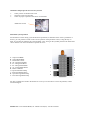
Selector Management