1
AJA Up/Down/Cross Mini-Converter
Software Update
Procedure
Use the Update screen to update the UDC software as follows:
1. Check the AJA website for new Mini-Config software for your Mini-Converter. If
you find new software, download it and uncompress the (zip) file archive.
Use this URL to check for new software:
http://www.aja.com/support/converters/converters-mini-rackmount.php
2. Connect the Mini-Converter to a Mac or PC via a USB port on the computer, and
run the new Mini-Config software you just downloaded.
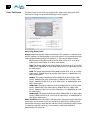
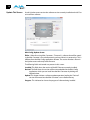
3. Click on the Update tab screen.
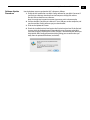
4. Check the Installed version level against the Desired version level. If the Desired
is newer, click the Update button to download the new firmware to the MiniConverter; progress will be shown via the “Progress” thermometer bar. When you
1 that you
click Update, Mini Config will provide a dialog asking you to confirm
really want to update the firmware (see below).
15