1
Q-Proto Systems
www.qprotos.com
---------------------------------------------------------------------------------------------------------------------------------
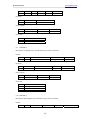
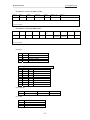
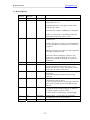
11. Revision History
Document
Revision
1.0
1.1
PC Software
Revision
1.0
1.1
Date
Comment
11-05-2004
7-22-2005
Initial release
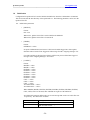
1) Add section 6.1 to show how to upgrade Interface
program from 1.0 to 1.1.
2) Add description for <view register> button under
<Add message> dialog.
3) The interface program is USBXpress.2.1 compatible.
1.2
1.2
4) Add <view ID format> in filter dialog to show the
converted ID format from registers values.
The QuickCAN interface program is now called
CANmunicator.
8-18-2005
Fixed the description in Section 10. Init file should now
be in the same directory of quickcan.exe file instead of
c:\windows
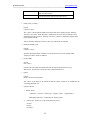
<Message activities> pane will not reset the content and
first in first out method is used.
1.3
1.4
1.3
1.4
11-1-2005
02-01-2006
1.5
1.5
03-22-2006
1.6
1.6
08-25-2006
1.7
1.7
05-01-2007
1.8
1.8
04/01/2008
<Abort All> button is changed to <Abort Tx> and
<Enable Tx> to toggle the ABAT bit. Users are no
longer need to clear this bit manually to re-enable the
transmission.
Add <refresh> button in the Registers map dialog.
(1) New commands ‘B’ and ‘H’.
(2) Device description returns string ‘quick—can’
instead of the firmware version. The firmware version
can be retrieved with the command ‘H’
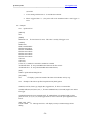
(1) New command ‘G’ and ‘K’ for automatic message
transmission.
(2) Option to display System time for the message
timestamp.
(1) Add a 2mS-based real time timer tick in the received
CAN message at byte 16 and 17.
(2) The size of the firmware CAN message is increased
from 17 byte to 20 byte because of the added 16 bits
timer tick.
Changes in CANmunicator
(1) Fixed the incorrect baud rate display for 1Mhz bus
(2) Add the <Display live data> feature.
(3) Allowed users to send message with zero length.
(1)Removed the ‘?’ popup dialog for invalid data
(2) Change the “Save as” to CSV format
- 27 -