1
LDMS User Manual
Specimen Management
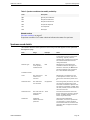
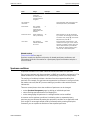
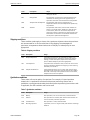
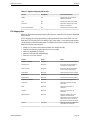
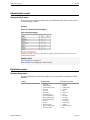
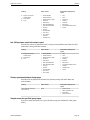
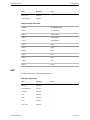
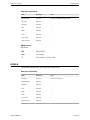
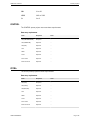
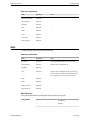
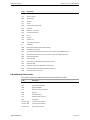
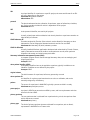
Table 2: Specimen conditions that modify availability
Code
Description
QNS
Quantity Not Sufficient
SNC
Sample Not Collected
SNP
Sample Not Processed
ANP
Aliquot Not Prepared
LSH
Lost Shipment
DSR
Destroyed
Related sections
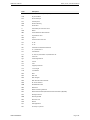
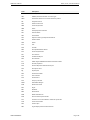
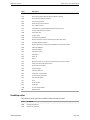
Specimen conditions on page 45
A specimen condition is a 3-letter code that indicates the status of a specimen.
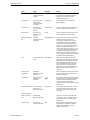
Specimen record details
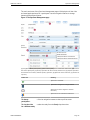
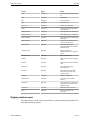
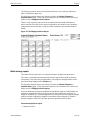
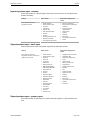
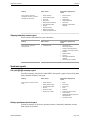
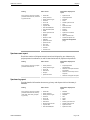
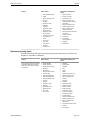
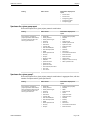
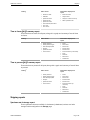
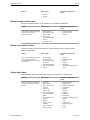
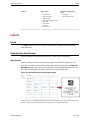
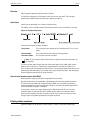
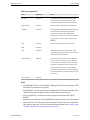
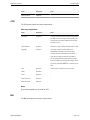
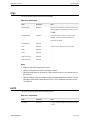
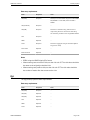
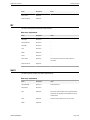
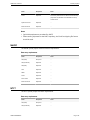
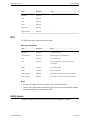
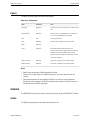
This section describes each specimen record entry box that appears on the Specimen
Management page.
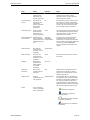
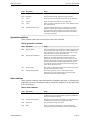
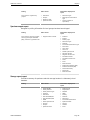
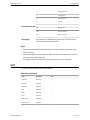
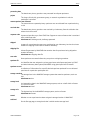
Field
Usage
Example
Additional time
A value and a unit 4 Hrs
Used to indicate information such
as the amount of time a participant
was fasting. Typically used for
pharmacology specimens to indicate
the amount of time after the last
dosage was taken.
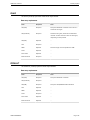
Additive type
The additive
in the primary
collection tube
Selected from a pre-defined list
of codified values. If there was no
additive in the tube, use NON. Hover
the mouse pointer over an additive
for a more detailed description.
EDT
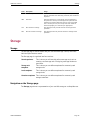
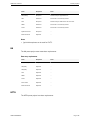
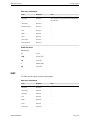
Available volume
LDMS USRMAN003
Notes
-
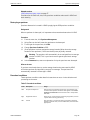
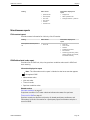
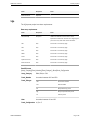
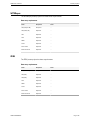
clinic
The clinical site
where a visit
occurred
102
Select from a pre-defined list. For
a description of a clinic, such as its
name, hover the mouse pointer over
it.
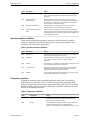
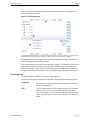
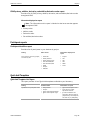
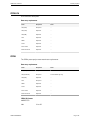
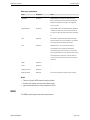
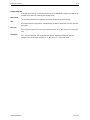
Collection date
The date that a
visit occurred
02/Apr/2014
This will typically be one day. If a visit
occurred over multiple days, each
event will considered a separate visit
and listed as separately in LDMS. They
will still, however, have the same visit
value and visit unit.
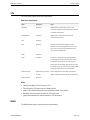
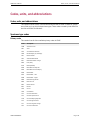
Collection time
The time that the
specimen was
collected
13:30
This time should be the local time
for the clinical site, and be in 24-hour
format. In LDMS, collection time is
known as specimen time
Comments
Additional
details about the
specimen
Used to provide additional
information, such as an explanation
of a specimen’s current condition.
This comment will be included if the
specimen data is shipped to another
laboratory.
Page 42