1
2004 DRAKE SOFTWARE
| 105
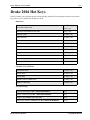
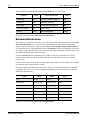
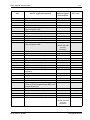
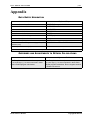
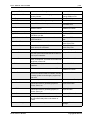
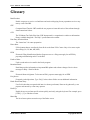
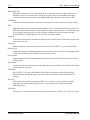
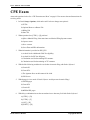
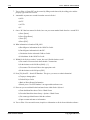
Task
Description
Change SSNs on File
Correct file name when changing a social
security number.
Location
Tools > File Maintenance >
Change SSNs on File
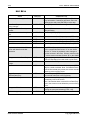
Check Register
Prints a check register as a record.
EF > Check Register
Check Print
Print new checks or reprint damaged checks.
EF > Check Print
Clear BBS files
Delete BBS files after they are installed.
Tools > File Maintenance >
Clear BBS Files
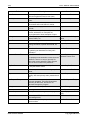
Client Reports
Generate reports based on default or user
identified criteria.
Reports > Reports >
Standard or Custom
Colors
Edit default colors displayed on-screen
Setup > Colors
Copy EF Returns to Disk
Copy print files of calculated returns from the
hard drive to a disk.
EF > Copy EF Returns to
Disk
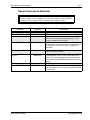
Copy EF Returns from Disk
Copy print files of calculated returns from a disk EF > Copy EF Returns to
to the hard drive.
Disk
Delete Client Files
Permanently delete client files.
Delete Print Files
Delete the temporary print files that are created Tools > File Maintenance >
when returns are calculated.
Delete Print Files
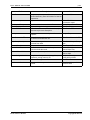
Depreciation List
Print a list of client’s depreciable assets.
Directories/Paths
Set up CD drive letter, drive location of current Setup > Directories/Paths
year, last year’s files and shared drive letter for
peer-to-peer networks.
Download Fonts
Copy Softfonts, which are necessary to print tax Tools > Download Fonts
forms, to the printer. This must be run each time
the printer is turned off.
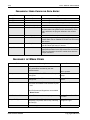
Edit EIN Database
Edit specific employer information in the EIN
Database.
EF Reports
Create standard and custom reports of EF data. Reports > Reports >
Standard or Custom
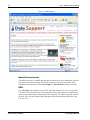
E-mail to Drake
Send email directly to technical support.
EF > email to Drake
Receive broadcast emails from Drake, including
a weekly update on tax changes, program tips
and more.
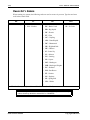
Envelopes
Print envelopes.
Tools > Letters > Envelopes
Export Client Data
Exports data to a database file that can be
opened and used for generating reports in
Access, Excel, etc.
Tools > File Maintenance >
Export Client Data
Export EF Data
Export data to a database file that can be
opened and used for generating reports, in
Access, Excel, etc.
Tools > File Maintenance >
Export EF Data
Filled In Screens
Print the Data Entry screens for a return.
Reports > Filled in Screens
Firm
Set up the preparer’s firm information. This is
the information that prints on the bottom of
1040s.
Setup > Firm
Fixed Asset Manager
Print various asset reports.
Reports > Fixed Asset
Manager
Drake Software Manual
Tools > File Maintenance >
Delete Client Files
Reports > Depreciation List
Tools > Edit EIN Database
Copyrighted Material