1
Chapter 4
NI-DNET Programming Techniques
Object Handles
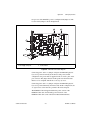
If you use an array to store configuration parameters for ncOpenDnetIO,
you can use this same scheme to store the ObjHandle returned by
ncOpenDnetIO. Within the For loop used for ncOpenDnetIO, you can store
the resulting ObjHandle into an array of object handles. Throughout your
code, you can index into this array to obtain the appropriate object handle.
Using an array of object handles is particularly useful in the LabVIEW
programming environment because it eliminates confusing routing of
individual object handle wires.
For applications with only a few object handles, another useful technique
for LabVIEW is to store each object handle in an indicator, then create a
local variable for each call that uses the handle. To create the indicator,
right-click on the ObjHandle out terminal and select Create Indicator.
To create a local variable, right-click on the indicator, select Create»Local
Variable, right-click on the local variable, and select Change To Read
Local. For more information on local variables, refer to the LabVIEW
online reference.
Main Loop
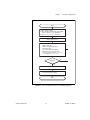
If your application essentially accesses all DeviceNet input/output data as
a single image, you would normally wait for read data to become available
on one of the input connections (such as a strobed I/O connection), read all
input data, execute your application code, then write all output data. The
wait is important because it helps to synchronize your application with the
overall DeviceNet network traffic.
In single-loop applications such as this, you normally set the PollMode
parameter of ncOpenDnetIntf to Automatic or Scanned so that all poll
command messages are sent out in quick succession.
Within a single-loop application, error handling is often done for the entire
application as a whole. In the C programming language, this means that
when an error is detected with any NI-DNET object, you display the error
and exit the application. In LabVIEW, this means that you wire all error
clusters of NI-DNET VIs together.
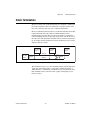
If your application uses different control code for different DeviceNet
devices, you might want to split your application into multiple tasks. You
can easily write a multitasking application by creating a notification for
the NI-DNET Read Avail state. This notification occurs when either
input data is available (to synchronize your code with each device’s
NI-DNET User Manual
4-16
ni.com