1
1.1– Setting HIGH RPM, Upper RPM Limit
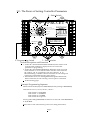
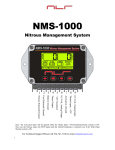
Set SELECT Switch to HIGH RPM.
Example that would set HIGH RPM at 10,400
1 set at
1
.1 set at
0
.01 set at
4
.001 set at
0
Press PROGRAM Button until the display reads PROGRAM. Release the button and the
display will now read 10,400. HIGH RPM is now set at 10,400 RPM.
Valid RPM range 2,000 to 14,500 RPM in 100-RPM Increments.
Setting HIGH RPM to 0 will turn this function off.
1.2- Setting LAUNCH RPM
Set SELECT Switch to LAUNCH RPM.
Example that would set LAUNCH RPM at 7,200
1 set at
0
.1 set at
7
.01 set at
2
.001 set at
0
Press PROGRAM Button until the display reads PROGRAM. Release the button and the
display will now read 7,200. LAUNCH RPM is now set at 7,200 RPM.
Valid RPM range 2,000 to 14,500 RPM in 100-RPM Increments.
Setting LAUNCH RPM to 0 will turn this function off.
1.3 - Setting SHIFT RPM
NOTE All Shift RPM’s MUST BE +/- 1,000 RPM of 1st Shift RPM!
Set SELECT Switch to the SHIFT RPM Setting you wish to Program.
When a NEW 1st Shift RPM is Programmed all Shift RPM’s will be set to the 1st Shift RPM
Setting Automatically.
Example that would set SHIFT RPM at 9,800
1 set at
0
.1 set at
9
.01 set at
8
.001 set at
0
Press PROGRAM Button until the display reads PROGRAM. Release the button and the
display will now read 9,800. SHIFT LIGHT RPM is now set at 9,800 RPM. NOTE, IF the
1st Shift RPM is Programmed it will take a couple of Seconds to Update the Following
Shift RPM’s. Valid RPM range 2,000 to 14,500 RPM in 100-RPM Increments.
NOTE: Only the 1st SHIFT RPM will be used until the AUTO-SHIFT Activation Terminal
is Active. This is done with a +12 volt signal. Please refer the next section for more
information on the Auto-Shift System and its use.
.Page 7