1
If you choose “yES”, after you press the REC/ENTER button the instrument will
prompt you to confirm that decision by displaying the term “Ent” below “yES” and
sounding three beeps. To confirm that you want to begin the erasure/formatting
procedure, press the REC/ENTER button. “Ent” will then flash several times and the
instrument will sound another three beeps to confirm that the SD card has been
erased and formatted.
Once the SD card has been set up, the display will then either return to the first of the
eight steps in the setup sequence—setting the current date and time—or show the
term “ESC”. If “ESC” appears, press the POWER/ESC button to exit the setup
procedure and enter normal operating mode.
NORMAL OPERATION
1. To prepare to make measurements, power on the DAF4207SD and make sure
an SD card is firmly seated in the socket on the bottom of the instrument.
The meter can make and display two kinds of measurements:
• Air speed and temperature (simultaneously)
• Surface temperature, as measured by an optional Type K or Type J
thermocouple
2. To select the measurement mode, use the FUNC./HOLD/NEXT button. Pressing
the button repeatedly toggles between the two modes. When the
FUNC./HOLD/NEXT button is released, the selected mode becomes the default until
the button is pressed again.
By default, the DAF4207SD uses Celsius units for temperature measurements. If you
wish to make Fahrenheit units the default, press the SET ▼ button to enter the setup
procedure and perform Step 8.
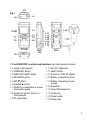
3. To measure air velocity and temperature simultaneously, seat the probe plug
(callout 1-17 of Fig. 1) in its socket (callout 1-7) on the top of the instrument. Then
press the FUNC./HOLD/NEXT button until the display shows the term “Air”. Holding
the probe by its handle, turn its head so the anemometer vanes face the flow of air
(the yellow dot in the center of the head should face that direction). The upper part
of the display will show the air speed while the lower part will show the
temperature (as “ºF” or “ºC”).
To change the units of air speed, use the REC/ENTER button (which has the word
“Unit” stenciled below it). Repeated presses of the button cycle through the five
options for air speed units: m/s (meters/second), fpm (feet per minute), km/h
(kilometers/hr), knots (nautical miles per hour), and mph (miles per hour). Release the
REC/ENTER button when the unit you wish to use appears, making it the default until
changed.
8