1
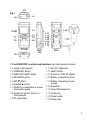
4. To measure surface temperature using a thermocouple, make sure the multifunction probe is not in its socket. Plug an optional Type K or Type J thermocouple
into its dedicated socket (callout 1-8 of Fig. 1). Then press the FUNC./HOLD/NEXT
button until the display shows the term “tP”.
Touch the wire end of the thermocouple to the surface whose temperature you wish
to measure. The display will show its temperature (as “ºF” or “ºC”).
By default, the DAF4207SD is configured for a Type K thermocouple. To use a Type J
thermocouple, press the SET ▼ button to enter the setup procedure and perform
Step 7.
Whenever the instrument is operating in measurement mode, you can turn off the
backlight (which is on by default) by briefly pressing (but not holding) the POWER/ESC
button. To reactivate the backlight, briefly press the button again.
Whenever the DAF4207SD is in either measurement mode, you also can check the
current date and time by briefly pressing the SET ▼ button (which has the words
“Time check” stenciled below it). Doing so causes both values to appear briefly at the
lower left of the display.
HOLDING AND STORING MEASUREMENTS
5. To hold a measured value, press the FUNC./HOLD/NEXT button during the
measurement. Doing so will cause the word “HOLD” to appear at the top of the
display. Pressing the FUNC./HOLD/NEXT button again releases the hold.
6. To record and recall readings, press the REC/ENTER button while making
measurements. This will make the term “REC” appear at the top of the display.
Pressing the REC/ENTER button again, briefly, will make the term “MAX” appear to
the right of “REC” and switch the display to the maximum value stored in memory
during the last recording session. Pressing the REC/ENTER button again, briefly,
will make the term “MIN” appear to the right of “REC” and switch the display to
the minimum value stored during the last session.
7. To exit recording mode, press the REC/ENTER button and hold it for at least three
seconds, until the term “REC” disappears from the top line of the display. The
display will then revert to showing the current reading.
9