1
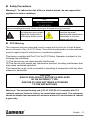
Chapter 1 Safety Instructions Always follow these safety instructions when setting up and using the Wireless Flyer: 1. Do not place Wireless Flyer in tilted position. 2. Do not place the Wireless Flyer on an unstable trolley, stand or table. 3. Do not use the Wireless Flyer near water or source of heat. 4. Use attachments only as recommended. 5. Use the type of power source indicated on the Wireless Flyer. If you are not sure of the type of power available, consult your dealer or local electricity company for advice. 6. Place the Wireless Flyer on a place that it can be unplugged easily. 7. Always take the following precautions when handling the plug. Failure to do so may result in sparks or fire. Ensure the plug is free of dust before inserting it into a socket. Ensure that the plug is inserted into the socket securely. 8. Do not overload wall sockets, extensions leads or multi-way plug boards as this may cause fire or electric shock. 9. Do not place the Wireless Flyer where the cord can be stepped on as this may result in fraying or damage to the lead or the plug. 10. Unplug the projector from the wall socket before cleaning. Use a damp cloth for cleaning. Do not use liquid or aerosol cleaners. 11. Do not block the slots and openings in the projector case. They provide ventilation and prevent the Wireless Flyer from overheating. Do not place the Wireless Flyer on a sofa, rug or other soft surface or in a built-in installation unless proper ventilation is provided. 12. Never push objects of any kind through cabinet slots. Never allow liquid of any kind to spill into the Wireless Flyer. 13. Except as specifically instructed in this User Manual, do not attempt to operate this product by yourself. Opening or removing covers may expose you to dangerous voltages and other hazards. Refer all servicing to licensed service personnel. 14. Unplug the Wireless Flyer during thunderstorms or if it is not going to be used for an extended period, do not place the Wireless Flyer or remote control on top of heat-emitting equipment or heated objects such as a car and etc. 15. Unplug the Wireless Flyer from the wall outlet and refer serving to licensed service personnel when the following situations happen: If the power cable or plug becomes damaged or frayed. If liquid is spilled into it or the Wireless Flyer has been exposed to rain or water. <NOTE> Do not remove the battery of Wireless Flyer. In case of any failure, please contact the original manufacturer for maintenance service. English - 4