1
Air filter
Please check and clean the air filter periodically. If the air filter becomes clogged by dust or
the like, internal temperatures rise, which could cause a fire, a burn or malfunction to the
projector. When the indicators or a message prompts you to clean the air filter, comply with
it as soon as possible. Note that the projector may shut down, when the projector heats too
much.
Please replace the air filter when it is damaged or too soiled. Preparation of a new air filter
is recommended. To prepare a new air filter, contact with your dealer and tell the air filter
type number.
Type number = MU03642
Cleaning the air filter
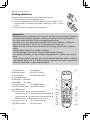
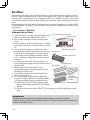
The front side of the projector
1. Turn the projector off, and unplug the power cord.
The filter cover
Allow the projector to sufficiently cool down.
2. Use a vacuum cleaner on and around the filter
cover.
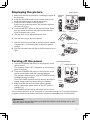
3. Hold the filter cover knobs while lifting it. The filter
unit made up the filter cover and others will come
off.
The filter cover knobs
4. Use a vacuum cleaner for the filter vent of the
projector and the filter frame side of the filter unit. The filter unit
If the air filter is damaged or too soiled, replace
The filter frame knob
it according to the following procedure number
5 to 7. Otherwise, please jump to the procedure
number 8.
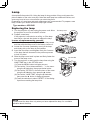
5. To remove the filter frame, hold the filter cover
while holding and pulling the filter frame’s knob by
The filter frame
another hand.
The air filter
6. Replace the air filter with new one. It is
recommended that the fluted surface of the air
filter faces the filter cover.
7. Put the filter frame back, and put the filter unit
back into the projector.
The fluted
8. Turn the projector on and reset the filter time
surface of the
using the FILTER TIME item in the EASY MENU.
air filter
(1) Press the MENU button to display a menu.
The filter cover
(2) Point at the “FILTER TIME” using the ▼/▲
button, then press the ► button. A dialog will
appear.
(3) Press the ▲ button to select “RESET” on the dialog. It performs resetting the filter
time.
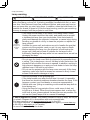
WARNING
►Unplug and cool down the projector before taking care of the air filter.
►Use only the air filter of the specified type. Do not use the projector without the
air filter or the filter cover.
10