1
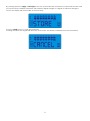
after a second the display shows:
You can now change the frequency with the up(3) or down(5) buttons (steps of 0.250 MHz to change the
frequency). To confirm you have to press the set(4) button. Now the display will briefly look as shown
below.
If you don’t press the set(4) button, FREQ in the LCD display will keep flashing.
Scan Menu
Press the set(4) button for three 3 seconds. Now you’re in the Frequency set menu, press the set(4) button
again to enter Scan Mode, the LCD shows:
after a second the display shows:
7