1
4.3 Accessing Results Via the Programming Interface
45
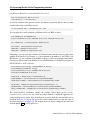
If bIsNewCycle = True Then
iNumGoodCycles = iNumGoodCycles + 1
bIsNewCycle = False
dSumUEC = dSumUEC + dUEC
dMeanUEC = dSumUEC / iNumGoodCycles
LabelUEC.Caption = Format(dMeanUEC, "Fixed")
End If
When using the programming interface of ActivVisionTools, you leave the safe world of the
graphical user interfaces where all input is checked for validity automatically. In contrast, if
you try to access a non-existent object or result via the programming interface, a run-time error
is caused which terminates your application! To avoid this, you can use the Visual Basic error
handling mechanisms, i.e., set up an error handler which examines any occurring error and reacts
in a suitable way. In the example project, if an error is caused by the result access, a dialog with
the error description pops up and the function SetAlarm is called. To view the effect of the
error handler, uncheck √ Unused Error Correction in AVTDataCodeSettings so that the
unused error correction is not calculated.
Private Sub AVTDataCode1_Finish(atToolResults As ACTIVVTOOLSLib.IAVTToolResult)
’ variable declarations
On Error GoTo ErrorHandler
’ procedure body
Exit Sub
ErrorHandler:
Dim sTitle As String
If Left(Err.Source, 11) = "ActivVTools" Then
sTitle = "ActivVisionTools Error"
Else
sTitle = "Runtime Error " & CStr(Err.Number)
End If
Call MsgBox(Err.Description, vbExclamation, sTitle)
Call SetAlarm
End Sub
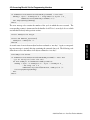
By placing the following code at the beginning of the event handler, the actual result access is
restricted to the application mode. With this mechanism you can setup the vision part of your
application in the configuration mode without having to worry about run-time errors.
ActivVisionTools 3.2 – Your Fast Track to Solutions
ActivDataCode
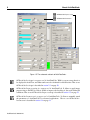
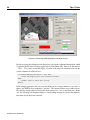
You can test this behavior by changing parameters in AVTDataCodeParameters: The code is
updated, while the mean value of the unused error correction remains constant.