1
Programming
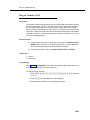
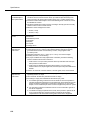
Backup Programming—Automatic (#123) enables you to specify whether
automatic backups should be performed or not. If you set this feature to “Active,”
your system and telephone programming settings are backed up to the PC Card
automatically at 2:00 a.m. on the first day of each month. The PC Card must be
present in the PC Card slot for the backup to take place.
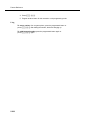
Backup Programming—Manual (#124) enables you to initiate a backup of your
system and telephone programming settings whenever you feel that it is
necessary. It is recommended that a backup be performed after any change to the
system or telephone programming.
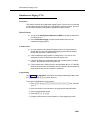
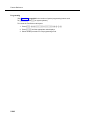
Restore Programming (#125) copies either the manual or the automatic backup
data stored on a PC Card back to the system, thereby enabling you to restore
settings to their status at the time of the last automatic or manual backup.
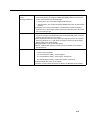
Hospitality Features
The following hospitality features are for special applications, such as the
Bed-and-Breakfast and Hotel/Motel industries. With both features, the receptionist
at extension 10 optionally can use the Intercom Autodialer to specify an extension.
■
Outgoing Call Restriction Button (#114) lets you program a button on
the system phone at extension 10 to change an extension’s current
Outgoing Call Restriction setting without entering System Programming
mode. For example, after a guest’s departure, a hotel manager can change
the No Restriction setting of the guest room phone to Inside Only so
outside calls cannot be made from the phone after the guest checks out.
■
Wake Up Service Button (#115) lets you program a button on the system
phone at extension 10 to be used for scheduling wake up (or reminder)
calls for system extensions. When a wake up call is scheduled, the system
makes an intercom call to the target extension at the scheduled time. If the
first call is not answered or the called extension is busy, the system makes
a second attempt five minutes later.
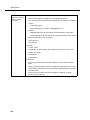
Using System Programming
System Programming changes settings for the system as a whole, or for individual
lines, pools, or extensions. You can also use System Programming to set up
dialing restrictions, define groups, or set up auxiliary equipment. Refer to the
filled-out System Planner when you are changing system settings, and be sure
that any changes in programming are recorded there.
2-20