1
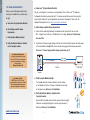
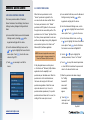
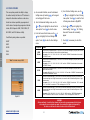
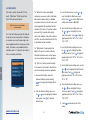
10:36:23
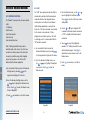
07/17/2013
Wednesday
Patent Pending
Stone Lock® Pro User Manual
v. 1.3
Preface
Thanks for choosing Stone Lock® Pro for your access control solution!
This User Manual had been developed as a reference to help the user enjoy
the ultimate in security + convenience with Stone Lock® Pro.
Modifications to the information in this Manual may occur without notification. For the latest
information about Stone Lock® Pro please visit our website at www.stonelockpro.com.
www.stonelockpro.com
Stone Lock® Pro User Manual v1.3
Copyright © 2015 CoprometroUSA®
All Rights Reserved. This book or any portion thereof may not be reproduced or used in
any manner whatsoever without the express written permission of CoprometroUSA® except for
excerpts referred to or otherwise called out in the normal course of business operations.
© 2015 HID Global Corporation/ASSA ABLOY AB. All Rights Reserved.
HID, HID Global, the HID Blue Brick logo, the Chain Design and HID Connect iCLASS,
iCLASS SE, are trademarks or registered trademarks of HID Global.
Designed in Leawood ∞ Printed in the USA
First Printing 2015
www.coprometrousa.com
Table of Contents
1.0 Introduction
Pg.
1.01.... Welcome to
Stone Lock® Pro / Features........... 2
1.02.... Passive Interface........................... 3
1.03.... What’s in the Box?........................ 4
1.04.... Preparation for Installation............ 5
1.05.... Locks............................................ 5
1.06.... Stone Lock®
Network Platform.......................... 5
1.07.... Installation Checklist..................... 6
1.08.... Installation.................................... 8
1.09.... Connecting Stone Lock® Pro........ 8
1.10.... Power Up Stone Lock® Pro.......... 8
1.11.... Setting the Faceplate Address....... 8
1.12.... Installation Tables....................9-11
1.13.... Connecting Stone Lock Pro to
an Access Control System.......... 12
1.14.... Voltage/Wire Gauge Tables....13-14
2.0 Using Stone Lock® Pro
2.01.... Startup Configurations................ 16
2.02.... Initial Enrollment......................... 16
2.03.... Advanced Function Menu............ 18
3.0
User
Management
3.01.... User Management Menu............. 20
3.02.... New User Enrollment Start......... 21
3.03.... Re-Enrollment Start.................... 22
3.04.... Changing Cards........................... 23
3.05.... Deleting A User........................... 23
3.06.... Change User Type....................... 24
3.07.... Check User Details...................... 24
Section 4.0
Verification
Records
4.01.... Verification Record
Overview..................................... 26
4.02.... Verification Failures..................... 26
4.03.... Record Viewing Date.................. 27
4.04.... Viewing Previous
Day’s Records............................. 27
4.05.... Viewing the Next
Day’s Records............................. 28
4.06.... Viewing a Record’s
Details......................................... 28
5.0
Access
Control
5.01.... Access Control Overview............ 30
5.02.... Device Permissions..................... 30
5.03.... Door Settings.............................. 31
5.04.... Door Lock Settings..................... 32
5.05.... Door Timer Setting..................... 32
5.06.... Guest PIN Access....................... 33
5.07.... Card # Parsing............................ 34
5.08.... Door Sensor Settings.................. 35
5.09.... Auxiliary Outputs & Inputs
Overview..................................... 36
5.10.... Auxiliary Outputs......................... 36
5.11.... Auxiliary Inputs........................... 36
5.12.... Wiegand Configuration..........38-39
5.13.... Silent Alarm................................ 40
6.0
Network
Functions
6.01.... Network Functions...................... 42
6.02.... LAN............................................. 42
6.03.... Setting Up the IP Address.......... 43
6.04.... Setting the Subnet Mask............. 43
6.05.... Setting the Gateway Address...... 44
6.06.... Setting the DNS Address............ 45
6.07.... IP Settings.................................. 45
6.08.... Web Service................................ 46
6.09.... Real-Time Records...................... 47
6.10.... Remote....................................... 48
6.11.... Auto Upload New User............... 48
7.0
System
Settings
7.01.... System Settings.......................... 50
7.02.... Delete Users/Recs....................... 50
7.03.... Security Level............................. 51
7.04.... Alarm Settings............................ 52
7.05.... Arm/Disarm Alarms.................... 52
7.06.... SMS Module............................... 53
7.07.... Event Linkage.............................. 55
7.08.... Aux In Linkage............................ 55
7.09.... Wireless Linkage......................... 56
7.10.... Impact Sensitivity........................ 56
7.11.... Setting Verification Modes.......... 57
7.12.... Setting Biometric Facial
Recognition Only......................... 58
7.0 System Settings (cont’d)
7.13.... Setting Biometric Facial
Recognition with a
Secondary Verification................ 59
7.14.... Setting Mixed Mode.................... 60
7.15.... Setting Card Only........................ 61
7.16.... Encrypting the
User Information Upon
Verification.................................. 61
7.17.... Setting User Interval................... 62
7.18.... Date/Time.................................... 62
7.19.... Time Settings.............................. 63
7.20.... Date Settings............................... 63
7.21.... USB Operations........................... 64
7.22.... Program Update.......................... 64
7.23.... Records Download...................... 65
7.24.... User Download........................... 65
7.25.... User Upload................................ 66
8.0
System
Info
8.01.... System Info................................. 68
9.0 Appendices
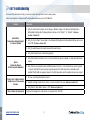
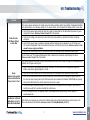
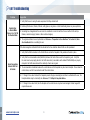
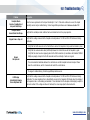
9.01.... Troubleshooting.....................70-77
9.02.... Product Specifications................ 78
9.03.... Dimension Drawings................... 79
9.04.... Warranty & Return Policy........... 80
www.stonelockpro.com
1.0
Section 1:
Introduction
Greetings
1.01Welcome to
Stone Lock® Pro
1.02 Passive Interface
1.03 What’s in the Box
1.04Preparation
for Installation
1.05Locks
1.06Stone Lock
Network Platform
®
1.07 Installation Checklist
1.08Installation
1.09Connecting Stone Lock® Pro
1.10Power Up Stone Lock® Pro
1.11Setting the Faceplate
Address
1.12 Installation Tables – A, B, C
Stone Lock® Pro is a
sophisticated biometric
access control device that
provides instant, reliable
confirmation of identity
1.13 Voltage/Wire Gauge Tables
1
www.stonelockpro.com
1.0
Section 1: Introduction
1.01 WELCOME TO STONE LOCK® PRO
Greetings
Congratulations on your purchase of Stone
Lock® Pro! Stone Lock® Pro is an extremely
accurate infrared biometric facial recognition
device designed for access control applications.
It is very reliable and easy to use.
Stone Lock® Pro is fast, accurate, safe, and
simple. Stone Lock’s proprietary hardware and
software has been field proven as a reliable
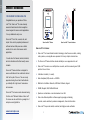
Stone Lock Pro® Device
Stone Lock Pro® Passive Interface
solution for the most critical access control
Stone Lock® Pro Features:
applications.
✓✓ Stone Lock® Pro’s near-infrared biometric technology is ideal for access control, creating
It is well suited for financial, medical, industrial,
and other situations with critical security access
demands.
Stone Lock® Passive Interface is designed for
access vericfication with no contact and minimal
effort on the part of the user. The user merely
approaches facing the unit and it authenticates
you instantly with a high level of convenience
and assurance.
Stone Lock® Pro devices can be networked using
the Stone Lock® Network Software. Stone Lock®
Pro devices are also certified to a growing list of
enterprise security platforms.
a safe, passive, even enjoyable user experience that is very simple to learn and use
✓✓ The Stone Lock® Passive Interface actuates instantly as a user approaches the unit
✓✓ Stone Lock® Pro scans a user multiple times a second, each time measuring over 2,000
points on the user’s face
✓✓ Verification is Instant (<1 second)
✓✓ False Acceptance (FAR) exceeds = <0.0004%
✓✓ Multi-Factor Verification: Biometric, HID iClass SE Reader, Keypad
✓✓ RS485, Wiegand, USB, Cat5/5e/6 Ethernet
✓✓ Operates as a stand-alone or can be networked via a LAN
✓✓ Stone Lock® Network platform software supports groupings, scheduling,
overrides, remote enrollment, permission management, other admin functions
✓✓ Stone Lock® Pro provides instant, consistent, and highly accurate verification
www.stonelockpro.com
2
1.0
1.02 STONE LOCK® PASSIVE INTERFACE
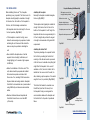
The Stone Lock® Passive Interface allows a user to
Stone Lock® Pro
Enhances Security in Your
Critical Areas
interact with a Stone Lock® Pro device with minimal
effort. It is what makes Stone Lock® Pro so easy to
learn and use.
Stone Lock® Passive Interface sensors scan the user’s
✓✓ Real-time event capture
face with infrared wavelengths several times a second.
✓✓ Dual faceplate applications
The user doesn’t touch anything; he or she merely
✓✓ Live video stream ties back to your VMS
approaches the Faceplate facing the unit, and Stone
Lock® Pro actuates instantly when it senses someone
✓✓ ADA applications
within arms length of the unit. Stone Lock Passive
®
✓✓ High-throughput areas
Interface has many advantages as an access control
✓✓ Temporary access situations
technology:
• Near-infrared wavelengths are safe, invisible to the
eye, and relatively unaffected by ambient light or
temperature
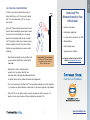
Stone Lock Pro® Passive Interface
The Stone Lock® Passive Interface
is designed to require almost no
effort on the part a user.
For inquiries related to Stone Lock® Pro,
contact [email protected]
• Near-infrared is ideal for capturing intrinsic
properties of a face (shape, reflectivity, and
expression) while minimizing unfavorable characteristics
of extrinsic factors (such as ambient illumination and misalignment)
• There is no known way to fake Stone Lock® Pro’s proprietary technology into a false acceptance
(i.e. simulate a near-infrared biometric measurement of a real person registered in the database)
• Stone Lock® Pro is safe, passive, simple, excels in convenience in almost every way, and
appeals to a wide range of people of all ages, nationalities, and walks of life
3
www.stonelockpro.com
1.0
1.03 WHAT’S IN THE BOX?
hardware. A current Stone Lock® Pro Packing
List (Fig 1.03-1) can be downloaded from
Cameras
Status Light
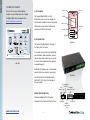
a) The Faceplate
Stone Lock® Pro comes with installation
The Faceplate (Fig 1.03-2) is used to
IR Lights
biometrically scan a user’s face, display real-
www.stonelockpro.com/products.
time interactive feedback, read card information,
LCD Screen
PIN numbers, control device functions, and
communicate with the Control Unit.
Stone Lock® Pro
Packing List
1
Faceplate
3
www.coprometrousa.com
RJ45 Connectors
4
(2)
2P Terminals
(2)
5
10P Terminals
7
(4)
M3 x 0.50 x 6
Flat Head Machine Screw
8
Control Unit
9
(for mounting Faceplate
and Control Unit to their
respective brackets)
Faceplate
Mounting
Bracket
10
Control Unit
Mounting Bracket
(for secure mounting situations)
11
If there are any parts missing or damaged please contact your Stone Lock Pro Integrator immediately
®
Stone Lock® Pro - Facial Recognition for Access Control
Fig 1.03-1
b) The Control Unit
M3 x 0.50 x 6
Tamper Resistant Flat Head
Machine Screw
(2)
(for Control Unit connections)
Keypad
3P Terminal
(1)
(for the Control Unit
power supply)
(for connecting the Faceplate
Power from the Control Unit)
(4)
2
Smart Inductor
Visit our website at
v 14.10
(for connecting the
Faceplate video and data
to the Control Unit)
6
Card Reader
Documentation
Fig 1.03-2
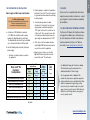
The Control Unit (Fig 1.03-3) is the brain of
the Stone Lock® Pro system.
It is used to receive, process and authenticate
user information, send permissions, process
and save information related to users, provide
the output unlock signal and alarm signal via
corresponding ports.
Additional I/O includes power, communication,
network, USB, video extension, access ports.
The Control Unit can be installed remotely
(within 80 ft. / 25 m) from the Faceplate in
a secure location.
Fig 1.03-3
Faceplate Power
Out 12VDC
Faceplate 2
Power
Communication Port
Indicator Light
(Control Unit Pin Out Ports)
Reference Section 1.12 for a Complete
Description of the Control Unit Pin Out Ports
12VDC Input
Faceplate 1
Communication
Port
www.stonelockpro.com
4
Ethernet Port
Power Supply and Wire Gauge Specifications:
Use Battery Backup System
It is highly recommended to power Stone Lock®
Pro with a non-shared source that
incorporates a battery backup system.
a. A
minimum of 18 AWG and a maximum
of 12 AWG wire should be used for power
between the faceplate and the control unit.
The faceplate and control unit may be installed
up to a maximum distance of 80 feet apart.
b. U
se the following steps to specify the proper
power supply:
Stone Lock Pro
Functions/
Configurations
iii. If a battery backup alarm is needed,
determine if it is desired to have the power
supply provide a method for pulling the
“UPS Signal” pin low on the control unit, or
if Stone Lock® Pro is required to sense that
it is running on battery backup because the
input voltage has dropped below 13.0 VDC.
iv. O
f the Stone Lock Pro hardware functions
listed in Fig 1.04-1 below, determine which
ones will be used in the application.
Current Draw WITH
Battery Backup
WITHOUT UPS
WITH UPS
Signal
Signal
(Table II Below) (Table I Below)
(Amps)
(Amps)
Current
Draw
WITHOUT
any Battery
Backup
(Table I Below)
(Amps)
Facial Verification Only w/ 1 Faceplate
1.5
2.0
2.0
Facial Verification Only w/ 2 Faceplates
2.0
2.5
2.5
Stone Lock Pro Powering Lock #1
2.0
2.0
2.0
Stone Lock Pro Powering Lock #2
2.0
2.0
2.0
Stone Lock Pro Powering Aux Output 1
2.0
2.0
2.0
Stone Lock Pro Powering Aux Output 2
2.0
2.0
2.0
Using Auxiliary Power Output (Pins 19 & 20)
1.0
1.0
1.0
®
®
®
®
1.05 LOCKS
Stone Lock® Pro is compatible with electric locks,
magnetic locks and electric mortise locks – consult
your integrator for specific hardware compatibility
and installation.
1.06 THE STONE LOCK® NETWORK PLATFORM
The Stone Lock® Network (SLN) platform software
is designed for installation on a centralized server.
For a full description of all Stone Lock® Network
functions download the Stone Lock® Network
User Guide at www.stonelockpro.com/technical
v. Based on steps i-iv above, use the table
Fig 1.04-1 below to calculate how much
current Stone Lock® Pro will require.
i. D
etermine if a battery backup is needed in
the application
®
ii. If battery backup is needed in the application,
determine if Stone Lock® Pro will be required
to signal and record an alarm when switching
to battery backup.
1.0
1.04 PREPARATION FOR INSTALLATION
Total
Current
Draw
(Amps)
Use Table 1.04-1 along with the tables in Section
1.13 to determine specific requirements for a
dedicated adjustable DC Power Supply
Use the appropriate table in Section 1.13 to
calculate the proper power supply/wire gauge/wire
length combination for your installation. Both tables
indicate an approximate supply voltage setting
based on using the maximum length for a specific
gauge of wire at a specific current. Both tables also
indicate the mV/ft voltage drop for each gauge of
wire at a specific current.
Fig 1.04-1
5
www.stonelockpro.com
1.0
1.07 INSTALLATION CHECKLIST
Please review the following checklist before
moving on to installation (See detailed steps
at right):
a) Stone Lock® Pro Specification Checklist
Did you, your integrator, or someone in your organization fill out a Stone Lock® Pro Hardware
Configuration Sheet before ordering this unit? If so please review that document for any specific
Sensor Inputs, Auxiliary I/O or other application requirements. Download the Stone Lock® Pro
a) Stone Lock® Pro Specification Checklist
b) Check Voltage and Wire Gauge
Requirements
c) Verify Faceplate Mounting Height
d) Verify the Ambient Lighting is Suitable
for the Faceplate Location
Hardware Configuration Sheet at www.stonelockpro.com/technical.
b) Check Voltage and Wire Gauge Requirements
i. Confirm that the cable length between the Faceplate and the Control Unit is no more than
80 ft. in length, and a minimum of 18 AWG wire (max 12 Awg). Reference 1.09 Connecting
Stone Lock® Pro.
ii. Verify that the DC power supply voltage at the back of the Control Unit is between the limits shown
in the relevant table in Section 1.13 used to calculate wire gauge and the distance parameters
Reference 1.13 Power Supply and Wire Gauge Specifications (p.12).
Use Battery Backup System
It is highly recommended to power
Stone Lock® Pro with a non-shared
source that incorporates a battery
backup system.
Reference Section 1.04.
80 ft. max
Cable Length
18 - 12 Gauge Awg
Cat5/5e/6
Faceplate
For Indoor Use Only
NOTE: Stone Lock® Pro is not
recommended for outdoor use. Please
contact [email protected]
for special application information.
c) Verify Faceplate Mounting Height
The Faceplate should be mounted 46 inches from the bottom
of the Faceplate to the floor. The proper orientation is chest-high
to the typical user. (Reference 1.08 Installation)
d) V
erify the Ambient Lighting is Suitable for the
Faceplate Location
Never install the Faceplate where it will be exposed to direct sunlight,
reflections, and strong lighting (not to exceed a light exposure of
6000 lux). (Reference 1.08 Installation)
www.stonelockpro.com
6
Control Unit
Faceplate Mounting (Wall-Mount Unit)
When installing Stone Lock® Pro, Faceplate
Installing the Faceplate:
positioning is very important. The Stone Lock® Pro
Normally the faceplate is installed alongside
Faceplate should typically be mounted at a height
the door. (Fig 1.08-1)
of 46 inches from the bottom of the Faceplate to
the floor, with the following considerations:
• The Faceplate should be chest-height to the user
for best operation. (Fig 1.08-2)
• If the Faceplate is mounted too high, users
The Faceplate should typically be installed at
Self-tapping screw hole for
hanging mounting bracket
(Wall)
Cable and wire holes
Network cables between
Faceplate and Control Unit
a height of 46 inches from the floor to the
bottom of the Faceplate. At a 46" height the
Faceplate will detect users approximately 5 to
Faceplate power source line
Aligns with anti-tamper sensor
6.5 feet in height, and positions the keypad
below the camera range may experience trouble
at a height commensurate with typical ADA
activating the unit. Users who fall outside the
requirements.
Anti-tamper screw hole
Fig 1.08-1
scan area may have problems activating the
unit.
• Never install the Faceplate where it will be
exposed to direct sunlight, reflections, and
strong lighting (not to exceed a light exposure
of 6000 lux).
• Before the installation of the Stone Lock® Pro
unit, cables should be prepared and installed.
All connectors required are included with
Stone Lock® Pro, including 2 RJ45 connectors.
Required cables and wirings include: Faceplate/
Control Unit communication wire (recommended
using Cat5/5e/6), and network communication
cables.
• Maximum distance between Faceplate and
Installing the Control Unit:
The primary advantage of a separate Control
Unit is that by mounting the Control Unit
remotely, all the data and records processed
at the Unit are not vulnerable to anything that
might affect the Faceplate. In the event of
vandalism or theft, since the Control Unit is
installed on the secure side of the wall, the
data, including a picture capture of the vandal
caught in the act, is protected. (Fig 1.08-3)
Fig 1.08-2
The Control Unit cannot be mounted more
than 80 feet (less than 25 meters) from
the Faceplate. Doing so can degrade the
communications between the Faceplate and
Control Unit should be no more than 80ft.
the Control Unit to the point of operational
(<25 meters).
failure.
Control Unit
mounting bracket
Bracket mounting slot
Fig 1.08-3
7
www.stonelockpro.com
1.0
1.08 INSTALLATION
1.0
1.09 CONNECTING STONE LOCK® PRO
Connecting Stone Lock® Pro
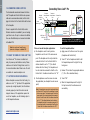
The fundamental connections between the Stone
Lock® Faceplate and Control Unit involve a power
cable and a communication cable, both of which
plug into the front of the Control Unit and the back
of the Faceplate.
Power is supplied to the Control Unit, and an
Faceplate
Power Out
12VDC
Faceplate 1
Faceplate 1
Communication Communication
Port
Port
Power
Indicator Light
12VDC Input
Ethernet connection is available if you are hooking
12VDC Input
GND Input
UPS Signal Input
your Stone Lock® Pro up to a network. In addition,
there are 40 additional pin-out connectors detailed
in Section 1.12.
Note: For any Access Control System,
please refer to diagram in Section 1.13.
1.10 READY TO POWER-UP STONE LOCK® PRO
Your Stone Lock® Pro device is installed and
ready for power-up and initial user setup. Please
continue on to Section 2 Using Stone Lock Pro.
®
For more information about Stone Lock Pro visit
®
our website at www.stonelockpro.com
1.11 SETTING THE FACEPLATE ADDRESS
When a faceplate is received from the factory, its
address is set to “11” by default. If the application
requires only a single faceplate, then the address
is already properly set and this section can be
skipped. However, if the application requires the
use of two faceplates, use the following steps to
set the faceplate addresses.
www.stonelockpro.com
Faceplate
Ethernet Port
Video & Ethernet:
Cat5/5e/6
Power:
Twisted Pair
Reference Section 1.12 for a complete
description of the Control Unit Pin Out Ports
There are two dual faceplate applications:
To set the faceplate address:
a) One faceplate is used for entry and one
a) Apply power to the Stone Lock® Pro system
faceplate is used for exit of the same access
point. The faceplate used for entry should be
connected to Front1 on the Control Unit. Its
address should be set to “11” (the default
address from the factory). The faceplate used
for exit should be connected to Front2 on the
Control Unit. Its address should be set to “10”.
b) Two faceplates are used for access in a man
trap application (one faceplate for each access
point).
(Faceplates and Control Unit)
b) Touch “0” on the faceplate and hold it until
the faceplate beeps and the light at the top
turns green.
c) Release “0” and enter the appropriate address
(11, 10 or 20 as described above).
d) Touch “OK”.
e) When the faceplate beeps and the light at
the top turns white, the address was set
Note: This application can only be implemented when
the Stone Lock® Control Unit is controlling the locks
of the access points. The faceplate used for the first
access point of the man trap should be connected
to Front1 on the Control Unit. Its address should be
set to “11” (the default address from the factory).
The faceplate used for the second access point of
the man trap should be connected to Front2 on the
Control Unit. Its address should be set to “20”.
8
successfully.
1.0
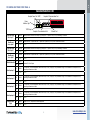
1.12 CONTROL UNIT PIN OUT PORT TABLE - A
Control Unit Pin Out Ports (1-20)
Faceplate Power Out 12VDC
Faceplate 2 Communication Port
Power
Indicator Light
12VDC Input
Faceplate 1 Communication Port
Ethernet Port
1
Button1
2
GND
Door Magnet
Sensor Input 1
3
Sensor1
4
GND
Exit Door Open
Button Input 2
5
Button2
6
GND
7
Sensor2
8
GND
9
CCTV+
10
CCTV-
11
AUX1
TTL Input Port 1 that is configurable to detect either Low (0.0 VDC) to High (4.0 VDC) transitions or High to Low transitions. Can be pulled Low by
connecting to Ground via a switch.
12
GND
Ground
13
AUX2
TTL Input Port 2 that is configurable to detect either Low (0.0 VDC) to High (4.0 VDC) transitions or High to Low transitions. Can be pulled Low by
connecting to Ground via a switch.
14
GND
Ground
15
AUX3
TTL Input Port 3 that is configurable to detect either Low (0.0 VDC) to High (4.0 VDC) transitions or High to Low transitions. Can be pulled Low by
connecting to Ground via a switch.
16
GND
Ground
17
AUX4
TTL Input Port 4 that is configurable to detect either Low (0.0 VDC) to High (4.0 VDC) transitions or High to Low transitions. Can be pulled Low by
connecting to Ground via a switch.
18
GND
Ground
19
AUXP
Supplies 12 VDC / 1Amp Max for external equipment.
20
GND
Ground
Exit Door Open
Button Input 1
Door Magnet
Sensor Input 2
Video Monitor Out
Auxiliary Input 1
Auxiliary Input 2
Auxiliary Input 3
Auxiliary Input 4
Auxiliary Power
Output
Manually controls Electronic Lock Output 1 by pulling this TTL Input to Low (0 VDC) or connecting it to Ground.
Ground
Senses that Door 1 is open when this TTL Input is NOT pulled Low (0 VDC) or NOT connected to Ground.
Ground
Manually controls Electronic Lock Output 2 by pulling this TTL Input to Low (0 VDC) or connecting it to Ground.
Ground
Senses that Door 2 is open when this TTL Input is NOT pulled Low (0 VDC) or NOT connected to Ground.
Ground
Standard PAL Video Output
9
www.stonelockpro.com
1.0
1.12 CONTROL UNIT PIN OUT PORT TABLE - B
Control Unit Pin Out Ports (21-28)
Faceplate Power Out 12VDC
Faceplate 2 Communication Port
Power
Indicator Light
12VDC Input
Close1
Open1
Passive Mode: Used as the Normally Open Pin of a standard relay with the EPOW1 pin as the common. Disconnected from the EPOW1 pin until after
successful user authentication when it is connected to the EPOW1 pin. After the “Door timer” time interval, it is disconnected from the EPOW1 pin.
Active Mode: No voltage is supplied, until after successful user authentication. Then, 12 VDC is supplied until after the “Door timer” time interval when no
voltage is again supplied.
Electric Mode: Supplies a 5 VDC, 500ms pulse signal after the “Door timer” time interval.
23
EPOW1
Passive Mode: Used as the Common Pin of a standard relay. Connected to the Close1 pin until after successful user authentication when it is connected
to the Open1 pin. After the “Door timer” time interval, it is disconnected from the Open 1 pin and reconnected to the Close 1 pin.
Active Mode: Supplies a continuous 12 VDC signal.
Electric Mode: Supplies a 5 VDC, 500ms pulse signal after successful user authentication followed by another 5 VDC, 500ms pulse signal after the “Door
timer” time interval.
24
GND
22
Ground
Close2
Passive Mode: Used as the Normally Closed Pin of a standard relay with the EPOW2 pin as the common. Connected to the EPOW2 pin until after successful user
authentication when it is disconnected from the EPOW2 pin. After the “Door timer” time interval, it is reconnected to the EPOW2 pin.
Active Mode: Supplies 12 VDC, until after successful user authentication. Then, no voltage is supplied until after the “Door timer” time interval when 12 VDC is
supplied again.
Electric Mode: Supplies a 5 VDC, 500ms pulse signal after successful user authentication.
Open2
Passive Mode: Used as the Normally Open Pin of a standard relay with the EPOW2 pin as the common. Disconnected from the EPOW2 pin until after successful
user authentication when it is connected to the EPOW2 pin. After the “Door timer” time interval, it is disconnected from the EPOW2 pin.
Active Mode: No voltage is supplied, until after successful user authentication. Then, 12 VDC is supplied until after the “Door timer” time interval when no voltage is
again supplied.
Electric Mode: Supplies a 5 VDC, 500ms pulse signal after the “Door timer” time interval.
27
EPOW2
Passive Mode: Used as the Common Pin of a standard relay. Connected to the Close2 pin until after successful user authentication when it is connected to the
Open2 pin. After the “Door timer” time interval, it is disconnected from the Open 2 pin and reconnected to the Close 2 pin.
Active Mode: Supplies a continuous 12 VDC signal.
Electric Mode: Supplies a 5 VDC, 500ms pulse signal after successful user authentication followed by another 5 VDC, 500ms pulse signal after the “Door timer”
time interval.
28
GND
Ground
25
Electronic Lock
Output 2
Ethernet Port
Passive Mode: Used as the Normally Closed Pin of a standard relay with the EPOW1 pin as the common. Connected to the EPOW1 pin until after
successful user authentication when it is disconnected from the EPOW1 pin. After the “Door timer” time interval, it is reconnected to the EPOW1 pin.
Active Mode: Supplies 12 VDC, until after successful user authentication. Then, no voltage is supplied until after the “Door timer” time interval when 12
VDC is supplied again.
Electric Mode: Supplies a 5 VDC, 500ms pulse signal after successful user authentication.
21
Electronic Lock
Output 1
Faceplate 1 Communication Port
26
www.stonelockpro.com
10
1.0
1.12 CONTROL UNIT PIN OUT PORT TABLE - C
Control Unit Pin Out Ports (29-40)
Faceplate Power Out 12VDC
Faceplate 2 Communication Port
Power
Indicator Light
12VDC Input
Wiegand
Output
Auxiliary
Output 1
Auxiliary
Output 2
RS485 (In/
Out)
Faceplate 1 Communication Port
Ethernet Port
29
WGOUT0
Wiegand data 0
30
WGOUT1
Wiegand data 1
31
NC1
Passive Mode: Used as the Normally Closed Pin of a standard relay with the COM1 pin as the common. Connected to the COM1 until a designated alarm
event. Is reconnected to COM1 6 seconds after the designated alarm event.
Active Mode: Supplies 12 VDC until a designated alarm event. After the event, no voltage is supplied for 6 seconds and then 12 VDC is supplied again.
32
NO1
Passive Mode: Used as the Normally Open Pin of a standard relay with the COM1 pin as the common. Disconnected from the COM1 until a designated alarm
event. Then is connected to COM1 for 6 seconds and then disconnected again.
Active Mode: No voltage is supplied until a designated alarm event. After the event, 12 VDC is supplied for 6 seconds and then no voltage is supplied again.
33
COM1
Passive Mode: Used as the Common Pin of a standard relay. Connected to the NC1 pin until a designated alarm event. Connected to NO1 pin for 6 seconds
and then reconnected to NC1.
Active Mode: Supplies a continuous 12 VDC signal.
34
GND
Ground
35
NC2
Passive Mode: Used as the Normally Closed Pin of a standard relay with the COM2 pin as the common. Connected to the COM2 until a designated alarm
event. Is reconnected to COM2 6 seconds after the designated alarm event.
Active Mode: Supplies 12 VDC until a designated alarm event. After the event, no voltage is supplied for 6 seconds and then 12 VDC is supplied again.
36
NO2
Passive Mode: Used as the Normally Open Pin of a standard relay with the COM2 pin as the common. Disconnected from the COM2 until a designated alarm
event. Then is connected to COM2 for 6 seconds and then disconnected again.
Active Mode: No voltage is supplied until a designated alarm event. After the event, 12 VDC is supplied for 6 seconds and then no voltage is supplied again.
37
COM2
Passive Mode: Used as the Common Pin of a standard relay. Connected to the NC2 pin until a designated alarm event. Connected to NO2 pin for 6 seconds
and then reconnected to NC2.
Active Mode: Supplies a continuous 12 VDC signal.
38
GND
39
RS485A
RS-485 communication wire A (D +) port
40
RS485B
RS-485 communication wire A (D -) port
Ground
11
www.stonelockpro.com
1.0
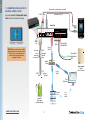
1.13 CONNECTING STONE LOCK PRO TO
AN ACCESS CONTROL SYSTEM
Run power lines as twisted pair (recommended)
+12 VDC
See [next] Section 1.14 Voltage/Wire Gauge
GND
Communication: Cat5/5e/6
Tables for more information on wiring.
Control Unit
GND
GND
UPS SIGNAL
POWER
POWER OUT
10:36:23
07/17/2013
FRONT1
FRONT2
1 2 3 4 5 6 7 8 9 10 1112 13 141516 17 18 19 20
212223 24 2526 27 28 29 30 313233 34 3536 37 38 3940
Faceplate
Power
Indicator
Light
NOTE: Make sure that you have installed
appropriate drivers and software to allow
Stone Lock® Pro to operate with your
Access Control System.Consult your
integrator for details.
Run power
lines as
twisted pair
(recommended)
GND 28
Do NOT
twist signal
wire with
power
Ethernet:
Cat5/5e/6
29 Wiegand Data 0
30 Wiegand Data 1
Wiegand Data 1
Wiegand Data 0
GND
Network
Router
+12 VDC
GND
UPS
Signal Input
(Optional)
Access Control
Panel
(Door Controller)
Ethernet:
Cat5/5e/6
Client
Workstation
Network
Server
Adjustable
Power Supply
with Battery Backup
www.stonelockpro.com
Wednesday
LAN
12
Access
Control
Software
1.0
1.14 VOLTAGE / WIRE GAUGE TABLES
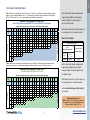
Table I. Based on the calculated total current draw of the unit, use Table I to determine the maximum distance and wire
gauge if one of the following conditions exist: (a.) A power supply is used with a battery backup and has the ability to
pull the “UPS Signal” pin low, or (b.) A power supply is used without a battery backup
Both of these tables indicate an approximate
supply voltage setting based on using the
maximum length for a specific gauge of
Maximum Power Supply Wire Length Table I
wire at a specific current.
Either: WITH a Battery Backup AND WITH a UPS Signal or WITHOUT a Battery Backup
(Assumes the voltage at the unit is set between 10.3 and 12.9 VDC during verification)
Supply Current
(A)
Supply Voltage
2.5
3
3.5
4
4.5
5
5.5
6
6.5
7
7.5
8
8.5
9
9.5
10
10.5
11
11.5
Both tables also indicate the mV/ft voltage drop
12.9
12.9
12.9
12.9
12.9
12.9
12.9
12.9
12.9
12.9
12.9
12.9
12.9
12.9
12.9
12.9
12.9
12.9
12.9
12.9
for each gauge of wire at a specific current.
12
409ft 327ft 272ft 233ft 204ft 181ft 163ft 148ft 136ft 125ft 116ft 109ft 102ft 96ft 90ft 86ft 81ft 77ft 74ft 71ft
6.35 7.94 9.53 11.12 12.71 14.29 15.88 17.47 19.06 20.65 22.24 23.82 25.41 27.00 28.59 30.18 31.77 33.35 34.94 36.53
14
257ft 205ft 171ft 147ft 128ft 114ft 102ft 93ft 85ft 79ft 73ft 68ft 64ft 60ft 57ft 54ft 51ft 49ft 46ft 44ft
10.10 12.63 15.15 17.68 20.20 22.73 25.26 27.78 30.31 32.83 35.36 37.88 40.41 42.93 45.46 47.99 50.51 53.04 55.56 58.09
16
161ft 129ft 107ft 92ft 80ft 71ft 64ft 58ft 53ft 49ft 46ft 43ft 40ft 38ft 35ft 34ft 32ft
16.06 20.07 24.09 28.10 32.11 36.13 40.14 44.16 48.17 52.18 56.20 60.21 64.23 68.24 72.26 76.27 80.28
18
101ft 81ft 67ft 58ft 50ft 45ft 40ft 37ft 33ft
25.54 31.93 38.31 44.70 51.08 57.47 63.86 70.24 76.63
20
64ft 51ft 42ft 36ft 32ft
40.61 50.76 60.92 71.07 81.22
22
40ft
64.57
How to Use The Tables:
Voltage Drop (mv/ft)
Wire Gauge
(V)
2
2
2.5
3
3.5
4
4.5
5
5.5
6
6.5
7
7.5
8
8.5
9
9.5
10
10.5
11
12
190ft 155ft
4.76 6.35
14
119ft 97ft 59ft 53ft 39ft 36ft 29ft 28ft 23ft 22ft 19ft 19ft 16ft 16ft 14ft 14ft 13ft 12ft 11ft 11ft
7.58 10.10 12.63 15.15 17.68 20.20 22.73 25.26 27.78 30.31 32.83 35.36 37.88 40.41 42.93 45.46 47.99 50.51 53.04 55.56
16
75ft 61ft 37ft 33ft 24ft 23ft 18ft 17ft 14ft 14ft 12ft 12ft 10ft 10ft
9ft
9ft
8ft
8ft
12.04 16.06 20.07 24.09 28.10 32.11 36.13 40.14 44.16 48.17 52.18 56.20 60.21 64.23 68.24 72.26 76.27 80.28
18
20
22
47ft 38ft 23ft
19.16 25.54 31.93
29ft 24ft 14ft
30.46 40.61 50.76
18ft
48.43
for each gauge of wire at a specific current.
85ft 63ft 58ft 47ft 44ft 37ft 36ft 31ft 30ft 27ft 26ft 23ft 22ft 21ft 20ft 18ft 18ft
9.53 11.12 12.71 14.29 15.88 17.47 19.06 20.65 22.24 23.82 25.41 27.00 28.59 30.18 31.77 33.35 34.94
21ft 15ft 14ft 11ft 11ft
9ft
9ft
38.31 44.70 51.08 57.47 63.86 70.24 76.63
13ft
9ft
9ft
60.92 71.07 81.22
13
Table I
Both tables also indicate the mV/ft voltage drop
14.11 14.19 13.95 14.01 13.90 13.95 13.88 13.91 13.86 13.89 13.85 13.88 13.84 13.87 13.84 13.86 13.83 13.85 13.83 13.85
94ft
7.94
Table I
at a specific current.
See also Actual Wire Gauge Table (Table III)
Voltage Drop (mv/ft)
Wire Gauge
(V)
pulls UPS PIN low
maximum length for a specific gauge of wire
(Assumes the voltage at the unit is set between 13.2 and 13.8 VDC during verification)
1.5
...UPS
Signal
supply voltage setting based on using the
WITH Battery Backup BUT WITHOUT a UPS Signal
(A)
...NO UPS
Signal
...does not have a
Backup Battery
Both of these tables indicate an approximate
Maximum Power Supply Wire Length Table II
Supply Voltage
has a
Backup Battery with...
Table II
Table II. Based on the calculated total current draw of the unit, use Table II to determine maximum distance and wire
gauge if a power supply is used with a battery backup but without the ability to pull the “UPS Signal” pin low.
Supply Current
If your Power Supply...
on next page.
Recommended Voltage Level
NOTE: Typically, a 3% or less drop in voltage from
the supply to the unit is the recommended level for
efficient operation of Stone Lock® Pro.
www.stonelockpro.com
1.14 VOLTAGE / WIRE
GAUGE TABLES (CONT’D)
Table III. If wire is already
installed, the table at the right can
be used as a reference to combine
wires in order to achieve an
equivalent wire gauge.
Actual Wire Gauge
Equivalent Wire Gauge
1.0
Notes:
24
23
22
21
20
19
18
17
16
12
16
13
11
9
7
6
5
4
3
13
13
11
9
7
6
5
4
3
14
11
9
7
6
5
4
3
15
9
7
6
5
4
3
3
16
7
6
5
4
17
6
5
4
3
18
5
4
3
19
4
3
20
3
21
22
www.stonelockpro.com
14
2
2
14
2
2
2
2
2
2
2
2
2
15
Example: An 12 AWG is the same
as using two (2) 14 AWG wires or
sixteen (16) 24 AWG wires.
2.0
Section 2:
Using Stone Lock Pro
®
2.01 Startup Configurations
2.02 Initial Enrollment
2.03 Advanced Function Menu
15
www.stonelockpro.com
Section 2: Using Stone Lock® Pro
2.02 INITIAL ENROLLMENT
Preparation for Initial Enrollment
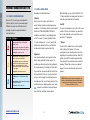
Stone Lock® Pro user types are divided into:
S-Admin, Admin, User. As one would expect,
different user types have different levels of
privileges to perform operations related to
users and devices.
S-Admin
User Type Privileges
Has access to: all items in “Advanced
Settings” menu.
User privileges: can perform all operations
except delete himself and change his type.
Designated by a red user icon.
Admin
Has access to: user management, record
inquiry, and system information.
User privileges: add users, delete users,
re-enroll users including himself; cannot
perform any modifications to S-Admin
profiles admin profiles, and cannot change
any user types.
Designated by an orange user icon.
While enrolling, the user should SLIGHTLY (1015º either direction) and slowly nod head side to
S-Admin
Stone Lock® Pro requires an S-Admin to
access all menu functions, including new user
enrollment. It is therefore HIGHLY recommended
that at least TWO ACCESSIBLE PEOPLE be
enrolled as an S-Admin to avoid being locked
side and up and down as the file builds.
Card ID
If you do not associate a card or ID # with a user
record at the time of enrollment, you cannot do
so at a later date and must re-enroll the user to
out of the menus. It is also important that if a
associate 1:1 credentials.
1:1 mode will be used, i.e. card + face that all
*Glasses
Stone Lock Pro enables the user to be verified
with or without their glasses. If the user
wears glasses, they should put them on at the
beginning of the enrollment process. When the
profile is about 50% complete (approximately
8 seconds into the enrollment process) and the
message “Please Note: remove your glasses”
appears, the user should quickly remove their
glasses.
S-Admins be enrolled with their card at initial
enrollment and must remember their ID #.
Alignment
User should enroll with a non-expressive face
that is easily replicated for daily access. The
enrolling user should keep their face centered in
the screen ensuring it is visible at all times and
they should see the green scan bar on their face
during enrollment. If at any time the scan bar is
User
2.0
2.01 STARTUP CONFIGURATIONS
Has NO access to the Advanced Setting
menu.
not seen on the image, the enrollment process
User privileges: Device activation privileges
as defined by Admins.
has stalled and they are not being enrolled. If the
Designated by a blue user icon.
enrollment process stalls more than once, touch
, educate the enrollee on proper technique,
and restart the enrollment process again.
www.stonelockpro.com
16
NOTE: Extremely thick lenses, safety glasses, sun
glasses or dark transitional glasses may disrupt the
scanning process and may have to be removed in
order to use Stone Lock® Pro.
d) Touch
to begin the enrollment
process. The process should take about
15 seconds.
2.0
Initial Enrollment, S-Admin
The initial user to be enrolled on a Stone Lock®
Pro device is enrolled as an S-Admin, granting
the initial user the highest level of privileges to
control all functions within the Stone Lock® Pro
device.
e) The user should enroll with a nonexpressive face that is easily replicated for
Subsequent enrollments enter as ordinary users
daily access. The enrolling user should
and must be upgraded by the S-Admin if other
keep their face centered in the screen
privilege levels are required. It is permissible to
ensuring it is visible at all times and they
have multiple S-Admins.
should see the green scan bar on their face
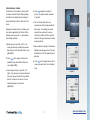
Fig 2.02-1
during enrollment.
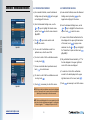
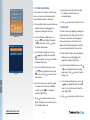
a) When you power up Stone Lock® Pro, the
device goes through an initial boot sequence.
f) After enrollment is complete, the Advanced
Wait until you see the animation start to cycle.
Settings menu will appear. From this menu,
(Fig. 2.02-1)
all local Stone Lock® Pro operations can be
performed.
b) Touch
on the keypad to interrupt the
Animation Cycles and initiate the New User
screen. (Fig. 2.02-2)
g) Touch
on the keypad twice to exit the
menu system and return to the Animation
Cycle.
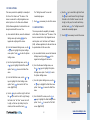
c) Use the keypad to input a user ID# (1-18
Fig 2.02-2
digits). If you also want a card associated with
this record, present the card at this point and
listen for a chirp from the device. The card
number will appear in the card line.
(Fig 2.02-3)
Fig 2.02-3
17
www.stonelockpro.com
2.0
Troubleshooting: Green Scan Bar Is Not Seen
If at any time the green scan bar is not seen on the enrollment screen, this indicates enrollment has
momentarily stalled, probably because the user is slightly out of range, has his/her head tilted or facial
features are being blocked. Moving the user closer, straightening the user’s posture, and
removing obstacles respectively should resume the enrollment process.
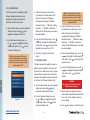
2.03 ACCESS OF ADVANCED FUNCTION MENU
a) As an S-Admin or Admin, at the Animation Cycle, touch
. The words “Administrator
Authentication” (Fig 2.03-1) will be displayed at the top of the screen when verifying for
Fig 2.03-1
device access.
b) Using the same (non-expressive) face that was used during enrollment, the user should keep
their face centered in the green frame of the verification screen.
c) If the verification fails, a failure note will pop up
(Fig 2.03-2), otherwise a success note (Fig 2.03-3),
and the device will enter the Advanced Setting menu.
Fig 2.03-2
Fig 2.03-3
www.stonelockpro.com
18
NOTE: If the verification mode is set to 1:1,
the user must present a card or an ID # as
described in 7.13 for proper verification.
Section 3:
3.0
User Management
3.01 User Management Menu
3.02 New User Enrollment Start
3.03Re-Enrollment
3.04 Changing Cards
3.05 Deleting A User
3.06 Change User Type
3.07 Check User Details
19
www.stonelockpro.com
Section 3: User Management
3.01 USER MANAGEMENT MENU
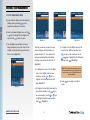
a) As an enrolled S-Admin, access the Advanced
Settings menu by touching
on the
3.0
keypad and verifying with the device.
b) From the Advanced Settings menu use the
or
keys to highlight the User Mgmt menu
option. Touch
to enter the menu.
Fig 3.01- 4
Fig 3.01- 3
Fig 3.01- 2
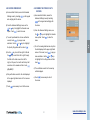
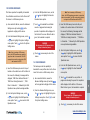
c) The User Mgmt menu defaults to all users
being displayed in the user list. Users that are
Touch any number key to search for users
enrolled are indicated with a green dot next to
whose ID# begins with that number. For
the user icon. (Fig 3.01-1)
example, when the “3” key is pressed, the
f) To display in the User Mgmt menu only the
users that have NOT been enrolled, Touch
to pop up menu selections. Use the
or
system automatically filters, and displays
only those users whose ID# starts with “3”.
keys to highlight the No BSD option
and then touch
. (Fig 3.01-4)
(Fig 3.01-2)
d) To display all the users in the User Mgmt
to show the menu
menu, touch
selections. Use the
or
keys to
highlight the All Users option and touch
. (Fig 3.01-1)
Fig 3.01- 1
to pop
users that are enrolled, touch
or
keys
to highlight the Enrolled option and then
touch
www.stonelockpro.com
. (Fig 3.01-3)
20
g) Touch
menus.
e) To display in the User Mgmt menu only the
up menu selections. Use the
Note: This function only exists when a profile
has been pushed from a fully integrated access
control system or the SLN, but the user has
not been enrolled.
as necessary to exit all the
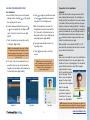
Preparation for User Enrollment:
User Enrollment:
a) As an enrolled S-Admin, access the Advanced
on the keypad
Settings menu by touching
and verifying with the device.
Alignment
User should enroll with a non-expressive face that is
easily replicated for daily access. The enrolling user
should keep their face centered in the screen ensuring
it is visible at all times and they should see the green
scan bar on their face during enrollment. If at anytime
the scan bar is not seen on the image, the enrollment
process has stalled and they are not being enrolled. If
the enrollment process stalls more than once, touch
, educate the enrollee on proper technique, and
restart the enrollment process again.
to discontinue the process
and return to the User Mgmt menu.
“Registration Successful” screen with the
keys to highlight the User Mgmt menu
option. Touch
or touch
to begin the enrollment process
f) When the enrollment is successful, the
b) From the Advanced Settings menu use the
or
e) Touch
ID #, the person’s first and last name, the
to enter the menu. (Fig.
department and the time of enrollment will
3.02-1)
momentarily appear. (Fig. 3.02-3)
c) Touch the number keys to input the user ID#
g) The system automatically returns to the
(4-18 digits). (Fig. 3.02-2)
User Mgmt menu.
Note: It is recommended to use at least a 4 digit
ID number as you can’t enter numbers of lesser
value from where you have started, i.e. if you have
a users with 1234, you will not be able to have a
1, a 12, or a 123.
h) Touch
as necessary to exit all the
menus.
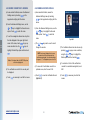
d) If the user is also to be enrolled with a card,
present the card over the card symbol on the
faceplate. The card number will be displayed in
the User Mgmt menu. (Fig. 3.02-2)
Note: The person’ first and last name
and the department will only appear if the
profile was pushed from the Stone Lock®
Network or from a fully integrated
access control system.
While enrolling, the user should SLIGHTLY (10-15º
either direction) and slowly nod head side to side and
up and down as the file builds.
Glasses
Stone Lock® Pro enables the user to be verified with or
without their glasses. If the user wears glasses, they
should put them on at the beginning of the enrollment
process. When the profile is about 50% complete
(approximately 8 seconds
into the enrollment process)
and the message “Please
Note: remove your glasses”
appears, the user should
quickly remove their glasses.
When the message
“Please Note: Remove
your glasses” appears at
the bottom of the screen,
please do so. (Fig 3.02-4)
Fig 3.02-1
Fig 3.02-2
Fig 3.02-3
21
Fig 3.02-4
NOTE: Extremely thick lenses, safety glasses, sun glasses or
dark transitional glasses may disrupt the scanning process and
may have to be removed in order to use Stone Lock® Pro.
www.stonelockpro.com
3.0
3.02 NEW USER ENROLLMENT START
Preparation for User Enrollment:
3.03 RE-ENROLLMENT
Alignment
a) As an enrolled S-Admin, access the
User should enroll with a non-expressive face
Advanced Settings menu by touching
that is easily replicated for daily access. The
enrolling user should keep their face centered in
the screen ensuring it is visible at all times and
3.0
they should see the green scan bar on their face
during enrollment. If at anytime the scan bar is
not seen on the image, the enrollment process
has stalled and they are not being enrolled. If the
enrollment process stalls more than once, touch
, educate the enrollee on proper technique,
and restart the enrollment process again.
While enrolling, the user should SLIGHTLY (10-
on the keypad and verifying with the
present the card over the card symbol on the
faceplate. The card number will be displayed
in the User Mgmt menu.
device.
b) From the Advanced Settings menu use
the
d) If the user is also to be enrolled with a card,
or
keys to highlight the User
Mgmt menu option. Touch
to enter
the menu.
or
keys to search the
list or by entering the ID# of the user.
(Fig.3.03-1)
to pop-up the re-enrollment
dialog box.
f) Touch
or touch
c) Select the user that needs to re-enroll by
using the
e) Touch
to begin the enrollment process
to discontinue the process and
return to the User Mgmt menu.
g) When the enrollment is successful, the
“Registration” screen with the ID #, the
person’s first and last name, the department
15º either direction) and slowly nod head side to
and the time of enrollment will momentarily
side and up and down as the file builds.
appear.
Glasses
Note: The person’ first and last name
and the department will only appear if the profile
was pushed from the Stone Lock® Network or
from a fully integrated access control system.
Stone Lock Pro enables the user to be verified
®
with or without their glasses. If the user wears
glasses, they should put them on at the beginning
h) The system automatically returns to the
of the enrollment process. When the profile is
User Mgmt menu.
about 50% complete (approximately 8 seconds
into the enrollment process) and the message
Fig 3.03-1
menus.
“Please Note: remove your glasses” appears, the
user should quickly remove their glasses.
NOTE: Extremely thick lenses, safety glasses, sun
glasses or dark transitional glasses may disrupt the
scanning process and may have to be removed in
order to use Stone Lock® Pro.
www.stonelockpro.com
i) Touch
22
as necessary to exit all the
3.04 CHANGING CARDS
3.05 DELETING A USER
a) As an enrolled S-Admin, access the Advanced
a) As an enrolled S-Admin, access the
on the keypad
on the keypad and verifying with the device.
and verifying with the device.
b) From the Advanced Settings menu use the
or
Advanced Settings menu by touching
b) From the Advanced Settings menu use the
keys to highlight the User Mgmt menu
option. Touch
to enter the menu.
or
keys to highlight the User Mgmt
menu option. Touch
c) Select the user that will be assigned to the card
by using the
or
keys to search the list or
by entering the ID# of the user. (Fig 3.04-1)
to enter the menu.
c) Select the user that is to be deleted by using
the
or
3.0
Settings menu by touching
Fig 3.04-1
Fig 3.04-2
keys to search the list or by
entering the ID# of the user. (Fig 3.05-1)
d) Present the card over the card symbol on the
the
displayed in the User Mgmt menu.
or
keys to highlight the Delete
option and then touch
e) If the user was previously assigned to a
different card, then presenting the new card
e) Touch
will cause a pop up dialogue box to appear
. (Fig 3.05-2)
to pop-up the delete confirmation
dialog box. (Fig 3.05-3) Touch
asking to replace the old card number with the
new card number. (Fig 3.04-2) Touch
to pop up menu selections. Use
d) Touch
face of the device. The card number will be
to
confirm the new card number or touch
the user and or touch
to discontinue the
process and return to the User Mgmt menu.
Fig 3.05-2
Fig 3.05-3
Fig 3.05-4
f) When the user has been deleted, the
Mgmt menu. The new card number will
“Deleted Successfully” screen will
be displayed in the User Mgmt menu.
momentarily appear (Fig 3.05-4)
to
re-enroll the user.
g) Touch
Fig 3.05-1
to
discontinue the process and return to the User
f) If you confirmed the new card, touch
to delete
g) Touch
as necessary to exit all the
menus.
as necessary to exit all the menus.
NOTE: Each card can only be
registered to one user profile.
NOTE: S-Admin cannot delete
their own profile(s).
23
www.stonelockpro.com
3.06 CHANGE USER TYPE
3.07 CHECK USER DETAILS
a) As an enrolled S-Admin, access the Advanced
a) As an enrolled S-Admin, access the
Settings menu by touching
on the
Advanced Settings menu by touching
on the keypad and verifying with
keypad and verifying with the device.
b) From then Advanced Settings menu use the
or
keys to highlight the User Mgmt
3.0
menu option. Touch
to enter the menu.
Fig 3.06-1
c) Select the user whose type needs to be
modified by using the
or
keys to
search the list or by entering the ID# of
the
to pop up menu selections. Use
or
keys to highlight the Change
Type option and then touch
e) Use the
Fig 3.06-3
Fig 3.06-2
or
. (Fig 3.06-1)
keys to highlight the
desired privilege type, “User” “Admin” or
“S-Admin”. (Fig 3.06-2)
f) Touch
or touch
to accept the selected privilege
to discontinue the process and
return to the User Mgmt menu.
g) When the user’s privilege has been changed,
the “Setting Successful” screen will
momentarily appear. (Fig 3.06-3)
h) Touch
Fig 3.07-1
www.stonelockpro.com
b) From the Advanced Settings menu use
the
or
keys to highlight the User
Mgmt menu option. Touch
to enter
the menu.
c) Select the user whose profile details
need to be viewed by using the
the user.
d) Touch
the device.
as necessary to exit all the
menus.
24
or
keys to search the list or by entering the
ID# of the user.
d) Touch
Use the
to pop up menu selections.
or
keys to highlight the
Details option, and then touch
. (Fig
3.07-1)
e) The “Details” screen for the selected
user will appear.
f) Touch
to return to the User Mgmt
menu.
g) Touch
the menus.
as necessary to exit all
Section 4:
4.0
Verification Records
4.01 Verification Record Overview
4.02 Verification Failures
4.03 Record Viewing Date
4.04 Viewing Previous Day’s Records
4.05 Viewing the Next Day’s Records
4.06 Viewing a Record’s Details
25
www.stonelockpro.com
Section 4: Verification Records
4.01 VERIFICATION OVERVIEW
4.02 VERIFICATION FAILURES
a) As an enrolled S-Admin, access the Advanced
a) As an enrolled S-Admin, access the Advanced
Settings menu by touching
on the keypad
and verifying with the device.
b) From the Advanced Settings menu, use the
or
keys to highlight the Records menu
option. Touch
to enter the menu shown in
Fig 4.01-1.
c) The
or
keys can be used to scroll
particular user, enter the user’s ID#.
e) T
o return to a list of all the verifications records
.
in a day, touch
f) To view more details about a particular record,
to view full screen.
g) To return to a list of all the verifications records
.
in a day, touch
Fig 4.02-1
h) Touch
as necessary to exit all the menus.
NOTE: Only one day’s verifications records can be displayed
at a time. Upon entry into the menu, the device defaults to
displaying the current day’s verification records.
NOTE: Each record displayed in the menu consists of an ID#
and a time that the verification was logged. If a verification
failure is logged, a “?” is displayed in place of an ID#.
www.stonelockpro.com
4.0
keypad and verifying with the device.
b) From the Advanced Settings menu, use the
or
keys to highlight the Records menu
option. Touch
to enter the menu.
26
date displayed in the upper right-hand corner
to pop up menu
of the menu, touch
d) To view a list of verification records for a
touch
on the
c) To view a list of all failed verifications for the
through the records.
Fig 4.01-1
Settings menu by touching
selections. Use the
or
keys to highlight
the “Denied Recs” option and then touch
.
(Fig 4.02-1)
d) Only verification failures denoted by a “?” for
the date displayed in the upper right-hand
corner of the menu are displayed.
e) To return to a list of all the verifications
records for the date displayed in the upper
right-hand corner of the menu, touch
f) Touch
.
as necessary to exit all the menus.
4.04 V
IEWING THE PREVIOUS DAY’S
RECORDS
4.03 RECORD VIEWING DATE
a) As an enrolled S-Admin, access the Advanced
on the keypad
and verifying with the device.
the device.
keys to highlight the Records menu
option. Touch
b) From the Advanced Settings menu, use
to enter the menu.
the
c) To select a particular date to view verification
records, touch
selections. Use the
d) Use the
the
keys to highlight the Records
to enter the
menu.
keys to highlight
the Specify Day option and then touch
or
menu option. Touch
to pop up menu
or
Advanced Settings menu by touching
on the keypad and verifying with
b) From the Advanced Settings menu, use the
or
a) As an enrolled S-Admin, access the
Fig 4.03-1
c) To set the viewing date back one day from
.
the date displayed in the upper right-hand
key to scroll from right to left and
to pop up
corner of the menu, touch
key to scroll from left to right through
menu selections. Use the
or
keys
the fields in the date screen. From left to
to highlight the Prev Day option and then
right, set the year, the month and the day that
touch
records are to be viewed and then touch
.
(Fig 4.03-1)
e) Only verification records for the date displayed
in the upper right-hand corner of the menu are
displayed.
f) Touch
4.0
Settings menu by touching
.
d) The verification records for the new day
will be displayed.
e) Touch
as necessary to exit all
the menus.
as necessary to exit all the menus.
27
www.stonelockpro.com
4.05 VIEWING THE NEXT DAY’S RECORDS
4.06 VIEWING A RECORD’S DETAILS
a) As an enrolled S-Admin, access the Advanced
a) As an enrolled S-Admin, access the
Settings menu by touching
on the
Advanced Settings menu by touching
keypad and verifying with the device.
b) From the Advanced Settings menu, use the
or
keys to highlight the Records menu
option. Touch
device.
b) From the Advanced Settings menu, use the
to enter the menu.
c) To set the viewing date forward one day from
the date displayed in the upper right-hand
to pop up
corner of the menu, touch
4.0
on the keypad and verifying with the
menu selections. Use the
or
keys to
or
keys to highlight the Records
menu option. Touch
to enter the
menu.
c) The
Fig 4.06-1
or
keys can be used to scroll
through the records.
highlight the Next Day option and then touch
.
Note: If it is today’s date, the NEXT DAY option
will not be highlighted.
pressing
NOTE: Each record displayed in the menu
consists of an ID# and a time that the
verification was logged. If a verification failure
is logged, a “?” is displayed in place of an ID#.
using the
to pop up menu selections,
or
keys to highlight the
Details option and then touching
.
g) To return to a list of all the verifications
d) To view a list of verification records for a
d) The verification records for the new day will
f) The Verification Record can also be view by
particular user, enter the user’s ID#.
records for a selected viewing date, touch
ESC.
be displayed.
e) Touch
e) Touch
as necessary to exit all the menus.
www.stonelockpro.com
to view the Verification Record.
h) Touch
menus.
(Fig 4.06-1)
28
as necessary to exit all the
Section 5:
5.01Access Control Overview
5.08 Door Sensor Settings
5.02 Device Permissions
5.09Auxiliary Outputs & Inputs
Overview
5.03 Door Settings
5.04 Door Lock Settings
5.05 Door Timer Setting
5.06 Guest PIN Access
5.07 Card # Parsing
5.0
Access Control
5.10 Auxiliary Outputs
5.11 Auxiliary Inputs
5.12 Wiegand Configuration
5.13 Silent Alarm
29
www.stonelockpro.com
Section 5: Access Control
5.01 ACCESS CONTROL OVERVIEW
When the device permission is set to
a) As an enrolled S-Admin, access the Advanced
“Access” permission is granted to the
This menu provides control of 6 features:
Settings menu by touching
user once he/she has been verified. When
Device Permission, Door Settings, Door Sensor
keypad and verifying with the device.
the device permission is set to “Denied”
Settings, Auxiliary, Wiegand Config and Silent
permission is NOT granted to the user even
Alarm.
though he/she has successfully verified. The
a) As an enrolled S-Admin, access the Advanced
Settings menu by touching
on the
keypad and verifying with the device.
b) From the Advanced Settings menu, use the
or
to enter the menu
shown in Fig 5.01-1.
c) Touch
permission is set to “Access” by default from
the factory. Access permission for each user
profile can be changed using a fully integrated
access control system or the Stone Lock®
Network (SLN) software application.
keys to highlight the Access Control
menu option. Touch
5.0
5.02 DEVICE PERMISSIONS
as necessary to exit all the
menus.
NOTE: Reference the applicable access control
system user guide or reference sections of the
Stone Lock® Network (SLN) User Guide.
A fully integrated access control system
or the Stone Lock® Network (SLN) software
application has the capability to set
permissions per individual users. When the
Fig 5.01- 1
b) From the Advanced Settings menu, use the
or
keys to highlight the Access Control
menu option. Touch
or
keys to highlight the Device Permission
menu option. Touch
to enter the Device
Permission: menu shown in Fig 5.02-1.
or
d) Use the
keys to highlight the
desired permission, “Access” or “Denied”.
e) Touch
to accept the selected permission
or touch ESC to discontinue the process and
return to the Access Control menu.
f) When the permission has been changed,
the “Setting
the device will comply with that user’s
Successful”
permission regardless of what this menu
screen will
option has been set to (i.e. the user’s
momentarily
permission takes precedence). If a specific
appear.
setting of this menu option is used.
to enter the menu.
c) From the Access Control menu, use the
permission is set for an individual user,
permission has not been set for a user, the
on the
g) Touch
as
necessary to exit
all the menus
Fig 5.02-1
www.stonelockpro.com
30
5.03 DOOR SETTINGS
This menu provides control of 6 features: Lock #1,
c) From the Access Control menu, use
Lock #2, Door Timer, Guest PIN, Guest PIN # and
the
Card # Parsing. Lock #1 and Lock #2 are set to
Settings menu option. Touch
“Passive” from the factory.
enter the Door Settings menu shown in
a) As an enrolled S-Admin, access the Advanced
Settings menu by touching
on the keypad
and verifying with the device.
or
keys to highlight the Door
to
Fig 5.03-1.
d) Touch
as necessary to exit all the
menus.
b) From the Advanced Settings menu, use the
or
Fig 5.03-1
keys to highlight the Access Control
menu option. Touch
to enter the menu.
Lock Settings Description
Passive
5.0
No voltage is supplied to the “Close”, “Open” or “EPOW” pins. The “Close” pins become the
Normally Closed pins, the “Open” pins become the Normally Open pins and the “EPOW” pins
become the Common pins of a standard relay.
The “EPOW” pins are connected to the “Close” pins until after successful user verification
when they are disconnected from the “Close” pins and connected to the “Open” pins.
After the “Door Timer” time interval, the EPOW pins are disconnected from the “Open” pins
and reconnected to the “Close” pins.
See section 5.05 “Door Timer Setting”.
Supplies 12 VDC, at the “Close” pins until after successful user verification. Then, no voltage
is supplied until after the “Door Timer” time interval and then returns to 12 VDC.
Active
Supplies no voltage, at the “Open” pins until after successful user verification. Then, supplies
12 VDC until after the “Door Timer” time interval and then returns to a no voltage state.
Supplies a continuous 12VDC at the “ EPOW” pins.
See section 5.05 “Door Timer Setting”.
Supplies a 5 VDC, 500ms pulse signal at the “Close” pins after successful user verification.
Electric
Supplies a 5 VDC, 500ms pulse signal at the “Open” pins after the “Door Timer” time
interval.
Supplies a 5 VDC, 500ms pulse signal after successful user verification followed by another
5 VDC, 500ms pulse signal after the “Door Timer” time interval at the “EPOW” pins.
See section 5.05 “Door Timer Setting”.
31
www.stonelockpro.com
5.04 DOOR LOCK SETTINGS
5.05 DOOR TIMER SETTING
Two lock controllers are available for use on
The Door Timer is the time interval between
the Stone Lock Pro device and each can be
when a user has been verified and allowed access
controlled independently by using the Lock #1
and when access is again denied until the next
and Lock #2 menu options in the Door Settings
successful verification. For example, if the device
menu.
is used to control a door lock, the lock will unlatch
®
a) As an enrolled S-Admin, access the Advanced
Fig 5.04-1
on the
Settings menu by touching
Settings menu by touching
b) From the Advanced Settings menu, use the
keys to highlight the Access Control
menu option. Touch
to enter the menu.
c) From the Access Control menu, use the
or
keys to highlight the Door Settings menu
to enter the Door Settings
5.0
option. Touch
d) From the Door Settings menu, use the
to pop up the
e) Use the
keypad and verifying with the device.
b) From the Advanced Settings menu, use the
or
keys to highlight the Access Control
menu option. Touch
to enter the menu.
c) From the Access Control menu, use the
or
keys to highlight the
desired lock setting, “Passive” “Active”
or “Electric” (Fig 5.04-1). Touch
option. Touch
to enter the Door Settings
menu shown in Fig 5.05-1.
d) From the Door Settings menu, use the
.
option. Touch
or
to pop up the interface
shown in Fig 5.05-2.
e) Enter a Hold Open time interval that is
The “Setting Successful” screen will
between 0 and 120 seconds and touch
momentarily appear.
The “Setting Successful” screen will
f) Touch
or
keys to highlight the Door Timer menu
interface.
as necessary to exit all
.
momentarily appear.
Note: When this parameter is set to 0, the actual hold
open time interval is 0.5s.
the menus.
Fig 5.05-2
www.stonelockpro.com
or
keys to highlight the Lock #1 or the Lock
#2 menu option. Touch
on the
keys to highlight the Door Settings menu
menu. (Fig 5.03-1, pg 31)
Fig 5.05-1
end of the set time interval.
a) A
s an enrolled S-Admin, access the Advanced
keypad and verifying with the device.
or
after verification of the user and latch again at the
f) Touch
32
as necessary to exit all the menus.
5.06 GUEST PIN ACCESS
Guest PIN access provides the ability for a user to be granted access to the facility by entering a Guest
PIN rather than by biometric verification. The use of this function is intended for temporary use only
and will generate an alarm record.
To use the Guest PIN once it has been set up and turned on, touch
, enter the Guest PIN and
touch OK. Use of the Guest PIN will be captured in the verification records with a photo of the
individual along with a time and date stamp.
on the keypad and
a) As an enrolled S-Admin, access the Advanced Settings menu by touching
verifying with the device.
Fig 5.06-1
or
b) From the Advanced Settings menu, use the
option. Touch
to enter the menu.
c) From the Access Control menu, use the
keys to highlight the Door Settings menu option.
to enter the Door Settings menu.
d) From the Door Settings menu, use the
Touch
or
or
5.0
Touch
keys to highlight the Access Control menu
keys to highlight the Guest PIN menu option.
to toggle the graphical switch from “Off to “On” or from “On” to “Off”. The “On” setting
allows the Guest PIN to be used to gain access. The “Off” setting does not allow the Guest PIN to
be used to gain access.
e) From the Door Settings menu, use the
Touch
or
keys to highlight the Guest Pin # menu option.
to pop up the interface shown in Fig 5.06-1.
f) Enter a Guest PIN that is 4 to 8 digits in length and touch
. The “Setting Successful” screen will
momentarily appear.
g) Touch
as necessary to exit all the menus.
33
www.stonelockpro.com
5.07 CARD # PARSING
This menu option provides the ability to change
the method used by the Stone Lock® Pro device to
Settings menu by touching
interpret the information read from a card whose
and verifying with the device.
format has not been specifically pre-programmed
into the device. Examples of preprogrammed formats
include, 35 Bit Corporate 1000, 37 Bit H10304, 37
Bit H10302, and 37 Bit Andover Infinity.
Five different parsing modes are provided:
6HND*
8H10D
or
menu option. Touch
4H4H
*Note: The default setting is 6HND.
Fig 5.07-1
or
keys to highlight the Door Settings menu
to enter the Door Settings
option. Touch
or
keys to highlight the Card # Parsing
to enter the Card
# Parsing menu shown in Fig 5.07-1.
to enter the menu.
c) From the Access Control menu, use the
d) From the Door Settings menu, use the
menu option. Touch
keys to highlight the Access Control
Designator
2H4H
on the keypad
b) From the Advanced Settings menu, use the
e) Use the
or
keys to highlight the
desired setting. Touch
. The “Setting
Successful” screen will momentarily
appear.
f) Touch
as necessary to exit all the
menus.
menu.
6H8D
5.0
a) As an enrolled S-Admin, access the Advanced
Format
6HND
Default
Convert the last 6 Hexadecimal digits (i.e. 24 bits of a 26 bit card after excluding the parity bits) into a Decimal
card number without limiting the amount of Decimal digits displayed.
For example: “0110 1111 0110 1100 0011 1010” card bits = “6F6C3A” in Hexadecimal and is converted
to“7302202” Decimal.
6H8D
Convert the last 6 Hexadecimal digits (i.e. 24 bits of a 26 bit card after excluding the parity bits) into an 8 digit
Decimal card number.
For example: “0110 1111 0110 1100 0011 1010” card bits = “6F6C3A” in Hexadecimal and is converted
to“07302202” Decimal.
8H10D
Convert the last 8 Hexadecimal digits (i.e. 32 bits of a 34 bit card after excluding the parity bits) into an 10
digit Decimal card number.
For example: 0000 0010 0110 1111 0110 1100 0011 1010” card bits = “026F6C3A” in Hexadecimal and
is converted to“0040856634” Decimal.
2H4H
Of the last 6 Hexadecimal digits (i.e. 24 bits of a 26 bit card after excluding the parity bits), convert the first
2 Hexadecimal digits into a 3 digit Decimal number, then convert the latter 4 Hexadecimal digits into a 5 digit
Decimal number.
For example: “0110 1111 0110 1100 0011 1010” card bits = “6F6C3A” in Hexadecimal. “6F” is converted
to “111” and “6C3A” is converted to “27706” and displayed as “11127706”.
4H4H
Of the last 8 Hexadecimal digits (i.e. 32 bits of a 34 bit card after excluding the parity bits), convert the first
4 Hexadecimal digits into a 5 digit Decimal number then convert the latter 4 Hexadecimal digits into a 5 digit
Decimal number.
For example: “0000 0010 0110 1111 0110 1100 0011 1010” card bits = “026F6C3A” in Hexadecimal.
“026F” is converted to “00623” and “6C3A” is converted to “27706” and displayed as “0062327706”.
WARNING
During enrollment, if cards that have formats that have not been preprogrammed into the device
are assigned to users read under one mode, these cards will no longer be interpreted by
the device as valid once the device has been set to a different mode.
www.stonelockpro.com
34
5.08 DOOR SENSOR SETTINGS
Using the “Door Sensor Inputs” on the device,
c) From the Access Control menu, use the
the “Door Sensor Settings” are used to detect a
or
forced entry or a held open condition.
Settings menu option. Touch
For a forced entry condition, an alarm record is
generated immediately when a Door Sensor Input
detects a transition from a low state of 0.0 VDC
keys to highlight the Door Sensor
the Door Sensor Settings menu shown in
Fig 5.08-1.
d) From the Door Sensor Settings menu, use
to its default high state of 4.0 VDC without a prior
the
successful user verification.
menu option. Touch
generated when a successful verification has
occurred and the Door Sensor Input detects
a transition from a low state of 0.0 VDC to its
default high state of 4.0 VDC but does not detect
a transition back to a low state prior to the “Door
Timeout” period expiring.
keys to highlight the “Detect”
to toggle the
graphical switch from “Off to “On” or from
Fig 5.08-1
“On” to “Off”. The “On” setting detects a
forced entry or a held open condition and
generates an alarm record. The “Off” setting
does not detect a forced entry or a held
open condition.
e) From the Door Sensor Settings menu, use
The “Door Timeout” period starts when the low
to high transition is detected at the Door Senor
Input. “Door Sensor Input 1” is used for the
primary door and “Door Sensor Input 2” is used
for the secondary door.
or
the
keys to highlight the Door
Timeout menu option. Touch
to pop up
the interface shown in Fig 5.08-2.
Fig 5.08-2
f) Enter a Door Sensor Timeout interval that
is between 3 and 120 seconds and touch
a) As an enrolled S-Admin, access the Advanced
Settings menu by touching
on the
keypad and verifying with the device.
b) From the Advanced Settings menu, use the
or
or
5.0
For a held open condition, an alarm record is
to enter
. The “Setting Successful” screen will
momentarily appear.
g) Touch
as necessary to exit all the
menus.
keys to highlight the Access Control
menu option. Touch
to enter the menu.
35
www.stonelockpro.com
5.09 AUXILIARY OUTPUTS AND INPUTS
5.10 AUXILIARY OUTPUTS
The Auxiliary menu provides the ability to control
Two auxiliary outputs are available for use on
the function of all Stone Lock Pro Auxiliary
the Stone Lock® Pro device and each can be
Outputs and Inputs.
controlled independently by using the “Aux
®
a) As an enrolled S-Admin, access the Advanced
Settings menu by touching
on the keypad
and verifying with the device.
b) From the Advanced Settings menu, use the
or
keys to highlight the Access Control menu
option. Touch
to enter the menu.
c) From the Access Control menu, use the
or
keys to highlight the Auxiliary menu
5.0
option. Touch
to enter the Auxiliary
menu shown in Fig 5.09-1.
d) Touch
as necessary to exit all the menus.
Out 1” and “Aux Out 2” menu options in the
Auxiliary menu. The outputs can be configured to
change state based on designated alarm events.
Reference Section 7.04, Alarm Settings.
a) As an enrolled S-Admin, access the Advanced
Settings menu by touching
on the
keypad and verifying with the device.
b) From the Advanced Settings menu, use the
or
keys to highlight the Access Control
menu option. Touch
to enter the menu.
c) From the Access Control menu, use the
or
keys to highlight the Auxiliary menu
option. Touch
to enter the Auxiliary
menu shown above in Fig 5.09-1.
Output Type
Passive
Fig 5.09-1
www.stonelockpro.com
Active
Default Setting
Fig 5.10-1
d) From the Auxiliary menu, use the
or
keys to highlight the “Aux Out 1” or the “Aux
Out 2” menu option. Touch
to pop up the
interface shown in Fig 5.10-1.
e) Use the
or
keys to highlight the desired
Output Type, “Passive” or “Active”. Touch
. The “Setting Successful” screen will
momentarily appear.
f) Touch
as necessary to exit all the menus.
Description
No voltage is supplied to the “Normally Closed (NC)”, “Normally Opened (NO)” or “Common (COM)” pins.
The “NC” pins become the Normally Closed pins, the “NO” pins become the Normally Open pins and the
“COM” pins become the Common pins of a standard relay.
The “COM’ pins are connected to the “NC” pins until after a designated alarm event occurs when they are
disconnected from the “NC” pins and connected to the “NO” pins.
After approximately 6 seconds, the “COM” pins are disconnect from the “NO” pins and reconnected to the
“NC” pins.
Supplies 12 VDC, at the “Normally Closed (NC)” pins until after a designated alarm event occurs.
Then, supplies no voltage for approximately 6 seconds and then returns to 12 VDC.
Supplies no voltage at the “Normally Opened (NO)” pins until after a designated alarm event occurs.
Then, supplies 12 VDC for approximately 6 seconds and then returns to a no voltage state.
Supplies a continuous 12VDC at the “Common (COM)” pins. This is the default setting.
36
5.11 AUXILIARY INPUTS
Four auxiliary Inputs are available for use on the Stone Lock® Pro device and each can be controlled
independently by using the “Aux In 1”, “Aux In 2”, “Aux In 3” and “Aux In 4” menu options in the
Auxiliary menu.
on the keypad and
a) As an enrolled S-Admin, access the Advanced Settings menu by touching
verifying with the device.
or
b) From the Advanced Settings menu, use the
option. Touch
keys to highlight the Access Control menu
to enter the menu.
Fig 5.11-1
c) From the Access Control menu, use the
keys to highlight the Auxiliary menu option.
to enter the Auxiliary menu shown in Fig 5.09-1.
d) From the Auxiliary menu, use the
or “Aux In 4” menu option. Touch
e) Use the
or
or
keys to highlight the “Aux In 1”, “Aux In 2”, “Aux In 3”
to pop up the interface shown in Fig 5.11-1.
keys to highlight the desired Input Type, “NO” or “NC”. Touch
5.0
Touch
or
. The “Setting
Successful” screen will momentarily appear.
f) Touch
as necessary to exit all the menus.
Input Type
Description
NO
When this menu option is chosen, an event is detected when the Auxiliary input detects a transition
from a low state of 0.0 VDC to its default high state of 4.0 VDC.
This can be accomplished by disconnecting the Auxiliary Input from ground or driving it high with
a TTL signal.
NC
When this menu option is chosen, an event is detected when the Auxiliary input detects a transition
from its default high state of 4.0 VDC to a low state of 0.0 VDC.
This can be accomplished by connecting the Auxiliary Input to ground or driving it low with a TTL
signal.
37
www.stonelockpro.com
5.12 WIEGAND CONFIGURATION
Fig 5.12-1
This “Wiegand Config” menu option provides
Card Number:
the ability to activate and de-activate the
If the output type is set to “Card” and the
Wiegand output on the control unit and to set
Recognition Mode is set to “1:N”, then upon
the type information that is communicated at
successful verification of a user, the card number
the Wiegand output. Three types of information
stored in the user’s profile will be communicated
can be communicated:
at the Wiegand output as a 26 bit or 34 bit
1. ID Number
Wiegand (depending on the Wiegand Output
2. Card Number
setting) with no Facility Code.
5.0
3. Customer Number
Fig 5.12-2
Fig 5.12-3
ID Number:
this scenario when the Wiegand Output setting
If the output type is set to “ID”, then upon
is 26 is 16777215. All card numbers larger than
successful verification of a user, independent
16777215 will be truncated (ex. 16777216, will
of the Recognition Mode used (1:N, 1:1 or
be sent as 0, 16777217 will be sent as 1 and
Card Only), the user’s ID number will be
so on). The largest Card number that can be
communicated at the Wiegand output as a
sent when the Wiegand Output Setting is 34
26 bit or 34 bit Wiegand (depending on the
is 4294967295. All Card numbers larger than
Wiegand Output setting) with no Facility Code.
4294967295 will be sent as 4294967295.
The largest ID number that can be sent under
If the Output Type is set to “Card” and the
this scenario when the Wiegand Output setting
Recognition Mode is set to “1:1”, then upon
is 26 is 16777215. All ID numbers larger than
successful verification of a user, the Wiegand
16777215 will be truncated (ex. 16777216,
Output setting is ignored and all the bits read
will be sent as 0, 16777217 will be sent as 1
from the user’s card during verification are
and so on). The largest ID number that can
communicated at the Wiegand output.
be sent when the Wiegand Output Setting is
Custom Number:
If the output type is set to “Custom” then upon
successful verification of any user, independent
34 is 4294967295. All ID numbers larger than
4294967295 will be sent as 4294967295.
Fig 5.12-4
www.stonelockpro.com
The largest Card number that can be sent under
38
Only), a custom number will be communicated at
d) From the Wiegand Config menu, use the
or
keys to highlight the Wiegand
to pop
the Wiegand output as a 26 Bit or 34 Bit Wiegand
Output menu option. Touch
(depending on the Wiegand Output setting) with
up the interface shown in Fig 5.12-2.
no Facility Code.
e) Use the
or
keys to highlight the
The largest Custom number that can be sent under
desired format type, “OFF”, “26” or “34”.
this scenario when the Wiegand Output setting is
Touch
26 is 16777215. All Custom numbers larger than
screen will momentarily appear.
16777215 will be truncated (ex. 16777216, will be
sent as 0, 16777217 will be sent as 1 and so on).
The largest Custom number that can be sent when
the Wiegand Output Setting is 34 is 99999999.
a) As an enrolled S-Admin, access the Advanced
Settings menu by touching
on the
or
keys to highlight the Access Control
menu option. Touch
to enter the menu.
c) From the Access Control menu, use the
or
keys to highlight the Wiegand Config menu
option. Touch
to enter the Wiegand Config
menu shown in Fig 5.12-1.
Description
Upon successful verification of a user, the
user’s ID number will be communicated at the
Wiegand output
Upon successful verification of a user, the
card number stored in the user’s profile (if
the Recognition Mode is set to “1:N”) or the
card information read from a presented card
(if the Recognition Mode is set to “1:1”) is
communicated at the Wiegand output.
Upon successful authentication of a user, a
custom number # will be communicated at the
Wiegand output.
f) From the Wiegand Config menu, use the
or
keys to highlight the Output
Type menu option. Touch
to pop up
g) Use the
or
Wiegand Output
desired Output Type, “ID”, “Card” or
“Custom”. Touch
The Wiegand output is turned off.
26
The Wiegand output is turned on and set
to 26 bits per packet to communicate ID
numbers or Card numbers stored in a user’s
profile as well as Custom numbers. This
setting is ignored for cards presented during
verification when all of the bits read from the
card will be communicated at the Wiegand
output.
34
The Wiegand output is turned on and set
to 34 bits per packet to communicate ID
numbers or Card numbers stored in a user’s
profile as well as Custom numbers. This
setting is ignored for cards presented during
verification when all of the bits read from the
card will be communicated at the Wiegand
output.
. The “Setting
Successful” screen will momentarily
appear.
or
keys to highlight the Custom
to pop
number menu option. Touch
Description
Off
keys to highlight the
from the Wiegand Config menu, use the
b) From the Advanced Settings menu, use the
Card
Custom
h) If the output type is set to “Custom”,
keypad and verifying with the device.
ID
. The “Setting Successful”
the interface shown in Fig 5.12-3.
*Note: The Custom Number is specific to a device not a
user. Therefore, every successful verification of a user at
one device will communicate the same Custom number
at the Wiegand output.
Output Type
up the interface shown in Fig 5.12-4.
i) Enter a custom number that is 1 to
8 digits in length and touch
.
The “Setting Successful” screen will
momentarily appear.
j) Touch
as necessary to exit all the
menus.
39
www.stonelockpro.com
5.0
of the Recognition Mode used (1:N, 1:1 or Card
Notes:
5.13 Silent Alarm
This function provides the capability for users to trip a silent alarm in case of emergencies. When
the function is turned on, all users are required to first touch either the
button (or any number
key on the keypad) prior to biometric verification (or present card or enter PIN when in 1:1 mode) to
gain normal access. To trip the silent alarm, the user must first touch and hold ESC for approximately
5 seconds until the “Verifying” screen appears and then present their face for verification. Once the
verification is successful, the silent alarm will be sent over the LAN connection.
a) As an enrolled S-Admin, access the Advanced Settings menu by touching
on the keypad and
verifying with the device.
or
b) From the Advanced Settings menu, use the
to enter the menu.
option. Touch
c) From the Access Control menu, use the
Touch
www.stonelockpro.com
or
keys to highlight the Silent Alarm menu option.
to toggle the graphical switch from “Off to “On” or from “On” to “Off”.
as necessary to exit all the menus.
5.0
d) Touch
keys to highlight the Access Control menu
40
Section 6:
Network Functions
6.02LAN
6.03 IP Settings
6.04 Setting Up the IP Address
6.05 Setting the Subnet Mask
6.06Setting the Gateway
Address
6.07Setting the
DNS Address
6.08 Web Service
6.09 Real-Time Records
6.0
6.01 Network Functions
6.10Remote
6.11Auto Upload
New User
41
www.stonelockpro.com
Section 6: Network Functions
6.02 LAN
The “LAN” menu option provides the ability to
6.01 NETWORK FUNCTIONS
The “Network” menu provides six menu options:
• LAN
connection. When a fully integrated access
Touch
control system or the Stone Lock® Network
in Fig 6.02-1.
for the device to communicate. If a fully
• Real-Time Records
integrated access control system or the SLN
• Remote Load
is not being used, it is recommended that the
• Auto Upload New User.
“Off” option be selected.
LAN, IP Settings and Web Service can be
modified locally at the device. The other three
can have their status viewed at the device but
can only be modified using a fully integrated
access control system or the Stone Lock
®
Network (SLN) software application.
Settings menu by touching
Advanced Settings menu by touching
on the keypad and verifying with the device.
b) From the Advanced Settings menu, use
on the
or
keys to highlight the Network
menu option. Touch
d) Use the
to enter the
to enter the LAN: menu shown
or
keys to highlight “On”
to enable the Ethernet network connection
or “Off” to disable the Ethernet network
connection.
e) Touch
a) As an enrolled S-Admin, access the
the
a) As an enrolled S-Admin, access the Advanced
6.0
keys to highlight the LAN menu option.
device, the “On” option will need to be selected
• Web Service
to accept the highlighted
selection. The “Setting Successful” screen
will momentarily appear. Touch
Network menu.
f) Touch
as necessary to exit all the
menus.
Network menu.
b) From the Advanced Settings menu, use the
keys to highlight the Network menu
option. Touch
to enter the Network menu
shown in Fig 6.01-1
c) Touch
as necessary to exit all the menus.
Fig 6.01-1
www.stonelockpro.com
42
to
discontinue the process and return to the
keypad and verifying with the device.
or
or
activate and de-activate the Ethernet network
(SLN) software application is used with the
• IP Settings
c) From the Network menu, use the
Fig 6.02-1
6.03 IP SETTINGS
6.04 SETTING THE IP ADDRESS
The IP Settings menu provides five menu options:
a) As an enrolled S-Admin, access the
• IP Address
Advanced Settings menu by touching
• Subnet Mask
on the keypad and verifying with
• Gateway
the device.
• DNS
b) From the Advanced Settings menu, use
• Multicast
or
the
keys to highlight the Network
The first four can be modified at the device. The
menu option. Touch
last one can only have its status viewed at
Network menu.
the device.
or
on the keypad
and verifying with the device.
to enter the IP Settings
d) To set the IP Address, use the
keys to highlight the Network menu
to enter the Network menu.
c) From the Network menu, use the
option. Touch
menu shown in Fig 6.04-1.
b) From the Advanced Settings menu, use the
option. Touch
keys to highlight the IP Settings menu
or
keys
to highlight the IP Settings menu option. Touch
to enter the IP Settings menu.
as necessary to exit all the menus.
or
keys to highlight the IP Address option
and then touch
to view the “Set IP
Address” screen shown in Fig 6.04-2.
e) Use the
key to scroll from right to left
and the
key to scroll from left to right
Fig 6.04-2
through the fields in the “Set IP Address:”
screen. Enter the desired IP Address and
touch
or touch
to leave the
address unchanged and return to the IP
Settings menu.
f) Touch
as necessary to exit all the
menus.
43
www.stonelockpro.com
6.0
Settings menu by touching
d) Touch
Fig 6.04-1
c) From the Network menu, use the
a) As an enrolled S-Admin, access the Advanced
or
to enter the
6.05 SETTING THE SUBNET MASK
a) As an enrolled S-Admin, access the Advanced Settings menu by touching
on the keypad
and verifying with the device.
or
b) From the Advanced Settings menu, use the
Touch
keys to highlight the Network menu option.
to enter the Network menu.
c) From the Network menu, use the
or
keys to highlight the IP Settings menu option. Touch
to enter the IP Settings menu shown in Fig 6.04-1.
Fig 6.05-1
d) To set the Subnet Mask, use the
touch
e) Use the
or
keys to highlight the “Subnet Mask” option and then
to view the “Set subnet Mask:” screen shown in figure Fig 6.05-1.
key to scroll from right to left and the
key to scroll from left to right through the
fields in the “Set subnet Mask:” screen. Enter the desired Subnet Mask and touch
to leave the Subnet Mask unchanged and return to the “IP Settings” menu.
as necessary to exit all the menus.
6.0
f) Touch
www.stonelockpro.com
44
or touch
6.06 SETTING THE GATEWAY ADDRESS
6.07 SETTING THE DNS ADDRESS
a) As an enrolled S-Admin, access the
a) As an enrolled S-Admin, access the Advanced
Advanced Settings menu by touching
Settings menu by touching
on the keypad and verifying with the device.
keypad and verifying with the device.
b) From the Advanced Settings menu, use the
or
keys to highlight the Network menu
option. Touch
to enter the Network
keys to highlight the Network menu
option. Touch
to enter the Network
menu.
menu.
c) From the Network menu, use the
or
keys to highlight the IP Settings menu
option. Touch
to enter the IP Settings
d) To set the Gateway Address, use the
keys to highlight the “Gateway”
option and then touch
Fig 6.06-1
c) From the Network menu, use the
or
keys to highlight the IP Settings menu option.
Touch
to enter the IP Settings menu
shown above in Fig 6.06-1.
menu shown in Fig 6.06-1.
or
b) From the Advanced Settings menu, use the
to view the
“Set Gateway:” screen shown in figure
Fig 6.06-2.
d) To set the DNS Address, use the
or
keys to highlight the DNS option and then
touch
to view the “Set DNS:” screen.
e) Use the
the
key to scroll from right to left and
key to scroll from left to right through
e) Use the
key to scroll from right to left
the fields in the “Set DNS:” screen.
and the
key to scroll from left to right
Enter the desired DNS Address and touch
through the fields in the “Set Gateway:”
or touch ESC to leave the DNS Address
screen. Enter the desired Gateway Address
unchanged and return to the IP Settings
and touch
menu.
or touch
to leave the
Gateway Address unchanged and return to
the IP Settings menu.
f) Touch
Fig 6.06-2
f) Touch
as necessary to exit all the
menus.
as necessary to exit all the
menus.
45
www.stonelockpro.com
6.0
or
on the
6.08 WEB SERVICE
This menu is used to turn on and off “Load
The “Write Users” feature automatically
Users”, “Write Users”, “Write Records” and
synchronizes a new user’s profile (information
keys to highlight the Web Service menu
“Sync Time” web service features.
and biometric signature data) to a database
option. Touch
on a network server over the web using a web
settings menu shown in Fig 6.08-1.
Note: This option is only available
in certain markets.
The “Load User” features provides the ability for
the device to access user profiles in a database
on a network server over the web using a web
service application without it storing any of them
service application after enrollment has been
completed at the device. If the profile contains
an unused ID #, the profile will be directly
stored in the database. If the profile contains a
used ID #, the profile associated with that ID #
in the database will be overwritten.
locally. This feature is only available when the
The “Write Records” feature provides the
verification mode is 1:1 (biometric and a Card or
ability for the device to provide verification
ID # as a secondary verification).
information and alarm events as they happen
over the web using a web service application.
The “Sync Time” feature provides the ability
for the device to synchronize its internal clock
6.0
over the web using a web service application.
a) As an enrolled S-Admin, access the
Advanced Settings menu by touching
on the keypad and verifying with the
Fig 6.08-1
device.
or
keys to highlight the Network
menu option. Touch
Network menu.
to enter the
the
or
46
to enter the Web Service
keys to highlight the Load
Users menu option. Touch
to toggle the
graphical switch from “Off to “On” or from
“On” to “Off”.
e) From the Web Service settings menu, use
or
the
keys to highlight the Write
Users menu option. Touch
to toggle the
graphical switch from “Off” to “On” or from
“On” to “Off”.
f) From the Web Service settings menu, use the
or
keys to highlight the Write Records
menu option. Touch
to toggle the
graphical switch from “Off to “On” or from
“On” to “Off”.
g) From the Web Service settings menu, use
or
keys to highlight the Sync
Time menu option. Touch
to toggle the
graphical switch from “Off to “On” or from
“On” to “Off”.
h)Touch
menus.
www.stonelockpro.com
or
d) From the Web Service settings menu, use
the
b) From the Advanced Settings menu, use
the
c) From the Network menu, use the
as necessary to exit all the
Notes:
6.09 REAL-TIME RECORDS
The “Real-Time Records” feature provides the ability for the device to provide verification
information and alarm events as they happen over the network connection back to a fully integrated
access control system or to the Stone Lock® Network (SLN) software application. The state (“On”
or “Off”) of the “Real-Time Records” option can be viewed at the Stone Lock® Pro device. However,
it can only be changed to “On” or “Off” through a fully integrated access control system or by
checking or un-checking respectively the “Display real-time Record” option under the “Device
Status” tab in the “Device Management” menu of the Stone Lock® Network (SLN) software
application. Reference Section 2.3.1 Device Management of the Stone Lock® Network User Guide.
When set to “On”, the device sends all user access verifications, administrator authentications
for menu access and records of any set alarms that have been tripped to a fully integrated
access control system or to the SLN. Denied user access verifications and denied administrator
authentications are only sent if the “Save failure record” option is turned “On”.
All these records can be viewed in a fully integrated access control system or in the SLN in the
Real-time Records Management screen under Device Settings. Reference Section 2.3.5 Real-time
Records Management of the Stone Lock® Network User Guide.
A list of verification records, only, can be viewed in a fully integrated access control system or
6.0
in the SLN in the Verification records screen under Data Management. Reference Section 2.5.1
Verification Records Management in the Stone Lock® Network User Guide.
A list of Alarm records, only, can be viewed in the SLN in the Alarm records screen under Data
Management.
Reference Section 2.5.2 Alarm Records” Management in the Stone Lock® Network User Guide.
47
www.stonelockpro.com
Notes:
6.10 REMOTE LOAD
6.11 AUTO UPLOAD NEW USER
The “Remote Load” feature provides the
The “Auto Upload New User” feature
ability for the device to access user profiles
automatically synchronizes a new user’s profile
in a database on a network server without it
(information and biometric signature data) with
storing any of them locally.
a fully integrated access control system or the
This feature is only available when the
verification mode is 1:1 (biometric and a Card
or ID # as a secondary verification). The state
device.
If the profile contains an unused ID #, the profile
can be viewed at the Stone Lock Pro device.
will be directly stored in the access control
However, it can only be changed to “On” or “Off”
system’s or SLN’s database. If the profile
through a fully integrated access control system
contains a used ID #, the profile associated with
or by checking or un-checking respectively the
that ID # in the access control system or in the
“Remote Load” option under the “Device Status”
SLN database will be overwritten. The state (“On”
tab in the “Device Management” menu of the
or “Off”) of the “Auto Upload New User” option
Stone Lock Network (SLN) software application.
can be viewed at the Stone Lock® Pro device.
Reference Section 2.3.1 Device Management,
However, it can only be changed to “On” or “Off”
of the Stone Lock Network User Guide.
through a fully integrated access control system
®
®
6.0
after enrollment has been completed at the
(“On” or “Off”) of the “Remote Load” option
®
When set to “On” and connected to the SLN,
a device can verify any user found in the SLN
database that has a card or ID # associated with
that user’s biometric profile even if that profile
does NOT reside on the device.
This feature provides the ability for devices,
when connected to the SLN, to verify a quantity
of users that is limited only by the disk storage
space where the SLN database resides if (card
and face) or (ID # and face) verification is used.
www.stonelockpro.com
Stone Lock® Network (SLN) software application
48
or by checking or un-checking respectively
the “Auto Upload New User” option under the
“Device Status” tab in the “Device Management”
menu of the SLN. Reference Section 2.3.1
“Device Management” of the Stone Lock®
Network User Guide.
When set to “On” and connected to the SLN,
enrolled users can be synchronized between the
device and the SLN.
Section 7:
System Settings
7.01 System Settings
7.10 Impact Sensitivity
7.17
7.02 Delete Users/Recs
7.11
7.18Date/Time
7.03 Security Level
7.12Setting Biometric Facial
Recognition Only
7.19 Time Settings
7.13Setting Biometric Facial
Recognition with a
Secondary Verification
7.21 USB Operations
7.05Arm/Disarm Alarms
7.06 SMS Module
7.07 Event Linkage
7.08 Aux In Linkage
7.09 Wireless Linkage
7.14 Setting Mixed Mode
7.15 Setting Card Only
7.16Encrypting the User
Information Upon Verification
49
7.20 Date Settings
7.22 Program Update
7.23 Records Download
7.24 User Download
7.25 User Upload
www.stonelockpro.com
7.0
7.04 Alarm Settings
Setting Verification Modes
Setting User Interval
7.01 SYSTEM SETTINGS
7.02 DELETE USERS/RECS
In the System Settings menu, there are six
This menu option provides the capability to
menu options:
delete all user profiles, including the S-Admin /
• Delete Users/Recs
Admin profiles and all verification records stored
• Security Level
in the Stone Lock® Pro device.
• Alarm Settings
*Note: All other menu option settings remain
unchanged including the verification mode
of 1:1, 1:N, Mixed and Card Only.
• Verification Mode
• Date/Time
• USB Operations (USB options accessible
Fig 7.01-1
only when a USB drive is detected).
a) As an enrolled S-Admin, access the
Advanced Settings menu by touching
on the keypad and verifying with the device.
b) From the Advanced Settings menu, use
the
or
keys to highlight the System
Settings menu option. Touch
to
enter the System Settings menu shown
in Fig 7.01-1.
Fig 7.02-1
c) Touch
as necessary to exit all the
menus.
Warning
Once the above process has been performed,
the user profiles and the verification
records cannot be restored.
a) As an enrolled S-Admin, access the Advanced
Settings menu by touching
on the
keypad and verifying with the device.
b) From the Advanced Settings menu, use
or
the
keys to highlight the System
Settings menu option. Touch
to enter
the System Settings menu. (Fig 7.01-1)
c) From the System Settings menu, use the
or
keys to highlight the Delete Users/Recs
menu option. Touch
to pop up the
7.0
“Delete All Users & Records?” dialogue box
(Fig 7.02-1)
d) Touch
to delete all user profiles
and verification records or touch
to
discontinue the process and return to the
“System Settings” menu.
e) Touch
menus.
www.stonelockpro.com
50
as necessary to exit all the
7.03 SECURITY LEVEL
This menu option provides the ability to increase or decrease the level of security. The setting
that provides the greatest accuracy is the “Highest” setting. This is the factory default setting. If
the device is set to “Higher” or “High”, it is highly recommended that the verification mode be
set to 1:1. (Reference Section 7.13)
on the keypad
a) As an enrolled S-Admin, access the Advanced Settings menu by touching
and verifying with the device.
or
b) From the Advanced Settings menu, use the
option. Touch
d) Use the
or
Fig 7.03-1
to enter the System Settings menu.
c) From the System Settings menu, use the
option. Touch
keys to highlight the System Settings menu
or
keys to highlight the Security Level menu
to access the Security Level: menu. (Fig 7.03-1)
keys to highlight the desired Security Level:
• High
• Higher
• Highest
e) Touch
to accept the selected security level or touch
to discontinue the process and
return to the System Settings menu.
f) When the security level has been changed, the “Setting Successful” screen will momentarily
g) Touch
7.0
appear.
as necessary to exit all the menus.
51
www.stonelockpro.com
7.04 ALARM SETTINGS
This menu provides the capability to arm alarms
This menu also provides an option for setting
Regardless of the switch position, all alarms are
that can be triggered by either detected events,
the level of impact sensitivity.
sent to a fully integrated access control systems
a change in state detected at one of the four
Auxiliary Inputs or events detected at wireless
sensors.
Advanced Settings menu by touching
on the keypad and verifying with the device.
There are six menu options:
b) From the Advanced Settings menu, use
• Arm / Disarm
or
the
• SMS Module
keys to highlight the System
Settings menu option. Touch
• Event Linkage
to enter
the System Settings menu.
• Aux In Linkage
• Wireless Linkage
c) From the System Settings menu, use the
• Impact Sensitivity
or
Each alarm input can be set to generate an
output signal at one or all of the following:
• Auxiliary Output 1
keys to highlight the Alarm Settings
menu option. Touch
to access the
Alarm Settings menu. (Fig 7.04-1)
d) T
ouch
• Auxiliary Output 2
as necessary to exit all the
menus.
• SMS Module
7.0
a) As an enrolled S-Admin, access the
7.05 Arm / Disarm Alarms
When the Arm / Disarm menu option is set
generated at the
to “On”, each tripped alarm will generate a
Auxiliary Outputs,
signal at its configured output(s). No signals
the outputs must
are generated at the configured outputs when
be turned on.
the menu option is set to “Off” except for the
Reference Section
wireless smoke and gas sensors. Reference
5.10 Auxiliary
Sections 7.07 (Event Linkage), 7.08 (Aux In
Fig 7.04-1
application. After one successful user verification,
the “Arm / Disarm” menu option is automatically
set to “off”.
a) As an enrolled S-Admin, access the Advanced
Settings menu by touching
Linkage) and 7.09 (Wireless Linkage).
b) From the Advanced Settings menu, use
or
the
keys to highlight the System
Settings menu option. Touch
52
to enter
the System Settings menu.
c) From the System Settings menu, use the
or
keys to highlight the Alarm Settings
to access the Alarm
Settings menu.
d) From the Alarm Settings menu, use the
or
keys to highlight the Arm / Disarm menu
option. Touch OK to toggle the graphical
switch from “Off to “On” or from “On” to
“Off”. The “On” setting “Arms” the alarms.
The “Off” setting “Disarms” the alarms.
e) Touch
menus.
www.stonelockpro.com
on the
keypad and verifying with the device.
menu option. Touch
For signals to be
Outputs.
or to the Stone Lock® Network (SLN) software
as necessary to exit all the
7.06 SMS MODULE
Notification of a triggered alarm from an Event,
d) From the Alarm Settings menu, use the
Input or Wireless Linkage can be sent to a mobile
or
device. When the Event Linkages of denied user,
menu option. Touch
faceplate removed, or impact alarms are set,
SMS Module menu.
triggering of these alarms will be sent via MMS.
All other alarms whose linkages have been set will
be sent via SMS. The first mobile ID will receive
alarms sent by SMS in 7 seconds and alarms sent
by MMS in 25 seconds.
keys to highlight the SMS Module
e) Touch
to access the
to toggle the graphical switch
from “Off” to “On”.
f) When the “SMS/MMS” graphical switch is
in the “On” position, the
or
keys can
Fig 7.06-1
be used to highlight any of the Mobile ID#
Note: This option is only available
in certain markets.
a) As an enrolled S-Admin, access the Advanced
Settings menu by touching
on the
keypad and verifying with the device.
b) From the Advanced Settings menu, use the
keys to highlight the System Settings
menu option. Touch
to enter the System
Settings menu.
keys to highlight the Alarm Settings
menu option. Touch
access the menu option. (Fig 7.06-1)
g) In the Mobile ID# menu, enter any valid
mobile number up to 13 digits long. Use
key to backspace if necessary. (Fig
the
7.06-2)
h) Touch
to accept the number or touch
to discontinue the process and return
Fig 7.06-2
to the SMS Module menu.
c) From the System Settings menu, use the
or
to
to access the Alarm
i) When the mobile number has been
7.0
or
menu options. Select one and touch
accepted, the “Setting Successful” screen
will momentarily appear.
Settings menu.
j) Touch
as necessary to exit all the
menus.
53
www.stonelockpro.com
7.07 EVENT LINKAGE
This menu option provides the following
events that can be detected:
or
• Denied User
menu option. Touch
• Battery Backup
Alarm Settings menu.
• Open Door Alert
or
• Faceplate Removed
output signal at one or all of the following:
• Auxiliary Output 1
These signals are only generated when the
“Arm / Disarm” menu option is set to “On”,
the Auxiliary Outputs are set to “active” (if
used) and or the SMS/MMS menu option is
set to “On” (if used). Reference Sections 7.05
(Arm / Disarm Alarms), 5.10 (Auxiliary
Outputs) and 7.06 (SMS Module).
on the
7.0
keypad and verifying with the device.
b) From the Advanced Settings menu, use
keys to highlight the System
the System Settings menu.
www.stonelockpro.com
54
keys to highlight the desired event and
to access the sub menu for that
f) From the event sub menu, use the
or
keys to highlight the desired menu option
and touch
to activate the desired
option. One or all of the menu options can be
activated. A green diamond will appear next
to each option that has been activated. Touch
to accept the changes. The “Setting
Successful” screen will momentarily appear.
a) As an enrolled S-Admin, access the Advanced
Settings menu option. Touch
or
event. Reference Fig 7.07-1 as an example.
• SMS Module
Settings menu by touching
e) From the Event Linkage menu, use the
touch
• Auxiliary Output 2
or
to access the Event
Linkage menu.
These events can be set to generate an
the
to access the
keys to highlight the Event Linkage
menu option. Touch
• Impact Alarm
Fig 7.07-2
keys to highlight the Alarm Settings
d) From the “Alarm Settings” menu, use the
• Forced Entry
Fig 7.07-1
c) From the System Settings menu, use the
to enter
Reference Fig 7.07-2 as an example.
g) Touch
menus.
as necessary to exit all the
7.08 AUX IN LINKAGE
In this menu option, each of the four Auxiliary
c) From the System Settings menu, use
Inputs can be set to generate an output signal
the
at one or all of the following:
Settings menu option. Touch
• Auxiliary Output 1
access the Alarm Settings menu.
• Auxiliary Output 2
or
keys to highlight the Alarm
to
d) From the Alarm Settings menu, use the
or
keys to highlight the Aux In Linkage
These signals are only generated when the “Arm /
menu option. Touch
Disarm” menu option is set to “On”, the Auxiliary
Aux In Linkage menu. (Fig 7.08-1)
Inputs are configured to detect the proper “high
to low” or “low to high” transition, the Auxiliary
Outputs are set to “active” (if used) and or the
SMS/MMS menu option is set to “On” (if used).
Reference Sections 7.05 (Arm / Disarm Alarms),
5.11 (Auxiliary Inputs), 5.10 (Auxiliary Outputs)
and 7.06 (SMS Module).
Settings menu by touching
on the
keypad and verifying with the device.
b) From the Advanced Settings menu, use the
or
keys to highlight the System Settings
menu option. Touch
Settings menu.
to enter the System
Fig 7.08-1
e) From the Aux In Linkage menu, use the
or
keys to highlight the desired aux in
linkage and touch
to access the sub
menu to set the input linkage.
f) From the input linkage pop up menu, use
the
a) As an enrolled S-Admin, access the Advanced
to access the
or
keys to highlight the desired
menu option and touch MENU to activate
the desired option. One or all of the menu
options can be activated. A green diamond
will appear next to each option that has
been activated. Touch
to accept the
changes. The “Setting Successful” screen
will momentarily appear.
g) Touch
7.0
• SMS Module
as necessary to exit all the
menus.
55
www.stonelockpro.com
7.09 WIRELESS LINKAGE
7.10 IMPACT SENSITIVITY
In this menu option, the following sensor alarms
c) From the System Settings menu, use
(Perimeter, Smoke and Gas) can be set to generate
the
an output signal at one or all of the following:
Settings menu option. Touch
Auxiliary Output 1, Auxiliary Output 2 and the SMS
access the Alarm Settings menu.
Module. These signals are only generated when
the “Arm / Disarm” menu option is set to “On”,
the Auxiliary Outputs are set to “active” (if used)
and or the SMS/MMS menu option is set to “On”
(if used). Reference Sections 7.05 (Arm / Disarm
Alarms), 5.10 (Auxiliary Outputs) and 7.06 (SMS
Module).
keys to highlight the Alarm
to
Settings menu by touching
on the keypad
and verifying with the device.
keys to highlight the System Settings
menu option. Touch
to enter the System
Settings menu.
or
keys to highlight the Wireless
Linkage menu option. Touch
to
access the Wireless Linkage menu. (Fig
7.09-1)
or
keys to highlight the desired
wireless sensor and touch
to access
the sub menu for that sensor. Reference
7.0
vibration).
a) As an enrolled S-Admin, access the Advanced
Settings menu by touching
on the
keypad and verifying with the device.
the
or
or
keys to highlight the desired
menu option and touch MENU to activate
keys to highlight the System Settings
menu option. Touch
c) From the System Settings menu, use the
keys to highlight the Alarm Settings
menu option. Touch
to access the Alarm
Settings menu.
d) From the Alarm Settings menu, use the
keys to highlight the Impact Sensitivity
the desired option. One or all of the menu
or
options can be activated. A green diamond
menu option. Touch
will appear next to each option that has
Sensitivity menu.
to accept the
to enter the System
Settings menu
or
f) From the wireless sensor sub menu, use
e) Use the
or
to access the Impact
keys to highlight the desired
changes. The “Setting Successful” screen
impact sensitivity level, “Low” “Medium” or
will momentarily appear.
“High”.
g) Touch
as necessary to exit all the
menus.
www.stonelockpro.com
triggered by a 300Hz vibration), to “Medium”
b) From the Advanced Settings menu, use the
been activated. Touch
Fig 7.09-1
can be changed from “Low” (where an alarm is
to “High” (where an alarm is triggered by a 40Hz
d) From the “Alarm Settings” menu, use the
Fig 7.09-2 as an example.
b) From the Advanced Settings menu, use the
In this menu option, the Impact Sensitivity level
(where an alarm is triggered by a 100Hz vibration)
e) From the Wireless Linkage menu, use the
a) As an enrolled S-Admin, access the Advanced
or
or
f) Touch
to accept the selected sensitivity
level or touch
to discontinue the process
and return to the Alarm Settings menu.
Fig 7.09- 2
56
g) When the impact sensitivity level has been
This feature provides the capability to set
changed, the “Setting Successful” screen will
the mode used for verification of a user in
momentarily appear.
the Stone Lock® Pro device. The device can
as necessary to exit all the menus.
h) Touch
be set to “1:N” Biometric Facial Recognition
only, “1:1” Biometric Facial Recognition with
7.11 SETTING VERIFICATION MODES
a secondary verification method (a card or
Stone Lock Pro allows you to configure four
a ID #), Mixed Mode where some users are
different verification modes
allowed to authenticate with biometric only
• 1:N Biometric Facial Recognition only
while other users are required to present a
• 1:1 Biometric Facial Recognition with a card as
secondary form of verification (a card or an
®
a secondary verification method
Fig 7.11-1
ID #), and “Card Only” which is card
• 1:1 Biometric Facial Recognition with a ID #
verification only.
number as a secondary verification method
a) As an enrolled S-Admin, access the
• Card reader only
Advanced Settings menu by touching
Stone Lock Pro comes standard with HID iClass
®
SE Card Reader hardware, allowing integration
on the keypad and verifying with the
device.
compatibility with a wide range of existing
b) From the Advanced Settings menu, use
installations.
or
the
keys to highlight the System
If a Stone Lock® Pro device is used as a stand-
Settings menu option. Touch
alone, and a card needs to be added or changed
the System Settings menu.
to enter
to an existing user redcord, the user profile must
or
reader and the uwer must re-enroll.
keys to highlight the Verification
Mode menu option. Touch
If a Stone Lock® device is used with a fully
7.0
c) From the System Settings menu, use the
be selected, the card must be presented to the
to access
the Verification Mode menu. (Fig 7.11-1)
integrated access control system or Stone Lock
®
Network (SLN) software, then cards can be added
to profiles and uploaded.
d) Touch
as necessary to exit all the
menus.
57
www.stonelockpro.com
7.12 S
ETTING BIOMETRIC FACIAL
RECOGNITION ONLY (1:N)
In the “1:N” mode, only biometric Facial
Recognition can be used to gain access. When a
Advanced Settings menu by touching
face is detected, the system “wakes up” from the
on the keypad and verifying with the device.
animation cycle to the Verifying screen. Using the
b) From the Advanced Settings menu, use
same (non-expressive) face that was used during
the
enrollment, the user should keep their face
Settings menu option. Touch
centered in the green frame of the verification
the System Settings menu.
screen. (Fig 7.12-1)
Fig 7.12-1
a) As an enrolled S-Admin, access the
If the verification is successful, the device will
momentarily display the “Successful” message
screen.
or
keys to highlight the System
to enter
c) From the System Settings menu, use the
or
keys to highlight the Verification
Mode menu option. Touch
to access
the Verification Mode menu.
d) From the Verification Mode menu, use the
After 2 seconds, if the device cannot verify the
Mode menu option. Touch
on the screen. After an additional 2 seconds,
Modes menu.
“Denied” will appear on the screen and the
device will file a verification failure record under
“Denied Recs”. The device will continue to try to
verify that person as long as he/she is present,
repeating this cycle of messages over and over.
7.0
keys to highlight the Recognition
user, “Adjust to Enrolled Expression” will appear
if the device still cannot authenticate the user
Fig 7.12-2
or
(See 4.02 Verification Failures)
When a face is no longer detected, the device
returns to the Animation Cycles.
e) Use the
or
to enter the
keys to highlight the
“1:N” menu option. (Fig 7.12-2)
f) Touch
or touch
to accept the recognition mode
to discontinue the process
and return to the Verification Mode menu.
The “Loading Biometric Profiles” screen will
momentarily appear.
g) When the recognition mode has been
changed, the “Setting Successful” screen
will momentarily appear.
Note: 1:N mode is the default mode for Stone
Lock® Pro as shipped from the factory.
h) Touch
menus.
www.stonelockpro.com
58
as necessary to exit all the
In the “1:1” mode, biometric facial recognition
with a secondary verification method (either ID #
or card) is required to be used to gain access. In
this mode, the user enters an ID # or presents a
valid card over the card symbol on the faceplate.
If successful, an “Accepted’ banner appears and
the verifying screen is initiated comparing the
user, 1:1, with the record registered to the ID # or
card. If the person standing in front of the device
matches the record referenced by the ID # or card,
the verification is “Successful”.
When the Verification Mode is set to “1:1” with
the “ID # Access” or “Card Access” menu option
the presented card is NOT associated with an
access. The “Off” setting in either menu option
existing user profile, the device will display the
does not allow that type of verification to be
“No User Information” banner.
used as a secondary verification method.
Once the ID # or the card is confirmed,
verification begins. Using the same (nonexpressive) face that was used during
enrollment, the user should keep their face
centered in the green frame of the verification
screen. If the verification is successful, the
device will momentarily display the “Successful”
message screen.
a) As an enrolled S-Admin, access the
Advanced Settings menu by touching
on the keypad and verifying with the device.
b) From the Advanced Settings menu, use
set to “On” in the “Verification Mode” menu, the
the
system automatically switches from the Animation
Settings menu option. Touch
Cycle to the “Verifying” interface when one of the
the System Settings menu.
following occurs:
• a card is presented over the card symbol
on the faceplate
• any numeric key or
or
keys to highlight the System
is touched
A user must first enter their ID # or present their
card prior to presenting their face for verification.
The device prompts the user to enter the ID # or
to enter
keys to highlight the Verification Mode
or
to access the
keys to highlight the Recognition Mode
menu option. Touch
to enter the “Modes”
menu.
or
keys to highlight the “1:1”
menu option.
d) From the Verification Mode menu, use the
keys to highlight either the “Card
Access” or ID # Access menu option. Touch
to toggle the graphical switch from
present the card if the verifying screen has been
“Off” to “On” or from “On” to “Off”.
activated. If the ID # or the presented card is
“On” setting in either menu option allows
associated with an existing user profile, the device
that type of credential to be used as a
will display the “Accepted” banner. If the ID # or
secondary verification method to gain
59
e) From the Verification Mode menu, use the
f) Use the
Verification Mode menu.
or
Note: If only one of the secondary verification
methods (“Card Access” or “ID # Access”) is set to
“On”, then that method is the required secondary
verification method. If both secondary verification
methods are set to “On”, then either method can be
used as the secondary verification method. If the only
secondary verification method is “Card Access”,
the S-Admin SHOULD have a card tied to their
profile prior to changing this setting in the event
that the S-Admin forgets his/her ID#
or
c) From the System Settings menu, use the
menu option. Touch
• a face is detected
Note: Either the “Card Access” or “ID # Access”
menu option must be turned on prior to setting the
“Recognition Mode” menu option to “1:1”. If both the
“Card Access” and “ID # Access” menu options are set
to “Off”, trying to set the “Recognition Mode” menu
option to anything other than “1:N” will result in a
“Settings Failed” message.
The
g) Touch
or touch
to accept the recognition mode
to discontinue the process and
return to the Verification Mode menu.
h) When the recognition mode has been
changed, the “Setting Successful” screen will
momentarily appear.
i) Touch
as necessary to exit all the menus.
www.stonelockpro.com
7.0
7.13 S
ETTING BIOMETRIC FACIAL
RECOGNITION WITH A SECONDARY
VERIFICATION (1:1)
7.14 SETTING MIXED MODE (1:N & 1:1)
d) From the Verification Mode menu, use
Note: This mode should only be used when the
device is connected to a fully integrated access
control system or to the Stone Lock® Network (SLN)
software application. Reference sections 2.3.1 Device
Management and 2.4.4 User Management of the
Stone Lock® Network User Guide
the
or
keys to highlight either the
If the device is connected to a fully integrated
access control system or to the Stone Lock®
“Card Access” or “ID # Access” menu
Network software application, then a mixed
option. Touch
mode setting can be applied to specific users
to toggle the graphical
switch from “Off” to “On” or from “On”
allowing them to verifiy by presenting face only,
to “Off”. The “On” setting in either menu
while other users who have not been set to
In the “Mixed” mode”, some users are allowed
option allows that type of credential to be
mixed mode by the SLN will be required to input
to authenticate with 1:N mode while remaining
used as a secondary verification method
their “ID # prior to biometric facial recognition.
users are required to us it in 1:1.
to gain access. The “Off” setting in either
Reference “Mixed Mode” in Section 2.4.4
menu option does not allow that type of
User Management of the Stone Lock® Network
verification to be used as a secondary
User Guide.
a) As an enrolled S-Admin, access the Advanced
Settings menu by touching
on the
verification method.
keypad and verifying with the device.
b) From the Advanced Settings menu, use
or
the
keys to highlight the System
Settings menu option. Touch
to enter
the System Settings menu.
Note: Either the “Card Access” or “ID #
Access” menu option must be turned on prior
to setting the “Recognition Mode” menu option
to “Mixed”. If both the “Card Access” and “ID
# Access” menu options are set to “Off”, trying
to set the “Recognition Mode” menu option
to anything other than “1:N” will result in a
“Settings Failed” message.
c) From the System Settings menu, use the
or
keys to highlight the Verification
Mode menu option. Touch
7.0
Verification Mode menu.
to access the
Note: If only one of the secondary verification
methods (“Card Access” or “ID # Access”) is
set to “On”, then that method is the required
secondary verification method. If both
secondary verification methods are set to
“On”, then either method can be used as the
secondary verification method.
Note: If “ID # Access” is the only secondary
verification method set to “On”, then all
users that were enrolled by the device will be
required to input their “ID# prior to biometric
facial recognition.
www.stonelockpro.com
60
e) From the Verification Mode menu, use the
or
keys to highlight the Recognition Mode
menu option. Touch
to enter the Modes
menu.
f) Use the
or
keys to highlight the
“Mixed” menu option.
g) Touch OK to accept the recognition mode or
touch
to discontinue the process and
return to the Verification Mode menu.
h) When the recognition mode has been
changed, the “Setting Successful” screen will
momentarily appear.
i) Touch
as necessary to exit all the menus.
7.15 SETTING CARD ONLY
In the “Card Only” mode, the Stone Lock®
d) From the Verification Mode menu, use
or
keys to highlight the Card
7.16 E
NCRYPTING THE USER INFORMATION
UPON VERIFICATION
When the Encrypt Display menu option is set
Pro device operates as a fully functional card
the
reader. The user presents a valid card over the
Access menu option. Touch
card symbol on the faceplate, and if it is a card
the graphical switch from “Off” to “On” or
displayed on the LCD screen after a successful
properly registered to the system, the verification
from “On” to “Off”. Ensure that the switch
verification is replaced by “*”s to prevent other
is successful.
is in the “On” position.
individuals who may be in the vicinity from seeing
to toggle
to “On”, the user information that is normally
the user’s information.
Settings menu by touching
on the
keypad and verifying with the device.
b) From the Advanced Settings menu, use the
or
keys to highlight the System Settings
menu option. Touch
to enter the System
c) From the System Settings menu, use the
keys to highlight the Verification
Mode menu option. Touch
keys to highlight the ID #
Access menu option. Touch
to toggle
the graphical switch from “Off” to “On” or
from “On” to “Off”. Ensure that the switch
is in the “Off” position.
to access the
Verification Mode menu.
Note: The “Card Access” menu option
must be in the “On” position and the “ID # Access”
menu option must be in the “Off: position prior to
setting the “Recognition Mode” menu option to
“Card Only”. If the “Card Access” and “ID # Access”
menu options are set in any other position, trying to
set the “Recognition Mode” menu option to anything
other than “1:N” will result in a “Settings Failed”
message.
or
keys to highlight the Recognition
Mode menu option. Touch
to enter the
Modes menu.
g) Use the
or
or touch
Settings menu by touching
on the keypad
and verifying with the device.
b) From the Advanced Settings menu, use the
keys to highlight the System Settings
menu option. Touch
to enter the System
Settings menu.
c) From the System Settings menu, use the
or
keys to highlight the Verification Mode menu
keys to highlight the
“Card Only” menu option.
h) Touch
a) As an enrolled S-Admin, access the Advanced
or
f) From the Verification Mode menu, use the
Settings menu.
or
or
the
to accept the recognition mode
to discontinue the process
and return to the Verification Mode menu.
option. Touch
to access the Verification
Mode menu.
d) From the Verification Mode menu, use the
or
keys to highlight the Encrypt Display
menu option. Touch
to toggle the graphical
switch from “Off to “On” or from “On” to “Off”.
i) When the recognition mode has been
changed, the “Setting Successful” screen
e) Touch
as necessary to exit all the menus.
will momentarily appear.
j) Touch
as necessary to exit all the
menus.
61
www.stonelockpro.com
7.0
a) As an enrolled S-Admin, access the Advanced
e) From the Verification Mode menu, use
7.17 SETTING USER INTERVAL
g) When the User Interval has been accepted,
The user interval is the amount of time between
the “Setting Successful” screen will
when a user has been verified and when that
momentarily appear.
same individual is allowed to verify again.
h) Touch
as necessary to exit all the menus.
a) As an enrolled S-Admin, access the Advanced
Settings menu by touching
on the
keypad and verifying with the device.
Fig 7.17-1
b) From the Advanced Settings menu, use
or
the
keys to highlight the System
Settings menu option. Touch
to enter
the System Settings menu.
keys to highlight the Verification
Mode menu option. Touch
to access the
Verification Mode menu.
d) From the Verification Mode menu, use the
or
Fig 7.18-1
keys to highlight the User Interval
menu option. Touch
to access the User
Interval menu.
7.0
e) In the User Interval menu, enter the number
of seconds for the interval up to 999999
seconds. Use the
key to backspace if
necessary. (Fig 7.17-1)
f) Touch
to accept the number or touch
ESC to discontinue the process and return to
the Verification Mode menu.
www.stonelockpro.com
62
This menu provides the capability to manually set
the Date and Time of the Stone Lock® Pro device.
If the device is connected to a fully integrated
access control system or to the Stone Lock®
Network (SLN) software application, its date and
time can be synchronized with the server time.
c) From the System Settings menu, use the
or
7.18 DATE/TIME
a) As an enrolled S-Admin, access the Advanced
Settings menu by touching
on the
keypad and verifying with the device.
b) From the Advanced Settings menu, use the
or
keys to highlight the System Settings
menu option. Touch
to enter the System
Settings menu.
c) From the System Settings menu, use the
or
keys to highlight the Date/Time menu
option. Touch
to access the Date/Time
menu. (Fig 7.18-1)
d) Touch
as necessary to exit all the menus.
7.19 TIME SETTINGS
This menu provides the capability to manually set
The “Setting Successful” screen will
the Time of the Stone Lock Pro device. If the
momentarily appear.
®
device is connected to a fully integrated access
control system or to the Stone Lock Network
®
(SLN) software application, its date and time can
be synchronized with the server time.
the
as necessary to exit all the menus.
f) Touch
on the
key to scroll from right to left and
key to scroll from left to right through
the fields in the “Set Date” screen. From left
to right, set the year, the month and the day
and then touch
7.20 DATE SETTINGS
This menu provides the capability to manually
a) As an enrolled S-Admin, access the Advanced
Settings menu by touching
e) Use the
set the Date of the Stone Lock® Pro device. If the
. The “Setting Successful”
screen will momentarily appear.
f) Touch
as necessary to exit all the menus.
device is connected to a fully integrated access
control system or to the Stone Lock® Network
keypad and verifying with the device.
(SLN) software application, its date and time can
b) From the Advanced Settings menu, use the
or
be synchronized with the server time.
keys to highlight the System Settings
menu option. Touch
to enter the System
a) As an enrolled S-Admin, access the Advanced
Settings menu by touching
Settings menu.
on the
keypad and verifying with the device.
c) From the System Settings menu, use the
or
keys to highlight the Date/Time menu
option. Touch
to access the Date/Time
b) From the Advanced Settings menu, use
or
the
keys to highlight the System
Settings menu option. Touch
menu.
Fig 7.19-1
to enter
the System Settings menu.
or
keys to highlight the Time Settings menu
option. Touch
to access the Set Time
c) From the System Settings menu, use the
or
keys to highlight the Date/Time menu
option. Touch
menu. (Fig 7.19-1)
7.0
d) From the Date/Time menu, use the
to access the Date/Time
menu.
e) Use the
the
key to scroll from right to left and
key to scroll from left to right through
the fields in the “Set Time” screen. From left
d) From the Date/Time menu, use the
keys to highlight the Date Settings menu
to right, set the hour (in military time), the
option. Touch
minute, and the second then touch
screen. (Fig 7.20-1)
.
or
to access the “Set Date”
63
Fig 7.20-1
www.stonelockpro.com
7.21 USB OPERATIONS
This feature provides the capability to upload
c) Insert the USB memory device into the
software, download verification records,
port located on the control device. At the
download user profiles and upload user
bottom of the screen, the following 3
profiles from a USB memory device.
messages will be displayed, “USB Drive
a) As an enrolled S-Admin, access the Advanced
Connected…”, “USB Drive Is Connected…”,
Settings menu by touching
Has Been Detected…”, “USB Drive Is Being
on the
keypad and verifying with the device.
b) From the Advanced Settings menu, use
the
or
keys to highlight the System
Settings menu option. Touch
to enter
the System Settings menu.
followed by the USB Operations menu option
becoming available.
keys to highlight the USB Operations
menu option. Touch
Note: Prior to inserting a USB memory
device, the USB Operations menu option is
greyed out and is not accessible. The USB
memory device must be no larger than 2GB
and formatted to FAT32.
to access the USB
Operations menu shown in Fig 7.21-1.
e) Touch
as necessary to exit all the
menus.
This feature provides the capability to upload a
Has Been Detected…”, “USB Drive Is Being
Connected…”, “USB Drive Is Connected…”,
followed by the USB Operations menu option
becoming available.
d) From the System Settings menu, use the
keys to highlight the USB Operations
e) From the USB Operations menu, use the
keys to highlight the Program Update
or
updates can also be performed via the network
menu option. Touch
a) As an enrolled S-Admin, access the Advanced
Settings menu by touching
on the
keypad and verifying with the device.
b) From the Advanced Settings menu, use
the
or
keys to highlight the System
Settings menu option. Touch
the System Settings menu.
64
to enter
to access the USB
Operations menu.
Pro device from a USB memory device. Program
or the Stone Lock® Network Software (SLN).
7.0
bottom of the screen, the following 3
menu option. Touch
7.22 PROGRAM UPDATE
by using a fully integrated access control system
www.stonelockpro.com
port located on the control device. At the
or
different version of software to the Stone Lock®
Fig 7.21-1
c) Insert the USB memory device into the
messages will be displayed, “USB Drive
d) From the System Settings menu, use the
or
Note: Prior to inserting a USB memory
device, the USB Operations menu option is
greyed out and is not accessible. The USB
memory device must be no larger than 2GB and
formatted to FAT32.
to upload the
software.
WARNING
Do not remove the USB memory device
during the download process.
f) Once the upload is completed, the device
should restart automatically. After 60 seconds
if the device has not restarted, restart the
device manually.
g) Touch
as necessary to exit all the menus.
7.23 RECORDS DOWNLOAD
e) From the USB Operations menu, use the
This feature provides the capability to download
or
the verification records stored on the Stone Lock
®
Download menu option.
Pro device to a USB memory device.
a) As an enrolled S-Admin, access the Advanced
Settings menu by touching
on the
keypad and verifying with the device.
b) From the Advanced Settings menu, use the
or
keys to highlight the System Settings
menu option. Touch
keys to highlight the Records
to enter the System
Settings menu.
to download the verification
f) Touch
Note: Prior to inserting a USB memory
device, the USB Operations menu option is greyed out
and is not accessible. The USB memory device must be
no larger than 2GB and formatted to FAT32.
c) Insert the USB memory device into the port
records. A progress bar showing the
located on the control device. At the bottom of
percent of completion will be displayed at
the screen, the following 3 messages will be
the bottom of the screen. When the bar is
displayed, “USB Drive Has Been Detected…”,
gone, the download is complete.
“USB Drive Is Being Connected…”, “USB Drive
WARNING
Do not remove the USB memory device
during the download process.
Is Connected…”, followed by the USB Operations
menu option becoming available.
d) From the System Settings menu, use the
c) Insert the USB memory device into the port
located on the control device. At the bottom of
the screen, the following 3 messages will be
displayed, “USB Drive Has Been Detected…”,
g) Touch
as necessary to exit all the
menus.
or
keys to highlight the USB Operations
menu option. Touch
to access the USB
Operations menu.
7.24 USER DOWNLOAD
e) From the USB Operations menu, use the
This feature provides the capability to
download the user profiles stored on the Stone
or
Lock® Pro device to a USB memory device.
menu option.
a) As an enrolled S-Admin, access the
f) Touch
keys to highlight the User Download
to download the user profiles. A
“USB Drive Is Being Connected…”, “USB
Advanced Settings menu by touching
progress bar showing the percent of completion
Drive Is Connected…”, followed by the USB
on the keypad and verifying with the device.
will be displayed at the bottom of the screen.
Operations menu option becoming available.
d) From the System Settings menu, use the
or
keys to highlight the USB Operations
menu option. Touch
to access the USB
When the bar is gone, the download is complete.
b) From the Advanced Settings menu, use
the
or
keys to highlight the System
Settings menu option. Touch
WARNING
Do not remove the USB memory device
during the download process.
to enter
the System Settings menu.
Operations menu.
g) Touch
65
as necessary to exit all the menus.
www.stonelockpro.com
7.0
Note: Prior to inserting a USB memory
device, the USB Operations menu option is
greyed out and is not accessible. The USB
memory device must be no larger than 2GB
and formatted to FAT32.
Notes:
7.25 USER UPLOAD
This feature provides the capability to upload
d) From the System Settings menu, use the
the user profiles stored on a USB memory
or
device to the Stone Lock Pro device.
menu option. Touch
®
keys to highlight the USB Operations
to access the USB
Operations menu.
Note: Prior to inserting a USB memory
device, the USB Operations menu option is
greyed out and is not accessible. The USB
memory device must be no larger than 2GB
and formatted to FAT32.
a) As an enrolled S-Admin, access the
Advanced Settings menu by touching
on the keypad and verifying with
the device.
or
keys to highlight the
System Settings menu option. Touch
to enter the System Settings menu. (See
Note at left.)
c) Insert the USB memory device into the
port located on the control device. At
the bottom of the screen, the following
7.0
or
keys to highlight the User Upload menu
option.
f) Touch
to upload the user profiles.
A progress bar showing the percent of
completion will be displayed at the bottom of
the screen. When the bar is gone, the upload
b) From the Advanced Settings menu,
use the
e) From the USB Operations menu, use the
3 messages will be displayed, “USB
is complete.
WARNING
Do not remove the USB memory device
during the download process.
Note: User profiles on the USB memory
device which have different ID#s than
those which already reside on the device
will be added to the profiles on the
device. Any user profile on the USB
memory device which has the same ID#
as one which already resides on the device
will overwrite the profile on the device.
Drive Has Been Detected…”, “USB
Drive Is Being Connected…”, “USB
Drive Is Connected…”, followed by the
USB Operations menu option becoming
available.
www.stonelockpro.com
66
g) Touch
menus.
as necessary to exit all the
Section 8:
System Info
8.0
8.01 System Info
67
www.stonelockpro.com
Section 8: System Info
8.01 System Info
The System Info menu provides the user with the ability to change the language used for the menus
as well as provide information about the Device S/N, the software version installed on the device, the
amount of disk space used verses the amount available, the number of 1:N users enrolled verses the
maximum number of 1:N users allowed and the total number of users enrolled verses the maximum
number of 1:1 users allowed.
a) As an enrolled S-Admin, access the Advanced Settings menu by touching
on the keypad and
verifying with the device.
b) From the Advanced Settings menu, use the
Fig 8.01-1
option. Touch
keys to highlight the System Info menu
to enter the System Info menu shown in Fig 8.01-1.
c) From the System Info menu, Touch
d) Use the
or
or
to access the Languages: menu. (Fig 8.01-2)
keys to highlight the desired language: “Simplified Chinese”, “English”, or
“Traditional Chinese”.
e) Touch
to accept the selected language or touch
to discontinue the process and return to
the System Info menu.
f) When the language has been changed, the “Setting Successful” screen will momentarily appear.
g) Touch
as necessary to exit all the menus.
8.0
Fig 8.01-2
www.stonelockpro.com
68
Section 9:
Appendices
9.01Troubleshooting
9.02Product Specifications
9.03 Dimension Drawings
69
www.stonelockpro.com
9.0
9.04Warranty
9.01 Troubleshooting
In the event this section does not help you correct a problem with your Stone Lock® Pro device, please
contact your integrator or CoprometroUSA® at [email protected] or (913) 998-6168.
Problem
Suggestion
1. V
erify the desired Event Linkage, Aux In Linkage or Wireless Linkage in the Advanced Settings/System
Settings/Alarm Settings/Event Linkage submenu has been set to “Output 1” or “Output 2”. Reference
Sections 7.04 and 7.09
Alarm Device
Connected to Auxiliary Output 1
or 2 Doesn’t Activate
2. V
erify the “Arm / Disarm” menu option in the Advanced Settings/System Settings/Alarm Settings sub menu is
set to “ON”. Reference Section 7.05
3. Verify the wiring between the control device and the alarm device.
4. Verify that the alarm device is functioning properly.
Device
Periodically Restarts
In Dual Faceplate Application
Device Fails To Switch from the
Standby Screen To Recognition
Interface
9.0
Device Powers Up Temporarily
www.stonelockpro.com
1. V
erify that the RJ45 connector in Front 1 on the Control Device and on Faceplate 1 is fully seated and locked
in place.
2. V
erify that the communication cable (Cat5/5e/6) between the Front 1 on the Control Device and on Faceplate
1 is good. Verify that the wires have been properly placed in the RJ45 connectors (in accordance with
standard TIA/EIA 568b) are properly crimped in the RJ45 connectors and the continuity of each wire is good.
1. The user is not facing directly at the device
2. Sunlight is shining directly into the device or over the shoulder of the user. Reference Section 1.08
3. Verify that the “Silent Alarm” feature is “Off”. Reference Section 5.13
Verify that the voltage at the control device is not greater than 13.8 VDC.
70
9.01 Troubleshooting
Problem
Suggestion
If the device operates normally in the standby screen but during verification and/or the activation of subsequent functions
(door lock actuation, use of auxiliary outputs etc.) the device restarts, or the Faceplate LCD display distorts or turns blue:
1. V
erify that the power supply voltage has been set properly to compensate for the cable distance between the power
supply and the device. Reference Section 1.04 and 1.13 of this manual.
Device Restarts,
LCD Display Distorts
or Turns Blue
2. V
erify that the voltage at the connector on the control device stays within the specified limits before and during
verification.
3. V
erify that the power supply is capable of supplying sufficient amperage for the application. Use the “Stone Lock®
Pro Functions/Configuration” table to determine the maximum current draw by the device. Reference Section 1 of this
manual for power supply specifications.
4. Verify that the RJ45 connector on the Control Device and on the Faceplate is fully seated and locked in place.
Use the “Stone Lock® Pro Functions/Configuration” table to determine the maximum current draw by the device.
Reference Section 1.04 and 1.13 of this manual.
If the device recognizes that a face is present and the infrared LEDs turn on but it does not begin the verification process
indicated with the green scanning bar:
1. V
erify that the user is facing directly at the device, centered in the screen and within the appropriate height and
distance requirements (approximately 3 to 4 feet).
Device
Switches to Recognition
Interface but Verification
Process Fails to Start
2. Verify that the RJ45 connector on the Control Device and on the Faceplate is fully seated and locked in place.
3. V
erify that the communication cable (Cat5/5e/6) between the Control Device and the Faceplate is good. Verify that
the wires have been properly placed in the RJ45 connectors (in accordance with standard TIA/EIA 568b) are properly
crimped in the RF45 connectors and the continuity of each wire is good.
4. T
he communication handshake between the control device and the Faceplate has been disrupted. Power down the
control device, wait for 5 seconds and restart the control device.
5. If after restarting the device, the problem persists, the Faceplatemay be malfunctioning. Contact support@
coprometrousa.com.
Verify that the user has been set up for mixed verification mode using a fully integrated access control system or the
Stone Lock® Network (SLN) Software. Reference Section 7.14 Setting Mixed Mode (1:N & 1:1).
71
www.stonelockpro.com
9.0
Enrolled User Is Denied
When Device Is Set To
Mixed Verification Mode
9.01 Troubleshooting
Problem
Suggestion
1. Verify that the user is using the same expression that they enrolled with.
Enrolled User
is Denied When
Device Is Set To 1:N
Verification Mode
2. Extremely thick lenses, bifocals, trifocals, safety glasses, sun glasses or dark transitional glasses may cause problems.
3. S
omething has changed about the user since the enrollment or since the last time the user verified at the unit (ex.
Glasses, cosmetic surgery, trauma or other extreme changes).
4. T
he original enrollment was not performed well. Reference “Preparation for User Enrollment” in Section 3.02, New
User Enrollment before re-enrolling the user.
If the facial recognition infrared LEDs fail to activate but the face detection infrared LEDs are still operational:
1. Verify that the RJ45 connector on the Control Device and on the Faceplate is fully seated and locked in place.
Facial Recognition
Infrared LEDs Fail
to Activate
2. V
erify that the communication cable (Cat5/5e/6) between the Control Device and the Faceplate is good. Verify that
the wires have been properly placed in the RJ45 connectors (in accordance with standard TIA/EIA 568b) are properly
crimped in the RJ45 connectors and the continuity of each wire is good.
3. T
he communication handshake between the control device and the Faceplate may have been disrupted. Power down the
control device, wait for 5 seconds and restart the control device.
4. If 1 through 3 have been tried and the Faceplate presents the green scanning bar and tries to authenticate the user, the
Faceplate address may be incorrectly set. Reference 1.11 Setting the Faceplate Address.
9.0
5. If 1 through 4 have been tried, then the Faceplate or the control device may have been damaged. Contact support@
coprometrousa.com.
www.stonelockpro.com
72
9.01 Troubleshooting
Problem
Suggestion
Faceplate Alarm
Sounds a Combination of
Long and Short Beeps
Enter the menu system and set the Impact Sensitivity to “Low”. If the alarm continues to sound, the impact
sensitivity sensor may be malfunctioning. Contact [email protected]. Reference Section 7.10
Faceplate Alarm
Sounds Quick Short Beeps
Verify that the anti-tamper alarm reflector has been installed and is in the proper position.
Keypad Slow or Stays Lit
Verify that the voltage measured at the Faceplate is steady between 7.5 VDC and 13.8 VDC before and during
verification
1. Verify that the RJ45 connector on the Control Device and on the Faceplate is fully seated and locked in place.
Keypad
Unresponsive
2. V
erify that the communication cable (Cat5/5e/6) between the Control Device and the Faceplate is good.
Verify that the wires have been properly placed in the RJ45 connectors (in accordance with standard TIA/EIA
568b) are properly crimped in the RJ45 connectors and the continuity of each wire is good.
3. T
he communication handshake between the control device and the Faceplate has been disrupted. Power
down the control device, wait for 5 seconds and restart the control device.
4 The keypad is malfunctioning. Contact [email protected].
Verify that the voltage measured at the Faceplate is steady between 7.5 VDC and 13.8 VDC before and during
verification. The green adjustment bar is intermittently present on the Faceplate LCD display when the voltage at
the Faceplate is low or is fluctuating and unstable. It is an indication that the Faceplate is attempting to adjust its
color and contrast. If the voltage continues to fluctuate, the screen may adjust to black and white.
73
www.stonelockpro.com
9.0
LCD Display
Intermittently Showing
Green Adjustment Bar
9.01 Troubleshooting
Problem
Suggestion
1. Verify that the RJ45 connector on the Control Device and on the Faceplate is fully seated and locked in place.
2. V
erify that the communication cable (Cat5/5e/6) between the Control Device and the Faceplate is good. Verify
that the wires have been properly placed in the RJ45 connectors (in accordance with standard TIA/EIA 568b)
are properly crimped in the RJ45 connectors and the continuity of each wire is good.
LCD Display Has
a Blue Screen
3. If the Faceplate is NOT powered by the control device but powered separately, then verify that the Control
Device has not lost power.
4. If items 1 through 3 have been verified and the voltage measured at the Faceplate is between 7.5 VDC and
13.8 VDC before and during verification, then the Faceplate or the control device may have been damaged.
Contact [email protected].
1. V
erify that you have the appropriate voltage at the input of the Control Device. Reference Section 1.04 and
1.13 of this manual.
2. Verify that the 2 pin connectors on the Control Device and on the Faceplate are properly seated.
LCD Display
Not Lit
3. V
erify that the wires at the 2 pin connectors on the Control Device and on the Faceplate are NOT loose or
have been stripped back to far and are touching.
4. V
erify that the corresponding wire connected to the “Power Out” pin on the control device is connected to
the “+12V” pin on the Faceplate and corresponding wire connected to the “GND” pin on the control device is
connected to the “GND” pin on the Faceplate.
5. If items 1 through 4 have been verified and the voltage measured at the Faceplate is between 7.5 VDC and
13.8 VDC before and during verification, then the Faceplate may have been damaged. Contact support@
coprometrousa.com.
9.0
LCD Display Is
Black and White
www.stonelockpro.com
Verify that the voltage measured at the Faceplate is steady between 7.5 VDC and 13.8 VDC before and during
verification. When the voltage at the Faceplate fluctuates for a period of time, the LCD display may adjust to
black and white.
74
9.01 Troubleshooting
Problem
Suggestion
LCD Display Exhibits
Sporadic Color Video
1. The faceplate is too far from the Control Device. Reference Section Sections 1.07 and 1.08.
LCD Display Prompts
“No Color Video”
2. The Faceplate or the control device may have been damaged. Contact [email protected].
If the LCD Display:
1. turns dark
LCD Display Turns Dark,
Exhibits Distortion, Exhibits Clear
Ripples In Standby Interface
2. exhibits distortion or
3. e xhibits clear ripples when the device is in the standby interface, and the ripples become bigger when a card
is read or a key is touched
Verify that the voltage measured at the Faceplate is steady between 7.5 VDC and 13.8 VDC before and during
verification.
1. Verify that the RJ45 connector on the Control Device and on the Faceplate is fully seated and locked in place.
3. T
he communication handshake between the control device and the Faceplate has been disrupted. Power
down the control device, wait for 5 seconds and restart the control device.
4. The IR Camera may be malfunctioning. Contact [email protected].
75
www.stonelockpro.com
9.0
Normal Color Video
but Device Won’t Enroll
or Verify Users
2. V
erify that the communication cable (Cat5/5e/6) between the Control Device and then Faceplate is good.Verify
that the wires have been properly placed in the RJ45 connectors (in accordance with standard TIA/EIA 568b)
are properly crimped in the RJ45 connectors and the continuity of each wire is good.
9.01 Troubleshooting
Problem
Suggestion
1. Verify that the Device Permission in the Access Control Menu has been set to Access. Reference Section 5.02.
2. Verify that the Lock #1 and/or Lock #2 in the Door Settings menu is set to
Lock Doesn’t Unlock After
Successful Verification
a. “Active” if powering a 12VDC Lock
b. “Passive” if the lock is powered by a separate supply
c. “Electric” if the lock is motor controlled.
Reference Sections 5.03 and 5.04.
3. Verify the continuity in the wiring from the device to the locks.
4. Verify that the wires are properly seated in the screw connectors.
9.0
5. B
ecause the individual user permissions take precedence over the Device Permission, verify that the verification
records for the user indicates “Access confirmed” and not just “Verification success”. If the verification records
show “successful verification”, use a fully integrated access control system or the Stone Lock® Network (SLN)
Software to set the users permission to open the lock.
Lock Works In Reverse
If the lock unlocks when the device powers up and then locks after a successful verification, verify that the wiring is
correct to the Electronic Lock Outputs (example, the “Close1” pin is being used instead of the “Open1” pin).
SD Card Undetected or
Invalid Serial Number
If the Faceplate LCD display prompts “SD Card Undetected” or “Invalid Serial Number”, contact support@
coprometrousa.com.
www.stonelockpro.com
76
9.01 Troubleshooting
Problem
Suggestion
Note: W
hen the Event Linkages of Denied User:, Faceplate Removed, or Impact Alarms are set, triggering of these alarms will be
sent via MMS. All other alarms are sent via SMS.
Mobile Device
Doesn’t Receive
SMS Or MMS
Messages
Note: Only
Available in Select
Markets
erify the “SMS/MMS” menu option in the Advanced Settings/System Settings/Alarm Settings submenu is set to on.
a. V
Reference Section 7.06.
b. Verify the Mobile ID#(s) have been correctly entered in the Advanced Settings/System Settings/Alarm Settings submenu.
c. Verify the desired Event Linkage, Aux In Linkage or Wireless Linkage in the Advanced Settings/System Settings/Alarm
Settings/Event Linkage submenu has been set to “SMS”.
d. Verify the “Arm / Disarm” menu option in the Advanced Settings/System Settings/Alarm Settings submenu is set to “ON”.
Reference Section 7.05.
e. Verify the SIM card is correctly seated in its slot.
f. Verify the cellular account is operational and the SMS and MMS functions are NOT blocked. If the account has expired,
once the account has been reactivated restart the device. If MMS messages are being received from Denied User:, Faceplate
Removed, or Impact Alarms but SMS messages are not being received, the GPRS for the account needs to be activated.
1. If the facial recognition infrared LEDs fail to activate for the Faceplate where verification is taking place but instead come on
for the opposite Faceplate, the Faceplate that should have been connected to Front 1 has been connected to Front 2 and viceversa Reference 1.11 Setting the Faceplate Address
2. If the facial recognition infrared LEDs activate for both faceplates during verification at Faceplate 1, the address for Faceplate
2 may be incorrectly set to the same Front 1 address as Faceplate 1. Reference 1.11 Setting the Faceplate Address
3. If the facial recognition infrared LEDs activate for both faceplates during verification at Faceplate 2, the address for Faceplate
1 may be incorrectly set to the same Front 2 address as Faceplate 2. Reference 1.11 Setting the Faceplate Address
4. If Faceplate 2 facial recognition infrared LEDs activate when verifying at Faceplate 2 but Faceplate 1 facial recognition infrared
LEDs DO NOT activate when verifying at Faceplate 1, the address for Faceplate 1 may be incorrectly set to a Front 2 address
that is different than the address of Faceplate 2. Reference 1.11 Setting the Faceplate Address
77
www.stonelockpro.com
9.0
Problems
with Facial
Recognition
Infrared LEDs
in Dual Faceplate
Applications
9.02 Product Specifications
Capacity
Single Unit - 1,000 1:N profiles
- 10,000 1:1 profiles
- 300,000 Maximum stored
verification records
Networked - 1:1 no limit*
*Requires LAN with server running Stone
Lock® Network Software or an enterprise
platform - visit www.stonelockpro.com
for details
Card Reader Supports MIFARE Classic®, MIFARE
DESFire® 0.6, MIFARE DESFire® EV1,HID:
iCLASS® Standard/SE/SR/Seos; PIV II,
Secure Identity Object™ (SIO), 35 Bit
Corporate 1000, 37 Bit and 37 Bit infinity
Card Formats
Enrollment
Approximately 15 seconds / user
Measurements
2,165 Points
Speed
Measurement time < 10ms
Record match time < 0.002ms
False Acceptance Rate (FAR)
9.0
FAR: Better than 1 in a quarter million
1/250,000 (< 0.0004%) at highest sensitivity
www.stonelockpro.com
Ambient Light Range
0-6000 Lx
LCD Screen
3.5" TFT Display
Temperature
25°c - 55°c (-10°f - 130°f)
Moisture
20% RH - 95% RH
Connectivity
Wiegand, RS485, USB, Cat5/5e/6
Ethernet
(Wiegand may be set to Card #,
User ID #, or Custom #)
2 Form C Contacts
Electrical Requirements
12.0 VDC ± 1.8 VDC, (± 15%)
measured at the unit
2 Amps Min, some configurations
may draw up to 11 Amps
Refer to Stone Lock® Pro User
Guide for specifics
Impact Sensitivity Settings
Low – A
larm triggered by a 300Hz
vibration
Medium – A
larm triggered by a 100Hz
vibration
High – A
larm triggered by a 40Hz
vibration
78
Body
Aluminum uni-body design
Electronic Locks 1 and 2
Active Mode - A
pproximately 12VDC output
(voltage equivalent to the
supply voltage minus 0.3
VDC), 2 Amps Maximum
Output
Passive Mode - F orm C contacts, Maximum
24VDC at 10 Amps,
DOES NOT SUPPORT AC
SIGNALS.
Auxiliary Output 1 and 2
Active Mode - A
pproximately 12VDC output
(voltage equivalent to the
supply voltage minus 0.3
VDC), 2 Amps Maximum
Output
Passive Mode - F orm C contacts, Maximum
24VDC at 10 Amps,
DOES NOT SUPPORT AC
SIGNALS.
Auxiliary Output Power (PIN 19)
Approximately 12VDC output (voltage
equivalent to the supply voltage), 1 Amp
Maximum Output.
Keypad
9.03 Dimension Drawings
HID® iClass SE Reader
Face Plate
mm [inches]
123mm [4.843’’ ]
Control Unit
mm [inches]
Depth
6.8mm [1.268’’ ]
202.7mm [7.980’’ ]
217mm [8.543’’ ]
Infrared
Lights
159mm [6.260’’ ]
131.4mm [5.173’’ ]
Cameras
Depth
40mm [1.575’’ ]
Keypad
HID® iClass SE Reader
79
Control Unit
Port Shield
www.stonelockpro.com
9.0
Connecting Ports
9.04 Warranty & Return Policy
2-YEAR LIMITED WARRANTY
RETURN POLICY
1
CoprometroUSA® warrants to the original purchaser of Stone
Lock® Pro (“product”) that the product will be free from defects in
workmanship and materials under normal use for a period of two
(2) years from the date that the product is shipped to the original
purchaser.
In order to make a claim of a defective unit, you must:
uring the warranty period, defective product will be replaced without
D
charge at CoprometroUSA’s sole discretion. This limited warranty
covers the replacement of the defective product only.
10 C
oprometroUSA® will send a replacement unit within 1 business day
of issuing an RMA.
2
3
4
his limited warranty does not cover repair or replacement of any
T
product damaged by: misuse, moisture, liquids, proximity or exposure
to heat and accident, abuse, non-compliance with the instructions
supplied with the product, neglect or misapplication.
5
his limited warranty does not cover physical damage to the surface
T
of the product.
6
This limited warranty does not cover any damage to the unit caused
by the installation of unauthorized software.
7
his limited warranty does not cover the installation, removal or
T
maintenance of the Hardware or any costs related herewith.
8
9.0
his limited warranty does not apply when the product is opened or
T
repaired by someone not authorized by CoprometroUSA®.
This
limited warranty gives the original purchaser specific legal rights;
original purchaser may also have other rights, which vary from state
to state and jurisdiction to jurisdiction.
80
9
Contact CoprometroUSA® (phone or email below) during the warranty
period to explain the defect and to obtain an RMA number (Return
Materials Authorization).
11 U
ser must return the questionable product within 5 business days of
receipt of the replacement unit to avoid invoicing of the replacement.
12 E
valuation and disposition of the questionable unit will be reported
within 30 days of receipt of unit.
13 U
ser may be required to comply with other return procedures
stipulated by CoprometroUSA®, if any.
Coprometro, Inc.
1-913-998-6168 • [email protected]
Coprometro, Inc.
1-913-998-6168 • [email protected] • www.stonelockpro.com
Rev 04.01.15