1
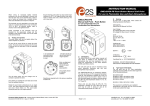
Wireless Mouse parts:
1. Scroll Wheel
2. Low battery indicator light. When batteries are low on power, a green light will
illuminate the scroll wheel. Replace the batteries when indicated.
3. Battery compartment cover.
4. Battery compartment tabs. Located on each side of the battery compartment cover.
Press these tabs to release the cover for battery replacement.
5. Additional mouse buttons. Left side button: Forward. Right side button: Back.
Keyboard – Battery low power alert:
When the indicator light next to the space bar begins to flash, it is time to replace the
keyboard's batteries.