1
STEP
5.
DESCRIPTION
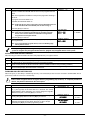
(House ID) This prompt will only appear if the receiver is disabled. If the
receiver is enabled the FA570RF will use the House ID programmed in the
panel.
DISPLAY
HOUSE ID = XX
CHOICES
00-31
Refer to the Application Guidelines on the previous page when selecting a
House ID.
To program a House ID: Enter 01-31.
To disable the transmitter: Enter 00
Note: All devices that you want to receive status from the FA570RF must be set
to the same House ID as the FA570RF (refer to Table on Page 1).
Press the [✱] key to continue.
6.
(Enable High Security Mode) Enter [1] to select High Security Mode.
Note: If this mode is enabled, the FA570RF will only recognize encrypted
devices. If this mode is disabled, the FA570RF will recognize both
encrypted and non-encrypted devices.
Press the [✱] key to continue.
7.
(Disable High Security Devices) Press the [✱] key to skip this prompt and
exit Program Mode.
Note: If you need to disable encrypted devices, refer to the Disabling High
Security Devices section.
HIGH SECURITY
OFF [1 = ON]
1= Enable
0 = Disable
DISABLE HS DEV?
NO [1 = YES]
1= YES
0 = NO
When operating the system in High-Security mode, the 5804BD wireless keys will still function. If you want the
system to recognize only encrypted wireless devices, program only encrypted devices in the system.
ACTIVATING HIGH SECURITY DEVICES
This following procedure should be followed if using High-Security (encrypted) devices.
STEP
1.
2.
3.
DESCRIPTION
Follow the normal procedure for programming the device into the control panel (refer to the Installation Instructions for
the device that you are programming). Exit out of Programming Mode.
Put the control panel in Go/ No Go Test mode. (See the Installation Guide for the panel being installed.)
Follow the instructions supplied with each wireless device to enroll the device in High-security mode. The FA570RF
will momentarily display the serial number of the device.
DISABLING HIGH SECURITY DEVICES
This mode gives you the ability to disable high security on all wireless keys that have been enrolled in the FA570RF. This is
particularly useful if a user loses a wireless key.
!
STEP
1.
Once high-security (encrypted) devices have been disabled, they will only operate if the FA570RF is set to
listen to both encrypted and non-encrypted devices (programming step 6, above). To completely disable the
devices, they must be deleted from the control panel.
DESCRIPTION
After the keypad has been powered for at least 60 seconds hold down
the [1] and [3] keys at the same time for 3 seconds. The current
keypad address will be displayed. (You cannot change the keypad’s
address at this point.) Press the [✱] key to continue.
2.
(Delete High Security Devices) Press the [1] key to remove all highsecurity (encrypted) devices. Press the [✱] key to continue.
3.
If YES was selected in Step 2 the unit will display a confirm request to
delete the stored high security device. Press the [1] key to accept,
followed by the [✱] key to exit the programming mode.
-3-
DISPLAY
CON ADDRESS = XX
DISABLE HS DEV?
NO [1=YES]
YES]
ARE YOU SURE?
NO [1=YES]
CHOICES
00-31
1= YES
0 = NO
1= YES
0 = NO