1
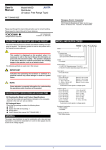
1. MOUNTING METHOD
2. INSTALLATION LOCATIONS
● Avoid the following environments for installation locations:
Areas with vibration, corrosive gases, dust, water, oil, solvents, direct sunlight, radiation, a strong electric field, and/or a strong
magnetic field
Installation altitude: 2000 m or less above sea level.
● If there is any risk of a surge being induced into the power line
and/or signal lines due to lightning or other factors, a dedicated
lightning arrester should be used as protection for both this computing unit and a field-installed device.
● Operating temperature/humidity range: 0 to 50C/5 to 90%RH (no
condensation)
NOTE
Plug/disconnect the main unit into/from the socket
vertically to the socket face. Otherwise the terminals may
bend and it may cause bad contact.
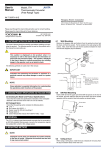
1.1
Wall Mounting
Unfasten the upper and lower stoppers of the computing unit to disconnect the main unit from the socket. Next, anchor the socket onto the
wall with two M4 screws. Then, plug the main unit into the socket and
secure the main unit with the upper and lower stoppers.
3. EXTERNAL WIRING
Stopper
WARNING
To avoid the risk of an electric shock, turn off the power
supply and use a tester or similar device to ensure that no
power is supplied to a cable to be connected, before carring
out wiring work.
Main unit
Socket
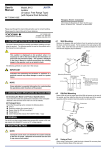
Wires are connected to the terminals of the computing unit’s socket.
M3.5 screw terminals are provided for the connection of external signals. Attach a crimp-on lug to each wire for connection to the terminals.
● Recommended cables: A nominal cross-sectional area of 0.5 mm2
or thicker for signal cables, and that of 1.25 mm2 or thicker for
power cables.
Mounting
screws
<Mounting Dimensions>
Unit: mm
Pitch: 56 or more
Socket
5 or more
(85)
2-4.5 or 2-M4
Note:
• When mounting the
computing units close
together, leave a space of at
least 5 mm between them.
• Use the supplied spacer to
keep a space of 5 mm for
DIN rail mounting.
Receiving resistor
(for current input)
Power supply
Input
+
L+
5
7
R
N–
8
400.2
(51)
GND
9
–
8
7
6
5
4
6
R: Receiving resistor
for current input
Contact input
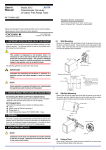
1.2
9
DIN Rail Mounting
Locate the computing unit so that the DIN rail fits into the upper part of
the DIN-rail groove at the rear of the socket, and fasten the socket using the slide lock at the lower part of the socket.
10 11
1
3
–
2
+
4
3
Output
Contact output
Fit into here
10
11
+
1
–
2
+
–
DIN rail
IMPORTANT
DIN rail
● The power line and input/output signal lines should be
installed away from noise-generating sources. Other
wise accuracy cannot be guaranteed.
● The grounding resistance must be 100 Ω (JIS Class D
grounding). The length and thickness of the grounding
cable should be as short and thick as possible. Directly
connect the lead from the ground terminal (terminal no.
9) of the product to the ground. Do not carry out daisychained inter-ground terminal wiring.
● Use of the product ignoring the specifications may
cause overheating or damage. Before turning on the
power, ensure the following:
(a) Power supply voltage and input signal value applied
to the product should meet the required
specifications.
(b) The external wiring to the terminals and wiring to
ground are as specifications.
● Do not operate the product in the presence of
flammable or explosive gases or vapors. To do so is
highly dangerous.
● The product is sensitive to static electricity; exercise
care in operating it. Before you operate the product,
touch a nearby metal part to discharge static electricity.
Push
(Rear of the socket)
Spacer
Slide lock
1.3
Using Ducts
Wiring ducts should be installed at least 30 mm away from the top or
bottom of the main unit.
2
IM 77J04X12-01E
1st Edition
Aug 31,2005-00