1
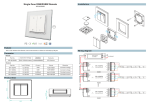
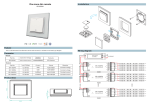
SR-2818&SR-1009XX full touch RGBW
remote controller User Manual
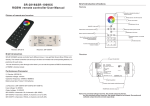
1.Brief introduction
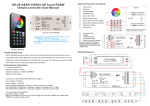
3.Brief introduction of buttons
①
Color wheel
②
Indicator
③
ON/OFF button
④
R/G/B/W button
⑤
Save color button
Bottom
SR-2818 RGBW remote controller is full touch remote
⑥
Play & Pause button
controller which has 8 different zones. It can get Red/ Green/
⑦
Return previous status button
Blue/ White color directly. The remote controller can save up
⑧
Speed down & speed up button
to 8 colors or 8 modes into corresponding buttons (1-8
⑨
Brightness button
buttons) for each zone. You can choose any color through
⑩
Zone button
OFF
USB port
ON
Indicator will be on while remote is charging.
Indicator will be off while it’s full power.
color wheel. There is a USB port to charge internal battery.
2.Performance Parameter
①
②
③
④
2.1 Sender: (SR-2818)
Operation voltage: 3.6VDC
Operation frequency: 434MHZ / 868MHZ
Battery: Lithium battery.
Learning button
Jumper
12-36VDC input
4 channels output
2.2 Receiver: (SR-1009FA/ SR-1009F3/ SR-1009F7))
Input voltage: 12-36VDC
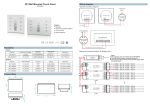
4.Wiring Diagram
Output voltage: 12-36VDC
SR-1009FA: 4 channels x 5A, 4channels x (60-180W)
SR-1006F7: 4 channels x 700mA, 4 channels x (8.4-25.2W).
N
L
110-240V
SR-1009F3: 4 channels x 350mA, 4 channels x (4.2-12.6W)
Power Supply
Input 12-36VDC
12-36VDC
SR-1009FAWi
Learning
Switch
PRI:
Uin=12-36VDC
Iin=20.5A
SEC:
Uout=4x(12-36)VDC
Iout=4x5A
Pout=4x(60-180)W
W
TEMP RANGE:-20℃-+50℃
Note: SR-2818 can also control WIFI receiver (SR-1009FAWi/ SR-1009F3Wi/ SR-1009F7Wi).
R
R
G
G
B
B
When WIFI receivers are not controlled by software, then you can use SR-2818 remote. The
operation will be the same.
W
1
W
2
N
L
110-240V
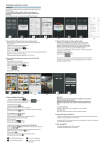
4. Touch
Power Supply
Input 12-36VDC
button is to play mode or do pause operation of mode. There are 10 build-in
modes in this button.
5. Touch
button is for saving color or mode at 1-8 buttons. Each zone (Each receiver)
can save 8 modes or 8 colors. Operation is show as below:
12-36VDC
+
SR-1009F7Wi
Learning
Switch
PRI:
Uin=12-36VDC
Iin=3.2A
SEC:
Uout=4x(12-36)VDC
Iout=4x700mA
Pout=4x(8.4-25.2)W
Touch
button, mode is running -----> touch
several or
W
single zone button -----> touch
TEMP RANGE:-20℃-+50℃
(over 2 seconds) to save program into zone
+
Touch
color wheel to get any color you want -----> touch
several or single zone button -----> touch
5.Operation
(over 2 seconds) to save color into zone.
If you want to play your saved color or mode, touch
1. Do wiring according to connection diagram
2. Learning process
a. Wake up the remote control by touching ON/OFF button.
b. Press at learning button on receiver.
c. Touch any button on remote control.
d. Connected LED light will blink to confirm zone designation.
e. Press at learning button on receiver over 5 seconds until LED light flash, then delete the
learned ID.
Then it will play.
Note: To choose a master from slaves by jumper for each zone.
Short circuit is to be slave.
Open circuit is to be master.
dim up whole brightness of LED lighting.
Each zone only can set 1 slave to be master . After a period of time , the master will do
synchronization operation to keep the same color or mode of all slaves in one zone.
6. Touch
button to return previous color or running mode.
7. Touch
button to speed down when mode is running, touch
8. Touch
9. Touch
press
button to dim down whole brightness of LED lighting, touch
button, then saved color or mode in button 1,2,3,4,5,6 will run chasing mode one
button to dim brightness of each
Note: If you press R, then press G, then it is mix color of R and G. If you want to get G color
directly, please press R to switch off of R first. Then press G.
3
button to
button one by one, such as press button 1,2,3,4,5,6, then
button is to switch on/off of each corresponding color.
Hold your finger on
corresponding color.
There are total 8 levels of brightness.
button to speed up
when mode is running.
by one.
3. Touch
, then touch saved zone number.
4