1
Media Engine™ User Manual
3.
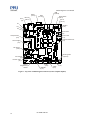
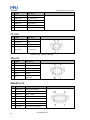
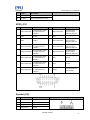
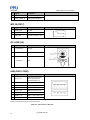
Cable the Touch Panel to the Media Engine.
Touch Panel
Caution: Connect
cable leads this way
4.
5.
Figure 2: Touch Panel Lead Orientation
Cable the LCD Panel with the LVDS Data Cable to the Media Engine.
Cable the LCD Panel to the Backlight Inverter and with the Inverter Cable to the Media Engine.
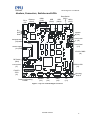
Touch Panel
Speaker
LVDS
Inverter
Figure 3: Cable Connection Locations
Starting Up the Media Engine Operating System
Connect the 12V AC Adapter and Power Cable to the Media Engine SBC.
When you apply power to the Media Engine, the operating system begins its startup process. As much as
15 seconds may elapse prior to the first image on the screen.
PS-XME-UM-023
11