Download User Manual
Transcript
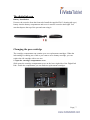
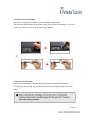
The digital ink pen Battery Installation Unscrew the rear tube from the front tube. Install the supplied ZA13 (hearing aid type ) battery into the battery compartment and screw it onto the rear tube until tight. You can then depress the top of the pen and start using it. Changing the pen cartridge The cartridge compartment can contain up to two replacement cartridges. When the ink cartridge is running out of ink or you want to use a dummy cartridge, you can replace the old cartridge with a new one. 1. Open the cartridge compartment cover. Slide opens the cartridge compartment cover on the lower right side of the Digital Ink Pad+. Inside the compartment you can find two replacement cartridges. Page | 7