1
VEHICLE CCTV AND SAFETY SYSTEMS
Full HD (1080P) Vehicle Accident Camera
SVC1080
User Guide
www.smartwitness.com
1
CONTENTS
GPS Reception ............................................................................
5
1. Overview .................................................................................
Contents ..........................................................................
6
9
2. Installation ..............................................................................
10
3. Basic Operation .....................................................................
11
Automatic Start ...............................................................
11
Language Selection ........................................................
11
Time Zone Setting ...........................................................
11
Automatic Booting ...........................................................
11
Recording Modes ............................................................
12
LCD Display ....................................................................
13
Modes .............................................................................13
Settings ...........................................................................13
Battery .............................................................................13
Delayed Shutdown ..........................................................
14
Parking Mode ..................................................................
14
Firmware Upgrade ..........................................................
14
4. OSD Menu ...............................................................................
15
General Settings..............................................................15
Video Settings .................................................................
19
Photo Settings .................................................................
24
Playback Settings ............................................................
24
5. Software Installation ..............................................................
27
6. SD Card Insert ........................................................................
29
7. Software User Guide ..............................................................
File Loading ....................................................................
Playback Screen .............................................................
Google Maps ...................................................................
Save JPEG and AVI File .................................................
31
31
34
35
36
www.smartwitness.com
CONTINUED...
Print Image ......................................................................
37
Backup Files ...................................................................
38
GPS Log to KML Converter .............................................
39
Initialise Micro SD Card ...................................................
41
Settings ............................................................................42
Viewing Settings ..............................................................
45
About ...............................................................................45
8. Recording Time Table ............................................................
46
9. Specifications ..........................................................................
47
www.smartwitness.com
SAFETY ADVICE
CAUTION
RISK OF ELECTRIC SHOCK
DO NOT OPEN
DO NOT REMOVE THE COVER
REFER SERVICING TO QUALIFIED SERVICE PERSONNEL
At 1080P resolution recording, the camera will not create
separate event files. Please back up your files regularly, as data
might be overwritten.
Connect your vehicle’s power cable (Cigarette Jack) to the
product after starting the vehicle to avoid damage.
Install the product where it does not block the driver’s view of
the road. Please refer to the installation section in the user
manual for a full guide on where to install product.
Damages caused by production malfunction, loss of data or
other damages that may occur while using this product is not
the responsibility of the manufacturer. When malfunction
occurs, the product may not save all videos and the sensor
may not recognise shock impacts.
WARNING:
DO NOT EXPOSE PRODUCT TO RAIN OR MOISTURE
4
www.smartwitness.com
GPS RECEPTION
1. Activate the product in an area without large buildings to improve
GPS reception.
For commercial purposes GPS has an average range error of more than 15
meters and the range error could be more than 100 meters depending on
environmental conditions like buildings and roadside trees etc.
2. The temperature range for optimum operation of the GPS receiver in
your car is -10 ~ 50°C.
3. When using the product for the first time or after a long period (more
than three days), it may take a little longer to recognise your current
location.
It may take between five and thirty minutes to get GPS reception.
GPS reception may be impaired under the following circumstances:
1) If there is an object at the end of the GPS antenna.
2) If your vehicle has metallic elements on the windshield.
3) If equipment generating electromagnetic waves that interfere with the GPS
signal are installed in the vehicle e.g. other GPS devices including certain
types of wireless activated alarms, MP3 and CD players and camera
alarms using GPS.
4) If you are using a receiver connected by a cable, electrical interference can
be avoided by simply changing the location of the receiver (antenna).
5) On heavily overcast or cloudy days, if the vehicle is in a covered location
such as under a bridge or raised roadway, in a tunnel, an underground
roadway or parking area, inside a building or surrounded by high-rise
buildings.
6) If GPS signal reception is poor, it may take longer to locate your current
position when the vehicle is moving than when it is stationary.
www.smartwitness.com
5
1. OVERVIEW
The SVC1080 is a 1080P Full HD vehicle accident camera with a 2.4” LCD
Monitor for live viewing, playback and setup. In addition, the camera features
an integrated 3 axis G-sensor and integrated GPS receiver.
This evidence can protect a driver from many of the issues faced on the
roads today:
•Cash for Crash / Pre-meditated staged accidents
•False/Exaggerated Whiplash Claims
•Conflicting Reports of Actual Events
•Lack of Witnesses
•Driving Offence Allegations (Speed Cameras, Traffic Signal Violations etc...)
Features:
•
•
•
•
•
•
•
•
•
•
Full HD 2M Pixel CMOS Image Sensor
Wide Angle Lens: 170°
1080P Full HD (1920x1080) with 30fps recording
2.4” LCD Display
Backup Power: Li-Po Battery (30 min) and super capacitor
Internal GPS and 3-axis accelerometer
Audio Recording
Internal Microphone and Speaker
Audio/Video output
Micro SD (Supports 4GB-32GB). Recommended Class 10.
www.smartwitness.com
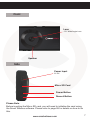
Front
Lens
170° Wide Angle Lens
Speaker
Side
Power Input
5V DC
Micro SD Card
Power Button
Record Button
Please Note
Before inserting the Micro SD card, you will need to initialise the card using
the Smart Witness software. Please refer to page 28 for details on how to do
this.
www.smartwitness.com
7
Rear
Mount
Use the double-sided
3M tape to attach the
mount to the
windscreen.
Up/Zoom In
Down/Zoom Out
Mode/OK
Menu/Return
LCD Screen
Reset AV Internal
Out Mic
PLEASE NOTE
Pressing the reset button on the bottom of the SVC1080 will reboot the unit,
but the configurations will remain the same. To reset the configuration, use
the reset menu. The SVC1080 can be restored to its factory default settings
by selecting the factory default option and then restarting the unit.
8
www.smartwitness.com
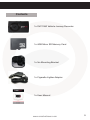
Contents
1x SVC1080 Vehicle Journey Recorder
1x 4GB Micro SD Memory Card
1x 3m Mounting Bracket
1x Cigarette Lighter Adapter
1x User Manual
www.smartwitness.com
9
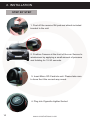
2. INSTALLATION
STEP BY STEP
1. Peel off the reverse 3M pad and attach included
bracket to the unit.
SMART
2. Position Camera at the front of the car. Secure to
windscreen by applying a small amount of pressure
and holding for 15-30 seconds.
3. Insert Micro SD Card into unit. Please take care
to have the it the correct way round.
4. Plug into Cigarette Lighter Socket
10
www.smartwitness.com
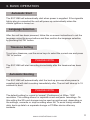
3. BASIC OPERATION
Automatic Start
The SVC1080 will automatically start when power is supplied. If the cigarette
lighter plug is connected the unit will power up automatically when the
vehicle ignition is turned on.
Language Selection
After the unit has been powered, follow the on screen instructions to set the
language using the arrow buttons and then confirm the language selection
by pressing the ‘OK’ button.
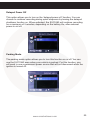
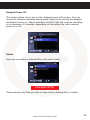
Timezone Setting
To set your timezone, use the arrow keys to select the correct one and press
‘OK’ to confirm.
PLEASE NOTE
The SVC1080 will start recording immediately after the timezone has been
set.
Automatic Booting
The SVC1080 will automatically start the boot-up process when power is
supplied and will start recording immediately after. The unit will take up to 15
seconds to boot.
PLEASE NOTE
The default setting for record is ‘normal’ (Continuous) at 30fps, 720P
resolution. This setting allows for separate event and panic recordings. On
this setting the SD card storage may be used up quicker and, depending on
the settings, overwrite or stop recording when full. To avoid losing valuable
data, back up data to a separate storage or PC/Mac device after any
incidents.
www.smartwitness.com
11
Recording Modes
Normal (Continuous)
This is the default and main mode for recording. In this setting the unit will
begin recording after boot up and record the entire time the unit is powered.
The resolution and frame rates can be set as per your requirements. You can
change the configuration of the recording using the SVC1080 Software
(Supplied). To do this, please see the ‘Settings’ section on page 42.
Event (Shock and Panic)
When set to event recording the unit will record when trigerred by either
an impact or a push of the ‘Rec’ button. In such events, 15 seconds of pre
and post events will be stored separately on the micro SD card under the
‘gsnr’ and ‘recsw’ folders respectively. A total of 10 events can be stored in
each folder and will be overwritten or not recorded when the SD card is full
depending on settings.
A. Shock triggered videos and data will be recorded automatically when the
G-sensor senses a change in G-force of more than the set limit.
This parameter can be set through the ‘Settings’ section on the software
(See page 41).
B. Panic videos and data will be recorded when the ‘REC” button has been
pushed.
PLEASE NOTE
When recording at 30fps, (1080P HD) resolution, separate event files (Shock
and Panic) will not be stored. If you wish to keep separate event files,
change the settings to a lower resolution or frame rate.
For example, 1080P @ 10fps or 720P @ 30fps
12
www.smartwitness.com
LCD Display
You can turn the LCD display on or off during recording. To turn the screen
on or off, press the ‘OK’ button.
You can also set the LCD to turn off after 10 seconds by setting the ‘LCD
Auto’ to on-either through the ‘Settings’ (Page 42) or go to ‘Video Settings’
on the device (Page 19).
Modes
The SVC1080 has 3 modes; Video, Photo and Playback. The modes can be
changed by pressing the ‘OK’ button while on standby.
Video Mode - Press ‘Rec’ to start recording and ‘Menu’ to stop.
Photo Mode - Press ‘Rec’ to take photos.
Playback Mode - Press the ‘Menu’ button to enter Playback settings and
folder change. Use the arrow buttons to change folders and to change files.
During video plaback, press ‘Rec’ button to play, ‘Menu’ button to stop and
use the arrow buttons to fast forward or rewind.
Settings
The SVC1080 has 4 settings; General, Video, Photo and Playback. The
general settings can be accessed in any mode by pressing the ‘Menu’ button
and the other mode settings can be accessed by pressing the ‘Menu’ button
when in their respective modes.
To navigate in the menus, press the arrow buttons to move between options,
press ‘OK’ to select an option and press ‘Menu’ to deselect and return to a
previous menu.
To enter into the video settings, recording will have to be stopped.
Battery
The SVC1080 comes with a built-in lithium polymer battery that can be
turned on for 15-30 minutes without the need for external power.
www.smartwitness.com
13
Delayed Shutdown
You can choose to continue recording during quick stopovers by turning the
delayed shutdown function on. When activated, the SVC1080 will continue
recording for a maximum of 5 minutes, depending on the battery life, after
external power is cut off.
Parking Mode
You can use the SVC1080 even when your vehicle is parked. For this
function, you will need to use a permanent power source that will not
disconnect when the ignition is turned off.
To turn this function on, go to ‘Device Settings’ and turn it on using the arrow
buttons and press ‘OK’ to confirm.
When in parking mode, if your vehicle is parked for more than 5 minues, the
SVC1080 will start to record. Recording will be at 1fps and the red LED will
blink. When the vehicle starts moving again, the recording wil return to its
original setting.
Firmware Upgrade
To perform and a firmware upgrade on the SVC1080, please follow the steps
below;
1. Turn off the SVC1080.
2. Download the latest firmware from our website www.smartwitness.com
3. Take out the micro SD card from the unit and insert it into your computer
using the micro SD Card reader.
4. Access the card and create a folder called ‘Program’
5. Copy the firmware file (SVC1080_1.0.0.bin) into the ‘Program’ folder
6. Take out the SD Card and re-insert into the SVC1080.
7. Turn the SVC1080 on.
8. The 2 LEDs will blink while upgrading.
9. After the upgrade, the unit will automatically reboot.
PLEASE NOTE
14
Please do not cut the power during the upgrade as this will seriously damage
the unit. Leave the unit powered until the upgrade has been completed.
www.smartwitness.com
4. OSD MENU
The SVC1080 allows you to adjust some of the settings on the recorder
through an on-screen menu as well as through the software.
There are 3 menus available for the 3 modes, as well as a general settings
menu. To access the menus, press the ‘Mode’ button until you are in the
mode you wish to adjust and then press the ‘Menu’ button. When presented
with the menus, use the arrow keys to toggle between ‘General’ and ‘mode’
menus and press the ‘Mode/OK’ button to enter.
To exit the menu or go back to a previous menu, press the ‘Menu’ button.
General Settings
The general settings menu allows you to adjust settings on the camera such
as button tones, date/time format etc.
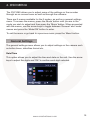
Date/Time
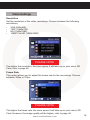
This option allows you to adjust the time and date on the unit. Use the arrow
keys to adjust the digits and ‘OK’ to confirm each digit selected.
www.smartwitness.com
15
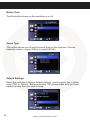
Button Tone
Turn the button tones on the machine on or off.
TONE
Scene Type
This option allows you to set the scene type on the recorder. Choose
between outdoor, indoor (50Hz) or indoor (60Hz).
Default Settings
Reset the recorder to factory default settings, use the arrow key to either
select ‘OK’ or ‘Cancel’. Before selecting ‘OK’ please make sure you have
backed up any files you wish to keep.
16
www.smartwitness.com
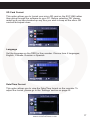
SD Card Format
This option allows you to format your micro SD card on the SVC1080 rather
than going through the software on your PC. Before selecting ‘OK’ please
make sure you have backed up any files you wish to keep as the micro SD
card will be wiped clean.
Language
Set the language on the OSD for the recorder. Choose from 4 languages;
English, Chinese, Russian or Spanish.
Date/Time Format
This option allows you to view the Date/Time format on the recorder. To
adjust the format, please go to the ‘Settings’ section on page 42.
www.smartwitness.com
17
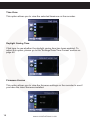
Time Zone
This option allows you to view the selected timezone on the recorder.
Daylight Saving Time
Click here to see whether the daylight saving time has been enabled. To
adjust this option, please go to the ‘Settings-Date/Time Format’ section on
page 42.
Firmware Version
This option allows you to view the firmware settings on the recorder to see if
you have the latest firmware installed.
18
www.smartwitness.com
Video Settings
Resolution
Set the resolution of the video recordings. Choose between the following
resolutions;
•
•
•
•
VGA (640x480)
720P (1280x720)
HD (1440x1080)
1080P Full HD (1920x1080)
PLEASE NOTE
The higher the resolution, the more space it will take up on your micro SD
Card, refer to page 46.
Frame Rate
This option allows you to adjust the frame rate for the recordings. Choose
between 30fps or 10fps.
PLEASE NOTE
The higher the frame rate, the more space it will take up on your micro SD
Card. However, the image quality will be higher, refer to page 46.
www.smartwitness.com
19
Voice Record
The voice record option allows you to enable audio recording on the
SVC1080.
Event Alarm
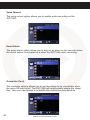
The event alarm option allows you to turn on an alarm on the recorder when
the shock sensor is activated or a when the SVC1080 starts recording.
Overwrite (Cont)
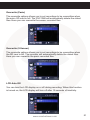
The overwrite options allows you to set recordings to be overwritten when
the micro SD card is full. The SVC1080 will automatically delete the oldest
files. Here you can choose to overwrite the continuous recorded files.
20
www.smartwitness.com
Overwrite (Panic)
The overwrite options allows you to set recordings to be overwritten when
the micro SD card is full. The SVC1080 will automatically delete the oldest
files. Here you can overwrite the sensor recorded files.
Overwrite (S.Sensor)
The overwrite options allows you to set recordings to be overwritten when
the SD card is full. The recorder will automatically delete the oldest files.
Here you can overwrite the panic recorded files.
LCD Auto Off
You can turn the LCD display on or off during recording. When this function
is turned on, the LCD display will turn off after 10 seconds of inactivity.
www.smartwitness.com
21
S.Sensor Settings
The S.Sensor settings allow you to change between basic options or
advanced settings that can be adjusted through the software. Please refer to
‘Video Settings’ section on page 42.
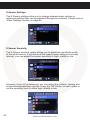
S.Sensor Sensivity
The S.Sensor sensivity option allows you to adjust the sensitivity levels
of the smart sensor. If you have set the smart sensor settings to pre-set
(above), you can adjust the sensor sensitivty to high, middle or low.
However, if you set to advanced, you can adjust the collision, turning and
acceleration/deceleration shocks. Press the ‘OK’ button on each option to
set the sensitivty level to either high, middle or low.
22
www.smartwitness.com
Delayed Power Off
This option allows you to turn on the ‘delayed power off’ function. You can
choose to continue recording during quick stopovers by turning the delayed
shutdown function on. When activated, the SVC1080 will continue recording
for a maximum of 5 minutes, depending on the battery life, after external
power is cut off.
Parking Mode
The parking mode option allows you to turn this function on or off. You can
use the SVC1080 even when your vehicle is parked. For this function, you
will need to use a permanent power source that will not disconnect when the
ignition is turned off.
www.smartwitness.com
23
Photo Settings
Resolution
Here you can adjust the resolution for the photos taken by the SVC1080.
Choose between the following resolutions:
•
•
•
•
•
VGA (640x480)
720P (1280x720)
HD (1440x1080)
1080P Full HD (1920x1080)
3.5 Megapixel (2176x1632)
Playback Settings
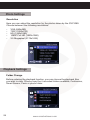
Folder Change
Before entering the playback function, you can choose the playback files
you wish to view. Choose from the 4 recorded folders available; Continuous,
Smart Sensor, Panic or photo folder.
24
www.smartwitness.com
Delayed Power Off
This option allows you to turn on the ‘delayed power off’ function. You can
choose to continue recording during quick stopovers by turning the delayed
shutdown function on. When activated, the SVC1080 will continue recording
for a maximum of 5 minutes, depending on the battery life, after external
power is cut off.
Delete
Here you can delete a selected file or the entire folder.
PLEASE NOTE
Please backup any files you wish to keep before deleting files or folders.
www.smartwitness.com
25
Play Audio
Turn this function on to play audio during recordings, if the audio recording
option has been turned on.
Volume
Adjust the volume of the recordings, if the audio function has been enabled.
26
www.smartwitness.com
5. SOFTWARE INSTALLATION
Software Installation
(Windows)
Software
Installation
(Windows)
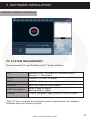
PC SYSTEM REQUIREMENT
Recommended PC specifications for PC Viewer software
OS
CPU
RAM
Interface
HDD Free Space
Display
Windows 2000, Windows XP, Windows Vista,
Windows 7, Windows 8
Pentium 4 2.6GHZ or higher
512MB or higher
Micro SD Memory Card Reader
Install 20MB or higher
Backup 2GB or higher
1,024 x 768 pixel / High Colour (16 bit) or higher
If the PC does not meet the minimum system requirements, the Analysis
Software may not function properly.
www.smartwitness.com
27
The SVC1080 software will come supplied on the micro SD card in the
‘pcsw’ folder. Or you can download it from our website www.smartwitness.
com.
1. Plug the micro SD card into your computer.
2. Open the ‘FHDREC1’ file.
software
3. Open the ‘Software’ folder.
4. Select the ‘setup.exe’ file to bring up the following screen.
5. Select the language and then follow the on screen dialog box.
6. The ‘SVC1080 Software’ icon will now be displayed on your desktop.
NOTE: To Un-install the PC Viewer
Make sure the program is not running and open the ‘Control Panel’
Select ‘Remove Program’ and remove SVC1080 Software
28
www.smartwitness.com
6. SD CARD INSERT
PLEASE NOTE
If you have been supplied with an micro SD
card, then this will need to be setup using the
latest Smart Witness Software.
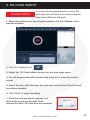
1. When the software has been installed,double click the software icon to
load the software.
2. Click the ‘Settings’ icon
3. Select the “SD Card Initilize” button from the drop down menu
4. You will be presented with another drop down list to select the card to format.
5. Select the micro SD card from the drop down and tick the “Quick Format”
box when prompted.
6. Click “Start” to begin formatting.
7. Once the card has been formatted, you
will see the screen on the right. Then,
remove the micro SD Card from the computer.
www.smartwitness.com
29
8. Make sure the unit is turned off before inserting the micro SD Card.
9. Insert the micro SD memory card into the micro SD card slot.
PLEASE NOTE
The very first time you power up your unit with the micro SD Card inserted, it
is important not to disconnect the power before the 2 minutes have elapsed,
as this may damage the unit.
30
www.smartwitness.com
7. SOFTWARE USER GUIDE
File Loading
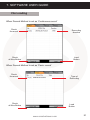
When Record Method is set as ‘Continuous record’
Check
the event
Recording
duration
Check
all files Button
Load
Button
When Record Method is set as ‘Panic record’
Check
the event
Type of
Recording
Check
all files Button
Load
Button
www.smartwitness.com
31
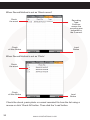
When Record Method is set as ‘Shock record’
Check
the event
G-Sensor
Check
all files Button
Recording
Type:
G-sensor
means the
recording was
activated by
the G-sensor
Load
Button
When Record Method is set as ‘Photo’
Check
the event
Check
all files Button
Load
Button
Check the shock, panic photo or normal recorded file from the list using a
mouse or click ‘Check All’ button. Then click the ‘Load’ button.
32
www.smartwitness.com
6. If you have selected more than one file, once you’ve clicked the “Load
Button” the “FileList” tab will change to the “PlayList” tab as shown below.
7. Double click the file you wish to playback to play that file.
www.smartwitness.com
33
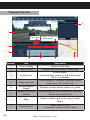
Playback Screen
8
1
Display Frame/Total
frames number
Frame Size
2
3
4
6
Number
Icon
Description
1
Video Display
Shows video data
3
Driving Info
4
Video Controls
5
Accelerometer
Graph
2
34
5
Date & Time
7
Displays time and date of video data
Shows speed,
acceloremeter values on the 3-axes and
GPS co-ordinates
Video playback controls, playback speed
options: x1, x2, x4, x8, x16
Displays accelerometer values on graph
6
Display and sound
controls
Select display to be continuous or frame by
frame and sound level
7
Map
Shows location and route using Google
Maps
8
Data File List
Select files to view:
Continuous, panic, shock, Photo
www.smartwitness.com
Google Maps
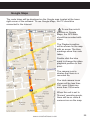
The route taken will be displayed on the Google map located at the lower
right corner of the software. To see Google Maps, the PC should be
connected to the Internet.
To see the route &
position on Google
Maps, the GPS data
should be recorded with
video.
The Playback position
will be shown on the map
with an arrow. The blue
markings show the route
taken.
Double click the blue
mark to change the video
playback position to that
point.
The camera icon indicates that there is a
recorded file.
The total camera icons
shown will be less than
100, even if there are
more than 100 events.
When the unit is set to
‘Normal’ recording mode,
there will be no route &
camera icon on the map.
www.smartwitness.com
35
Save JPEG and AVI File
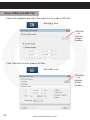
Pause the playback and click ‘Save jpg’ icon to make a JPG file.
‘Save jpg’ Icon
Click the
‘...’ to
choose
a save
location
Click ‘Save AVI’ icon to make a AVI file.
‘Save AVI’ Icon
Click the
‘...’ to
choose
a save
location
36
www.smartwitness.com
Print Image
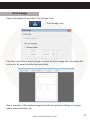
Pause the playback and click ‘Print Image’ icon.
‘Print Image’ Icon
Choose to print the current image or select another image from the same file
you are in by searching the time and date.
See a preview of the printed image and alter the printer settings to change
paper size/orientation etc.
www.smartwitness.com
37
Backup Files
Click the Backup files icon to backup the files to the PC.
‘Backup Event/Log Files’ Icon
Select ‘continuous, ‘panic’, ‘s.sensor’ or ‘photo’ and then select the backup
folder location. To begin, click the ‘start’ button.
To backup the whole data from micro SD card to the PC, check the ‘Backup
All’ option.
38
www.smartwitness.com
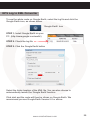
GPS Log to KML Converter
To see the whole route on Google Earth, select the log file and click the
Google Earth icon, as shown below.
‘Google Earth’ Icon
STEP 1. Install Google Earth on your
PC. (http://www.google.com/earth/)
STEP 2. Check the log file
STEP 3. Click the Google Earth button
Select the folder location of the KML file. You can also choose to
automactically launch the ‘Google Earth’ function.
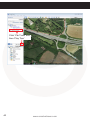
Click start and the route will then be shown on Google Earth. We
recommend you use Google Earth Version 5.0 or above.
www.smartwitness.com
39
Click ‘Car Track’ and
then ‘Play Tour’
40
www.smartwitness.com
Initialise Micro SD Card
‘Init Micro SD Card’ Icon
To initialise the micro SD card quickly, click on the above icon and you will be
presented with the following screen to choose the card to initialise. Click ‘Ok’
when selected.
Blank Card
Pre initialised Card
On the following screen, check the ‘Quick Format’ button and uncheck the
‘Backup Configuration File’ and click ‘Start’ to begin initialisation.
www.smartwitness.com
41
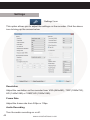
Settings
‘Settings’ Icon
This option allows you to adjust the settings on the recorder. Click the above
icon to bring up the screen below.
Resolution
Adjust the resolution on the recorder from VGA (640x480), 720P (1280x720),
HD (1440x1080) or 1080P HD (1920x1080).
Frame Rate
Adjust the frame rate from 30fps or 10fps.
Audio Recording
42
Turn the audio recording on or off.
www.smartwitness.com
Event Alarm
Turn on the event alarm to make the unit ‘beep’ when the G-sensor has been
shocked and the unit has started recording.
LCD Auto Off
When turning this function, the LCD screen will turn off after 10 seconds.
The unit will still be recording as indicated by the LED’s flashing above the
screen.
Delayed Power Shutdown
The ‘Delayed Power Shutdown’ feature allows you to delay when the unit
shuts down after the power off button is pressed. The current video will be
saved and stored before the unit has shut down.
Parking Mode
You can use the SVC1080 even when your vehicle is parked. For this
function, you will need to use a permanent power source that will not
disconnect when the ignition is turned off.
Password
This option allows you to set a password on the SD card to help prevent
evidence tampering.
Photo Mode Settings - Resolution
Set the resolution of the photos taken by the SVC1080. Resolution can be
set to:
•
•
•
•
•
VGA (640x480)
720P (1280x720)
HD (1440x1080)
1080P HD (1920x1080)
3.5 Megapixel (2176x1632)
Date/Time
Set the date and time on the unit and set any daylight saving time.
www.smartwitness.com
43
Overwrite
This function allows the unit to overwrite old files on the micro SD Card
automatically. You can overwrite the continuous, panic or S Sensor recorded
files.
Shock Sensor Sensitivity
The shock sensor sensitivity can be set to ‘basic’ or ‘advanced’. Set to easy
set allows you to set the sensitivity to 1 (High), 2 (Medium) or 3 (Low).
In custom set, you can set 3 different shock sensor values individually.
Collision shock sensor sensitivity (1-3), turning shock sensor (1-3) and
Acceleration/deceleration shock sensor (1-3).
System
The system option allows you to adjust various settings on the SVC1080
from speaker volume to date format.
Speaker Volume - Set speaker volume when playing back on the unit (1-4
or Mute).
Button Tone - Turn the button beeps on or off on the unit.
Scene Type - Set Scene Type on the recorder (Outdoor, Indoor 50MHz, or
Indoor 60MHz).
Audio Playback - Turn the audio playback on or off.
Date Format - Adjust the date format on the recorder.
Time Format - Adjust the time format on the recorder (24HR, AM/PM).
Vehicle ID
Set an ID for the unit.
Initialise micro SD Card
When the settings have been adjusted, you can intitialise the micro SD Card
to save the settings and transfer to the SVC1080. Please backup all data
files you wish to keep before doing this.
Delete Recorded Files
Click this option to delete all recorded files on the microSD card. Please
backup all data files you wish to keep before doing this.
44
www.smartwitness.com
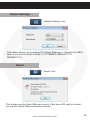
Viewer Settings
‘Viewer Settings’ Icon
This option allows you to change PC Viewer Settings for ‘Speed Unit’ (MPH,
km/h or kn) and the ‘Date Format’ (YYYY/MM/DD, MM/DD/YYYY,
DD/MM/YYYY).
About
‘About’ Icon
This shows you the Smart Witness version, if the micro SD card is in inserted and the Smart Witness firmware version.
www.smartwitness.com
45
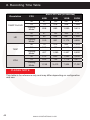
8. Recording Time Table
Resolution
FPS
30
1080P Full HD
HD
VGA
4GB
8GB
16GB
32GB
73
218
508
1,089
57
10
123
257
523
Parking
Mode
228
683
1,593
3,413
30
10
47
332
897
711
Parking
Mode
85
142
1,280
310
931
2,172
4,655
10
72
163
215
488
502
1,138
1,076
427
1,280
2,967
6,400
30
213
640
1,493
3,200
Parking
Mode
1,138
3,413
7,964
17,067
30
720P
Micro SD Card (in minutes)
Parking
Mode
10
245
256
735
1,716
2,438
3,677
PLEASE NOTE
This table is for reference only and may differ depending on configuration
and use.
46
www.smartwitness.com
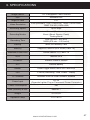
9. SPECIFICATIONS
Image Sensor
1/3” 3 Megapixel CMOS Sensor
DSP
Standard DSP
Angle of View
170°
Video Resolution
VGA (640x480), 720P (1280x720), 1080P (1440x1080),
1080P Full HD (1920x1080)
Recording Speed
Up to 30fps
Recording Modes
Normal (Continuous)
Event (Shock Sensor, Panic)
Parking Mode
Recording Time
8GB (50 min ~ 960 min)
32GB (470 min ~ 150 hours)
Backup
Micro SD Memory Card
Memory
Supports Cards of up to 32GB (Class 10)
Maximum Event Files
Shock Sensor: 10, Panic: 10
GPS
Internal GPS
G-Sensor
Internal 3-Axis G-Sensor
RTC
Internal Battery
Buzzer
Event Trigger Alarm, Micro SD Card Error
LED
2 LEDs (Recording - Red, Power - Green)
PC Software
Available from the Smart Witness Website
Power Input
DC 5V
(Cigarette Lighter Plug or Permanent Power Connector)
Power Consumption
5W
Size (WxHxD) in mm
88x55x17
Weight
0.075 KG
Operation Temp
-10°C~60°C
www.smartwitness.com
47
TECHNICAL SUPPORT & WARRANTY
Technical Support
For Technical Support, please contact your local distributor.
Limited Warranty
This product is supplied with a 2 year warranty. The Warranty excludes
products that have been misused, (including accidental damage) and
damage caused by normal wear and tear. In the unlikely event that you
encounter a problem with this product, it should be returned to the place of
purchase.
48
www.smartwitness.com
NOTES
www.smartwitness.com
49
Manufactured Exclusively for:
VEHICLE CCTV AND SAFETY SYSTEMS
www.smartwitness.com
Smart Witness, Unit 2 Valley Point, Beddington Farm Road, Croydon, Surrey, CR0 4WP