1
GSK980TD Turning CNC
PLC User Manual
GSK CNC Equipment Co., Ltd.
PLC specification, PLC address, ladder
PLC function control logic and relative signals
GSKCC software and usage
Book 3 CNC Configuration software
Book 3 CNC CONFIGRUTION SOFTWARE
Book 2 Function
Book 2 FUNCTION
Book 1 Programming
Book 1 PROGRAMMING
APPENDIX
Appendix
ndix
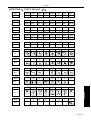
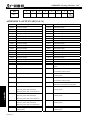
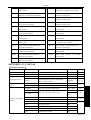
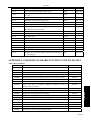
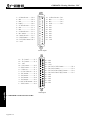
Apprndix 1:input signal(X)……………………………………………appendix-1
Apprndix 2:output signal(Y)…………………………………………appendix -2
Apprndix 3:G, F signal……………………….………………………… appendix -3
Apprndix 4:GSK980TD standard function configuration…………… appendix -8
PROGRAMMING
Book 1 Programming
BOOK 1
Chapter 1
Sequential Program
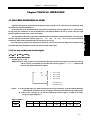
Chapter 1 SEQUENTIAL PROGRAM
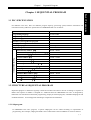
For different CNC PLC, there are different program capacity, processing speed, function instructions and
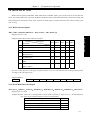
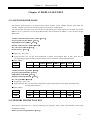
nonvolatile memory addresses. Specifications of GSK980TD PLC are as follows:
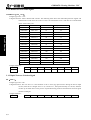
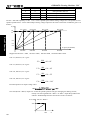
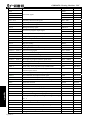
Specification
980TD-PLC
Programming language
Chinese ladder
Programming software
GSKCC.exe
Programming grades
2
Executive cycle of grade one program
8ms
Average processing time of basic instruction
<2μs
Max. step of program
5000 steps
Programming instruction
Basic instruction +function instruction
Programming address
Internal relay address(R)
R0000~R0999
Information displaying request address(A)
A0000~A0024
Timer address (T)
T0000~T0099
Counter address(C)
C0000~C0099
Data tablet address(D)
D0000~D0999
Hold relay address(K)
K0000~K0039
Counter preset value address(DC)
DC0000~DC0099
Timer preset value address(DT)
DT0000~DT0099
Subprogram address(P)
P0000~P9999
Label address (L)
L0000~L9999
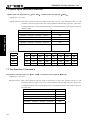
Machine→PLC address(X)
X0000~X0029
PLC→machine address(Y)
Y0000~Y0019
CNC→PLC address (F)
F0000~F0255
PLC→CNC address(G)
G0000~G0255
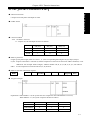
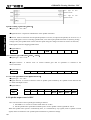
1.2 STRUCTURE of SEQUENTIAL PROGRAM
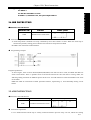
Sequential program is defined to logically control the machine and relative devices according to sequence of
ladder. The sequence of ladder is compiled in a traditional PLC but GSK980TD CNC PLC is integrated by
traditional one and advanced structured programming, employed with subprogram, embedded subprogram and
conditional branch,and with apparent advantages compared to the traditional.
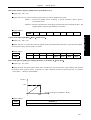
1.2.1 Subprogram
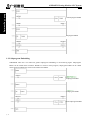
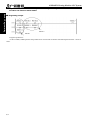
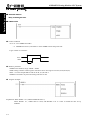
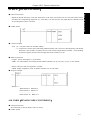
In GSK980TD CNC PLC program, a special subprogram can be called according to requirements of
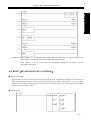
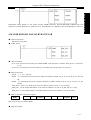
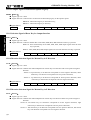
programming. For example, subprogram P0001 can be called when contactor X0000.0 is closed as follows:
Ⅰ-1
Book 1 Programming
1.1 PLC SPECIFICATION
GSK980TD Turning Machine CNC System
Book 1 Programming
Call subprogram P0001
Subprogram P0001
1.2.2 Subprogram Embedding
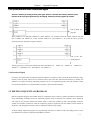
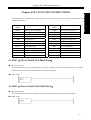
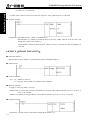
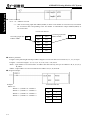
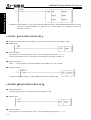
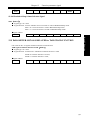
GSK980TD CNC PLC can realize 20 grades subprogram embedding as the following figure. Subprogram
P0001 can be called when contractor X0000.0 is closed in main program; subprogram P0002 can be called
when contractor X0002.0 is closed in the subprogram P0001.
Subprogram P0001
Subprogram P0001
Call subprogram P0002
Ⅰ-2
Chapter 1
Sequential Program
Subprogram P0002
Book 1 Programming
1.2.3 Conditional Branch
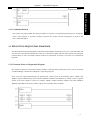
The system can judge whether the setting conditions to execute a corresponding subprogram are satisfactory
when a main program is executed circularly, otherwise the system executes subprograms in order as the
above-mentioned figure.
1.3 EXECUTING SEQUENTIAL PROGRAM
The edited sequential programs(ladder program)are downloaded to 980TD by serial, CNC reads the ladder and
converts into some format identified by it after it is switched on again, and then CPU decodes and operation
processes them to store into RAM, and last reads every instruction in memory to execute it by arithmetical
operation.
1.3.1 Execution Process of Sequential Program
PLC sequence control is executed by software and there is different from general relay circuit, and so its method
is understandingly considered in editing PLC sequential programs.
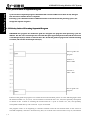
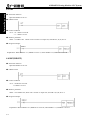
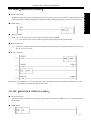
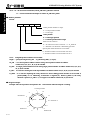
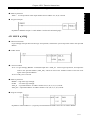
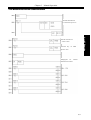
Every relay can output simultaneously for general relay control circuit as the following figure. Y0002.3 and
Y0002.5 output simultaneously when contactor X0000.0, X0002.0 and X0002.2 are closed; in PLC sequence
control, every relay outputs in order. For example, Y0002.3 outputs and then Y0002.5 does when X0000.0,
X0002.0 and X0002.2 are closed, namely, outputs are executed in order as ladder.
Ⅰ-3
GSK980TD Turning Machine CNC System
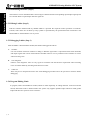
1.3.2 Cycle Execution of Sequential Program
Book 1 Programming
Cycle execution of sequential program is defined that PLC executes ladder from its home to end, and again
from its home to end after the run is completed.
Processing cycle is defined to runtime of ladder from home to end. The shorter the processing cycle is, the
stronger the response of signal is.
1.3.3 Priority Order of Executing Sequential Program
1.3.3
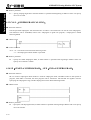
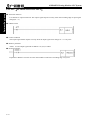
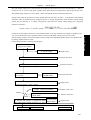
GSK980TD PLC programs are divided into grade one and grade two programs which processing cycles are
different. The first one is executed per 8ms to do with short pulse signal with quick reaction,and the second one
is executed per 8n(ms),in which n is fraction times. PLC divides the grade two program into n blocks according
to runtime, and executes one block per each 8(ms).
End of grade one
program
Fraction 1:
0004~0006
Fraction 1:
0007~0011
End of grade one
program
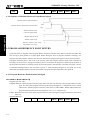
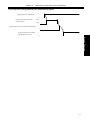
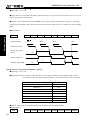
Fraction of the grade two program is to execute the first and execution process is as the following figure when
the fraction number is n; T11, T12, T1n are runtime to execute the first. T21, T22, T2n separately corresponds
to runtime of No. n block in executing the second when No. n cycle is execute. Tc1, Tc2, Tcn separately
corresponds to hold time by CNC when No. n cycle is executed.
The program returns to its beginning to continue execution when the last fraction block of the second is
executed completely. The first is executed every 8ms, No. n block of the second is done every 8n, and runtime
Ⅰ-4
Chapter 1
Sequential Program
of one cycle is 8n(ms). The more the fraction number of the second is, the longer the runtime of one cycle is.
8ms
1ms
T12
Block 1
T21
1ms
T1n
Block 2
T22
Tc1
Block n
Book 1 Programming
T11
8ms
8ms
1ms
Block 1
T2n
Tc2
Tcn
1.4 PROCESSING INPUT/OUTPUT SIGNAL
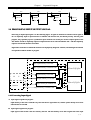
Processing of input/output signal is as the following figure. X signal of machine I/O interface and F signal of
NC are separately input to input memories at machine side and NC side, and directly used by the first grade
program; they separately input to synchronous input memories are used by the second. Output signals of the
first and the second are separately output to output memories at NC side and machine side,and then separately
output to NC and I/O interface of machine
Signal states of the above-mentioned memories are displayed by diagnostic interface, and the diagnostic number
corresponds to address number of program.
PLC
NC侧
步输入
存 side
储器
Syn.
input同
memory
at CN
Syn.
memory
machine
side
机 床input
侧同
步 输at入
存储器
Grade
第 一one
级 program
程序
F
NC侧
输 入at存
器
Input
memory
CN储side
N
C
G
NC侧memory
输出存
储器
Output
at CN
side
X
Machine
机
床
机 床memory
侧输入
存 储 器side
Input
at machine
Y
Grade
two
第二
级program
程序
Output
at 出
machine
机memory
床侧输
存 储side
器
1.4.1 Processing Input Signal
A:Input signal of grade one program:
Input memory at NC side is scanned every 8ms and stores F signal from NC, and the system directly use its state
when the first is executed.
B:Input signal of grade two program:
Input signal of the second is the one stored by the first. The first directly use F and X signal and so the input
Ⅰ-5
GSK980TD Turning Machine CNC System
signal of the second lags the first one and its max. lag time is runtime of one grade two program.
Book 1 Programming
C:Difference of input signal states of the first and the second:
For the same input signal, its states are different in the first and the second when PLC reads input signals,
because the first reads input memories at NC side and machine side but the second reads the synchronous input
memory at NC side and ones at machine side. The input signal of the second lags behind that of the first and its
lag time is 8nms which should be noted.
Example:
End of grade one
program
Fraction1:
0003~0005
Fraction1:
0006~0007
End of grade two
program
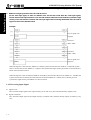
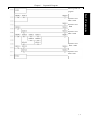
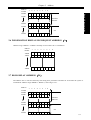
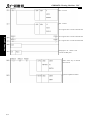
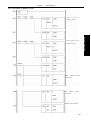
When the lag time is the first 8ms, X0001.0=1 and the system executes the first Y0001.0=1. When the system
starts to execute the second, X0001.0=1 inputs to the synchronous input memory and starts to execute the first
block of the fractional second.
When the lag time is the second 8ms, X0001.0=0 and the system executes the first one Y0001.0=1. And then the
system executes the second block of the fractional second but X0001.0 =1 which state is still the previous
synchronous input memory and Y0002.3=1 after execution.
1.4.2 Processing Input Signal
A:Signal to NC
PLC transmits output signal to the output memory at NC side every 8ms, and then directly outputs to NC.
B:Signal to machine
PLC transmits output signal to the output memory at machine side, and then directly outputs to memory every
2ms.
Ⅰ-6
Chapter 1
Sequential Program
1.4.3 Synchronous Procession of Short Pulse Signal
End of grade one
program
As
above, X0001.3=0 is changed to X0001.3=1 after Y0002.3=1 is executed, and if the system executes the next
line of ladder and Y0003.3=1, at the moment Y0002.3=1 and Y0003.3=1. To avoid the above, process
synchronously the short pulse signal as follows:
End of the first
grade program
After the program is executed synchronously and when X0001.3=1,Y0003.3=1,Y0002.3=0, X0001.3=0,
Y0002.3=1,and Y0003.3=0,but Y0003.3=1 or Y0002.3=1.
1.4.4 Interlock Signal
For safety, the signals must be employed with soft interlock in sequence control, and with hard interlock to relay
control circuit of power electric box at machine side at the same time. Because the hardware is failure, the
interlock is invalid in executing sequential program even if it is employed logically with soft interlock, which
can ensure the operator is not injured and the machine is prevented from damage.
1.5 EDITING SEQUENTIAL PROGRAM
Edit the sequential program from ladder which is composed of relay contacts, symbols and function instructions.
Logic relationship in ladder consists of sequential program which is edited by two methods: one is employed
with input to use program instructions and the other is with relay symbols by their corresponding contactor,
symbol and function instruction. Edit the sequential program employed with the ladder format instead of
mnemonic code language when the system is employed with the relay symbol.
In actual editing sequential program, use programming instruction or ladder to edit it according to PLC. In the
User Manual, the system is employed with ladder as follows:
Ⅰ-7
Book 1 Programming
The first is used for processing the short pulse signal. When it is less than 8ms, namely when the system
executes the first, the input signal state may be changed, which may execute programs by mistake.
GSK980TD Turning Machine CNC System
1.5.1 Distributing Interface (Step 1)
Book 1 Programming
The interfaces can be distributed after control target is defined and the corresponding input/output signal points
are counted. Refer to input/output interface signal list
1.5.2 Editing Ladder (Step 2)
Edit the software GSKCC.EXE by 980TD ladder to represent the required control operations of machine.
Counter, timer which are not done by relay symbol is represented by the specified function instructions. The
edited ladder is downloaded to CNC by serial.
1.5.3 Debugging Ladder (Step 3)
After the ladder is downloaded to 980TD, the ladder is debugged as follows:
A: emulator
Use one emulator instead of machine to debug it. Machine signal state is represented with switch ON/OFF,
and output signal state is done with indicator ON/OFF. Observe if every indicator on the emulator is correct
when executing CNC.
B: CNC diagnosis
Observe if the diagnostic state of every signal is consistent with the function requirement when executing
CNC. Check the ladder by checking each function in order.
C: actual run
There may be an unexpected result in the actual debugging machine and so do preventive measures before
debugging.
1.5.4 Program Editing Limit
In program, END1 and END2 are needed, which are taken separately as ending character of the first and the
second, and END1 must be before END2. The system only supports parallel output instead of multi grades
output and there are syntactic errors as follows:
Ⅰ-8
Chapter 1
Sequential Program
End of grade one
program
Book 1 Programming
Syntactic error:
0002~0003
Syntactic error:
0004
Syntactic error:
0005~0006
Syntactic error:
0007~0009
Syntactic error:
0010~0011
Ⅰ-9
Chapter 2
Address
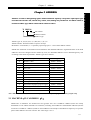
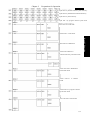
Addresses are used for distinguishing signals. Different addresses separately correspond to input/output signal
at machine side and CNC side, internal relay, counter, timer, holding relay and data list. An address number is
consisted of address type, address number and bit number as follows:
X 0001.6
Bit
number
位号
地 址 号 number
Address
地 址 类 型 type
Address
Address type: X, Y, R, F, G, K, A, T, DT, DC, C, D, L, P
Address number: decimal number to express one byte
Bit number: octal number, 0~7 separately expressing byte 0~7 bit of front address number
980TD PLC addresses are divided into fixed addresses and definable addresses. Signal definitions of the fixed
addresses cannot be changed and are defined by CNC; the definable addresses can be defined again by user
according to the actual requirements. Address types are as follows:
Address
Explanation
Range
X
Machine→PLC
X0000~X0029
Y
PLC→machine
Y0000~Y0019
F
NC→PLC
F0000~F0255
G
PLC→NC
G0000~G0255
R
Intermediate relay
R0000~R0999
D
Data register
D0000~D0999
C
Counter
C0000~C0099
T
Timer
T0000~T0099
DC
Counter preset value register
DC0000~DC0099
DT
Timer preset value register
DT0000~DT0099
A
Information displaying request signal
A0000~A0024
K
Hold relay
K0000~K0039
L
Jump label
L0000~L9999
P
Subprogram label
P0000~P9999
Note: address R900~R999, K30~39 are used for reserved area of CNC program instead of output relay.
2.1 MACHINE→PLC ADDRESS(X)
980TD PLC X addresses are divided into two types,the first one is X0000.0~X0003.7,which are mainly
distributed to CNC XS40 and XS41 I/O interfaces, including fixed addresses and definable addresses,and the
second one is X0020.0~X0026.7,which are fixed addresses and mainly be distributed to input keys on operator
panel. Other addresses are reserved ones. The value range is 0 or 1.
Ⅱ-1
Book 1 Programming
Chapter 2 ADDRESS
GSK980TD Turning Machine CNC
2.1.1 X Address in I/O Interface
Book
k 1 Programming
Address range: X0000.0~X0003.7 are separately distributed to CNC XS40 and XS41 I/O interface.
Fixed address: X0000.3, X0000.5, X0001.3 separately corresponds to XDEC, ESP, ZDEC signal
which can be directly distinguished by CNC in CNC run.
Example: ESP signal is can be connected to X0000.5, CNC directly distinguishes signals on it and judge if there
is ESP signal; CNC alarms to emergently stop when G8.4 signal is valid by PLC control.
Namely: CNC alarms to emergently stop when X0000.5 is 0;
CNC alarms to emergently stop when G8.4 is 0 by PLC control.
Input signal of fixed addresses
Signal
Symbol
Address
ESP
X0000.5
Deceleration signal of machine reference point return in X direction
XDEC
X0000.3
Deceleration signal of machine reference point return in Z direction
ZDEC
X0001.3
Emergent stop signal
Definable address: their functions can be defined by user according to requirement and used for connecting
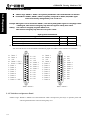
with external electric circuit and ladder. Distribution graph of X address in I/O interface is as follows:
13:Y0001.7
12:Y0001.6
11:+24V
10:X0000.5(ESP)
9: X0001.3(ZDEC)
8:X0001.1
7:X0001.4
6:X0001.6
5:X0001.7
4:X0000.0
3:X0000.1
2:X0000.2
1:X0000.3(XDEC)
25:COM
24:COM
23:+24V
22:X0000.4
21:X0001.2
20:X0001.0
19:X0001.5
18:COM
17:COM
16:COM
15:COM
14:COM
XS40(female)
13:X0002.1
12:X0002.2
11:+24V
10:X0002.3
9:X0002.5
8:X0003.1
7:X0003.3
6:X0003.6
5:X0003.5
4:X0003.7
3:X0003.0
2:X0002.7
1:X0002.0
25:COM
24:COM
23:+24V
22:X0002.4
21:X0002.6
20:X0003.2
19:X0003.4
18:COM
17:COM
16:COM
15:COM
14:COM
XS41(female)
2.1.2 X Address on Operator Panel
Address range: X0020.0~X0026.0 are fixed addresses which correspond to press keys on operator panel and
which signal definitions cannot be changed by user.
Ⅱ-2
Chapter 2
Address
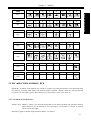
Relationship between addresses and press keys is as follows:
X0020
X0021
跳段
7
6
单段
6
5
手动
5
4
手轮
4
Key
X0022
3
机械零点
3
程序零点
2
录入
2
空运行
1
0
自动
1
辅助锁
编辑
0
机床锁
7
6
5
4
3
2
1
0
7
6
5
4
3
2
1
0
2
1
0
Key
X0023
Key
X0024
Key
X0025
润滑
反转
7
点动
6
停止
5
冷却
4
正转
3
暂停
7
换刀
6
5
4
3
2
1
Key
X0026
0
运行
7
6
5
Key
4
3
2
1
0
复位
2.2 PLC→MACHINE ADDRESS(Y)
980TD-PLC Y address are divided into two: Y0000.0~Y0003.7 are mainly distributed to CNC XS42 and XS39
I/O interfaces, including fixed address and definable address; Y0004.0~X0009.7 which are mainly distributed
to indicators on the operator panel. Other addresses are reserved ones. Their values are 0 or 1.
2.2.1 Y Address in I/O Interface
Address range: Y0000.0~Y0003.7 are separately distributed to CNC XS42 and XS39 I/O interfaces and their
signal definitions can be defined by user according to requirements to connect to external
electric circuit and ladder.
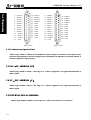
Distribution graph of 980TD output interfaces address is as follows:
Ⅱ-3
Book 1 Programming
Key
7
GSK980TD Turning Machine CNC
Book
k 1 Programming
1:Y0003.0
2:Y0002.7
3:Y0002.6
4:Y0002.2
5:Y0002.0
6:Y0002.1
7:Y0003.2
8:Y0003.3
9:Y0003.4
10:Y0003.5
11:Y0003.6
12:Y0003.7
13:+24V
14:Y0003.1
15:Y0002.5
16:Y0002.4
17:Y0002.3
18:COM
19:COM
20:COM
21:COM
22:COM
23:COM
24:COM
25:+24V
XS42(male)
1:Y0000.0
2:Y0000.2
3:Y0000.4
4:Y0000.6
5:Y0001.0
6:Y0001.1
7:Y0001.2
8:Y0001.3
9:Y0001.4
10:Y0001.5
11:X0000.6
12:X0000.7
13:+24V
14:Y0000.1
15:Y0000.3
16:Y0000.5
17:Y0000.7
18:COM
19:COM
20:COM
21:COM
22:COM
23:COM
24:COM
25:+24V
XS39(male)
2.2.2 Y Addresses on Operator Panel
Address range: Y0004.0~Y0009.0 are fixed addresses which correspond to indicators on the operator panel,
and which signal definitions cannot be changed by user. Relationship corresponding to each state indicator is
referred to Appendix2: Output signal(Y).
2.3 PLC→NC ADDRESS(G)
Address range: G0000.0~G0255.7, value range: 0 or 1. Refer to Appendix3: G, F signals about definitions of
address signals.
2.4 NC→PLC ADDRESS(F)
Address range: F0000.0~F0255.7, value range: 0 or 1. Refer to Appendix3: G, F signal about definitions of
address signals.
2.5 INTERNAL RELAY ADDRESS
Address range: R0000.0~R0999.7, value range: 0 or 1. They are zero after CNC is switched on.
Ⅱ-4
Chapter 2
Address
number
7
6
5
4
3
2
Address
1
0
Book 1 Programming
R0000
R0001
Definable
addresses
R0899
R0900
NC
R0999
2.6 INFORMATION DISPLAYING REQUEST ADDRESS(A)
Address range: A0000.0~A00024.7 and they are zero after CNC is switched on.
Address
number
7
6
5
4
3
2
1
0
A0000
A0001
A0024
2.7 HOLD RELAY ADDRESS(K)
The address area is used for hold relay and setting PLC parameters and data are saved after the system is
switched off. Address range: K0000.0~K0039.7, value range: 0 or 1.
Address
number
7
6
5
4
3
2
1
0
K0000
K0001
Definable
addresses
K0029
K0030
NC
K0039
Ⅱ-5
GSK980TD Turning Machine CNC
2.8 COUNTER ADDRESS(C)
Book
k 1 Programming
The address area is used for storing current counting value of counter and data are saved after the system is
switched off. Address range: C0000~C0099, value range: 0~21,4748,3647.
Address
number
31
30
29
28
3
2
1
0
C0000
C0001
C0099
2.9 COUNTER PRESET VALUE ADDRESS(DC)
The address area is used for storing preset value of counter and data are saved after the system is switched off.
Address range: DC0000~DC0099, value range: 0~21,4748,3647.
Address
number
31
30
29
28
3
2
1
0
DC0000
DC0001
DC0099
2.10 TIMER ADDRESS(T)
The address area is used for storing current value of timer and T0000~T0079 are zero after the system is
switched on.T0080~T0099 are saved after it is switched off. Value range: 0~21,4748,3647.
Address
number
T0000
T0001
T0099
Ⅱ-6
31
30
29
28
3
2
1
0
Chapter 2
Address
2.11 TIMER PRESET VALUE ADDRESS(DT)
Address
number
31
30
29
28
3
2
1
0
DT0000
DT0099
2.12 DATA LIST ADDRESS(D)
D0000~D0299 are zero when CNC is switched on. D0300~D0999 are saved after it is switched off. Value
range: 0~255.
Address
number
7
6
5
4
3
2
1
0
D0000
D0001
D0299
D0300
D0999
2.13 LABEL ADDRESS(L)
It is used for specifying jump target label in JMPB and LBL label.
Range: L0~L9999
2.14 SUBPROGRAM NUMBER(P)
It is used for specifying the target subprogram number to call in CALL and subprogram number in SP.
Range: P0000~P9999
Ⅱ-7
Book 1 Programming
The address area is used for storing preset value of timer and data are saved after the system is switched off.
Address range: DT0000~DT0099 and value range: 0~21,4748,3647.
Chapter 3 PLC Basic Instructions
Basic instructions are used for editing sequential programs and executing 1-bit operation. There are basic instructions
for GSK980TD PLC as follows:
Instruction
name
Function
Component
LD
Read normally-open contact
X, Y, F, G, R, K, A
LDI
Read normally-closed contact
X, Y, F, G, R, K, A
OUT
Output coil
Y, G, R, K, A
AND
Normally-open contact in series
X, Y, F, G, R, K, A
ANI
Normally-closed contact in series
X, Y, F, G, R, K, A
OR
Parallel normally-open contact
X, Y, F, G, R, K, A
ORI
Parallel normally-closed contact
X, Y, F, G, R, K, A
ORB
Parallel series circuit block
ANB
Parallel circuit block in series
3.1 LD,LDI,OUT INSTRUCTION
● Mnemonic code and function
Mnemonic code
Function
LD
Read normally-open contact
LDI
Read normally-closed contact
OUT
Output coil
Ladder symbol
● Instruction explanation
A: LD, LDI are used for connecting contact to bus bar. Each one can combine with instruction ANB and can be
used at starting point of branch.
B: OUT is used for driving output relay, internal relay coil instead of input relay.
C: Parallel instruction OUT can be continuously used.
● Programming example
Program explanation:
When X0002.1 is 1, the system outputs Y0003.7
When F0100.3 is 0, the system outputs G0120.0
Ⅲ-1
Book 1 Programming
Chapter 3 PLC BASIC INSTRUCTIONS
GSK980TD Turning Machine CNC System
3.2 AND, ANI INSTRUCTION
Book 1 Programming
● Mnemonic code and function
Mnemonic code
Function
AND
Normally-open contact in series
ANI
Normally-closed contact in series
Ladder symbol
● Instruction explanation
AND, ANI can connect one contact in serial. There can be many contacts in serial and the instructions can be
used many times.
● Programming example
Program explanation:
Use X0002.1,
Use F0100.3 and X0002.1 in series
Use X0008.6, and F0100.3 and X0002.1 in series
If X0002.1=1, X0008.6=1 and F0100.3 is 0, the system outputs Y0003.7.
3.3 OR, ORI INSTRUCTION
● Mnemonic code and function
Mnemonic code
Function
OR
Parallel normally-open contact
ORI
Parallel normally-closed contact
Ladder symbol
● Instruction explanation
A: OR, ORI can be connected to one contact in parallel. When more than two contacts are connected in series
and the serial loop is connected with other loop in parallel, the system should use ORB.
B: The system executes OR, ORI from its current step with LD, LDI in parallel.
● Programming example
Ⅲ-2
Chapter 3 PLC Basic Instructions
Book 1 Programming
Program explanation:
Use X0002.1
Use F0100.3 and X0002.1 in series
If X0002.1=1, and F0100.3 is 0, the system outputs Y0003.7.
3.4 ORB INSTRUCTION
●Mnemonic code and function
Mnemonic code
Function
ORB
Parallel series circuit block
Ladder symbol
● Instruction explanation
A: Serial loop block is defined to its loop combined by more than contacts in series. When the serial loop is
connected in parallel, starting point of branch uses LD and its end point uses ORB.
B: ORB is sole instruction without address.
● Programming example
Node
Program explanation:
As above figure, there are three branches(0002,0003,0004) from left bus line to node, and 0002 and 0003 are
serial circuit blocks. There is parallel serial circuit block between bus line and node or among nodes, the
following ending of branch use ORB except for the first one. Use OR instruction if the branch 0004 is not serial
circuit block.
ORB and ANB are instructions without operation function, representing or, and relationship among circuit
blocks.
3.5 ANB INSTRUCTION
●Mnemonic code and function
Mnemonic code
Function
ANB
Parallel circuit block in series
Ladder symbol
● Instruction explanation
A: Use ANB when the branch loop is serially connected with the previous loop. Use LD, LDI at the starting
Ⅲ-3
GSK980TD Turning Machine CNC System
point of branch, and use ANB to serially connect with the previous loop.
B: ANB is sole instruction without address.
Book 1 Programming
● Programming example
Block 2
Block 1
Program explanation:
As above ladder, ORB represents the parallel serial circuit block in block 2 and ANB represents block 1 and 2 in
series.
Ⅲ-4
Chapter 4 PLC Function Instructions
Some functions are completed by function instructions instead of basic ones. The function instructions in the
system are as follows:
Instruction
name
Function
Instruction
name
Function
END1
End of grade one program
ROTB
Binary rotation control
END2
End of grade two program
DECB
Binary decoding
SET
Set
CODB
Binary code conversion
RST
Reset
JMPB
Program jumping
CMP
Comparative set
CTRC
Counter
TMRB
MOVN
LBL
Program jumping label
CALL
Subprogram calling
Timer
SP
Start of subprogram
Binary Data copy
SPE
End of subprogram
Parity check
DIFU
Ascending edge set
ADDB
Binary data adding
DIFD
Descending edge set
SUBB
Binary data subtracting
PARI
ALT
MOVE
And
Alternative output
4.1 END1(END of GRADE ONE PROGRAM)
● Instruction function
There must be END1 in the sequential program one time, located at the end of grade one program. It should be
located at the home of the second when there is no grade one program.
● Ladder format
4.2 END2(END of GRADE TWO PROGRAM)
● Instruction function
There must be END2 at the end of grade two program which representing end of grade two program.
● Ladder format
Ⅳ-1
Book 1 Programming
Chapter 4 PLC FUNCTION INSTRUCTIONS
GSK980TD Turning Machine CNC System
4.3 SET
Book 1 Programming
● Instruction function
Specified address is set to 1.
● Ladder format
● Control condition
ACT =0:add.b is reserved.
=1:add.b is set to 1.
● Relative parameter
add.b:set address bit,which can be a contact or output coil, and add is Y, G, R, K or A.
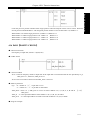
● Program example:
Explanation: When X0002.1 is 1, R0002.0 is set to 1; when X0002.1 is 0, R0002.0 is reserved.
4.4 RST(RESET)
● Instruction function
Specified address is set to 0.
● Ladder format
● Control condition
ACT =0:add.b is reserved.
=1:add.b is set to 0.
● Relative parameter
add.b:reset address bit ,which can a contact or output coil ,and add is Y, G, R, K or A.
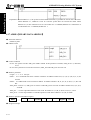
● Program example:
Explanation: When X0002.1 is 0, R0002.0 is reserved; when X0002.1 is 1, R0002.0 is set to 0.
Ⅳ-2
Chapter 4 PLC Function Instructions
4.5 CMP(BINARY COMPARATIVE SET)
Book 1 Programming
● Instruction function
Compare two binary data and output its result.
● Ladder format
● Control condition
ACT =0:add.b is reserved.
=1: compare S1, S2 and output the result as follows:
add.(b+2)
add.(b+1)
add.(b+0)
S1>S2
0
0
1
S1=S2
0
1
0
S1<S2
1
0
0
● Relative parameter
Length: specify data length, when it is set to 1, 2, 4, the corresponding data length is 1byte, 2bytes,4 bytes.
S1, S2: compare source data 1 with data 2, and the comparative result can be constant or address number(it is not
address bit. For example: add.b is illegal.). Address number is R, X, Y, F, G, K, A, D, T, C, DC and DT.
add.b:it is the comparative result and can be R, Y, G, K and A.
● Relative operation information register:
R900
Negative
overflow
Zero
● Program example:
Explanation: When X0002.1 is 0, the system does not compare the data and R0300.0 is reserved;
When X0002.1 is 1, the system compares the data as follows:
R0300.2
R0300.1
R0300.0
R0100>R0200
0
0
1
R0100=R0200
0
1
0
R0100<R0200
1
0
0
Ⅳ-3
GSK980TD Turning Machine CNC System
4.6 TMRB(TIMER)
Book 1 Programming
● Instruction function
Delay connecting the timer.
● Ladder format
● Control condition
ACT =0:reset TIMER and add.b.
=1:TIMER times from 0, and add.b=1 when TIMER reaches the preset time.
Logic relation is as follows:
ACT
add.b
TIME
● Relative parameter
TIMER: timer number, range: T0000~T0099.
TIME: timing constant or data register with DT in front. DT range is from 0 21,4748,3647(ms) .
add.b:it is timer output address and can be R, Y, G, K and A.
TIMER is executed every 8ms and timing with 8ms as unit.
● Program example:
Explanation: When X0002.1 is 0, T0002 and R0300.0 are 0;
When X0002.1 is 1, T0002 starts to count, and R0300.0 is set to 1 after it reaches the time set by
DT0004.
Ⅳ-4
Chapter 4 PLC Function Instructions
4.7 CTRC(BINARY COUNTER)
Book 1 Programming
● Instruction function
Data in the counter is binary and the functions of CTRC is as follows:
A: reset counter: it resets count value and the system outputs the corresponding signal when the count value
reaches the resetting count value.
B: ring counter:input the count value signal when the counter reaches the reset value, and count again the
counter reset to initial value.
C: adding/subtracting counter: bit bidirectional counter used for addition and subtraction.
D: initial value selection: it can be 0 or 1.
● Ladder format
● Control condition
ACT is at ascending edge:
Adding: COUNTER counts from its setting initial value, adds the count one time when it reaches the
ascending edge, and O_add.b =1 when it reaches the reset count value. O_add.b =0 when
COUNTER is less than NCOUNT; COUNTER resumes and starts to count and O_add.b =0 when
it reaches the ascending edge again.
Subtracting: COUNTER subtracts from its setting initial value, subtracts the count one time when it
reaches the ascending edge, and O_add.b =1 when it reaches the reset count value. O_add.b
=0 when COUNTER is more than NCOUNT; COUNTER resumes and starts to count and
O_add.b =0 when it reaches the ascending edge again.
ACT=0:
COUNTER and O_add.b are reserved.
● Relative parameter
Data format:
0
0
CN0
U/D
Specify adding/subtracting count
0:adding count and counting from 0
1:subtracting count and counting from
reset value
Specify the counter initial value
0:count from 0
1:count from 1
R_add.b :when it is 1 whatever ACT is , COUNTER=CN0,O_add.b =0. R_add can be X, Y, G, F, R, K, A.
COUNTER: specify the counter number( Cxxx, xxxx is digit(0~99),
Ⅳ-5
GSK980TD Turning Machine CNC System
NCOUNT: it is counter preset value(constant) and also can be data register beginning with DC. If it is constant,
its value is 0~21,4748,3647.
Book 1 Programming
O_add.b: when it reaches to the count value, the output is 1 and O_add can be R, Y, G, K and A.
● Program example:
Explanation: When R0100.0 is 1, C0001=0 and R0500.0=0;
When R0100.0 is 0, X0002.1 reaches the drift up one time, C0001 adds the count one time, and
R0500.0 is 1 if the count reaches 10.
When X0002.1 reaches the drift up again, C0001 is reset to 0 and start to count, and R0500.0 is
reset to 0.
4.8 MOVN(BINARY DATA COPY)
● Instruction function
Transmit data at source address or specified binary data to destination address.
● Ladder format
● Control condition
ACT =0:ADD-D is reserved.
=1:copy the value in ADD-S or constant CON to ADD-D
● Relative parameter
Length : it is the copy data(1, 2, 4 byte).
ADD-S/CON: it is initial byte of source data address or constant, and its address number is R, X, Y, F, G, K, A,
D, T, C, DC and DT.
ADD-D: it is initial byte of target address, and its address number is R, Y, G, K, A, D, T, C, DC, DT.
● Program example:
Explanation:R0100 value is transmitted to G0043 when X0003.3 is 1.
Ⅳ-6
Chapter 4 PLC Function Instructions
4.9 DECB(BINARY ENCODING)
● Ladder format
Book 1 Programming
● Instruction function
DECB can decode the binary code data. When there is the same one between one of 8 successive data and the
code data, the corresponding output data is 1; when there is no the same one, the output data is 0. DECB is used
for encoding data of M or T function.
● Control condition
ACT =0:reset the 8 data bits of ADD2. ADD2.
=1:compare the content value of decoding address(ADD1) with 8 successive data beginning with DATA.
‘
When the value of ADD1 is equal to one of 8 data and the output address (ADD2) s corresponding
bit which sequence number is that of equal data in these 8 data is set to 1.
● Relative parameter
Length:specify the length(1, 2, 4) of ADD1.
ADD1: it is initial address of encoding and the address number is R, X, Y, F, G, K, A, D, T, C, DC and DT.
.
DATA: reference value of comparative constant.
ADD2: output comparative result. Its address number is R, Y, G, K and A.
● Program example:
X0003.3=1:
When F0010=8,R0010.0=1;
When F0010=9,R0010.1=1;
…………………………
When F0010=15,R0010.7=1
4.10 CODB(BINARY CODE CONVERSION)
● Instruction function
The instruction is used for binary code conversion.
● Ladder format
Ⅳ-7
GSK980TD Turning Machine CNC System
Book 1 Programming
● Control condition
ACT =0:ADD2 is reserved.
=1:value of conversing input data address(ADD1) is taken as list number of conversion list, from which
the conversion data corresponding to the list number is transmitted to output address(ADD2) of
conversion data.
Conversion data list
Converting input data
Address ADD1
001
Number
Value
000
D1
001
D2
002
……..
D3
……….
n
Dn
Converting input data
Address ADD2
D2
● Relative parameter
Length1: binary data length and output address length of conversion data in conversion list, 1-1, 2-2, 4-4 byte.
Length2:conversion length, 1-2, 2-4, 3-8, 4-16, 5-32, 6-64, 7-128, 8-256.
ADD1:input address of conversion data. Its address has data with only one byte. Its address is R, X, Y, G, F,A,
K, and D.
ADD2:output address of conversion data and its address is R, Y, G, K and D.
● Program example:
Example
X0003.3=1:
X0003.3=1, R0100=0:R0200=1
X0003.3=1, R0100=1:R0200=2
X0003.3=1, R0100=2:R0200=3
X0003.3=1, R0100=3:R0200=4
Ⅳ-8
Conversion data list
Number
Value
000
1
001
2
002
003
3
4
Chapter 4 PLC Function Instructions
4.11 JMPB(PROGRAM JUMPING)
● Ladder format
● Control condition
ACT =0:do not jump and execute the next instruction following JMPB.
=1:execute the next instruction following the label after jumping to the specified label.
● Relative parameter
Lx :specify the jumping target label, label number must be specified with beginning L address t and it can
specify one of L1 to L999.
● Program example:
Explanation: When X0003.3 is 1, the program jumps 0003 and orderly executes from 0004; when X0003.3 is 0, the
system orderly executes the program from 0003.
4.12 LBL(PROGRAM JUMPING LABEL)
● Instruction function
Specify one label in ladder, namely jumping target position specified by JMPB. One Lx is only specified one
time by LBL.
● Ladder format
Ⅳ-9
Book 1 Programming
● Instruction function
Immediately jump the program to the position set by label with characteristics as follows: jump instructions can
use the same label; forbid jumping END1 and END2; forbid jumping subprogram; jump forward or backward.
GSK980TD Turning Machine CNC System
Book 1 Programming
● Relative parameter
Lx :specify jumping target label. The label number is specified with beginning L address t and it can specify
one of L1 to L999.
4.13 CALL(SUBPROGRAM CALLING)
● Instruction function
Call the specified subprogram with characteristics as follows: call instructions can use the same subprogram;
call instruction can be embedded; cannot call a subprogram in grade one program; a subprogram is edited
following END2.
● Ladder format
● Control condition
ACT =0:execute the next instruction following CALL.
=1:call subprogram which number is specified.
● Relative parameter
Px :specify the called subprogram label, its label number is specified with beginning P address and it can
specify one of from P1 to P999.
4.14 SP(START of SUBPROGRAM), SPE(END of SUBPROGRAM)
● Instruction function
SP is to create a subprogram which number is used for subprogram name ,and SPE is taken as end symbol of
program ,when SPE is executed, the main program will be returned to. SP and SPE are together used for
specifying the subprogram range ,and the subprogram must be edited following END2.
● Ladder format
● Relative parameter
Px :specify the call subprogram label, its label number is specified with beginning P address and it can specify
one of P1 to P999.
Ⅳ-10
Chapter 4 PLC Function Instructions
● Program example:
Book 1 Programming
Explanation: When X0003.3 is 1, the program calls P0000 subprogram and jumps to execute 0006, and the
system orderly executes the program from 0003 after executing 0009.
When X0003.3 is 0, the system does not call P0000 subprogram and orderly executes
subprograms from 0003.
4.15 ROTB(BINARY ROTATION CONTROL)
● Instruction function
The instruction is used for rotation control, such as toolpost, rotary worktable. Its functions are as follows: to
select rotation direction of short path ,to count steps from current position to target position ;or to count steps
from the previous one of current position to the previous one of target position ,to count the position number of
the previous one of target position.
● Ladder format
Ⅳ-11
GSK980TD Turning Machine CNC System
Book 1 Programming
● Control condition
ACT =0:do not execute instructions, and E_add and O_add.b are reserved.
=1:execute instruction and output its result to E_add and O_add.b.
● Relative parameter
Format:
RN0
DIR
POS
INC
Count position number or steps
0:Count position number
1:Count steps
Count position
0:Count target position
1:Count the position before target
Short circuit selection
0:No selection. Positive rotation,i.e. O_add.b=0
1:Selection. Its direction is defined by specifics
Specify the initial number of swivel table
0:Position number of swivel table is from 0
1:Position number of swivel table is from 1
CNT :centigrade position number of swivel table.
length :specify the length of W_add ,D_add and E_add(1, 2, 4 byte).
W_add :it is current position address used for storing current position number. Its address
number is R, X, Y, F, G , K, A, D, DC and DT.
D_add :it is target position address used for storing target position number. Its address number is R, X, Y, F, G,
K, A, D, DC and DT.
E_add :it is used for counting the result output address. Its address number is R, Y, G, K, A, D, DC and DT.
O_add.b :it is used for outputting the rotary direction to ensure adding position number of swivel table is
positive(FOR); if it is subtracting, its direction is negative(rev). When O_add.b=0, the rotary
direction is positive; O_add.b=1, it is negative. Its address number is R, Y, G, K and A.
● Program example:
Example: The current position corresponds to No. 1 tool selection when the toolpost is rotating.
Current position
1
12
2
Position D
11
3
Negative
Positive
10 Position A
4
Position C
9
5
6
Ⅳ-12
7
8
Position B
Chapter 4 PLC Function Instructions
4.16 PARI(PARITY CHECK)
● Instruction function
Check parity of input data ,which is 1 byte(8 bits)
● Ladder format
● Control condition
ACT=1: Execute the parity check for input data. If the input data is inconsistent with the one specified by O_E,
Addr_Err.b is 1; otherwise, Addr_Err.b is 0
ACT=0: Do not execute instructions and Addr_Err.b is reserved.
● Relative parameter
O_E =0:number of “1” in put data is even
=1:number of “1” in put data is old number
Addr_Rst.b:when it is 1, Addr_Err.b is reset to 0 and its address is X, Y, G, R, F, A, K and K.
Addr_Err.b .
Addr_In :it is the input data address and its address is X, Y, G, R, F, A, K and D.
Addr_Err.b :it is the output address of check result and its address is Y, G, R, A and K.
为 1 时,
● Program example:
Ⅳ-13
Book 1 Programming
Count the previous position number before target position when the toolpost rotates in short circuit. When the
current position number R0007=1 and centigrade position number of swivel table CNT=12, X0003.3=1:
When F0026=10 and the target position is A, R0027=11,R0037.0=1
When F0026=8 and the target position is B,R0027=9 ,R0037.0=1
When F0026=5 and the target position is C,R0027=4 ,R0037.0=0
When F0026=3 and the target position is D,R0027=2 ,R0037.0=0
GSK980TD Turning Machine CNC System
Book 1 Programming
Explanation: When X0003.3 is 1, the system executes PARI instruction, O_E=0000 to execute the even check.
When R0010.0 is 1, R0030.0 is reset to 0 and the system does not execute the check. When
R0010.0 is 0, it does. When there is an even number for “1”in R0020, R0030.0 is 0. When there is
an odd number for “1”in R0020, R0030.0 is 1.
4.17 ADDB(BINARY DATA ADDING)
● Instruction function
Add binary data
● Ladder format
● Control condition
ACT=1: the system executes Addr_Out=AGD1+AGD2. If the operation is mistake, Addr_Err.b is 1; otherwise,
it is 0.
ACT=0: the system does not execute instruction, Addr_Out and Addr_Err.b are reserved.
● Relative parameter
Length :1-1,2-2,4-4 byte.
AGD1 :it is a summand and can be constant or address. Its address number is R, X, Y, F, G, A, K, D, T, C, DC
and DT.
AGD2 :it is addend and can be constant or address. Its address number is R, X, Y, F, G, A, K, D, T, C, DC and
DT.
Addr_Rst.b:when it is 1, Addr_Err.b is reset to 0 and Addr_Out is reserved. Its address number is R, X, Y, F, G,
A and K.
Addr_Out :it is the output data address of run result. Its address is Y, G, R, A, K, DC, DT, D, C, and T.
Addr_Err.b:it is the output address of mistake operation result and its address is Y, G, R, A and K.
● Relative operation information register
R900
● Program example:
Ⅳ-14
overflow
negative
zero
Chapter 4 PLC Function Instructions
4.18 SUBB(BINARY DATA SUBTRACTING)
● Instruction function
Subtract the binary data.
● Ladder format
● Control condition
ACT=1: the system executes Addr_Out= MIND-SUBD. If the operation is mistake, Addr_Err.b is 1; otherwise,
it is 0.
ACT=0: the system does not execute instruction, and Addr_Out and Addr_Err.b are reserved.
● Relative parameter
Length :1-1,2-2,4-4 byte.
MIND :it is minend and can be constant or address. Its address number is R, X, Y, F, G, A, K, D, T, C, DC and
DT.
SUBD :it is subtrahend and can be constant or address. Its address number is R, X, Y, F, G, A, K, D, T, C, DC
and DT.
Addr_Rst.b:when it is 1, Addr_Err.b is reset. Its address number is R, X, Y, F, G, A and K.
Addr_Out:it is the output data address of run result. Its address is Y, G, R, A, K, DC, DT, D, C, and T.
Addr_Err.b:it is the output address of mistake operation result and its address is Y, G, R, A and K.
● Relative operation information register
R900
Overflow
negative
Zero
Note: the reset has no related to R900.
● Program example:
Ⅳ-15
Book 1 Programming
Explanation: When X0003.3=1, the system executes ADDB instruction. When R0040=R0010+R0020 and if the
operation is mistake, R0050.0 is 1, otherwise it is 0. When R0030.0 is 1, R0040 is reserved and R0050.0 is reset to 0.
GSK980TD Turning Machine CNC System
Book 1 Programming
Explanation: When X0003.3=1, the system executes SUBB instruction. When R0040=R0010-R0020 , and if the
operation is mistake, R0050.0 is 0, otherwise it is 1. When R0030.0 is 1, R0040 is reserved and
R0050.0 is reset to 0.
4.19 DIFU(ASCENDING EDGE SET)
● Instruction function Set the output signal to 1 when the ascending edge of input signal is valid.
● Ladder format
● Control condition
Input signal ACT: the output signal is set to 1 at the ascending edge of ACT(0->1).
Output signal Add.b: when it is executed, one scanning period of Add.b in ladder is 1.
● Relative parameter
add.b :it is the operation result output address and its address is Y, G, R, A and K.
● Program example
Explanation: R0040.0 output is 1 when X0003.3 reaches the ascending edge.
4.20 DIFD(DESCENDING EDGE SET)
● Instruction function
Set the output signal to 1 when drift down of input signal is valid.
● Ladder format
● Control condition
Input signal ACT: the output signal is set to 1 at the descending edge of ACT(1->0).
Ⅳ-16
Chapter 4 PLC Function Instructions
Output signal Add.b: when it is executed, one scanning period of Add.b in ladder is 1.
Book 1 Programming
● Relative parameter
Add.b :it is the operation result output address and its address is Y, G, R, A and K.
● Program example:
Explanation: R0040.0 output is 1 when X0003.3 reaches the descending edge.
4.21 MOVE(AND)
● Instruction function
Logic multiply and input data execute logic and operation, and then the system output the result to the specified
address.
● Ladder format
● Control condition
ACT=1: Logic multiply (HIGH4、LOW4)and input data(Addr_In)execute logical operation, and output the
result to the specified address (Addr_Out), which can remove the needless number of bit from 8-bit
signal of the specified address.
ACT=0: Addr_Out is reserved.
● Relative parameter
HIGH4 :high 4-bit logic multiply
LOW4 :low 4-bit logic multiply
Addr_In :input data address. Its address number is R, A, K, X, Y, F, G, and D.
Addr_Out:output data address. Its address number is R, A, K, X, Y, F, G, and D.
● Program example:
Explanation: When X0003.3 is 1, logically execute R0010 and 01001110 to save its result to R0020.
Ⅳ-17
GSK980TD Turning Machine CNC System
4.22 ALT(ALTERNATIVE OUTPUT)
Book 1 Programming
● Instruction function
It is alternative output instruction. The output signal outputs reversely when the ascending edge of input signal
changes(0->1).
● Ladder format
● Control condition
The output signal Add.b outputs reversely when the input signal ACT changes 0->1 every time.
● Relative parameter
Add.b:it is the output signal and its address is Y, G, R, A and K.
● Program example:
Explanation: R0033.0 oversets one time when X0003.3 reaches the ascending edge every time.
Ⅳ-18
BOOK 2
FUNCTION
Book2 Function
Contents
I
Book 2 Function
Chapter 1 AXES CONTROL SIGNAL ........................................................................................... Ⅰ-1
1.1 AXIS MOVING STATUS................................................................................................... Ⅰ-1
1.1.1 Feed Axis and Direction Selection Signal ................................................................ Ⅰ-1
1.1.2 Axis Moving Signal .................................................................................................. Ⅰ-1
1.1.3 Axis Moving Direction Signal .................................................................................. Ⅰ-1
1.2 SERVO READY SIGNAL...................................................................................................... Ⅰ-1
Chapter 2 PREPARATION for OPERATION ................................................................................. Ⅱ-1
2.1 EMERGENT STOP ............................................................................................................ Ⅱ-1
2.2 CNC READY SIGNAL ...................................................................................................... Ⅱ-1
2.3 CNC OVERTRAVEL SIGNAL .......................................................................................... Ⅱ-1
2.4 ALARM SIGNAL............................................................................................................... Ⅱ-2
2.5 START LOCK SIGNAL ..................................................................................................... Ⅱ-2
2.6 MODE SELECTION .......................................................................................................... Ⅱ-3
2.6.1 Mode Selection Signal .............................................................................................. Ⅱ-3
2.6.2 Work Mode Detection Signal.................................................................................... Ⅱ-3
2.6.3 Sequence of Work Mode Signals 2 Function............................................................ Ⅱ-4
2.6.4 Work Mode Control Flowchart ................................................................................. Ⅱ-4
2.7 STATUS OUTPUT ............................................................................................................. Ⅱ-6
2.7.1 Rapid Feed Signal ..................................................................................................... Ⅱ-6
2.7.2 Cutting Feed Signal................................................................................................... Ⅱ-6
2.7.3 Tap Cutting Signal .................................................................................................... Ⅱ-6
2.7.4 Thread Cutting Signal ............................................................................................... Ⅱ-7
Chapter 3 MANUAL OPERATION ................................................................................................ Ⅲ-1
3.1 JOG FEED/INCREMENTAL FEED .................................................................................. Ⅲ-1
3.1.1 Feed Axis and Direction Selection Signal ................................................................ Ⅲ-1
3.1.2 Manual Feed Override Signal ................................................................................... Ⅲ-2
3.1.3 Rapid Traverse Selection Signal ............................................................................... Ⅲ-2
3.1.4 Manual Feed Override Control Flowchart ................................................................ Ⅲ-3
3.2 HANDWHEEL FEED ........................................................................................................ Ⅲ-5
3.2.1 Handwheel Feed Axis Selection Signal .................................................................... Ⅲ-6
3.2.2 Handwheel / Increment Override Signal................................................................... Ⅲ-6
3.2.3 Handwheel Override Control Flowchart................................................................... Ⅲ-7
Chapter 4 MACHINE/PROGRAM REFERENCE POINT RETURN......................................... Ⅳ-1
4.1 MACHINE REFERENCE POINT RETURN .................................................................... Ⅳ-1
4.1.1 Machine Reference Point Return End Signal ........................................................... Ⅳ-1
4.1.2 Deceleration Signal in Machine Reference Point Return ......................................... Ⅳ-1
4.1.3 Machine Reference Point Setting Signal .................................................................. Ⅳ-1
4.1.4 Sequence of Machine Reference Point Return Signal .............................................. Ⅳ-2
4.2 PROGRAM REFERENCE POINT RETURN ............................................................ Ⅳ-2
4.2.1 Program Reference Point Return End Signal............................................................ Ⅳ-2
4.2.2 Sequence of Program Reference Point Return Signals............................................. Ⅳ-3
Chapter 5 AUTOMATIC OPERATION .......................................................................................... Ⅴ-1
5.1 CYCLE START/FEED HOLD ........................................................................................... Ⅴ-1
5.1.1 Cycle Start Signal...................................................................................................... Ⅴ-2
5.1.2 Feed Hold Signal....................................................................................................... Ⅴ-2
5.1.3 Cycle Start Light Signal............................................................................................ Ⅴ-2
5.1.4 Feed Hold Light Signal ............................................................................................. Ⅴ-2
GSK980TD Turning Machine CNC System
Book 2 Function
5.1.5 Automatic Operation Signal ..................................................................................... Ⅴ-2
5.2 RESET ................................................................................................................................ Ⅴ-3
5.2.1 External Reset Signal................................................................................................ Ⅴ-3
5.2.2 Reset Signal .............................................................................................................. Ⅴ-3
5.2.3 Sequence of Start Operation ..................................................................................... Ⅴ-4
5.3 MACHINE LOCK.............................................................................................................. Ⅴ-4
5.3.1 All-axis Machine Lock Signal .................................................................................. Ⅴ-4
5.3.2 Detection Signal of All-axis Machine Lock ............................................................. Ⅴ-4
5.4 DRY DRUN ........................................................................................................................ Ⅴ-5
5.4.1 Dry Run Signal ......................................................................................................... Ⅴ-5
5.4.2 Detection Signal of Dry Run .................................................................................... Ⅴ-5
5.5 SINGLE BLOCK................................................................................................................ Ⅴ-5
5.5.1 Single Block Signal .................................................................................................. Ⅴ-5
5.5.2 Detection Signal of Single Block ............................................................................. Ⅴ-6
5.6 OPTIONAL BLOCK JUMP............................................................................................... Ⅴ-6
5.6.1 Optional Block Jump Signal..................................................................................... Ⅴ-6
5.6.2 Detection Signal of Jump Block ............................................................................... Ⅴ-6
Chapter 6 FEED SPEED CONTROL.............................................................................................. Ⅵ-1
6.1 RAPID TRAVERSE SIGNAL............................................................................................ Ⅵ-1
6.2 RAPID TRAVERSE OVERIRDE ...................................................................................... Ⅵ-1
6.2.1 Rapid Traverse Override Signal................................................................................ Ⅵ-1
6.2.2 Rapid Traverse Override Control Flowchart ............................................................ Ⅵ-2
6.3 FEED OVERRIDE ............................................................................................................. Ⅵ-3
6.3.1 Feed Override Signal ................................................................................................ Ⅵ-3
6.3.2 Feed Override Control Flowchart............................................................................. Ⅵ-4
6.4 OVERRIDE CANCEL SIGNAL........................................................................................ Ⅵ-4
Chapter 7 M S T Functions.............................................................................................................. Ⅶ-1
7.1 AUXILIARY FUNCTION(M FUNCTION)................................................................. Ⅶ-2
7.1.1 Code Signal and Strobe Signal ................................................................................. Ⅶ-2
7.1.2 M Code Signal .......................................................................................................... Ⅶ-3
7.2 Spindle Speed Function (S Function) ................................................................................. Ⅶ-4
7.3 Tool Function (T Function) .............................................................................................. Ⅶ-4
7.4 MST Function End.............................................................................................................. Ⅶ-5
7.4.1 End Signal................................................................................................................. Ⅶ-5
7.4.2 Distribution End Signal ............................................................................................ Ⅶ-5
7.5 AUNCTION LOCK SIGNAL ............................................................................................ Ⅶ-5
7.5.1 Auxiliary Function Lock Signal................................................................................ Ⅶ-5
7.5.2 Detection Signal of Auxiliary Function Lock........................................................... Ⅶ-6
Chapter 8 SPINDLE SPEED ........................................................................................................... Ⅷ-1
8.1 GEAR SPINDLE ................................................................................................................ Ⅷ-1
8.2 ANALOG SPINDLE .......................................................................................................... Ⅷ-1
8.2.1 Analog Spindle Speed Control.................................................................................. Ⅷ-1
8.2.2 spindle output control of PLC................................................................................... Ⅷ-6
8.3 SPINDLE JOG FUNCTION .............................................................................................. Ⅷ-8
8.3.1 Spindle Jog Signal .................................................................................................... Ⅷ-8
8.3.2 Spindle Jog Detection Signal.................................................................................... Ⅷ-8
8.4 SPINDLE SPEED IN-POSITION SIGNAL ...................................................................... Ⅷ-9
II
Contents
III
Book 2 Function
8.5 RIGID TAPPING ................................................................................................................ Ⅷ-9
Chapter 9 TOOL FUNCTION ......................................................................................................... Ⅸ-1
9.1 TOOL CHANGE with T INSTRUCTION ......................................................................... Ⅸ-1
9.2 MANUALLY SEQUENTIAL TOOL CHANGE ............................................................... Ⅸ-1
Chapter 10 PROGRAMMING INSTRUCTION............................................................................. Ⅹ-1
10.1 INPUT SIGNALS of USER MACRO PROGRAM ......................................................... Ⅹ-1
10.2 OUTPUT SIGNALS of USER MACRO PROGRAM ..................................................... Ⅹ-2
Chapter 11 DISPLAY/SET/EDIT .................................................................................................... Ⅺ-1
11.1 SOFT OPERATOR PANEL .............................................................................................. Ⅺ-1
11.2 MEMORY PROTECTION KEY ...................................................................................... Ⅺ-1
Chapter 12 FUNCTION PARAMETER SIGNAL .......................................................................... Ⅻ-1
12.1 PARAMETER SIGNALS RELATED to SPINDLE......................................................... Ⅻ-1
12.1.1 Spindle Control Mode Signal.................................................................................. Ⅻ-1
12.1.2 Spindle Rotation Enabling Signal ........................................................................... Ⅻ-1
12.1.3 Automatic Gear Shifting Function Signal............................................................... Ⅻ-1
12.1.4 Checking Gear Shifting In-position Signal When Automatic Shifting to Gear 1 or 2 ............ Ⅻ-1
12.1.5 Gear Shifting In-position Signal/Level Selection of Spindle Enabling Signal....... Ⅻ-1
12.1.6 Selection Signal of FS1~S4 Output ...................................................................... Ⅻ-2
12.2 PARAMETER SIGNALS for REFERENCE POINT RETURN...................................... Ⅻ-2
12.2.1 Selection Signal of Valid Level of Deceleration Signal.......................................... Ⅻ-2
12.2.2 Self-hold Signal of Motion Key in Reference Point Return ................................... Ⅻ-2
12.3 PARAMETER SIGNALS RELATED to TOOL .............................................................. Ⅻ-3
12.3.1 Total Tool Selection Signal ..................................................................................... Ⅻ-3
12.3.2 Level Selection Signal for Tool Selection Signal ................................................... Ⅻ-3
12.3.3 Level Selection Signal of Toolpost Clamping ........................................................ Ⅻ-3
12.3.4 Selection Signal of Tool Change Mode .................................................................. Ⅻ-3
12.3.5 Selection Signal of In-position Test ........................................................................ Ⅻ-4
12.4 PARAMETER SIGNAL RELATED to CHUCK FUNCTION ........................................ Ⅻ-4
12.4.1 Valid Signal of Chuck Function .............................................................................. Ⅻ-4
12.4.2 Valid Signal of Chuck Clamping Test Function...................................................... Ⅻ-4
12.4.3 Selection Signal of Chuck Mode ............................................................................ Ⅻ-4
12.4.4 Valid Signal of Chuck In-position Signal Test Function......................................... Ⅻ-5
12.5 PARAMETER SIGNALS of PRESSURE LOW TEST FUNCTION .............................. Ⅻ-5
12.5.1 Valid Signal of Pressure Low Test Function ........................................................... Ⅻ-5
12.5.2 Valid Level Selection Signal of Pressure Low Input Signal ................................... Ⅻ-5
12.6 PARAMETER SIGNALS of SAFEGUARD TEST FUNCTION.................................... Ⅻ-6
12.6.1 Valid Signal of Safeguard Test Function................................................................. Ⅻ-6
12.6.2 Selection Signal of Valid Level of Safeguard Input Signal .................................... Ⅻ-6
12.7 PARAMETER SINGALS of SHIELDING EXTERNAL SIGNALS .............................. Ⅻ-6
12.7.1 Shielding External Feedrate Override Input Signal ................................................ Ⅻ-6
12.7.2 Shielding External Emergent Stop Signal............................................................... Ⅻ-6
12.7.3 Shielding External Pause Signal ............................................................................. Ⅻ-7
12.7.4 Shielding External Cycle Startup Signal................................................................. Ⅻ-7
12.8 PARAMETER SIGNAL for KEYS on OPERATOR PANEL .......................................... Ⅻ-7
12.8.1 Signal of OUT Key Startup Programs .................................................................... Ⅻ-7
12.8.2 Complex Signal of Lubrication/Spindle Jog Key ................................................... Ⅻ-8
12.8.3 Selection Signal of Reset Key for Output Interface................................................ Ⅻ-8
GSK980TD Turning Machine CNC System
12.8.4 Direction Selection Signal for Motion Key in X Direction .................................... Ⅻ-8
12.8.5 Direction Selection Signal for Motion Key in Z Direction .................................... Ⅻ-8
12.8.6 Handwheel/Step 0.1mm Selection Signal............................................................... Ⅻ-9
12.9 PARAMETER SIGNALS RELATED to TAILSTOCK FUNCTION.............................. Ⅻ-9
Book 2 Function
IV
Chapter 1
Axes Control Signal
Chapter 1 AXES CONTROL SIGNAL
GSK980TD defines 4 axes: Axis 1, 2, 3 and 4. The detailed functions of each axis vary from one software version to
another. Now only Axis 1 and 2 are controllable, i.e. Axis X and Z.
1.1 AXIS MOVING STATUS
NC can transmit current axis moving status to PLC, and then PLC works according to the status of axis moving.
1.1.1 Feed Axis and Direction Selection Signal
Book 2 Function
+J1~+J4(G100.0~G100.3)
-J1~-J4(G102.0~G102.3)
● Signal type: PLC→NC
● Signal functions: For detailed functions, please refer to section 3.1.1.
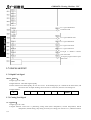
1.1.2 Axis Moving Signal
MV1~MV4(F102.0~F102.3)
● Signal type: NC→PLC
● Signal functions: MV1, MV2, MV3, MV4 are moving signals for Axis 1, 2, 3, 4 respectively. When an axis is
moving, NC sets corresponding axis moving signal to 1. When an axis stops moving, the axis moving
signal is 0.
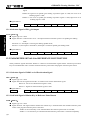
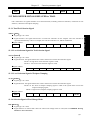
● Signal addresses:
F102
MV4
MV3
MV2
MV1
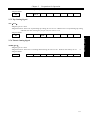
1.1.3 Axis Moving Direction Signal
MVD1~MVD4(F106.0~F106.3)
● Signal type: NC→PLC
● Signal functions: MVD1, MVD2, MVD3, MVD4 are axis moving direction signals for Axis 1, 2, 3, 4 respectively.
When an axis is moving backwards, NC sets the axis moving direction signal to 1; when an axis is
moving forward, the axis moving direction signal is 0; If an axis stops moving, the direction signal
will be 1 or 0 depending on the moving status before the axis stopping.
● Signal addresses:
F106
1.2
MVD4
MVD3
MVD2
MVD1
SERVO READY SIGNAL
SA(F000.6)
● Signal type:NC→PLC
Ⅰ-1
GSK980TD Turning Machine CNC
● Signal functions: When CNC gives out a warning, NC sets SA signal to 0 to stop axis moving. When the warning is
cancelled, NC sets SA to 1 to move axis again.
● Signal address:
F0
Book 2 Function
Ⅰ-2
SA
Chapter 2
Preparation for Operation
Chapter 2 PREPARATION for OPERATION
2.1 EMERGENT STOP
ESP(X0.5):
Emergency stop signal
● Signal type: machine tool → NC
● Signal function: If external emergency stop signal X0.5 is not shielded and is detected to be 0, CNC will give out
an emergency stop warning (no matter whether PLC program is configured in CNC or not). At this
time CNC resets, and the machine tool stops running.
● Signal address:
ESP
Emergency stop signal
ESP(G8.4):
● Signal type: PLC→NC
● Signal function: If the voltage of G8.4 is 0, once NC detects this signal, an emergency stop warning will be given
out.
● Signal address:
G8
ESP
2.2 CNC READY SIGNAL
MA(F001.7):
● Signal type: NC→PLC
● Signal function: CNC Ready Signal indicates that CNC is ready for working.
● Output conditions: When CNC is powered on without warning, F1.7 will be set to 1 in several seconds. otherwise,
CNC ready signal will be 0.
● Signal address:
F001
MA
2.3 CNC OVERTRAVEL SIGNAL
+L1~+L4(G114.0~G114.3)
-L1~-L4(G116.0~G116.3)
● Signal type: PLC→NC
● Signal functions: If a tool moves beyond the distance which the machine limit switch sets, the limit switch starts
working, the tool slows down and then stops, and overtravel alarm is given out. This signal indicates
that control axis already reaches the limit distance. Every direction of each control axis has this signal.
Ⅱ-1
Book 2 Function
X0
GSK980TD Turning Machine CNC
“+” and “-” displays the direction, and the number means corresponding axis name.
+
L
1
1
Axis 1 overtravel
2
Axis 2 overtravel
3
Axis 3 overtravel
4
Axis 4 overtravel
+ “forward” overtravel
- “backward” overtravel
● Output conditions: If CNC overtravel signal is 0, the control unit will response as follows:
*During automatic operation, if any one of the axis overtravel signal is 0, all axes will slow down and
stop, also alarm will be given out.
Book
k 2 Function
*During manual operation, only the axis with a moving signal of 0 is going to slow down and stop.
The axis can move backwards after it stops.
*Once an axis overtravel signal turns to 0, the moving direction will be saved in the memory. Even
though the signal changes to 1 again before the warning is cancelled, the axis cannot move on in the
foregoing direction.
● Signal addresses:
G114
+L4
+L3
+L2
+L1
G116
-L4
-L3
-L2
-L1
2.4 ALARM SIGNAL
AL(F001.0):
● Signal type: NC→PLC
● Signal functions: When an alarm is given out, the cause message of the alarm will be displayed, and NC will set
F1.0 signal to 1. There are two types of alarm: PLC alarm and CNC alarm. When the alarm is
cancelled and CNC resets, F1.0 will turns to 0.
● Signal address:
F001
AL
2.5 START LOCK SIGNAL
STLK(G007.1)
● Signal type: PLC→NC
● Signal functions: When PLC sets G7.1 to 1, and transmits to NC, NC control axis slows down and stops. During
automatic operation, if G7.1 is 1, and the commands before axis moving command block contain M, S,
T commands, M, S, T commands can execute constantly until all the axis moving command blocks are
finished and axis slows down and stops. Unless G7.1 signal is 0, program can restart.
● Signal address:
G007
Ⅱ-2
STLK
Chapter 2
Preparation for Operation
2.6 MODE SELECTION
Mode selection signals include MD1, MD2, MD4, DNC1 and ZRN. Eight types of work mode can be selected: Edit
mode, Auto mode, MDI mode, Jog mode, Handwheel mode/Increment mode, Machine Reference Point Return mode and
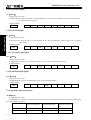
Program Reference Point Return mode. CNC outputs work mode detection signals and informs PLC which working mode
CNC is using.
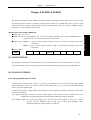
2.6.1 Mode Selection Signal
MD1、MD2、MD4(G043.0~G043.2)
DNC1(G043.5)
ZRN(G043.7):
● Signal type: PLC→NC
No.
Code signal
Work mode
ZRN
DNC1
MD4
MD2
MD1
1
Edit mode
0
0
0
1
1
2
Auto mode
0
0
0
0
1
3
MDI mode
0
0
0
0
0
4
Handwheel
0
0
1
0
0
mode/Increment
mode
Book 2 Function
● Signal function: Work mode codes are as follows.
(HANDLE/INC)
5
Jog mode (JOG)
0
0
1
0
1
9
Machine Reference Point Return mode
1
0
1
0
1
0
0
0
1
0
(REF)
10
Program Reference Point Return mode
(PROG_ZERO)
PLC sets a value/digit to a Code signal, and then transfers to NC. NC will determine the working method of CNC
according to the code signal value.
● Signal addresses:
G43
ZRN
DNCI
MD4
MD2
MD1
2.6.2 Work Mode Detection Signal
MINC(F3.0)、MH(F3.1)、MJ(F3.2)、MMDI(F3.3)、MMEM(F3.5)、MEDT(F3.6)、MREF(F4.5)、MPST(F4.6)
● Signal type: NC→PLC
● Signal functions: when CNC is working under a certain mode, if related “F” signal is set to 1, and transmitted to
PLC, PLC can be informed about the current working method.
Increment mode detection signal
MINC
Handwheel mode detection signal
MH
Jog mode detection signal
MJ
MDI mode detection signal
MMDI
Auto mode detection signal
MMEM
Ⅱ-3
GSK980TD Turning Machine CNC
Edit mode detection signal
MEDT
Machine Reference Point Return mode detection signal
MREF
Program Reference Point Return mode detection signal
MPRO
● Signal addresses:
F3
MEDT
MMEM
F4
MPRO
MREF
MMDI
MJ
MH
MINC
2.6.3 Sequence of Work Mode Signals 2 Function
Work
mode keys
工作方式键输入(X20.0、
1
Book
k 2 Function
X20.1、X20.2、X20.3、
X20.4、X20.5、X21.3) 0
1
工作方式选
Work mode selection
择信号G43
signal G43
0
Work mode detection
工作方signal
式检测信号(F3.0、
1
F3.1、F3.2、F3.3、F3.5、
F3.6、F4.5、F4.6)
0
工作
方式指示灯(Y5.3、
Work mode
indicator
1
Y5.2、Y5.5、Y5.6、
Y5.7、Y5.4、Y6.2)
0
2.6.4 Work Mode Control Flowchart
Resume hold mode after power on
Input X20.0 by edit mode key
Input X20.1 by auto mode key
Input X20.2 by MDI mode key
Ⅱ-4
Chapter 2
Preparation for Operation
Input X20.3 by machine reference point return key
Input X20.4 by handwheel/incremental mode key
Input X20.5 by JOG mode key
Input X21.3 by program reference point return
Select G43:11 in Edit mode
Select G43:1 in Auto mode
Book 2 Function
Select G43:0 in MDI mode
Select G43:10000101 in
machine reference point return mode
Select G43:100 in Handwheel/
incremental mode
Select
G43:101
in
Manual
mode
Select G43:10 in program reference
point return mode
Save G43:100 in current mode
Ⅱ-5
GSK980TD Turning Machine CNC
Y5.3: light in Handwheel/
incremental mode
Y5.2: light in Manual mode
Book 2 Function
Y5.5: light in MDI mode
Y5.6: light in Auto mode
Y5.7: light in Edit mode
Y5.4:light in Machine
reference
point return mode
Y6.2:ligh in program reference point
return mode
2.7 STATUS OUTPUT
2.7.1 Rapid Feed Signal
RPDO(F002.1):
● Signal type: NC→PLC
● Signal function: CNC feeds signals rapidly
● Notes: When an axis feeds rapidly, NC sets F2.1 to be 1. If the feeding stops, F2.1 remains at the same status, and
then selects the “un-rapid” feeding, moves the axis or resets CNC, then F2.1 will change to 0.
● Signal address:
F2
PRDO
2.7.2 Cutting Feed Signal
CUT(F002.6):
● Signal type: NC→PLC
● Signal function: when CNC is performing cutting feed (linear interpolation, circular interpolation, helical
interpolation, thread cutting, skip cutting or fixed cycle cutting), NC sets F2.6 to 1, and then transmits
Ⅱ-6
Chapter 2
Preparation for Operation
to PLC. When it changes to rapid feed, F2.6 turns to be 0.
● Signal address:
F2
CUT
2.7.3 Tap Cutting Signal
TAP(F1.5):
● Signal type: NC→PLC
● Signal functions: when CNC is performing tap cutting, NC sets F1.5 to 1.When CNC is not performing tap cutting,
and under the state of emergency stop or reset, NC sets F1.5 to 0.
● Signal address:
F1
TAP
THRD(F2.3):
● Signal type: NC→PLC
● Signal functions: when CNC is executing thread cutting, NC sets F2.3 to 1. While on the contrary F2.3 is
0.
● Signal address:
F2
THRD
Ⅱ-7
Book 2 Function
2.7.4 Thread Cutting Signal
Chapter 3
Manual Operation
Chapter 3 MANUAL OPERATION
3.1 JOG FEED/INCREMENTAL FEED
Jog feed: In the jog mode, if the feed axis and direction selection signal is set to 1, the tool moves continuously along
the selected axis in the selected direction.
Incremental feed: In the incremental mode, if the feed axis and direction selection signal is set to 1, the tool moves
one step along the selected axis in the selected direction. The minimum distance the tool is moved is the least input
increment. Each step can be 0.001, 0.010 or 0.100 times .
The only difference between jog feed and incremental feed is the method of selecting feed distance. In the jog mode,
By pressing the jog rapid traverse feed selection switch, the tool can be moved at the rapid traverse federate. In the
incremental feed mode, the distance of each step can be selected by MP1, MP2.
3.1.1 Feed Axis and Direction Selection Signal
+J1~+J4(G100.0~G100.3)
-J1~-J4(G102.0~G102.3)
● Signal type: PLC→NC
● Signal functions: In the jog feed or incremental feed mode, select a feed axis and a direction, perform axis moving,
and NC sets the corresponding axis and direction selection signal to 1. “+”, “-” indicates feed
direction. The number indicates axis number.
+
J
1
1
2
3
4
Axis 1 feed
Axis 2 feed
Axis 3 feed
Axis 4 feed
+ Forward feed
- Backward feed
● Notes: A:In the jog feed mode, CNC makes the selected axis moving continuously. In the incremental feed mode,
CNC makes the selected axis moving according to the specified rate defined by MP1, MP2 signals.
B:When an axis is moving, NC sets the axis and direction selection signal to 1. When the axis stops
moving, the signal changes to 0.
● Signal addresses:
G100
+J4
+J3
+J2
+J1
G102
-J4
-J3
-J2
-J1
Ⅲ-1
Book
k 2 Function
when the feed axis and direction selection signal +J1、-J1、+J2、-J2、+J3、-J3 is 1, the tool can move/feed
continuously. While in the incremental mode, the tool only moves one step.
GSK980TD Turning Machine CNC
3.1.2 Manual Feed Override Signal
JV00~JV15(G10、G11):
● Signal type: PLC →NC
● Signal functions: Select manual feed override. The following table shows the relationship between signals and
manual feed override. PLC sets a value to G10, G11 and transmits to NC. Then NC sets override based
on the value of G10, G11.
Book 2 Function
G11
G10
Override(%)
Feed speed (mm/min)
0000 0000
0000 1111
0
0
0000 0000
0000 1110
10
2.0
0000 0000
0000 1101
20
3.2
0000 0000
0000 1100
30
5.0
0000 0000
0000 1011
40
7.9
0000 0000
0000 1010
50
12.6
0000 0000
0000 1001
60
20
0000 0000
0000 1000
70
32
0000 0000
0000 0111
80
50
0000 0000
0000 0110
90
79
0000 0000
0000 0101
100
126
0000 0000
0000 0100
110
200
0000 0000
0000 0011
120
320
0000 0000
0000 0010
130
500
0000 0000
0000 0001
140
790
0000 0000
0000 0000
150
1260
● Signal addresses:
G10
JV07
JV06
JV05
JV04
JV03
JV02
JV01
JV00
G11
JV15
JV14
JV13
JV12
JV11
JV10
JV09
JV08
3.1.3 Rapid Traverse Selection Signal
RT(G019.7)
● Signal type: PLC→NC
● Signal functions: PLC sets G19.7 to 1 and transmits to NC to select jog rapid traverse. During the time of rapid
traverse, either G19.7 changes from 1 to 0, or from 0 to 1, feed speed will drop to 0 at first, and then
increase up to stated value. In the process of speed decreasing, feed axis and direction selection signal
remains unchanged.
● Signal addresses:
G19
Ⅲ-2
RT
Chapter 3
Manual Operation
3.1.4 Manual Feed Override Control Flowchart
Resume manual feed
override after power on
Book
k 2 Function
External override OV
~OV8 is valid
Override
key
on
MDI
panel is valid
Subprogram
for
external
manual feed override
Ⅲ-3
GSK980TD Turning Machine CNC
Min.: override
Max. override
Y8.4: light for min. override in manual feed
Book 2 Function
Y8.4: light for min. override in manual feed
Y8.1: light for max. override in manual feed
Subprogram for manual feed
override on MDI panel
X24.6: down key for manual
feed override
Upload computation number
Ⅲ-4
Chapter 3
Manual Operation
Y24.3: up key for
manual feed override
Upload computation number
Upload override value
Book 2 Function
Save override data
Max. override
Min. override
Y8.1: light for manual
feed max. override
Y8.4: light for manual
feed min. override
3.2 HANDWHEEL FEED
In manual handle feed mode, the tool can be minutely moved by rotating the handle. An axis can be selected
according to the handle feed axis selection signal.
Ⅲ-5
GSK980TD Turning Machine CNC
3.2.1 Handwheel Feed Axis Selection Signal
HS1A(G18.0)、HS1B(G18.1)
● Signal type: PLC→NC
● Signal type: PLC sets a value to handwheel feed axis selection signal G18.0, G18.1, and transmits to NC. NC
selects appropriate axis to feed based on the value of G18.0、G18.1. The relationship between signals
G18.0, G18.1 and handwheel feed axis is as follows:
HS1B(G18.1) HS1A(G18.0)
● Signal addresses:
Feed axis
0
0
No feed axis selected
0
1
Axis 1 is selected
1
0
Axis 2 is selected
1
1
Axis 3 is selected
Book 2 Function
G18
HS1B
HS1A
3.2.2 Handwheel / Increment Override Signal
MP1(G19.4)、MP2( G19.5):
● Signal type: PLC→NC
● Signal functions: MP1, MP2 can select the moving distance of each pulse during the handwheel feed, and also can
select the moving distance of each step during the incremental feed. PLC sets a value to G19.4, G19.5,
and transmits to NC. NC adjusts override according to the value of G19.4, G19.5. See below table for
detailed relationship:
MP2
MP1(G19.4)
(G19.5)
● Signal addresses:
G19
Ⅲ-6
Moving distance
(mm)
0
0
0.001
0
1
0.010
1
0
0.100
1
1
1.000
MP2
MP1
Chapter 3
Manual Operation
3.2.3 Handwheel Override Control Flowchart
X22.1:Z handwheel selection signal
X21.7:X handwheel selection signal
Book
k 2 Function
select X handwheel
select Z handwheel
Y7.4:X handwheel indicator
Y7.2:Z handwheel indicator
X21.4:0.001 key
X21.5:0.01 key
X21.6:0.1 key
Encode handwheel override
Ⅲ-7
GSK980TD Turning Machine CNC
Y7.7: 0.01 indicator
Y7.6 : 0.01 indicator
Y7.5: 0.1 indicator
Book 2 Function
Ⅲ-8
Chapter 4
Machine/Program Reference Point Return
Chapter 4 MACHINE/PROGRAM REFERENCE POINT RETURN
4.1 MACHINE REFERENCE POINT RETURN
In the mode of Machine reference point Return, by setting the feed axis and direction selection signals to 1, the
tool can move along the specified direction, and return to machine reference point position. After returning to
machine reference point position, CNC sets a workpiece coordinate system based on the values of NO.049, NO.050.
4.1.1 Machine Reference Point Return End Signal
4.1.2 Deceleration Signal in Machine Reference Point Return
XDEC(X09.0)、ZDEC(X09.1):
● Signal type: machine tool→NC
● Signal functions: As soon as NC receives the deceleration signal in machine reference point return, the
moving speed will be decelerated, until the machine tool returns to machine reference point
position at a low rate. XDEC, ZDEC signals are machine reference point return deceleration
signals for Axis X, Z respectively.
● Signal addresses:
X9
ZDEC
XDEC
4.1.3 Machine Reference Point Setting Signal
ZRF1~ZRF4(F120.0~F120.4)
● Signal type: NC→PLC
● Signal functions: After ending NC machine reference point return and setting a machine reference point point,
the corresponding machine reference point establish signal is set to 1, and then it is transmitted to
PLC. ZRF1, ZRF2, ZRF3, ZRF4 signals are machine reference point establish signals for Axis 1,
2, 3, 4 respectively.
Ⅳ-1
Book 2 Function
ZP1~ZP4(F094.0~F094.3):
● Signal type: NC→PLC
● Signal function: When an axis ends the machine reference point return, NC will set the related F signal to 1,
and transmit to PLC. This is to inform the axis that the machine reference point return already
ends. ZP1, ZP2, ZP3, ZP4 signals are machine reference point return end signals for Axis 1, 2, 3,
4 respectively.
● Notes: When machine reference point return has already ended (and G28 command returns to zero), and the
current position is within the specified area, the machine reference point return end signal turns to 1.
When the tool moves away from machine reference point point, the machine reference point return
end signal changes to 0.
GSK980TD Turning Machine CNC
● Signal addresses:
F120
ZRF4
ZRF3
ZRF2
ZRF1
4.1.4 Sequence of Machine Reference Point Return Signal
Machine reference point return(F4.5)
Start
Machine reference point return in X/Z direction
Stop
Machine reference point
return end signal (F094)
Book 2 Function
Machine reference point
establish signal (F120)
Machine reference point return
end indicator (Y4.7, Y4.5)
4.2 PROGRAM REFERENCE POINT RETURN
Under the status of Program reference point Return, Program reference point Return executes and makes the
tool moving to G50 position at a rapid speed. While during the time of program automatic executing, if a
program stops, the program returns to zero, the tool will return to program start position, and cancel tool offset.
If program reference point is not saved in the memory, when the program reference point return command is
executing, an alarm occurs. If program reference point is saved, then the program is started up, the position of
the tool when G50 block is executing will be saved in the memory automatically. Once the zero point is saved,
it will keep unchanged until a new zero point is saved. i.e. when executing Program A, zero point A is saved;
Then when executing Program B (if G50 is included), zero point A will be replaced by zero point B.
4.2.1 Program Reference Point Return End Signal
PRO1~PRO4(F198.0~F198.3):
● Signal type: NC→PLC
● Signal functions: When program reference point return ends, the tool will stay at the program reference point
point. NC will set the program reference point return end signal to 1, and transmit to PLC, which
informs PLC that the program reference point return is ended. PRO1, PRO2, PRO3, PRO4 are
program reference point return end signals for Axis 1, 2, 3, 4 respectively.
● Note: When the tool moves away from program reference point, the signal of program reference point return
turns to 0.
● Signal addresses:
F198
Ⅳ-2
PRO4
PRO3
PRO2
PRO1
Chapter 4
Machine/Program Reference Point Return
4.2.2 Sequence of Program Reference Point Return Signals
程序回零方
Program reference
point (F4.6)
式(F4.6)
Program reference point return
in X/Z direction
X、Z回程
序零点
Program reference point return程序零点返回结
end signal(F198)
束信号(F198)
Program reference point return
程序回零结束灯
end indicator(Y4.7,
Y4.5)
(Y4.7、Y4.5)
1
0
Start
开始
Stop
停止
1
0
1
0
Book 2 Function
Ⅳ-3
Chapter 5
Automatic Operation
Chapter 5 AUTOMATIC OPERATION
5.1 CYCLE START/FEED HOLD
● Cycle start (start automatic operation):
In the mode of automatic or inputting method, when automatic operation start signal ST is effective, programs start
running.
1. Under the following conditions, ST signal is ignored:
A:any other methods except automatic method or inputting method
B:feed hold signal(SP)is 0
Book 2 Function
C:emergency stop signal(ESP)is 0
D:external reset signal(ERS)is 1
E:press “reset” button on the operator’s panel
F:CNC is warning
G:automatic operation has already started
H:program restart signal(SRN)is 1
I:CNC is searching for a sequence number
2. During automatic operation, CNC performs feed hold under the following conditions:
A:feed hold signal(SP)is 0
B:change to manual method, wheel method, single step method, machine zero return, or program zero return
C:single block command is finished
D:already finished inputting
E:CNC is warning
F:After changing to editing method, single block command is finished.
4、During automatic operation, CNC keeps in “reset” status and stops running under the following conditions:
A:emergency stop signal(ESP)is 0
B:external reset signal(ERS)is 1
C:press “reset” button on the operator’s panel
● Feed hold(pause automatic operation):
During automatic operation, when the feed hold signal SP is 0, CNC pauses and stops running. At the same time cycle
start indictor signal (STL) is set to 0, feed hold signal (SPL) is set to 1, even though SP is set to 1, the machine will not
restart and operate automatically. Unless SP is set to 1, and ST signal is effective, the machine can restart and operate
automatically.
When executing program blocks with only M, S, T commands, SP signal is set to 0, STL will be 0 immediately, SPL
signal is 1, and CNC performs feed hold. When FIN signals are received from PLC, CNC continues executing the paused
program blocks. After finish executing, SPL signal is 0 (STL signal is 0), CNC stops automatic operation.
While G92 command(thread cutting cycle)is executing, SP signal is 0, and SPL signal changes to 1 immediately, but
the operation keeps running until cutter withdrawal is finished after thread cutting.
While G32 command (thread cutting) is executing, SP signal is 0, and SPL signal changes to 1 immediately, but the
operation keeps running until the non-thread cutting program block is finished executing after the thread cutting block.
While G84 command (fixed tap cycle) is executing, SP signal is 0, SPL signal changes to 1 immediately, but the
operation keeps running until the cutter returns to start position or R position after tap cutting is finished.
While executing macro command, after macro command is finished, it stops operating.
Ⅴ-1
GSK980TD Turning Machine CNC
5.1.1 Cycle Start Signal
ST(G007.2)
:
● Signal type: PLC→NC
● Signal function: under the automatic or editing method, PLC sets G7.2 to 1, and then sets to 0, and transmits to NC.
NC starts automatic operation.
● Signal address:
G7
ST
5.1.2 Feed Hold Signal
SP(G008.5)
Book 2 Function
● Signal type: PLC→NC
● Signal function: PLC sets G8.5 to 0, and transmits to NC. NC starts automatic operation. If G8.5 is 0, programs
cannot restart.
● Signal address:
G8
SP
5.1.3 Cycle Start Light Signal
STL(F000.5)
● Signal type: NC→PLC
● Signal function: when NC is on automatic operation, STL is set to 1 and transmitted to PLC.
● Signal address:
F0
STL
5.1.4 Feed Hold Light Signal
SPL(F000.4)
● Signal type: NC→PLC
● Signal function: when NC is paused, SPL is set to 1 and transmitted to PLC.
● Signal address:
F0
SPL
5.1.5 Automatic Operation Signal
OP(F000.7)
● Signal type: NC→PLC
● Signal function: when NC is on automatic operation, OP is set to 1 and transmitted to PLC. The relationship among
STL, SPL and OP is as follows:
Cycle start light STL
Feed hold light SPL
Automatic operation
OP
Ⅴ-2
Cycle start status
1
0
1
Feed hold status
0
1
1
Chapter 5
Automatic operation
Automatic Operation
0
0
0
0
0
0
status
Reset status
● Signal address:
F0
OP
5.2 RESET
Under the following conditions, CNC starts “reset” status.
A:Emergency stop signal(ESP) is 0
B:External reset signal(ERS)is 1
C:Press the “reset” button on the panel
Book 2 Function
Except the above conditions, after the time specified by parameter NO.071, reset signal RST changes to 0.
RST time=Treset(reset processing time)+reset signal output time(parameter NO.071)
Reset processing
Reset “ON”
Reset signal
Treset
Parameter NO.071
During automatic operation, once CNC is reset, automatic operation stops, and the tool slows down along the
controlled axis until stops in the end. If CNC is executing M, S, T commands, when it is reset, MF, SF, TF signals will
change to 0 in 8ms.
5.2.1 External Reset Signal
ERS(G008.7)
● Signal type: PLC→NC
● Signal function: when PLC sets G8.7 to 1 and transmits to NC, CNC resets and RST signal becomes 1.
● Signal address:
G8
ERS
5.2.2 Reset Signal
RST(F001.1)
● Signal type: NC→PLC
● Signal function: when NC is reset, it sets RST to 1 and transmits to PLC. This is to inform PLC that CNC is reset.
● Note: Under the following conditions, RST is set to 1:
A:external emergency stop signal (ESP) is set to 0.
B:external reset signal(ERS)is set to 1
C:press the “reset” button on the panel
Except the above conditions, after the time specified by parameter NO.071, reset signal RST changes to 0.
Ⅴ-3
GSK980TD Turning Machine CNC
● Signal address:
F1
RST
5.2.3 Sequence of Start Operation
忽略
Ignorance
1
RST(F1.1) 0
ST(G7.2)
OP(F0.7)
Book 2 Function
SP(G8.5)
SPL(F0.4)
STL(F0.5)
1
0
1
0
1
0
1
0
1
0
5.3 MACHINE LOCK
When checking programs before running the machine, machine lock function can be used. Set all-axis machine lock
signal (MLK) to 1. In the process of manual operation or automatic operation, the machine stops pulse output to servo
motor. But CNC still keeps command assignment, and absolute coordinates and relative coordinates are updated.
Monitoring the changes of the coordinates positions can check if the edited programs are correct or not.
5.3.1 All-axis Machine Lock Signal
MLK(G44.1)
● Signal type: PLC →NC
● Signal functions: PLC sets G44.1 to 1, and transmits to NC. All axes are locked. Once G44.1 is set to 1, during the
time of manual operation or automatic operation, CNC cannot output pulses to servo motor. Therefore
the axis doesn’t move.
● Signal address:
G44
5.3.2 Detection Signal of All-axis Machine Lock
MMLK(F004.1)
● Signal type: NC→PLC
● Signal function: When all axes are locked, NC sets F4.1 to 1 and transmits to PLC.
Ⅴ-4
MLK
Chapter 5
Automatic Operation
● Signal address:
F4
MMLK
5.4 DRY DRUN
Dry run is effective in the automatic operation mode. At dry run time, the tool moves at an invariable override,
instead of moving at a override specified in the program. This function is used for checking the movement of the tool
under the state that the workpiece is removed. The movement speed depends on manual feed override signal (JV0~JV15).
Rapid traverse selection signal
Dry run speed
(RT)
1
Rapid traverse override
0
Manual feed override
DRN(G46.7):
● Signal type: PLC→NC
● Signal function: PLC sets G46.7 to 1, and transmits to NC. Then the dry run starts.
● Notes: A:If G46.7 is 1, the tool moves at a override specified for dry run. If G46.7 is 0, the tool moves normally.
Book 2 Function
5.4.1 Dry Run Signal
B:When the tool is moving, and when G46.7 changes from 0 to 1 or from 1 to 0, the movement speed of
the tool first drops down to 0, and then accelerates to a specified override.
● Signal address:
G46
DRN
5.4.2 Detection Signal of Dry Run
MDRN(F002.7)
:
● Signal type: NC→PLC
● Signal function: when a CNC is in the status of dry run, NC sets F2.7 to 1, and then transmits to PLC.
● Signal address:
F2
MDRN
5.5 SINGLE BLOCK
Single block execution is effective in the automatic operation mode only. During the time of automatic operation, if
single block signal(SBK)is set to 1, after the current block is executed, CNC starts feed hold. If single block signal(SBK)
is set to 0, programs run normally.
5.5.1 Single Block Signal
SBK(G046.1):
● Signal type: PLC→NC
● Signal function: When PLC sets G46.1 to 1, and transmits to NC. CNC starts single block executing.
● Signal address:
G46
SBK
Ⅴ-5
GSK980TD Turning Machine CNC
5.5.2 Detection Signal of Single Block
MSBK(F004.3)
:
● Signal type: NC→PLC
● Signal function: when CNC is executing single block, NC sets F4.3 to 1 and transmits to PLC.
● Notes: A:thread cutting: during the time of thread cutting, SBK changes to 1. The executing stops until the first non
thread cutting block is finished.
B:fixed cycle executing: during the time of fixed cycle executing, if SBK is set to 1, the executing stops
when approaching drill and cutting withdrawal, instead of at the end of the program block.
● Signal address:
Book 2 Function
F4
MSBK
5.6 OPTIONAL BLOCK JUMP
During automatic operation, if a slash “/” at the start of a block is specified, and the block jump signal BDT is set to
1, the program block is jumped and ignored.
5.6.1 Optional Block Jump Signal
BDT(G44.0):
● Signal type: PLC→NC
● Signal function: If PLC sets G44.0 to 1 and transmits to NC, CNC starts executing block jumping. Any program
block with a slash “/” at the start of the block will not executed.
● Signal address:
G44
BDT
5.6.2 Detection Signal of Jump Block
MBDT(F04.0)
:
● Signal type: NC→PLC
● Signal function: when CNC is executing block jumping, NC sets F4.0 to 1 and transmits to PLC, which informs that
PLC is running block jumping.
● Signal address:
F4
Ⅴ-6
MBDT
Chapter 6
Feed speed Control
Chapter 6 FEED SPEED CONTROL
6.1 RAPID TRAVERSE SIGNAL
The rapid traverse speed of each axis can be controlled by parameters NO.022 and NO.023, rather than program
setting. But rapid traverse speed can also be controlled by adjusting rapid traverse override.
RPDO(F2.1):
●Signal type:NC→PLC
●Signal function:When CNC is executing moving commands at a rapid traverse speed, NC sets F2.1 to 1, and
● Notes:
A:
If RPDO is 1, this indicates that an axis is moving after selecting rapid traverse mode; if RPDO is 0,
it means an axis is moving after selecting null rapid traverse override.
B:In the automatic operation, rapid traverse includes all rapid traverse modes, such as fixed cycle
position, machine zero return, etc, not only for G00 command. Manual rapid traverse also includes
the rapid traverse in machine zero return.
C:Once rapid traverse is selected, the signal keeps to 1, even during the stop time, but changes until
other feed speed is selected and moving is started.
●Signal address
F2
RPDO
6.2 RAPID TRAVERSE OVERIRDE
Rapid traverse override has four levels F0, 25%, 50% and 100%. F0 override is specified by parameter NO.032.
In automatic method or manual method (including machine zero return, program zero return), actual moving rate is
obtained through multiplying the value set by parameters NO.022, NO.023 by the rate value
6.2.1 Rapid Traverse Override Signal
ROV1、ROV2(G014.0、G014.1)
●Signal type:PLC→NC
●Signal function:PLC sets values to G14.0, G14.1 and transmits to NC. NC then sets the rapid traverse override
according to the values of G14.0, G14.1. The override values of ROV1, ROV2 are shown in the
following table:
ROV2(G14.1) ROV1(G14.0)
Override value
0
0
100%
1
0
50%
0
1
25%
1
1
FO
●Signal address
G14
ROV2
ROV1
Ⅵ-1
Book 2 Function
transmits to PLC.
GSK980TD Turning Machine CNC
6.2.2 Rapid Traverse Override Control Flowchart
X24.5: down key for rapid traverse override
X24.2: up key for rapid traverse override
Rapid traverse override +
Book 2 Function
Rapid traverse override -
Max. rapid traverse override
Min. rapid traverse override
Ⅵ-2
Chapter 6
Feed speed Control
Encode computation number
Rapid traverse override encode
Y8.2: indicator for max.
rapid traverse override
Y8.5: indicator for min.
rapid traverse override
Feed speed can be adjusted by feed override, and can be used for checking programs. For example, if the feed speed
specified in the program is 100mm/min, when the feed override is adjusted to 50%, the tool moves at a speed of
50mm/min.
6.3.1 Feed Override Signal
FV0~FV7 (G012):
●Signal type:PLC→NC
●Signal function:PLC sets a value to G12 and transmits to NC. NC can set a feed override according to the value of
G12. The relationship between FV0 - FV7 binary codes and feed override is shown below:
FV7~FV0 (G012.7~G012.0 )
Cutting feed override
0000 1111
0%
0000 1110
10%
0000 1101
20%
0000 1100
30%
0000 1011
40%
0000 1010
50%
0000 1001
60%
0000 1000
70%
0000 0111
80%
0000 0110
90%
0000 0101
100%
0000 0100
110%
0000 0011
120%
0000 0010
130v
0000 0001
140%
0000 0000
150%
● Note: In automatic operation, actual feed speed = cutting feed speed x feed override.
●Signal address
Ⅵ-3
Book 2 Function
6.3 FEED OVERRIDE
GSK980TD Turning Machine CNC
G12
FV7
FV6
FV5
FV4
FV3
FV2
FV1
FV0
6.3.2 Feed Override Control Flowchart
Subprogram for calling
external feed override
Subprogram for calling
external feed override on MDI panel
Book 2 Function
Subprogram for external
feed override on MDI panel
Subprogram for feed override
override on MDI panel
X24.6: down key for feed override
Ⅵ-4
Chapter 6
Feed speed Control
Feed
override-
X24.3: up key for feed override
Feed override+
Book 2 Function
Min. feed override
Max. feed override
Y8.4: indicator for max. feed override
Y8.1: indicator for m. feed override
6.4 OVERRIDE CANCEL SIGNAL
OVC(G006.4)
:
●Signal type:PLC→NC
●Signal function:PLC sets G6.4 to 1 and transmits to NC. NC will set the feed override to be 100%.
Ⅵ-5
GSK980TD Turning Machine CNC
●Note:when OVC is 1, CNC operates as follows:
A:no matter how the feed override signal is adjusted, the feed override remains unchanged 100%
B:rapid traverse override and spindle override are not affected.
●Signal address:
G6
Book 2 Function
Ⅵ-6
OVC
Chapter 7 M S T Functions
Chapter 7 M S T Functions
When a maximum 8-digit number following M, S, T address is specified, the corresponding code signals and strobe
signals are sent to PLC. PLC starts logic control according to these signals, as shown below:
Program
Function
End signal
NC→PLC
address
Code signal
Strobe signal
Distribution of
(PLC→NC)
end signal
Miscellaneous
M
M00~M31(F10~F13)
MF(F7.0)
S
S00~S31(F22~F25)
SF(F7.2)
T
T00~T31(F26~F29)
TF(F7.3)
function
DEN(F1.3)
FIN(G4.3)
function
Tool function
The process is as follows: (change M code to S, T code, i.e. the process of spindle speed function and tool function)
A:Supposed M
is specified in the program, while CNC doesn’t specify, an alarm occurs.
B:After sending code signals M00 - M31 to PLC, and strobe signal MF is set to 1, code signal uses binary system to
express program command value
. If moving is paused, spindle speed or other functions are commanded
together with auxiliary functions, after code signals of the auxiliary functions are sent, other functions start
executing.
C:When strobe signal MF is 1, PLC reads the code signal and executes corresponding operations.
D:If move command and pause command is included in a program block, in order to execute auxiliary functions after
move commands and pause commands are finished, have to wait until DEN signal changes to 1.
E:When operation stops, PLC sets the end signal FIN to 1. End signal is used for auxiliary functions, spindle speed
functions and tool functions. If all these functions are executed at the same time, end signal FIN changes to 1
until all functions are stopped.
F:When end signal FIN becomes 1 for a period of time, CNC can set the strobe signal to 0 and confirm end signal is
received.
G:Until strobe signal is 0, PLC can set FIN to 0.
H:When FIN is 0, CNC sets all code signals to 0 and stops all the sequence operation of the auxiliary function.
(While executing spindle speed function and tool function, code signal keeps unchanged until a new code is
specified.)
I:After commands in a same block is finished, CNC starts executing next block.
In application, the following sequences can be selected as per logical requirements:
If there is one auxiliary function in the block, PLC uses the following sequence:
Ⅶ-1
Book 2 Function
Spindle speed
GSK980TD Turning Machine CNC
M00~M31
MF
PLC operation
FIN
DEN
When move command and auxiliary function are in a same block, if PLC executes auxiliary function before move
command ends, it executes in the following sequence:
Book 2 Function
Move command
M00~M31
MF
PLC operation
FIN
DEN:0
When move command and auxiliary function are in a same block, if PLC executes auxiliary function after move
command ends, it executes in the following sequence:
Move command
M00~M31
MF
PLC operation
FIN
DEN
7.1 AUXILIARY FUNCTION(M FUNCTION)
7.1.1 Code Signal and Strobe Signal
Code signal: M00~M31(F010~F013), strobe signal: MF(F007.0)
●Signal type: NC→PLC
●Signal functions: After CNC executes M code, NC sends M code to PLC via F10 - F13, and sets MF to 1, to start
logical control. For related output conditions and executing processes, please refer to above
descriptions. The relationship between M command and code signal number is as follows:
Ⅶ-2
Chapter 7 M S T Functions
F013,F012,F011,F010
M command
00000000,00000000,00000000,00000000
M00
00000000,00000000,00000000,00000001
M01
00000000,00000000,00000000,00000010
M02
00000000,00000000,00000000,00000011
M03
00000000,00000000,00000000,00000100
M04
00000000,00000000,00000000,00000101
M05
00000000,00000000,00000000,00000110
M06
00000000,00000000,00000000,00000111
M07
00000000,00000000,00000000,00001000
M08
.
.
● Notes: The following auxiliary function commands cannot be output even if they are instructed in CNC programs:
Book 2 Function
A:M98,M99
B:M code for subprogram call
C:M code for custom macro program call
●Signal addresses:
F10
M07
M06
M05
M04
M03
M02
M01
M00
F11
M15
M14
M13
M12
M11
M10
M09
M08
F12
M23
M22
M21
M20
M19
M18
M17
M16
F13
M31
M30
M29
M28
M27
M26
M25
M24
F7
MF
7.1.2 M Code Signal
DM00(F009.7)
、DM01(F009.6)、DM02(F009.5)
、DM30(F009.4):
●Signal type:NC→PLC
●Signal function:When CNC is executing M00, M01, M02, M30 commands, NC sets corresponding code signals
DM00, DM01, DM02, DM30 to 1.
● Notes:
Program command
Code signal
M00
DM00
M01
DM01
M02
DM02
M30
DM30
1:Under the following conditions, M code signal is 1: related auxiliary function is specified, and other
move commands and pause commands are finished in a same block. (If NC receives FIN signal
before move command and pause command end, M code signal will not be outputted.)
2:When FIN signal is 1 or the tool is reset, M code signal is 0.
3:While executing M00, M01, M02, M30, code signals DM00, DM01, DM02, DM30 and code signals
M00 - M31 and strobe signal MF are all outputted at the same time.
●Signal address
F9
DM00
DM01
DM02
DM30
Ⅶ-3
GSK980TD Turning Machine CNC
7.2 Spindle Speed Function (S Function)
Spindle speed code signal S00 - S31(F022 - F025), spindle speed strobe signal SF(F007.2)
●Signal type:NC→PLC
●Signal function:After CNC executes S code, NC sends S code to PLC via F22 – F25, and then sets SF to 1, and
transmits to PLC for logical control. For output conditions and executing progresses, please refer
to related description. The relationship between S command and binary code signal is shown in
the below table:
Book 2 Function
F025,F024,F023,F022
S command
00000000,00000000,00000000,00000000
S00
00000000,00000000,00000000,00000001
S01
00000000,00000000,00000000,00000010
S02
00000000,00000000,00000000,00000011
S03
00000000,00000000,00000000,00000100
S04
.
.
.
.
.
.
●Signal addresses:
F22
S07
S06
S05
S04
S03
S02
S01
S00
F23
S15
S14
S13
S12
S11
S10
S09
S08
F24
S23
S22
S21
S20
S19
S18
S17
S16
F25
S31
S30
S29
S28
S27
S26
S25
S24
F7
SF
7.3 Tool Function (T Function)
Tool function code signal T00 - T31(F026 - F029), tool function strobe signal TF(F007.3)
●Signal type:NC→PLC
●Signal function:After CNC executes T code, NC sends T code to PLC via F26 - F29, and then sets TF to 1 and
transmits to PLC for logical control. For output conditions and executing progresses, please refer
to related description. The relationship between T command and binary code signal is shown in
the below table:
Ⅶ-4
F029,F028,F027,F026
T command
00000000,00000000,00000000,00000000
T00
00000000,00000000,00000000,00000001
T01
00000000,00000000,00000000,00000010
T02
00000000,00000000,00000000,00000011
T03
00000000,00000000,00000000,00000100
T04
.
.
.
.
.
.
.
.
Chapter 7 M S T Functions
●Signal addresses:
F26
T07
T06
T05
T04
T03
T02
T01
T00
F27
T15
T14
T13
T12
T11
T10
T09
T08
F28
T23
T22
T21
T20
T19
T18
T17
T16
F29
T31
T30
T29
T28
T27
T26
T25
T24
F7
TF
7.4 MST Function End
7.4.1 End Signal
●Signal type:PLC→NC
●Signal function:When auxiliary functions, spindle speed function and tool function are all finished executing, PLC
sets FIN to 1 and transmits to NC.
●Signal address:
G4
FIN
7.4.2 Distribution End Signal
DEN(F001.3):
●Signal type:NC→PLC
●Signal function:If auxiliary functions, spindle speed function, tool function and other commands (e.g. move
command, pause command) are all in a single block, after other commands are finished executing,
waiting for FIN signal, then NC sets DEN to 1. Every time a block ends executing, DEN will be set to
0.
●Signal address:
F1
DEN
7.5 AUNCTION LOCK SIGNAL
7.5.1 Auxiliary Function Lock Signal
AFL(G0005.6)
:
●Signal type:PLC→NC
●Signal function:PLC sets G5.6 to 1, then transmits to NC to disenable the execution of M, S, T functions.
● Notes: When AFL signal is 1, CNC works as below:
Ⅶ-5
Book 2 Function
FIN(G004.3)
GSK980TD Turning Machine CNC
A:For operations with automatic method and inputting method, CNC doesn’t execute specified M, S
and T functions, i.e. code signal and strobe signal are not outputted.
B:If AFL is set to 1 after code signal is outputted, CNC works in a normal way until execution
finishes (until FIN signal is received and strobe signal is set to 0).
C:When AFL is 1, M00, M01, M02 and M30 commands can be executed, and corresponding code
signal, strobe signal, coding signal are all outputted in a normal way.
D:If AFL is 1, auxiliary functions M98 and M99 still works in a normal way, but no results are
outputted.
E:If AFL is 1, spindle analog value can be outputted.
●Signal address:
G5
AFL
Book 2 Function
7.5.2 Detection Signal of Auxiliary Function Lock
MAFL(F004.4)
:
●Signal type:NC→PLC
●Signal function:When CNC is executing auxiliary function lock, NC sets F4.4 to 1 and transmits to PLC.
●Signal address:
F4
Ⅶ-6
MAFL
Chapter 8
Spindle Speed
Chapter 8 SPINDLE SPEED
The spindle is divided into gear spindle and analog spindle according its control mode. CNC converts S code
into switching value to output to spindle to control spindle speed in gear spindle mode; CNC converts S code
into analog value to spindle to control spindle speed in analog spindle mode; CNC transmits SIMSPL signal to
inform PLC of current spindle control mode.
F200
SIMSPL
8.1 GEAR SPINDLE
Gear spindle is defined that the actual spindle speed is controlled by gears of machine, and CNC converts S
code into switching value to control gears of machine to realize spindle speed control. Refer to Section 7.2.
8.2 ANALOG SPINDLE
8.2.1 Analog Spindle Speed Control
S instruction for analog spindle control: it is input by part programs and used for specifying analog spindle
speed controlled by CNC. For constant surface speed cutting (G96), CNC converts the specified constant
surface speed into spindle speed.
S code/SF signal output: analog spindle control function in CNC outputs S instruction with binary code to PLC
and does not output SF.
Gear shifting: although S instruction specifies spindle speed, actual control of CNC is spindle motor. CNC
outputs the corresponding spindle speed when the machine gear shifts to some gear.
Gear shifting method: to execute gear shifting, max. spindle speed corresponding to each gear is set by
NO.037~NO.040. Selection signal of gear shift is 2-bit code signal(GR1, GR2).
Relationship between signal and gear is as follows:
Ⅷ-1
Book 2 Function
Spindle mode signal SIMSPL(F200.4)
●Signal type:NC→PLC
●Signal function: NC sets SIMSPL to 0 or 1, sets control mode of spindle speed,transmits SIMSPL to PLC
and informs PLC of current spindle speed control mode.
●Signal action: SIMSPL=1: CNC sets analog spindle control; S code is converted into analog value and is
transmitted.
SIMSPL=0: CNC sets gear spindle control; S code is converted into switching value and is
transmitted.
●Signal address
GSK980TD Turning Machine CNC
GR2(G28.2)
GR1(G28.1)
Gear
Parameter number of max. spindle speed
0
0
1
Data parameter NO.037
0
1
2
Data parameter NO.038
1
0
3
Data parameter NO.039
1
1
4
Data parameter NO.040
NO.037~NO.040 separately set No. 1~No. 4 max. spindle speed. When analog voltage 10V corresponds to max.
speed of spindle motor,linear relationship of analog voltage output for the same S instruction in different gears is as
follows:
U(V)
No.2 gear
No.3 gear
No.4 gear
No.1 gear
10
U1
Book 2 Function
U2
U3
U4
S input (S0~S9999)
NO.037
NO.038
NO.039
NO.040
Suppose that NO.037=1000;NO.038=2000;NO.039=4000;NO.040=5000. S=800:
G28.1=0, G28.2=0, No. 1 gear:
U1 =
800
× 10 = 8V
1000
U2 =
800
× 10 = 4V
2000
U3 =
800
× 10 = 2V
4000
U4 =
800
× 10 = 1.6V
5000
G28.1=0, G28.2=0, No. 2 gear:
G28.1=0, G28.2=0, No. 3 gear:
G28.1=0, G28.2=0, No. 4 gear:
Formula operation of output voltage value:
S12 code (R12O~R01O) output: NC counts the spindle speed of each gear through gear shifting control,
namely S12 code signal R12O~R01O(0~4095)output the spindle motor
and PLC. Relationship between 10V and S12 code is as follows:
S12 code (R12O~R01O)
4095
10V
Ⅷ-2
U
Chapter 8
Spindle Speed
S12 code output: SIND (G33.7) determinates the spindle speed instruction uses S12 code data(R12O~R01O)
counted by NC or S12 bit code signal (spindle motor speed instruction signal R12I~R01I) specified by PLC.
The spindle speed instruction is set in R12I~R01I if the spindle speed is transmitted from PLC.
Voltage offset: after the system receives the spindle speed S12 bit code(0~4095), it compensates and regulates
instruction value of spindle speed by setting NO.021 (it is voltage compensation value when the analog voltage
outputs 0V) and NO.036 (it is voltage compensation value when the analog voltage outputs 0V). Operation
formula is as follows:
Output value of spindle speed=
9999+NO.021-NO.036
4095
XS12 code+NO.036X
9999
9999
S instruction in part
program (S0~S9999)
S code/SF output
Output to PLC
Spindle override signal(SOV0~SOV7)
Transmit from PLC
Spindle stop signal(*SSTP)
Transmit from PLC
Gear shifting:
(S—>spindle
motor speed)
Input gear selection
signal(GR1,GR2)
Result after NC outputting speed:
S12 bit code output(R12O~R01O)
SIND=0
SIND=1
Output to PLC
Output(selection by SIND)
Transmit from PLC
PLC specifies S12 bit code to input
(R12I~R01I)
Transmit from PLC
Use NO.021 and NO.036 to regulate the offset Spindle enabling
value and to output spindle instruction(0~10V) signal output
Converter
Transmit from PLC
Spindle motor
Output to PLC
Machine
Ⅷ-3
Book 2 Function
Conditions of stop output: when S0 is commanded (*SSTP=0 or S0), the instruction output to spindle is reset
to 0. An instruction from NC to spindle cannot be reset to 0 with M05, emergent stop or reset mode.
Analog spindle interface: the system outputs analog voltage of the regulated spindle speed to the spindle motor
by analog spindle interface circuit.
Control instruction flow of analog spindle speed
GSK980TD Turning Machine CNC
Spindle stop signal *SSTP(G29.6):
●Signal type:PLC→NC
●Signal function: stop output the spindle speed instruction. The signal sets S instruction in NC to be 0. Its
relative time sequence is as follows:
●Caution: when the spindle stop signal *SSTP is 0, the output voltage is 0V. When the signal is 1, the analog
voltage outputs instruction value. When the signal is not used, the signal is set to 1 to make CNC control spindle
speed.
●Signal address:
G29
*SSTP
Book 2 Function
S
Input instruction
M03
M05
M04
S00
Auxiliary function
“1”
Spindle stop signal
*SSTP
“0”
Analog voltage 0V
“1”
“0”
Enabling signal ENB
Spindle speed override signal SOV0~SOV7(G30)
●Signal type:PLC→NC
●Signal function: PLC evaluates G30 to transmit it to NC which will determine the spindle speed override
according to G30 value. Relation between SOV0~SOV7 and override value is as follows:
SOV7~SOV0(G30.7~G30.0)
Spindle override
0000,0111
50%
0000,0110
60%
0000,0010
70%
0000,0011
80%
0000,0001
90%
0000,0000
100%
0000,0100
110%
0000,0101
120%
●Caution: The spindle override function is value in tapping cycle and thread cutting.
●Signal address:
G30
Ⅷ-4
SOV07
SOV06
SOV05
SOV04
SOV03
SOV02
SOV01
SOV00
Chapter 8
Spindle Speed
PLC control flow of spindle override:
X24.1
up
key
for
spindle override
spindle override
Max.
spindle
override
in-position
Min.
spindle
override
in-position
Spindle override encode
Ⅷ-5
Book 2 Function
X24.4: down key for
GSK980TD Turning Machine CNC
Y8.6:
light
for
max.
spindle override
Y8.3:
light
for
min.
spindle override
Spindle enabling signal ENB(F001.4)
●Signal type:NC→PLC
●Signal function: it represents whether there is the spindle instruction.
Book 2 Function
●Caution: when an instruction sets the spindle speed(it is not zero) to output to the spindle, NC set F1.4 to 1; if
it is 0, ENB signal is set to 0. In analog spindle mode, even if the input spindle instruction is 0(namely, analog
voltage is 0V), the spindle motor rotates with low speed owing the voltage excursion of inverter. At this time,
ENB signal is used for stopping spindle motor.
●Signal address:
F1
ENB
Gear selection signal GR1,GR2(G28.1,G28.2)
●Signal type:PLC→CNC
● Signal function : it informs CNC of current selected gear and its operations is referred to the
above-mentioned.
●Signal address:
GR2
G28
GR1
S 12-bit code signal R01O~R12O(F036.0~F037.3)
●Signal type:NC→PLC
●Signal function: it converts instruction value of spindle speed counted by NC spindle control function into
0~4095 and outputs to PLC.
●Signal address:
F36
R08O
R07O
F37
R06O
R05O
R04O
R03O
R02O
R01O
R12O
R11O
R10O
R09O
8.2.2 spindle output control of PLC
PLC can be used for control spindle gear shifting as follows:
1:Set SIND to 1 to convert its control mode from NC to PLC.
2:Set the spindle motor speed data counted by PLC in PLC spindle control signal R01I~R12I.
When the spindle motor speed is controlled by PLC, it is influenced by any signals (such as spindle override
signal) which are related to CNC spindle speed instructions or parameter settings.
Ⅷ-6
Chapter 8
Spindle Speed
Instruction selection signal of spindle motor speed SIND (G33.7)
●Signal type:PLC→NC
●Signal function: it is used for selecting CNC or PLC to control spindle motor speed.
SIND=1:control the spindle motor according to speed instruction(R01I~R12I)
transmitted by PLC
SIND=0:control the spindle motor according to speed instruction transmitted by PLC. The
spindle speed is output by specified by S instruction.
●Signal address:
SIND
G33
●Signal function: it is instruction value the spindle motor speed transmitted from PLC. It specifies the spindle
motor speed in binary and its speed is 0~4095.
●Signal address:
R08I
G32
R07I
R06I
G33
R05I
R04I
R03I
R02I
R01I
R12I
R11I
R10I
R09I
Instruction signal of spindle gear shifting SFTREV_L, SFTREV_H(F215, F216)
●Signal type:NC→PLC
●Signal function: the signal informs PLC of the spindle motor speed instruction in gear shifting and specifies
the spindle motor speed in binary. Its speed is 0~4095. Relation between the speed and 10V is as follows
(F216,F215)=NO.067×4095/10000):
NO.067
10V
S12 bit code input value(R01I~R12I)
4095
●Signal address:
F215
SFTREV_L
F216
SFTREV_H
Ⅷ-7
Book 2 Function
S 12-bit code input signal R01I~R12I(G32.0~G33.3)
●Signal type:PLC→NC
GSK980TD Turning Machine CNC
Valid signal of automatic gear shifting AGER(F208.7)
●Signal type:NC→PLC
●Signal function: NC transmits AGER(F208.7) to PLC and PLC executes logical control based whether
AGER(F208.7) is 1. When AGER(F208.7) is 1, the automatic gear shifting is valid and PLC executes the
automatic gear shifting.
●Signal address:
F208
AGER
Test gear shifting in-position signal AGIN(F208.6)in automatic gear shifting to 1, 2
●Signal type:NC→PLC
●Signal function: NC transmits AGIN(F208.6) to PLC. When AGIN(F208.6)is 1, the system automatically
gear shifts to 1 or 2, and AGIN(F208.6)is 0, PLC does not test the gear shifting in-position signal.
Book 2 Function
●Signal address:
F208
AGIN
8.3 SPINDLE JOG FUNCTION
When the spindle jog function is valid, the spindle rotates at the speed set by NO.109 for some time set by
NO.108 after it is started. The function is valid for analog spindle control and executed in JOG,
Handwheel/Increment, Machine Reference Point Return and Program Reference Point Return mode.
8.3.1 Spindle Jog Signal
SPHD(G200.0)
●Signal type:PLC→NC
●Signal function: when the analog spindle function is valid, PLC sets G200.0 to 1 and transmits to 1 to specify
that the spindle jog function is valid. G200.0 is 1 when the spindle rotates normally.
●Signal address:
G200
SPHD
8.3.2 Spindle Jog Detection Signal
MSPHD(F199.0):
●Signal type:NC→PLC
●Signal function: when CNC is executing the spindle jog, NC sets F199.0 to 1 and transmits to PLC to inform
PLC that NC is executing the spindle jog; F199.0 is 0 when NC is not the spindle jog mode.
●Signal address:
F199
Ⅷ-8
MSPHD
Chapter 8
Spindle Speed
8.4 SPINDLE SPEED IN-POSITION SIGNAL
CNC can start the cutting feed when the spindle speed in-position SAR is input signal. Usually, when the
spindle speed is the specified one, the cutting feed is started. At this time, sensor detects the spindle speed, and
the detected one is transmitted to NC by PLC.
When PLC program is edited for spindle speed in-position, if instructions of spindle speed changing and cutting
feed are transmitted simultaneously, CNC changes its state according to the spindle speed to confirm SAR
signal to start cutting feed. To avoid the above-mentioned problem, CNC needs to delay SAR signal and delay
time is set by NO.072 after S instruction and cutting feed are transmitted.
NO.175 BIT6 is set to 1 when SAR signal is used.
●Signal function: when PLC sets G29.4 to 1, it transmits to NC and informs NC that the cutting feed can be
started. When G29.4 is 0, the cutting feed cannot be started.
●Caution: the signal is used for informing CNC that the spindle speed is in-position. And so the signal is set to
1 after the actual spindle speed is the specified one. CNC detects SAR signal in the following states:
A: After CNC switches from rapid traverse movement mode to cutting feed, before the first feed
block is distributed, and after CNC reads the feed block and runs a period of time set by
NO.072, CNC starts to detect SAR.
B: After S code is commanded and before the first feed block is distributed, its dwell time is the
same as the above-mentioned A.
C: When S code and the cutting feed are in the same block, and after S code is output, CNC
dwell a period of time set by NO.072 and starts to detect SAR signal. If SAR signal is 1,
CNC starts to cutting feed.
●Signal address:
G29
SAR
8.5 RIGID TAPPING
Rigid tapping is defined that the tapping axis and the spindle are executed synchronously in general tapping
fixed cycle. CNC needs to test directional signal of spindle rotating in rigid tapping to ensure that the cutting
feed direction and machining process are executed normally.
Execution process: spindle rotating →tool infeed to tapping in Z direction→transmit M05 to spindle →wait for
spindle complete stop →transmit instruction for spindle counterclockwise rotation →tool retraction to starting
point in Z direction →spindle stop. To execute the rigid tapping, the ladder must be edited to inform CNC of
rotating direction of external spindle.
Ⅷ-9
Book 2 Function
Spindle speed in-position signal SAR(G029.4)
:
●Signal type:PLC→NC
GSK980TD Turning Machine CNC
SRVB(G74.4), SFRB(G74.5):
●Signal type:PLC→NC
●Signal function: PLC sets G74.4, G74.5 in rigid tapping, transmits to NC and inform it that the spindle rotates
clockwise or counterclockwise to start cutting feed; when the spindle rotates clockwise, SRVB=1; when it
rotates counterclockwise, SFRB=1; when it stops, SRVB, SFRB are set to 0.
●Caution: PLC must set SRVB, SFRB and informs CNC of current spindle rotating direction in rigid tapping.
●Signal address:
G74
Book 2 Function
Ⅷ-10
SFRB
SRVB
Chapter 9
Tool function
Chapter 9 TOOL FUNCTION
When the T code or HDT signal is specified, NC compares the required tool number with the current tool
number NT00~NT31, and it does not execute the tool change if the tool numbers are not consistent with each
other, which generates a code signal and general signal of the required tool number, and the machine selects tool
according to the generated signal.
The tool change can be executed with T instruction in Auto/MDI/Manual mode and the sequential tool change is
executed by HDT signal.
●Signal address
G201
NT07
NT06
NT05
NT04
NT03
NT02
NT01
NT00
G202
NT15
NT14
NT13
NT12
NT11
NT10
NT09
NT08
G203
NT23
NT22
NT21
NT20
NT19
NT18
NT17
NT16
G204
NT31
NT30
NT29
NT28
NT27
NT26
NT25
NT24
9.1 TOOL CHANGE with T INSTRUCTION
User can specify T instruction to tool change in Auto/MDI mode; NC transmits tool selection number and
general signal specified by T instruction and then waits for PLC to execute tool change after it explains T
instruction. Refer to Chapter 7 about tool change.
9.2 MANUALLY SEQUENTIAL TOOL CHANGE
The current tool number adds 1 as the next tool to execute tool change in manual sequential tool change. If the
current tool number adding 1 is more than the total tool selections set by NO.084, the required next tool number
is 1.
Execution process of CNC manual sequential tool change is the same that of tool change with T instruction; NC
transmits the tool selection number and general signal of the next tool and waits for PLC executing tool change.
CNC transmits the tool number which the current one adds 1 in manual sequential tool change, but one is
specified by T instruction in tool change with T instruction.
Manually sequential tool change HDT(G44.7):
●Signal type:PLC→NC
●Signal function: PLC sets G44.7 to 1 and transmits to NC; NC will execute tool change sequentially
according to current tool number.
Ⅸ-1
Book 2 Function
Current tool number NT00~NT31(G201~G204)
●Signal type:PLC→NC
●Signal function: After PLC has tested the current tool selection signal, it sets NT00~NT31(G201~G204)
to the corresponding value, transmits to NC and informs NC of current tool number. These
signals are to represent tool numbers with binary code.
GSK980TD Turning Machine CNC
●Signal address:
G44
Book 2 Function
Ⅸ-2
HDT
Chapter 10
Programming instruction
Chapter 10 PROGRAMMING INSTRUCTION
In programming, although subprogram is useful for repetitively executing the same operations, macro program
is useful for editing general program because it can use variable, arithmetical operation, logic operation and
condition branch. A part program can call a user macro program like calling a subprogram as follows:
○0001(main program name);
Subprogram(custom M61)
N10 G50 X100 Z100;
○9064;
N20 G00 U50 F100;
N10 G65 P#1104 Q1;
N30 G01 U0.8;
G65 H82 P20 Q#1004 R1;
N50 G0 X100 Z100;
G65 H01 P#1100 Q0;
N60 M99;
M99 P50;
Some function programmed by macro program is usually used for module. Programs can be edited by data
variable and can be compiled by macro program to form the machining technology.
10.1 INPUT SIGNALS of USER MACRO PROGRAM
UI000~UI015(G054, G055):
●Signal type:PLC→CNC
●Signal function: They are used for CNC variable of user macro program read/write, and for interface signal
between user macro program and PLC instead of offering any functions for control units.
Their corresponding variables are as follows:
G54
UI007
UI006
UI005
UI004
UI003
UI002
UI001
UI000
Variable
#1007
#1006
#1005
#1004
#1003
#1002
#1001
#1000
G55
UI015
UI014
UI013
UI012
UI011
UI010
UI009
UI008
Variable
#1015
#1014
#1013
#1012
#1011
#1010
#1009
#1008
BIT7
BIT6
BIT5
BIT4
BIT3
BIT2
BIT1
BIT0
UI007
UI006
UI005
UI004
UI003
UI002
UI001
UI000
BIT15
BIT14
BIT13
BIT12
BIT11
BIT10
BIT9
BIT8
UI015
UI014
UI013
UI012
UI011
UI010
UI009
UI008
●Signal address:
#1032
Ⅹ-1
Book 2 Function
,,,,,,,,,,,,,,,,,,,,,,
N40 M61;
GSK980TD Turning Machine CNC
10.2 OUTPUT SIGNALS of USER MACRO PROGRAM
UO000~UO015(F054~F055), UO100~UO131(F056~F059):
●Signal type:CNC→PLC
●Signal function: They are used for CNC variable of user macro program read/write and for interface signal
between user macro program and PLC instead of offering any functions for control units.
Their corresponding variables are as follows:
Book 2 Function
F54
UO007
UO006
UO005
UO004
UO003
UO002
UO001
UO000
Variable
#1107
#1106
#1105
#1104
#1103
#1102
#1101
#1100
F55
UO015
UO014
UO013
UO012
UO011
UO010
UO009
UO008
Variable
#1115
#1114
#1113
#1112
#1111
#1110
#1109
#1108
F56
UO107
UO106
UO105
UO104
UO103
UO102
UO101
UO100
F57
UO115
UO114
UO113
UO112
UO111
UO110
UO109
UO108
F58
UO123
UO122
UO121
UO120
UO119
UO118
UO117
UO116
F59
UO131
UO130
UO129
UO128
UO127
UO126
UO125
UO124
BIT7
BIT6
BIT5
BIT4
BIT3
BIT2
BIT1
BIT0
UO007
UO006
UO005
UO004
UO003
UO002
UO001
UO000
BIT15
BIT14
BIT13
BIT12
BIT11
BIT10
BIT9
BIT8
UO015
UO014
UO013
UO012
UO011
UO010
UO009
UO008
BIT7
BIT6
BIT5
BIT4
BIT3
BIT2
BIT1
BIT0
UO107
UO106
UO105
UO104
UO103
UO102
UO101
UO100
BIT15
BIT14
BIT13
BIT12
BIT11
BIT10
BIT9
BIT8
UO115
UO114
UO113
UO112
UO111
UO110
UO109
UO108
BIT23
BIT22
BIT21
BIT20
BIT19
BIT18
BIT17
BIT16
UO123
UO122
UO121
UO120
UO119
UO118
UO117
UO116
BIT31
BIT30
BIT29
BIT28
BIT27
BIT26
BIT25
BIT24
UO131
UO130
UO129
UO128
UO127
UO126
UO125
UO124
●Signal address:
#1132
#1133
Ⅹ-2
Chapter 11
Display/Set/Edit
Chapter 11 DISPLAY/SET/EDIT
11.1 SOFT OPERATOR PANEL
Soft operator panel function is to replace some control switches on the machine operator panel with soft
switches. Connect or disconnect with soft switches by using keys on MDI panel.
CNC informs PLC that states of all soft switches are indicated by their output signals. For example, soft switch
SBKO is set to 1, and CNC is not in Single Block mode. Only when PLC set SBK to 1, CNC can select Single
Block mode.
Book 2 Function
Auxiliary function locked soft key AFLO(F75.1)
Program jump soft key BDTO(F75.2)
Single Block soft key SBKO(F75.3)
Machine locked soft key MLKO(F75.4)
Dry run soft key DRNO(F75.5)
OUTO soft key(F197.1)
●Signal type:NC→PLC
● Signal function: NC sets the above-mentioned F signals, and transmits them to PLC; PLC sets the
corresponding F signals and then transmits them to NC to select their corresponding functions.
●Signal address:
F75
DRNO
F197
MLKO
SBKO
BDTO
AFLO
OUTO
Auxiliary function signal AFL(G5.6)
Program jump signal BDT(G44.0)
Single Block signal SBK(G46.1)
Machine locked signal MLK(G44.1)
Dry run signal DRN(G46.7)
● Signal type:PLC→NC
● Signal function: PLC sets the above-mentioned G signals, and transmits to NC which will define their
corresponding functions.
●Signal address
G5
AFL
G44
G46
MLK
DRN
BDT
SBK
11.2 MEMORY PROTECTION KEY
The memory protection key is used for protecting part programs, offset values, and parameters from being
modified by mistake.
Memory protection signal KEY1(G46.3)
Ⅺ-1
GSK980TD Turning Machine CNC
●Signal type:PLC→NC
● Signal function: Set whether memory content can be modified.
KEY1=1:inputs of programs, offset values and parameters are valid;
KEY1=0:inputs of programs, offset values and parameters are invalid.
●Signal address
G46
Book 2 Function
Ⅺ-2
KEY1
Chapter 12
Function parameter signal
Chapter 12 FUNCTION PARAMETER SIGNAL
The function parameter signals are defined that CNC converts function parameters related to PLC to F signals
to output it. PLC optionally executes a concrete function set by CNC parameter according to these function
parameter signals.
12.1 PARAMETER SIGNALS RELATED to SPINDLE
Book 2 Function
CNC informs PLC of signals related to spindle, including spindle control mode, automatic gear shifting,
rotation enabling test.
12.1.1 Spindle Control Mode Signal
SIMSPL(F200.4):
● Signal type: NC→PLC, refer to Chapter 8 in the book
12.1.2 Spindle Rotation Enabling Signal
SPEN(F208.3):
● Signal type: NC→PLC
● Signal function: set whether the spindle rotation enabling signal test is valid.
SPEN=0: the spindle rotation enabling signal test is invalid.
SPEN=1:and AGIN(F208.6)=0: the detection for spindle rotation enabling signal is
valid.
●Signal address:
F208
SPEN
12.1.3 Automatic Gear Shifting Function Signal
AGER(F208.7)
:
● Signal type: NC→PLC, refer to 8.2.2
12.1.4 Checking Gear Shifting In-position Signal When Automatic Shifting to Gear 1 or 2
AGIN(F208.6)
● Signal type: NC→PLC, refer to 8.2.2
12.1.5 Gear Shifting In-position Signal/Level Selection of Spindle Enabling Signal
AGIM(F208.5)
:
● Signal type: NC→PLC
Ⅻ-1
GSK980TD Turning Machine CNC
● Signal function: It informs PLC of valid levels of gear shifting in-position signal and spindle enabling
signal.
AGIM=0: high level of spindle gear shifting in-position signal is valid; low level of its
enabling signal is valid;
AGIM=1: low level of spindle gear shifting in-position signal is valid; high level of its
enabling signal is valid.
●Signal address:
F208
AGIM
12.1.6 Selection Signal of FS1~S4 Output
Book 2 Function
SUOS(F211.0):
● Signal type: NC→PLC
● Signal function: it informs PLC of S1~S4 output selection when the system is in spindle gear shifting
mode.
SUOS=0: S1~S4 output is valid in gear shifting spindle mode;
SUOS=1: S1, S2 output is valid and S3, S4 output is invalid in spindle gear shifting mode.
●Signal address:
F211
SUOS
12.2 PARAMETER SIGNALS for REFERENCE POINT RETURN
These parameter signals determine whether a valid level of deceleration signal and the reference point return
keys are self-hold when CNC executes machine reference point return and program reference point return.
12.2.1 Selection Signal of Valid Level of Deceleration Signal
DECI(F201.5):
● Signal type: NC→PLC
● Signal function: the signal informs PLC of valid level of current deceleration signal.
DECI=0: low level of deceleration signal is valid;
DECI=1: high level of deceleration signal is valid.
●Signal address:
F201
DECI
12.2.2 Self-hold Signal of Motion Key in Reference Point Return
ZNIK(F205.2)
● Signal type: NC→PLC
● Signal function: The signal informs whether the motion key is self-hold when the machine reference point
return or the program reference point is executed.
ZNIK=0: the motion key is not self-hold when the reference point return is executed;
ZNIK=1: t he motion key is self-hold until the reference point return is executed completely.
Ⅻ-2
Chapter 12
Function parameter signal
●Signal address:
F205
ZNIK
12.3 PARAMETER SIGNALS RELATED to TOOL
CNC inform PLC of signals related to tool control function, including total tool selections, valid level of tool
selection, valid level of toolpost clamping.
12.3.1 Total Tool Selection Signal
TMAX(F207)
● Signal type: NC→PLC
F207
12.3.2 Level Selection Signal for Tool Selection Signal
TSGN(F205.1)
● Signal type: NC→PLC
● Signal function: the signal informs PLC of the valid level of current tool selection signal.
TSGN=0: high level of tool selection signal is valid;
TSGN=1: low level of tool selection signal is valid;
●Signal address:
F205
TSGN
12.3.3 Level Selection Signal of Toolpost Clamping
TCPS(F205.0):
● Signal type: NC→PLC
● Signal function: the signal informs PLC of the valid level of current tool selection signal.
TSGN=0: low level of toolpost clamping signal is valid or the system does not test the
toolpost clamping signal;
TSGN=1: high level of toolpost clamping signal is valid.
●Signal address:
F205
TCPS
12.3.4 Selection Signal of Tool Change Mode
PB5(F223.0):
● Signal type: NC→PLC
● Signal function: it informs PLC that CNC selects tool change mode A or B (refer to GSK980TD Turning
Machine CNC-Connection)
Ⅻ-3
Book 2 Function
● Signal function: the signal informs PLC of total tool selections on the toolpost. The tool selection is
represented with binary code. For example, the total tool selection is 4, TMAX: 00000100.
●Signal address:
GSK980TD Turning Machine CNC
PB5=1:select tool change mode A
PB5=0:select tool change mode B
●Signal address:
F223
PB5
12.3.5 Selection Signal of In-position Test
PB6(F223.2):
● Signal type: NC→PLC
Book 2 Function
● Signal function: the signal informs PLC whether CNC tests the tool selection signal after the tool change is
completed.
PB6=1:test the tool selection signal;
PB6=0:do not test the tool selection signal.
●Signal address:
F223
PB6
12.4 PARAMETER SIGNAL RELATED to CHUCK FUNCTION
CNC inform PLC of signals related to the chuck control function, including valid signal of chuck function,
internal/external chuck, chuck in-position test and valid level of chuck in-position signal and so on.
12.4.1 Valid Signal of Chuck Function
SLQP(F208.0):
● Signal type: NC→PLC
● Signal function: it informs PLC whether the current chuck function is valid.
SLQP=0: the chuck function is invalid;
SLQP=1: the chuck function is valid.
●Signal address:
F208
SLQP
12.4.2 Valid Signal of Chuck Clamping Test Function
SLSP(F208.1):
● Signal type: NC→PLC
● Signal function: it informs PLC whether the chuck clamping signal is tested.
SLSP=0: test whether the chuck is clamping, otherwise the spindle cannot be started;
SLSP=1: do not test whether the chuck is clamping.
●Signal address:
F208
12.4.3 Selection Signal of Chuck Mode
PB1(F209.0)
Ⅻ-4
SLSP
Chapter 12
Function parameter signal
● Signal type: NC→PLC
● Signal function: it informs PLC that the current machine is in the internal chuck mode or the external chuck
mode.
PB1=0: internal chuck mode;
PB1=1: external chuck mode.
●Signal address:
F209
PB1
12.4.4 Valid Signal of Chuck In-position Signal Test Function
PB2(F209.2)
● Signal type: NC→PLC
F209
Book 2 Function
● Signal function: it informs PLC whether the chuck in-position signal is tested.
PB2=0: do not test the chuck in-position signal;
PB2=1: test the chuck in-position signal.
●Signal address
PB2
12.5 PARAMETER SIGNALS of PRESSURE LOW TEST FUNCTION
CNC informs PLC of signals related to pressure low test function, including valid signal of pressure low test
function, valid level selection signal of pressure low input signal.
12.5.1 Valid Signal of Pressure Low Test Function
PB3(F209.4):
● Signal type: NC→PLC
● Signal function: it informs PLC whether the current pressure low test function is valid.
PB3=0: the pressure low test function is invalid;
PB3=1: the pressure low test function is valid
●Signal address
F209
PB3
12.5.2 Valid Level Selection Signal of Pressure Low Input Signal
SPB3(F209.5):
● Signal type: NC→PLC
● Signal function: it informs PLC of valid level of current pressure low.
SPB3=0: CNC alarms when the high level of pressure low input signal is valid;
SPB3=1: CNC alarms when the low level of pressure low input signal is valid.
●Signal address:
F209
SPB3
Ⅻ-5
GSK980TD Turning Machine CNC
12.6 PARAMETER SIGNALS of SAFEGUARD TEST FUNCTION
CNC inform PLC of signals related to safeguard test function, including valid signal of safeguard test function,
selection signal of valid level of safeguard input signal.
12.6.1 Valid Signal of Safeguard Test Function
PB4(F209.6)
● Signal type: NC→PLC
Book 2 Function
● Signal function: it informs PLC whether the current safeguard test function is valid.
PB4=0: the safeguard test function is invalid;
PB4=1: the safeguard test function is valid.
●Signal address:
F209
PB4
12.6.2 Selection Signal of Valid Level of Safeguard Input Signal
SPB4(F209.7)
● Signal type: NC→PLC
● Signal function: it informs PLC of the valid level of current safeguard input signal.
SPB4=0: the safeguard is closed in low level;
SPB4=1: the safeguard is closed in high level.
●Signal address:
F209
SPB4
12.7 PARAMETER SINGALS of SHIELDING EXTERNAL SIGNALS
These signals inform PLC whether CNC shields some external input signals. Shielded external input signals
include an external emergent stop, an external cycle startup, an external pause, an external override signal and
so on.
12.7.1 Shielding External Feedrate Override Input Signal
SOVI(F210.0):
● Signal type: NC→PLC
● Signal function: it informs PLC whether the external feedrate override signal is shielded.
SOVI=0: the external feedrate override signal is valid;
MES=1: the external feedrate override signal is shielded.
●Signal address:
F210
12.7.2 Shielding External Emergent Stop Signal
MESP(F210.3)
:
Ⅻ-6
SOVI
Chapter 12
Function parameter signal
● Signal type: NC→PLC
● Signal function: it informs PLC whether the external emergent stop signal is shielded.
MESP=0: the external emergent stop signal is valid;
MESP=1: the external emergent stop signal is shielded.
●Signal address:
F210
MESP
12.7.3 Shielding External Pause Signal
MSP(F210.5):
● Signal type: NC→PLC
F210
Book 2 Function
● Signal function: it informs PLC whether the external pause signal is shielded.
MST=0: the external pause signal is valid;
MST=1: the external pause signal is shielded.
●Signal address:
MSP
12.7.4 Shielding External Cycle Startup Signal
MST(F210.6):
● Signal type: NC→PLC
● Signal function: it informs PLC whether the external cycle startup signal is shielded.
MST=0: the external cycle startup input signal is valid;
MST=1: the external cycle startup input signal is shielded.
●Signal address:
F210
MST
12.8 PARAMETER SIGNAL for KEYS on OPERATOR PANEL
These signals inform PLC that CNC defines complex usages of keys on the operator panel and usages of special
definitions. Such as complex usage of OUT key and lubrication key, reset key of output interface, direction
selection of motion key.
12.8.1 Signal of OUT Key Startup Programs
DCS(F201.2):
● Signal type: NC→PLC
● Signal function: it informs PLC whether pressing OUT key starts programs in MDI mode.
DCS=0: pressing OUT key cannot start programs;
DCS=1: pressing OUT key can start programs.
●Signal address:
F201
DCS
Ⅻ-7
GSK980TD Turning Machine CNC
12.8.2 Complex Signal of Lubrication/Spindle Jog Key
RHDO(F214.7)
:
● Signal type: NC→PLC
● Signal function: it informs PLC of functions of lubrication/jog key on the operator panel.
RHDO=0: Lubrication/Jog key as Lubrication key;
RHDO=1: Lubrication/Jog key as JOG key.
●Signal address:
F214
RHDO
12.8.3 Selection Signal of Reset Key for Output Interface
Book 2 Function
RSJG(F204.3):
● Signal type: NC→PLC
● Signal function: it informs whether PLC resets M03, M04, M32, M08 when the reset key is pressed.
RSJG=0: PLC automatically closes M03, M04, M32, M08 output signal when the reset
key is pressed;
RSJG=1: M03, M04, M32, M08 output signals are reserved when the reset key is pressed.
●Signal address:
F204
RSJG
12.8.4 Direction Selection Signal for Motion Key in X Direction
XVAL(F214.0):
● Signal type: NC→PLC
● Signal function: it defines the relationship between motion key in X direction and X-axis positive/negative
direction.
XVAL=0: up motion key in X direction corresponds to X-axis negative direction, down
motion key in Z direction corresponds to Z-axis positive direction;
XVAL=1: up motion key in X direction corresponds to X-axis positive direction, down
motion key in Z direction corresponds to Z-axis negative direction.
●Signal address:
F214
XVAL
12.8.5 Direction Selection Signal for Motion Key in Z Direction
ZVAL(F214.1):
● Signal type: NC→PLC
● Signal function: it defines the relationship between motion key in Z direction and Z-axis positive/negative
direction.
ZVAL=0: left motion key in Z direction corresponds to Z-axis negative direction, right
motion key in Z direction corresponds to Z-axis positive direction;
ZVAL=1: left motion key in Z direction corresponds to Z-axis positive direction, left motion
key in Z direction corresponds to Z-axis negative direction.
Ⅻ-8
Chapter 12
Function parameter signal
●Signal address:
F214
ZVAL
12.8.6 Handwheel/Step 0.1mm Selection Signal
SINC(F211.1):
● Signal type: NC→PLC
● Signal function: it selects whether 0.1mm increment is valid in Handwheel/Step mode.
SINC =0: 0.1mm increment is valid in Handwheel/Step mode.
SINC =1: 0.1mm increment is invalid in Handwheel/Step mode.
●Signal address:
F211
SINC
Book 2 Function
12.9 PARAMETER SIGNALS RELATED to TAILSTOCK FUNCTION
CNC informs PLC of signals related to tailstock control function.
Valid signal of tailstock function SLTW(F208.2)
● Signal type: NC→PLC
● Signal function: it informs PLC whether the tailstock function is valid.
SLTW=0: tailstock function is invalid;
SLTW=1: tailstock function is valid;
●Signal address:
F208
SLTW
Ⅻ-9
BOOK 3
CNC CONFIGURATION SOFTWARE
Book 3 CNC Configuration software
Contents
I
Book 3 CNC Configuration software
Chapter 1 OVERVIEW ................................................................................................................. Ⅰ-1
1.1 GSKCC SOFTWARE ...................................................................................................... Ⅰ-1
1.2 DEFINITION of PROJECT............................................................................................. Ⅰ-1
Chapter 2 MENU COMMANDS............................................................................................... Ⅱ-1
2.1 GENERAL INTERFACE ................................................................................................ Ⅱ-1
2.2 MAIN MENU COMMAND............................................................................................ Ⅱ-2
2.2.1 [File] Menu ......................................................................................................... Ⅱ-2
2.2.2 [Edit] Menu ......................................................................................................... Ⅱ-4
2.2.3 [View] Menu ....................................................................................................... Ⅱ-8
2.2.4 [PLC] Menu ...................................................................................................... Ⅱ-81
2.2.5 [Tool]Menu ......................................................................................................... Ⅱ-9
Chapter 3 PLC BASIC INSTRUCTIONS .................................................................................... Ⅲ-1
3.1 LD,LDI,OUT INSTRUCTION.................................................................................. Ⅲ-1
3.2 AND, ANI INSTRUCTION............................................................................................. Ⅲ-2
3.3 OR, ORI INSTRUCTION ............................................................................................... Ⅲ-2
3.4 ORB INSTRUCTION...................................................................................................... Ⅲ-3
3.5 ANB INSTRUCTION...................................................................................................... Ⅲ-3
Chapter 4 PLC FUNCTION INSTRUCTIONS ........................................................................... Ⅳ-1
4.1 END1(END of GRADE ONE PROGRAM) .............................................................. Ⅳ-1
4.2 END2(END of GRADE TWO PROGRAM) ............................................................. Ⅳ-1
4.3 SET .................................................................................................................................. Ⅳ-2
4.4 RST(RESET) ................................................................................................................... Ⅳ-2
4.5 CMP(BINARY COMPARATIVE SET) ..................................................................... Ⅳ-3
4.6 TMRB(TIMER).......................................................................................................... Ⅳ-4
4.7 CTRC(BINARY COUNTER) .................................................................................... Ⅳ-5
4.8 MOVN(BINARY DATA COPY)................................................................................ Ⅳ-6
4.9 DECB(BINARY ENCODING) .................................................................................. Ⅳ-7
4.10 CODB(BINARY CODE CONVERSION)............................................................... Ⅳ-7
4.11 JMPB(PROGRAM JUMPING)................................................................................ Ⅳ-9
4.12 LBL(PROGRAM JUMPING LABEL) .................................................................... Ⅳ-9
4.13 CALL(SUBPROGRAM CALLING) ..................................................................... Ⅳ-10
4.14 SP(START of SUBPROGRAM), SPE(END of SUBPROGRAM) .................. Ⅳ-10
4.15 ROTB(BINARY ROTATION CONTROL) ........................................................... Ⅳ-11
4.16 PARI(PARITY CHECK) ........................................................................................ Ⅳ-13
4.17 ADDB(BINARY DATA ADDING)........................................................................ Ⅳ-14
4.18 SUBB(BINARY DATA SUBTRACTING) ............................................................ Ⅳ-15
4.19 DIFU(ASCENDING EDGE SET) ......................................................................... Ⅳ-16
4.20 DIFD(DESCENDING EDGE SET) ....................................................................... Ⅳ-16
4.21 MOVE(AND) ......................................................................................................... Ⅳ-17
4.22 ALT(ALTERNATIVE OUTPUT)........................................................................... Ⅳ-18
Chapter 5 COMMUNICATION ................................................................................................... Ⅴ-1
5.1 TRANSMIT FILES to CNC ............................................................................................ Ⅴ-1
5.2 UPLOAD FILES from CNC............................................................................................ Ⅴ-3
5.3 DISCONNECT with CNC ............................................................................................... Ⅴ-4
Chapter 1
Overview
Chapter 1 OVERVIEW
1.1 GSKCC SOFTWARE
With a brief software interface, GSKCC is a configuration software of GSK-980TD, used for editing PLC
ladder and part programs, setting CNC parameters, tool offset, pitch compensation.
GSKCC runs in WINDOWS98/2000/XP, editing PLC ladder, setting parameters relative to CNC, saving them,
and printing PLC program by printer. Its characteristics are as follows:
·Edit component comment, block comment in ladder to contribute to easy reading programs for user
·Instruction system supports subprograms and program jumping contributed to flexible programming
·Software with user environment menus and access keys is easy to operate
· Download current engineering to CNC or transmit related configuration files from CNC by serial
communication interface
Refer to Programming of GSK980TD Turning Machine CNC PLC User Manual about CNC PLC ladder
and
component
settings,
detailing
operations
and
usages
of
GSKCC
software
(V1.1-Bulid050901).
System requirements:
·Operating system:
Windows98/2000/XP
·CPU:
Pentium 133MHz or more
·Hard disk: over 10M
·Memory: over 32M
·Display: resolution 1024*768,16 colors
·Keyboard, mouse
·Serial communication interface
1.2 DEFINITION of PROJECT
Project is defined to be an integrated file used for managing PLC, CNC configuration and part programs. PLC
includes data setting list, displaying information list, ladder programs and program version information. CNC
configuration includes parameters, tool offset and pitch error compensation.
Ⅰ-1
Book 3 CNC Configuration software
program rules
Chapter 2
Chapter 2
Menu Commands
MENU COMMANDS
2.1 GENERAL INTERFACE
Book 3 CNC Configuration software
Fig. 2-1
·Main menu
All software operating commands
·Main toolbar
Normal operating commands
·Ladder editing toolbar
Operating commands for editing ladder
·Workspace window
Manage all configurations of project
·Message table
Output compile message of adder and search content message
·User editing area
User can select all types of view to execute many operations, including editing
ladder and setting parameters
Ⅱ-1
GSK980TD Turning Machine CNC
2.2 MAIN MENU COMMAND
2.2.1
[File] Menu
Fig. 2-2
Book 3 CNC Configuration software
·[New Project ]
Create a new project by pressing access key [Ctrl+N] or mouse selecting
in the main toolbar. After
executing the new project command, dialog box is displayed as follows:
Fig. 2-3
Input one project name in the first editing box and its path to memory in the second one, or select a button to
browse files at the right side, and there is a dialog box as follows, then, select one file to confirm it, and there
is the selected path to memory in the second editing box:
Ⅱ-2
Chapter 2
Menu Commands
Fig. 2-4
·[Open Project]
Open a project stored in hardware by access key [Ctrl+O] or mouse selecting
in the
main toolbar. After executing the open project command, there is a dialog box to open
project is displayed, and then you select the project *.gpr and press [Open] to open it.
Book 3 CNC Configuration software
Fig. 2-5
·[Close project] :Close the current open project.
·[Save Project] :Save the current open project by access key or pressing
in the main toolbar.
·[Save As]:The current is saved as ones which is to open. After executing the command, pop-up a dialog similar to
that of [New project], set its name and path to save.
·[Import Lad File[*.ldx]]:
Import ladder file*.ldx to project.
Execute the command and a dialog is displayed as follows:
Ⅱ-3
GSK980TD Turning Machine CNC
Saving project: select [importing to a new project]
File path: press [Browse] and a dialog box to select files is displayed.
Press [OK] and import ladder project after selecting the saving project and file path.
·[Print] :Execute the command to print the ladder when the ladder editing view is current activation one.
·[Print Preview]:Firstly preview the file on screen not to print.
·[Last File List] :
Book 3 CNC Configuration software
Fig. 2-6
Menu [Print Setup] lists files in which there are last 4 open files, directly press one of them to open it.
·[Exit]:Exit from the current application program. When the current file is not save, the program indicates if the
current file is saved before exiting.
2.2.2
[Edit] Menu
Fig. 2-7
Ⅱ-4
Chapter 2
Menu Commands
·[Cut] :Delete the selection contents to copy to clipboard by pressing access key [Ctrl+X] or
·[Copy]:Copy the selected contents to clipboard by pressing access key [Ctrl+C] or
in main toolbar.
in main toolbar.
·[Paste]:Paste the contents in clipboard to the selected position by pressing access key [Ctrl+C] or
in main
toolbar.
·[Delete]:Delete the selected content by access key[Delete].
·[Insert]:Pop-up three operating commands and insert the corresponding in the selected position.
Fig. 2-8
——[Contact]:Insert one contact (normally-open/closed)in the selected position. Pop-up a dialog to set the
contact’s style and address after executing the operating command.
Book 3 CNC Configuration software
Fig. 2-9
——[Coil] :Insert a output coil in the selected position. Pop-up a dialog to set the coil’s style and address after
executing the operating command.
Fig. 2-10
Ⅱ-5
GSK980TD Turning Machine CNC
——[Function Instruction]:Insert a function instruction the selected position. Pop-up a dialog on the screen after
executing the operating command, and then press [OK] to pop-up a dialog of the
corresponding function instruction setting after selecting the function instruction.
For example, execute the operation [Edit]—[Insert]—[Function Instruction] for
inserting a CODB instruction:
Fig. 2-11
Book 3 CNC Configuration software
Pop-up a setting window as Fig. 2-12 after selecting CODB and pressing [OK]:
Fig. 2-12
Set the corresponding parameter in the instruction setting dialog box and press [OK].
·[Find]:Find the required instruction or address in the ladder program. Pop-up a dialog for finding after executing
the command:
Ⅱ-6
Chapter 2
Menu Commands
Fig. 2-13
Select [Address] or [Function Address] for finding type. Input the finding content in [Address] and press [UP],
[DOWN] or [ALL] located at the right side to gradually find. The result of finding is displayed item by item in
[Output] window as Fig. 2-14.
Fig. 2-14
Book 3 CNC Configuration software
Double click “Found item No.XX;[Line (8) Column(1)]” to scroll ladder to the corresponding position.
·[Goto] :Rapidly scroll the current ladder to the required position and pop-up a menu as follows:
Fig. 2-15
——[Line…]: Rapidly scroll the ladder program to the specified line and pop-up a dialog as follows:
Ⅱ-7
GSK980TD Turning Machine CNC
Fig. 2-16
Set line and column number of ladder , and rapidly scroll the ladder program to the specified position.
——[Program Starting]:Rapidly scroll the ladder program to starting position of program.
——[End of Program]:Rapidly scroll the ladder program to end position of program.
2.2.3
[View] Menu
Book 3 CNC Configuration software
Fig. 2-17
·[Workspace]:display workspace window or not.
·[Output]:display output window or not.
·[Line Number]:display line number or not.
·[Toolbar]:display main toolbar or not.
·[StatusBar]:display statusBar or not
·[Instruction]:display instruction or not.
2.2.4
[PLC] Menu
Fig. 2-18
·[Compile]:Compile the current ladder program by access key F9.
Ⅱ-8
Chapter 2
2.2.5
Menu Commands
[Tool]Menu
Fig. 2-19
·[Connect To CNC ]:Execute the command and connect to CNC by serial communication interface.
·[Disconnect To CNC]:Disconnect to CNC and release serial communication interface.
·[Write To CNC]:Write the current file to CNC to store.
·[Read From CNC]:Read a file from CNC to PC.
·[Communication setting]:Set parameters of serial communication interface, including selecting serial number and
baud rate.
·[Options]:Set the relative program options. Pop-up a dialog as follows after executing the command:
Book 3 CNC Configuration software
Fig. 2-20
Ⅱ-9
Chapter 3
Toolbar
Chapter 3 TOOLBAR
3.1 MAIN BOOLBAR
Fig. 3-1
Create new project
Open project
Save project
Print
Print Preview
Cut
Copy
Book 3 CNC Configuration software
Paste
Find
Search
Compile
Connect to CNC
Disconnect with CNC
Write to CNC
Read From CNC
3.2 TOOLBAR for EDITING LADDER
Fig. 3-2
Insert a contact at the cursor( access key F1)
Insert a parallel contact at the cursor
Insert a coil at the cursor(access key F2)
Insert a parallel contact at the cursor and press the small arrowhead to pop-up menu to select the
function instruction (access key F3)
Ⅲ-1
GSK980TD Turning Machine CNC
Book 3 CNC Configuration software
Fig. 3-3
Insert a horizontal connecting line at the cursor (access key F4)
Insert a vertical connecting line at the cursor
Delete the selected element of ladder(access key Delete)
Delete a left vertical connecting line of the selected element
Display line number of ladder or not
Display annotation of ladder or not
Ⅲ-2
Chapter 4
Chapter 4
Software
SOFTWARE
4.1 WORKSPACE WINDOW
Fig. 4-1
compensation], are operated by pressing right key of mouse. Pop-up a menu by pressing right key for [Ladder]
Fig. 4-2
[Open] function is the same as that of double clicking left key.
Ⅳ-1
Book 3 CNC Configuration software
Submenu items, including [Data setting table ], [Message table], [Ladder], [Parameter] , [Tool offset], [Screw-pitch
GSK980TD Turning Machine CNC
4.2 DATA SETTING TABLE
Set data in internal data register(D, DC, DT) of PLC by Data Setting Table as Fig. 4-3.
Fig. 4-3
Book 3 CNC Configuration software
4.3 MESSAGE TABLE
Double click [Message table] by left key or click by right key to pop a menu, and execute [Open] to open the
message table as follows:
Fig. 4-4
Three lines in Message Table are as follows:
·[A address]:A0.0 ~ A24.7 can set 25×8=200 points for outputting coil.
·[Code]:Double click [Code] and there is prompt signal to input 1000 – 9999 as alarm code when CNC displays
messages.
Ⅳ-2
Chapter 4
Software
Fig. 4-5
·[Message]:There is a prompt signal after inputting the coil and the input method is to double click the list box by
left key, and character strings are input after there is a prompt cursor as Fig. 4-6
Fig. 4-6
4.4 LADDER
operations of each menu and toolbar.
Fig. 4-7
Ⅳ-3
Book 3 CNC Configuration software
Edit the ladder program and annotation after opening its view. Refer to Chapter 2 and Chapter 3 about
GSK980TD Turning Machine CNC
4.5 PROGRAM VERSION
Double click the menu to pop-up its input box and input the corresponding message.
Fig. 4-8
4.6 PARAMETER
Book 3 CNC Configuration software
Fig. 4-9
Ⅳ-4
Chapter 4
Software
4.6.1 Modifying Parameters by Sequence Number
User interface is as Fig.4-11 and the right property window is the to edit parameters when selecting sequence
number to modify parameters.
Color cord circle in the above figure:
① Editing box for parameter;
② Choice box for bit parameter set. In the box, click the corresponding bit parameter set 1/0 by left key and
the corresponding bit value will be updated in ①;
③ Menu of parameter data can be switch by right clicking the above property menu.
Ⅳ-5
Book 3 CNC Configuration software
Fig. 4-11
GSK980TD Turning Machine CNC
Fig. 4-12
4.7 TOOL OFFSET
Book 3 CNC Configuration software
Fig. 4-14
Ⅳ-6
Chapter 4
Software
4.8 SCREW-PITCH COMPENSATION
Fig. 4-15
Book 3 CNC Configuration software
4.9 PART PROGRAM
Fig. 4-16
As Fig. 4-16, right click [CNC Program] to pop-up:[New …] and [Load file]. New file is to create one CNC
part program to project and Load file is to load a existed one on disk to project. Their methods are as follows: 1
Ⅳ-7
GSK980TD Turning Machine CNC
4.9.1 Create a New NC Program
Pop-up a dialog box as Fig.4-17 after executing [New…] in Fig. 4-16 , prompting to input program name(note: O is
at program name’s home and 1-4 digits are followed).
Fig. 4-17
After confirming CNC part program in the workspace, the created CNC part program is displayed and is opened to
edit programs. Save them after editing the programs.
Book 3 CNC Configuration software
Fig. 4-18
4.9.2 Load to CNC Part Program
Pop-up a dialog box as Fig.4-19 after executing [Load File] in Fig. 4-16, and select the stored CNC part
program on the disk..
Ⅳ-8
Chapter 4
Software
Fig. 4-19
Click [Open] to pop-up a dialog box as Fig.4-20:
After confirming the file name, load it to the current project. The system prompts to set a new program name
again if there is the same one.
4.9.3 NC Part Program management
Manage part programs after operating the above methods, including modification, deletion. Open the
corresponding program after double clicking program file menu as Fig. 4-20.
Ⅳ-9
Book 3 CNC Configuration software
Fig. 4-20
GSK980TD Turning Machine CNC
Fig. 4-21
Open programs or delete the unnecessary programs by right clicking menu as Fig. 4-22.
Book 3 CNC Configuration software
Fig. 4-22
Ⅳ-10
Chapter 5
Communication
Chapter 5 COMMUNICATION
GSKCC communicates with CNC by RS232,during which ladder of current project and parameters can be
transmitted to CNC or ladder and parameters can be read from CNC
Rightly connect COMM port of PC with CNC communication interface, and set the corresponding parameters of
GSKCC. Baud rate should be set same as that of CNC as follows:
Select [Tool]-[Communication Settings] to pop-up a dialog box (Fig. 5-2), and set the port and baud rate. Start the
next operation after confirming.
Book 3 CNC Configuration software
Fig. 5-1
Fig. 5-2
5.1 TRANSMIT FILES to CNC
1. Connect with CNC
Run GSKCC and open the required project. Click
or [Tool]-[ Connect to CNC] in Fig.5-1, and
GSKCC prompts a dialog box [Connect To CNC successfully!]
Ⅴ-1
GSK980TD Turning Machine CNC
Fig. 5-3
After GSKCC is connected to CNC successfully, the toolbar is as follows:
连接成功后的工具条如下:
Fig. 5-4
(Disconnect with CNC),
(Transfer current project to CNC),
(Read Files from CNC) are in high
light to execute the next operations.
2. File transmitting
Start to transmit files when CNC is in Edit mode,.
When the system transmits the screw-pitch compensation or PLC program, the user level of CNC is not
Book 3 CNC Configuration software
less than 2, and the parameter switch is ON for transmitting;
When the system transmits the parameter, the user level of CNC is not less than 3 and the parameters
switch is ON for transmitting;
When the system transmits tool offset, the user level of CNC is not less than 4 and the parameters switch is
ON for transmitting;
When the system transmits part program, the user level of CNC is not less than 4 and the program switch is
ON for transmitting. Press
to transmit files to pop-up a dialog box as follows:
Fig. 5-5
Ⅴ-2
Chapter 5
Communication
Click the left box in [Download Project] to select the required files. The system selects files when there is a
red√, otherwise, the system does not. Click [Download] to transmit files. There is a prompting box in
transferring to display the current communication state, rate and so on.
Fig. 5-6
Run GSKCC, and pop-up a dialog box after connecting to CNC and clicking
Book 3 CNC Configuration software
5.2 UPLOAD FILES from CNC
.
Fig. 5-7
For options pointed by cursor,[How to save] of [Upload files] can be selected:
a.
[New Project]: If a project is opened currently, the system will close the current project and prompts
the user to create a project to save the uploaded files when selecting [Upload files]; if a project is not
opened, the system directly prompts to create a project to save the uploaded files.
Ⅴ-3
GSK980TD Turning Machine CNC
b. [Current Project]: If a project is opened currently, one option is that the current opened project is
replaced by the upload file data, namely, the data of current project is replaced by uploading PLC
programs, parameters from CNC.
After a file is selected in [Select Files], click [Upload] to upload the selected file to the project, and the
corresponding setting view is automatically updated by the uploaded data.
5.3 DISCONNECT with CNC
After the communication is executed,
is clicked to disconnect with CNC in order that the serial is released
or it is used by other application programs when GSKCC is connected to CNC.
Book 3 CNC Configuration software
Ⅴ-4
Apendix
APPENDIX 1:INPUT SINGAL(X)
X0
Pin
X1
Pin
X2
Pin
X3
Pin
Input
Input
ESP
Input
Input
Input
Input
Input
Input
Input
Input
Input
Input
Input
Input
Input
ZDEC
Input
Input
Input
Input
Input
Input
Input
Input
Input
Input
Input
XS41.4 XS41.6 XS41.5 XS41.19 XS41.7 XS41.20 XS41.8 XS41.3
XS40.10
7
跳段
7
6
单段
6
5
手动
5
4
手轮
4
Key
X22
Input
XS41.2 XS41.21 XS41.9 XS41.22 XS41.10 XS41.12 XS41.13 XS41.1
Pin
X21
Input
XS40.5 XS40.6 XS40.19 XS40.7 XS40.9 XS40.21 XS40.8 XS40.20
ESP
Key
Input
XS39.12 XS39.11 XS40.10 XS40.22 XS40.1 XS40.2 XS40.3 XS40.4
X8
X20
XDEC
3
机械零点
3
程序零点
2
录入
2
空运行
1
自动
1
辅助锁
0
编辑
0
机床锁
7
6
5
4
3
2
1
0
7
6
5
4
3
2
1
0
2
1
0
Key
X23
Key
X24
X25
Key
7
点动
6
停止
5
冷却
4
正转
3
暂停
7
换刀
6
5
4
3
2
1
0
Appendix
Key
润滑
反转
运行
Appendix-1
GSK980TD Turning Machine CNC
X26
7
6
5
4
3
2
1
Key
0
复位
APEENDIX 2: OUTPUT SIGNAL (Y)
Address
Signal
Address
Signal
Appendix
Y00.0
Universal output
Y01.0
Universal output
Y00.1
Universal output
Y01.1
Universal output
Y00.2
Universal output
Y01.2
Universal output
Y00.3
Universal output
Y01.3
Universal output
Y00.4
Universal output
Y01.4
Universal output
Y00.5
Universal output
Y01.5
Universal output
Y00.6
Universal output
Y01.6
Universal output
Y00.7
Universal output
Y01.7
Universal output
Y02.0
Universal output
Y03.0
Universal output
Y02.1
Universal output
Y03.1
Universal output
Y02.2
Universal output
Y03.2
Universal output
Y02.3
Universal output
Y03.3
Universal output
Y02.4
Universal output
Y03.4
Universal output
Y02.5
Universal output
Y03.5
Universal output
Y02.6
Universal output
Y03.6
Universal output
Y02.7
Universal output
Y03.7
Universal output
Y04.0
Auxiliary function locked indicator
Y05.0
Coolant indicator on machine control
panel
Y04.1
Machine locked indicator
Y05.1
Spindle clockwise rotatition indicator
on machine control panel
Y04.2
Optional block jump indicator
Y05.2
JOG mode indicator on machine
control panel
Y04.3
Single block indicator
Y05.3
Handwheel/increment mode indicator
on machine control panel
Y04.4
Rapid run indicator
Y05.4
Machine reference poin return mode
indicator on machine control panel
Y04.5
End indicator for program
reference point return/machine
reference point return in Z direction
Y05.5
MDI mode indicator on machine
control panel
Y04.6
End indicator for program
reference point return/machine
reference point return in Y direction
Y05.6
Auto mode indicator on machine
control panel
Y04.7
End indicator for program
reference point return/machine
reference point return in X direction
Y05.7
Edit mode indicator on machine
control panel
Y06.0
Spindle stopped indicator on machine
control panel
Y07.0
Tool change indicator on machine
control panel
Appendix -2
Apendix
Y06.1
Rapid feed indicator on machine
control panel
Y07.1
Spindle counterclockwise rotation
indicator on machine control panel
Y06.2
Program reference point return mode
indicator on machine control panel
Y07.2
Handwheel indicator in Z direction on
machine control panel
Y06.3
Dry run indicator on machine control
Y07.3
Handwheel indicator in Y direction on
machine control panel
Y06.4
Auxiliary function locked indicator
on mchine control panel
Y07.4
Handwheel indicator in X direction on
machine control panel
Y06.5
Machine locked indicator on machine
control panel
Y07.5
0.1 feedrate indicator on machine
control panel
Y06.6
Optional block jump indicator on
machine control panel
Y07.6
0.01 feedrate indicator on machine
control panel
Y06.7
Single block indicator on machine
control panel
Y07.7
0.001 feedrate indicator on machine
control panel
Y08.0
Cycle start indicator on machine
control panel
Y08.5
Min. rapid override indicator on
machine control panel
Y08.1
Min.feedrate override indicator on
machine control panel
Y08.6
Max. spindle override indicator on
machine control light
Y08.2
Max. rapid override indicator on
machine control panel
Y08.7
Spindle jog indicator on machine
control panel
Y08.3
Min. spindle override indicator on
machine control panel
Y09.0
Feed dwell indicator on machine
control panel
Y08.4
Max.feedrate override indicator on
machine control panel
Y09.1
Dry running indicator
APPENDIX 3 G, F SIGNAL
(Function sequence)
Function
Address
Signal name
Code
Chapter
Alarm signal
F1.0
Alarm signal
AL
2.3
Cancel override
G6.4
Override canceling signal
OVC
6.4
G12
Feedrate override signal
FV0~FV7
6.3.1
F210.0
External feedrate override switch input
*0V1~*0V8 is valid
F_SOVI
12.7.1
G44.0
Optional block jump signal
BDT
F4.0
Detection signal for optional block jump
MBDT
G54,G55
User macro program input signal
UI0~UI15
Feedrate override
Optional block jump
signal
F54,F55
User macro program
signal
10.1
UO0~UO15
User macro program output signal
U0100
~
10.2
UO131
F210.6
Shield external cycle start signal (ST)
MST
F210.5
Shield external pause signal(SP)
MSP
G7.2
Cycle start signal
ST
G8.5
Feed pause signal
SP
F0.5
Cycle start alarm signal
STL
F0.4
Feed dwell alarm signal
SPL
F0.7
Automatic run signal
OP
12.7
Appendix
F56~F59
5.6
5.1
Appendix-3
GSK980TD Turning Machine CNC
Function
Address
Axis moving state
output
F102.0~ F102.3
Axis moving signal
MV1~MV4
F106.0~ F106.3
Axis motion direction
MVD1
MVD4
G29.4
Spindle speed in-position signal
SAR
G30
Spindle override signal
SOV0
SOV7
G29.6
Spindle stop signal
*SSTP
G200.0
Spindle jog signal
SPHD
F199.0
Spindle jog test signal
MSPHD
F200.4
Spindle mode signal
SIMSPL
F208.3
Spindle enables the input singal is valid
SPEN
F208.7
Valid signal of automatic gear shifting
AGER
F208.6
Detection signal of gear shifting in-position
when automatic gear shifting to 1, 2
AGIN
G18.0, G18.1
Handwheel feed axis selection signal
HS1A,HS1B
3.2.1
MP1,MP2
3.2.2
SINC
12.8.6
2.5.2
Spindle speed control
Spindle automatic
gear shifting
Handwheel feed
Machine
point
reference
G19.4, G19.5
Handwheel/Incremental override signal
F211.1
0.1mm increment selection signal
Handwheel/Incremental mode
MREF
F201.5
Level selection for deceleration signal when
executing machine reference point return
DECI
F205.2
Self-hold of axis motion is valid in reference
point return
ZNIK
G100
CNC ready signal
Appendix
State output signal
Single block
Start locked
Dry run
Appendix -4
on
Machine reference point return detection
signal
F120.0~ F120.3
JOG
feed/
incremental feed
Code
F4.5
F94.0~ F94.3
JOG feed/
incremental feed
Signal name
G102
~
1.1
8.4
~
8.2.1
8.3
8
12.1.2
8.2.2
12.2
End signal of machine reference point
return
ZP1~ZP4
Machine reference point creation signal
ZRF1
ZRF4
Selection signal of feed axis and direction
Chapter
~
+J1~+J4
-J1~-J4
4.1
3.1.1
F214.0
X selection
XVAL
F214.1
Z selection
ZVAL
G10,G11
Manual traverse override signal
JV0~JV15
3.1.2
G19.7
Manual rapid feed selection signal
RT
3.1.3
F1.7
CNC ready signal
MA
2.2
F0.6
Servo ready signal
SA
1.2
F2.1
Rapid feed signal
RPDO
F2.6
Cutting feed signal
CUT
F1.5
Tapping signal
TAP
F2.3
Thread cutting
THRD
G46.1
Single block signal
SBK
F4.3
Single block test signal
MSBK
G7.1
Start locked signal
STLK
G46.7
Dry run signal
DRN
F2.7
Dry run test signal
MDRN
12.8
2.6
5.5
2.4
5.4
Apendix
Function
Rapid
override
feedrate
Emergent stop
Address
Code
Chapter
Rapid feedrate override signal
ROV1,ROV2
6.2.2
Emergent stop signal
ESP
F10~F13
Auxiliary function code signal
M00~M31
F7.0
Auxiliary function strobe signal
MF
G14.0, G14.1
X0.5
G8.4
Signal name
F9.4
F9.5
F9.6
Auxiliary function
2.1
7.1.1
DM30
M decode signal
F9.7
DM02
DM01
7.1.2
DM00
F22~F25
Spindle speed code signal
S00~S31
F7.2
Spindle speed strobe signal
SF
F26~F29
Tool function code signal
T00~T31
F7.3
Tool function strobe signal
TF
G4.3
End signal of auxiliary function
FIN
7.4.1
F1.3
End signal of distribution
DEN
7.4.2
G44.7
Manual sequential tool change signal
HDT
9.2
F205.0
Level selection for toolpost locked signal
TCPS
F205.1
Level selection for toolpost in-position
signal
TSGN
F207
Total tool selection
TMAX
F223.0
Tool change mode selection
PB5
F223.2
If in-position of tool change end is tested
PB6
G5.6
Auxiliary function locked signal
AFL
F4.4
Auxiliary function locked test signal
MAFL
G44.1
All axes on machine locked signal
MlK
F4.1
All axes on machine locked test signal
MMLK
F75.1
Auxiliary function locked
AFLO
F75.2
Program jump
BDTO
F75.3
Single block
SBKO
F75.4
Machine locked
MLKO
F75.5
Dry run
DRNO
F197.1
OUT key
OUTO
Memory defence
G46.3
Memory defence signal
KEY1
11.2
Mode selection
F3.0
Increment mode detection signal
MINC
2.5
F3.1
Handwheel mode detection signal
MH
F3.2
JOG mode detection signal
MJ
F3.3
MDI mode detection signal
MMDI
F3.5
Auto mode detection signal
MMEM
F3.6
Edit mode detection signal
MEDT
F4.5
Machine reference point return detection
mode signal
MREF
F4.6
Program reference point return detection
mode signal
MPRO
Tool
function
change
Auxiliary function
locked
Machine locked
Soft operator panel
7.2
7.3
12.3
7.5
5.3
11.1
Appendix
Appendix-5
GSK980TD Turning Machine CNC
G43.0~G43.2,
G43.5, G43.7
Mode selection signa
MD1,MD2,
MD4
DNC1,ZRN
G74.4
Signal of spindle clockwise rotation in
rigid tapping
SRVB
G74.5
Signal of spindle counterclockwise rotation
in rigid tapping
SFRB
F76.3
Signal in rigid tapping
RTAP
G8.7
External reset signal
ERS
F1.1
Reset signal
RST
Selection signal with
reset key for output
interface
F204.3
Selection signal with reset key for output
interface
RSJG
12.7
Tailstock control
F208.2
Tailstock control is invalid/valid
SLTW
12.8.3
F208.0
Chuck function is valid
SLSP
F208.1
Do not check chuck signal
SLQP
F209.0
Internal chuck selection
PB1
F209.2
Chuck in-position signal test is valid
PB2
F209.4
Pressure low detection is valid
PB3
F209.5
Level selection for pressure signal
SPB3
F209.6
Safeguard detection is valid
PB4
F209.7
Level selection for safeguard input signal
SPB4
F211.0
S1-S4 output selection
SUOS
Rigid tapping
Reset
Internal/external
chuck function
Pressure
detection
low
Safeguard detection
S1-S4
selection
output
8.5
5.2
12.4
12.5
12.6
12.1.6
(Address sequence)
Function
Address
Signal name
Appendix
G4.3
Signal for auxiliary function end
FIN
G5.6
Signal for auxiliary function locked
AFL
G6.4
Override canceling signal
OVC
G7.2
Cycel start signal
ST
G8.0
Interlock signal
IT
G8.4
Emergent stop signal
ESP
G8.5
Feed pause signal
SP
G8.7
External reset signal
ERS
G10,G11
Manual traverse override signal
JV0~JV15
G12
Feedrate override signal
FV0~FV7
G14.0, G14.1
Rapid feedrate override signal
ROV1, ROV2
G18.0, G18.1
Handwheel feed axis selection signal
HS1A, HS1B
G19.4, G19.5
Handwheel/Incremental override signal
MP1, MP2
G19.7
Manual rapid feed selection signal
RT
G29.4
Spindle speed in-position signal
SAR
G29.6
Spindle stop signal
*SSTP
G30
Spindle override signal
SOV0~SOV7
G43.0~G43.2,
Mode selection signal
MD1,
Appendix -6
MD2,
Code
Apendix
Function
Address
G43.5, G43.7
Signal name
MD4,
ZRN
DNC1,
G44.0
Optional block jump signal
BDT1
G44.1
All axes on machine locked signal
MlK
G44.7
Manually sequential tool change signal
HDT
G46.1
Block signal
SBK
G46.3
Memory defence signal
KEY1
G46.7
Dry run signal
DRN
G54, G55
User maro program input signal
UI0~UI15
G74.4
Spindle clockwise rotation in rigid tapping
SRVB
G74.5
Spindle counterclockwise rotation in rigid tapping
SFRB
G100
G102
G114
G116
Feed axis and direction selection signal
Overtravel signal
Code
+J1~+J4
-J1~-J4
+L1~+L4
-L1~-L4
Spindle jog function signal
SPHD
G201~G204
Current tool selection signal
F0.4
Feed dwell lamp signal
SPL
F0.5
Cycle start lamp signal
STL
F0.6
Servo ready signal
SA
F0.7
Automatic run signal
OP
F1.0
Alarm signal
AL
F1.1
Reset signal
RST
F1.3
Distribution end signal
DEN
F1.5
Tapping signal
TAP
F1.7
CNC ready signal CNC
MA
F2.1
Rapid feed signal
RPDO
F2.3
Thread cutting
THRD
F2.6
Cutting feed signal
CUT
F2.7
Dry run test signal
MDRN
F3.0
Increment mode detection signal
MINC
F3.1
Handwheel mode detection signal
MH
F3.2
JOG mode detection signal
MJ
F3.3
MDI mode detection signal
MMDI
F3.5
Auto mode detection signal
MMEM
F3.6
Edit mode detection signal
MEDT
F4.0
Optional block jump detection signal
MBDT1
F4.1
All axes on machine locked detection signal
MMLK
F4.3
Single block detection signal
MSBK
F4.4
Detection signal for auxiliary function locked
MAFL
F4.5
Detection signal for machine reference point return mode
MREF
F4.6
Detection signal for program reference point return mode
MPST
F7.0
Auxiliary function strobe signal
MF
F7.2
Spindle speed function strobe siganl
SF
F7.3
Tool function strobe signal
TF
Appendix
G200.0
Appendix-7
GSK980TD Turning Machine CNC
Function
Address
F9.4
F9.5
F9.6
Signal name
DM30
M encode signal
F9.7
DM02
DM01
DM00
F10~F13
Auxiliary function code signal
M00~M31
F22~F25
Spindle speed code signal
S00~S31
F26~F29
Tool function code signal
T00~T31
F53.4
Background busy signal
BGEACT
F54、F55
F56~F59
Code
User macro program output signal
UO0~UO15
U0100~UO131
Appendix
F75.1
Auxiliary function locked soft key
AFLO
F75.2
Program optional jump soft key
BDTO
F75.3
Block soft key
SBKO
F75.4
Machine locked soft key
MLKO
F75.5
Dry run soft key
DRNO
F76.3
Rigid tapping process signal
RTAP
F94.0~ F94.3
End signal of machine reference point return
ZP1~ZP4
F102.0~ F102.3
Axis traversing signal
MV1~MV4
F106.0~ F106.3
Axis motion direction signal
MVD1~MVD4
F120.0~ F120.3
Reference point creation signal
ZRF1~ZRF4
F197.1
OUT key in MDI mode MDI
F198.0~ F198.3
End signal of program reference point return
PRO1~PRO4
F199.0
Spindle jog detection signal
MSPHD
F200.4
Analog spindle is valid
SIMSPL
NO.001.4
F201.2
If OUT key starts programs (only in MDI mode)
DCS
NO.004.2
F201.5
Level selection for deceleration signal when executing
reference point return
DECI
NO.004.5
F204.3
Selection Signal with Reset key for output interface
RSJG
NO.009.3
F205.0
Level selection for toolpost locked signal
TCPS
NO.011.0
F205.1
Level selection for toolpost in-position signal
TSGN
NO.011.1
F205.2
Self-hold of axis motion is valid in reference point return
ZNIK
NO.011.2
F207
Total tool selection
TMAX
NO.084
F208.0
Chuck function is valid
SLQP
NO.164.0
F208.1
Do not check chuck clamping signal
SLSP
NO.164.1
F208.2
Tailstock control function is invalid/valid
SLTW
NO.164.2
F208.3
Spindle rotating enables the input signal is valid
SPEN
NO.164.3
F208.5
Level selection for gear shifting in-positon signal
AGIM
NO.164.5
F208.6
Check gear shifting in-position signal when gear shifting
to 1, 2
AGIN
NO.164.6
F208.7
Automatic gear shifting is valid
AGER
NO.164.7
F209.0
Chuck mode selection
PB1
NO.168.0
F209.2
Detection function for chuck in-position signal is valid
PB2
NO.168.2
F209.4
Pressure low detection is valid
PB3
NO.168.4
F209.5
Level selection for pressure signal
SPB3
NO.168.5
F209.6
Safteguard detection function is valid
PB4
NO.168.6
Appendix -8
Apendix
Function
Address
Signal name
Code
F209.7
Level selection for safeguard input signal
SPB4
F210.0
Input *0V1~*0V8 for external feedrate override switch
is valid
SOVI
F210.3
Shield the external emergent stop signal(*ESP)
ESP
NO.172.3
F210.5
Shield the external pause signal(*SP)
MSP
NO.172.5
F210.6
Shield the external cycle start signal(ST)
MST
NO.172.6
F211.0
S1-S4 output selection
SUOS
NO.173.0
F211.1
0.1mm
feedrate
selection
Handwheel/Incremental mode
SINC
NO.173.1
F212.2
The system is executing G04(dwell)
CDWL
F212.3
The system is executing check
CINP
F212.4
Override of 0%
COVL
F213.0
Outputtingm message by RS232 interface
CTPU
F213.1
Inputting message by RS232 interface
CTRD
F214.0
Select X direction
XVAL
NO.175.0
F214.1
Select Z direction
ZVAL
NO.175.1
F214.7
Spindle jog/lubrication
F223.0
Select a tool change mode
PB5
NO.182.0
F223.2
Whether the in-position signal is detected at the end of
tool changing
PB6
NO.182.2
signal
on
NO.168.7
NO.172.0
NO.175.7
APPENDIX 4: GSK980TD STANDARD FUNCTION CONFIGURATION
A.DT address definition
Address
Definition
Parameter
Gear shifting time 1
NO.065
DT0001
Gear shifting time 2
NO.066
DT0002
Alarm time width for low pressure
NO.069
DT0003
Time upper limit for moving one tool when executing tool change
NO.076
DT0004
Time upper limit for tool change from the first tool to the last one
NO.078
DT0005
Executive duration for M code
NO.080
DT0006
Executive duration for S code
NO.081
DT0007
Delay from stop of toolpost clockwise rotation to start of
counterclockwise locked
NO.082
DT0008
Alarm time without receiving*TCP
NO.083
DT0009
Locked time for toolpost counterclockwise rotation
NO.085
DT0010
Output time from spindle stop to braking
NO.087
DT0011
Spindle braking output time
NO.089
DT0012
Spindle rotational time when spindle jogging
NO.108
DT0013
Lubrication output pulse time
NO.112
DT0016
Automatic lubrication meantime
DT0017
Automatic lubrication output time
DT0018
Chuck pulse output width
DT0021
Spindle stop, chuck operation enabling delay
Appendix
DT0000
Appendix-9
GSK980TD Turning Machine CNC
B. X, Y address definition
1:S2/M42/#1101----Y0.0
2:M10-------------Y0.2
3:M04-------------Y0.4
4:DOQPJ-----------Y0.6
5:S1/M41/#1100----Y1.0
6:M32-------------Y1.1
7:M03-------------Y1.2
8:S4/M44/#1103----Y1.3
9:M11/#1104-------Y1.4
10:DOQPS/#1105----Y1.5
11:DIQP/#1006-----X0.6
12:TCP/PRES/#1007-X0.7
13:+24V
14:S3/M43/#1102--Y0.1
15:M08-----------Y0.3
16:M05-----------Y0.5
17:SPZD----------Y0.7
18:COM
19:COM
20:COM
21:COM
22:COM
23:COM
24:COM
25:+24V
XS39 output
13:TL-/#1107------Y1.7
12:TL+/#1106------Y1.6
11:+24V
10:ESP/#1012------X0.5
9:ZDEC/#1013------X1.3
8:ST/#1014--------X1.1
7:SP/SAGT/#1015---X1.4
6:T01/#1000-------X1.6
5:T02/#1001-------X1.7
4:T03/#1002-------X0.0
3:T04/#1003-------X0.1
2:BDT/DITW/#1004--X0.2
1:XDEC/#1101------X0.3
25:COM
24:COM
23:+24V
22:T05/*OV1/SPEN/#1008----------X0.4
21:T06/*OV2/#1009---------------X1.2
20:T07/*OV4/M41I/WQPJ/#1010-----X1.0
19:T08/*OV8/M42I/NQPJ/#1011-----X1.5
18:COM
17:COM
16:COM
15:COM
14:COM
Appendix
XS40 input
C. GSK980TD standard function ladder
Appendix -10
GSK CNC Equipment Co., Ltd.
http://www.gsk.com.cn E-mail: [email protected]
Switchboard:(020)81789477
st
ADD: No.52 1 Street Luochongwei Luoyong North Road, Guangzhou China PC:510165
Sale Dept. Tel:(020)81993293
81992395
81990819
81993683(Fax)
Service Dept. Tel:(020)81986247
81986826
81997083(FAX)
Tech Support Dept. Tel:
(020)81798010
Training Dept. Tel:
(020)81995822
All specification and designs are subject to change without notice
Jan, 2006/Edition 3
Jan, 2006/Printing 1