1
Contents
Safety
. . . . . . . . . . . . . . . v
Chapter 1. General information . . . . . 1
Introduction . . . . . . . . . .
Notices and statements in the document .
Related documentation . . . . . . .
.
.
.
.
.
.
.
.
.
. 1
. 1
. 2
Chapter 2. Server setup roadmap . . . . 5
Chapter 3. Features and technologies . . 7
What is included with your server . .
Features . . . . . . . . . . .
Specifications . . . . . . . . .
Software programs . . . . . . .
EasyStartup. . . . . . . . .
EasyManage . . . . . . . .
Reliability, availability, and serviceability
.
.
.
.
.
.
.
.
.
.
.
.
.
.
.
.
.
.
.
.
.
.
.
.
.
.
.
.
.
.
.
.
.
.
.
7
7
8
9
9
9
9
Chapter 4. Locating parts, controls,
LEDs, and connectors . . . . . . . . 11
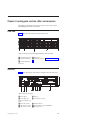
Front view. . . . . . . . . .
Rear view . . . . . . . . . .
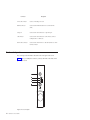
Front control panel . . . . . . .
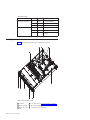
Locating server components . . . .
Locating parts on the system board .
Locating connectors on the backplane
.
.
.
.
.
.
.
.
.
.
.
.
.
.
.
.
.
.
.
.
.
.
.
.
.
.
.
.
.
.
11
11
12
14
15
17
Chapter 5. Installing, removing, or
replacing hardware . . . . . . . . . 19
Guidelines . . . . . . . . . . . . . . .
Basic guidelines . . . . . . . . . . . .
System reliability guidelines . . . . . . . .
Handling static-sensitive devices . . . . . .
Working inside the server with the power on . .
Removing the server cover . . . . . . . . .
Installing, removing, or replacing optional hardware
devices . . . . . . . . . . . . . . . .
Installing or removing a memory module . . .
Removing or installing internal drives . . . .
Removing or installing the riser card assembly
Installing or removing a PCI card . . . . . .
Installing, removing, or replacing hardware devices
Removing or installing the system board battery
Removing or installing the 8708ELP RAID
controller . . . . . . . . . . . . . .
Removing or installing the Ethernet card . . .
Removing or installing the microprocessor fan
duct . . . . . . . . . . . . . . . .
Removing or installing the power supply . . .
Removing or installing the system fans . . . .
Removing or installing the heat sink . . . . .
Removing or installing the microprocessor . . .
Completing the parts replacement . . . . . . .
Installing the server cover . . . . . . . .
© Copyright Lenovo 2010
19
19
20
20
21
21
22
22
26
38
40
43
43
45
49
51
53
56
60
63
67
67
Connecting the cables . . . . .
Turning on the server . . . . .
Updating the server configuration .
Turning off the server . . . . .
Connecting external devices . . .
.
.
.
.
.
.
.
.
.
.
.
.
.
.
.
.
.
.
.
.
.
.
.
.
.
67
67
68
68
69
Chapter 6. Configuring the server . . . 71
Using the Setup Utility program . . . . . .
Starting the Setup Utility program . . . . .
Introduction of the BIOS items . . . . . .
Using passwords . . . . . . . . . .
RAID controllers . . . . . . . . . . .
Using the ThinkServer EasyStartup program . .
Before you use the EasyStartup DVD . . . .
Setup and configuration . . . . . . . .
Configuring RAID . . . . . . . . . .
Typical operating system installation . . . .
Onboard 1068E SAS RAID controller Configuration
Utility program . . . . . . . . . . . .
Installing the SAS SGPIO cables . . . . .
Starting the Configuration Utility program . .
Accessing the Adapter Properties window . .
SAS RAID settings . . . . . . . . . .
Creating or deleting the RAID 1 array . . .
Accessing the SAS Topology window. . . .
Configuring the Gigabit Ethernet controller. . .
Updating the firmware . . . . . . . . .
Using the EasyUpdate Firmware Updater
program . . . . . . . . . . . . .
Installing the ThinkServer EasyManage program .
.
.
.
.
.
.
.
.
.
.
71
72
72
80
81
82
82
82
83
83
.
.
.
.
.
.
.
.
.
84
84
84
85
86
87
87
88
88
. 88
. 89
Chapter 7. Troubleshooting . . . . . . 91
Troubleshooting tables . . . . . . . . . . . 91
DVD drive problems . . . . . . . . . . 91
General problems . . . . . . . . . . . 92
Hard disk drive problems . . . . . . . . 92
Intermittent problems . . . . . . . . . . 93
Keyboard, mouse, or pointing-device problems
93
Memory problems . . . . . . . . . . . 95
Microprocessor problems . . . . . . . . . 96
Monitor problems . . . . . . . . . . . 97
Optional-device problems . . . . . . . . 98
Power problems . . . . . . . . . . . . 99
Serial port problems . . . . . . . . . . 100
Software problems. . . . . . . . . . . 100
Universal Serial Bus (USB) port problems . . . 101
Solving power problems. . . . . . . . . . 101
Solving Ethernet controller problems . . . . . 101
Solving undetermined problems . . . . . . . 102
Event logs . . . . . . . . . . . . . . 103
Viewing event logs without restarting the server 103
System event log . . . . . . . . . . . . 104
Diagnostic LEDs on the front control panel . . . 104
Onboard debug digitron. . . . . . . . . . 104
iii