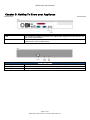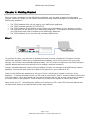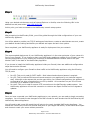
1
MailFoundry Users Manual Chapter 2: Important Safety Information Please observe the following guidelines when using your MailFoundry appliance to protect yourself and your appliance from damage. To avoid damage to your appliance make sure the AC power source available in your region is compatible with the appliance. The MailFoundry appliance is designed to operate using a power connection of 115 volts (AC 5.0A) used in most of North and South America and some Far Eastern countries such as South Korea and Taiwan or 230 volts (AC 2.5A) used in most of Europe, the Middle East, and the Far East. The power supply used in the MailFoundry appliance uses “Auto Switching” technology to determine which power system is used. To avoid damage to your MailFoundry appliance when disconnecting and connecting a network cable from the appliance, follow these steps: first unplug the cable from the network adapter on the back of the appliance, and then from the network jack. When reconnecting a network cable to your appliance, first connect the cable into the network jack, and then into the appliance. To help prevent electric shock, plug the MailFoundry appliance power cable into a properly grounded power source. The cable is equipped with a 3-prong connector to help ensure proper grounding. Do not use adapter plugs or remove the grounding prong from the cable. To help protect your appliance from sudden increases and decreases in electrical power use a surge suppressor at minimum. It is *strongly* recommended that you use an uninterruptible power supply (UPS) with your appliance to help prevent data loss. To help protect your appliance from over heating make sure the appliance is properly ventilated. Make sure no vents, located on the front and rear of the appliance, are blocked by other objects. Page 5 of 91 MailFoundry Users Manual – Revision MF2005071100