1
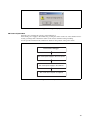
Figure 8 Dialog box display
■ Power-off procedure
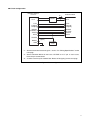
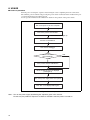
Turn the power off using the sequence shown in Figure 9.
Turn off the power supply to the emulator by pressing the switch on the rear of the emulator and releasing your finger. The switch then returns to the off state with the switch protruding.
See the operation manual of the emulator for details on the position of the power switch.
Exit "Emulator Debugger"
Turn off the power supply to the user system
Turn off the power supply to the emulator
Turn off the host computer as required
Figure 9 Power-off procedure
13