1
• Checksum Transmission: If this parameter is enabled, the checksum
characters (two characters) will be transmitted together with data.
5. Data Output Format
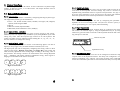
Data read by the scanner will be processed in the following sequence (RS-232,
Keyboard Wedge and USB interfaces).
1) The character substitution is performed on the barcode data.
2) The Code ID and the Length Code are inserted at the beginning of the data as
shown below.
[Code ID] [Length Code] [Data]
3) The resulting data of step 1 will be processed by the editing formats. For details,
please refer to the section “Data Editing”.
4) And finally the Prefix Code and the Postfix Code will be added before
transmission.
[Prefix Code] [Resulting Data of Step 3] [Postfix Code]
5.1 Character Substitution
There are three character substitution settings on the scanner. These settings are
configured on a character base. That is, a specific character is to be substituted by
an another character. The character substitution is performed on every occurrence
of the characters specified in these settings. Be aware, the substitution is performed
only on the barcode itself (exclude Prefix Code, Postfix Code, Code ID, Length
Code or any Additional Field) and is performed before editing mode processing.
If only the character to be replaced is specified, every occurrence of that character
in the barcode will be taken away.
5.2 Prefix / Postfix Code
Up to four characters of prefix / postfix code can be configured for the scanner.
5.3 Code ID
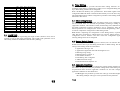
Up to two characters of Code ID can be configured for each symbology. To
minimize the Code ID configuration efforts, the scanner provides five predefined
Code ID Sets that user can select from. User can first select one of the Code ID
Sets and then make desired modifications. The pre-defined Code ID Sets are shown
below.
11
12