1
Moxa Command Line Interface
Fifth Edition, September 2014
www.moxa.com/product
© 2014 Moxa Inc. All rights reserved.
Moxa Command Line Interface
The software described in this manual is furnished under a license agreement and may be used only in accordance with
the terms of that agreement.
Copyright Notice
© 2014 Moxa Inc. All rights reserved.
Trademarks
The MOXA logo is a registered trademark of Moxa Inc.
All other trademarks or registered marks in this manual belong to their respective manufacturers.
Disclaimer
Information in this document is subject to change without notice and does not represent a commitment on the part of
Moxa.
Moxa provides this document as is, without warranty of any kind, either expressed or implied, including, but not limited
to, its particular purpose. Moxa reserves the right to make improvements and/or changes to this manual, or to the
products and/or the programs described in this manual, at any time.
Information provided in this manual is intended to be accurate and reliable. However, Moxa assumes no responsibility for
its use, or for any infringements on the rights of third parties that may result from its use.
This product might include unintentional technical or typographical errors. Changes are periodically made to the
information herein to correct such errors, and these changes are incorporated into new editions of the publication.
Technical Support Contact Information
www.moxa.com/support
Moxa Americas
Moxa China (Shanghai office)
Toll-free: 1-888-669-2872
Toll-free: 800-820-5036
Tel:
+1-714-528-6777
Tel:
+86-21-5258-9955
Fax:
+1-714-528-6778
Fax:
+86-21-5258-5505
Moxa Europe
Moxa Asia-Pacific
Tel:
+49-89-3 70 03 99-0
Tel:
+886-2-8919-1230
Fax:
+49-89-3 70 03 99-99
Fax:
+886-2-8919-1231
Table of Contents
1.
Command Modes ............................................................................................................................... 1-1
CLI (Command Line Interface) ............................................................................................................. 1-1
Configuring a Switch to CLI Mode ......................................................................................................... 1-1
Basic Operation .................................................................................................................................. 1-2
Useful Interactive “Help” Features ........................................................................................................ 1-3
Understanding All Commands ............................................................................................................... 1-3
2.
Commands ........................................................................................................................................ 2-1
access-ip ........................................................................................................................................... 2-1
acl id ................................................................................................................................................. 2-1
acl id ip-base ..................................................................................................................................... 2-2
acl id mac-base .................................................................................................................................. 2-3
area .................................................................................................................................................. 2-3
area range ......................................................................................................................................... 2-4
area virtual-link .................................................................................................................................. 2-4
auth tacacs+ ...................................................................................................................................... 2-5
auth tacacs+ auth-type ....................................................................................................................... 2-5
auth tacacs+ server ............................................................................................................................ 2-6
auto-backup....................................................................................................................................... 2-7
bind vlan ........................................................................................................................................... 2-7
clear counters .................................................................................................................................... 2-8
clear logging event-log ........................................................................................................................ 2-8
clock set ............................................................................................................................................ 2-8
clock summer-time ............................................................................................................................. 2-9
clock timezone ................................................................................................................................. 2-10
copy................................................................................................................................................ 2-10
dot1x auth ....................................................................................................................................... 2-11
dot1x auth ....................................................................................................................................... 2-12
dot1x local-userdb ............................................................................................................................ 2-12
dot1x reauth .................................................................................................................................... 2-13
dot1x reauth .................................................................................................................................... 2-13
dip-switch ........................................................................................................................................ 2-13
eip .................................................................................................................................................. 2-14
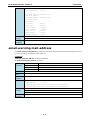
email-warning account ...................................................................................................................... 2-14
email-warning event ......................................................................................................................... 2-15
email-warning event ......................................................................................................................... 2-16
email-warning mail-address ............................................................................................................... 2-17
email-warning send test email ............................................................................................................ 2-18
email-warning server ........................................................................................................................ 2-18
exit ................................................................................................................................................. 2-19
flowcontrol ....................................................................................................................................... 2-19
gmrp ............................................................................................................................................... 2-20
gvrp ................................................................................................................................................ 2-20
hostname ........................................................................................................................................ 2-21
interface mgmt................................................................................................................................. 2-21
interface vlan ................................................................................................................................... 2-22
ip address ........................................................................................................................................ 2-22
ip address ........................................................................................................................................ 2-23
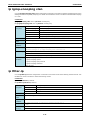
ip auto-assign .................................................................................................................................. 2-23
ip default-gateway ............................................................................................................................ 2-24
ip dhcp retry .................................................................................................................................... 2-24
ip dhcp-relay server .......................................................................................................................... 2-25
ip dhcp-relay option82 ...................................................................................................................... 2-25
ip dhcp-relay option82 remote-id-type ................................................................................................ 2-26
ip http-server ................................................................................................................................... 2-26
ip http-server auto-logout .................................................................................................................. 2-27
ip igmp static-group .......................................................................................................................... 2-27
ip igmp-snooping .............................................................................................................................. 2-28
ip igmp-snooping enhanced ............................................................................................................... 2-28
ip igmp-snooping querier vlan ............................................................................................................ 2-29
ip igmp-snooping querier vlan vlan-id v3 ............................................................................................. 2-30
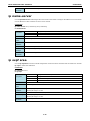
ip igmp-snooping query-interval ......................................................................................................... 2-30
ip igmp-snooping vlan ....................................................................................................................... 2-31
ip filter-ip ........................................................................................................................................ 2-31
ip name-server ................................................................................................................................. 2-32
ip ospf area...................................................................................................................................... 2-32
ip ospf auth ..................................................................................................................................... 2-33
ip ospf cost ...................................................................................................................................... 2-33
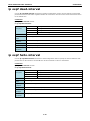
ip ospf dead-interval ......................................................................................................................... 2-34
ip ospf hello-interval ......................................................................................................................... 2-34
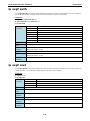
ip ospf priority .................................................................................................................................. 2-35
ip pim-dm........................................................................................................................................ 2-35
ip pim-sm ........................................................................................................................................ 2-36
ip pim-sm dr-priority ......................................................................................................................... 2-36
ip pim-sm hello-interval..................................................................................................................... 2-37
ip pim-sm join-prune-interval ............................................................................................................. 2-37
ip proxy-arp ..................................................................................................................................... 2-38
ip route ........................................................................................................................................... 2-38
ipv6 address .................................................................................................................................... 2-38
line-swap-fast-recovery ..................................................................................................................... 2-39
lldp enable ....................................................................................................................................... 2-40
lldp timer ......................................................................................................................................... 2-40
logging ............................................................................................................................................ 2-41
login mode....................................................................................................................................... 2-41
mac-address-table aging-time ............................................................................................................ 2-42
mcast-filter ...................................................................................................................................... 2-42
media cable-mode ............................................................................................................................ 2-43
modbus ........................................................................................................................................... 2-43
monitor ........................................................................................................................................... 2-44
Management-Interface ...................................................................................................................... 2-44
name .............................................................................................................................................. 2-45
network ........................................................................................................................................... 2-45
ntp refresh-time ............................................................................................................................... 2-46
ntp remote-server ............................................................................................................................ 2-47
ntp server ........................................................................................................................................ 2-47
permit ............................................................................................................................................. 2-48
ping ................................................................................................................................................ 2-48
port-security .................................................................................................................................... 2-48
profinetio ......................................................................................................................................... 2-49
ptp announce-receipt-timeout ............................................................................................................ 2-49
ptp arb-time .................................................................................................................................... 2-50
ptp clockclass ................................................................................................................................... 2-50
ptp domain-number .......................................................................................................................... 2-51
ptp enable ....................................................................................................................................... 2-51
ptp leap59 ....................................................................................................................................... 2-52
ptp leap61 ....................................................................................................................................... 2-52
ptp log-sync-interval ......................................................................................................................... 2-53
ptp log-announce-interval .................................................................................................................. 2-53
ptp log-min-delay-req-interval ........................................................................................................... 2-54
ptp log-min-pdelay-req-interval .......................................................................................................... 2-54
ptp mode ......................................................................................................................................... 2-55
ptp preferred-master......................................................................................................................... 2-55
ptp priority1 ..................................................................................................................................... 2-56
ptp priority2 ..................................................................................................................................... 2-56
ptp timescale ................................................................................................................................... 2-57
ptp transport.................................................................................................................................... 2-57
ptp utc-offset ................................................................................................................................... 2-58
ptp utc-offset-valid ........................................................................................................................... 2-58
qos highest-priority ........................................................................................................................... 2-59
qos default-cos ................................................................................................................................. 2-59
qos inspect ...................................................................................................................................... 2-60
qos mapping .................................................................................................................................... 2-60
qos mode ........................................................................................................................................ 2-61
quit ................................................................................................................................................. 2-61
rate-limit ......................................................................................................................................... 2-62
redistribute ...................................................................................................................................... 2-63
redundancy ...................................................................................................................................... 2-63
redundancy mode ............................................................................................................................. 2-64
relay-warning config relay ................................................................................................................. 2-64
relay-warning event .......................................................................................................................... 2-65
relay-warning event .......................................................................................................................... 2-65
relay-warning override ...................................................................................................................... 2-66
reload ............................................................................................................................................. 2-67
router ospf ....................................................................................................................................... 2-67
router rip ......................................................................................................................................... 2-68
router vrrp ....................................................................................................................................... 2-68
router vrrp adver-interval .................................................................................................................. 2-69
save config ...................................................................................................................................... 2-69
show acl .......................................................................................................................................... 2-70
show auth tacacs+............................................................................................................................ 2-70
show clock ....................................................................................................................................... 2-71
show dot1x ...................................................................................................................................... 2-72
show dot1x local-userdb .................................................................................................................... 2-72
show eip .......................................................................................................................................... 2-73
show PROFINETIO ............................................................................................................................ 2-73
show email-warning config................................................................................................................. 2-73
show gmrp....................................................................................................................................... 2-75
show gvrp........................................................................................................................................ 2-75
show interfaces acl ........................................................................................................................... 2-75
show interfaces counters ................................................................................................................... 2-76
show interfaces ethernet ................................................................................................................... 2-77
show interfaces filter-ip ..................................................................................................................... 2-78
show interfaces mgmt ....................................................................................................................... 2-79
show interfaces mgmt access-ip ......................................................................................................... 2-79
show interfaces rate-limit .................................................................................................................. 2-80
show interfaces trunk ........................................................................................................................ 2-80
show interfaces vlan ......................................................................................................................... 2-81
show interfaces mgmt trusted-access .................................................................................................. 2-82
show ip auto-assign .......................................................................................................................... 2-82
show ip dhcp-relay config .................................................................................................................. 2-83
show ip http-server status ................................................................................................................. 2-84
show ip igmp ................................................................................................................................... 2-84
show ip ospf..................................................................................................................................... 2-85
show ip ospf database ....................................................................................................................... 2-86
show ip ospf interface ....................................................................................................................... 2-86
show ip ospf neighbor ....................................................................................................................... 2-87
show ip pim-dm................................................................................................................................ 2-87
show ip pim-dm neighbor .................................................................................................................. 2-88
show ip pim-sm ................................................................................................................................ 2-88
show ip pim-sm bsr .......................................................................................................................... 2-89
show ip pim-sm neighbor................................................................................................................... 2-89
show ip pim-sm routing ..................................................................................................................... 2-90
show ip pim-sm rp ............................................................................................................................ 2-91
show ip rip ....................................................................................................................................... 2-91
show ip route ................................................................................................................................... 2-92
show ip vrrp ..................................................................................................................................... 2-92
show lldp ......................................................................................................................................... 2-93
show logging .................................................................................................................................... 2-94
show mac-address-table .................................................................................................................... 2-95
show mac-address-table aging-time .................................................................................................... 2-96
show mcast-filter .............................................................................................................................. 2-96
show modbus ................................................................................................................................... 2-97
show port monitor ............................................................................................................................ 2-97
show port-security ............................................................................................................................ 2-97
show qos ......................................................................................................................................... 2-98
show redundancy mst configure ......................................................................................................... 2-99
show redundancy mst instance ......................................................................................................... 2-100
show redundancy spanning-tree ....................................................................................................... 2-101
show redundancy turbo-chain .......................................................................................................... 2-101
show redundancy turbo-ring-v1 ........................................................................................................ 2-102
show redundancy turbo-ring-v2 ........................................................................................................ 2-103
show relay-warning......................................................................................................................... 2-104
show running-config........................................................................................................................ 2-105
show startup-config ........................................................................................................................ 2-106
show snmp .................................................................................................................................... 2-107
show storm-control ......................................................................................................................... 2-107
show system .................................................................................................................................. 2-108
show users .................................................................................................................................... 2-108
show vlan ...................................................................................................................................... 2-109
show vlan config ............................................................................................................................. 2-109
shutdown....................................................................................................................................... 2-110
snmp-server community .................................................................................................................. 2-111
snmp-server contact ....................................................................................................................... 2-111
snmp-server description .................................................................................................................. 2-112
snmp-server host ........................................................................................................................... 2-112
snmp-server location....................................................................................................................... 2-113
snmp-server trap-mode ................................................................................................................... 2-113
snmp-server user ........................................................................................................................... 2-114
snmp-server version ....................................................................................................................... 2-114
spanning-tree forward-delay ............................................................................................................ 2-115
spanning-tree hello-time ................................................................................................................. 2-115
spanning-tree max-age ................................................................................................................... 2-116
spanning-tree mst cist cost .............................................................................................................. 2-116
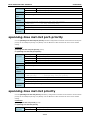
spanning-tree mst cist port-priority ................................................................................................... 2-117
spanning-tree mst cist priority.......................................................................................................... 2-117
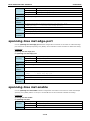
spanning-tree mst edge-port............................................................................................................ 2-118
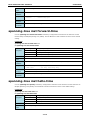
spanning-tree mst enable ................................................................................................................ 2-118
spanning-tree mst forward-time ....................................................................................................... 2-119
spanning-tree mst hello-time ........................................................................................................... 2-119
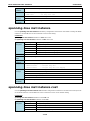
spanning-tree mst instance .............................................................................................................. 2-120
spanning-tree mst instance cost ....................................................................................................... 2-120
spanning-tree mst instance port-priority ............................................................................................ 2-121
spanning-tree mst instance priority ................................................................................................... 2-121
spanning-tree mst max-age ............................................................................................................. 2-122
spanning-tree mst max-hops ........................................................................................................... 2-122
spanning-tree mst name.................................................................................................................. 2-123
spanning-tree mst revision .............................................................................................................. 2-123
spanning-tree priority...................................................................................................................... 2-124
spanning-tree................................................................................................................................. 2-124
spanning-tree cost .......................................................................................................................... 2-125
spanning-tree edge-port .................................................................................................................. 2-125
spanning-tree priority...................................................................................................................... 2-126
speed-duplex ................................................................................................................................. 2-126
storm-control ................................................................................................................................. 2-127
switchport access vlan..................................................................................................................... 2-127
switchport hybrid fixed vlan add ....................................................................................................... 2-128
switchport hybrid forbidden vlan add ................................................................................................. 2-128
switchport hybrid forbidden vlan remove ........................................................................................... 2-129
switchport hybrid native vlan ........................................................................................................... 2-129
switchport pvlan ............................................................................................................................. 2-130
switchport trunk fixed vlan add ........................................................................................................ 2-130
switchport trunk fixed vlan remove ................................................................................................... 2-131
switchport trunk forbidden vlan add .................................................................................................. 2-131
switchport trunk forbidden vlan remove ............................................................................................. 2-132
switchport trunk native vlan ............................................................................................................. 2-132
trunk-group ................................................................................................................................... 2-133
trunk-mode.................................................................................................................................... 2-133
turbo-chain .................................................................................................................................... 2-134
turbo-ring-v1 ................................................................................................................................. 2-134
turbo-ring-v1 coupling..................................................................................................................... 2-135
turbo-ring-v1 master ...................................................................................................................... 2-135
turbo-ring-v2 ................................................................................................................................. 2-136
turbo-ring-v2 coupling backup .......................................................................................................... 2-137
turbo-ring-v2 coupling dual-homing .................................................................................................. 2-137
turbo-ring-v2 coupling primary ......................................................................................................... 2-138
turbo-ring-v2 master ...................................................................................................................... 2-139
trusted-access ................................................................................................................................ 2-139
username ...................................................................................................................................... 2-140
version .......................................................................................................................................... 2-140
vlan create..................................................................................................................................... 2-141
vlan mode ..................................................................................................................................... 2-142
vrrp .............................................................................................................................................. 2-142
vrrp preempt.................................................................................................................................. 2-143
vrrp priority ................................................................................................................................... 2-143
warning-notification system-event .................................................................................................... 2-144
warning-notification port-event ........................................................................................................ 2-145
1
1.
Command Modes
CLI (Command Line Interface)
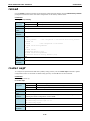
The CLI (command line interface) for Moxa switches can be accessed through either the serial console or Telnet
console. For either type of connection, access to the command line interface is generally referred to as an EXEC
session.
Configuring a Switch to CLI Mode
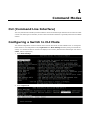
The default configuration mode for both the serial console and Telnet console is MENU mode. To change the
Moxa switch to CLI configuration mode, Login Mode from Basic Settings and then press y to activate the
change. You will then be able to view the CLI display in the console. (Note that the default login user name is
admin, without a password.)
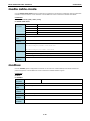
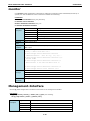
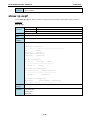
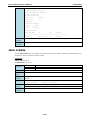
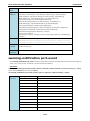
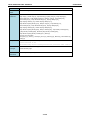
1. Select Basic Settings.
2. Select Login mode.
Moxa Command Line Interface
Command Modes
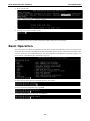
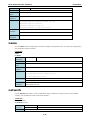
3. Press y to activate.
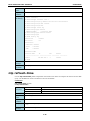
4. Now log in to access CLI display mode.
After changing to CLI mode, CLI mode will be the default setting for the next reboot.
Basic Operation
The CLI is organized in different configuration levels. When you first enter CLI mode, type ? to view a quick help
panel that shows the basic commands of the first configuration level. Type any of the commands shown on the
screen to access the next configuration level. The quick help panel, accessed from any level by typing ?, is a
useful tool for understanding the commands in any level.
To enter the next level, type the commands shown in the console.
To leave access the next higher level, type exit.
To jump directly back to the first level, type Ctrl + z.
1-2
Moxa Command Line Interface
Command Modes
Useful Interactive “Help” Features
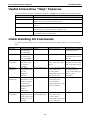
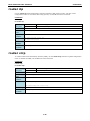
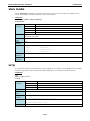
The CLI includes several types of interactive commands. The Help commands are listed in the following table:
Command
Purpose
?
Provides a brief description of the Help feature in any command level.
Partial command?
Provides a list of commands that begin with the character string (no space
between the command and the question mark).
Partial command<Tab>
Completes a partial command name (no space between the command and
Command
?
Lists the keywords, arguments, or both associated with the command (type a
Command
keyword
<Tab>).
space between the command and the question mark).
?
Lists the arguments that are associated with the keyword (type a space between
the keyword and the question mark).
Understanding All Commands
To understand all the details of the commands supported in the CLI of Moxa switches, refer to the following
table.
Mode
Access Method
User EXEC
Begin a session with Switch>
Prompt
Exit Method
About This Mode
Enter exit or quit.
Use this mode to display
your switch and
system information.
login with user.
Privileged EXEC
Begin a session with Switch#
Enter exit or quit.
your switch and
Use this mode to verify
commands that you have
login with admin.
entered.
Global
While in privileged
To exit to privileged EXEC Use this mode to
configuration
EXEC mode, enter
mode, enter exit or press configure parameters that
the configure
Ctrl-Z.
Switch(config)#
apply to the entire switch.
command.
Redundancy
From global
configuration
configuration mode,
mode, press Ctrl-Z.
configure Turbo Ring
enter the
To exit to global
V1/V2, Turbo Chain, and
redundancy
configuration mode, enter Spanning Tree
Switch(config-rdnt)#
To exit to privileged EXEC Use this mode to
the exit command.
command.
Interface
From global
configuration
configuration mode,
mode, press Ctrl-Z.
specify an interface
To exit to global
by entering the
configuration mode, enter
interface command
the exit command.
Switch(config-if)#
To exit to privileged EXEC
followed by an
interface
identification.
Router
From global
configuration
configuration mode, Switch(config-ospf)#
Switch(config-rip)#
mode, press Ctrl-Z.
specify a protocol by
To exit to global
entering the router
configuration mode, enter
command.
the exit command.
1-3
To exit to privileged EXEC
parameters.
2
2.
Commands
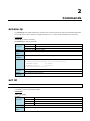
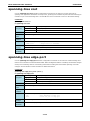
access-ip
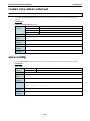
Use access-ip in the VLAN configuration command as to restrict access to the switch to specified IP addresses.
Use the no form of this command to disable this feature or to remove the IP addresses from access list.
Commands
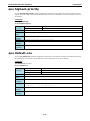
access-ip [ip-address netmask]
no access-ip [ip-address netmask]
Syntax
access-ip
Enable the accessible IP list
Description
ip-address
IP address
netmask
IP netmask
Defaults
The feature is disabled by default.
Command
VLAN configuration as management VLAN
Modes
Usage
This feature will take effect when the access-ip command is executed.
Guidelines
Examples
PT-7828(config)# interface mgmt
PT-7828(config-vlan)# access-ip 10.10.10.10 255.255.255.0
<IPV4ADDR:ipaddr>
<IPV4ADDR:netmask>
- IP address
- IP netmask
PT-7828(config-vlan)# access-ip
Error
IP or netmask invalid
messages
Access IP list full
Related
show interface mgmt access-ip
commands
acl id
NOTE
The command is supported only in Layer 3 switches
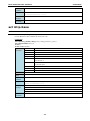
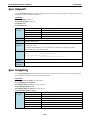
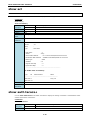
Use acl id interface configuration commands on the switch to attach ACL to the port. Use the no form of this
command to return to the default setting.
Commands
acl id { in | out}
no acl id
Syntax
acl
Description
id
The access list ID
in
Inbound traffic
out
Outbound traffic
Configure access control list
Defaults
N/A
Command
Interface configuration
Modes
Moxa Command Line Interface
Usage
Commands
N/A
Guidelines
Examples
PT-7828(config-if)# acl 10 in
PT-7828(config-if)# no acl 10
Error
Invalid ID!
messages
Related
commands
acl id ip-base
NOTE
The command is supported only in Layer 3 switches
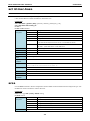
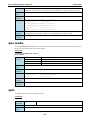
Use the acl id ip-base global configuration commands on the switch to create an IP-base ACL and add rules.
Use the no form of this command to remove the rule.
Commands
acl id ip-base { permit | deny } srcip [ dstip] [ protocol ] [ port ]
acl id ip-base name name_str
no acl id
no acl id rule ruleindex
Syntax
acl
Configure access control list
Description
Id
Set ACL ID
ip-base
IP-base ACL
permit
Forward packets
deny
Drop packets
srcip
Set source IP address and subnet mask. Ex: 192.168.1.1/255.255.255.0 or
192.168.127.1
dstip
Set destination IP address and subnet mask. Ex: 192.168.1.1/255.255.255.0
or 192.168.127.1
protocol
Set protocol number, Ex: ICMP, TCP, UDP, etc.
port
Set TCP/UDP port number
name_str
ACL name
Defaults
N/A
Command
Global configuration
Modes
Usage
The ACL ID is 1 ~ 16.
Guidelines
Examples
PT-7828(config)# acl 8 ip-base permit 172.3.1.1/255.255.255.0
201.16.9.7/255.255.0.0 6 23
Error
Invalid ID!
messages
This ID is used by MAC-base ACL!
Invalid IP address format!
Invalid subnet mask format!
Related
commands
2-2
Moxa Command Line Interface
Commands
acl id mac-base
NOTE
The command is supported only in Layer 3 switches
Use the acl id mac-base global configuration commands on the switch to create an MAC-base ACL and add
rules. Use the no form of this command to remove the rule.
Commands
acl id mac-base { permit | deny } srcmac [ dstmac] [ ethertype ] [ vid ]
acl id mac-base name name_str
no acl id
no acl id rule ruleindex
Syntax
Acl
Configure access control list
Description
Id
Set ACL ID
mac-base
MAC-base ACL
permit
Forward packets
Deny
Drop packets
srcmac
Set source MAC address and MAC mask. Ex:
00:90:E8:1D:24:23/FF:FF:FF:FF:00:00 or 00:90:E8:1D:24:23
dstmac
Set destination IP address and subnet mask. Ex:
192.168.1.1/255.255.255.0 or 192.168.127.1
ethertype
Set ether type
Vid
Set VLAN ID
name_str
ACL name
Defaults
N/A
Command
Global configuration
Modes
Usage
The ACL ID is 1 ~ 100.
Guidelines
Examples
PT-7828(config)# acl 10 mac-base deny 00:11:22:33:44:55/ff:ff:ff:00:00:00
aa:bb:cc:dd:ee:ff/ff:ff:00:00:00:00 2048 10
Error messages
Invalid ID!
This ID is used by IP-base ACL!
Invalid MAC address format!
Invalid MAC mask format!
Related
commands
area
Use the area command in Router configuration mode as OSPF to add an OSPF area and configure its type. Use
the no form of this command to remove the area.
Commands
area area-id [ { stub | nssa } metric value ]
no area area-id
Syntax
area
Configure OSPF Area
Description
area-id
OSPF Area id, format is ip address
stub
Configure OSPF area type to stub
nssa
Configure OSPF area type to NSSA
metric
Configure OSPF area metric
value
Metric value ( 1 to 65535)
Defaults
N/A
2-3
Moxa Command Line Interface
Command
Commands
Router configuration mode as OSPF
Modes
Usage
Metric value: 1 to 65535
Guidelines
Examples
PT-7828(config-ospf)# area 2.2.2.2
PT-7828(config-ospf)# area 2.2.2.2 stub metric 4
PT-7828(config-ospf)# area 2.2.2.2 nssa metric 4
Error messages
Configuration Error!!
Metric value error (1 to 65535)!!
Related
show ip ospf
commands
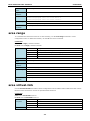
area range
To consolidate and summarize routes at an area boundary, use the area range command in router
configuration mode. To disable this function, use the no form of this command.
Commands
area area-id range ip-address netmask
no area area-id range ip-address netmask
Commands
area
Configure OSPF Area
area-id
OSPF Area id, format is ip address
range
Specify an address range for route aggregation
ip-address
E.g., 11.22.33.44
netmask
E.g., 255.255.255.0
Defaults
N/A
Command
Router configuration mode as OSPF
Modes
Usage
N/A
Guidelines
Examples
PT-7828(config-ospf)# area 1.1.1.1 range 192.0.0.0 255.0.0.0
Error messages
Configuration Error!!
IP Prefix format Error!!
Netmask format Error!!
IP format Error!!
Related
show ip ospf
commands
area virtual-link
Use the area virtual-link command in Router configuration mode as OSPF to add an OSPF virtual link. Use the
no form of this command to remove the specified OSPF virtual link.
Commands
area area-id virtual-link router-id
no area area-id virtual-link router-id
Syntax
area
Configure OSPF Area
Description
area-id
OSPF Area id
virtual-link
Establish a virtual link
router-id
Neighbor Router ID
Defaults
N/A
2-4
Moxa Command Line Interface
Command
Commands
Router configuration mode as OSPF
Modes
Usage
N/A
Guidelines
Examples
PT-7828(config-ospf)# area 1.1.1.1 virtual-link 0.0.0.0
Error messages
Configuration Error!!
Related
show ip ospf
commands
auth tacacs+
Use the auth tacacs+ global configuration command on the switch to enable TACACS+ authentication. Use
the no form of this command to return to the default setting.
Commands
auth tacacs+
no auth tacacs+
Syntax
auth
Configure authentication mechanism
Description
tacacs+
TACACS+ authentication
Defaults
The default setting is disabled.
Command
Global configuration
Modes
Usage
N/A
Guidelines
Examples
PT-7828(config)# auth tacacs+
Error
N/A
messages
Related
show auth tacacs+
commands
auth tacacs+ auth-type
Use the auth tacacs+ auth-type global configuration command on the switch to specify the type of TACACS+
authentication. Use the no form of this command to return to the default setting.
Commands
auth tacacs+ auth-type { ascii | pap | chap | arap | mschap }
no auth tacacs+ auth-type
Syntax
auth
Configure authentication mechanism
Description
tacacs+
TACACS+ authentication
auth-type
Specify the authentication type
ascii
Normal ASCII code authentication
pap
Password Authentication Protocol
chap
Challenge-handshake authentication protocol
arap
AppleTalk Remote Access Protocol
mschap
Microsoft Challenge-handshake authentication protocol
Defaults
Default type is ASCII code authentication
Command
Global configuration
Modes
Usage
To enable the TACACS+ authentication, the command “auth tacacs+” must be executed first.
Guidelines
2-5
Moxa Command Line Interface
Examples
PT-7828(config)# auth tacacs+ auth-type
ascii
- Normal ASCII code authentication
pap
- Password Authentication Protocol
arap
- AppleTalk Remote Access Protocol
chap
mschap
Error
Commands
- Challenge-handshake authentication protocol
- Microsoft Challenge-handshake authentication protocol
N/A
messages
Related
auth tacacs+
commands
show auth tacacs+
auth tacacs+ server
Use the auth tacacs+ server global configuration command on the switch to set the TACACS+ authentication
server address and the shared key information. Use the no form of this command to remove the settings.
Commands
auth tacacs+ server server-address shared-key key [timeout seconds]
no auth tacacs+ server
Syntax
auth
Configure authentication mechanism
Description
tacacs+
TACACS+ authentication
server
TACACS+ authentication server
server-address
Authentication server address
shared-key
Configure the shared key
key
Key string, max 15 characters
timeout
Configure server timeout
seconds
1 to 255 sec.
Defaults
Default timeout is 30 seconds
Default tacacs+ server port is 49
Command
Global configuration
Modes
Usage
To enable the TACACS+ authentication, the command “auth tacacs+” must be executed first.
Guidelines
Examples
PT-7828(config)# auth tacacs+ server
<STRING:auth_server> - Authentication server address
PT-7828(config)# auth tacacs+ server tacacs.server.moxa.com
shared-key
- Configure the shared key
<STRING:key>
- Key string, max 15 characters
PT-7828(config)# auth tacacs+ server tacacs.server.moxa.com shared-key
PT-7828(config)# auth tacacs+ server tacacs.server.moxa.com shared-key 1234
<LF>
timeout
- Configure server timeout
PT-7828(config)# auth tacacs+ server tacacs.server.moxa.com shared-key 1234
timeout
<UINT:seconds>
- 1 to 255 sec.
PT-7828(config)# auth tacacs+ server tacacs.server.moxa.com shared-key 1234
timeout 200
Error
Timeout value must be in the range from 1 to 255 seconds
messages
Invalid IP protocol port
Related
auth tacacs+
commands
show auth tacacs+
2-6
Moxa Command Line Interface
Commands
auto-backup
Use auto-backup to enable Auto load system configurations when the system boots up. To disable it, use the
no form of this command.
Commands
auto-backup
no auto-backup
Syntax
auto-backup
Use auto backup configurator to restore configuration
Description
Defaults
Auto-backup configuration is enabled by default.
Command
Global configuration
Modes
Usage
N/A
Guidelines
Examples
PT-7828# configure terminal
PT-7828(config)# auto-backup
PT-7828(config)# no au
auto-backup
- Deactive auto-backup configurator
PT-7828(config)# no auto-backup
Error
N/A
messages
Related
N/A
commands
bind vlan
Use the bind vlan configuration command on the switch to bind the management address with a specified
VLAN ID. Use the no form of this command to return to the default.
Commands
bind vlan VLAN-ID
Syntax
bind
Description
vlan
VLAN parameters
VLAN-ID
1 to 4094
Bind VLAN as management VLAN
Defaults
Default management VLAN ID is 1
Command
VLAN configuration mode as management VLAN
Modes
Usage
N/A
Guidelines
Examples
PT-7828(config)# interface mgmt
PT-7828(config-vlan)# bind vlan
<UINT:vlanid>
- 1 to 4094
Error
L3 interface cannot be assigned as management interface
messages
VLAN id is out of range!
Related
show interfaces mgmt
commands
2-7
Moxa Command Line Interface
Commands
clear counters
Use the clear counters user EXEC command on the switch to clear the switch’s statistics counters.
Commands
clear counters
Syntax
clear
Clear information
Description
counters
Clear statistic counters
Defaults
N/A
Command
Privileged
Modes
Usage
N/A
Guidelines
Examples
PT-7828# clear
counters
Error
- Clear statistic counters
N/A
messages
Related
show interfaces counters
commands
clear logging event-log
Use the clear logging event-log user EXEC command on the switch to clear the system log of the switch.
Commands
clear logging event-log
Syntax
clear
Clear information
Description
logging
System event logs
event-log
System event logs
Defaults
N/A
Command
Privileged
Modes
Usage
N/A
Guidelines
Examples
PT-7828# clear
logging
- System event logs
event-log
- System event logs
PT-7828# clear logging
Error
N/A
messages
Related
show logging
commands
clock set
Use the clock set global configuration command on the switch to set the current switch time.
Commands
clock set hh:mm:ss month day year
Syntax
clock
Configure time-of-day clock
Description
set
Adjust the clock
hh:mm:ss
hh:mm:ss
2-8
Moxa Command Line Interface
Commands
month
1 to 12
day
1 to 31
year
2000 to 2037
Defaults
N/A
Command
Global configuration
Modes
Usage
N/A
Guidelines
Examples
PT-7828(config)# clock set 11:11:11 1 1 2010
Error
Illegal parameters!
messages
Related
show clock
commands
clock summer-time
Use the clock summer-time global configuration command on the switch to enable the daylight saving time
offset and set the apply duration. Use the no form of this command to disable it.
Commands
clock summer-time start-date month week day hour
clock summer-time end-date month week day hour
clock summer-time offset offset-hour
Syntax
clock
Configure time-of-day clock
Description
summer-time
Configure Summer time parameter
start-date
The date when summer time offset start
end-date
The date when summer time offset end
month
From ‘Jan’, ‘January’ or ‘1’ to ‘Dec’, ‘December’, or ‘12’
week
From ‘1st’ or ‘1’ to ‘Last’ or ‘6’
day
From ‘Sun’, ‘Sunday’ or ‘1’ to ‘Sat’, ‘Saturday’ or ‘7’
hour
0 to 23
offset
Summer time offset
offset-hour
1 to 12
Defaults
N/A
Command
Global configuration
Modes
Usage
When configuring the summer time offset, the start-date and end-date must be configured
Guidelines
correctly first.
Examples
PT-7828(config)# clock timezon gmt -4
Error
Invalid parameter
messages
Month must be configured as ‘Jan’, ‘January’ or a numerical ‘1’.
Week must be configured as ‘1st’, ‘2nd’, ‘3rd’, ‘4th’, ‘5th’ or ‘Last’
Day must be configured as ‘Sun’, ‘Sunday’ or a numerical ‘1’.
Hour must be in the range from 0 to 23.
Please input the correct start/end date of the summer time first!
Hour offset is out of range.
Related
show clock
commands
2-9
Moxa Command Line Interface
Commands
clock timezone
Use the clock timezone global configuration command on the switch to set the current time zone.
Commands
clock timezone gmt offset-hour
Syntax
clock
Configure time-of-day clock
Description
timezone
Time zone hour shifting
gmt
Greenwich Mean Time
offset-hour
-12 to 12
Half an hour
Only type 30
Defaults
N/A
Command
Global configuration
Modes
Usage
N/A
Guidelines
Examples
EDS-G516E(config)# clock timezone gmt 5 30
Error
This timezone doesn’t support half an hour
messages
Related
show clock
commands
copy
Use the copy privileged command on the switch to copy an image or configuration file from a remote server to
the Flash memory or copy the running configuration, startup configuration, or event log to a remote server via
TFTP.
Commands
copy tftp device-firmware
copy tftp running-config
copy {running-config|event-log|startup-config} tftp [tftp-address]
Syntax
copy
Copy from one file to another
Description
tftp
Remote server through TFTP
device-firmware
System firmware
running-config
Current running configuration of system
startup-config
System startup configuration
event-log
Event log file
tftp-address
TFTP address. E.g., tftp://192.168.127.1/abc.txt
Defaults
N/A
Command
Privileged EXEC
Modes
Usage
N/A
Guidelines
Examples
PT-7828# copy tftp
device-firmware
running-config
- System firmware
- Current running configuration of system
PT-7828# copy tftp running-config
Address or name of remote host [192.168.127.1]? 192.168.127.95
Source file name ? cli.ini
Save import config to flash ? [Y/n]
Saving configuration ...Success
2-10
Moxa Command Line Interface
Commands
Error
Input error
messages
Invalid TFTP Server IP/Name !!!
TFTP Configuration File Download Failed
Invalid Config Files Path and Name !!!
Invalid Firmware Files Path and Name !!!
TFTP Firmware Download Failed !!!
TFTP Configuration File Upload Failed !!!
TFTP Log File Upload Failed !!!
Related
N/A
commands
dot1x auth
Use the dot1x auth global configuration command to set dot1x authentication type and relative
configurations.
Commands
dot1x auth local
dot1x auth radius server server port port shared-key string
dot1x auth radius-local server server port port shared-key string
Syntax
dot1x
802.1x setting
Description
auth
802.1x auth type
local
802.1x authentication uses local database
radius
802.1x authentication uses radius server
radius-local
802.1x authentication uses both local and radius server
server
802.1x radius server name/ip
server
802.1x radius server name/ip string
port
802.1x radius server port
port
802.1x radius server port (default 1812)
shared-key
802.1x Shared Key
string
Shared Key string
Defaults
802.1x local authentication
Command
Global configuration
Modes
Usage
N/A
Guidelines
Examples
PT-7828(config)# dot1x auth local
PT-7828(config)# dot1x auth radius server moxanet port 1812 shared-key moxa
PT-7828(config)# dot1x auth radius-local server moxanet port 1812 shared-key moxa
Error messages
Local Database is Full !!!
Invalid User Name !!!
Invalid User Password !!!
Invalid User Description !!!
Related
show dot1x
commands
2-11
Moxa Command Line Interface
Commands
dot1x auth
Use thedot1x auth interface configuration command on the switch to enable port 802.1x authenticate. Use the
no form of this command to return to the default setting.
Commands
dot1x auth
no dot1x auth
Syntax
dot1x
802.1x setting
Description
auth
802.1x port authentication enable/disable
Defaults
802.1x port authentication default disable
Command
interface configuration
Modes
Usage
N/A
Guidelines
Examples
PT-7828(config)# interface ethernet 1/1
PT-7828(config-if)# dot1x auth
PT-7828(config-if)# no dot1x auth
Error messages
N/A
dot1x local-userdb
To add 802.1x local user database, use thedot1x local-userdb global configuration command. To remove the
user database, use the no form of this command.
Commands
dot1x local-userdb username user password password [desc description ]
no dot1x local-userdb username user
Syntax
dot1x
Description
local-userdb
Local user settings
username
Local user
user
Local user name (max. 30 characters)
password
Local user password
password
Local user password (max. 16 characters)
desc
User description
description
Description string
802.1x setting
Defaults
N/A
Command
Global configuration
Modes
Usage
N/A
Guidelines
Examples
PT-7828(config)# dot1x local-userdb username moxa password moxanet
PT-7828(config)# no dot1x local-userdb username moxa
Error messages
Local Database is Full !!!
Invalid User Name !!!
Invalid User Password !!!
Invalid User Description !!!
Related
show dot1x local-userdb
commands
2-12
Moxa Command Line Interface
Commands
dot1x reauth
Use thedot1x reauth global configuration command on the switch to globally enable periodic
re-authentication of the client. Use the no form of this command to return to the default setting.
Commands
dot1x reauth [period period]
no dot1x reauth [period period]
Syntax
dot1x
Description
reauth
802.1x reauth enable
period
802.1x reauth period
period
60 to 65535 seconds
802.1x setting
Defaults
802.1x reauth default enable and period 3600 seconds
Command
Global configuration
Modes
Usage
N/A
Guidelines
Examples
PT-7828(config)# dot1x reauth period 3600
PT-7828(config)# no dot1x reauth
Error messages
Invalid Re-Auth Period!!! Must not be smaller than 65535 or greater than 60
Related
show dot1x
commands
dot1x reauth
Use thedot1x reauth interface configuration command on the switch to trigger port 802.1x re-authenticate
immediately.
Commands
dot1x reauth
Syntax
dot1x
802.1x setting
Description
reauth
802.1x port re-authenticate immediately
Defaults
N/A
Command
interface configuration
Modes
Usage
N/A
Guidelines
Examples
PT-7828(config)# interface ethernet 1/1
PT-7828(config-if)# dot1x reauth
Error messages
N/A
Related
N/A
commands
dip-switch
Use the dip-switch command to disable/enable HW dip-switch function.
Commands
dip-switch
Syntax
disable
Disable HW dip-switch function.
Description
enable
Enable HW dip-switch function.
mode turbo-ring-v1
set dip-switch function as turbo-ring-v1.
2-13
Moxa Command Line Interface
Commands
mode turbo-ring-v2
set dip-switch function as turbo-ring-v2.
Defaults
1.Enable dip-switch. 2.set to turbo-ring-v2.
Command
Global configuration
Modes
Usage
N/A
Guidelines
Examples
PT-7828(config)# dip-switch disable
PT-7828(config-if)# dip-switch mode turbo-ring-v1
Error messages
N/A
Related
N/A
commands
eip
Use the eip command to disable/enable Ethernet/IP support.
Commands
eip
no eip
Syntax
eip
Enable Ethernet/IP
Description
Defaults
Default is disable
Command
Global configuration
Modes
Usage
N/A
Guidelines
Examples
PT-7828(config)# eip
Error messages
N/A
Related
show eip
commands
email-warning account
Use email-warning account to configure the account and the password to log in to the remote Mail Server.
To clear the setting, use the no form of this command.
Commands
email-warning account name password
no email-warning account
Syntax
email-warning
Email warning setting
Description
account
Email account on server
name
User name
password
User password
Defaults
N/A
Command
Global configuration
Modes
Usage
N/A
Guidelines
Examples
PT-7828(config)# email-warning account test1 1234
PT-7828(config)# email-warning account test1
Error
Length of SMTP User name is too long !!!
messages
Invalid User name
2-14
Moxa Command Line Interface
Commands
Length of password is too long!!!
Related
show email-warning
commands
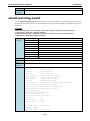
email-warning event
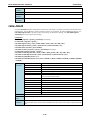
Use the email-warning event global configuration command to enable the system warning events to send
through the email if the event occurs. Use the no form of this command to disable the specified warning event
notifications.
Commands
email-warning event { all | cold-start | warm-start | power-trans-off | power-trans-on |
config-change | auth-fail | topology-change }
no email-warning event { cold-start | warm-start | power-trans-off | power-trans-on |
config-change | auth-fail | topology-change}
Syntax
Email-warning
Email warning setting
Description
event
System events
all
Enable all events
cold-start
Switch cold start
warn-start
Switch warm start
power-trans-off
Power transition (on->off)
power-trans-on
Power transition (off->on)
config-change
Configuration changed
auth-fail
Authentication failed
topology-change
Topology changed (from redundant protocols)
Defaults
All system events are disabled by default.
Command
Global configuration
Modes
Usage
N/A
Guidelines
Examples
PT-7828(config)# email-warning event
all
cold-start
- Enable all events
- Switch cold start
warm-start
- Switch warm start
power-trans-off
- Power transition (on->off)
power-trans-on
config-change
auth-fail
topology-change
- Power transition (off->on)
- Configuration changed
- Authentication failed
- Communication redundancy topology changed
PT-7828(config)# email-warning event cold-start
PT-7828(config)# email-warning event topology-change
PT-7828(config)# email-warning event auth-fail
PT-7828(config)# exit
PT-7828# show email-warning config
Mail Server and Email Setup
SMTP Server IP/Name : ms1.hinet.net
SMTP Port
Account Name
Account Password
: 25
: test1
: 1234
1st email address: [email protected]
2nd email address :
3rd email address: [email protected]
2-15
Moxa Command Line Interface
Commands
4th email address :
System Events
Cold Start
: Enable
Conf. Changed
: Disable
Warm Start
: Disable
Power On->Off
: Disable
Power Off->On
: Disable
Auth. Failure
: Enable
Topology Changed
: Enable
--More-Error
N/A
messages
Related
show email-warning
commands
email-warning event
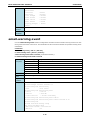
Use the email-warning event interface configuration command to allow interface warning events to be sent
through the email if the event occurs. Use the no form of this command to disable the specified warning event
notifications.
Commands
email-warning event { link-on | link-off }
no mail-warning event { link-on | link-off }
email-warning event traffic-overload [rxThreshold duration]
no email-warning event traffic-overload
Syntax
email-warning
Configure email warning
Description
event
Port events
link-on
Link ON
link-off
Link OFF
traffic-overload
Traffic overloading
rxThreshold
0 to 100
duration
1 to 300
Defaults
All port events are disabled by default.
Command
Interface configuration
Modes
Usage
N/A
Guidelines
Examples
PT-7828# configure terminal
PT-7828(config)# interface ethernet 3/1
PT-7828(config-if)# email-warning
event
- Port events
link-on
- Link ON
PT-7828(config-if)# email-warning event
link-off
traffic-overload
- Link OFF
- Traffic overloading
PT-7828(config-if)# email-warning event link-on
PT-7828(config-if)# email-warning event traffic-overload 80 20
PT-7828(config-if)#
PT-7828# show email-warning config
Mail Server and Email Setup
SMTP Server IP/Name : ms1.hinet.net
SMTP Port
: 25
2-16
Moxa Command Line Interface
Account Name
Account Password
Commands
: test1
: 1234
1st email address: [email protected]
2nd email address :
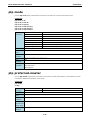
3rd email address: [email protected]
4th email address :
System Events
Cold Start
: Enable
Conf. Changed
: Disable
Warm Start
Power On->Off
Power Off->On
Auth. Failure
Topology Changed
: Disable
: Disable
: Disable
: Enable
: Enable
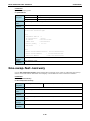
Error
Threshold should be between 0 and 100
messages
Duration should be between 1 and 300
Related
show email-warning
commands
email-warning mail-address
Use email-warning mail-address to configure the email address(es) to which warning messages will be sent.
To clear the setting, use no form of this command.
Commands
email-warning mail-address mailIndex mailAddress
no email-warning mail-address mailIndex
Syntax
email-warning
Description
mail-address
Target email address
mailIndex
1 to 4
mailAddress
Email address
Defaults
N/A
Command
Global configuration
Email warning setting
Modes
Usage
N/A
Guidelines
Examples
PT-7828(config)# email-warning mail-address
<UINT:mailIdx>
- 1 to 4
PT-7828(config)# email-warning mail-address 1 [email protected]
PT-7828(config)# email-warning mail-address 3 [email protected]
Error
Index should be between 1 and 4
messages
Length of email address is too long !!!
Invalid Email address format
Related
show email-warning
commands
2-17
Moxa Command Line Interface
Commands
email-warning send test email
Use email-warning send test email to send a test email.
Commands
switch(config)# email-warning send test email
Syntax
email-warning
Email warning setting
Description
send
Send test email
test
Test email
email
Test email address
Defaults
N/A
Command
Global configuration
Modes
Usage
The test email will be sent to the mail address that “email-warning mail-address” command
Guidelines
configured.
Examples
PT-7828(config)# email-warning server 192.168.127.95
<LF>
<UINT:smtpPort>
- SMTP Port
PT-7828(config)# email-warning server 192.168.127.95 25
PT-7828(config)# email-warning account admin 1234
PT-7828(config)# email-warning mail-address 1
<STRING:mailAddress> - Email address
PT-7828(config)# email-warning mail-address 1 [email protected]
PT-7828(config)# email-warning send test email
Sending test email ...
You may check if your dedicated email addresses have received this email!
PT-7828(config)#
Error
Warning !!! You must first do Email Setup before sending the test email.
messages
Warning !!! You must first configure DNS Server IP Address before sending the test email.
Sending test email failed !!!
Related
email-warning server
commands
email-warning account
email-warning mail-address
email-warning server
Use email-warning server to configure Mail Server IP/Name (IP address or name) for the switch. To clear the
setting, use the no form of this command.
Commands
email-warning server smtpServerIp [smtpPort]
no email-warning server
Syntax
email-warning
Email warning setting
Description
server
Email Server
smtpServerIp
Email Server name/address
smtpPort
SMTP Port, 1 to 65535
Defaults
N/A
Command
Global configuration
Modes
Usage
N/A
Guidelines
2-18
Moxa Command Line Interface
Examples
Commands
PT-7828(config)# email-warning server mail.hinet.net 25
PT-7828(config)# email-warning server ms1.hinet.net
Error
Length of server address is too long !!!
messages
Invalid SMTP server name/address
Invalid Mail Server Port, Range(1 to 65535) !!!
Related
show email-warning
commands
exit
Use exit to exit the current configuration mode.
Commands
exit
Syntax
exit
Description
Exit from configure mode
Exit from port setting mode
Exit command line interface
Exit from management interface setting
Defaults
N/A
Command
N/A
Modes
Usage
N/A
Guidelines
Examples
PT-7828(config)# exit
PT-7828 #
Error
N/A
messages
Related
quit
commands
flowcontrol
To set the method of data flow control between the terminal or other device, use the flowcontrol interface
configuration command. Use the no form of this command to disable flow control
Commands
flowcontrol
no flowcontrol
Syntax
flowcontrol
Configure flowcontrol
Description
Defaults
The default is disable
Command
Interface configuration
Modes
Usage
Guidelines
Examples
PT-7828(config)# interface ethernet 1/1
PT-7828(config-if)# flowcontrol
PT-7828(config-if)# no flowcontrol
Error messages
Fiber port can not be set flow control!!
Force speed can not be set flow control!!
2-19
Moxa Command Line Interface
Commands
Cannot configure on trunk member port 1/1!
This setting cannot be applied on trunk port!
Related
show interfaces ethernet
commands
gmrp
Use the gmrp interface configuration command on the switch to active the IEEE 802.1D-1998 GMRP (GARP
Multicast Registration Protocol). Use the no form of this command to stop this function.
Commands
gmrp
no gmrp
Syntax
gmrp
Enable GMRP (GARP Multicast Registration Protocol)
Description
Defaults
gmrp is default disable
Command
Interface configuration
Modes
Usage
N/A
Guidelines
Examples
PT-7828(config)# interface ethernet 1/1
PT-7828(config-if)# gmrp
PT-7828(config-if)# no gmrp
Error messages
GMRP cannot be enabled on static multicast member port!!!
Related
commands
gvrp
Use the gvrp global configuration command on the switch to enable GVRP. Use the no form of this command
to disable it.
Commands
gvrp
no gvrp
Syntax
gvrp
Enable/Disable GVRP
Description
Defaults
The feature is enabled by default.
Command
Global configuration
Modes
Usage
N/A
Guidelines
Examples
PT-7828(config)# gvrp
gvrp
Error
- Enable GVRP
N/A
messages
Related
show gvrp
commands
2-20
Moxa Command Line Interface
Commands
hostname
To specify or modify the host name for the network server, use the hostname global configuration command.
To return to the default, use the no form of this command.
Commands
hostname name
no hostname
Syntax
hostname
Set system’s network name (maximum 30 characters)
Description
name
Switch name string
Defaults
Name is the default switch name with the serial number
Command
Global configuration
Modes
Usage
Maximum string tokens are 5.
Guidelines
Maximum switch name length is 30 characters.
Examples
PT-7828(config)# hostname MOXA Ethernet Switch PT 7828
PT-7828(config)# exit
PT-7828# show system
System Information
System Name
: MOXA Ethernet Switch PT 7828
System Location
: Switch Location
System Description
Maintainer Information
MAC Address
:
: 00:90:E8:1D:24:36
System Uptime
Error
: MOXA PT-7828
: 0d0h36m57s
Length of switch hostname is too long
messages
Related
show system
commands
interface mgmt
Use the interface mgmt global configuration command on the switch to enter the VLAN configuration mode of
Mgmt-VLAN.
Commands
interface mgmt
Syntax
interface
Select an interface to configure
Description
mgmt
Configure management VLAN
Defaults
N/A
Command
Global configuration
Modes
Usage
N/A
Guidelines
Examples
PT-7828(config)# interface
mgmt
- Configure management VLAN
PT-7828(config)# interface mgmt
PT-7828(config-vlan)#
Error
N/A
messages
Related
show interfaces mgmt
commands
2-21
Moxa Command Line Interface
Commands
interface vlan
Use the interface vlan global configuration command on the switch to create or access a dynamic switch
virtual interface (SVI) and to enter interface configuration mode. Use the no form of this command to delete an
SVI.
Commands
interface vlan vlan-id
no interface vlan vlan-id
Syntax
interface
Select an interface to configure
Description
vlan
Configure L3 interface
vlan-id
Configure L3 interface vlan id
Defaults
N/A
Command
Global configuration
Modes
Usage
Management vlan id cannot be same as interface vlan id.
Guidelines
Examples
PT-7828(config)# interface vlan 2
<UINT:vlanid>
- Configure L3 interface vlan id
Error
interface vlan 2 is not exist
messages
mgmt vlan id cannot be same as interface vlan id!!
vlan interface full
Related
show interfaces vlan
commands
ip address
Use the ip address VLAN configuration command on the switch to configure the address of a Layer 3 interface.
Commands
ip address ip-address netmask
Syntax
ip
Configure L3 interface ip
Description
address
Interface ip setting
ip-address
IP address
netmask
IP netmask
Defaults
N/A
Command
VLAN configuration
Modes
Usage
N/A
Guidelines
Examples
PT-7828(config-vlan)# ip address 10.10.10.10 255.255.255.0
ip
- Configure L3 interface ip
Error
IP or netmask invalid
messages
vlan 4097 is invalid!! should be range from 1 to 4094
vlan interface full
Interface VLAN is not allowed to modify!!
Related
show interfaces vlan
commands
2-22
Moxa Command Line Interface
Commands
ip address
Use the ip address VLAN configuration command on the switch to configure the IP retrieve mechanism of the
switch. Use no form of this command to return to the default.
Commands
ip address {static ip-address netmask | dhcp | bootp }
no ip address
Syntax
ip
Configure IP paramters
Description
address
Congiure IP address
static
E.g., 11.22.33.44
ip-address
IP address
netmask
Subnet mask
dhcp
Use DHCP to retrieve IP setting automatically
bootp
Use BOOTP to retrieve IP setting automatically
Defaults
N/A
Command
VLAN configuration as management VLAN
Modes
Usage
N/A
Guidelines
Examples
PT-7828(config-vlan)# ip address
static
- Configure static IP
dhcp
- Use DHCP to retrieve IP setting automatically
bootp
Error
- Use BOOTP to retrieve IP setting automatically
N/A
messages
Related
show interfaces mgmt
commands
ip auto-assign
Use the ip auto-assign interface configuration command on the switch to enable and set the auto IP
assignment of specified interfaces. Use the no form of this command to remove an Ethernet port from a trunk
group.
Commands
ip auto-assign ipaddr
no ip auto-assign
Syntax
ip
Configure IP paramters
Description
auto-assign
Automatic port IP assignment through DHCP/BootP/RARP
ipaddr
E.g., 11.22.33.44
Defaults
N/A
Command
Interface configuration
Modes
Usage
This specified IP address must be in the same subnet of the system IP address
Guidelines
Examples
(static IP)
PT-7828(config-if)# ip auto-assign
<IPV4ADDR:ipaddr>
- E.g., 11.22.33.44
Error
Cannot configure on trunk member port
messages
This IP address must be in the same subnet of the system IP address
Related
show ip auto-assign
commands
2-23
Moxa Command Line Interface
Commands
ip default-gateway
Use the ip default-gateway VLAN configuration command on the switch to configure the IP default gateway
address. Us thee no form of this command to return to the default.
Commands
ip default-gateway ip-address
no default-gateway
Syntax
ip
Configure IP paramters
Description
default-gateway
Configure default gateway address
ip-address
IP address
Defaults
N/A
Command
VLAN configuration as management VLAN
Modes
Usage
N/A
Guidelines
Examples
PT-7828(config-vlan)# ip default-gateway 192.168.1.1
Error
Warning! IP and gateway are not in the same subnet
messages
Related
show interfaces mgmt
commands
ip dhcp retry
Use ip dhcp retry to enable the DHCP request retry for a specified period and times. Use the no form of this
command to return to the default.
Commands
ip dhcp retry times period seconds
no ip dhcp retry
Syntax
ip
Global IP configuration subcommands
Description
dhcp
DHCP related configuration
retry
Configure DHCP client request retry paramter
times
0 - 65535 times, 0 means retry forever
Period
Retry period
seconds
1 - 30 seconds
Defaults
Default retry times = 0, retry period=1
Command
VLAN configuration as management VLAN
Modes
Usage
N/A
Guidelines
Examples
PT-508(config-vlan)# ip dhcp retry 500 period 30
PT-508# show interfaces mgmt
IPv4
Management VLAN id : 1
IP configuration
IP address
Subnet mask
Default gateway
: DHCP
: 192.168.127.253
: 255.255.255.0
: 0.0.0.0
DNS server
:
Dhcp Retry Times
: 500
Dhcp Retry Periods : 30 seconds
2-24
Moxa Command Line Interface
Error
Commands
Illegal parameter!
messages
Related
show interface mgmt
commands
ip dhcp-relay server
Use ip dhcp-relay server to configure the DHCP server address that the switch will forward DHCP messages
to. To remove the DHCP server address, use the no form of this command.
Commands
ip dhcp-relay server serverIndex serverAddr
no ip dhcp-relay server serverIndex
Syntax
ip
Description
dhcp-relay
Configure DHCP relay agent parameter
server
DHCP server IP address
serverIndex
DHCP server address index, 1 to 4
serverAddr
DHCP server IP address
Defaults
N/A
Command
Global configuration
Global IP configuration subcommands
Modes
Usage
N/A
Guidelines
Examples
PT-7828(config)# ip dhcp-relay server 1 192.168.127.100
PT-7828(config)# ip dhcp-relay server 3 192.168.127.200
Error
Invalid server index
messages
Invalid IPv4 address
Related
show ip dhcp-relay
commands
ip dhcp-relay option82
Use the ip dhcp-relay option82 global and interface configuration command to enable DHCP Relay with
Option 82 messages. To disable it, use the no form of this command.
Commands
ip dhcp-relay option82
no ip dhcp-relay option82
Syntax
Ip
Configure IP parameters
Description
dhcp-relay
Configure DHCP relay agent parameter
option82
Option 82
Defaults
Default is disabled.
Command
Global configuration / Interface configuration
Modes
Usage
N/A
Guidelines
Examples
PT-7828(config)# ip dhcp-relay option82 ?
<LF>
remote-id-type
man-id
- Remote Id type
- Manual remote ID
PT-7828(config)# ip dhcp-relay option82
2-25
Moxa Command Line Interface
Error
Commands
N/A
messages
Related
N/A
commands
ip dhcp-relay option82 remote-id-type
Use the ip dhcp-relay option82 remote-id-type global configuration command to select the remote ID
information of DHCP option82 messages. Use ip dhcp-relay option82 man-id to manually set the remote id
instead of the predefined ones.
Commands
ip dhcp-relay option82 remote-id-type remoteIdType
ip dhcp-relay option82 man-id manualId
Syntax
ip
Global IP configuration subcommands
Description
dhcp-relay
Configure DHCP relay agent parameter
option82
Option 82
Defaults
remote-id-type
Remote Id type
remoteIdType
ip | mac | client-id | other
man-id
Manual remote ID
manualId
Manual remote ID, maximum 15 characters
DHCP-relay option82 is disable in factory default.
Default remote-id-type is IP.
Command
Global configuration
Modes
Usage
N/A
Guidelines
Examples
PT-7828(config)# ip dhcp-relay option82 remote-id-type
<STRING:remoteIdType> - ip | mac | client-id | other
PT-7828(config)# ip dhcp-relay option82 remote-id-type mac
PT-7828(config)# ip dhcp-relay option82 remote-id-type other
PT-7828(config)# ip dhcp-relay option82 man-id abcdef
Error
Invalid remote ID type
messages
Manual Id is over 15 characters
Related
N/A
commands
ip http-server
Use ip http-server global configuration commands on the switch to enable HTTP/HTTPs service. Use the no
form of this command to disable HTTP/HTTPS service.
Commands
ip http-server
ip http-server secure
no ip http-sever
Syntax
ip
Global IP configuration subcommands
Description
http-server
Enable HTTP/HTTPS web service
secure
HTTPS support only
Defaults
HTTP service is enabled.
2-26
Moxa Command Line Interface
Command
Commands
Global configuration
Modes
Usage
N/A
Guidelines
Examples
PT-7828(config)# ip http-server
auto-logout
- Web auto-logout timer
<LF>
secure
- HTTPS support only
PT-7828(config)# ip http-server secure
PT-7828(config)# ip http-server
PT-7828(config)# no ip http-server
Error
N/A
messages
Related
show ip http-server
commands
ip http-server auto-logout
Use ip http-server auto-logout global configuration commands on the switch to enable the auto-logout for
the HTTP/HTTPs connections with specified seconds. Use the no form of this command to disable it.
Commands
ip http-server auto-logout seconds
Syntax
ip
Global IP configuration subcommands
Description
http-server
Enable HTTP/HTTPS web service
auto-logout
Web auto-logout timer
seconds
0 for disable, or 60 to 86400 seconds
Defaults
Auto-logout is disabled by default.
Command
Global configuration
Modes
Usage
N/A
Guidelines
Examples
PT-7828(config)# ip http-server auto-logout 120
Error
Switch Web auto-logout interval should be 0(disable) or 60 to 86400s !!!
messages
Related
show ip http-server
commands
ip igmp static-group
Use the ip igmp static-group global configuration command on the switch to add a static multicast MAC
address and its member ports. Use the no form of this command to remove the static multicast group or just
its member ports.
Commands
ip igmp static-group MAC-address interface module/port
no ip igmp static-group [MAC-address] [ interface module/port]
Syntax
Ip
Global IP configuration subcommands
Description
Igmp
IGMP
static-group
Add New Static Multicast MAC Address
Mac-address
MAC address XX:XX:XX:XX:XX:XX
Interface
Binding ports
2-27
Moxa Command Line Interface
Module/port
Defaults
N/A
Command
Global configuration
Commands
Port(Trunk) ID or list. E.g., 1/1,2,4-5,2/1,Trk1,Trk2-Trk
Modes
Usage
N/A
Guidelines
Examples
PT-7828(config)# ip igmp static-group 01:00:00:00:00:01 interface 1/2-3
PT-7828(config)# no ip igmp static-group
Error messages Add new static multicast MAC address Fail !!!
Please check the multicast mac address’s type !!!
Add new static multicast MAC address Fail !!!
Not enough space to add a new static multicast MAC address !!!
The member port should not be GMRP-enabled port !!!
Related
show mac-address-table mcast
commands
ip igmp-snooping
Use the ip igmp-snooping global configuration command on the switch to globally enable Internet Group
Management Protocol (IGMP) snooping on the switch. Use the command with keywords to enable IGMP
snooping. Use the no form of this command to disable IGMP snooping.
Commands
ip igmp-snooping
no ip igmp-snooping
Syntax
ip
Global IP configuration subcommands
Description
igmp-snooping
IGMP snooping
Defaults
IGMP snooping is globally disable
Command
Global configuration
Modes
Usage
N/A
Guidelines
Examples
PT-7828(config)# ip igmp-snooping
PT-7828(config)# no ip igmp-snooping
Error messages
IGMP Function is only supported by 802.1Q VLAN mode!
Related
ip igmp-snooping vlan
commands
ip igmp-snooping querier
ip igmp-snooping query-interval
ip igmp-snooping enhanced
show ip igmp
ip igmp-snooping enhanced
Use the ip igmp-snooping enhanced global configuration command on the switch to enable the enhanced
mode. Use the no form of this command to disable the enhanced mode.
Commands
ip igmp-snooping enhanced
no ip igmp-snooping enhanced
Syntax
ip
Global IP configuration subcommands
Description
igmp-snooping
IGMP snooping
enhanced
IGMP snooping enhanced mode
2-28
Moxa Command Line Interface
Commands
Defaults
Enhanced mode is globally disabled on the switch
Command
Global configuration
Modes
Usage
The IGMP snooping function must be enabled first.
Guidelines
Examples
PT-7828(config)# ip igmp-snooping enhanced
PT-7828(config)# no ip igmp-snooping enhanced
Error messages
IGMP Function is Disabled !!!
IGMP Function is only supported by 802.1Q VLAN mode!
Related
ip igmp-snooping
commands
ip igmp-snooping vlan
ip igmp-snooping querier
ip igmp-snooping query-interval
show ip igmp
ip igmp-snooping querier vlan
Use the ip igmp-snooping querier global configuration command to enable and configure the IGMP querier
feature on a VLAN interface. Use the no form of this command to disable the IGMP querier feature.
Commands
ip igmp-snooping querier vlan vlan-id
no ip igmp-snooping querier vlan vlan-id
Syntax
ip
Global IP configuration subcommands
Description
igmp-snooping
IGMP snooping
querier
IGMP snooping qeury enable
vlan
VLAN parameters
vlan-id
1 to 4094
Defaults
The IGMP snooping querier feature is globally disabled on the switch
Command
Global configuration
Modes
Usage
The IGMP snooping function must be enabled first.
Guidelines
Examples
PT-7828(config)# ip igmp-snooping querier vlan 1
PT-7828(config)# no ip igmp-snooping querier vlan 1
Error messages
Vlan entry not found!!!
Vlan IGMP Function is Disabled !!!
IGMP Function is Disabled !!!
IGMP Function is only supported by 802.1Q VLAN mode!
Related
ip igmp-snooping
commands
ip igmp-snooping vlan
ip igmp-snooping query-interval
ip igmp-snooping enhanced
show ip igmp
2-29
Moxa Command Line Interface
Commands
ip igmp-snooping querier vlan vlan-id v3
NOTE
The command is supported only in Layer 3 switches
Use the ip igmp-snooping querier global configuration command to enable and configure the IGMP querier
feature on a VLAN interface. Use ip igmp-snooping querier vlan vlan-id v3 can make the switch to send
IGMP V3 query, otherwise the default is V2 query.
Syntax
ip
Global IP configuration subcommands
Description
igmp-snooping
IGMP snooping
querier
IGMP snooping qeury enable
vlan
VLAN parameters
vlan-id
1 ~ 4094
v3
IGMPv3 mode
Defaults
The IGMP snooping querier feature is globally disabled on the switch
Command
Global configuration
Modes
Usage
The IGMP snooping function must be enabled first.
Guidelines
Examples
PT-7828(config)# ip igmp-snooping querier vlan 1 v3
Error messages
Vlan entry not found!!!
Vlan IGMP Function is Disabled !!!
IGMP Function is Disabled !!!
IGMP Function is only supported by 802.1Q VLAN mode!
Related
ip igmp-snooping
commands
ip igmp-snooping vlan
ip igmp-snooping query-interval
ip igmp-snooping query-interval
Use the ip igmp-snooping query-interval global configuration command on the switch to configure the
interval between IGMP queries. Use the no form of this command to return to the default.
Commands
ip igmp-snooping query-interval interval
Syntax
ip
Global IP configuration subcommands
Description
igmp-snooping
IGMP snooping
query-interval
IGMP snooping query interval
interval
20 to 600 seconds
Defaults
Query interval default value is 125 seconds
Command
Global configuration
Modes
Usage
The IGMP snooping function must be enabled first.
Guidelines
Examples
PT-7828(config)# ip igmp-snooping query-interval 125
Error messages
The range of Quierier interval value should be between 20 and 600 !!!
IGMP Function is Disabled !!!
IGMP Function is only supported by 802.1Q VLAN mode!
Related
ip igmp-snooping
commands
ip igmp-snooping vlan
ip igmp-snooping querier
ip igmp-snooping enhanced
show ip igmp
2-30
Moxa Command Line Interface
Commands
ip igmp-snooping vlan
Use the ip igmp-snooping vlan global configuration command on the switch to globally enable Internet Group
Management Protocol (IGMP) snooping on a VLAN. Use the no form of this command to disable IGMP snooping
on a vlan.
Commands
ip igmp-snooping vlan vlan-id [mrouter module/port]
no ip igmp-snooping vlan vlan-id [mrouter module/port]
Syntax
ip
Global IP configuration subcommands
Description
igmp-snooping
IGMP snooping
vlan
VLAN parameters
vlan-id
1 to 4094
mrouter
IGMP snooping query port enable
Module/port
Port(Trunk) ID or list. E.g., 1/1,2,4-5,2/1,Trk1,Trk2-Trk4
Defaults
N/A
Command
Global configuration
Modes
Usage
The IGMP snooping must be enabled first.
Guidelines
Examples
PT-7828(config)# ip igmp-snooping vlan 1 mrouter 1/1
PT-7828(config)# no ip igmp-snooping vlan 1 mrouter 1/1
Error messages Vlan entry not found!!!
IGMP Function is Disabled !!!
IGMP Function is only supported by 802.1Q VLAN mode!
Related
ip igmp-snooping
commands
ip igmp-snooping querier
ip igmp-snooping query-interval
ip igmp-snooping enhanced
show ip igmp
ip filter-ip
Use the ip filter-ip interface configuration command on the switch to add the IP filtering address entries. Use
the no form of this command to delete the filtering entries.
Commands
ip filter-ip allowed ip-address
no ip filter-ip allowed ip-address
Syntax
ip
Description
filter-ip
IP filter
allowed
Configured traffic allowed from specified IP
ip-address
E.g., 11.22.33.44
Configure IP paramters
Defaults
N/A
Command
Interface configuration
Modes
Usage
N/A
Guidelines
Examples
PT-7828(config-if)# ip filter-ip allowed 192.168.127.1
<LF>
Error
Not a unicast IP
messages
Allowed only 8 filters at most
2-31
Moxa Command Line Interface
Related
Commands
show interfaces filter-ip
commands
ip name-server
Use the ip name-server VLAN configuration command on the switch to configure the DNS server for the switch.
Use the no form of this command to return to the default.
Commands
ip name-server dns-ip-address1 [dns-ip-address2]
no name-server
Syntax
ip
Configure IP paramters
Description
name-server
Configure DNS server address
ip-address
IP address
Defaults
N/A
Command
VLAN configuration as management VLAN
Modes
Usage
N/A
Guidelines
Examples
PT-7828(config-vlan)# ip name-server 192.168.1.1
Error
Warning! IP and gateway are not in the same subnet
messages
Related
show interfaces mgmt
commands
ip ospf area
Use the ip ospf area command in VLAN configuration mode to bind the interfaces with an OSPF area. Use no
ip ospf to unbind the OSPF area.
Commands
ip ospf area area-id
no ip ospf
Syntax
ip
Configure L3 interface ip
Description
ospf
Configure OSPF
area
OSPF Area binding
area-id
OSPF Area id
Defaults
This command is disabled by default.
Command
VLAN configuration
Modes
Usage
Auth Key lengths up to 8 characters
Guidelines
MD5 Key ID range 1 to 255
Examples
PT-7828(config-vlan)# ip ospf auth md5 5 auth-key abcdabcd
Error messages
Auth Key lengths up to 8 characters
MD5 Key ID range 1 to 255
Related
show ip ospf interface
commands
2-32
Moxa Command Line Interface
Commands
ip ospf auth
Use the ip ospf auth command in VLAN configuration mode to specify the authentication type for an interface.
Use the no form of this command to remove the authentication type for an interface.
Commands
ip ospf auth simple auth-key key
ip ospf auth md5 key-id auth-key key
no ip ospf auth
Syntax
ip
Configure L3 interface ip
Description
ospf
Configure OSPF
auth
Configure OSPF authentication type
simple
Configure OSPF authentication type to SIMPLE
md5
Configure OSPF authentication type to MD5
key-id
MD5 key id
auth-key
Configure authentication key
key
Key string
Defaults
This command is disabled by default.
Command
VLAN configuration
Modes
Usage
Auth Key lengths up to 8 characters
Guidelines
MD5 Key ID range 1 to 255
Examples
PT-7828(config-vlan)# ip ospf auth md5 5 auth-key abcdabcd
Error messages
Auth Key lengths up to 8 characters
MD5 Key ID range 1 to 255
Related
show ip ospf interface
commands
ip ospf cost
Use the ip ospf cost command in VLAN configuration mode to explicitly specify the cost of sending a packet on
a VLAN interface. Use the no form of this command to return to the default.
Commands
ip ospf cost cost
no ip ospf cost
Syntax
ip
Description
ospf
Configure OSPF
cost
Configure OSPF Metric
cost
Metric value ( 1 to 65535)
Defaults
Default cost is 1
Command
VLAN configuration
Configure L3 interface ip
Modes
Usage
N/A
Guidelines
Examples
PT-7828(config-vlan)# ip ospf cost 10
Error
Metric Range 1 to 65535
messages
Related
show ip ospf interface
commands
2-33
Moxa Command Line Interface
Commands
ip ospf dead-interval
Use the ip ospf dead-interval command in interface configuration mode to set the interval at which hello
packets must not be seen before neighbors declare the router down. Use the no form of this command to return
to the default time.
Commands
ip ospf dead-interval seconds
no ip ospf dead-interval
Syntax
ip
Configure L3 interface ip
Description
ospf
Configure OSPF
dead-interval
Configure OSPF dead interval
seconds
Dead Interval Range 1 to 65535
Defaults
Default dead interval is 40 seconds
Command
VLAN configuration
Modes
Usage
Dead interval Range 1 to 65535
Guidelines
Examples
PT-7828(config-vlan)# ip ospf dead-interval 100
Error messages
Dead Interval Range 1 to 65535
Related
show ip ospf interface
commands
ip ospf hello-interval
Use the ip ospf hello-interval command in VLAN configuration mode to specify the interval between hello
packets sent on the interface. Use the no form of this command to return to the default.
Commands
ip ospf hello-interval seconds
no ip ospf hello-interval
Syntax
ip
Description
ospf
Configure OSPF
hello-interval
Configure OSPF hello interval
seconds
Hello Interval Range 1 to 65535
Configure L3 interface ip
Defaults
Default interval is 10 seconds
Command
VLAN configuration
Modes
Usage
Hello Interval Range 1 to 65535
Guidelines
Examples
PT-7828(config-vlan)# ip ospf hello-interval 100
Error
Hello Interval Range 1 to 65535
messages
Related
show ip ospf interface
commands
2-34
Moxa Command Line Interface
Commands
ip ospf priority
Use the ip ospf priority command in VLAN configuration mode to set the router priority for the determination
of the designated router. Use the no form of this command to return to the default.
Commands
ip ospf priority priority
no ip ospf priority
Syntax
ip
Configure L3 interface ip
Description
ospf
Configure OSPF
priority
Configure OSPF router priority
priority
priority range ( 0 to 255)
Defaults
Default priority is 1
Command
VLAN configuration
Modes
Usage
priority range 0 to 255
Guidelines
Examples
PT-7828(config-vlan)# ip ospf priority 10
Error
Priority Range 0 to 255
messages
Related
show ip ospf interface
commands
ip pim-dm
NOTE
This command is only supported by Layer 3 switches.
Use the ip pim-dm command to enable the PIM-DM function.
Commands
ip pim-dm
no ip pim-dm
Syntax
ip
Configure L3 interface IP
Description
pim-dm
Configure PIM-DM
Defaults
This command is disabled by default
Command
VLAN interface configuration
Modes
Usage
N/A
Guidelines
Examples
ICS-G7852A-4XG(config-vif)# ip pim-dm
Error
N/A
ICS-G7852A-4XG(config-vif)# no ip pim-dm
messages
Related
show ip pim-dm
commands
show ip pim-dm neighbor
2-35
Moxa Command Line Interface
Commands
ip pim-sm
NOTE
This command is only supported by Layer 3 switches.
Use the ip pim-sm command to enable the PIM-SM function.
Commands
ip pim-sm
no ip pim-sm
Syntax
ip
Configure L3 interface IP
Description
pim-sm
Configure PIM-SM
Defaults
This command is disabled by default
Command
VLAN interface configuration
Modes
Usage
N/A
Guidelines
Examples
ICS-G7852A-4XG(config-vif)# ip pim-sm
ICS-G7852A-4XG(config-vif)# no ip pim-sm
Error
N/A
messages
Related
show ip pim-sm
commands
show ip pim-sm routing
show ip pim-sm neighbor
show ip pim-sm rp
show ip pim-sm bsr
ip pim-sm dr-priority
NOTE
This command is only supported by Layer 3 switches.
Use ip pim-sm dr-priority command in VLAN interface configuration mode to setup DR priority.
Commands
ip pim-sm dr-priority priority
Syntax
ip
Configure L3 interface IP
Description
pim-sm
Configure PIM-SM
dr-priority
Configure DR priority
priority
Priority value
Defaults
Default priority is 0
Command
VLAN interface configuration
Modes
Usage
The priority range is 0 to 4294967296
Guidelines
Examples
ICS-G7852A-4XG(config-vif)# ip pim-sm dr-priority 100
Error
N/A
messages
Related
show ip pim-sm
commands
show ip pim-sm routing
show ip pim-sm neighbor
show ip pim-sm rp
show ip pim-sm bsr
2-36
Moxa Command Line Interface
Commands
ip pim-sm hello-interval
NOTE
This command is only supported by Layer 3 switches.
Use ip pim-sm hello-interval command in VLAN interface configuration mode to setup PIM-SM hello interval.
Commands
ip pim-sm hello-interval interval
Syntax
ip
Configure L3 interface IP
Description
pim-sm
Configure PIM-SM
hello-interval
Configure hello interval
interval
Interval value
Defaults
Default hello-interval is 30
Command
VLAN interface configuration
Modes
Usage
The hello interval range is 1 to 65535
Guidelines
Examples
ICS-G7852A-4XG(config-vif)# ip pim-sm hello-interval 10
Error
N/A
messages
Related
show ip pim-sm
commands
show ip pim-sm routing
show ip pim-sm neighbor
show ip pim-sm rp
show ip pim-sm bsr
ip pim-sm join-prune-interval
NOTE
This command is only supported by Layer 3 switches.
Use ip pim-sm join-prune-interval command in VLAN interface configuration mode to setup PIM-SM
join-prune interval.
Commands
ip pim-sm join-prune-interval interval
Syntax
ip
Configure L3 interface IP
Description
pim-sm
Configure PIM-SM
join-prune-interval
Configure hello interval
interval
Interval value
Defaults
Default hello-interval is 30
Command
VLAN interface configuration
Modes
Usage
The join-prune interval range is 1 to 65535
Guidelines
Examples
ICS-G7852A-4XG(config-vif)# ip pim-sm join-prune-interval 10
Error
N/A
messages
Related
show ip pim-sm
commands
show ip pim-sm routing
show ip pim-sm neighbor
show ip pim-sm rp
show ip pim-sm bsr
2-37
Moxa Command Line Interface
Commands
ip proxy-arp
Use the ip proxy-arp VLAN configuration command on the switch to enable Proxy ARP. Use the no form of this
command to disable Proxy ARP.
Commands
ip proxy-arp
no ip proxy-arp
Syntax
ip
Configure L3 interface ip
Description
proxy-arp
Enable L3 interface proxy arp
Defaults
N/A
Command
VLAN configuration
Modes
Usage
N/A
Guidelines
Examples
PT-7828(config-vlan)# ip proxy-arp
proxy-arp
- Enable L3 interface proxy arp
Error
vlan 4097 is invalid!! should be range from 1 to 4094
messages
Interface not exist! Please create interface and set ip and netmask first
Related
show interfaces vlan
commands
ip route
Use the ip route command in global configuration mode to establish static routes. Use the no form of this
command to remove the specified static routes.
Commands
ip route prefix mask next-hop [distance]
no ip route prefix mask next-hop
Syntax
ip
Global IP configuration subcommands
Description
route
Static routing entry
prefix
Address prefix
mask
Subnet mask
next-hop
Next hop address
distance
Distance metric
Defaults
N/A
Command
Global configuration
Modes
Usage
N/A
Guidelines
Examples
PT-7828(config)# ip route 2.2.0.0 255.0.0.0 2.2.3.1 10
Error
Route Entry Full!!!
messages
Related
show ip route
commands
show ip route static
ipv6 address
Use the ipv6 address command in VLAN configuration mode as a management VLAN to set the IPv6 address
for the device. Use the no form of the command to return to the default.
2-38
Moxa Command Line Interface
Commands
Commands
ipv6 address ipv6_prefix
no ipv6 address
Syntax
ipv6
Configure IPv6
Description
address
IPv6 address setting
ipv6_prefix
IPv6 address prefix
Command
VLAN configuration as management VLAN
Modes
Usage
N/A
Guidelines
Examples
PT-510(config-vlan)# ipv6 address 1::1
PT-510# show interfaces mgmt
IPv4
Management VLAN id : 1
IP configuration
IP address
Subnet mask
Default gateway
: Static
: 192.168.127.253
: 255.255.255.0
DNS server
: 0.0.0.0
:
IPv6
Global Unicast Address Prefix : 1:0:0:1:201:2ff:fe03
Global Unicast Address
: 1::1:201:2ff:fe03:405
Link-Local Address
Error
: fe80::201:2ff:fe03:405
Invalid prefix!
messages
Related
show interface mgmt
commands
line-swap-fast-recovery
Use the line-swap-fast-recovery global configuration command on the switch to enable the fast recovery
feature of the MAC address table when line swapping. Use the no form of this command to disable it.
Commands
line-swap-fast-recovery
no line-swap-fast-recovery
Syntax
line-swap-fast-recovery
Enable Line Swap Fast Recoverty feature
Description
Defaults
This feature is enabled by default.
Command
Global configuration
Modes
Usage
N/A
Guidelines
Examples
PT-7828(config)# line-swap-fast-recovery
<LF>
Error
N/A
messages
Related
show mac-address-table
commands
2-39
Moxa Command Line Interface
Commands
lldp enable
Use the lldp enable global configuration command to enable LLDP. To stop LLDP, use the no form of this
command.
Commands
lldp run
no lldp run
Syntax
lldp
Configure LLDP parameters
Description
run
Start up
Defaults
LLDP is enable in factory default.
Command
Global configuration
Modes
Usage
N/A
Guidelines
Examples
PT-7828(config)# lldp enable
PT-7828(config)# no lldp enable
Error
N/A
messages
Related
show lldp
commands
lldp timer
Use the lldp timer global configuration command to configure the transmission frequency of LLDP messages.
To reset the timer to default, use the no form of this command.
Commands
lldp timer transFreq
no lldp timer
Syntax
lldp
Configure LLDP parameters
Description
timer
Transmission frequency of LLDP updates
transFreq
5 to 32768 seconds
Defaults
Transmission frequency of LLDP updates is 30 seconds.
Command
Global configuration
Modes
Usage
N/A
Guidelines
Examples
PT-7828(config)# lldp timer
<UINT:transFreq>
- 5 to 32768 seconds
PT-7828(config)# lldp timer 4
% LLDP transmit frequency should be between 5 to 32768
PT-7828(config)# lldp timer 50
Error
messages
Related
LLDP transmit frequency should be between 5 to 32768
show lldp
commands
2-40
Moxa Command Line Interface
Commands
logging
Use the logging global configuration command on the switch to configure the remote SYSLOG server. Use the
no form of this command to remove the server.
Commands
logging ip-address
no logging ip-address
Syntax
logging
Syslog server setting
Description
ip-address
IP or DNS name w/wo. port, Ex:1.2.3.4 or 1.2.3.4:5678
Defaults
N/A
Command
Global configuration
Modes
Usage
N/A
Guidelines
Examples
PT-7828(config)# logging 192.168.1.1
<LF>
Error
Logging server configurations are full!
messages
Related
show logging
commands
login mode
Use the login mode global configuration command to change the login UI mode from the console or telnet
connection of the switch.
Commands
login mode { cli | menu }
Syntax
login
Change login mode
Description
mode
Login mode
cli
Command line interface
menu
Legacy Menu Mode
Defaults
Default UI mode is MENU mode
Command
Global configuration
Modes
Usage
N/A
Guidelines
Examples
PT-7828(config)# login mode
menu
cli
- Legacy Menu Mode
- Command line interface
PT-7828(config)# login mode cli
PT-7828(config)# login mode menu
Error
N/A
messages
Related
N/A
commands
2-41
Moxa Command Line Interface
Commands
mac-address-table aging-time
Use the mac-address-table aging-time global configuration command on the switch to configure the aging
time of the MAC address. Use the no form of this command to return to the default.
Commands
mac-address-table aging-time seconds
no mac-address-table aging-time
Syntax
mac-address-table
Configure MAC address table
Description
aging-time
Aging time
seconds
15 to 3825 seconds
Defaults
Default aging time is 300 sec
Command
Global configuration
Modes
Usage
N/A
Guidelines
Examples
PT-7828(config)# mac-address-table aging-time
Error
N/A
<UINT:seconds>
- 15 to 3825 seconds
messages
Related
show mac-address-table aging-time
commands
mcast-filter
Use the mcast-filter interface configuration command on the switch to activate the multicast filter. Use the no
form of this command to stop this function.
Commands
mcast-filter [forward-all | forward-unknown | filter-unknown]
no mcast-filter
Syntax
mcast-filter
Description
forward-all
Forward all
forward-unknown
Forward unknown
filter-unknown
Filter unknown
Multicast filter
Defaults
Default forward unknown
Command
Interface configuration
Modes
Usage
N/A
Guidelines
Examples
PT-7828(config)# interface ethernet 1/1
PT-7828(config-if)# mcast-filter forward-all
PT-7828(config-if)# mcast-filter forward-unknown
PT-7828(config-if)# mcast-filter filter-unknown
PT-7828(config-if)# no mcast-filter
Error messages
N/A
Related
show mcast-filter
commands
2-42
Moxa Command Line Interface
Commands
media cable-mode
Use the media cable-mode interface configuration command on the switch to enable the medium-dependent
interface crossover feature on the interface. Use the no form of this command to disable Auto-MDIX.
Commands
media cable-mode [mdi | mdix | auto]
no media cable-mode
Syntax
media
Description
cable-mode
Select cable mode
mdi
MDI
mdix
MDIX
auto
Auto select MDI/MDIX
Select a media
Defaults
The default is auto
Command
Interface configuration
Modes
Usage
N/A
Guidelines
Examples
PT-7828(config)# interface ethernet 1/1
PT-7828(config-if)# media cable-mode auto
PT-7828(config-if)# no media cable-mode
Error messages
Fiber port can not be set MDI/MDIX!!
This setting cannot be applied on trunk port!
Cannot configure on trunk member port 1/1!
Related
show interface ethernet
commands
modbus
Use the modbus global configuration command on the switch to enable Modbus/TCP industrial Ethernet
protocol supported. Use the no form of this command to disable Modbus support.
Commands
modbus
no modbus
Syntax
modbus
Enable Modbus
Description
Defaults
Default is enable
Command
Global configuration
Modes
Usage
N/A
Guidelines
Examples
PT-7828(config)# modbus
Error
N/A
messages
Related
show modbus
commands
2-43
Moxa Command Line Interface
Commands
monitor
Use monitor global configuration commands to enable the monitoring of data transmitted/received by a
specific port. Use the no form of this command to disable the monitoring.
Commands
monitor source interface mod_port [direction]
no monitor source interface
monitor destination interface mod_port
no monitor destination interface
Syntax
monitor
Configure Port mirror
Description
source
Monitored port
interface
Port
destination
Mirror port
modPort
Port ID. E.g., 1/3, Trk2,...
direction
tx | rx | both
Defaults
N/A
Command
Global configuration
Modes
Usage
Traffic send/receive by a source port (Monitored port) will be mirrored to the destination port
Guidelines
(Mirror port.
Examples
PT-7828(config)# monitor source interface 3/1 both
Warning !!! Mirror Port don’t set !
PT-7828(config)# monitor destination interface
<STRING:mirrorPort> - Port ID. E.g., 1/3, 2/1,...
PT-7828(config)# monitor destination interface 3/1,2
% Invalid format
PT-7828(config)# monitor destination interface 3/1
% Monitored Port is the same with Mirror Port !!!
PT-7828(config)# monitor destination interface 3/2
PT-7828(config)# monitor source interface 1/1-2
Error
Monitored Port is the same with Mirror Port !!!
messages
Invalid parameter
Warning !!! Mirror Port don’t set !
Warning !!! Monitored Port don’t set !
Related
show port monitor
commands
Management-Interface
Use the ip global configuration command on the switch to set management interface
Commands
ip { http-server [ secure ] | telnet | ssh } [ port port-number ]
no ip { http-server [ secure ] | telnet | ssh }
Syntax
Description
http-server
Enable Http-server service
secure
Enable SSL service
telnet
Enable Telnet service
ssh
Enable SSH service
Port
Port
2-44
Moxa Command Line Interface
Port-number
Commands
Listening port number
Defaults
The feature is enabled by default.
Command
Global configuration
Modes
Usage
N/A
Guidelines
Examples
EDS-G516E(config)# ip http-server port 80
EDS-G516E(config)# ip http-server secure port 443
EDS-G516E(config)# ip telnet 23
EDS-G516E(config)# ip ssh port 22
EDS-G516E(config)# no ip http-server secure
Error
Assigning duplicate port numbers is not allowed
messages
HTTP/SSH/Telnet/SSL port number is invalid, the interval is from 1 to 65535.
Related
commands
name
Use the name interface configuration command to configure the interface name. To remove the configuration,
use the no form of this command.
Commands
name
no name
name
Syntax
Port name
Description
Defaults
None
Command
Interface configuration
Modes
Usage
N/A
Guidelines
PT-7828(config)# interface ethernet 1/1
Examples
PT-7828(config-if)# name interface1_port1
PT-7828(config-if)# no name
Error messages
The length of port name must between 1 and 63!
Cannot configure on trunk member port 1/1
Related
show interfaces ethernet
commands
show interfaces trunk
network
Use the network command in router configuration mode to enable the routing process on the specified
interface. Use the no form of this command to disable it.
Commands
network if-name
no network if-name
Syntax
network
Enable dynamic routing on an IP network
Description
if-name
Interface name
Defaults
N/A
2-45
Moxa Command Line Interface
Command
Commands
Router configuration of RIP, OSPF, and Static routes
Modes
Usage
N/A
Guidelines
Examples (for PT-7828(config)# vlan create 2
RIP settings) % create vlan id:2
PT-7828(config)# interface vlan 2
PT-7828(config-vlan)# ip address 192.168.102.1 255.255.255.0
PT-7828(config-vlan)# name vlan2if
PT-7828(config-vlan)# exit
PT-7828(config)# router rip
PT-7828(config-rip)# network
<STRING:ifname>
- Interface name
PT-7828(config-rip)# network vlan2if
PT-7828(config-rip)#
PT-7828# show ip rip
RIP Protocol
RIP version
Distribution
: Enable
: V1
Connected : Enable
Static
OSPF
: Disable
: Disable
RIP Enable Table
Interface Name
IP
VID
Enable
2
Enable
-------------------- ---------------- ---------- ----------
vlan2if
PT-7828#
Error
192.168.102.1
No such interface existed
messages
Related
show ip rip
commands
ntp refresh-time
Use the ntp refresh-time global configuration command on the switch to configure the interval of each NTP
query. Use the no form of this command to return to the default.
Commands
ntp refresh-time seconds
no ntp refresh-time
Syntax
ntp
Description
refresh-time
Configure NTP query intervals
seconds
1-9999 seconds
Configure Network Time Protocol
Defaults
Default query interval is 600 sec
Command
Global configuration
Modes
Usage
N/A
Guidelines
Examples
PT-7828(config)# ntp refresh-time 600
<LF>
Error
Time is out of range
messages
2-46
Moxa Command Line Interface
Related
Commands
show clock
commands
ntp remote-server
Use the ntp remote-server global configuration command on the switch to configure the remote NTP server.
Use the no form of this command to return to the default.
Commands
ntp remote-server server-addr-1 [server-addr-2]
no ntp remote-server
Syntax
ntp
Configure Network Time Protocol
Description
remote-server
Configure NTP server for time query
Simple
Configure Simple Network Time Protocol instead of Network Time
Protocol
server-addr-1
IP address or DNS name
server-addr-2
IP address or DNS name
Defaults
The default configuration contains one time server “time.nist.gov”.
Command
Global configuration
Modes
Usage
N/A
Guidelines
Examples
PT-7828(config)# ntp remote-server 192.168.127.1 time.stdtime.gov.tw
Error
N/A
messages
Related
show clock
commands
ntp server
Use the ntp server global configuration command on the switch to enable the switch as an NTP server. Use the
no form of this command to return to disable it.
Commands
ntp server
no ntp server
Syntax
ntp
Configure Network Time Protocol
Description
server
Enable NTP server
Defaults
Default is disabled
Command
Global configuration
Modes
Usage
N/A
Guidelines
Examples
PT-7828(config)# ntp server
Error
N/A
messages
Related
show clock
commands
2-47
Moxa Command Line Interface
Commands
permit
Use the permit ACL configuration command on the switch to add a permit rule in the current ACL for traffic with
specified IPs. Use the no form of this command to delete the rule.
Commands
permit ip-address
no permit ip-address
Syntax
permit
Configure PERMIT filter
Description
ip-address
E.g., 11.22.33.44
Defaults
N/A
Command
ACL configuration
Modes
Usage
N/A
Guidelines
Examples
PT-7828(config-acl)# permit
<IPV4ADDR:ipaddr>
Error
- E.g., 11.22.33.44
Invalid IPv4 address
messages
Related
Show ip access-list
commands
ip access-list
ping
Use the ping user EXEC command on the switch to diagnose the remote host if it is alive.
Commands
ping ip-address
Syntax
ping
Send echo messages
Description
ip-address
E.g., 11.22.33.44
Defaults
N/A
Command
Privileged
Modes
Usage
N/A
Guidelines
Examples
PT-7828# ping 192.168.127.1
PING 192.168.127.1, Send/Recv/Lost = 4/4/0
Error
N/A
messages
Related
N/A
commands
port-security
Use the port-security interface configuration command on the switch to add a static unicast MAC-address on
a specified port. Use the no form of this command to remove the specified MAC address.
Commands
port-security MAC-address
no port-security MAC-address
Syntax
port-security
Set port security
2-48
Moxa Command Line Interface
Commands
Description
MAC-address
MAC address XX:XX:XX:XX:XX:XX
Defaults
N/A
Command
interface configuration
Modes
Usage
N/A
Guidelines
PT-7828(config-if)# port-security 00:00:00:00:00:01
Examples
PT-7828(config-if)# no port-security 00:00:00:00:00:01
Error messages
Add new static unicast MAC address Fail !!!
Related
N/A
commands
profinetio
Use the profinetio command to disable/enable PROFINET support (EDS-400A-PN series support only).
Commands
profientio
no profientio
Syntax
profinetio
Enable PROFINET IO
Description
Defaults
Default is disabled
Command
Global configuration
Modes
Usage
N/A
Guidelines
Examples
EDS-G516E(config)# profinetio
EDS-G516E(config)# no profinetio
Error
N/A
messages
Related
Show profinetio
commands
ptp announce-receipt-timeout
Use the ptp announce-receipt-timeout configuration command on the switch to set the
announce-receipt-timeout parameter.
Commands
ptp announce-receipt-timeout interval
Syntax
ptp
Description
announce-receipt-timeout
Set the integral multiple of announceInterval
interval
2 to 10
Defaults
default is 3
Command
configuration
Configure PTP
Modes
Usage
N/A
Guidelines
Examples
PT-7828(config)# ptp announce-receipt-timeout
2-49
Moxa Command Line Interface
Error
Commands
announceReceiptTimeout must be in the range from 2 to 10
messages
Related
Show ptp settings
commands
Show ptp status
Show ptp port
ptp arb-time
Use the ptp arb-time configuration command on the switch to set the arb-time parameter of the local clock.
Commands
ptp arb-time time
Syntax
ptp
Description
arb-time
Set the ARB time parameter of the local clock
time
0 to 2147483646
Defaults
default is 0
Command
configuration
Configure PTP
Modes
Usage
N/A
Guidelines
Examples
PT-7828(config)# ptp arb-time 0
Error
Arb time must be in the range from 0 to 2147483646
messages
Related
Show ptp settings
commands
Show ptp status
Show ptp port
ptp clockclass
Use the ptp clockclass configuration command on the switch to set the clockclass parameter of the local clock.
Commands
ptp clockclass class
Syntax
ptp
Configure PTP
Description
clockclass
Set the clock class parameter of the local clock
class
0 to 255
Defaults
default is 248
Command
configuration
Modes
Usage
N/A
Guidelines
Examples
PT-7828(config)# ptp clockclass 248
Error
clockclass must be in the range from 0 to 255
messages
Related
Show ptp settings
commands
Show ptp status
Show ptp port
2-50
Moxa Command Line Interface
Commands
ptp domain-number
Use the ptp domain-number configuration command on the switch to set the domain number of the local
clock.
Commands
ptp domain-number interval
Syntax
ptp
Configure PTP
Description
domain-number
Set the domain number of the local clock
interval
0 to 3
Defaults
default is 0
Command
configuration
Modes
Usage
N/A
Guidelines
Examples
PT-7828(config)# ptp domain-number
Error
domainNum must be in the range from 0 to 3
messages
Related
Show ptp settings
commands
Show ptp status
Show ptp port
ptp enable
Use the ptp enable command on the switch to enable the PTP operation. Use the no form of this command to
disable the PTP operation on the switch.
Commands
ptp enable
no ptp
Syntax
ptp
Configure PTP
Description
enable
Enable the ptp operation
Defaults
ptp is default disable
Command
Configuration
Modes
Interface configuration mode
Usage
N/A
Guidelines
Examples
PT-7828(config)# ptp enable
PT-7828(config)# no ptp
PT-7828(config-if)# ptp enable
PT-7828(config-if)# no ptp
Error
N/A
messages
Related
Show ptp settings
commands
Show ptp status
Show ptp port
2-51
Moxa Command Line Interface
Commands
ptp leap59
Use the ptp leap59 global configuration command on the switch to enable the PTP leap59. Use the no form of
this command to disable the PTP leap59 on the switch.
Commands
ptp leap59
no ptp leap59
Syntax
ptp
Configure PTP
Description
leap59
enable the last minute of the current UTC day contains 59 seconds
Defaults
default disable
Command
configuration
Modes
Usage
N/A
Guidelines
Examples
PT-7828(config)# ptp leap59
PT-7828(config)# no ptp leap59
Error
N/A
messages
Related
Show ptp settings
commands
Show ptp status
Show ptp port
ptp leap61
Use the ptp leap61 global configuration command on the switch to enable the PTP leap61. Use the no form of
this command to disable the PTP leap61 on the switch.
Commands
ptp leap61
no ptp leap61
Syntax
ptp
Configure PTP
Description
leap61
enable the last minute of the current UTC day contains 61 seconds
Defaults
default disable
Command
configuration
Modes
Usage
N/A
Guidelines
Examples
PT-7828(config)# ptp leap61
PT-7828(config)# no ptp leap61
Error
N/A
messages
Related
Show ptp settings
commands
Show ptp status
Show ptp port
2-52
Moxa Command Line Interface
Commands
ptp log-sync-interval
Use the ptp log-sync-interval global configuration command on the switch to set the log-sync-interval
parameter.
Commands
ptp log-sync-interval interval
Syntax
ptp
Configure PTP
Description
log-sync-interval
Set the logarithm to the base 2 of the mean SyncInterval
interval
-3 to 1
Defaults
default is 0
Command
configuration
Modes
Usage
N/A
Guidelines
Examples
PT-7828(config)# ptp log-sync-interval
Error
logSyncInterval must be in the range from -3 to 1
messages
Related
Show ptp settings
commands
Show ptp status
Show ptp port
ptp log-announce-interval
Use the ptp log-announce-interval global configuration command on the switch to set the
log-announce-interval parameter.
Commands
ptp log-announce-interval interval
Syntax
ptp
Configure PTP
Description
log-announce-interval
Set the logarithm to the base 2 of the mean AnnounceInterval
interval
0 to 4
Defaults
default is 1
Command
configuration
Modes
Usage
N/A
Guidelines
Examples
PT-7828(config)# ptp log-announce-interval
Error
logAnnounceInterval must be in the range from 0 to 4
messages
Related
Show ptp settings
commands
Show ptp status
Show ptp port
2-53
Moxa Command Line Interface
Commands
ptp log-min-delay-req-interval
Use the ptp log-min-delay-req-interval global configuration command on the switch to set the
log-min-delay-req-interval parameter.
Commands
ptp log-min-delay-req-interval interval
Syntax
ptp
Configure PTP
Description
log-min-delay-req-interval
Set the logarithm to the base 2 of the mean
minDelayReqInterval
interval
Defaults
default is 0
Command
configuration
0 to 5
Modes
Usage
N/A
Guidelines
Examples
PT-7828(config)# ptp log-min-delay-req-interval
Error
logMinDelayReqInterval must be in the range from 0 to 5
messages
Related
Show ptp settings
commands
Show ptp status
Show ptp port
ptp log-min-pdelay-req-interval
Use the ptp log-min-pdelay-req-interval global configuration command on the switch to set the
log-min-pdelay-req-interval parameter.
Commands
ptp log-min-pdelay-req-interval interval
Syntax
ptp
Configure PTP
Description
log-min-delay-req-interval
Set the logarithm to the base 2 of the mean
minPDelayReqInterval
interval
Defaults
default is 0
Command
configuration
-1 to 5
Modes
Usage
N/A
Guidelines
Examples
PT-7828(config)# ptp log-min-pdelay-req-interval
Error
logMinPDelayReqInterval must be in the range from -1 to 5
messages
Related
Show ptp settings
commands
Show ptp status
Show ptp port
2-54
Moxa Command Line Interface
Commands
ptp mode
Use the ptp mode global configuration command on the switch to set the PTP operation mode.
Commands
ptp mode v1-bc
ptp mode v2-e2e-bc
ptp mode v2-p2p-bc
ptp mode v2-e2e-1step-tc
ptp mode v2-e2e-2step-tc
ptp mode v2-p2p-2step-tc
Syntax
ptp
Configure PTP
Description
mode
Set the ptp operation mode
v1-bc
ptp v1 boundary clock mode
v2-e2e-bc
ptp v2 end-to-end boundary clock mode
v2-p2p-bc
ptp v2 peer-to-peer boundary clock mode
v2-e2e-1step-tc
ptp v2 end-to-end 1-step transparent clock mode
v2-e2e-2step-tc
ptp v2 end-to-end 2-step transparent clock mode
v2-p2p-2step-tc
ptp v2 peer-to-peer 2-step transparent clock mode
Defaults
Default setting of ptp is v1-bc mode
Command
configuration
Modes
Usage
N/A
Guidelines
Examples
PT-7828(config)# ptp mode v1-bc
Error
N/A
messages
Related
Show ptp settings
commands
Show ptp status
Show ptp port
ptp preferred-master
Use the ptp enable configuration command on the switch to enable PTP operation. Use the no form of this
command to disable PTP operation on the switch.
Commands
ptp enable
no ptp
Syntax
ptp
Configure PTP
Description
preferred-master
Set the local clock as the master clock(only valid in v1-bc mode)
Defaults
default disable
Command
configuration
Modes
Usage
N/A
Guidelines
Examples (set PT-7828(config)# ptp preferred-master
switch as local
master clock)
Error
N/A
messages
2-55
Moxa Command Line Interface
Related
Show ptp settings
commands
Show ptp status
Commands
Show ptp port
ptp priority1
Use the ptp priority1 configuration command on the switch to set the priority1 parameter of the local clock.
Commands
ptp priority1 priority
Syntax
ptp
Configure PTP
Description
priority1
Set the priority1 parameter of the local clock
priority
0 to 255
Defaults
default is 128
Command
configuration
Modes
Usage
N/A
Guidelines
Examples
PT-7828(config)# ptp priority1 128
Error
priority1 must be in the range from 0 to 255
messages
Related
Show ptp settings
commands
Show ptp status
Show ptp port
ptp priority2
Use the ptp priority2 configuration command on the switch to set the priority2 parameter of the local clock.
Commands
ptp priority2 priority
Syntax
ptp
Configure PTP
Description
Priority2
Set the priority2 parameter of the local clock
priority
0 to 255
Defaults
default is 128
Command
configuration
Modes
Usage
N/A
Guidelines
Examples
PT-7828(config)# ptp priority2 128
Error
priority2 must be in the range from 0 to 255
messages
Related
Show ptp settings
commands
Show ptp status
Show ptp port
2-56
Moxa Command Line Interface
Commands
ptp timescale
Use the ptp timescale configuration command on the switch to set the transport type of the ptp domain.
Commands
ptp timescale [arb|ptp]
Syntax
ptp
Configure PTP
Description
timescale
Set the timescale parameter of the local clock
arb
Set the timescale parameter of the local clock to ARB
ptp
Set the timescale parameter of the local clock to PTP
Defaults
default is ptp
Command
configuration
Modes
Usage
N/A
Guidelines
Examples
PT-7828(config)# ptp timescale arb
PT-7828(config)# ptp timescale ptp
Error
N/A
messages
Related
Show ptp settings
commands
Show ptp status
Show ptp port
ptp transport
Use the ptp transport configuration command on the switch to set the transport type of the ptp domain.
Commands
ptp transport [802_3|ipv4]
Syntax
ptp
Configure PTP
Description
transport
Set the transport type of the ptp doman
802_3
Set the transport type of the PTP domain to 802.3/Ethernet
Ipv4
Set the transport type of the PTP domain to IPv4
Defaults
default is ipv4
Command
configuration
Modes
Usage
N/A
Guidelines
Examples
PT-7828(config)# ptp transport 802_3
PT-7828(config)# ptp transport ipv4
Error
N/A
messages
Related
Show ptp settings
commands
Show ptp status
Show ptp port
2-57
Moxa Command Line Interface
Commands
ptp utc-offset
Use the ptp utc-offset configuration command on the switch to set the PTP utc-offset field.
Commands
ptp utc-offset interval
Syntax
ptp
Configure PTP
Description
utc-offset
sets the offset between TAI and UTC
interval
0 to 65535
Defaults
default is 0
Command
configuration
Modes
Usage
N/A
Guidelines
Examples
PT-7828(config)# ptp utc-offset 0
Error
utc_offset must be in the range from 0 to 65535
messages
Related
Show ptp settings
commands
Show ptp status
Show ptp port
ptp utc-offset-valid
Use the ptp utc-offset-valid configuration command on the switch to enable the PTP utc-offset field. Use the
no form of this command to disable the PTP utc-offset field on the switch.
Commands
ptp utc-offset-valid
no ptp utc-offset-valid
Syntax
ptp
Configure PTP
Description
utc-offset-valid
UTC Offset field is valid
Defaults
default disable
Command
configuration
Modes
Usage
N/A
Guidelines
Examples
PT-7828(config)# ptp utc-offset-valid
PT-7828(config)# no ptp utc-offset-valid
Error
N/A
messages
Related
Show ptp settings
commands
Show ptp status
Show ptp port
2-58
Moxa Command Line Interface
Commands
qos highest-priority
Use the qos highest-priority interface configuration command on the switch to set the Port Priority of the
ingress frames to “High” queues of the Ethernet ports/Trunks. Use the no form of this command to return to
the default.
Commands
qos highest-priority
no qos highest-priority
Syntax
qos
Configure QoS
Description
highest-priority
Enable port highest priority queue
Defaults
N/A
Command
Interface configuration
Modes
Usage
N/A
Guidelines
Examples
EDS-518A(config-if)# qos highest-priority
Error
Cannot configure on trunk member port 1/1!
messages
Related
show qos
commands
qos default-cos
Use the qos default-cos interface configuration command on the switch to configure the default CoS priority
of the Ethernet ports/Trunks. Use the no form of this command to return to the default.
Commands
qos default-cos cos-value
no qos default-cos
Syntax
qos
Configure QoS
Description
default-cos
Configure Default CoS of each port
cos-value
CoS value (0 to 7)
Defaults
Default CoS value is 3
Command
Interface configuration
Modes
Usage
N/A
Guidelines
Examples
PT-7828(config-if)# qos default-cos
<UINT:cos>
Error
- CoS value (0 to 7)
Cannot configure on trunk member port 1/1!
messages
Related
show qos
commands
2-59
Moxa Command Line Interface
Commands
qos inspect
Use the qos inspect global/interface configuration command on the switch to enable the inspect criteria. Use
the no form of this command to disable it.
Commands
qos inspect dscp module_id
no qos inspect dscp module_id
qos inspect cos
no qos inspect cos
Syntax
qos
Configure QoS
Description
Inspect
Configure inspection criteria
dscp
Enable DSCP inspection
module_id
Module ID from 1 to 4
cos
Enable CoS inpsection of each port
Defaults
N/A
Command
Global configuration
Modes
Interface configuration
Usage
In product with 88E6095, the “qos inspect dscp” command is configured in interface
Guidelines
configuration mode.
In product with BCM5650, the “qos inspect dscp” command is configured in global
configuration mode with module index.
Examples
PT-7828(config)# qos inspect
dscp
- Enable DSCP inspection
cos
- Enable CoS inpsection of each port
PT-7828(config-if)# qos inspect
Error
Cannot configure on trunk member port 1/1!
messages
Related
show qos
commands
qos mapping
Use the qos mapping global configuration command on the switch to configure the CoS and DSCP mappings.
Use the no form of this command to return to the default.
Commands
qos mapping cos-to-queue cos-value queue
no qos mapping cos-to-queue
qos mapping dscp-to-cos dscp-value cos-value
no qos mapping dscp-to-cos
qos mapping dscp-to-queue dscp-value queue
no qos mapping dscp-to-queue
Syntax
qos
Configure QoS
Description
mapping
Configure QoS mapping
cos-to-queue
CoS to traffic queue
cos-value
CoS value (0 to 7)
queue
Traffic queue
dscp-to-cos
DSCP to CoS mapping
dscp-value
DSCP value (0 to 63)
dscp-to-queue
DSCP to traffic queue
2-60
Moxa Command Line Interface
Defaults
Commands
Cos (queue): 0 (0), 1(0), 2(1), 3(1), 4(2), 5(2), 6(3), 7(3)
DSCP(Cos): 0-7(0), 8-15(1), 16-23(2), 24-31(3), 32-39(4), 40-47(5), 48-55(6), 56-63(7)
Command
Global configuration
Modes
Usage
N/A
Guidelines
Examples
PT-7828(config)# qos mapping cos-to-queue 7
<UINT:queue>
- Traffic queue
PT-7828(config)# qos mapping cos-to-queue 7 3
PT-7828(config)# qos mapping dscp-to-cos 23
<UINT:cos>
- CoS value (0 to 7)
PT-7828(config)# qos mapping dscp-to-cos 23 7
Error
Invalid parameter. CoS value must be 0 to 7 and queue number must be 0 to 3
messages
Invalid parameter. CoS value must be 0 to 7 and DSCP value must be 0 to 63
Related
show qos
commands
qos mode
Use the qos mode global configuration command on the switch to configure the current QoS strategy. Use the
no form of this command to return to the default.
Commands
qos mode { weighted-fair | strict }
no qos mode
Syntax
qos
Configure QoS
Description
mode
Configure queuing mechanism
weighted-fair
Weighted fair queuing
strict
Strict queuing
Command
Global configuration
Modes
Usage
N/A
Guidelines
Examples
PT-7828(config)# qos mode
weighted-fair
strict
Error
- Weighted fair queuing
- Strict queuing
N/A
messages
Related
show qos
commands
quit
Use quit to quit the current configuration mode.
Commands
exit
Syntax
quit
Exit command line interface
Description
Defaults
N/A
Command
N/A
Modes
2-61
Moxa Command Line Interface
Usage
Commands
N/A
Guidelines
Examples
PT-7828 # quit
Error
N/A
messages
Related
Exit
commands
rate-limit
Use the rate-limit interface configuration command on the switch to configure the traffic rate allowed for the
specified port. Use the no form of this command to return to the default. For Marvell 88E6095 chipsets, use
rate-limit ingress rate to set the ingress rate limiting; for Broadcom chipsets, use rate-limit ingress
percentage to set the ingress rate limiting.
Commands
rate-limit { ingress | egress } percentage percentage
no rate-limit { ingress | egress }
rate-limit ingress rate { none | 128k | 256k | 512k | 1M | 2M | 4M | 8M }
rate-limit ingress mode { bcast | bcast-mcast | bcast-mcast-dlf | all }
rate-limit mode {normal | port-disable}
rate-limit normal { ingress | egress } percentage percentage
no rate-limit normal { ingress | egress }
rate-limit normal ingress rate { none | 128k | 256k | 512k | 1M | 2M | 4M | 8M }
rate-limit normal ingress mode { bcast | bcast-mcast | bcast-mcast-dlf | all }
rate-limit port-disable period period
rate-limit port-disable ingress rate { none | 44640 | 74410 | 148810 | 223220 | 372030 | 520840
| 744050 }
Syntax
rate-limit
Rate limiting
Description
normal
Rate limiting normal mode
port-disable
Rate limiting port-disable mode
ingress
Ingress rate limiting
egress
Egress rate limiting
percentage
Percentage correspond to current port speed
percentage
Limit percentage, and will take effect at the percentage
0/3/5/10/15/25/35/50/65/85
rate
Specify the rate
mode
Specify the mode
bcast
Limit broadcast frames
bcast-mcast
Limit broadcast and multicast frames
bcast-mcast-dlf
Limit broadcast, multicast and DLF frames
all
All traffic
period
Port disable period
period
Seconds
Defaults
0 or none means unlimiting.
Command
Interface configuration
Modes
Usage
The percentage will only take effect at the 0/3/5/10/15/25/35/50/65/85 %.
Guidelines
For port disable mode, the port will be disabled when the ingress rate reach the specified packet
rate.
2-62
Moxa Command Line Interface
Examples
Commands
PT-7828(config-if)# rate-limit percentage
<UINT:percent>
- Limit percentage, and will take effect at the percentage
0/3/5/10/15/25/35/50/65/85
EDS-408A-1M2S-SC(config-if)# rate-limit ingress rate none none none none
PT-7828(config-if)# rate-limit port-disable ingress period 30
EDS-408A-1M2S-SC(config-if)# rate-limit port-disable ingress rate 148810
Error
Cannot configure on trunk member port 1/1!
messages
This setting cannot be applied on trunk port!
Related
show interfaces rate-limit
commands
redistribute
Use the redistribute commands to enable learning routes from another IP routing protocol. Use the no form
of this command to disable it.
Commands
redistribute connected
no redistribute connected
redistribute static
no redistribute static
redistribute rip
no redistribute rip
resitribute ospf
no redistribute ospf
Commands
redistribute
Enable the switch’s import routes learned through another IP routing
connected
Import routes learned through directly connected
Static
Import routes learned through static route
rip
Import routes learned through RIP
ospf
Import routes learned through OSPF
protocol
Defaults
N/A
Command
Router configuration mode as OSPF / RIP
Modes
Usage
N/A
Guidelines
Examples
PT-7828(config-ospf)# redistribute rip
PT-7828(config-rip)# redistribute ospf
Error messages
N/A
Related
show ip ospf
commands
show ip rip
redundancy
Use the redundancy global configuration command on the switch to enter the redundancy configuration
mode.
Commands
redundancy
Syntax
redundancy
Enter redundancy configuration mode
Description
2-63
Moxa Command Line Interface
Commands
Defaults
N/A
Command
Global configuration
Modes
Usage
N/A
Guidelines
Examples
PT-7828(config)# redundancy
PT-7828(config-rdnt)#
Error messages
N/A
Related
N/A
commands
redundancy mode
Use the redundancy mode global configuration command on the switch to change the redundancy protocol
mode.
Commands
redundancy mode { mst | rstp | turbo-ring-v1 | turbo-ring-v2 | turbo-chain }
Syntax
redundancy
Enter redundancy configuration mode
Description
mode
Specify the redundancy protocol
mst
MSTP
rstp
Rapid Spanning Tree
turbo-ring-v1
Turbo ring version 1
turbo-ring-v2
Turbo ring version 2
turbo-chain
Turbo chain
Defaults
The default redundancy protocol mode is RSTP.
Command
Global configuration
Modes
Usage
N/A
Guidelines
Examples
PT-7828(config)# redundancy mode
rstp
turbo-ring-v1
- Rapid Spanning Tree
- Turbo ring version 1
turbo-ring-v2
turbo-chain
mst
Error
- Turbo ring version 2
- Turbo chain
- MSTP
N/A
messages
Related
show redundancy mode
commands
relay-warning config relay
Use relay-warning config relay to select relay to trigger when a warning event occurs.
Commands
relay-warning config relay [ relayId ]
Syntax
relay-warning
Configure relay warning
Description
config
Choose which relay to configure
Defaults
relay
Relay
relayId
Relay’s ID = 1 or 2
N/A
2-64
Moxa Command Line Interface
Command
Commands
Global configuration / Interface configuration
Modes
Usage
These commands only existed in device with multiple relays.
Guidelines
Examples
N/A
Error
Please designate the relay ID
messages
Invalid relay ID
Related
show relay-warning
commands
relay-warning event
Use relay-warning event global configuration commands to enable the warning events trigger to the relay.
Use the no form of this command to disable it.
Commands
relay-warning event { power-input1-fail | power-input2-fail | turbo-ring-break }
no relay-warning event { power-input1-fail | power-intput2-fail | turbo-ring-break }
Syntax
relay-warning
Configure relay warning
Description
event
System events
power-input1-fail
Power input 1 failure (On->Off)
power-input2-fail
Power input 2 failure (On->Off)
turbo-ring-break
Turbo Ring break
Defaults
All system events are disabled by default.
Command
Global configuration
Modes
Usage
N/A
Guidelines
Examples
PT-7828# configure terminal
PT-7828(config)# relay-warning
override
event
- Override the relay warning setting
- System events
PT-7828(config)# relay-warning event
power-input1-fail
power-input2-fail
turbo-ring-break
- Power input 1 failure (ON->Off)
- Power input 2 failure (ON->Off)
- Turbo Ring break
PT-7828(config)# relay-warning event turbo-ring-break
Error
N/A
messages
Related
show relay-warning
commands
relay-warning event
Use relay-warning event interface configuration commands to enable the warning events trigger to the relay.
Use the no form of this command to disable it.
Commands
relay-warning event { link-on | link-off }
relay-warning event traffic-overload [ rxThreshold duration]
no relay-warning event { link | traffic-overload }
2-65
Moxa Command Line Interface
Commands
Syntax
relay-warning
Configure relay warning
Description
event
Port events
link-on
Link ON
link-off
Link OFF
traffic-overload
Traffic overloading
rxThreshold
0 to 100
duration
1 to 300
link
All link events
Defaults
All interface events are disabled by default.
Command
Global configuration
Modes
Usage
N/A
Guidelines
Examples
PT-7828(config)# interface ethernet 3/1
PT-7828(config-if)# relay-warning event ?
link-on
link-off
traffic-overload
- Link ON
- Link OFF
- Traffic overloading
PT-7828(config-if)# relay-warning event link-off
PT-7828(config-if)# relay-warning event traffic-overload
Error
Threshold should be between 0 and 100
messages
Duration should be between 1 and 300
Related
show relay-warning
commands
relay-warning override
Use relay-warning override relay to override the relay warning setting temporarily. Releasing the relay
output will allow administrators to fix any problems with the warning condition. Use the no form of this
command to disable the override.
Commands
relay-warning override relay [ relayId ]
no relay-warning override relay [ relayId ]
Syntax
relay-warning
Configure relay warning
Description
override
Override the relay warning setting
relay
Relay
relayId
Relay’s ID = 1 or 2
Defaults
N/A
Command
Global configuration
Modes
Usage
relayId will only be used on the product that have multiple relays.
Guidelines
Examples
PT-7828(config)# relay-warning override relay
Error
Please designate the relay ID
messages
Invalid relay ID
Related
show relay-warning
commands
2-66
Moxa Command Line Interface
Commands
reload
Use the reload privileged command on the switch to restart the Moxa Switch. Use the reload factory-default
privileged command to restore the switch configuration to the factory default values.
Commands
reload [factory-default]
Syntax
reload
Halt and perform a cold restart
Description
factory-default
Halt and perform a cold restart with factory default
Defaults
N/A
Command
Privileged EXEC
Modes
Usage
N/A
Guidelines
Examples
PT-7828# reload
<LF>
factory-default
- Halt and perform a cold restart with factory default
PT-7828# rel
reload
- Halt and perform a cold restart
PT-7828# reload factory-default
<LF>
PT-7828# reload
Proceed with reload ? [Y/n]
PT-7828# reload factory-default
Proceed with reload to factory default? [Y/n]
Error
N/A
messages
Related
N/A
commands
router ospf
To configure an Open Shortest Path First (OSPF) routing process, use the router ospf command in global
configuration mode. To terminate an OSPF routing process, use the no form of this command.
Commands
router ospf [router-id]
no router ospf
Syntax
router
Enable a routing process
Description
ospf
Enable OSPF routing, and enter router configuration mode
router-id
OSPF routing ID has a unique value
Defaults
N/A
Command
Global configuration
Modes
Usage
Use router ospf commands to enable OSPF routing process. Use router ospf router-id to
Guidelines
entering the Router configuration mode as OSPF.
Examples
PT-7828(config)# router ospf
PT-7828(config)# router ospf 0.0.1.1
PT-7828(config-ospf)#
Error messages
Invalid parameters!
Related
show ip ospf
commands
2-67
Moxa Command Line Interface
Commands
router rip
Use the router rip global configuration command to Enable a RIP routing process, and enter router
configuration mode. To turn off the RIP routing process, use the no form of this command.
Commands
router rip
no router rip
Syntax
router
Enable a routing process
Description
rip
Enable RIP (Routing Information Protocol)
Defaults
RIP is disabled in factory default.
Command
Global configuration
Modes
Usage
N/A
Guidelines
Examples
PT-7828(config)# router rip
PT-7828(config-rip)#
Error
N/A
messages
Related
show ip rip
commands
router vrrp
To enable Virtual Router Redundancy Protocol (VRRP), use the router vrrp command in global configuration
mode. To disable the VRRP, use the no form of this command
Commands
router vrrp
no router vrrp
Syntax
router
Enable a routing process
Description
vrrp
Enable VRRP (Virtual Router Redundancy Protocol)
Defaults
VRRP is not default disabled.
Command
Global configuration
Modes
Usage
N/A
Guidelines
Examples
PT-7828(config)# router vrrp
PT-7828(config)# no router vrrp
Error messages
N/A
Related
show ip vrrp
commands
2-68
Moxa Command Line Interface
Commands
router vrrp adver-interval
NOTE
This command is only supported by Layer 3 switches.
Use router vrrp adver-interval command in global configuration mode to setup VRRP advertisement
interval.
Commands
router vrrp adver-interval interval
Syntax
router
Enable a routing process
Description
vrrp
Enable VRRP (Virtual Router Redundancy Protocol)
adver-interval
Configure advertisement interval
interval
Interval value
Defaults
Default VRRP adver-interval is 1000 ms
Command
Global configuration
Modes
Usage
The join-prune interval range is 25 to 1000 ms
Guidelines
Examples
ICS-G7852A-4XG(config)# router vrrp adver-interval 25
Error
N/A
messages
Related
show ip vrrp
commands
save config
Use the save config command to save the running configuration to the startup configuration on flash.
Commands
save config
Syntax
save
Save running configuration to flash
Description
config
Save running configuration to flash
Defaults
N/A
Command
Privileged EXEC
Modes
Usage
N/A
Guidelines
Examples
PT-7828# save config
Saving configuration ...Success
Error
N/A
messages
Related
N/A
commands
2-69
Moxa Command Line Interface
Commands
show acl
NOTE
The command is supported only in Layer 3 switches
Use the show acl user EXEC command to display the ACL configuration.
Commands
show acl [id]
show acl summary
Syntax
show
Show running system information
Description
acl
Display ACL information
id
The access list ID
summary
Display active ACL status
Defaults
N/A
Command
Privileged EXEC/ User EXEC
Modes
Usage
N/A
Guidelines
Examples
PT-7828# show acl 10
ACL ID
: 10
Name
:
Type
: MAC-base
Rule Index
:1
Action
: deny
Source MAC Address
: 00:11:22:33:44:55/FF:FF:FF:00:00:00
Destination MAC Address : AA:BB:CC:DD:EE:FF/FF:FF:00:00:00:00
Ether Type
: 2048
VLAN ID
: 10
Ingress Port Map
:0
Egress Port Map
:0
--------------------------------------------------------------PT-7828# show acl summary
Type
ID
Attached Port
Name
-------- ----- ------------------------- -------------------MAC-base 1
test_acl1
MAC-base 10
Error messages Invalid ID!
Related
commands
show auth tacacs+
Use the show auth tacacs+ user EXEC command to display the setting of TACACS+ authentication traffic
statistic information of interfaces.
Commands
show auth tacacs+
Syntax
auth
Display authentication settings
Description
tacacs+
Tacacs+ authentication
Defaults
N/A
2-70
Moxa Command Line Interface
Command
Commands
Privileged EXEC/ User EXEC
Modes
Usage
N/A
Guidelines
Examples
PT-7828# show auth tacacs+
Tacacs+ information:
Status
: Disabled
Auth server
: tacacs.server.moxa.com, port:49
Shared key
:
Auth type
: ASCII
Server Timeout : 23 sec.
Error
N/A
messages
Related
auth tacacs+
commands
auth tacacs+ server
auth tacacs+ auth-type
show clock
Use the show clock user EXEC command to display time-related settings.
Commands
show clock
Syntax
clock
Display the system clock
Description
Command
Privileged EXEC/ User EXEC
Modes
Usage
N/A
Guidelines
Examples
PT-7828# show clock
Current Time
Daylight Saving
Start Date
End Date
Offset
:
:
:
Time Zone
: GMT-4:00
Query Period
: 600 sec
Time Server
NTP/SNTP Server
Error
: Fri Jan 01 08:38:28 2010
:
: Disabled
N/A
messages
Related
clock set
commands
clock summer-time
clock timezone
ntp refresh-time
ntp remote-server
ntp server
2-71
Moxa Command Line Interface
Commands
show dot1x
To check the 802.1x setting, use the show dot1x command.
Commands
show dot1x
Syntax
dot1x
Display 802.1x settings
Description
Defaults
N/A
Command
Privileged EXEC/ User EXEC
Modes
Usage
Guidelines
PT-7828# show dot1x
Database Option: Local
Radius Server : localhost
Server Port
Shared Key
Re-Auth
: 1812
:
: Enable
Re-Auth Period : 3600
Port 802.1X Enable
---- ------------1-1 Disable
1-2 Enable
1-3 Disable
1-4 Disable
Examples
N/A
Error messages
N/A
Related
dot1x auth
commands
dot1x reauth
show dot1x local-userdb
To check the 802.1x local user database, use the show dot1x local-userdb command.
Commands
show dot1x local-userdb
Syntax
dot1x
Display 802.1x settings
Description
local-userdb
Display current local database
Defaults
N/A
Command
Privileged EXEC/ User EXEC
Modes
Usage
Guidelines
PT-7828# show dot1x local-userdb
Index User Name
Description
1
moxanet
----- ------------------------------ -----------------------------moxanet
Examples
N/A
Error messages
N/A
Related
dot1 local-userdb
commands
2-72
Moxa Command Line Interface
Commands
show eip
Commands
show eip
eip
Syntax
Display Ethernet/IP configuration
Description
Defaults
N/A
Command
Privileged EXEC/ User EXEC
Modes
PT-7828# show eip
Usage
Guidelines
eip disable
Examples
N/A
Error messages
N/A
Related
eip
commands
show PROFINETIO
Use the show profinetio user EXEC command to display PROFINET configuration
Commands
show profinetio
Syntax
Description
show
Show running system information
profinetio
Display PROFINET configuration
Defaults
N/A
Command
Privileged EXEC / User EXEC
Modes
Usage
N/A
Guidelines
Examples
EDS-G516E> show profinetio
profinet io disable
Error
N/A
messages
Related
profinetio
commands
show email-warning config
Commands
show email-warning config
Syntax
show
Show running system information
Description
email-warning
Display Email warning configuration
config
Email warning configuration
Defaults
N/A
Command
Privileged EXEC /User EXEC
Modes
Usage
N/A
Guidelines
2-73
Moxa Command Line Interface
Examples
Commands
PT-7828# show email-warning config
Mail Server and Email Setup
SMTP Server IP/Name :
SMTP Port
Account Name
: 25
:
Account Password
:
1st email address :
2nd email address :
3rd email address :
4th email address :
System Events
Cold Start
Warm Start
Conf. Changed
Power On->Off
Power Off->On
Auth. Failure
Topology Changed
--More--
Port Events Setting
Port
Link
ON
: Disable
: Disable
: Disable
: Disable
: Disable
: Disable
: Disable
Link
Traffic
OFF
Overload
RX
Threshold(%)
Traffic
Duration(s)
------------ ---------- ---------- ---------- ---------------- ------------
1-1
Disable
Disable
Disable
0
1
1-3
Disable
Disable
Disable
0
1
1-2
1-4
1-5
1-6
1-7
1-8
3-1
3-2
Disable
Disable
Disable
Disable
Disable
Disable
Disable
Disable
Disable
Disable
Disable
Disable
Disable
Disable
Disable
Disable
Disable
Disable
Disable
Disable
Disable
Disable
Disable
0
0
0
0
0
0
0
0
1
1
1
1
1
1
1
1
3-3
Disable
Disable
Disable
0
1
3-5
Disable
Disable
Disable
0
1
3-7
Disable
Disable
Disable
0
1
3-4
3-6
3-8
PT-7828#
Error
Disable
Disable
Disable
Disable
Disable
Disable
Disable
N/A
messages
Related
email-warning event
commands
email-warning account
email-warning server
email-warning mail-address
2-74
Disable
Disable
Disable
0
0
0
1
1
1
Moxa Command Line Interface
Commands
show gmrp
Use the show igmp user EXEC command to display the GMRP table of the switch.
Commands
show gmrp
Syntax
gmrp
Show GMRP Settings
Description
Defaults
N/A
Command
Privileged EXEC/ User EXEC
Modes
Usage
Guidelines
PT-7828# show gmrp
Index Multicast Address Fixed Ports
Learned Ports
----- ----------------- -------------------------- --------------------------Examples
N/A
Error messages
N/A
Related
gmrp
commands
show gvrp
Use the show gvrp user EXEC command to display GVRP state information.
Commands
show gvrp
Syntax
show
Show running system information
Description
gvrp
Display GVRP configuration
Defaults
N/A
Command
Privileged EXEC / User Exec
Modes
Usage
N/A
Guidelines
Examples
PT-7828# show gvrp
gvrp enable
Error
N/A
messages
Related
gvrp
commands
show interfaces acl
NOTE
The command is supported only in Layer 3 switches
Use the show interfaces acl user EXEC command to display ACL configurations by port.
Command
show interfaces ethernet [module/port] acl
Syntax
show
Show running system information
Description
interfaces
Interface status and configuration
ethernet
IEEE 802.3/IEEE 802.3z
module/port
Port ID or list. Ex. 1/1,2,3,2/1-3,5,...
acl
Display ACL configurations by port
2-75
Moxa Command Line Interface
Commands
Defaults
N/A
Command
Privileged EXEC/ User EXEC
Modes
Usage
N/A
Guidelines
Examples
PT-7828# show interfaces ethernet 2/1 acl
Type
ID
Direction Index
-------- ------- ---------- -----IP-base 2
MAC-base 4
IP-base 7
MAC-base 11
Error
Inbound
Inbound
Inbound
Outbound
1
3
2
4
Invalid ID!
messages
Related
commands
show interfaces counters
Use the show interfaces couters user EXEC command to display traffic statistics information of interfaces.
Commands
show interfaces counters
show interfaces ethernet port-id counters
show interfaces trunk trunk-id counters
Syntax
interfaces
Interface status and configuration
Description
counters
Display counters
port-id
Port ID or list. E.g., 1/1,2,3,2/1-3,5,...
trunk-id
Trunk ID (or list)
Defaults
N/A
Command
Privileged EXEC/ User EXEC
Modes
Usage
Detail counter information will contain the differences information from last query.
Guidelines
Examples
PT-7828# show interfaces counters
Port
Tx Packets(Load%)
Rx Packets(Load%)
1/ 5
662( 0)
364( 0)
Trk1
1608( 0)
1608( 0)
---- ----------------------- -----------------------
1/ 6
Trk2
0( 0)
0( 0)
0( 0)
0( 0)
PT-7828# show interfaces ethernet 1/5 counters
Port 1/5 (last sample time: 16577 sec. ago)
- TX -
Unicast Packets
: 108
+108
Broadcast Packets
: 2
+2
Multicast Packets
: 553
+553
Collision Packets
: 0
+0
Unicast Packets
: 109
+109
- RX -
2-76
Moxa Command Line Interface
Commands
Multicast Packets
Broadcast Packets
Pause Packets
- Error TX Late
TX Excessive
RX CRC error
RX Discard
RX Undersize
RX Fragments
RX Oversize
RX Jabber
Error
: 0
+0
: 255
+255
: 0
+0
: 0
+0
: 0
+0
: 0
+0
: 0
+0
: 0
+0
: 0
+0
: 0
+0
: 0
+0
N/A
messages
Related
N/A
commands
show interfaces ethernet
To check the status of interfaces, use the show interfaces ethernet command.
Commands
show interfaces ethernet [ module/port [config] ]
Syntax
interfaces
Description
ethernet
IEEE 802.3/IEEE 802.3z
module/port
Port ID or list. E.g., 1/1,2,3,2/1-3,5,...
config
Show interface module/port settings
Interface status and configuration
Defaults
N/A
Command
Privileged EXEC/ User EXEC
Modes
Usage
Guidelines
PT-7828# show interfaces ethernet
Port Link
Description
Speed
FDX Flow Ctrl MDI/MDIX
---- ------- ----------------------- --------- ------------- --------
1-1 Down
100TX,RJ45.
--
--
--
--
--
--
1-2 Down
100TX,RJ45.
--
1-4 Down
100TX,RJ45.
--
1-3 Down
100TX,RJ45.
---
1-5 Up
100TX,RJ45.
100M-Full Off
1-7 Down
100TX,RJ45.
--
1-6 Down
1-8 Down
100TX,RJ45.
100TX,RJ45.
--
--
MDI
--
--
--
--
--
--
--
--
PT-7828# show interfaces ethernet 1/1-3 config
Port Enable Description
Speed
FDX Flow Ctrl MDI/MDIX
1-1 Yes
100FX,SC,Single,40.
100M-Full Disable
1-3 Yes
100TX,RJ45.
---- ------ ----------------------- --------- ------------- --------
1-2 Yes
Examples
N/A
Error messages
N/A
Related
N/A
100FX,SC,Single,40.
commands
2-77
100M-Full Disable
Auto
Disable
Auto
Auto
Auto
Moxa Command Line Interface
Commands
show interfaces filter-ip
Use the show interfaces filter-ip user EXEC command to display the setting of IP filtering entries.
Commands
show interfaces ethernet module/port filter-ip
Syntax
interfaces
Interface status and configuration
Description
ethernet
IEEE 802.3/IEEE 802.3z
module/port
Port ID or list. E.g., 1/1,2,3,2/1-3,5,...
filter-ip
Rate limiting configuration
Defaults
N/A
Command
Privileged EXEC/ User EXEC
Modes
Usage
N/A
Guidelines
Examples
PT-7828# show interfaces ethernet 1/1-6 filter-ip
Allowed IP in Port 1/1:
192.168.127.1
192.168.127.2
192.168.127.3
192.168.127.4
192.168.127.5
192.168.127.6
192.168.127.7
192.168.127.8
Allowed IP in Port 1/2:
Allowed IP in Port 1/3:
Allowed IP in Port 1/4:
--More--
Allowed IP in Port 1/5:
192.168.127.1
Allowed IP in Port 1/6:
Error
N/A
messages
Related
ip filter-ip
commands
2-78
Moxa Command Line Interface
Commands
show interfaces mgmt
Use the show interfaces mgmt user EXEC command to display the Mgmt-VLAN settings.
Commands
show interfaces mgmt
Syntax
interfaces
Interface status and configuration
Description
mgmt
Display management VLAN information
Defaults
N/A
Command
Privileged EXEC/ User EXEC
Modes
Usage
N/A
Guidelines
Examples
PT-7828# show interfaces mgmt
IPv4
Management VLAN id : 1
IP configuration
IP address
Subnet mask
Default gateway
DNS server
Error
: Static
: 192.168.127.253
: 255.255.255.0
: 0.0.0.0
:
N/A
messages
Related
ip address
commands
ip default-gateway
ip name-server
bind vlan
show interfaces mgmt access-ip
Use the show interfaces mgmt access-ip user EXEC command to display the settings of accessible IP list.
Commands
show interfaces mgmt access-ip
Syntax
show
Show running system information
Description
interfaces
Interface status and configuration
mgmt
Display management VLAN information
access-ip
Display accessible IP list
Defaults
N/A
Command
Privileged EXEC / User EXEC
Modes
Usage
N/A
Guidelines
Examples
PT-7828# show interfaces mgmt access-ip
Accessible IP List: Enable
Index
1
Error
IP / Netmast
192.168.127.253 / 255.255.255.0
N/A
messages
Related
access-ip
commands
2-79
Moxa Command Line Interface
Commands
show interfaces rate-limit
Use the show interfaces rate-limit user EXEC command to display the setting of Rate-limiting.
Commands
show interfaces ethernet module/port rate-limit
Syntax
interfaces
Interface status and configuration
Description
ethernet
IEEE 802.3/IEEE 802.3z
module/port
Port ID or list. E.g., 1/1,2,3,2/1-3,5,...
rate-limit
Rate limiting configuration
Defaults
N/A
Command
Privileged EXEC/ User EXEC
Modes
Usage
N/A
Guidelines
Examples
PT-508# show interfaces ethernet 1/1-3 rate-limit
Port 1/1:
Ingress Limit Mode: Broadcast, Multicast, DLF
Ingress Limit Rate: 8M
Egress Limit Rate : Not Limited
Port 1/2:
Ingress Limit Mode: Broadcast
Ingress Limit Rate: 8M
Egress Limit Rate : Not Limited
Port 1/3:
Ingress Limit Mode: Broadcast
Ingress Limit Rate: 8M
Egress Limit Rate : Not Limited
Error
N/A
messages
Related
rate-limit
commands
show interfaces trunk
Use the show interfaces trunk user EXEC command to display spanning-tree state information
Commands
show interfaces trunk [trunk-id-list]
Syntax
interfaces
Interface status and configuration
Description
trunk
Show interface trunk information
trunk-id-list
Trunk ID (or list)
Defaults
N/A
Command
Privileged EXEC/ User EXEC
Modes
Usage
N/A
Guidelines
2-80
Moxa Command Line Interface
Examples
Commands
PT-7828# show interfaces trunk
Trk# Type Enable Description
Speed
1
100M-Full
---- ------ ------ ----------------------- --------Static Yes
2
Static Yes
100M-Full
PT-7828# show interfaces trunk 1-2
Trunk-1 (Static):
Member
Status
------ ---------1/1
1/2
Success
Success
Trunk-2 (Static):
Member
Status
------ ---------1/3
1/4
Error
Fail
Fail
There is no member in Trunk 1
messages
Related
trunk-mode
commands
trunk-group
show interfaces vlan
Use the show interfaces vlan user EXEC command to display vlan ip interface information.
Commands
show interfaces vlan [vlan-id-list]
Syntax
show
Show running system information
Description
Interfaces
Interface status and configuration
Vlan
Display layer3 IP interface settings
vlan-id-list
1 to 4094
Defaults
N/A
Command
Privileged EXEC
Modes
Usage
N/A
Guidelines
Examples
PT-7828# show interfaces vlan
Interface Name: VLAN2
IP Address: 10.10.10.10
Subnet Mask: 255.255.255.0
VLAN ID: 2
Proxy ARP: Disable
Error
N/A
messages
Related
Interface vlan
commands
2-81
Moxa Command Line Interface
Commands
show interfaces mgmt trusted-access
Same as show interfaces mgmt access-ip.
Commands
show interfaces mgmt trusted-access
Syntax
Description
show
Show running system information
interfaces
Interface status and configuration
mgmt
Display management VLAN information
trusted-access
Display trusted access IP list
Defaults
N/A
Command
Privileged EXEC / User EXEC
Modes
Usage
N/A
Guidelines
Examples
PT-7828# show interfaces mgmt trusted-access
Trusted Access IP List: Enable
Index IP / netmask
1
192.168.127.253 / 255.255.255.0
Error
N/A
messages
Related
trusted-access
commands
show ip auto-assign
Use the show ip auto-assign user EXEC command to display the setting of the Auto IP Assignment feature.
Commands
show ip auto-assign
Syntax
ip
Display IP information
Description
auto-assign
Display automatic ip asignment settings
Defaults
N/A
Command
Privileged EXEC/ User EXEC
Modes
Usage
N/A
Guidelines
Examples
PT-7828# show ip auto-assign
Port Device’s Current IP Active Function
Desired IP
---- ------------------- ---------------- --------------1/ 6
NA
-- 192.168.127.8
Trk1
NA
-- 192.168.127.7
Error
N/A
messages
Related
ip auto-assign
commands
2-82
Moxa Command Line Interface
Commands
show ip dhcp-relay config
Use the show ip dhcp-relay config user EXEC command to display the setting of the DHCP relay feature.
Commands
show ip dhcp-relay config
Syntax
show
Show running system information
Description
ip
Display IP information
dhcp-relay
Display DHCP relay configuration
config
DHCP relay configuration
Defaults
N/A
Command
Privileged EXEC / User EXEC
Modes
Usage
N/A
Guidelines
Examples
PT-7828# show ip dhcp-relay config
DHCP Relay Agent Setting
1st server IP :
2nd server IP :
3rd server IP :
4th server IP :
DHCP Relay Option 82: Enable
Remote ID type
: Other
Remote ID value : 1234567890123
Remote ID display: 31323334353637383930313233
--More--
DHCP Function Table
Port Circuit-ID
Option 82
----- ---------------- ---------------1-1
01000101
Disable
1-3
01000103
Disable
1-2
1-4
1-5
1-6
1-7
1-8
3-1
3-2
3-3
3-4
3-5
3-6
3-7
3-8
01000102
01000104
01000105
01000106
01000107
01000108
01000111
01000112
Disable
Disable
Disable
Disable
Disable
Disable
Disable
01000113
Disable
01000115
Disable
01000114
01000116
01000117
01000118
PT-7828#
Error
Disable
Disable
Disable
Disable
Disable
N/A
messages
Related
N/A
commands
2-83
Moxa Command Line Interface
Commands
show ip http-server status
Use show ip http-server status to display HTTP server related settings.
Commands
show ip http-server status
Syntax
show
Show running system information
Description
ip
Display IP information
http-server
HTTP server information
status
Status
Defaults
N/A
Command
Privileged EXEC / User EXEC
Modes
Usage
N/A
Guidelines
PT-7828# show ip http-server status
Examples
HTTP service is enable
HTTP server capability: Present
HTTPS secure server capability: Present
Auto-logout: disable
Error
N/A
messages
Related
N/A
commands
show ip igmp
Use the show ip igmp user EXEC command to display the Internet Group Management Protocol (IGMP)
snooping configuration and IGMP table of the switch.
Commands
show ip igmp
Commands
ip
Display IP information
igmp
Show IGMP snooping settings
Defaults
N/A
Command
Privileged EXEC/ User EXEC
Modes
Usage
Guidelines
PT-7828# show ip igmp
IGMP Snooping
:Enable
Query Interval
:125(sec)
IGMP Snooping Enhanced Mode :Enable
VID |Static(S) / Learned(L)
|
|Multicast Querier Port & |IP
|Querier(Q) connected Port|
Active IGMP Groups
|MAC
|
|Members Port
|
---------------------------------------------------------------------------1
Examples
N/A
Error
N/A
1-1(S)
224.1.1.8
01-00-5E-01-01-08
239.255.255.250 01-00-5E-7F-FF-FA
messages
2-84
1-1
1-1
Moxa Command Line Interface
Related
ip igmp
commands
ip igmp snooping
Commands
show ip ospf
Use the show ip ospf user EXEC command to display general information about OSPF routing processes.
Commands
show ip ospf
Syntax
show
Show running system information
Description
ip
Display IP information
ospf
Display OSPF configurations
Defaults
N/A
Command
Privileged EXEC/ User EXEC
Modes
Usage
N/A
Guidelines
Examples
PT-7828# show ip ospf
OSPF Golbal Configuration
------------------------------------------------------OSPF
Router ID
Enabled
192.168.1.1
Current Router ID 192.168.1.1
Redistribute
[Connected]
OSPF Area Configuration
Idx Area ID
Area Type
Metric
----------------------------------------1
192.168.1.1
Normal
0
OSPF Virtual Link Configuration
Idx Transit Area ID
Neighbor Router ID
-------------------------------------------1
192.168.1.1
192.168.0.0
OSPF Aggregation Configuration
Idx Area ID
Network Address
Network Mask
----------------------------------------------------Error
N/A
messages
Related
area
commands
area virtual-link
network area
redistribute
2-85
Moxa Command Line Interface
Commands
show ip ospf database
Use the show ip ospf database user EXEC command to display information related to the OSPF database for
a specific router.
Commands
show ip ospf database
Syntax
show
Show running system information
Description
ip
Display IP information
ospf
Display OSPF configurations
database
OSPF database
Defaults
N/A
Command
Privileged EXEC/ User EXEC
Modes
Usage
N/A
Guidelines
Examples
PT-7828# show ip ospf database
Error
N/A
messages
Related
ip ospf area
commands
show ip ospf interface
Use the show ip ospf interface user EXEC command to display the OSPF related interfaces information.
Commands
show ip ospf interface
Syntax
show
Show running system information
Description
ip
Display IP information
ospf
Display OSPF configurations
interface
OSPF routing interface
Defaults
N/A
Command
Privileged EXEC/ User EXEC
Modes
Usage
N/A
Guidelines
Examples
PT-7828# show ip ospf interface
Error
N/A
messages
Related
ip ospf area
commands
ip ospf priority
ip ospf hello-interval
ip ospf dead-interval
ip ospf cost
2-86
Moxa Command Line Interface
Commands
show ip ospf neighbor
Use the show ip ospf neighbor user EXEC command to display OSPF neighbor information.
Commands
show ip ospf neighbor
Syntax
show
Show running system information
Description
ip
Display IP information
ospf
Display OSPF configurations
neighbor
OSPF neighbor information
Defaults
N/A
Command
Privileged EXEC/ User EXEC
Modes
Usage
N/A
Guidelines
Examples
PT-7828# show ip ospf neighbor
Error
N/A
messages
Related
ip ospf area
commands
show ip pim-dm
NOTE
This command is only supported by Layer 3 switches.
Use show ip pim-dm command to display the settings of PIM-DM.
Commands
show ip pim-dm
Syntax
show
Show running system information
Description
ip
Display IP information
pim-dm
Display PIM-DM information
Defaults
N/A
Command
Privileged EXEC/ User EXEC
Modes
Usage
N/A
Guidelines
Examples
ICS-G7852A-4XG# show ip pim-dm
PIM-DM: Enable
Interface
Address
VID
Enable
Mode
---------------------------------------------------V100
172.100.1.2
100
V
V200
172.200.1.2
200
V
V10
172.10.1.2
10
V
V20
172.20.1.2
20
V
Error
N/A
messages
Related
ip pim-dm
commands
no ip pim-dm
2-87
Moxa Command Line Interface
Commands
show ip pim-dm neighbor
NOTE
This command is only supported by Layer 3 switches.
Use show ip pim-dm neighbor command to display PIM-DM neighbor information.
Commands
show ip pim-dm neighbor
Syntax
show
Show running system information
Description
ip
Display IP information
pim-dm
Display PIM-DM information
neighbor
PIM-DM neighbor information
Defaults
N/A
Command
Privileged EXEC/ User EXEC
Modes
Usage
N/A
Guidelines
Examples
ICS-G7852A-4XG# show ip pim-dm neighbor
PIM Neighbor Table
Index Neighbor Address Interface
Uptime
Expire
-------------------------------------------------------1
172.100.1.4
V100
89 --2
172.100.1.1
V100
89 --3
172.200.1.3
V200
75 ---
Error
N/A
messages
Related
ip pim-dm
commands
no ip pim-dm
show ip pim-sm
NOTE
This command is only supported by Layer 3 switches.
Use show ip pim-sm command to display the settings of PIM-SM.
Commands
show ip pim-sm
Syntax
show
Show running system information
Description
ip
Display IP information
pim-sm
Display PIM-SM information
Defaults
N/A
Command
Privileged EXEC/ User EXEC
Modes
Usage
N/A
Guidelines
Examples
ICS-G7852A-4XG# show ip pim-sm
PIM-SM: Enable
Interface
Address
VID
Enable
Mode
---------------------------------------------------V100
172.100.1.2
100
V
V200
172.200.1.2
200
V
V10
172.10.1.2
10
V
2-88
Moxa Command Line Interface
V20
Error
Commands
172.20.1.2
20
V
N/A
messages
Related
ip pim-sm
commands
no ip pim-sm
ip pim-sm dr-priority
ip pim-sm hello-interval
ip pim-sm join-prune-interval
show ip pim-sm bsr
NOTE
This command is only supported by Layer 3 switches.
Use show ip pim-sm bsr command to display PIM-SM BSR information.
Commands
show ip pim-sm bsr
Syntax
show
Show running system information
Description
ip
Display IP information
pim-sm
Display PIM-SM information
bsr
PIM-SM BSR information
Defaults
N/A
Command
Privileged EXEC/ User EXEC
Modes
Usage
N/A
Guidelines
Examples
ICS-G7852A-4XG# show ip pim-sm bsr
PIM BSR
BSR Address Priority Hash Mask Length
----------------------------------------172.230.1.1
0
4
Error
N/A
messages
Related
ip pim-sm
commands
no ip pim-sm
ip pim-sm dr-priority
ip pim-sm hello-interval
ip pim-sm join-prune-interval
show ip pim-sm neighbor
NOTE
This command is only supported by Layer 3 switches.
Use show ip pim-sm neighbor command to display PIM-SM neighbor information.
Commands
show ip pim-sm neighbor
Syntax
show
Show running system information
Description
ip
Display IP information
pim-sm
Display PIM-SM information
neighbor
PIM-SM neighbor information
Defaults
N/A
2-89
Moxa Command Line Interface
Command
Commands
Privileged EXEC/ User EXEC
Modes
Usage
N/A
Guidelines
Examples
ICS-G7852A-4XG# show ip pim-sm neighbor
PIM Neighbor Table
Index Neighbor Address Interface
Uptime
Expire
-------------------------------------------------------1
172.100.1.4
V100
89 --2
172.100.1.1
V100
89 --3
172.200.1.3
V200
75 ---
Error
N/A
messages
Related
ip pim-sm
commands
no ip pim-sm
ip pim-sm dr-priority
ip pim-sm hello-interval
ip pim-sm join-prune-interval
show ip pim-sm routing
NOTE
This command is only supported by Layer 3 switches.
Use show ip pim-sm routing command to display current PIM-SM routing table entries.
Commands
show ip pim-sm
Syntax
show
Show running system information
Description
ip
Display IP information
pim-sm
Display PIM-SM information
routing
Display routing entries
Defaults
N/A
Command
Privileged EXEC/ User EXEC
Modes
Usage
N/A
Guidelines
Examples
ICS-G7852A-4XG# show ip pim-sm routing
PIM-SM Routing
Multicast
|
Source
Group Address |
Address
| RP Address
|
| VID | Left time | Downstream
|
| (Second) | Interface VID
=======================================================================
0.0.0.0
232.0.0.1
*
172.20.2.1
0.0.0.0
0.0.0.0
local
20
-
38s
NULL
100
200
10
232.0.0.1
232.0.0.2
*
172.20.2.1
0.0.0.0
0.0.0.0
local
20
-
48s
0
NULL
100
200
10
0
Error
N/A
messages
2-90
Moxa Command Line Interface
Related
ip pim-sm
commands
no ip pim-sm
Commands
ip pim-sm dr-priority
ip pim-sm hello-interval
ip pim-sm join-prune-interval
show ip pim-sm rp
NOTE
This command is only supported by Layer 3 switches.
Use show ip pim-sm rp command to display PIM-SM RP information.
Commands
show ip pim-sm rp
Syntax
show
Description
ip
Display IP information
pim-sm
Display PIM-SM information
rp
PIM-SM RP information
Show running system information
Defaults
N/A
Command
Privileged EXEC/ User EXEC
Modes
Usage
N/A
Guidelines
Examples
ICS-G7852A-4XG# show ip pim-sm rp
PIM-SM RP Set
Group Address |R| RP Address | Holdtime | Priority | Hash
==========================================================
224.0.0.0/4
172.230.1.4
112
0
7331bd32
224.0.0.0/4
172.230.1.1
78
0
2a523511
224.0.0.0/4
*172.200.1.3
86
0
7d18d1eb
224.0.0.0/4
172.200.1.2
112
0
3edf2058
Error
N/A
messages
Related
ip pim-sm
commands
no ip pim-sm
ip pim-sm dr-priority
ip pim-sm hello-interval
ip pim-sm join-prune-interval
show ip rip
Use the show ip rip command to display the settings of RIP.
Commands
show ip rip
Syntax
show
Description
ip
rip
Show running system information
Display IP information
Display RIP configurations
Defaults
N/A
Command
Privileged EXEC / User EXEC
Modes
2-91
Moxa Command Line Interface
Usage
Commands
N/A
Guidelines
Examples
PT-7828# show ip rip
RIP Protocol
: Enable
RIP version
: V2
Distribution
Connected : Enable
Static
OSPF
: Disable
: Disable
RIP Enable Table
Interface Name
IP
VID
Enable
2
Enable
-------------------- ---------------- ---------- ----------
vlan2if
Error
192.168.102.1
N/A
messages
Related
N/A
commands
show ip route
Use the show ip route user EXEC command to display current routing table entries.
Commands
show ip route [static]
Syntax
show
Show running system information
Description
ip
Display IP information
route
Display routing entries
static
Static routing entries
Defaults
N/A
Command
Privileged EXEC/ User EXEC
Modes
Usage
N/A
Guidelines
Examples
PT-7828# show ip ospf neighbor
Error
N/A
messages
Related
N/A
commands
show ip vrrp
To display a detailed status of all Virtual Router Redundancy Protocol (VRRP) virtual routers, use the show ip
vrrp command in EXEC mode.
Commands
show ip vrrp
Commands
ip
Display IP information
vrrp
Display VRRP information
Defaults
N/A
Command
Privileged EXEC/ User EXEC
Modes
2-92
Moxa Command Line Interface
Commands
PT-7828# show ip vrrp
Usage
VRRP Enable
Guidelines
VRRP Interface Table
Interface Name
1
Enable
IP Address
1.1.1.1
VRRP Basic Setting
VRRP Entry Enable
:0.0.0.0
Priority
:100
Preemption Mode
Init
:Enable
Virtual IP
Virtual Router ID
VID Status
2
:0
:Enable
-----------------------------------------Interface Name
2
IP Address
2.2.2.2
VRRP Basic Setting
VRRP Entry Enable
Virtual IP
Virtual Router ID
Priority
Preemption Mode
VID Status
3
Init
:Disable
:0.0.0.0
:0
:100
:Enable
-----------------------------------------Examples
N/A
Error messages N/A
Related
router vrrp
commands
vrrp
vrrp preempt
vrrp priority
show lldp
Use the show lldp command to display the LLDP settings and the LLDP neighbor information.
Commands
show lldp
show lldp entry
Syntax
show
Show running system information
Description
lldp
Display LLDP information
entry
LLDP entries
Defaults
N/A
Command
Privileged EXEC / User EXEC
Modes
Usage
N/A
Guidelines
2-93
Moxa Command Line Interface
Examples
Commands
PT-7828# show lldp
LLDP Enable
: Enable
Message Transmit Interval: 30 seconds
PT-7828# show lldp entry
Port
: 23
Neighbor ID
: 00:90:e8:0a:0a:0a
Neighbor Port
: 3
Neighbor Port Descript : 100TX,RJ45.
Neighbor System
Port
: 19
Neighbor ID
: Managed Redundant Switch 00000
: 00:90:e8:0a:0a:0a
Neighbor Port
: 2
Neighbor Port Descript : 100TX,RJ45.
Neighbor System
Port
: 24
Neighbor ID
: Managed Redundant Switch 00000
: 00:90:e8:0a:0a:0a
Neighbor Port
: 1
Neighbor Port Descript : 100TX,RJ45.
Neighbor System
Error
: Managed Redundant Switch 00000
N/A
messages
Related
lldp timer
commands
lldp run
show logging
Use the show logging user EXEC command to display the setting of the IP filter feature.
Commands
show logging [event-log]
Syntax
logging
Display syslog information
Description
event-log
Display system event logs
Defaults
N/A
Command
Privileged EXEC/ User EXEC
Modes
Usage
N/A
Guidelines
Examples
PT-7828# show logging
Syslog server #1:
Syslog server #2: 192.168.1.2, port: 514
Syslog server #3: 192.168.1.3, port: 514
PT-7828# show logging event-log
Idx Boot
Time or Uptime
Log
--- ---- ----------------------- -------------------------------------------1 337 2037/06/23, 20:46:08
192.168.127.1 admin Auth. ok
3 338 2037/06/23, 21:51:59
Port 1-1(Trk1) link on
2 337 2037/06/23, 20:52:47
4 338 2037/06/23, 21:51:59
5 338 2037/06/23, 21:51:59
6 338 2037/06/23, 21:52:03
2-94
Authentication fail
Port 1-2 link on
Port 1-5 link on
Port 1-5 link off
Moxa Command Line Interface
Commands
7 338 2037/06/23, 21:52:03
Warm start by Firmware Upgrade
8 338 2037/06/23, 21:52:04
Port 1-5 link on
9 338 2037/06/23, 22:03:43
192.168.127.1 admin Auth. ok
10 338 2037/06/23, 22:04:04
192.168.127.1 admin Auth. ok
11 338 2037/06/24, 00:02:47
Port 1-5 link off
12 338 2037/06/24, 00:02:48
Error
Port 1-5 link on
N/A
messages
Related
logging
commands
show mac-address-table
Use the show mac-address-table user EXEC command to display MAC addresses in the MAC address table.
Commands
show mac-address-table [static | learned | mcast]
show mac-address-table [interface{ ethernet module/port | trunk trunk-id } ]
Syntax
mac-address-table
Display MAC address forwarding table
Description
static
Retrieve static MAC addresses
learned
Retrieve learned MAC addresses
mcast
Retrieve Multicast address
interface
Retrieve MAC address by interface
ethernet
Ethernet Port interface
module/port
Port ID. E.g., 1/3, 2/1,...
trunk
Trunk interface
trunk-id
Trunk ID. From 1 to 4
Defaults
N/A
Command
Privileged EXEC/ User EXEC
Modes
Usage
N/A
Guidelines
Examples
PT-7828# show mac-address-table
Line Swap Fast Recovery : Enabled
MAC
Type
VLAN
Port
----------------- -------- ---- ---------------------------------------------
00-40-F4-8D-0D-F7 ucast(l)
1 1/5
PT-7828# show mac-address-table learned
MAC
Type
VLAN
Port
----------------- -------- ---- --------------------------------------------00-40-F4-8D-0D-F7 ucast(l)
Error
1 1/5
N/A
messages
Related
N/A
commands
2-95
Moxa Command Line Interface
Commands
show mac-address-table aging-time
Use the show mac-address-table aging-time user EXEC command to display the aging time setting of the
MAC address table.
Commands
show mac-address-table aging-time
Syntax
mac-address-table
Display MAC address forwarding table
Description
aging-time
MAC entry aging time
Defaults
N/A
Command
Privileged EXEC/ User EXEC
Modes
Usage
N/A
Guidelines
Examples
PT-7828# show mac-address-table
aging-time
- MAC entry aging time
PT-7828# show mac-address-table aging-time
MAC address aging time: 300 sec
Error
N/A
messages
Related
mac-address-table aging-time
commands
show mcast-filter
Use the show mcast-filter user EXEC command to display the multicast filter configuration.
Commands
show mcast-filter [module/port]
Commands
mcast-filter
Multicast Filtering Behavior
Module/port
Port(Trunk) ID or list. E.g., 1/1,2,4-5,2/1,Trk1,Trk2-Trk4
Defaults
N/A
Command
Privileged EXEC/ User EXEC
Modes
Usage
Guidelines
PT-7828# show mcast-filter
Port Multicast Filtering Behavior
---- ---------------------------1-1 Forward All
1-2 Forward Unknown
1-3 Filter Unknown
Examples
N/A
Error messages
N/A
Related
mcast-filter
commands
2-96
Moxa Command Line Interface
Commands
show modbus
Use the show modbus user EXEC command to display Modbus configuration.
Commands
show modbus
modbus
Syntax
Display Modbus configuration
Description
Defaults
N/A
Command
Privileged EXEC/ User EXEC
Modes
PT-7828# show modbus
Usage
Guidelines
Modbus enable
Examples
N/A
Error messages
N/A
Related
modbus
commands
show port monitor
Use the show port monitor EXEC command to display the port mirror settings.
Commands
show port monitor
Syntax
show
Show running system information
Description
port
Display Port configuration
monitor
Display Port mirror configuration
Defaults
N/A
Command
Privileged EXEC / User EXEC
Modes
Usage
N/A
Guidelines
Examples
PT-7828# show port monitor
Port Being Monitored
Direction
Mirror Port
1-1 1-2
both
3-2
---------------------------------------- ---------- ---------------
PT-7828#
Error
N/A
messages
Related
monitor
commands
show port-security
To check the port access control table, use the show port-security command.
Commands
show port-security [module/port]
Commands
Defaults
port-security
Display port access control table
module/port
Port ID or list. E.g., 1/1,2,3,2/1-3,5,...
N/A
2-97
Moxa Command Line Interface
Command
Commands
Privileged EXEC/ User EXEC
Modes
Usage
Guidelines
PT-7828# show port-security
Port Index Mac Address
Status
1-2 1
static lock
---- ------ ----------------------- -------------00-00-00-00-00-01
Examples
N/A
Error messages
N/A
Related
port-security
commands
show qos
Use the show qos user EXEC command to display QoS related settings.
Commands
show qos [ cos-to-queue | dscp-to-cos | dscp-to-queue ]
Syntax
qos
Display QoS configuration
Description
cos-to-queue
CoS to traffic queue mappings
dscp-to-cos
DSCP to CoS mappings
dscp-to-queue
DSCP to traffic queue mappings
Defaults
N/A
Command
Privileged
Modes
Usage
N/A
Guidelines
Examples
PT-7828# show qos
Queuing Mechanism
Tos Inspection
Module 1
Module 3
: Weighted Fair (1:2:4:8)
: Disabled
: Disabled
Int# CoS Inspection CoS
---- -------------- --1/3
Enabled
3
1/5
Enabled
3
1/4
1/6
3/1
3/2
3/3
3/4
3/5
3/6
3/7
3/8
Trk1
Enabled
Enabled
Enabled
Enabled
Enabled
Enabled
Enabled
3
3
3
3
3
3
3
Enabled
3
Enabled
3
Enabled
Enabled
3
3
PT-7828# show qos cos-to-queue
CoS Queue #
--- -------
2-98
Moxa Command Line Interface
Commands
0 Q0
1 Q0
2 Q1
3 Q1
4 Q2
5 Q2
6 Q3
7 Q3
PT-7828# show qos dscp-to-cos
DSCP Cos DSCP Cos DSCP Cos DSCP Cos
---- --- ---- --- ---- --- ---- --0
0
1
0
2
0
3
0
8
1
9
1
10
1
11
1
2
18
2
19
4
12
16
20
24
28
32
36
40
44
48
52
56
60
Error
0
5
1
13
2
21
2
3
3
4
4
5
5
6
17
25
29
33
37
41
45
49
0
1
2
3
3
4
4
5
5
6
6
53
6
7
61
7
7
57
7
6
14
22
26
30
34
38
42
46
50
54
58
62
0
1
2
3
3
4
4
5
5
6
7
15
23
27
31
35
39
43
47
51
0
1
2
2
3
3
4
4
5
5
6
6
55
6
7
63
7
7
59
7
N/A
messages
Related
qos mode
commands
qos inspect
qos mapping
qos default-cos
show redundancy mst configure
Use the show redundancy mst configure user EXEC command to display settings of Multiple Spanning Tree
(MSTP).
Commands
show redundancy mst configuration
Syntax
show
Show running system information
Description
redundancy
Display redundancy protocol status
mst
Display multiple spanning tree settings
configure
Display multiple spanning tree global settings
Defaults
N/A
Command
Privileged EXEC
Modes
Usage
N/A
Guidelines
2-99
Moxa Command Line Interface
Examples
Commands
PT-7828# show redundancy mst configuration
MSTP global setting:
Forwarding Delay:
Hello Time:
2
Max Hops:
20
Max Age:
20
Revision Level:
0
Region Name:
Error
15
MSTP
N/A
messages
Related
spanning-tree mst
commands
show redundancy mst instance
Use the show redundancy mst instance user EXEC command to display Multiple Spanning Tree (MSTP)
instance state information.
Commands
show redundancy mst instance instance-id
Syntax
show
Show running system information
Description
redundancy
Display redundancy protocol status
mst
Display multiple spanning tree settings
instance
Display MSTP msti status
instance-id
MSTP instance ID
Defaults
N/A
Command
Privileged EXEC
Modes
Usage
N/A
Guidelines
Examples
PT-7828# show redundancy mst instance 1
MSTP msti root status:
MSTI Root: ---
MSTP msti 1 bridge status:
Vlan Mapping:
Birdge Priority: 32768
Int# Enable
Prio
Cost
Oper Cost
Edge
State
Role
---- -------- -------- -------- ------------- -------- ---------- ----------
Error
N/A
messages
Related
spanning-tree mst instance
commands
2-100
Moxa Command Line Interface
Commands
show redundancy spanning-tree
Use the show redundancy spanning-tree user EXEC command to display spanning-tree state information
Commands
show redundancy spanning-tree
Syntax
redundancy
Display redundancy protocol status
Description
spanning-tree
Display spanning tree settings
Defaults
N/A
Command
Privileged EXEC/ User EXEC
Modes
Usage
N/A
Guidelines
Examples
PT-7828# show redundant spanning-tree
Spanning tree status: Enabled
Role
: Root
Bridge priority : 32768
Hello time
: 2 sec
Max age time
: 20 sec
Forwarding delay: 30 sec
Int# Enable Edge Port
Prio
Cost
Status
128
200000
---
200000
---
---- -------- --------- -------- -------- --------------1/1 Disabled
1/2 Disabled
1/3 Disabled
Auto
Auto
128
128
200000
1/4 Disabled
Auto
128
200000
1/6 Disabled
Auto
128
200000 ---
1/5 Disabled
Error
Auto
Auto
128
200000
-------
N/A
messages
Related
spanning-tree forward-delay
commands
spanning-tree hello-time
spanning-tree max-age
spanning-tree priority
spanning-tree
spanning-tree cost
spanning-tree edge-port
spanning-tree priority
show redundancy spanning-tree
show redundancy turbo-chain
Use the show redundancy turbo-chain user EXEC command to display turbo-chain state information
Commands
show redundancy turbo-chain
Commands
redundancy
Display redundant settings
turbo-chain
Display turbo chain status
Defaults
N/A
Command
Privileged EXEC/ User EXEC
Modes
2-101
Moxa Command Line Interface
Usage
Commands
N/A
Guidelines
Examples
PT-7828# show redundancy turbo-chain
Role
:HEAD
--------------------------------------Port Role
Port Number
Port Status
1-1
Forwarding
--------------- ----------Head Port
Member Port
Error
--------------
1-2
Forwarding
N/A
messages
Related
turbo-chain
commands
show redundancy turbo-ring-v1
Use the show redundancy turbo-ring-v1 user EXEC command to display Turbo Ring v1 configure and state
information.
Commands
show redundancy turbo-ring-v1
Syntax
show
Show running system information
Description
redundancy
Display redundancy protocol status
turbo-ring-v1
Display turbo ring v1 status
Defaults
N/A
Command
Privileged EXEC
Modes
Usage
N/A
Guidelines
Examples
PT-7828# show redundancy turbo-ring-v1
Turbo Ring V1 settings:
Set as master: Disabled
1st port:
2nd port:
4-3
4-4
Ring Coupling: Disabled
Coupling Port: 4-1
Coupling Control Port: 4-2
Turbo Ring V1 status:
Master/Slave:
---
Redundant Ports Status:
1st port:
2nd port:
-----
Ring Coupling Ports Status:
Coupling Port: ---
Coupling Control Port: --Error
N/A
messages
2-102
---
Moxa Command Line Interface
Related
Commands
turbo-ring-v1
commands
show redundancy turbo-ring-v2
Use the show spanning-tree turbo-ring-v2 user EXEC command to display Turbo Ring v2 configuration and
state information.
Commands
show redundancy turbo-ring-v2
Syntax
show
Show running system information
Description
redundancy
Display redundancy protocol status
turbo-ring-v2
Display turbo ring v2 status
Defaults
N/A
Command
Privileged EXEC
Modes
Usage
N/A
Guidelines
Examples
PT-7828# show redundancy turbo-ring-v2
Turbo Ring V2 settings:
Ring 1: Enabled
Set as master: Disabled
1st port:
2nd port:
Ring 2: Disabled
4-3
4-4
Set as master: Disabled
1st port:
2nd port:
4-1
4-2
Ring Coupling: Disabled
Primary Port:4-1
Backup Port:4-2
Turbo Ring V2 status:
Ring 1:
Status:---
Master/Slave:---
1st Ring Port Status:--2nd Ring Port Status:---
Ring 2:
Status:---
Master/Slave:---
1st Ring Port Status:--2nd Ring Port Status:---
Coupling:
Mode:---
Coupling Port Status: ---
Error
N/A
messages
Related
turbo-ring-v2
commands
2-103
Moxa Command Line Interface
Commands
show relay-warning
Use the show relay-warning command to display the Relay Warning settings.
Commands
show relay-warning config
show relay-warning status
Syntax
show
Show running system information
Description
relay-warning
Display relay warning configuration
config
Relay warning configuration
status
Current relay warning list
Defaults
N/A
Command
Privileged EXEC / User EXEC
Modes
Usage
N/A
Guidelines
Examples
PT-7828# show relay-warning config
System Events Setting
Override Relay Warning Settings
: Disable
Power Input 1 failure(On->Off)
Power Input 2 failure(On->Off)
: Disable
Turbo Ring Break
--More--
Port Events Setting
Traffic
: Disable
: Disable
Overload
RX
Threshold(%)
Traffic
Port
Link
Duration(s)
1-1
Ignore
Disable
1
1
1-3
Ignore
Disable
1
1
------------ ---------------- ---------------- ---------------- ------------
1-2
1-4
1-5
1-6
1-7
1-8
3-1
3-2
3-3
3-4
3-5
3-6
3-7
3-8
PT-7828#
Error
Ignore
Ignore
Ignore
Ignore
Ignore
Ignore
Disable
1
Disable
1
1
Disable
1
1
Disable
Disable
Disable
1
1
1
1
1
1
Ignore
Disable
1
1
Ignore
Disable
1
1
Ignore
Ignore
Ignore
Ignore
Ignore
Ignore
Disable
Disable
Disable
Disable
Disable
Disable
N/A
messages
Related
1
N/A
commands
2-104
1
1
1
1
1
1
1
1
1
1
1
1
Moxa Command Line Interface
Commands
show running-config
Use show running-config to display the current running configuration of the switch.
Commands
show running-config
Syntax
show
Show running system information
Description
running-config
Current operating configuration
Defaults
N/A
Command
Privileged EXEC / User EXEC
Modes
Usage
N/A
Guidelines
Examples
PT-7828# show running-config
Building configuration ...
!
ip telnet
ip http-server
ip http-server auto-logout 120
!
ntp remote-server time.nist.gov
!
!
vlan mode 1qvlan
gvrp
!
snmp-server version v1-v2c
snmp-server community public ro
snmp-server community private rw
snmp-server trap-mode trap
!
lldp run
lldp timer 30
!
!
dhcp-relay option82
dhcp-relay option82 remote-id-type other
dhcp-relay option82 man-id 1234567890123
!
!
interface ethernet 1/1
no shutdown
speed-duplex Auto
no flowcontrol
media cable-mode auto
--More-Error
N/A
messages
Related
show startup-config
commands
2-105
Moxa Command Line Interface
Commands
show startup-config
Use show startup-config to display the system startup configuration of the switch.
Commands
show running-config
Syntax
show
Show running system information
Description
startup-config
Contents of startup configuration
Defaults
N/A
Command
Privileged EXEC / User EXEC
Modes
Usage
N/A
Guidelines
Examples
PT-7828# show startup-config
Building configuration ...
!
ip telnet
ip http-server
ip http-server auto-logout 120
!
ntp remote-server time.nist.gov
!
!
vlan mode 1qvlan
gvrp
!
snmp-server version v1-v2c
snmp-server community public ro
snmp-server community private rw
snmp-server trap-mode trap
!
lldp run
lldp timer 30
!
!
dhcp-relay option82
dhcp-relay option82 remote-id-type other
dhcp-relay option82 man-id 1234567890123
!
!
interface ethernet 1/1
no shutdown
speed-duplex Auto
no flowcontrol
media cable-mode auto
--More-Error
N/A
messages
Related
show running-config
commands
2-106
Moxa Command Line Interface
Commands
show snmp
To check the status of Simple Network Management Protocol (SNMP) communications, use the show snmp
command.
Commands
show snmp
Syntax
snmp
Display SNMP configuration
Description
Defaults
N/A
Command
Privileged EXEC/ User EXEC
Modes
Usage
Guidelines
PT-7828# show snmp
SNMP Read/Write Settings
SNMP Versions
V1,V2c Read Community
: v1-v2c
: public
V1,V2c Write/Read Community: private
Trap Settings
1st Trap Server IP/Name
:
1st Trap Community
: public
2nd Trap Community
: public
Mode
: Trap
Switch Object ID
: enterprise.8691.7.15
2nd Trap Server IP/Name
Trap Mode
Private MIB information
Examples
N/A
Error messages
N/A
Related
snmp-server community
commands
snmp-server host
:
snmp-server trap-mode
snmp-server user
snmp-server version
show storm-control
Use the show storm-control user EXEC command to display the setting of storm protection.
Commands
show storm-control
Syntax
stom-control
Display storm protection settings
Description
Defaults
N/A
Command
Privileged EXEC/ User EXEC
Modes
Usage
N/A
Guidelines
Examples
PT-7828# show storm-control
Storm Supress: Broadcast,DLF
Error
N/A
messages
2-107
Moxa Command Line Interface
Related
Commands
storm-control
commands
show system
Use the show system command to display system identification settings.
Commands
show system
Syntax
show
Show running system information
Description
system
System hardware and software status
Defaults
N/A
Command
Privileged EXEC/ User EXEC
Modes
Usage
N/A
Guidelines
Examples
PT-7828# show system
System Information
System Name
: Managed Redundant Switch 09458
System Location
: Xidian No. 135 6F Taiwan
System Description
Maintainer Information
MAC Address
: 8860289191230
: 00:90:E8:1D:24:36
System Uptime
Error
: MOXA PT Series
: 0d0h6m46s
N/A
messages
Related
snmp-server description
commands
snmp-server contact
snmp-server location
show users
Use the show users user EXEC command to display the username/password configuration.
Commands
show users
Syntax
show
Show running system information
Description
Users
Display login user settings
Defaults
N/A
Command
Privileged EXEC/ User EXEC
Modes
Usage
N/A
Guidelines
Examples
EDS-G516E# show users
Login account information:
Name
---------------admin
user
Error
Authority
----------admin
user
N/A
messages
2-108
Moxa Command Line Interface
Related
Commands
username
commands
show vlan
Use the show vlan user EXEC command to display VLAN status information.
Commands
show vlan
Syntax
show
Show running system information
Description
vlan
Display VLAN status
Defaults
N/A
Command
Privileged EXEC
Modes
Usage
N/A
Guidelines
Examples
PT-7828# show vlan
vlan mode: 802.1Q vlan
mgmt vlan: 1
VLAN 1:
Access Ports: 1-1, 1-2, 1-3, 1-4, 1-5, 1-6, 1-7, 1-8,
Trunk Ports:
Hybrid Ports:
Error
PT
N/A
messages
Related
N/A
commands
show vlan config
Use the show vlan user EXEC command to display VLAN configuration information.
Commands
show vlan config
Syntax
show
Show running system information
Description
vlan
Display VLAN status
config
Display VLAN configuration
Defaults
N/A
Command
Privileged EXEC
Modes
Usage
N/A
Guidelines
2-109
Moxa Command Line Interface
Examples
Commands
vlan mode: 802.1Q vlan
VLAN
Ports(Type)
1
1-1(A), 1-2(A), 1-3(A), 1-4(A), 1-5(A), 1-6(A), 1-7(A), 1-8(A),
Port
Trunk Native vlan
Port
Fixed VLAN (Tagged)
Port
Forbidden VLAN
Port
Fixed VLAN (Untagged)
-----
-------------------------------
Current VLAN interface vid:
1, 2,
Error
N/A
messages
Related
interface vlan
commands
shutdown
To disable an interface, use the shutdown interface configuration command. To restart a disabled interface,
use the no form of this command.
Commands
shutdown
no shutdown
Syntax
shutdown
Shutdown the selected interface
Description
Defaults
None
Command
Interface configuration
Modes
Usage
N/A
Guidelines
Examples
PT-7828(config-if)# shutdown
PT-7828(config-if)# no shutdown
Error
Cannot configure on trunk member port 1/1!
messages
Related
show interfaces ethernet
commands
show interfaces trunk
2-110
Moxa Command Line Interface
Commands
snmp-server community
To set up the community access string to permit access to the Simple Network Management Protocol (SNMP),
use the snmp-server community global configuration command.
Commands
snmp-server community text mode
Syntax
snmp-server
Configure SNMP server
Description
community
SNMP community setting
text
SNMP community string
mode
ro | rw
Defaults
Public community is ro
Private community is rw
Command
Global configuration
Modes
Usage
Specifies read-only access. Authorized management stations are only able to retrieve MIB
Guidelines
objects.
Specifies read-write access. Authorized management stations are able to both retrieve and
modify MIB objects
Examples
PT-7828(config)# snmp-server community public ro
Error
SNMP community mode must be ( ro|rw )!!
messages
The longest snmp community string length is 30!!
Related
show snmp
commands
snmp-server contact
To set the system contact string, use the snmp-server contact global configuration command. To remove the
contact string, use the no form of this command.
Commands
snmp-server contact text
no snmp-server contact
Syntax
snmp-server
Configure SNMP server
Description
contact
Switch maintainer contact information
text
Maintainer contact information
Defaults
N/A
Command
Global configuration
Modes
Usage
“text” parameter can be set as string separated by space.
Guidelines
Maximum string tokens are 5.
Maximum length of switch maintainer contact info is 40.
Examples
PT-7828(config)# snmp-server contact
<STRING:token1>
- Maintainer contact information
PT-7828(config)# no snmp-server contact
Error
Length of maintainer info is too long
messages
Related
show snmp
commands
2-111
Moxa Command Line Interface
Commands
snmp-server description
To set the system description string, use the snmp-server description global configuration command. To
remove the description string, use the no form of this command.
Commands
snmp-server description text
no snmp-server description
Syntax
snmp-server
Configure SNMP server
Description
description
Switch description
text
Description string
Defaults
The default description is the model name.
Command
Global configuration
Modes
Usage
“text” parameter can be set as string separated by space.
Guidelines
Maximum string tokens are 5.
Maximum length of switch maintainer contact info is 40.
Examples
PT-7828(config)# snmp-server description MOXA PT Series
PT-7828(config)# exit
PT-7828# show system
System Information
System Name
System Location
: Managed Redundant Switch 09458
System Description
: Xidian No. 135 6F Taiwan
Maintainer Information
MAC Address
System Uptime
Error
: MOXA PT Series
: 8860289191230
: 00:90:E8:1D:24:36
: 0d0h6m46s
Length of system description is too long
messages
Related
show snmp
commands
snmp-server host
To specify the recipient of a Simple Network Management Protocol (SNMP) notification operation, use the
snmp-server host global configuration command. To remove the specified host, use the no form of this
command
Commands
snmp-server host host-addr community-string
no snmp-server host [host-addr]
Syntax
snmp-server
Configure SNMP server
Description
host
SNMP host setting
host-addr
SNMP host address
community-string
Defaults
N/A
Command
Global configuration
SNMP Community string
Modes
Usage
N/A
Guidelines
Examples
PT-7828(config)# snmp-server host 192.168.127.253 moxacli
PT-7828(config)# no snmp-server host
2-112
Moxa Command Line Interface
Error
Commands
Trap server are full, please remove at least one first!!!
messages
Related
show snmp
commands
snmp-server location
To set the system location string, use the snmp-server location global configuration command. To remove
the location string, use the no form of this command.
Commands
snmp-server location text
no snmp-server location
Syntax
snmp-server
Configure SNMP server
Description
location
Switch location
text
Location string
Defaults
The default text is Switch Location
Command
Global configuration
Modes
Usage
“text” parameter can be set as string separated by space.
Guidelines
Maximum string tokens are 5.
Maximum length of switch location is 80.
Examples
PT-7828(config)# snmp-server location
<STRING:token1>
- Location string token 1
PT-7828(config)# no snmp-server location
Error
Length of location is too long
messages
Related
show snmp
commands
snmp-server trap-mode
To enable all Simple Network Management Protocol (SNMP) notifications (traps or informs) available on your
system, use the snmp-server trap-mode global configuration command. To disable all available SNMP
notifications, use the no form of this command
Commands
snmp-server trap-mode trap
snmp-server trap-mode trap-v2c
snmp-server trap-mode inform [retry times timeout seconds]
no snmp-server trap-mode
Syntax
snmp-server
Configure SNMP server
Description
trap-mode
SNMP Trap/Inform mode setting
trap
SNMP Trap
trap-v2c
SNMP Trap v2c instead of v1
inform
SNMP Inform
retry
Inform retries times
times
1 to 99
timeout
Timeout timer
seconds
1 to 300 seconds
2-113
Moxa Command Line Interface
Commands
Defaults
The default mode is “trap”
Command
Global configuration
Modes
Usage
N/A
Guidelines
Examples
PT-7828(config)# snmp-server trap-mode trap
PT-7828(config)# snmp-server trap-mode inform retry 3 timeout 10
PT-7828(config)# no snmp-server trap-mode
Error
Invalid inform retries value !!!
messages
Invalid inform timeout value !!!
Related
show snmp
commands
snmp-server user
To configure a user and its authentication type and password to a Simple Network Management Protocol
(SNMP), use the snmp-server user global configuration command.
Commands
snmp-server user username auth auth-type password
Syntax
snmp-server
Configure SNMP server
Description
user
SNMP user setting
user-privilege
SNMP user privilege
auth
Specifies which authentication level should be used
auth-type
no-auth | md5 | sha
password
Password (maximum 30 characters)
Defaults
N/A
Command
Global configuration
Modes
Usage
username is only allowed to be set as “admin” or “user”
Guidelines
auth-type is only allowed to be set as “no-auth”, “md5” or “sha”
Examples
PT-7828(config)# snmp-server user admin auth md5 moxacli
Error
SNMP user must be ( admin | user )!!
messages
SNMP authtype must be ( no-auth | md5 | sha )!!
Admin/User Password must be at least 8 bytes !!!
Admin/User Data Encryption must be at least 8 bytes !!!
Related
show snmp
commands
snmp-server version
To set up the snmp version, use the snmp-server version global configuration command.
Commands
snmp-server version [v1-v2c-v3 | v1-v2c | v3]
Syntax
snmp-server
Configure SNMP server
Description
version
SNMP version setting
v1-v2c-v3
Version 1, 2C and 3 support
v1-v2c
Version 1 and 2C support
v3
Only version 3 support
Defaults
Default version is v1-v2c
2-114
Moxa Command Line Interface
Command
Commands
Global configuration
Modes
Usage
N/A
Guidelines
Examples
PT-7828(config)# snmp-server version
v1-v2c-v3
- Version 1, 2C and 3 support
v1-v2c
- Version 1 and 2C support
v3
Error
- Only version 3 support
N/A
messages
Related
show snmp
commands
spanning-tree forward-delay
Use the spanning-tree forward-delay redundancy configuration command on the switch to set the
forward-delay time for the spanning-tree. The forwarding time specifies how long each of the listening and
learning states last before the interface begins forwarding. Use the no form of this command to return to the
default setting.
Commands
spanning-tree forward-delay seconds
no spanning-tree forward-delay
Syntax
spanning-tree
Configure spanning tree
Description
forward-delay
Configure spanning tree BPDU forward delay
seconds
Range from 4 to 30 seconds
Defaults
Forward delay = 15 sec.
Command
Redundancy configuration
Modes
Usage
2*( hello-time + 1.0 sec) <= max-age <= 2*( forward-delay - 1.0 sec)
Guidelines
Examples
PT-7828(config-rdnt)# spanning-tree forward-delay
<UINT:seconds>
- Range from 4 to 30 seconds
Error
The BPDU forward delay time must be in the range from 4 to 30 sec.
messages
The formula must be obeyed:
2 x (Hello Time + 1 sec) <= Max age <= 2 x (Forward Delay - 1 sec)
Related
spanning-tree hello-time
commands
spanning-tree max-age
show redundancy spanning-tree
spanning-tree hello-time
Use the spanning-tree hello-time redundancy configuration command on the switch to set the interval
between hello bridge protocol data units (BPDUs) sent by root switch configuration messages. Use the no form
of this command to return to the default setting.
Commands
spanning-tree hello-time seconds
no spanning-tree hello-time
Syntax
spanning-tree
Configure spanning tree
Description
hello-time
Configure spanning tree BPDU hello time
seconds
Range from 1 to 2 seconds
2-115
Moxa Command Line Interface
Commands
Defaults
Hello time = 2 sec.
Command
Redundancy configuration
Modes
Usage
2*( hello-time + 1.0 sec) <= max-age <= 2*( forward-delay - 1.0 sec)
Guidelines
Examples
PT-7828(config-rdnt)# spanning-tree hello-time
<UINT:seconds>
- Range from 1 to 2 seconds
Error
BPDU hello time must be in the range from 1 to 2 sec.
messages
The formula must be obeyed:
Related
spanning-tree forward-delay
commands
spanning-tree max-age
2 x (Hello Time + 1 sec) <= Max age <= 2 x (Forward Delay - 1 sec)
show redundancy spanning-tree
spanning-tree max-age
Use the spanning-tree max-age redundancy configuration command on the switch to set the interval
between messages that the spanning tree receives from the root switch. If a switch does not receive a bridge
protocol data unit (BPDU) message from the root switch within this interval, it recomputes the spanning-tree
topology. Use the no form of this command to return to the default setting.
Commands
spanning-tree max-age seconds
no spanning-tree max-age
Syntax
spanning-tree
Configure spanning tree
Description
max-age
Configure spanning tree max age
seconds
Range from 6 to 40 seconds
Defaults
Forward delay = 20 sec.
Command
Redundancy configuration
Modes
Usage
2*( hello-time + 1.0 sec) <= max-age <= 2*( forward-delay - 1.0 sec)
Guidelines
Examples
PT-7828(config-rdnt)# spanning-tree max-age
Error
The BPDU forward delay time must be in the range from 4 to 30 sec.
messages
The formula must be obeyed:
Related
spanning-tree forward-delay
commands
spanning-tree max-age
<UINT:seconds>
- Range from 6 to 40 seconds
2 x (Hello Time + 1 sec) <= Max age <= 2 x (Forward Delay - 1 sec)
show redundancy spanning-tree
spanning-tree mst cist cost
Use the spanning-tree mst cist cost interface configuration command on the switch to set the port cost of
the Multiple Spanning Tree (MSTP). Use the no form of this command to return to the default setting.
Commands
spanning-tree mst cist cost cost
no spanning-tree mst cist cost
Syntax
spanning-tree
Configure spanning tree
Description
mst
Configure mstp
cist
Configure mstp cist port
2-116
Moxa Command Line Interface
Commands
cost
Configure mstp cist port path cost
cost
Configure mstp cist port path cost
Defaults
cost=0
Command
Interface configuration
Modes
Usage
N/A
Guidelines
Examples
PT-7828(config-if)# spanning-tree mst cist cost 2000000
<UINT:time>
- Set mstp forwarding delay
Error
MSTP port path cost must be in the range from 0 to 200000000
messages
MSTP port 2/1 path cost set error
Related
show redundancy mst configuration
commands
spanning-tree mst cist port-priority
Use the spanning-tree mst cist port-priority interface configuration command on the switch to set the port
priority for the Multiple Spanning Tree (MSTP). Use the no form of this command to return to the default
setting.
Commands
spanning-tree mst cist port-priority priority
no spanning-tree mst cist port-priority
Syntax
spanning-tree
Configure spanning tree
Description
mst
Configure mstp
cist
Configure mstp cist port
port-priority
Configure mstp cist port priority
priority
Configure mstp cist port priority
Defaults
priority =128
Command
Interface configuration
Modes
Usage
N/A
Guidelines
Examples
PT-7828(config-if)# spanning-tree mst cist port-priority 128
<UINT:priority>
- Configure mstp cist port priority
Error
MSTP port priority must be in the range from 0 to 240
messages
MSTP port %s priority set error
MSTP port priority should be 16 times the value
Related
show redundancy mst configuration
commands
spanning-tree mst cist priority
Use the spanning-tree mst cist priority redundancy configuration command on the switch to set the switch
priority for the Multiple Spanning Tree (MSTP). Use the no form of this command to return to the default
setting.
Commands
spanning-tree mst cist priority priority
no spanning-tree mst cist priority
Syntax
spanning-tree
Configure spanning tree
Description
mst
Configure mstp
2-117
Moxa Command Line Interface
Commands
cist
Configure mstp cist
priority
Set mstp cist bridge priority
priority
Set mstp cist bridge priority
Defaults
priority = 32768
Command
Redundancy configuration
Modes
Usage
N/A
Guidelines
Examples
PT-7828(config-rdnt)# spanning-tree mst cist priority 32768
<UINT:priority>
- Set mstp cist bridge priority
Error
MSTP bridge priority must be in the range from 0 to 61140
messages
MSTP cist bridge priority set error
CIST bridge priority should be 4096 times the value
Related
show redundancy mst cist
commands
spanning-tree mst edge-port
Use the spanning-tree mst edge-port interface configuration command on the switch to enable the Edge
port feature for the Multiple Spanning Tree (MSTP). Use the no form of this command to disable the setting.
Commands
spanning-tree mst edge-port
no spanning-tree mst edge-port
Syntax
spanning-tree
Configure spanning tree
Description
mst
Configure mstp
edge-port
Enable mstp edge port
Defaults
N/A
Command
Interface configuration
Modes
Usage
N/A
Guidelines
Examples
PT-7828(config-if)# spanning-tree mst edge
<edge>
Error
- Enable mstp edge port
MSTP edge port enable set error
messages
Related
show redundancy mst configuration
commands
spanning-tree mst enable
Use the spanning-tree mst enable interface configuration command on the switch to enable the Multiple
Spanning Tree (MSTP) feature on the port. Use the no form of this command to disable the setting.
Commands
spanning-tree mst enable
no spanning-tree mst
Syntax
spanning-tree
Configure spanning tree
Description
mst
Configure mstp
enable
Enable mstp port
Defaults
N/A
2-118
Moxa Command Line Interface
Command
Commands
Interface configuration
Modes
Usage
N/A
Guidelines
Examples
PT-7828(config-if)# spanning-tree mst enable
Error
MSTP port 2-1 enable set error
<enable>
- Enable mstp port
messages
Related
show redundancy mst configuration
commands
spanning-tree mst forward-time
Use the spanning-tree mst forward-time redundancy configuration command on the switch to set the
forward delay of Multiple Spanning Tree (MSTP). Use the no form of this command to return to the default
setting.
Commands
spanning-tree mst forward-time time
no spanning-tree mst forward-time
Syntax
spanning-tree
Configure spanning tree
Description
mst
Configure mstp
forward-time
Set mstp forwarding delay
time
Set mstp forwarding delay
Defaults
time=15
Command
Redundancy configuration
Modes
Usage
2*( hello-time + 1.0 sec) <= max-age <= 2*( forward-delay - 1.0 sec)
Guidelines
Examples
PT-7828(config-rdnt)# spanning-tree mst forward-time 15
<UINT:time>
- Set mstp forwarding delay
Error
MSTP forward delay must be in the range from 4 to 30
messages
MSTP forward delay set error
Related
show redundancy mst configuration
commands
spanning-tree mst hello-time
Use the spanning-tree priority redundancy configuration command on the switch to set the hello time of
Multiple Spanning Tree (MSTP). Use the no form of this command to return to the default setting.
Commands
spanning-tree mst hello-time time
no spanning-tree mst hello-time
Syntax
spanning-tree
Configure spanning tree
Description
mst
Configure mstp
hello-time
set mstp hello time
time
set mstp hello time
Defaults
time=2
Command
Redundancy configuration
Modes
2-119
Moxa Command Line Interface
Usage
Commands
2*( hello-time + 1.0 sec) <= max-age <= 2*( forward-delay - 1.0 sec)
Guidelines
Examples
PT-7828(config-rdnt)# spanning-tree mst hello-time 1
<UINT:time>
- set mstp hello time
Error
MSTP hello time must be in the range from 1 to 10
messages
MSTP hello time set error
Related
show redundancy mst configuration
commands
spanning-tree mst instance
Use the spanning-tree mst instance redundancy configuration command on the switch to setting the MSTP
instances. Use the no form of this command to remove the setting.
Commands
spanning-tree mst instance instance-id vlan vlan-id-list
no spanning-tree mst instance instance-id vlan vlan-id-list
Syntax
spanning-tree
Configure spanning tree
Description
mst
Configure mstp
Instance
Configure mstp msti
instance-id
MSTP instance ID
vlan
Configure mstp msti vlan mapping
vlan-id-list
Configure mstp msti vlan mapping
Defaults
N/A
Command
Redundancy configuration
Modes
Usage
N/A
Guidelines
Examples
PT-7828(config)# spanning-tree mst instance 1 vlan 2
<STRING:instids>
<STRING:vidlist>
- Configure mstp msti
- Configure mstp msti vlan mapping
Error
The instance id must be in the range from 1 to 16.
messages
vlan 4097 is invalid!! should be range from 1 to 4094
The maximum VLAN mapping is 64.
The vlan id 2 setting is exist in another instance.
MSTI 1 vlan id 2 set error
Related
show redundancy mst instance
commands
spanning-tree mst instance cost
Use the spanning-tree mst instance cost interface configuration command on the switch to set the port cost
of the MSTP instances. Use the no form of this command to return to the default setting.
Commands
spanning-tree mst instance instance-id-list cost cost
no spanning-tree mst instance instance-id-list cost
Syntax
spanning-tree
Configure spanning tree
Description
mst
Configure mstp
instance
Configure mstp msti port
instance-id-list
MSTP instance IDs
cost
Configure mstp msti port path cost
2-120
Moxa Command Line Interface
cost
Commands
Configure mstp msti port path cost
Defaults
cost =0
Command
Interface configuration
Modes
Usage
N/A
Guidelines
Examples
PT-7828(config-if)# spanning-tree mst cist cost 0
Error
MSTP port path cost must be in the range from 0 to 200000000
messages
MSTP forward delay set error
Related
show redundancy mst configuration
<UINT:cost>
- Configure mstp msti port path cost
commands
spanning-tree mst instance port-priority
Use the spanning-tree mst instance port-priority interface configuration command on the switch to set the
port priority for the MSTP instances. Use the no form of this command to return to the default setting.
Commands
spanning-tree mst instance instance-id-list port-priority priority
no spanning-tree mst instance instance-id-list port-priority
Syntax
spanning-tree
Description
mst
Configure mstp
instance
Configure mstp msti port
Configure spanning tree
instance-id-list
MSTP instance ID
port-priority
Configure mstp msti port priority
priority
Configure mstp msti port priority
Defaults
priority =128
Command
Interface configuration
Modes
Usage
N/A
Guidelines
Examples
PT-7828(config-if)# spanning-tree mst instance 1 port-priority 128
<STRING:instids>
<UINT:priority>
- Configure mstp msti port priority
- Configure mstp msti port priority
Error
MSTP port priority must be in the range from 0 to 240
messages
MSTI 2 port 2-1 priority set error
MSTI 2 port priority should be 16 times the value
Related
show redundancy mst configuration
commands
spanning-tree mst instance priority
Use the spanning-tree mst instance priority redundancy configuration command on the switch to set the
switch priority for the MSTP instances. Use the no form of this command to return to the default setting.
Commands
spanning-tree mst instance instance-id-list priority priority
no spanning-tree mst instance instance-id-list priority
Syntax
spanning-tree
Configure spanning tree
Description
mst
Configure mstp
instance
Configure mstp msti
2-121
Moxa Command Line Interface
Commands
instance-id
MSTP instance ID
priority
Set mstp msti bridge priority
priority
Set mstp msti bridge priority
Defaults
priority = 32768
Command
Redundancy configuration
Modes
Usage
N/A
Guidelines
Examples
PT-7828(config-rdnt)# spanning-tree mst instance 1 priority 32768
<UINT:priority>
- Set mstp msti bridge priority
Error
MSTP bridge priority must be in the range from 0 to 61140
messages
MSTP cist bridge priority set error
MSTI bridge priority should be 4096 times the value
Related
show redundancy mst instance
commands
spanning-tree mst max-age
Use the spanning-tree mst max-age redundancy configuration command on the switch to set the switch
maximum age time for Multiple Spanning Tree (MSTP). Use the no form of this command to return to the
default setting.
Commands
spanning-tree mst max-age age
no spanning-tree mst max-age
Syntax
spanning-tree
Configure spanning tree
Description
mst
Configure mstp
max-age
Set mstp max age
age
Set mstp max age
Defaults
age=20
Command
Redundancy configuration
Modes
Usage
2*( hello-time + 1.0 sec) <= max-age <= 2*( forward-delay - 1.0 sec)
Guidelines
Examples
PT-7828(config-rdnt)# spanning-tree mst max-age 10
Error
MSTP max age must be in the range from 6 to 40
messages
MSTP max age set error
Related
show redundancy mst configuration
<UINT:age>
- Set mstp max age
commands
spanning-tree mst max-hops
Use the spanning-tree max-hops redundancy configuration command on the switch to set the switch
maximum hop number for Multiple Spanning Tree (MSTP). Use the no form of this command to return to the
default setting.
Commands
spanning-tree mst max-hops hops
no spanning-tree mst max-hops
Syntax
spanning-tree
Configure spanning tree
Description
mst
Configure mstp
2-122
Moxa Command Line Interface
Commands
max-hops
Set mstp max hops
hops
Set mstp max hops
Defaults
hops=20
Command
Redundancy configuration
Modes
Usage
2*( hello-time + 1.0 sec) <= max-age <= 2*( forward-delay - 1.0 sec)
Guidelines
Examples
PT-7828(config-rdnt)# spanning-tree mst max-hops 10
<UINT:hops>
- Set mstp max hops
Error
MSTP max hops must be in the range from 6 to 40
messages
MSTP max hops set error
Related
show redundancy mst configuration
commands
spanning-tree mst name
Use the spanning-tree mst name redundancy configuration command on the switch stack to set the name of
MSTP region for the spanning-tree.
Commands
spanning-tree mst name region-name
Syntax
spanning-tree
Configure spanning tree
Description
mst
Configure mstp
name
Set mstp regional name
region-name
Set mstp regional name
Defaults
N/A
Command
Redundancy configuration
Modes
Usage
N/A
Guidelines
Examples
PT-7828(config-rdnt)# spanning-tree mst name mstp
<STRING:region>
- Set mstp reginal name
Error
The length of mstp regional name should be smaller than 32
messages
MSTP regional name set error
Related
show redundancy mst instance
commands
spanning-tree mst revision
Use the spanning-tree mst revision redundancy configuration command on the switch to set revision level
for Multiple Spanning Tree (MSTP).
Commands
spanning-tree mst revision revision-level
Syntax
spanning-tree
Configure spanning tree
Description
mst
Configure mstp
revision
Set mstp revision level
revision-level
Set mstp revision level
Defaults
revision-level=0
Command
Redundancy configuration
Modes
2-123
Moxa Command Line Interface
Usage
Commands
N/A
Guidelines
Examples
PT-7828(config-rdnt)# spanning-tree mst revision 1
<UINT:level>
- Set mstp revision level
Error
MSTP revision level must be in the range from 0 to 65535
messages
MSTP revision level set error
Related
show redundancy mst configuration
commands
spanning-tree priority
Use the spanning-tree priority redundancy configuration command on the switch to set the switch priority
for the spanning-tree. Use the no form of this command to return to the default setting.
Commands
spanning-tree priority priority
no spanning-tree priority
Syntax
spanning-tree
Configure spanning tree
Description
priority
Configure spanning tree bridge priority
priority
Range from 0 to 61440, and must be the multiples of 4096
Defaults
priority = 32768
Command
Redundancy configuration
Modes
Usage
0 <= priority <= 61440, and must be multiples of 4096.
Guidelines
Examples
PT-7828(config-rdnt)# spanning-tree priority
<UINT:prio>
- Range from 0 to 61440, in steps of 4096
Error
The bridge priority must be in the range from 0 to 61440
messages
The bridge priority must be the multiples of 4096
Related
show redundancy spanning-tree
commands
spanning-tree
Use the spanning-tree interface configuration command on the switch to enable the spanning-tree feature of
the specified interfaces. Use the no form of this command to disable it.
Commands
spanning-tree
no spanning-tree
Syntax
spanning-tree
Enable spanning tree
Description
Command
Interface configuration
Modes
Usage
N/A
Guidelines
Examples
PT-7828(config-if)# spanning-tree
Error
Cannot configure on trunk member port 1/1!
messages
Related
redundancy mode
commands
show redundancy spanning-tree
2-124
Moxa Command Line Interface
Commands
spanning-tree cost
Use the spanning-tree cost interface configuration command on the switch to set the path cost for
spanning-tree algorithms calculations. If a loop occurs, spanning tree considers the path cost when selecting an
interface to put in the forwarding state. Use the no form of this command to return to the default setting.
Commands
spanning-tree cost cost
no spanning-tree cost
Syntax
spanning-tree
Enable spanning tree
Description
cost
Configure port path cost
cost
Range from 1 to 200000000
Defaults
cost = 200000
Command
Interface configuration
Modes
Usage
1 <= Cost <= 200000000
Guidelines
Examples
PT-7828(config-if)# spanning-tree cost
<UINT:cost>
- Range from 1 to 200000000
Error
Cost value must be in the range 1 to 200000000
messages
Cannot configure on trunk member port 1/1!
Related
show redundancy spanning-tree
commands
spanning-tree edge-port
Use the spanning-tree edge-port interface configuration command on the switch to enable the Edge Port
feature on an interface in all its associated VLANs. When the Edge Port feature is enabled, the interface changes
directly from a blocking state to a forwarding state without making the intermediate spanning-tree state
changes. Use the no form of this command to disable the feature.
Commands
spanning-tree edge-port { auto | force }
no spanning-tree edge-port
Syntax
spanning-tree
Enable spanning tree
Description
edge-port
Configure as edge port
auto
Auto determine as edge port
force
Force the port as edge port
Defaults
port-fast = auto
Command
Interface configuration
Modes
Usage
N/A
Guidelines
Examples
PT-7828(config-if)# spanning-tree edge-port
auto
force
Error
- Auto determine as edge port
- Force the port as edge port
Cannot configure on trunk member port 1/1!
messages
Related
show redundancy spanning-tree
commands
2-125
Moxa Command Line Interface
Commands
spanning-tree priority
Use the spanning-tree priority interface configuration command on the switch to set the interfaces priority
for the spanning-tree. Use the no form of this command to return to the default setting.
Commands
spanning-tree priority prioriy
no spanning-tree priority
Syntax
spanning-tree
Enable spanning tree
Description
priority
Configure port priority
priority
Range from 0 to 240, in steps of 16
Defaults
priority = 128
Command
interface configuration
Modes
Usage
0 <= priority <= 240, and must be multiples of 16.
Guidelines
Examples
PT-7828(config-rdnt)# spanning-tree priority
Error
The bridge priority must be in the range from 0 to 240
messages
The bridge priority must be multiples of 16
Related
show redundancy spanning-tree
<UINT:prio>
- Range from 0 to 61440, in steps of 4096
commands
speed-duplex
Use the speed-duplex interface configuration command to specify the speed of the interface and its duplex
mode. Use the no form of this command to return the interface to its default value.
Commands
speed-duplex {10M-Full | 10M-Half | 100M-Full| 100M-Half | 1G-Full | Auto}
no speed-duplex
Syntax
speed-duplex
Description
10M-Full
Speed 10M-full
10M-Half
Speed 10M-Half
100M-Full
Speed 100M-Full
100M-Half
Speed 100M-Half
1G-Full
Speed 1G-Full
Auto
Speed Auto
Configure speed and duplex operation
Defaults
The default is Auto
Command
Interface configuration
Modes
Usage
N/A
Guidelines
Examples
PT-7828(config)# interface ethernet 1/1
PT-7828(config-if)# speed-duplex 100M-Full
Error messages
Fiber port can not be set speed-duplex!!!
This port can not be set to 1G!!!
Parameter does not be defined!!!
Cannot configure on trunk member port 1/1
This setting cannot be applied on trunk port!
Related
show interfaces ethernet
commands
2-126
Moxa Command Line Interface
Commands
storm-control
Use the storm-control global configuration command on the switch to enable the storm protection. Use the no
form of this command to disable it or return to the default.
Commands
storm-control { bcast | mcast }
no storm-control bcast
no storm-control mcast
no storm-control
Syntax
storm-control
Storm protection
Description
bcast
Storm protection for broadcast traffic
mcast
Storm protection for Multicast traffic
Defaults
The broadcast storm protection is default enabled.
Command
Global configuration
Modes
Usage
N/A
Guidelines
Examples
bcast
storm-control
- Storm protection for broadcast traffic
mcast
Error
- Storm protection for Multicast traffic
N/A
messages
Related
show storm-control
commands
switchport access vlan
Use the switchport access vlan interface configuration command on the switch to configure a port as a
static-access or dynamic-access port. If the switchport mode is set to access, the port operates as a member
of the specified VLAN. If set to dynamic, the port starts discovery of VLAN assignment based on the incoming
packets it receives. Use the no form of this command to reset the access mode to the default VLAN for the
switch.
Commands
switchport access vlan vlan-id
no switchport access vlan
Syntax
switchport
Set switching mode characteristics
Description
access
Set access mode characteristics of the interface
vlan
Set (default) pvid in access mode
vlan-id
1 to 4094
Defaults
vlan-id = 1
Command
Interface configuration
Modes
Usage
You can only use this command mode for configuring normal-range VLANs, that is, VLAN IDs 1
Guidelines
to 4094.
Examples
PT-7828(config-if)# switchport access vlan 2
<UINT:vlanid>
Error
- 1 to 4094
vlan 4097 is invalid!! should be range from 1 to 4094
messages
Related
show vlan
commands
show vlan config
2-127
Moxa Command Line Interface
Commands
switchport hybrid fixed vlan add
Use the switchport hybrid fixed vlan add interface configuration command on the switch to add the trunk
hybrid characteristics when the interface is in hybrid mode. Use the no form of this command to reset to the
default.
Commands
switchport hybrid fixed vlan add vlan-id-list tag
switchport hybrid fixed vlan add vlan-id-list untag
no switchport hybrid fixed vlan tag
no switchport hybrid fixed vlan untag
Syntax
switchport
Set switching mode characteristics
Description
hybrid
Set hybrid mode characteristics of the interface
fixed
Set fixed VLAN characteristics
vlan
1 to 4094
add
Add VLANs to the current list
vlan-id-list
VLAN IDs of the VLANs
untag
Configure egress traffic as VLAN untagged traffic
tag
Configure egress traffic as VLAN tagged traffic
Defaults
N/A
Command
Interface configuration
Modes
Usage
You can only use this command mode for configuring normal-range VLANs, that is, VLAN IDs 1
Guidelines
to 4094.
Examples
PT-7828(config-if)# switchport hybrid fixed vlan add 1,3-5,7 tag
Error
vlan 4097 is invalid!! should be range from 1 to 4094
messages
vlan interfaces are full, total vlan interface is 64 !!
Related
show vlan
commands
show vlan config
<STRING:vlanids>
- VLAN IDs of the VLANs
switchport trunk hybrid vlan remove
switchport hybrid forbidden vlan add
Use the switchport hybrid forbidden vlan add interface configuration command on the switch to add the
trunk forbidden characteristics when the interface is in hybrid mode. Use the no form of this command to reset
to the default.
Commands
switchport hybrid forbidden vlan add vlan-id-list
no switchport hybrid forbidden vlan
Syntax
switchport
Set switching mode characteristics
Description
hybrid
Set hybrid mode characteristics of the interface
forbidden
Set forbidden VLAN characteristics
vlan
1 to 4094
add
Add VLANs to the current list
vlan-id-list
VLAN IDs of the VLANs
Defaults
N/A
Command
Interface configuration
Modes
Usage
You can only use this command mode for configuring normal-range VLANs, that is, VLAN IDs 1
Guidelines
to 4094.
2-128
Moxa Command Line Interface
Examples
Commands
PT-7828(config-if)# switchport hybrid forbidden vlan add 1,3-5,7
<STRING:vlanids>
- VLAN IDs of the VLANs
Error
vlan 4097 is invalid!! should be range from 1 to 4094
messages
vlan interfaces are full, total vlan interface is 64 !!
Related
show vlan
commands
show vlan config
switchport hybrid forbidden vlan remove
switchport hybrid forbidden vlan remove
Use the switchport hybrid forbidden vlan add interface configuration command on the switch to remove
the trunk forbidden characteristics when the interface is in hybrid mode. Use the no form of this command to
reset to the default.
Commands
switchport hybrid forbidden vlan remove vlan-id-list
no switchport hybrid forbidden vlan
Syntax
switchport
Set switching mode characteristics
Description
hybrid
Set hybrid mode characteristics of the interface
forbidden
Set forbidden VLAN characteristics
vlan
1 to 4094
remove
Remove VLANs from the current list
vlan-id-list
VLAN IDs of the VLANs
Defaults
N/A
Command
Interface configuration
Modes
Usage
You can only use this command mode for configuring normal-range VLANs, that is, VLAN IDs 1
Guidelines
to 4094.
Examples
PT-7828(config-if)# switchport hybrid forbidden vlan remove 1,3-5,7
<STRING:vlanids>
- VLAN IDs of the VLANs
Error
vlan 4097 is invalid!! should be range from 1 to 4094
messages
vlan interfaces are full, total vlan interface is 64 !!
Related
show vlan
commands
show vlan config
switchport hybrid forbidden vlan add
switchport hybrid native vlan
Use the switchport hybrid native vlan interface configuration command on the switch to configure PVID of
a port. Use the no form of this command to return to the default PVID.
Commands
switchport hybrid native vlan vlan-id
no switchport hybrid native vlan
Syntax
switchport
Set switching mode characteristics
Description
hybrid
Set hybrid mode characteristics of the interface
native
Set trunking native characteristics
vlan
Set pvid vlanid in hybrid mode
vlan-id
1 to 4094
Defaults
vlan-id = 1
Command
Interface configuration
Modes
2-129
Moxa Command Line Interface
Usage
Commands
You can only use this command mode for configuring normal-range VLANs, that is, VLAN IDs 1
Guidelines
to 4094.
Examples
PT-7828(config-if)# switchport hybrid native vlan 2
<UINT:vlanid>
Error
- 1 to 4094
vlan 4097 is invalid!! should be range from 1 to 4094
messages
Related
show vlan
commands
show vlan config
switchport pvlan
Use the switchport pvlan interface configuration command on the switch stack to define a port-based VLAN
association for an isolated or community port or a mapping for a promiscuous port. Use the no form of this
command to remove the port-based VLAN association or mapping from the port.
Commands
switchport pvlan vlan-groups
no switchport pvlan vlan-groups
Syntax
switchport
Set switching mode characteristics
Description
pvlan
Configure port-based vlan
vlan-groups
Set/unset port-based vlan group
Defaults
N/A
Command
Interface configuration
Modes
Usage
N/A
Guidelines
Examples
PT-7828(config-if)# switchport pvlan 2,3,4
<STRING:groups>
Error
- set port-based vlan group
vlan 4097 is invalid!! should be range from 1 to 4094
messages
Related
show vlan
commands
show vlan config
switchport trunk fixed vlan add
Use the switchport trunk fixed vlan add interface configuration command on the switch to add the trunk
characteristics when the interface is in trunking mode. Use the no form of this command to reset a trunking
characteristic to the default.
Commands
switchport trunk fixed vlan add vlan-id-list
no switchport trunk fixed vlan
Syntax
switchport
Set switching mode characteristics
Description
trunk
Set trunking mode characteristics of the interface
fixed
Set fixed VLAN characteristics
vlan
1 to 4094
add
Add VLANs to the current list
vlan-id-list
VLAN IDs of the VLANs
Defaults
N/A
Command
Interface configuration
Modes
2-130
Moxa Command Line Interface
Usage
Commands
You can only use this command mode for configuring normal-range VLANs, that is, VLAN IDs 1
Guidelines
to 4094.
Examples
PT-7828(config-if)# switchport trunk fixed vlan add 1,3-5,7
<STRING:vlanids>
- VLAN IDs of the VLANs
Error
vlan 4097 is invalid!! should be range from 1 to 4094
messages
vlan interfaces are full, total vlan interface is 64 !!
Related
show vlan
commands
show vlan config
switchport trunk fixed vlan remove
switchport trunk fixed vlan remove
Use the switchport trunk fixed vlan add configuration command on the switch stack to remove the trunk
characteristics when the interface is in trunking mode. Use the no form of this command to reset a trunking
characteristic to the default.
Commands
switchport trunk fixed vlan remove vlan-id-list
no switchport trunk fixed vlan
Syntax
switchport
Set switching mode characteristics
Description
trunk
Set trunking mode characteristics of the interface
fixed
Set fixed VLAN characteristics
vlan
1 to 4094
remove
Remove VLANs from the current list
vlan-id-list
VLAN IDs of the VLANs
Defaults
N/A
Command
Interface configuration
Modes
Usage
You can only use this command mode for configuring normal-range VLANs, that is, VLAN IDs 1
Guidelines
to 4094.
Examples
PT-7828(config-if)# switchport trunk fixed vlan remove 1,3-5,7
<STRING:vlanids>
- VLAN IDs of the VLANs
Error
vlan 4097 is invalid!! should be range from 1 to 4094
messages
vlan interfaces are full, total vlan interface is 64 !!
Related
show vlan
commands
show vlan config
switchport trunk fixed vlan add
switchport trunk forbidden vlan add
Use the switchport trunk forbidden vlan add configuration command on the switch to add the trunk
forbidden characteristics when the interface is in trunking mode. Use the no form of this command to reset a
trunking characteristic to the default.
Commands
switchport trunk forbidden vlan add vlan-id-list
no switchport trunk forbidden vlan
Syntax
switchport
Set switching mode characteristics
Description
trunk
Set trunking mode characteristics of the interface
forbidden
Set forbidden VLAN characteristics
vlan
1 to 4094
add
Add VLANs to the current list
2-131
Moxa Command Line Interface
vlan-id-list
Commands
VLAN IDs of the VLANs
Defaults
N/A
Command
Interface configuration
Modes
Usage
You can only use this command mode for configuring normal-range VLANs, that is, VLAN IDs 1
Guidelines
to 4094.
Examples
PT-7828(config-if)# switchport trunk forbidden vlan add 1,3-5,7
Error
vlan 4097 is invalid!! should be range from 1 to 4094
messages
vlan interfaces are full, total vlan interface is 64 !!
Related
show vlan
commands
show vlan config
<STRING:vlanids>
- VLAN IDs of the VLANs
switchport trunk forbidden vlan remove
switchport trunk forbidden vlan remove
Use the switchport trunk forbidden vlan remove configuration command on the switch stack or on a
standalone switch to remove the trunk forbidden characteristics when the interface is in trunking mode. Use
the no form of this command to reset a trunking characteristic to the default.
Commands
switchport trunk forbidden vlan remove vlan-id-list
no switchport trunk forbidden vlan
Syntax
switchport
Set switching mode characteristics
Description
trunk
Set trunking mode characteristics of the interface
forbidden
Set forbidden VLAN characteristics
vlan
1 to 4094
remove
Remove VLANs from the current list
vlan-id-list
VLAN IDs of the VLANs
Defaults
N/A
Command
Interface configuration
Modes
Usage
You can only use this command mode for configuring normal-range VLANs, that is, VLAN IDs 1
Guidelines
to 4094.
Examples
PT-7828(config-if)# switchport trunk forbidden vlan remove 1,3-5,7
Error
vlan 4097 is invalid!! should be range from 1 to 4094
messages
vlan interfaces are full, total vlan interface is 64 !!
Related
show vlan
commands
show vlan config
<STRING:vlanids>
- VLAN IDs of the VLANs
switchport trunk forbidden vlan add
switchport trunk native vlan
Use the switchport trunk native vlan interface configuration command on the switch to configure PVID of a
port as a trunking port. Use the no form of this command to return to the default.
Commands
switchport trunk native vlan vlan-id
no switchport trunk native vlan
Syntax
switchport
Set switching mode characteristics
Description
trunk
Set trunking mode characteristics of the interface
2-132
Moxa Command Line Interface
Commands
native
Set trunking native characteristics
vlan
Set pvid vlanid in trunk mode
vlan-id
1 to 4094
Defaults
vlan-id = 1
Command
Interface configuration
Modes
Usage
You can only use this command mode for configuring normal-range VLANs, that is, VLAN IDs 1
Guidelines
to 4094.
Examples
PT-7828(config-if)# switchport trunk native vlan 2
<UINT:vlanid>
Error
- 1 to 4094
vlan 4097 is invalid!! should be range from 1 to 4094
messages
Related
show vlan
commands
show vlan config
trunk-group
Use the trunk-group interface configuration command on the switch to assign an Ethernet port to a trunk
group. Use the no form of this command to remove an Ethernet port from a trunk group.
Commands
trunk-group trunk_id
no trunk-group
Syntax
trunk-group
Join trunk group as members
Description
trunk_id
Trunk ID. From 1 to 4
Defaults
N/A
Command
Interface configuration
Modes
Usage
N/A
Guidelines
Examples
PT-7828(config-if)# trunk-group
<UINT:trunk_id>
- Trunk ID. From 1 to 4
Error
This setting cannot be applied on trunk port!
messages
Trunk ID is only allowed from 1 to 4
Related
show interfaces trunk
commands
trunk-mode
Use the trunk-mode interface configuration command on the switch to set the trunk mode of the specified
trunk group. Use the no form of this command to return to the default setting.
Commands
trunk-mode { static | lacp }
no trunk-mode
Syntax
trunk-mode
Trunk mode configuration
Description
static
Configure as static trunk
lacp
Configure as LACP trunk
Defaults
The default trunk mode of creating trunk manually is static.
Command
Interface configuration
Modes
2-133
Moxa Command Line Interface
Usage
Commands
N/A
Guidelines
Examples
PT-7828(config-if)# trunk-mode
static
- Configure as static trunk
lacp
Error
- Configure as LACP trunk
This setting cannot be applied on normal port!
messages
Related
show interfaces trunk
commands
turbo-chain
Use the turbo-chain redundancy configuration command on the switch stack or on a standalone switch to
configure Turbo Chain.
Commands
turbo-chain role {head | member | tail} primary interface module/port secondary interface
module/port
Syntax
turbo-chain
Configure turbo chain
Description
role
Turbo chain role setting
head
Turbo chain role head setting
member
Turbo chain role member setting
tail
Turbo chain role tail setting
primary
Turbo chain primary port setting
interface
Turbo chain port interface setting
secondary
Turbo chain secondary port setting
module/port
Port ID. E.g., 1/3, 2/1,...
Defaults
N/A
Command
redundancy configuration
Modes
Usage
N/A
Guidelines
Examples
PT-7828(config-rdnt)# turbo-chain role head primary interface 1/1 secondary
interface 1/2
Error
N/A
messages
Related
show redundancy turbo-chain
commands
turbo-ring-v1
Use the turbo-ring-v1 redundancy configuration command on the switch to enable the Turbo Ring v1 with
specified Ring ports.
Commands
turbo-ring-v1 primary interface primary-port secondary interface secondary-port
Syntax
turbo-ring-v1
Configure turbo ring v1
Description
primary
Turbo ring v1 ring ports setting
interface
Turbo ring v1 ring ports setting
primary-port
Port ID. E.g., 1/3, Trk2,...
secondary
Turbo ring v1 ring ports setting
interface
Turbo ring v1 ring ports setting
2-134
Moxa Command Line Interface
secondary-port
Commands
Port ID. E.g., 1/3, Trk2,...
Defaults
N/A
Command
Redundancy configuration
Modes
Usage
N/A
Guidelines
Examples
PT-7828(config-rdnt)# turbo-ring-v1 primary interface 2/1 secondary interface 2/2
<STRING:pri_port>
<STRING:sec_port>
- Port ID. E.g., 1/3, Trk2,...
- Port ID. E.g., 1/3, Trk2,...
Error
Interface 2-1 not exist
messages
One port is the same in ring ports or coupling ports
Related
show turbo-ring-v1
commands
turbo-ring-v1 coupling
Use the turbo-ring-v1 coupling redundancy configuration command on the switch to set the coupling for
Turbo Ring v1. Use the no form of this command to disable it.
Commands
turbo-ring-v1 coupling interface primary-port coupling-control-port interface secondary-port
no turbo-ring-v1 coupling
Syntax
turbo-ring-v1
Configure turbo ring v1
Description
coupling
Configure ring coupling
interface
Turbo ring v1 ring ports setting
primary-port
Primary port ID. E.g., 1/3, Trk2,...
coupling-control-port
Turbo ring v1 coupling ports setting
interface
Turbo ring v1 ring ports setting
secondary-port
Secondary port ID. E.g., 1/3, Trk2,...
Defaults
N/A
Command
Redundancy configuration
Modes
Usage
N/A
Guidelines
Examples
PT-7828(config-rdnt)# turbo-ring-v1 coupling interface 2/1 coupling-control-port
interface 2/2
<STRING:pri_port>
<STRING:sec_port>
- Port ID. E.g., 1/3, Trk2,...
- Port ID. E.g., 1/3, Trk2,...
Error
Interface 2-1 not exist
messages
One port is the same in ring ports or coupling ports
Related
show turbo-ring-v1
commands
turbo-ring-v1 master
Use the turbo-ring-v1 master redundancy configuration command on the switch to set the switch as the
Turbo Ring v1 Master. Use the no form of this command to return to the normal Turbo Ring v1 member.
Commands
turbo-ring-v1 master
no turbo-ring-v1 master
Syntax
turbo-ring-v1
Configure turbo ring v1
2-135
Moxa Command Line Interface
Commands
Description
master
Defaults
N/A
Command
Redundancy configuration
Set ring as master
Modes
Usage
N/A
Guidelines
Examples
PT-7828(config-rdnt)# turbo-ring-v1 master
Error
N/A
master
- Set ring as master
messages
Related
show turbo-ring-v1
commands
turbo-ring-v2
Use the turbo-ring-v2 redundancy configuration command on the switch to configure the Turbo Ring v2 with
specified Ring ports. Use the no form of this command to disable the specified ring.
Commands
turbo-ring-v2 ring-id primary interface primary-port secondary interface secondary-port
no turbo-ring-v2 ring-id
Syntax
turbo-ring-v2
Description
ring-id
Turbo ring v2 ring id
primary
Turbo ring v2 ring ports setting
Configure turbo ring v2
interface
Turbo ring v2 ring ports setting
primary-port
Port ID. E.g., 1/3, 2/1,...
secondary
Turbo ring v2 ring ports setting
interface
Turbo ring v2 ring ports setting
secondary-port
Port ID. E.g., 1/3, 2/1,...
Defaults
N/A
Command
Redundancy configuration
Modes
Usage
At least enable one turbo-ring domain or coupling. But cannot enable two turbo-ring domains
Guidelines
and coupling in the same time.
Examples
PT-7828(config-rdnt)# turbo-ring-v2 1 primary interface 2/1 secondary interface
2/2
<STRING:pri_port>
<STRING:sec_port>
- Port ID. E.g., 1/3, Trk2,...
- Port ID. E.g., 1/3, Trk2,...
Error
Turbo ring v2 only supports maximum 2 ring domains
messages
Interface 2-1 not exist
Ring1: One port couldn’t be set as 1st and 2nd redundant port simultaneously !!!
Ring2: One port couldn’t be set as Ring1 redundant port simultaneously !!!
Coupling: One port couldn’t be set as 1st and 2nd redundant port simultaneously !!!
Primary port couldn’t be set as Ring2 redundant port simultaneously !!!
Backup port couldn’t be set as Ring2 redundant port simultaneously !!!
Coupling port couldn’t be set as Ring2 redundant port simultaneously !!!
Please select at least one Ring!!!
Ring1, ring2, coupling couldn’t be enabled simultaneously!!!
Please enable one Ring in “Ring Coupling” mode!!!
Related
show turbo-ring-v2
commands
2-136
Moxa Command Line Interface
Commands
turbo-ring-v2 coupling backup
Use the turbo-ring-v2 coupling redundancy configuration command on the switch to configure the backup
port of Ring coupling for Turbo Ring v2. Use the no form of this command to disable the coupling.
Commands
turbo-ring-v2 coupling backup interface backup-port
no turbo-ring-v2 coupling
Syntax
turbo-ring-v2
Description
coupling
Configure ring coupling
backup
Configure ring coupling mode
interface
Turbo ring v2 coupling ports setting
backup-port
Port ID. E.g., 1/3, 2/1,...
Configure turbo ring v2
Defaults
N/A
Command
Redundancy configuration
Modes
Usage
At least enable one turbo-ring domain or coupling. But cannot enable two turbo-ring domains
Guidelines
and coupling in the same time.
Examples
PT-7828(config-rdnt)# turbo-ring-v2 coupling backup interface 2/1
<STRING:pri_port>
- Port ID. E.g., 1/3, Trk2,...
Error
Turbo ring v2 only supports maximum 2 ring domains
messages
Ring1: One port couldn’t be set as 1st and 2nd redundant port simultaneously !!!
Ring2: One port couldn’t be set as Ring1 redundant port simultaneously !!!
Coupling: One port couldn’t be set as 1st and 2nd redundant port simultaneously !!!
Primary port couldn’t be set as Ring2 redundant port simultaneously !!!
Backup port couldn’t be set as Ring2 redundant port simultaneously !!!
Coupling port couldn’t be set as Ring2 redundant port simultaneously !!!
Please select at least one Ring!!!
Ring1, ring2, coupling couldn’t be enabled simultaneously!!!
Please enable one Ring in “Ring Coupling” mode!!!
Related
show turbo-ring-v2
commands
turbo-ring-v2 coupling dual-homing
Use the turbo-ring-v2 coupling dual-homing redundancy configuration command on the switch to enable
dual homing feature of Ring coupling for the Turbo Ring v2. Use the no form of this command to disable it.
Commands
turbo-ring-v2 coupling dual-homing primary interface primary-port backup interface secondary-port
no turbo-ring-v2 coupling
Syntax
turbo-ring-v2
Configure turbo ring v2
Description
coupling
Configure ring coupling
dual-homing
Configure dual homing mode
primary
Turbo ring v2 ring ports setting
interface
Turbo ring v2 ring ports setting
primary-port
Port ID. E.g., 1/3, 2/1,...
backup
Turbo ring v2 ring ports setting
interface
Turbo ring v2 ring ports setting
secondary-port
Port ID. E.g., 1/3, 2/1,...
Defaults
N/A
2-137
Moxa Command Line Interface
Command
Commands
Redundancy configuration
Modes
Usage
At least enable one turbo-ring domain or coupling. But cannot enable two turbo-ring domains
Guidelines
and coupling in the same time.
Examples
PT-7828(config-rdnt)# turbo-ring-v2 coupling dual-homing primary interface 2/1
secondary interface 2/2
<STRING:pri_port>
<STRING:sec_port>
- Port ID. E.g., 1/3, Trk2,...
- Port ID. E.g., 1/3, Trk2,...
Error
Turbo ring v2 only supports maximum 2 ring domains
messages
Ring1: One port couldn’t be set as 1st and 2nd redundant port simultaneously !!!
Ring2: One port couldn’t be set as Ring1 redundant port simultaneously !!!
Coupling: One port couldn’t be set as 1st and 2nd redundant port simultaneously !!!
Primary port couldn’t be set as Ring2 redundant port simultaneously !!!
Backup port couldn’t be set as Ring2 redundant port simultaneously !!!
Coupling port couldn’t be set as Ring2 redundant port simultaneously !!!
Please select at least one Ring!!!
Ring1, ring2, coupling couldn’t be enabled simultaneously!!!
Please enable one Ring in “Ring Coupling” mode!!!
Related
show turbo-ring-v2
commands
turbo-ring-v2 coupling primary
Use the turbo-ring-v2 coupling primary redundancy configuration command on the switch to configure the
primary port of Ring coupling for Turbo Ring v2. Use the no form of this command to return to the default
setting.
Commands
turbo-ring-v2 coupling primary interface primary-port
no turbo-ring-v2 coupling
Syntax
turbo-ring-v2
Configure turbo ring v2
Description
coupling
Configure ring coupling
primary
Configure ring coupling mode
interface
Turbo ring v2 coupling ports setting
primary-port
Port ID. E.g., 1/3, 2/1,...
Defaults
N/A
Command
Redundancy configuration
Modes
Usage
At least enable one turbo-ring domain or coupling. But cannot enable two turbo-ring domains
Guidelines
and coupling in the same time.
Examples
PT-7828(config-rdnt)# turbo-ring-v2 coupling primary interface 2/1
<STRING:pri_port>
- Port ID. E.g., 1/3, Trk2,...
Error
Turbo ring v2 only supports maximum 2 ring domains
messages
Ring1: One port couldn’t be set as 1st and 2nd redundant port simultaneously !!!
Ring2: One port couldn’t be set as Ring1 redundant port simultaneously !!!
Coupling: One port couldn’t be set as 1st and 2nd redundant port simultaneously !!!
Primary port couldn’t be set as Ring2 redundant port simultaneously !!!
Backup port couldn’t be set as Ring2 redundant port simultaneously !!!
Coupling port couldn’t be set as Ring2 redundant port simultaneously !!!
Please select at least one Ring!!!
Ring1, ring2, coupling couldn’t be enabled simultaneously!!!
Please enable one Ring in “Ring Coupling” mode!!!
2-138
Moxa Command Line Interface
Related
Commands
show turbo-ring-v2
commands
turbo-ring-v2 master
Use the turbo-ring-v2 master redundancy configuration command on the switch to configure the switch as
the Ring Master of specified ring for Turbo Ring v2. Use the no form of this command to configure the switch
as the normal member of specified ring for Turbo Ring v2.
Commands
turbo-ring-v2 ring-id master
no turbo-ring-v2 ring-id master
Syntax
turbo-ring-v2
Configure turbo ring v2
Description
ring-id
Turbo ring v2 ring id
master
Set turbo ring v2 ring id as master
Defaults
N/A
Command
Redundancy configuration
Modes
Usage
N/A
Guidelines
Examples
PT-7828(config-rdnt)# turbo-ring-v2 1 master
master
Error
- Set turbo ring v2 ring id as master
Turbo ring v2 only supports maximum 2 ring domains
messages
Related
show turbo-ring-v2
commands
trusted-access
Same as access-ip.
Commands
trusted-access [ip-address netmask]
no trusted-access [ip-address netmask]
Syntax
Description
trusted-access
Enable the trusted IP list for access
ip-address
IP address
netmask
IP netmask
Defaults
The feature is disabled by default.
Command
VLAN configuration as management VLAN
Modes
Usage
This feature will take effect when the “trusted-access” command is executed.
Guidelines
Examples
PT-7828(config)# interface mgmt
PT-7828(config-vlan)# trusted-access 10.10.10.10 255.255.255.0
<IPV4ADDR:ipaddr>
<IPV4ADDR:netmask>
- IP address
- IP netmask
PT-7828(config-vlan)# trusted-access
Error
messages
Trusted access ip list full
IP: IP-format mask: mask-format does not exist in trusted access IP list
2-139
Moxa Command Line Interface
Related
Commands
show interface mgmt trusted-access
commands
username
Use the username global configuration command on the switch to set the username and password of the local
login user. Use the no form of this command will clear the password setting of the specified user.
Commands
username { admin | user } password password
no username { admin | user } password
Syntax
username
Configuration for login account authentication
Description
username
User name
privilege
Privilege for account
privilege-level
3 values, “admin” and “user” for account leve, “no login” indicates account
as non-login user
password
Specify the password
password
Password string (Length of password should be from 4 to 16, and empty
password is no longer allowed)
Defaults
There is no password for each user
Command
Global configuration
Modes
Usage
N/A
Guidelines
Examples
PT-7828(config)# username admin password 1234
<LF>
PT-7828(config)# username user password 5678
<LF>
Error
N/A
messages
Related
show users
commands
version
Use the version command in router configuration mode as RIP on the switch to change the version of the
current running RIP.
Commands
version version
Syntax
version
Set RIP version
Description
version
Defaults
Default is 1 (i.e. RIP version 1 )
Command
1 | 2 | 1c
Router configuration as RIP
Modes
Usage
N/A
Guidelines
2-140
Moxa Command Line Interface
Examples
Commands
PT-7828# configure terminal
PT-7828(config)# router rip
PT-7828(config-rip)# version 2
PT-7828(config-rip)#
PT-7828# show ip rip
RIP Protocol
: Enable
RIP version
: V2
Distribution
Connected : Enable
Static
OSPF
: Disable
: Disable
RIP Enable Table
Interface Name
IP
VID
Enable
2
Enable
-------------------- ---------------- ---------- ---------vlan2if
Error
messages
Related
192.168.102.1
Invalid version
N/A
commands
vlan create
Use the vlan create global configuration command on the switch to create a VLAN in the VLAN database. Use
the no form of this command to delete a VLAN.
Commands
vlan create vlan-id-list
no vlan create vlan-id-list
Syntax
vlan
Configure VLAN parameters
Description
create
Configure VLAN parameters
vlan-id-list
VLAN IDs of the VLANs
Defaults
N/A
Command
Global configuration
Modes
Usage
You can only use this command mode for configuring normal-range VLANs, that is, VLAN IDs 1
Guidelines
to 4094.
Examples
PT-7828(config)# vlan create 1,3-5,7
Error
vlan 4097 is invalid!! should be range from 1 to 4094
messages
vlan interfaces are full, total vlan interface is 64 !!
Related
show vlan config
<STRING:vlanids>
- VLAN IDs of the VLANs
commands
2-141
Moxa Command Line Interface
Commands
vlan mode
Use the vlan mode configuration command on the switch to change current VLAN mode operated on the
switch. Use the no form of this command to return to the default.
Commands
vlan mode { 1qvlan | pvlan | unaware }
no vlan mode
Syntax
vlan
Description
mode
Set (default) vlan mode
1qvlan
IEEE 802.1Q
pvlan
Port-based vlan
unaware
Unaware vlan
Defaults
Configure VLAN parameters
The default mode is 802.1Q mode in the product with 802.1Q supported; otherwise is
port-based VLAN mode.
Command
Global configuration
Modes
Usage
N/A
Guidelines
Examples
PT-7828(config)# vlan mode 1qvlan
1qvlan
pvlan
unaware
Error
- IEEE 802.1Q
- Port-based vlan
- Unaware vlan
N/A
messages
Related
show vlan
commands
vrrp
To configure the Virtual Router Redundancy Protocol (VRRP) on an interface, use the vrrp command in VRRP
interface configuration mode. To disable the VRRP configuration, use the no form of this command
Commands
vrrp
vrrp vrid vrip ip-address
no vrrp
Syntax
vrrp
Description
vrid
VRRP interface virtual router ID
vrip
set virtual router ID and virtual IP
ip-address
virtual IP(IPv4 address)
VRRP interface setting
Defaults
VRRP is not configured
Command
VRRP interface configuration
Modes
Usage
Use vrrp command in VLAN configuration mode to enable vrrp in the VLAN interface.
Guidelines
Examples
PT-7828(config-vlan)# vrrp 1 vrip 1.1.1.1
PT-7828(config-vlan)# no vrrp
Error messages
Entry not Found!
2-142
Moxa Command Line Interface
Related
vrrp preempt
commands
vrrp priority
Commands
show ip vrrp
vrrp preempt
VRRP preempt is enabled by default. This means that a VRRP router with higher priority than the master VRRP
router will take over as master router. To disable this feature, use the no form of this command.
Commands
vrrp preempt
no vrrp preempt
Syntax
vrrp
VRRP interface setting
Description
preempt
VRRP preemption mode enable
Defaults
VRRP preempt is enable
Command
VRRP interface configuration
VRRP preemption mode disable
Modes
Usage
Use vrrp command in VLAN configuration mode to enable vrrp in the VLAN interface.
Guidelines
Examples
PT-7828(config-vlan)# vrrp preempt
PT-7828(config-vlan)# no vrrp preempt
Error messages
Entry not Found!
Related
vrrp
commands
vrrp priority
vrrp priority
To set the priority of the virtual router, use the vrrp priority command in VRRP interface configuration mode.
To remove the priority of the virtual router, use the no form of this command.
Commands
vrrp priority
no vrrp priority
Syntax
vrrp
VRRP interface setting
Description
priority
VRRP priority (1 to 254)
Defaults
priority 100
Command
VRRP interface configuration
Set VRRP priority to default(100)
Modes
Usage
Use vrrp command in VLAN configuration mode to enable vrrp in the VLAN interface.
Guidelines
Examples
PT-7828(config-vlan)# vrrp priority 100
PT-7828(config-vlan)# no vrrp priority
Error messages
Entry not Found!
Invalid parameters!
Related
vrrp
commands
vrrp preempt
2-143
Moxa Command Line Interface
Commands
warning-notification system-event
Use warning-notification system-event global configuration commands to enable the system warning events
trigger to email, relay, syslog or trap. Use no form of this command to disable it.
Commands
warning-notification system-event { cold-start | warm-start | config-changed | pwr1-trans-on |
pwr2-trans-on | pwr1-trans-off | pwr2-trans-off | auth-fail | password-changed | tacacs-auth-fail |
radius-auth-fail | topology-changed | coupling-changed | master-changed | rstp-admin-changed |
rstp-topology-changed | turbo-ring-break | di1-trans-on|di1-trans-off } {action action-index | severity
severity-level | active}
no warning-notification system-event { cold-start | warm-start | config-changed | pwr1-trans-on |
pwr2-trans-on | pwr1-trans-off | pwr2-trans-off | auth-fail | password-changed | tacacs-auth-fail |
radius-auth-fail | topology-changed | coupling-changed | master-changed | rstp-admin-changed |
rstp-topology-changed | turbo-ring-break | di1-trans-on|di1-trans-off } active}
Syntax
Description
warning-notification
system-event
cold-start
warm-start
config-changed
pwr1-trans-on
pwr2-trans-on
pwr1-trans-off
pwr2-trans-off
auth-fail
password-changed
tacacs-auth-fail
radius-auth-fail
topology-changed
coupling-changed
master-changed
rstp-admin-changed
rstp-topology-changed
turbo-ring-break
di1-trans-on
di1-trans-off
action
action-index
severity
severity-level
active
Defaults
N/A
2-144
Moxa Command Line Interface
Command
Commands
Global configuration
Modes
Usage
action-index as follow,
Guidelines
Trap only(1), Email only(2), Trap+Email(3), Syslog only(4), Trap+Syslog(5),
Email+Syslog(6), Trap+Email+Syslog(7), Relay1 only(8), Trap+Relay1(9),
Email+Relay1(10), Trap+Email+Relay1(11), Syslog+Relay1(12),
Trap+Syslog+Relay1(13), Email+Syslog+Relay1(14),
Trap+Email+Syslog+Relay1(15), Relay2 only(16), Trap+Relay2(17),
Email+Relay2(18), Trap+Email+Relay2(19), Syslog+Relay2(20),
Trap+Syslog+Relay2(21), Email+Syslog+Relay2(22),
Trap+Email+Syslog+Relay2(23), Relay1+Relay2(24), Trap+Relay1+Relay2(25),
Syslog+Relay1+Realy2(28), Email+Syslog+Relay1+Relay2(30),
Trap+Email+Syslog+Relay1+Relay2(31), None(0)
severity-level as follow,
Emergency(0), Alert(1), Critical(2), Error(3), Warning(4), Notice(5), Information(6),
Debug(7)
Examples
EDS-G516E(config)# warning-notification system-event cold-start action 5
EDS-G516E(config)# warning-notification system-event cold-start severity 3
EDS-G516E(config)# no warning-notification system-event cold-start active
Error
Invalid action value or non-support this combination action
messages
Invalid severity type
Related
show relay-warning config
commands
warning-notification port-event
Use warning-notification port-event interface configuration commands to enable the port warning events trigger to
email, relay, syslog or trap. Use no form of this command to disable it.
Commands
warning-notification port-event {event { link-on | link-off | traffic-overload
rx-threshold duration} | action
action-index |severity severity-level | active}
no warning-notification port-event {event { link-on | link-off | traffic-overload} | active}
Syntax
Description
warning-notification
port-event
event
link-on
link-off
traffic-overload
rx-threshold
duration
action
action-index
severity
severity-level
active
2-145
Moxa Command Line Interface
Defaults
N/A
Command
Interface configuration
Commands
Modes
Usage
action-index as follow,
Guidelines
Trap only(1), Email only(2), Trap+Email(3), Syslog only(4), Trap+Syslog(5),
Email+Syslog(6), Trap+Email+Syslog(7), Relay1 only(8), Trap+Relay1(9),
Email+Relay1(10), Trap+Email+Relay1(11), Syslog+Relay1(12),
Trap+Syslog+Relay1(13), Email+Syslog+Relay1(14),
Trap+Email+Syslog+Relay1(15), Relay2 only(16), Trap+Relay2(17),
Email+Relay2(18), Trap+Email+Relay2(19), Syslog+Relay2(20),
Trap+Syslog+Relay2(21), Email+Syslog+Relay2(22),
Trap+Email+Syslog+Relay2(23), Relay1+Relay2(24), Trap+Relay1+Relay2(25),
Syslog+Relay1+Realy2(28), Email+Syslog+Relay1+Relay2(30),
Trap+Email+Syslog+Relay1+Relay2(31), None(0)
severity-level as follow,
Emergency(0), Alert(1), Critical(2), Error(3), Warning(4), Notice(5), Information(6),
Debug(7)
Examples
EDS-G516E(config-if)#warning-notification port-event event
traffic-overload 30 150
EDS-G516E(config-if)# no warning-notification port-event event link-on
Error
Invalid action value or non-support this combination action
messages
Invalid severity type
Related
show relay-warning config
commands
2-146