1
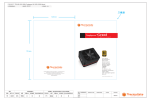
Toughpower
Toughpower
CableManagement 1000W ATX12V 2.2 & EPS 12V 2.91 Version
CableManagement 1000W ATX12V 2.2 & EPS 12V 2.91 Version
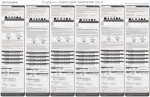
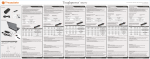
5. Installation Steps
To prevent electrical shocks, please disconnect the power cord
from your existing power supply unit. Toughpower 1000W
Power Supply has automatic voltage selector which will
automatically change to 100V-240V PSU.
Step 3
Connect the 6 pin/8 ping PCI-Express connector to your
graphic card if needed. (Notice: Before the connection,
please refer to Section 6.2 for more information.)
1
Step 1
2
After install the power supply unit into the chassis and then
connect the 20+4-pin main power cable to motherboard 20pin
or 24 pin socket.
1
2
Step 4
3
Connect the 4 pin power connector to peripheral devices such
as DVD-Burner, hard drive, and etc. In addition, a user can
connect the 3-pin floppy power connector to connect the floppy
drive.
1
2
Step 2
Connect the 4+4-pin/8-pin +12V auxiliary power connector to
the motherboard. (Users can use either 4 pins or 8 pins,
depending on the motherboard. Please check with the
motherboard user's manual.)
12
3
www.rackmountnet.com
13