1
5.0: Setting up the Transducer and OD4 (continued)
5.2: Basic Procedure
STEP 4 - Setting Uni-polar Full-Scale Output (adding an offset)
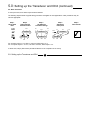
1. Move the transducer to the null position. OD4 output will be 0 V or 0 mA.
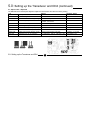
2. Apply offset using the +VE, -VE, 5 V and 10 V links and then adjust the Fine Offset control to set the offset precisely.
3. Perform final checks, step 5.
Example: 0-10 V is required for a ±1 mm transducer. Set the transducer to give ±5 V over the full range and then, with
the transducer at null, add +5 V offset. Adjust the Fine Offset control to give 5 V. When the transducer is moved to the
+1 mm position, the output will be +10 V.
Example: 4-20 mA is required for a ±1 mm transducer. Set the transducer to give ±8 mA over the full range and then,
with the transducer at null, add +5 V (approx. 10 mA) offset. Adjust the Fine Offset control to give +12 mA. When the
transducer is moved to the +1 mm position, the output will be +20 mA.
STEP 5 - Final Checks
Ensure that the calibration is correct by moving the transducer across the required mechanical range, checking
calibration points. Fine adjustment can be made if required.
It may only be possible to set the output accurately at the two calibration points. This is due to non-linearity within the
transducer.
5.0: Setting up the Transducer and OD4
18
Part No. 502621 Issue 8