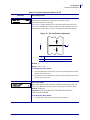
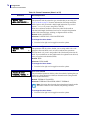
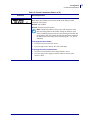
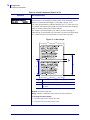
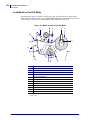
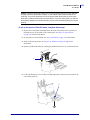
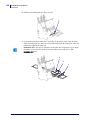
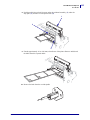
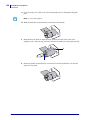
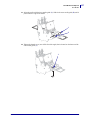
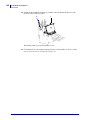
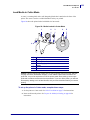
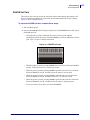
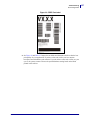
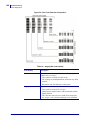
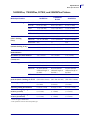
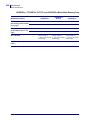
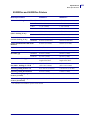
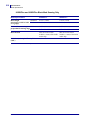
1
Zebra® XiIIIPlus™/R110Xi™/R170Xi™ User Guide © 2007 ZIH Corp. The copyrights in this manual and the software and/or firmware in the label printer described therein are owned by Brady Corp. Unauthorized reproduction of this manual or the software and/or firmware in the label printer may result in imprisonment of up to one year and fines of up to $10,000 (17 U.S.C.506). Copyright violators may be subject to civil liability. This product may contain ZPL®, ZPL II®, and ZebraLink™ programs; Element Energy Equalizer® Circuit; E3®; and Monotype Imaging fonts. Software © Brady Corp. All rights reserved worldwide. ZebraLink and all product names and numbers are trademarks, and Zebra, the Zebra logo, ZPL, ZPL II, Element Energy Equalizer Circuit, and E3 Circuit are registered trademarks of ZIH Corp. All rights reserved worldwide. All other brand names, product names, or trademarks belong to their respective holders. For additional trademark information, please see “Trademarks” on the product CD. Proprietary Statement This manual contains proprietary information of Brady Corporation and its subsidiaries (“Zebra Technologies”). It is intended solely for the information and use of parties operating and maintaining the equipment described herein. Such proprietary information may not be used, reproduced, or disclosed to any other parties for any other purpose without the express, written permission of Zebra Technologies. Product Improvements Continuous improvement of products is a policy of Zebra Technologies. All specifications and designs are subject to change without notice. Liability Disclaimer Zebra Technologies takes steps to ensure that its published Engineering specifications and manuals are correct; however, errors do occur. Zebra Technologies reserves the right to correct any such errors and disclaims liability resulting therefrom. Limitation of Liability In no event shall Zebra Technologies or anyone else involved in the creation, production, or delivery of the accompanying product (including hardware and software) be liable for any damages whatsoever (including, without limitation, consequential damages including loss of business profits, business interruption, or loss of business information) arising out of the use of, the results of use of, or inability to use such product, even if Zebra Technologies has been advised of the possibility of such damages. Some jurisdictions do not allow the exclusion or limitation of incidental or consequential damages, so the above limitation or exclusion may not apply to you. Part Number: 13383L-004 Rev. A Declaration of Conformity Declaration of Conformity I have determined that the Zebra printers identified as the XiIIIPlus™ Series 110XiIIIPlus, R110Xi, 140XiIIIPlus, 170XiIIIPlus, R170Xi, 220XiIIIPlus manufactured by: Zebra Technologies Corporation 333 Corporate Woods Parkway Vernon Hills, Illinois 60061-3109 U.S.A. Have been shown to comply with the applicable technical standards of the FCC For Home, Office, Commercial, and Industrial use If no unauthorized change is made in the equipment, and if the equipment is properly maintained and operated. 9/6/07 XiIIIPlus/R110Xi/R170Xi User Guide 13383L-004 Rev. A 3 4 Compliance Information Compliance Information Compliance Information FCC Compliance Statement This device complies with Part 15 rules. Operation is subject to the following two conditions: 1. This device may not cause harmful interference, and 2. This device must accept any interference received, including interference that may cause undesired operation. The user is cautioned that any changes or modifications not expressly approved by Zebra Technologies could void the user’s authority to operate the equipment. To ensure compliance, this printer must be used with Shielded Communication Cables. FCC Radiation Exposure Statement (for printers with RFID encoders) This equipment complies with FCC radiation exposure limits set forth for an uncontrolled environment. This equipment should be installed and operated with minimum distance 20cm between the radiator and your body. This transmitter must not be co-located or operating in conjunction with any other antenna or transmitter. Canadian DOC Compliance Statement This Class B digital apparatus complies with Canadian ICES-003. Cet appareil numérique de la classe B est conforme à la norme NMB-003 du Canada. 13383L-004 Rev. A XiIIIPlus/R110Xi/R170Xi User Guide 9/6/07 Contents Declaration of Conformity . . . . . . . . . . . . . . . . . . . . . . . . . . . . . . . . . . . . . . . . . . . 3 Compliance Information . . . . . . . . . . . . . . . . . . . . . . . . . . . . . . . . . . . . . . . . . . . . . . . . . . . 4 About This Document . . . . . . . . . . . . . . . . . . . . . . . . . . . . . . . . . . . . . . . . . . . . . . 11 Who Should Use This Document . . . . . . . . . . . . . . . . . . . . . . . . . . . . . . . . . . . . . . . . . . . How This Document Is Organized . . . . . . . . . . . . . . . . . . . . . . . . . . . . . . . . . . . . . . . . . . Contacts . . . . . . . . . . . . . . . . . . . . . . . . . . . . . . . . . . . . . . . . . . . . . . . . . . . . . . . . . . . . . . Web Site . . . . . . . . . . . . . . . . . . . . . . . . . . . . . . . . . . . . . . . . . . . . . . . . . . . . . . . . . . . The Americas . . . . . . . . . . . . . . . . . . . . . . . . . . . . . . . . . . . . . . . . . . . . . . . . . . . . . . . Europe, Africa, Middle East, and India . . . . . . . . . . . . . . . . . . . . . . . . . . . . . . . . . . . . Asia Pacific . . . . . . . . . . . . . . . . . . . . . . . . . . . . . . . . . . . . . . . . . . . . . . . . . . . . . . . . . Document Conventions. . . . . . . . . . . . . . . . . . . . . . . . . . . . . . . . . . . . . . . . . . . . . . . . . . . 12 12 13 13 13 13 13 14 1 • Introduction . . . . . . . . . . . . . . . . . . . . . . . . . . . . . . . . . . . . . . . . . . . . . . . . . . . 17 External View . . . . . . . . . . . . . . . . . . . . . . . . . . . . . . . . . . . . . . . . . . . . . . . . . . . . . . . . . . Printer Components . . . . . . . . . . . . . . . . . . . . . . . . . . . . . . . . . . . . . . . . . . . . . . . . . . . . . Control Panel . . . . . . . . . . . . . . . . . . . . . . . . . . . . . . . . . . . . . . . . . . . . . . . . . . . . . . . . . . Control Panel LCD . . . . . . . . . . . . . . . . . . . . . . . . . . . . . . . . . . . . . . . . . . . . . . . . . . . Control Panel Buttons. . . . . . . . . . . . . . . . . . . . . . . . . . . . . . . . . . . . . . . . . . . . . . . . . Control Panel Indicator Lights. . . . . . . . . . . . . . . . . . . . . . . . . . . . . . . . . . . . . . . . . . . 18 19 20 21 21 23 2 • Printer Setup . . . . . . . . . . . . . . . . . . . . . . . . . . . . . . . . . . . . . . . . . . . . . . . . . . 25 Before You Begin . . . . . . . . . . . . . . . . . . . . . . . . . . . . . . . . . . . . . . . . . . . . . . . . . . . . . . . Handling the Printer . . . . . . . . . . . . . . . . . . . . . . . . . . . . . . . . . . . . . . . . . . . . . . . . . . . . . Unpack and Inspect the Printer . . . . . . . . . . . . . . . . . . . . . . . . . . . . . . . . . . . . . . . . . Store the Printer . . . . . . . . . . . . . . . . . . . . . . . . . . . . . . . . . . . . . . . . . . . . . . . . . . . . . Ship the Printer . . . . . . . . . . . . . . . . . . . . . . . . . . . . . . . . . . . . . . . . . . . . . . . . . . . . . . 9/6/07 XiIIIPlus/R110Xi/R170Xi User Guide 26 27 27 27 27 13383L-004 Rev. A 6 Contents Select a Site for the Printer . . . . . . . . . . . . . . . . . . . . . . . . . . . . . . . . . . . . . . . . . . . . . . . . Select a Surface . . . . . . . . . . . . . . . . . . . . . . . . . . . . . . . . . . . . . . . . . . . . . . . . . . . . . Provide Proper Operating Conditions . . . . . . . . . . . . . . . . . . . . . . . . . . . . . . . . . . . . . Allow Proper Space . . . . . . . . . . . . . . . . . . . . . . . . . . . . . . . . . . . . . . . . . . . . . . . . . . Provide a Data Source . . . . . . . . . . . . . . . . . . . . . . . . . . . . . . . . . . . . . . . . . . . . . . . . Provide a Power Source . . . . . . . . . . . . . . . . . . . . . . . . . . . . . . . . . . . . . . . . . . . . . . . Select a Data Communication Interface . . . . . . . . . . . . . . . . . . . . . . . . . . . . . . . . . . . . . . Data Cables and Wireless Cards . . . . . . . . . . . . . . . . . . . . . . . . . . . . . . . . . . . . . . . . Connect the Printer to the Computer or Network . . . . . . . . . . . . . . . . . . . . . . . . . . . . Connect the Printer to a Power Source . . . . . . . . . . . . . . . . . . . . . . . . . . . . . . . . . . . . . . Power Cord Specifications . . . . . . . . . . . . . . . . . . . . . . . . . . . . . . . . . . . . . . . . . . . . . Types of Media . . . . . . . . . . . . . . . . . . . . . . . . . . . . . . . . . . . . . . . . . . . . . . . . . . . . . . . . . Ribbon Overview. . . . . . . . . . . . . . . . . . . . . . . . . . . . . . . . . . . . . . . . . . . . . . . . . . . . . . . . When to Use Ribbon. . . . . . . . . . . . . . . . . . . . . . . . . . . . . . . . . . . . . . . . . . . . . . . . . . Coated Side of Ribbon . . . . . . . . . . . . . . . . . . . . . . . . . . . . . . . . . . . . . . . . . . . . . . . . 28 28 28 28 28 28 29 30 30 33 34 35 37 37 37 3 • Operations . . . . . . . . . . . . . . . . . . . . . . . . . . . . . . . . . . . . . . . . . . . . . . . . . . . . 39 Prepare the Media for Loading . . . . . . . . . . . . . . . . . . . . . . . . . . . . . . . . . . . . . . . . . . . . . Print Modes. . . . . . . . . . . . . . . . . . . . . . . . . . . . . . . . . . . . . . . . . . . . . . . . . . . . . . . . . . . . Load Media in Tear-Off Mode . . . . . . . . . . . . . . . . . . . . . . . . . . . . . . . . . . . . . . . . . . . . . . Load Ribbon . . . . . . . . . . . . . . . . . . . . . . . . . . . . . . . . . . . . . . . . . . . . . . . . . . . . . . . . . . . Remove Used Ribbon. . . . . . . . . . . . . . . . . . . . . . . . . . . . . . . . . . . . . . . . . . . . . . . . . Calibrate the Printer . . . . . . . . . . . . . . . . . . . . . . . . . . . . . . . . . . . . . . . . . . . . . . . . . . . . . Adjust Media Sensors . . . . . . . . . . . . . . . . . . . . . . . . . . . . . . . . . . . . . . . . . . . . . . . . . . . . Upper Media Sensor—Inside Half of Media . . . . . . . . . . . . . . . . . . . . . . . . . . . . . . . . Upper Media Sensor—Outside Half of Media. . . . . . . . . . . . . . . . . . . . . . . . . . . . . . . Lower Media Sensor. . . . . . . . . . . . . . . . . . . . . . . . . . . . . . . . . . . . . . . . . . . . . . . . . . Adjust Printhead Pressure and Toggle Position . . . . . . . . . . . . . . . . . . . . . . . . . . . . . . . . Toggle Position Adjustment . . . . . . . . . . . . . . . . . . . . . . . . . . . . . . . . . . . . . . . . . . . . Printhead Pressure Adjustment . . . . . . . . . . . . . . . . . . . . . . . . . . . . . . . . . . . . . . . . . 40 43 44 49 54 56 58 58 59 60 61 61 62 4 • Configuration . . . . . . . . . . . . . . . . . . . . . . . . . . . . . . . . . . . . . . . . . . . . . . . . . . 65 Setup Mode. . . . . . . . . . . . . . . . . . . . . . . . . . . . . . . . . . . . . . . . . . . . . . . . . . . . . . . . . . . . Enter Setup Mode. . . . . . . . . . . . . . . . . . . . . . . . . . . . . . . . . . . . . . . . . . . . . . . . . . . . Exit Setup Mode . . . . . . . . . . . . . . . . . . . . . . . . . . . . . . . . . . . . . . . . . . . . . . . . . . . . . Change Password-Protected Parameters . . . . . . . . . . . . . . . . . . . . . . . . . . . . . . . . . . . . Default Password Value . . . . . . . . . . . . . . . . . . . . . . . . . . . . . . . . . . . . . . . . . . . . . . . Disable the Password Protection Feature . . . . . . . . . . . . . . . . . . . . . . . . . . . . . . . . . Print a Configuration Label . . . . . . . . . . . . . . . . . . . . . . . . . . . . . . . . . . . . . . . . . . . . . . . . Print a Network Configuration Label . . . . . . . . . . . . . . . . . . . . . . . . . . . . . . . . . . . . . . . . . 13383L-004 Rev. A XiIIIPlus/R110Xi/R170Xi User Guide 66 66 67 68 68 68 69 70 9/6/07 Contents Control Panel Parameters. . . . . . . . . . . . . . . . . . . . . . . . . . . . . . . . . . . . . . . . . . . . . . . . . How to View or Modify Parameters . . . . . . . . . . . . . . . . . . . . . . . . . . . . . . . . . . . . . . Additional Parameters . . . . . . . . . . . . . . . . . . . . . . . . . . . . . . . . . . . . . . . . . . . . . . . . Standard Printer Parameters . . . . . . . . . . . . . . . . . . . . . . . . . . . . . . . . . . . . . . . . . . . 71 71 71 72 5 • Print Modes and Options . . . . . . . . . . . . . . . . . . . . . . . . . . . . . . . . . . . . . . . . 99 Printer Options . . . . . . . . . . . . . . . . . . . . . . . . . . . . . . . . . . . . . . . . . . . . . . . . . . . . . . . . 100 RFID Capability. . . . . . . . . . . . . . . . . . . . . . . . . . . . . . . . . . . . . . . . . . . . . . . . . . . . . 100 XML-Enabled Printing. . . . . . . . . . . . . . . . . . . . . . . . . . . . . . . . . . . . . . . . . . . . . . . . 100 Print Modes. . . . . . . . . . . . . . . . . . . . . . . . . . . . . . . . . . . . . . . . . . . . . . . . . . . . . . . . . . . 101 Select the Print Mode . . . . . . . . . . . . . . . . . . . . . . . . . . . . . . . . . . . . . . . . . . . . . . . . 101 Tear-Off Mode . . . . . . . . . . . . . . . . . . . . . . . . . . . . . . . . . . . . . . . . . . . . . . . . . . . . . . 101 Load Media in Peel-Off Mode . . . . . . . . . . . . . . . . . . . . . . . . . . . . . . . . . . . . . . . . . . 102 Load Media in Cutter Mode . . . . . . . . . . . . . . . . . . . . . . . . . . . . . . . . . . . . . . . . . . . 109 Load Media in Rewind Mode (No Cutter) . . . . . . . . . . . . . . . . . . . . . . . . . . . . . . . . . .114 Load Media in Rewind Mode with Cutter Option . . . . . . . . . . . . . . . . . . . . . . . . . . . 121 Install the Rewind Plate . . . . . . . . . . . . . . . . . . . . . . . . . . . . . . . . . . . . . . . . . . . . . . 128 Remove Media Liner from the Rewind or Peel Spindle . . . . . . . . . . . . . . . . . . . . . . 129 6 • Routine Maintenance . . . . . . . . . . . . . . . . . . . . . . . . . . . . . . . . . . . . . . . . . . 131 Replacing Printer Components . . . . . . . . . . . . . . . . . . . . . . . . . . . . . . . . . . . . . . . . . . . . Ordering Replacement Parts . . . . . . . . . . . . . . . . . . . . . . . . . . . . . . . . . . . . . . . . . . Recycling Printer Components . . . . . . . . . . . . . . . . . . . . . . . . . . . . . . . . . . . . . . . . . Lubrication . . . . . . . . . . . . . . . . . . . . . . . . . . . . . . . . . . . . . . . . . . . . . . . . . . . . . . . . . . . Cleaning Schedule and Procedures . . . . . . . . . . . . . . . . . . . . . . . . . . . . . . . . . . . . . . . . Clean the Exterior . . . . . . . . . . . . . . . . . . . . . . . . . . . . . . . . . . . . . . . . . . . . . . . . . . . Clean the Media Compartment . . . . . . . . . . . . . . . . . . . . . . . . . . . . . . . . . . . . . . . . . Clean the Printhead and Platen Roller . . . . . . . . . . . . . . . . . . . . . . . . . . . . . . . . . . . Clean the Sensors . . . . . . . . . . . . . . . . . . . . . . . . . . . . . . . . . . . . . . . . . . . . . . . . . . Clean the Snap Plate . . . . . . . . . . . . . . . . . . . . . . . . . . . . . . . . . . . . . . . . . . . . . . . . Clean the Cutter . . . . . . . . . . . . . . . . . . . . . . . . . . . . . . . . . . . . . . . . . . . . . . . . . . . . Replace the Fuse . . . . . . . . . . . . . . . . . . . . . . . . . . . . . . . . . . . . . . . . . . . . . . . . . . . . . . 132 132 132 132 133 133 134 134 137 140 142 143 7 • Troubleshooting . . . . . . . . . . . . . . . . . . . . . . . . . . . . . . . . . . . . . . . . . . . . . . 145 Troubleshooting Checklists . . . . . . . . . . . . . . . . . . . . . . . . . . . . . . . . . . . . . . . . . . . . . . . LCD Error Messages . . . . . . . . . . . . . . . . . . . . . . . . . . . . . . . . . . . . . . . . . . . . . . . . . . . Print Quality Problems . . . . . . . . . . . . . . . . . . . . . . . . . . . . . . . . . . . . . . . . . . . . . . . . . . Calibration Problems. . . . . . . . . . . . . . . . . . . . . . . . . . . . . . . . . . . . . . . . . . . . . . . . . . . . Communications Problems . . . . . . . . . . . . . . . . . . . . . . . . . . . . . . . . . . . . . . . . . . . . . . . Ribbon Problems . . . . . . . . . . . . . . . . . . . . . . . . . . . . . . . . . . . . . . . . . . . . . . . . . . . . . . RFID Problems . . . . . . . . . . . . . . . . . . . . . . . . . . . . . . . . . . . . . . . . . . . . . . . . . . . . . . . . Miscellaneous Printer Problems . . . . . . . . . . . . . . . . . . . . . . . . . . . . . . . . . . . . . . . . . . . 9/6/07 XiIIIPlus/R110Xi/R170Xi User Guide 146 147 151 155 156 157 158 161 13383L-004 Rev. A 7 8 Contents Printer Diagnostics . . . . . . . . . . . . . . . . . . . . . . . . . . . . . . . . . . . . . . . . . . . . . . . . . . . . . Power-On Self Test. . . . . . . . . . . . . . . . . . . . . . . . . . . . . . . . . . . . . . . . . . . . . . . . . . CANCEL Self Test . . . . . . . . . . . . . . . . . . . . . . . . . . . . . . . . . . . . . . . . . . . . . . . . . . PAUSE Self Test . . . . . . . . . . . . . . . . . . . . . . . . . . . . . . . . . . . . . . . . . . . . . . . . . . . . FEED Self Test . . . . . . . . . . . . . . . . . . . . . . . . . . . . . . . . . . . . . . . . . . . . . . . . . . . . . FEED and PAUSE Self Test . . . . . . . . . . . . . . . . . . . . . . . . . . . . . . . . . . . . . . . . . . . Communications Diagnostics Test . . . . . . . . . . . . . . . . . . . . . . . . . . . . . . . . . . . . . . Sensor Profile . . . . . . . . . . . . . . . . . . . . . . . . . . . . . . . . . . . . . . . . . . . . . . . . . . . . . . 163 163 164 165 166 170 171 172 8 • Data Ports . . . . . . . . . . . . . . . . . . . . . . . . . . . . . . . . . . . . . . . . . . . . . . . . . . . . 173 Parallel Data Port . . . . . . . . . . . . . . . . . . . . . . . . . . . . . . . . . . . . . . . . . . . . . . . . . . . . . . Parallel Cabling Requirements . . . . . . . . . . . . . . . . . . . . . . . . . . . . . . . . . . . . . . . . . Parallel Port Interconnections. . . . . . . . . . . . . . . . . . . . . . . . . . . . . . . . . . . . . . . . . . Serial Data Port. . . . . . . . . . . . . . . . . . . . . . . . . . . . . . . . . . . . . . . . . . . . . . . . . . . . . . . . Hardware Control Signal Descriptions . . . . . . . . . . . . . . . . . . . . . . . . . . . . . . . . . . . Pin Configuration . . . . . . . . . . . . . . . . . . . . . . . . . . . . . . . . . . . . . . . . . . . . . . . . . . . RS-232 Interface Connections . . . . . . . . . . . . . . . . . . . . . . . . . . . . . . . . . . . . . . . . . USB 2.0 Port . . . . . . . . . . . . . . . . . . . . . . . . . . . . . . . . . . . . . . . . . . . . . . . . . . . . . . . . . . Applicator Interface Connector . . . . . . . . . . . . . . . . . . . . . . . . . . . . . . . . . . . . . . . . . . . . Applicator Signals . . . . . . . . . . . . . . . . . . . . . . . . . . . . . . . . . . . . . . . . . . . . . . . . . . . Applicator Interface Connector Pin Configuration. . . . . . . . . . . . . . . . . . . . . . . . . . . Jumper Configurations and Pinouts for +5 V I/O Operation . . . . . . . . . . . . . . . . . . . Pinouts for +24-28 V I/O Operation . . . . . . . . . . . . . . . . . . . . . . . . . . . . . . . . . . . . . 174 174 174 176 176 177 178 180 181 181 183 186 187 9 • PC Cards . . . . . . . . . . . . . . . . . . . . . . . . . . . . . . . . . . . . . . . . . . . . . . . . . . . . 189 PCMCIA PC Cards . . . . . . . . . . . . . . . . . . . . . . . . . . . . . . . . . . . . . . . . . . . . . . . . . . . . . 190 10 • Specifications . . . . . . . . . . . . . . . . . . . . . . . . . . . . . . . . . . . . . . . . . . . . . . . 193 Features . . . . . . . . . . . . . . . . . . . . . . . . . . . . . . . . . . . . . . . . . . . . . . . . . . . . . . . . . . . . . Standard Features . . . . . . . . . . . . . . . . . . . . . . . . . . . . . . . . . . . . . . . . . . . . . . . . . . Print Modes. . . . . . . . . . . . . . . . . . . . . . . . . . . . . . . . . . . . . . . . . . . . . . . . . . . . . . . . Zebra Programming Language (ZPL). . . . . . . . . . . . . . . . . . . . . . . . . . . . . . . . . . . . Bar Codes. . . . . . . . . . . . . . . . . . . . . . . . . . . . . . . . . . . . . . . . . . . . . . . . . . . . . . . . . Agency Approvals . . . . . . . . . . . . . . . . . . . . . . . . . . . . . . . . . . . . . . . . . . . . . . . . . . . . . . XiIIIPlus Non-RFID or RFID-Ready without RFID Reader Installed . . . . . . . . . . . . . RXi or XiIIIPlus with RFID Reader Installed . . . . . . . . . . . . . . . . . . . . . . . . . . . . . . . General Specifications . . . . . . . . . . . . . . . . . . . . . . . . . . . . . . . . . . . . . . . . . . . . . . . . . . Physical Specifications . . . . . . . . . . . . . . . . . . . . . . . . . . . . . . . . . . . . . . . . . . . . . . . Electrical Specifications . . . . . . . . . . . . . . . . . . . . . . . . . . . . . . . . . . . . . . . . . . . . . . Environmental Conditions for Operation and Storage . . . . . . . . . . . . . . . . . . . . . . . 13383L-004 Rev. A XiIIIPlus/R110Xi/R170Xi User Guide 194 194 194 194 195 196 196 196 198 198 198 199 9/6/07 Contents Print Specifications by Model . . . . . . . . . . . . . . . . . . . . . . . . . . . . . . . . . . . . . . . . . . . . . 110XiIIIPlus and R110Xi . . . . . . . . . . . . . . . . . . . . . . . . . . . . . . . . . . . . . . . . . . . . . . 90XiIIIPlus, 96XiIIIPlus, and 140XiIIIPlus . . . . . . . . . . . . . . . . . . . . . . . . . . . . . . . . . 170XiIIIPlus, R170Xi, and 220XiIIIPlus. . . . . . . . . . . . . . . . . . . . . . . . . . . . . . . . . . . Ribbon Specifications . . . . . . . . . . . . . . . . . . . . . . . . . . . . . . . . . . . . . . . . . . . . . . . . . . . Media Specifications . . . . . . . . . . . . . . . . . . . . . . . . . . . . . . . . . . . . . . . . . . . . . . . . . . . . 110XiIIIPlus and R110Xi Printers . . . . . . . . . . . . . . . . . . . . . . . . . . . . . . . . . . . . . . . 140XiIIIPlus, 170XiIIIPlus, R170Xi, and 220XiIIIPlus Printers . . . . . . . . . . . . . . . . . 90XiIIIPlus and 96XiIIIPlus Printers . . . . . . . . . . . . . . . . . . . . . . . . . . . . . . . . . . . . . 200 200 201 201 203 205 205 207 209 End User License Agreement . . . . . . . . . . . . . . . . . . . . . . . . . . . . . . . . . . . . . . 211 Glossary . . . . . . . . . . . . . . . . . . . . . . . . . . . . . . . . . . . . . . . . . . . . . . . . . . . . . . . . 217 Index . . . . . . . . . . . . . . . . . . . . . . . . . . . . . . . . . . . . . . . . . . . . . . . . . . . . . . . . . . . 221 9/6/07 XiIIIPlus/R110Xi/R170Xi User Guide 13383L-004 Rev. A 9 10 Contents Notes • ___________________________________________________________________ __________________________________________________________________________ __________________________________________________________________________ __________________________________________________________________________ __________________________________________________________________________ __________________________________________________________________________ __________________________________________________________________________ __________________________________________________________________________ __________________________________________________________________________ __________________________________________________________________________ 13383L-004 Rev. A XiIIIPlus/R110Xi/R170Xi User Guide 9/6/07 About This Document This section provides you with contact information, document structure and organization, and additional reference documents. Contents Who Should Use This Document . . . . . . . . . . . . . . . . . . . . . . . . . . . . . . . . . . . . . . . . . . . How This Document Is Organized . . . . . . . . . . . . . . . . . . . . . . . . . . . . . . . . . . . . . . . . . . Contacts . . . . . . . . . . . . . . . . . . . . . . . . . . . . . . . . . . . . . . . . . . . . . . . . . . . . . . . . . . . . . . Web Site . . . . . . . . . . . . . . . . . . . . . . . . . . . . . . . . . . . . . . . . . . . . . . . . . . . . . . . . . . . The Americas. . . . . . . . . . . . . . . . . . . . . . . . . . . . . . . . . . . . . . . . . . . . . . . . . . . . . . . . Europe, Africa, Middle East, and India. . . . . . . . . . . . . . . . . . . . . . . . . . . . . . . . . . . . . Asia Pacific . . . . . . . . . . . . . . . . . . . . . . . . . . . . . . . . . . . . . . . . . . . . . . . . . . . . . . . . . Document Conventions . . . . . . . . . . . . . . . . . . . . . . . . . . . . . . . . . . . . . . . . . . . . . . . . . . 9/6/07 XiIIIPlus/R110Xi/R170Xi User Guide 12 12 13 13 13 13 13 14 13383L-004 Rev. A 12 About This Document Who Should Use This Document Who Should Use This Document This User Guide is intended for use by any person who needs to perform routine maintenance, upgrade, or troubleshoot problems with the printer. How This Document Is Organized The User Guide is set up as follows: 13383L-004 Rev. A Section Description Introduction on page 17 This section provides a high-level overview of the printer and its components. Printer Setup on page 25 This section provides the tasks that you must complete and the issues that you must consider before you load and configure your printer. Operations on page 39 This section provides the procedures for loading and calibrating the printer. Configuration on page 65 This section describes the control panel parameters that are used to configure the printer for operation. Print Modes and Options on page 99 This section describes the print modes and other options available for the printer. Routine Maintenance on page 131 This section provides routine cleaning and maintenance procedures. Troubleshooting on page 145 This section provides information about errors that you might need to troubleshoot. Assorted diagnostic tests are included. Data Ports on page 173 This section describes the standard communication ports available to connect the printer to your computer or network. Specifications on page 193 This section provides the features of and specifications for this printer. Glossary on page 217 The glossary provides a list of common terms. XiIIIPlus/R110Xi/R170Xi User Guide 9/6/07 About This Document Contacts Contacts You can contact Zebra Technologies at the following: Web Site http://www.zebra.com Technical Support via the Internet is available 24 hours per day, 365 days per year. Go to http://www.zebra.com/support. The Americas Regional Headquarters Technical Support Customer Service Dept. Zebra Technologies International, LLC 333 Corporate Woods Parkway Vernon Hills, Illinois 60061.3109 U.S.A T: +1 847 793 2600 Toll-free +1 800 423 0422 F: +1 847 913 8766 T: +1 877 ASK ZEBRA (275 9327) F: +1 847 913 2578 For printers, parts, media, and ribbon, please call your distributor, or contact us. Hardware: [email protected] Software: [email protected] T: +1 877 ASK ZEBRA (275 9327) E: [email protected] Europe, Africa, Middle East, and India Regional Headquarters Technical Support Internal Sales Dept. Zebra Technologies Europe Limited Zebra House The Valley Centre, Gordon Road High Wycombe Buckinghamshire, HP13 6EQ, UK T: +44 (0) 1494 768298 F: +44 (0) 1494 768210 Germany: [email protected] France: [email protected] Spain/Portugal: [email protected] All other areas: [email protected] For printers, parts, media, and ribbon, please call your distributor, or contact us. Regional Headquarters Technical Support Customer Service Zebra Technologies Asia Pacific, LLC 120 Robinson Road #06-01 Parakou Building Singapore 068913 T: +65 6858 0722 F: +65 6885 0838 T: +65 6858 0722 F: +65 6885 0838 E: China: [email protected] All other areas: [email protected] For printers, parts, media, and ribbon, please call your distributor, or contact us. T: +44 (0)1494 472872 F: +44 (0) 1494 450103 T: +44 (0) 1494 768316 F: +44 (0) 1494 768244 E: [email protected] Asia Pacific 9/6/07 XiIIIPlus/R110Xi/R170Xi User Guide T: +65 6858 0722 F: +65 6858 0836 13383L-004 Rev. A 13 14 About This Document Document Conventions Document Conventions The following conventions are used throughout this document to convey certain information. Alternate Color (online only) Cross-references contain hot links to other sections in this guide. If you are viewing this guide online in .pdf format, you can click the cross-reference (blue text) to jump directly to its location. LCD Display Examples Text from a printer’s Liquid Crystal Display (LCD) appears in Bubbledot ICG font. Command Line Examples Command line examples appear in Courier New font. For example, type ZTools to get to the Post-Install scripts in the bin directory. Files and Directories File names and directories appear in Courier New font. For example, the Zebra<version number>.tar file and the /root directory. Icons Used Caution • Warns you of the potential for electrostatic discharge. Caution • Warns you of a potential electric shock situation. Caution • Warns you of a situation where excessive heat could cause a burn. Caution • Advises you that failure to take or avoid a specific action could result in physical harm to you. Caution • (No icon) Advises you that failure to take or avoid a specific action could result in physical harm to the hardware. Important • Advises you of information that is essential to complete a task. Note • Indicates neutral or positive information that emphasizes or supplements important points of the main text. Example • Provides an example, often a scenario, to better clarify a section of text. 13383L-004 Rev. A XiIIIPlus/R110Xi/R170Xi User Guide 9/6/07 About This Document Document Conventions Illustration Callouts Callouts are used when an illustration contains information that needs to be labeled and described. A table that contains the labels and descriptions follows the graphic. Figure 1 provides an example. Figure 1 • Sample Figure with Callouts 1 2 1 2 9/6/07 SETUP/EXIT button CALIBRATE button XiIIIPlus/R110Xi/R170Xi User Guide 13383L-004 Rev. A 15 16 About This Document Document Conventions Notes • ___________________________________________________________________ __________________________________________________________________________ __________________________________________________________________________ __________________________________________________________________________ __________________________________________________________________________ __________________________________________________________________________ __________________________________________________________________________ __________________________________________________________________________ __________________________________________________________________________ __________________________________________________________________________ 13383L-004 Rev. A XiIIIPlus/R110Xi/R170Xi User Guide 9/6/07 1 Introduction This section provides a high-level overview of the printer and its components. Contents External View . . . . . . . . . . . . . . . . . . . . . . . . . . . . . . . . . . . . . . . . . . . . . . . . . . . . . . . . . . Printer Components . . . . . . . . . . . . . . . . . . . . . . . . . . . . . . . . . . . . . . . . . . . . . . . . . . . . . Control Panel . . . . . . . . . . . . . . . . . . . . . . . . . . . . . . . . . . . . . . . . . . . . . . . . . . . . . . . . . . Control Panel LCD . . . . . . . . . . . . . . . . . . . . . . . . . . . . . . . . . . . . . . . . . . . . . . . . . . . . Control Panel Buttons . . . . . . . . . . . . . . . . . . . . . . . . . . . . . . . . . . . . . . . . . . . . . . . . . Control Panel Indicator Lights . . . . . . . . . . . . . . . . . . . . . . . . . . . . . . . . . . . . . . . . . . . 9/6/07 XiIIIPlus/R110Xi/R170Xi User Guide 18 19 20 21 21 23 13383L-004 Rev. A 18 Introduction External View External View Figure 2 shows the outside of the printer. Figure 2 • Exterior of Printer Front 1 2 Rear 3 4 5 1 2 3 4 5 13383L-004 Rev. A Control panel Media door Electronics cover Power switch (O = Off, I = On) AC power connector XiIIIPlus/R110Xi/R170Xi User Guide 9/6/07 Introduction Printer Components Printer Components Figure 3 shows the components inside the media compartment of your printer. Depending on installed options, your printer may look slightly different. Figure 3 • Printer Components 4 5 6 7 3 2 1 1 2 3 4 5 6 7 9/6/07 Printhead-open lever Peel-off/tear-off bar Platen roller Ribbon take-up spindle Ribbon supply spindle Media supply hanger Media supply guide XiIIIPlus/R110Xi/R170Xi User Guide 13383L-004 Rev. A 19 20 Introduction Control Panel Control Panel All controls and indicators for the printer are located on the control panel (Figure 4). • The control panel Liquid Crystal Display (LCD) shows the operating status and printer parameters. • The control panel buttons are used to control the printer operations and to set parameters. • The control panel lights (LEDs) show the printer’s operating status or indicate which control panel buttons are active. Figure 4 • Location of Control Panel Buttons and Lights 1 2 3 4 5 6 11 7 8 9 10 1 2 3 4 5 6 7 8 9 10 11 13383L-004 Rev. A LCD PLUS button MINUS button PREVIOUS button NEXT/SAVE button SETUP/EXIT button FEED button PAUSE button CANCEL button CALIBRATE button Indicator lights XiIIIPlus/R110Xi/R170Xi User Guide 9/6/07 Introduction Control Panel Control Panel LCD The control panel LCD functions differently in different printer modes. • In Operating mode, the LCD displays the printer’s status, sometimes in conjunction with a control panel light (see Control Panel Indicator Lights on page 23). • In Pause mode, the printer stops printing temporarily. • In Setup mode, you can use the control panel LCD to view or modify printer parameters (see Control Panel Parameters on page 71). • In Error mode, the LCD may display an alert or error message (see LCD Error Messages on page 147). Control Panel Buttons Table 1 describes the function of each button. Table 1 • Control Panel Buttons Button Appearance Function PAUSE Stops and restarts the printing process or removes error messages and clears the LCD. • If the printer is idle, it enters Pause mode immediately. • If the printer is printing, the label is completed before the printer pauses. FEED Advances a blank label. • If the printer is idle or paused, the label is fed immediately. • If the printer is printing, the label is fed after printing finishes. CANCEL CANCEL functions only in Pause mode. Pressing CANCEL once has these effects: • Cancels the label format that is currently printing. • If no label format is printing, the next one to be printed is canceled. • If no label formats are waiting to be printed, CANCEL is ignored. To clear the printer’s entire label format memory, press and hold CANCEL. When the formats are cleared, the DATA light turns off. CALIBRATE Calibrates the printer for the following: • Media length • Media type (continuous or non-continuous) • Print mode (direct thermal or thermal transfer) • Sensor values For more information on calibration, see Calibrate the Printer on page 56. SETUP/EXIT Enters and exits Setup mode. 9/6/07 XiIIIPlus/R110Xi/R170Xi User Guide 13383L-004 Rev. A 21 22 Introduction Control Panel Table 1 • Control Panel Buttons (Continued) Button Appearance Function PREVIOUS When in Setup mode, scrolls the LCD to the previous parameter. Press and hold to scroll quickly. NEXT/SAVE • When in Setup mode, scrolls the LCD to the next parameter. Press and hold to scroll quickly. • When exiting Setup mode, saves any changes you have made in the configuration and calibration sequence. LEFT OVAL Changes the parameter values. Common uses are to decrease a value, to answer “no,” to scroll through choices, or to change the cursor position while entering the password. RIGHT OVAL Changes the parameter values. Common uses are to increase a value, to answer “yes,” to scroll through choices, or to change values while entering the password. 13383L-004 Rev. A XiIIIPlus/R110Xi/R170Xi User Guide 9/6/07 Introduction Control Panel Control Panel Indicator Lights Table 2 describes lights on the control panel that indicate different printer conditions. Note • If two operating conditions occur simultaneously (for example, one that causes a light to be on constantly and one that causes the same light to flash), the indicator light flashes. Table 2 • Control Panel Indicator Lights Light POWER Appearance Status Indication Off The printer is off or power is not applied. On The printer is on. TAKE LABEL Off Normal operation. Flashing (Peel mode only.) The label is available. Printing pauses until the label is removed. ERROR Off Normal operation—no printer errors. Flashing A printer error exists. Check the LCD for more information. CHECK RIBBON Off Normal operation—ribbon (if used) is properly loaded. On Printing is paused, the LCD displays a warning message, and the PAUSE light is on. • If the printer is in Direct Thermal Mode: ribbon is loaded. • If the printer is in Thermal Transfer Mode: no ribbon is loaded. PAPER OUT Off Normal operation—media is properly loaded. On No media is under the media sensor. Printing is paused, the LCD shows an error message, and the PAUSE light is on. Off Normal operation. On The printer stopped all printing operations. Causes include: • PAUSE was pressed • A label format included a pause command • The online verifier detected an error • A printer error was detected. The LCD gives additional information. Off Normal operation. No data being received or processed. On The printer is processing data or is printing. No data is being received. Flashing The printer is receiving data from or sending status information to the host computer. PAUSE DATA 9/6/07 XiIIIPlus/R110Xi/R170Xi User Guide 13383L-004 Rev. A 23 24 Introduction Control Panel Notes • ___________________________________________________________________ __________________________________________________________________________ __________________________________________________________________________ __________________________________________________________________________ __________________________________________________________________________ __________________________________________________________________________ __________________________________________________________________________ __________________________________________________________________________ __________________________________________________________________________ __________________________________________________________________________ 13383L-004 Rev. A XiIIIPlus/R110Xi/R170Xi User Guide 9/6/07 2 Printer Setup This section provides the tasks that you must complete and the issues that you must consider before you load and configure your printer. Contents Before You Begin . . . . . . . . . . . . . . . . . . . . . . . . . . . . . . . . . . . . . . . . . . . . . . . . . . . . . . . Handling the Printer . . . . . . . . . . . . . . . . . . . . . . . . . . . . . . . . . . . . . . . . . . . . . . . . . . . . . Unpack and Inspect the Printer . . . . . . . . . . . . . . . . . . . . . . . . . . . . . . . . . . . . . . . . . . Store the Printer . . . . . . . . . . . . . . . . . . . . . . . . . . . . . . . . . . . . . . . . . . . . . . . . . . . . . . Ship the Printer . . . . . . . . . . . . . . . . . . . . . . . . . . . . . . . . . . . . . . . . . . . . . . . . . . . . . . Select a Site for the Printer . . . . . . . . . . . . . . . . . . . . . . . . . . . . . . . . . . . . . . . . . . . . . . . Select a Surface. . . . . . . . . . . . . . . . . . . . . . . . . . . . . . . . . . . . . . . . . . . . . . . . . . . . . . Provide Proper Operating Conditions . . . . . . . . . . . . . . . . . . . . . . . . . . . . . . . . . . . . . Allow Proper Space . . . . . . . . . . . . . . . . . . . . . . . . . . . . . . . . . . . . . . . . . . . . . . . . . . . Provide a Data Source . . . . . . . . . . . . . . . . . . . . . . . . . . . . . . . . . . . . . . . . . . . . . . . . . Provide a Power Source . . . . . . . . . . . . . . . . . . . . . . . . . . . . . . . . . . . . . . . . . . . . . . . Select a Data Communication Interface. . . . . . . . . . . . . . . . . . . . . . . . . . . . . . . . . . . . . . Data Cables and Wireless Cards . . . . . . . . . . . . . . . . . . . . . . . . . . . . . . . . . . . . . . . . . Connect the Printer to the Computer or Network. . . . . . . . . . . . . . . . . . . . . . . . . . . . . Connect the Printer to a Power Source . . . . . . . . . . . . . . . . . . . . . . . . . . . . . . . . . . . . . . Power Cord Specifications . . . . . . . . . . . . . . . . . . . . . . . . . . . . . . . . . . . . . . . . . . . . . . Types of Media. . . . . . . . . . . . . . . . . . . . . . . . . . . . . . . . . . . . . . . . . . . . . . . . . . . . . . . . . Ribbon Overview . . . . . . . . . . . . . . . . . . . . . . . . . . . . . . . . . . . . . . . . . . . . . . . . . . . . . . . When to Use Ribbon . . . . . . . . . . . . . . . . . . . . . . . . . . . . . . . . . . . . . . . . . . . . . . . . . . Coated Side of Ribbon. . . . . . . . . . . . . . . . . . . . . . . . . . . . . . . . . . . . . . . . . . . . . . . . . 9/6/07 XiIIIPlus/R110Xi/R170Xi User Guide 26 27 27 27 27 28 28 28 28 28 28 29 30 30 33 34 35 37 37 37 13383L-004 Rev. A 26 Printer Setup Before You Begin Before You Begin Review this checklist, and resolve any issues before you set up or use your printer. Unpack and Inspect the Printer Have you unpacked the printer and inspected it for damage? If you have not, see Unpack and Inspect the Printer on page 27. Select a Site Have you selected an appropriate location for the printer? If you have not, see Select a Site for the Printer on page 28. Connect to a Data Source Have you determined how the printer will connect to a data source (usually a computer)? For more information, see Select a Data Communication Interface on page 29. Attach a Power Cord Do you have the correct power cord for your printer? If you are unsure, see Power Cord Specifications on page 34. To attach the power cord and connect the printer to a power source, see Connect the Printer to a Power Source on page 33. Select Media Do you have the correct media for your application? If you are unsure, see Types of Media on page 35. Select Ribbon Do you need to use ribbon, and is the appropriate ribbon available, if needed? If you are unsure, see Ribbon Overview on page 37. 13383L-004 Rev. A XiIIIPlus/R110Xi/R170Xi User Guide 9/6/07 Printer Setup Handling the Printer Handling the Printer This section describes how to handle your printer. Unpack and Inspect the Printer When you receive the printer, immediately unpack it and inspect for shipping damage. • Save all packing materials. • Check all exterior surfaces for damage. • Raise the media door, and inspect the media compartment for damage to components. If you discover shipping damage upon inspection: • Immediately notify the shipping company and file a damage report. • Keep all packaging material for shipping company inspection. • Notify your authorized Zebra reseller Important • Zebra Technologies is not responsible for any damage incurred during the shipment of the equipment and will not repair this damage under warranty. Store the Printer If you are not placing the printer into immediate operation, repackage it using the original packing materials. You may store the printer under the conditions shown in Table 3. Table 3 • Storage Temperature and Humidity Temperature Relative Humidity –40°F to 140°F (–40° to 60°C) 5% to 85% non-condensing Ship the Printer If you must ship the printer: • Turn off (O) the printer, and disconnect all cables. • Remove any media, ribbon, or loose objects from the printer interior. • Close the printhead. • Carefully pack the printer into the original container or a suitable alternate container to avoid damage during transit. A shipping container can be purchased from Zebra if the original packaging has been lost or destroyed. 9/6/07 XiIIIPlus/R110Xi/R170Xi User Guide 13383L-004 Rev. A 27 28 Printer Setup Select a Site for the Printer Select a Site for the Printer Consider the following when selecting an appropriate location for your printer. Select a Surface Select a solid, level surface of sufficient size and strength to accommodate the printer and other equipment (such as a computer), if necessary. The choices include a table, countertop, desk, or cart. For the printer’s weight and dimensions, see General Specifications on page 198. Provide Proper Operating Conditions This printer is designed to function in a wide range of environmental and electrical conditions, including a warehouse or factory floor. For more information on the required conditions, see General Specifications on page 198. Table 4 shows the temperature and relative humidity requirements for the printer when it is operating. Table 4 • Operating Temperature and Humidity Mode Temperature Relative Humidity Thermal Transfer 41° to 104°F (5° to 40°C) 20 to 85% non-condensing. Direct Thermal 32° to 104°F (0° to 40°C) 20 to 85% non-condensing Allow Proper Space The printer should have enough space around it for you to be able to open the media door. To allow for proper ventilation and cooling, leave open space on all sides of the printer. Caution • Do not place any padding or cushioning material behind or under the printer because this restricts air flow and could cause the printer to overheat. Provide a Data Source If the printer will be located away from the data source (such as a computer), the selected site must provide the appropriate connections to that data source. For more information on the types of communication interfaces and their limitations, see Select a Data Communication Interface on page 29. Provide a Power Source Place the printer within a short distance of a power outlet that is easily accessible. 13383L-004 Rev. A XiIIIPlus/R110Xi/R170Xi User Guide 9/6/07 Printer Setup Select a Data Communication Interface Select a Data Communication Interface Table 5 provides basic information about data communication interfaces that you can use to connect your printer to a computer. You may send label formats to the printer through any data communication interface that is available. Select an interface that is supported by both your printer and your computer or your Local Area Network (LAN). Table 5 • Characteristics of the Data Communication Interfaces Interface Standard or Optional on Printer RS-232 Serial Standard • Maximum cable length of 50 ft (15.24 m). • You may need to change printer parameters to match the host computer. • You need to use a null-modem adaptor to connect to the printer if using a standard modem cable. IEEE 1284 Bidirectional Parallel Standard • Maximum cable length of 10 ft (3 m). • Recommended cable length of 6 ft (1.83 m). • An Ethernet print server takes up or covers this port on the printer. • No printer parameter changes required to match the host computer. USB Standard • Maximum cable length of 16.4 ft (5 m). • No printer parameter changes required to match the host computer. Internal wired Ethernet print server Optional • Can print to the printer from any computer on your LAN. • Can communicate with the printer through the printer’s web pages. • Computer must be equipped with an Ethernet board. • The printer must be configured to use your LAN. Wireless Ethernet print server Optional • Can print to the printer from any computer on your Wireless Local Area Network (WLAN). • Can communicate with the printer through the printer’s web pages. • Computer must be equipped with an Ethernet board. • The printer must be configured to use your WLAN. 9/6/07 Characteristics XiIIIPlus/R110Xi/R170Xi User Guide 13383L-004 Rev. A 29 30 Printer Setup Select a Data Communication Interface Data Cables and Wireless Cards You must supply all data cables or wireless cards for your application. Data Cables Ethernet cables do not require shielding, but all other data cables must be fully shielded and fitted with metal or metallized connector shells. Unshielded data cables may increase radiated emissions above the regulated limits. To minimize electrical noise pickup in the cable: • Keep data cables as short as possible. • Do not bundle the data cables tightly with the power cords. • Do not tie the data cables to power wire conduits. Wireless Cards For supported wireless cards, refer to the ZebraNet Wireless Print Server and Wireless Plus Print Server User Guide. A copy of the manual is available at http://www.zebra.com/manuals or on the user CD that came with your printer. Connect the Printer to the Computer or Network Table 6 shows how to connect the different types of data cables to your printer and computer. The connectors on the back of your computer may be in different locations than on the sample computer shown in this section. Caution • Ensure that the printer power is off (O) before connecting data communications cables. Connecting a data communications cable while the power is on (I) may damage the printer. Table 6 • Connecting the Printer to a Computer or Network 13383L-004 Rev. A Interface Connection and Configuration RS-232 Serial The baud rate, number of data and stop bits, the parity, and the XON/XOFF or DTR control must match those of the host computer. See Control Panel Parameters on page 71 to view or change these parameters. XiIIIPlus/R110Xi/R170Xi User Guide 9/6/07 Printer Setup Select a Data Communication Interface Table 6 • Connecting the Printer to a Computer or Network (Continued) Interface Connection and Configuration IEEE 1284 Bidirectional Parallel No additional configuration is necessary. An Ethernet print server takes up or covers this port on the printer. USB No additional configuration is necessary. Caution • Be careful not to plug the USB cable into the wired Ethernet print server connector on the printer because doing so will damage the connector. 9/6/07 XiIIIPlus/R110Xi/R170Xi User Guide 13383L-004 Rev. A 31 32 Printer Setup Select a Data Communication Interface Table 6 • Connecting the Printer to a Computer or Network (Continued) 13383L-004 Rev. A Interface Connection and Configuration Internal wired Ethernet print server Refer to the ZebraNet 10/100 Print Server User and Reference Guide for configuration instructions. A copy of this manual is available at http://www.zebra.com/manuals or on the user CD that came with your printer. Wireless Ethernet print server Refer to the ZebraNet Wireless Print Server and Wireless Plus Print Server User Guide for configuration instructions. A copy of this manual is available at http://www.zebra.com/manuals or on the user CD that came with your printer. XiIIIPlus/R110Xi/R170Xi User Guide 9/6/07 Printer Setup Connect the Printer to a Power Source Connect the Printer to a Power Source The AC power cord must have a three-prong female connector on one end that plugs into the mating AC power connector at the rear of the printer. If a power cable was not included with your printer, refer to Power Cord Specifications on page 34. Caution • For personnel and equipment safety, always use an approved three-conductor power cord specific to the region or country intended for installation. This cord must use an IEC 320 female connector and the appropriate region-specific three-conductor grounded plug configuration. To connect the printer to a power source, complete these steps: 1. Toggle the printer power switch to the off (O) position. 2. Plug the power cord into the AC power connector (1) on the rear of the printer. 1 3. Plug the other end of the power cord into a power outlet near the printer. 4. Turn on (I) the printer. The control panel LCD and lights activate, indicating that the printer is booting up. 9/6/07 XiIIIPlus/R110Xi/R170Xi User Guide 13383L-004 Rev. A 33 34 Printer Setup Connect the Printer to a Power Source Power Cord Specifications Caution • For personnel and equipment safety, always use an approved three-conductor power cord specific to the region or country intended for installation. This cord must use an IEC 320 female connector and the appropriate region-specific, three-conductor grounded plug configuration. Depending on how your printer was ordered, a power cord may or may not be included. If one is not included or if the one included is not suitable for your requirements, see Figure 5 and refer to the following guidelines: • The overall cord length must be less than 9.8 ft. (3 m). • The cord must be rated for at least 10 A, 250 V. • The chassis ground (earth) must be connected to ensure safety and reduce electromagnetic interference. Figure 5 • Power Cord Specifications 2 1 3 4 1 2 3 4 AC power plug for your country—This should bear the certification mark of at least one of the known international safety organizations (Figure 6). 3-conductor HAR cable or other cable approved for your country. IEC 320 connector—This should bear the certification mark of at least one of the known international safety organizations (Figure 6). Length ≤ 9.8 ft. (3 m). Rating 10 Amp, 250 VAC. Figure 6 • International Safety Organization Certifications 13383L-004 Rev. A XiIIIPlus/R110Xi/R170Xi User Guide 9/6/07 Printer Setup Types of Media Types of Media Important • Zebra strongly recommends the use of Zebra-brand supplies for continuous high-quality printing. A wide range of paper, polypropylene, polyester, and vinyl stock has been specifically engineered to enhance the printing capabilities of the printer and to prevent premature printhead wear. To purchase supplies, go to http://www.zebra.com/howtobuy. Your printer can use various types of media: • Standard media—Most standard media uses an adhesive backing that sticks individual labels or a continuous length of labels to a liner. • Tag stock—Tags are usually made from a heavy paper. Tag stock does not have adhesive or a liner, and it is typically perforated between tags. • Radio frequency identification (RFID) “smart” media—RFID media can be used in a printer that is equipped with an RFID reader/encoder. RFID labels are made from the same materials and adhesives as non-RFID labels. Each label has an RFID transponder (sometimes called an “inlay”), made of a chip and an antenna, embedded between the label and the liner. The shape of the transponder varies by manufacturer and is visible through the label. All “smart” labels have memory that can be read, and many have memory that can be encoded. Important • Transponder placement within a label depends on the transponder type and the printer model. Make sure that you are using the correct “smart” media for your printer. Table 7 describes roll and fanfold media. Roll media is loaded into the printer while fanfold media may be located inside or outside of the printer. 9/6/07 XiIIIPlus/R110Xi/R170Xi User Guide 13383L-004 Rev. A 35 36 Printer Setup Types of Media Table 7 • Roll and Fanfold Media Media Type Non-Continuous Roll Media How It Looks Description Roll media is wound on a 3-in. (76-mm) core. Individual labels are separated by one or more of the following methods: • Web media separates labels by gaps, holes, or notches. • Black mark media uses pre-printed black marks on the back side of the media to indicate label separations. • Perforated media has perforations that allow the labels or tags to be separated from each other easily. The media may also have black marks or other separations between labels or tags. Non-Continuous Fanfold Media Fanfold media is folded in a zigzag pattern. Fanfold media can have the same label separations as non-continuous roll media. The separations would fall on or near the folds. Continuous Roll Media Roll media is wound on a 3-in. (76-mm) core. Continuous roll media does not have gaps, holes, notches, or black marks to indicate label separations. This allows the image to be printed anywhere on the label. Sometimes a cutter is used to cut apart individual labels. 13383L-004 Rev. A XiIIIPlus/R110Xi/R170Xi User Guide 9/6/07 Printer Setup Ribbon Overview Ribbon Overview Ribbon is a thin film that is coated on one side with wax, resin, or wax resin, which is transferred to the media during the thermal transfer process. The media determines whether you need to use ribbon and how wide the ribbon must be. When ribbon is used, it must be as wide as or wider than the media being used. If the ribbon is narrower than the media, areas of the printhead are unprotected and subject to premature wear. When to Use Ribbon Thermal transfer media requires ribbon for printing while direct thermal media does not. To determine if ribbon must be used with a particular media, perform a media scratch test. To perform a media scratch test, complete these steps: 1. Scratch the print surface of the media rapidly with your fingernail. 2. Did a black mark appear on the media? If a black mark... Then the media is... Does not appear on the media Thermal transfer. A ribbon is required. Appears on the media Direct thermal. No ribbon is required. Coated Side of Ribbon Ribbon can be wound with the coated side on the inside or outside (Figure 7). This printer can only use ribbon that is coated on the outside. If you are unsure which side of a particular roll of ribbon is coated, perform an adhesive test or a ribbon scratch test to determine which side is coated. Figure 7 • Ribbon Coated on Outside or Inside Outside 9/6/07 XiIIIPlus/R110Xi/R170Xi User Guide Inside 13383L-004 Rev. A 37 38 Printer Setup Ribbon Overview Adhesive Test If you have labels available, perform the adhesive test to determine which side of a ribbon is coated. This method works well for ribbon that is already installed. To perform an adhesive test, complete these steps: 1. Peel a label from its liner. 2. Press a corner of the sticky side of the label to the outer surface of the roll of ribbon. 3. Peel the label off of the ribbon. 4. Observe the results. Did flakes or particles of ink from the ribbon adhere to the label? If ink from the ribbon... Then... Adhered to the label The ribbon is coated on the outside and can be used in this printer. Did not adhere to the label The ribbon is coated on the inside and cannot be used in this printer. To verify this, repeat the test on the other surface of the roll of ribbon. Ribbon Scratch Test Perform the ribbon scratch test when labels are unavailable. To perform a ribbon scratch test, complete these steps: 1. Unroll a short length of ribbon. 2. Place the unrolled section of ribbon on a piece of paper with the outer surface of the ribbon in contact with the paper. 3. Scratch the inner surface of the unrolled ribbon with your fingernail. 4. Lift the ribbon from the paper. 5. Observe the results. Did the ribbon leave a mark on the paper? 13383L-004 Rev. A If the ribbon... Then... Left a mark on the paper The ribbon is coated on the outer surface. Did not leave a mark on the paper The ribbon is coated on the inner surface and cannot be used in this printer. To verify this, repeat the test on the other surface of the roll of ribbon. XiIIIPlus/R110Xi/R170Xi User Guide 9/6/07 3 Operations This section provides the procedures for loading and calibrating the printer. Note • Complete the tasks and resolve the issues in Printer Setup on page 25 before operating the printer. Contents Prepare the Media for Loading. . . . . . . . . . . . . . . . . . . . . . . . . . . . . . . . . . . . . . . . . . . . . Print Modes . . . . . . . . . . . . . . . . . . . . . . . . . . . . . . . . . . . . . . . . . . . . . . . . . . . . . . . . . . . Load Media in Tear-Off Mode. . . . . . . . . . . . . . . . . . . . . . . . . . . . . . . . . . . . . . . . . . . . . . Load Ribbon. . . . . . . . . . . . . . . . . . . . . . . . . . . . . . . . . . . . . . . . . . . . . . . . . . . . . . . . . . . Remove Used Ribbon . . . . . . . . . . . . . . . . . . . . . . . . . . . . . . . . . . . . . . . . . . . . . . . . . Calibrate the Printer . . . . . . . . . . . . . . . . . . . . . . . . . . . . . . . . . . . . . . . . . . . . . . . . . . . . . Adjust Media Sensors . . . . . . . . . . . . . . . . . . . . . . . . . . . . . . . . . . . . . . . . . . . . . . . . . . . Upper Media Sensor—Inside Half of Media. . . . . . . . . . . . . . . . . . . . . . . . . . . . . . . . . Upper Media Sensor—Outside Half of Media . . . . . . . . . . . . . . . . . . . . . . . . . . . . . . . Lower Media Sensor . . . . . . . . . . . . . . . . . . . . . . . . . . . . . . . . . . . . . . . . . . . . . . . . . . Adjust Printhead Pressure and Toggle Position . . . . . . . . . . . . . . . . . . . . . . . . . . . . . . . . Toggle Position Adjustment . . . . . . . . . . . . . . . . . . . . . . . . . . . . . . . . . . . . . . . . . . . . . Printhead Pressure Adjustment . . . . . . . . . . . . . . . . . . . . . . . . . . . . . . . . . . . . . . . . . . 9/6/07 XiIIIPlus/R110Xi/R170Xi User Guide 40 43 44 49 54 56 58 58 59 60 61 61 62 13383L-004 Rev. A 40 Operations Prepare the Media for Loading Prepare the Media for Loading You can use roll media or fanfold media in your printer. Roll media hangs on and is loaded from the media supply hanger. Fanfold media is stored away from or in the bottom of the printer and can drape across the media supply hanger. Roll Media To place roll media on the media supply hanger, complete these steps: 1. Slide out and flip down the media supply guide. 2. Place the roll of media on the media supply hanger. Push the roll back as far as it will go. 3. Flip up the media supply guide, and then slide it in until it touches the edge of the roll. 13383L-004 Rev. A XiIIIPlus/R110Xi/R170Xi User Guide 9/6/07 Operations Prepare the Media for Loading Fanfold Media You can load fanfold media through the rear access slot or through the bottom access slot. Using the media supply hanger is optional. Figure 8 • Rear Feed Using Media Supply Hanger Figure 9 • Bottom Feed Without Using Media Supply Hanger 9/6/07 XiIIIPlus/R110Xi/R170Xi User Guide 13383L-004 Rev. A 41 42 Operations Prepare the Media for Loading To load fanfold media, complete these steps: 1. Thread the fanfold media through the rear or bottom access slot. 2. Do you wish to use the media supply guide? If… Then… No Continue with the media loading procedure for the desired print mode. Yes a. Slide out and flip down the media supply guide. b. Drape the media over the media supply hanger. 3. Flip up the media supply guide, and then slide it in until it touches the edge of the media. 13383L-004 Rev. A XiIIIPlus/R110Xi/R170Xi User Guide 9/6/07 Operations Print Modes Print Modes The printer can print on roll or fanfold media and use different print modes for label removal. Use a print mode that matches the media being used and the printer options available (Table 8). For more information on the types of media, see Types of Media on page 35. Table 8 • Print Modes 9/6/07 Mode When to Use Printer Action Tear-Off (default setting) Use for most applications. Can use roll or fanfold media. See Load Media in Tear-Off Mode on page 44. Each label or strip of labels can be torn off after printing. Peel-Off Use only if printer has the Peel-Off or Rewind option. Usually uses roll media. See Load Media in Peel-Off Mode on page 102. The liner is peeled away from the label during printing. When the printed label is removed, the next label prints. Cutter Use only if printer has a cutter option. Usually uses roll media. See Load Media in Cutter Mode on page 109. The printer automatically cuts the label after it is printed. Rewind Use only if printer has the Rewind option without a cutter. Can use roll or fanfold media. See Load Media in Rewind Mode (No Cutter) on page 114. The media and/or liner are rewound onto a core as they are printed. Rewind with Cutter Option Use only if printer has the Rewind option and a cutter. Can use roll or fanfold media. See Load Media in Rewind Mode with Cutter Option on page 121. The media and/or liner are rewound onto a core as they are printed. The labels are not cut. XiIIIPlus/R110Xi/R170Xi User Guide 13383L-004 Rev. A 43 44 Operations Load Media in Tear-Off Mode Load Media in Tear-Off Mode Tear-Off is the default mode. Figure 10 shows roll media loaded in Tear-Off mode. Figure 10 • Tear-Off Mode 4 1 5 2 1 2 3 4 5 13383L-004 Rev. A 3 Printhead-open lever Media guide Media guide roller Media supply guide Media supply hanger XiIIIPlus/R110Xi/R170Xi User Guide 9/6/07 Operations Load Media in Tear-Off Mode Caution • While performing any tasks near an open printhead, remove all rings, watches, hanging necklaces, identification badges, or other metallic objects that could touch the printhead. You are not required to turn off the printer power when working near an open printhead, but Zebra recommends it as a precaution. If you turn off the power, you will lose all temporary settings, such as label formats, and you must reload them before you resume printing. To load roll media, complete these steps: 1. Set the printer to Tear-Off mode. See Select Print Mode on page 73 for instructions. 2. Insert media into the printer. See Prepare the Media for Loading on page 40 for instructions. 3. Open the printhead assembly by rotating the printhead-open lever (1) counter-clockwise. 1 4. Loosen the thumb screw (not visible from this angle) that is located on the bottom of the outer media guide (1). 1 9/6/07 XiIIIPlus/R110Xi/R170Xi User Guide 13383L-004 Rev. A 45 46 Operations Load Media in Tear-Off Mode 5. Slide the outer media guide (1) all the way out. 1 6. If your printer includes a media dancer assembly (1), thread the media under the media dancer assembly roller. For all printers, thread the media under the media guide roller (2) and then the upper media sensor (3). Important • Make sure that you thread the media under these components. If you thread the media over the them, the media obstructs the ribbon sensor and causes a false RIBBON OUT error. 3 2 1 13383L-004 Rev. A XiIIIPlus/R110Xi/R170Xi User Guide 9/6/07 Operations Load Media in Tear-Off Mode 7. Push the media forward until it passes under the printhead assembly (1), under the snap plate (2), and then over the platen roller (3). 1 2 3 8. Align the media with the inner media guide (1). Slide in the outer media guide (2) until it just touches the edge of the media. 1 2 9/6/07 XiIIIPlus/R110Xi/R170Xi User Guide 13383L-004 Rev. A 47 48 Operations Load Media in Tear-Off Mode 9. Tighten the thumb screw (not visible from this angle) that is located on the bottom of the outer media guide (1). 1 10. Push down the printhead assembly (1), and then rotate the printhead-open lever (2) clockwise until it locks into place. 2 13383L-004 Rev. A 1 XiIIIPlus/R110Xi/R170Xi User Guide 9/6/07 Operations Load Ribbon Load Ribbon Use the instructions in this section to load ribbon for use with thermal transfer labels. For direct thermal labels, do not load ribbon in the printer. The ribbon path is slightly different for printers with ribbon dancers (Figure 11). Important • Use ribbon that is wider than the media to protect the printhead from wear. Ribbon must be coated on the outside. Figure 11 • Ribbon Path Without Ribbon Dancer With Ribbon Dancer Caution • While performing any tasks near an open printhead, remove all rings, watches, hanging necklaces, identification badges, or other metallic objects that could touch the printhead. You are not required to turn off the printer power when working near an open printhead, but Zebra recommends it as a precaution. If you turn off the power, you will lose all temporary settings, such as label formats, and you must reload them before you resume printing. To load ribbon, complete these steps: 1. Align the arrow (1) on the ribbon take-up spindle knob with the notch (2) in the ribbon take-up spindle. 2 9/6/07 XiIIIPlus/R110Xi/R170Xi User Guide 1 13383L-004 Rev. A 49 50 Operations Load Ribbon 2. Align the segments of the ribbon supply spindle. 3. Orient the ribbon with the loose end unrolling clockwise. 4. Place the roll of ribbon on the ribbon supply spindle. Push the roll back as far as it will go. 5. A ribbon leader makes ribbon loading and unloading easier. Does your roll of ribbon have paper or something else attached to the end to serve as a ribbon leader? If… Then… Yes Continue with the next step. No a. Tear off a strip of media (labels and liner) about 6–12 in. (150–305 mm) long from the roll. b. Peel a label from the media strip. c. Use this label (1) to attach the end of the ribbon (2) to the media strip (3). The media strip acts as a leader. 3 13383L-004 Rev. A 1 XiIIIPlus/R110Xi/R170Xi User Guide 2 9/6/07 Operations Load Ribbon 6. Open the printhead assembly by rotating the printhead-open lever counter-clockwise. 7. Does your printer contain a ribbon dancer assembly? (See Figure 11 on page 49 for the ribbon dancer location.) If... Then... No Thread the ribbon over the media dancer assembly (1) and under the ribbon guide roller (2). 2 9/6/07 XiIIIPlus/R110Xi/R170Xi User Guide 1 13383L-004 Rev. A 51 52 Operations Load Ribbon If... Then... Yes a. Thread the ribbon through the ribbon dancer. The ribbon must go under the upper roller (1) and then over the lower roller (2). b. Thread the ribbon under the ribbon guide roller (3). 3 2 1 8. Push the ribbon leader forward until it passes under the printhead assembly (1), over the snap plate (2), and then over the platen roller (3). 1 2 3 13383L-004 Rev. A XiIIIPlus/R110Xi/R170Xi User Guide 9/6/07 Operations Load Ribbon 9. Bring the ribbon leader over the upper ribbon roller (1) and then toward the ribbon take-up spindle (2). 1 2 10. Wind the ribbon leader and attached ribbon counterclockwise around the ribbon take-up spindle. 11. Rotate the spindle counterclockwise several turns to wind the ribbon and remove any slack. 9/6/07 XiIIIPlus/R110Xi/R170Xi User Guide 13383L-004 Rev. A 53 54 Operations Load Ribbon 12. Push down the printhead assembly (1), and then rotate the printhead-open lever (2) clockwise until it locks into place. 2 1 Remove Used Ribbon Remove used ribbon from the ribbon take-up spindle each time you change the roll of ribbon. To remove used ribbon, complete these steps: 1. Has the ribbon run out? 13383L-004 Rev. A If the ribbon... Then Ran out Continue with the next step. Did not run out Cut or break the ribbon before the ribbon take-up spindle. XiIIIPlus/R110Xi/R170Xi User Guide 9/6/07 Operations Load Ribbon 2. While holding the ribbon take-up spindle, turn the ribbon release knob clockwise until it stops. The ribbon release bars pivot down, easing the spindle’s grip on the used ribbon. 3. Slide the used ribbon off of the ribbon take-up spindle and discard. 9/6/07 XiIIIPlus/R110Xi/R170Xi User Guide 13383L-004 Rev. A 55 56 Operations Calibrate the Printer Calibrate the Printer Calibrate the printer when it is first put into service. Calibration allows the printer to establish the proper settings for the specific media and ribbon used in your application. You may calibrate the printer at other times as needed. Table 9 shows the different methods for calibration. Table 9 • Types of Calibration Type of Calibration Description When/How It Occurs Auto-calibration The printer automatically sets the value it detects for the spaces between labels. Occurs at the following times: • When the printer is first turned on if CALIBRATION is selected for MEDIA POWER UP (see Select Media Power-Up Option on page 90). • When the printer feeds media after the printhead is closed if CALIBRATION is selected for HEAD CLOSE (see Select Head Close Option on page 91). • As part of both the sensor profile and media and ribbon sensor calibration procedures. Long (Standard) Calibration The printer does the following: • feeds media and ribbon • sets the values it detects for media length, media type (continuous or non-continuous), and print mode (thermal transfer or direct thermal) • updates the sensor values To perform a long calibration, do one of the following: • Press PAUSE on the control panel to pause the printer, and then press CALIBRATE. • Select CALIBRATION for the MEDIA POWER UP or HEAD CLOSE parameter (see Select Media Power-Up Option on page 90 or Select Head Close Option on page 91). Short Calibration The printer calibrates using the current sensor values rather than detecting the spaces between labels and resetting the sensors. This calibration sequence uses fewer labels than the long calibration sequence, but it is less reliable because the values that are stored in the sensors could be incorrect. Select SHORT CAL for the MEDIA POWER UP or HEAD CLOSE parameter (see Select Media Power-Up Option on page 90 or Select Head Close Option on page 91. 13383L-004 Rev. A XiIIIPlus/R110Xi/R170Xi User Guide 9/6/07 Operations Calibrate the Printer Table 9 • Types of Calibration (Continued) Type of Calibration Description When/How It Occurs Sensor Profile Calibration The printer auto-calibrates and prints a media sensor profile. Select the SENSOR PROFILE option on the control panel. See Print Sensor Profile on page 84 for instructions. Media and Ribbon Sensor Sensitivity Calibration One of the most common adjustments to printer settings. The printer resets the sensitivity of the sensors to detect correctly the media and ribbon that you are using. If you change the type of ribbon and/or media, you might need to reset the sensitivity of the media and ribbon sensors. When the sensors are at their new sensitivity, the printer performs an auto-calibration. Select the MEDIA AND RIBBON CALIBRATE option on the control 9/6/07 XiIIIPlus/R110Xi/R170Xi User Guide panel. See Calibrate Media and Ribbon Sensor Sensitivity on page 85 for instructions. 13383L-004 Rev. A 57 58 Operations Adjust Media Sensors Adjust Media Sensors The transmissive sensor consists of two sections: a light source (the lower media sensor) and a light sensor (the upper media sensor). The media passes between the two. Adjust these sensors only when the printer cannot detect the top of the label. The control panel LCD displays ERROR CONDITION PAPER OUT, even though there are labels loaded in the printer. Note • For most models of XiIIIPlus, the upper media sensor can be positioned along the inside half of the media (the side closest to the back frame of the printer) or the outside half of the media (the side farthest from the back frame of the printer). However, for the 220XiIIIPlus, you cannot move the sensors to the outside half of the media. Upper Media Sensor—Inside Half of Media To adjust the upper media sensor for the inside half of the media, complete these steps: 1. Remove the ribbon (if ribbon is used). 2. See Figure 12. Locate the upper media sensor. The upper media sensor eye is directly below the adjustment screw head. Figure 12 • Upper Media Sensor Location 1 1 2 3 2 3 Upper media sensor adjustment screw Upper media sensor Printer back frame 3. Using a Phillips-head screwdriver, slightly loosen the upper media sensor adjustment screw. 13383L-004 Rev. A XiIIIPlus/R110Xi/R170Xi User Guide 9/6/07 Operations Adjust Media Sensors 4. Using the tip of the screwdriver, slide the upper sensor along the slot to the desired position (for non-continuous media with a notch or hole in the media, the sensor must be directly above the notch or hole). 5. Tighten the adjustment screw to secure the upper media sensor. Upper Media Sensor—Outside Half of Media To adjust the upper media sensor for the outside half of the media, complete these steps (all models except the 220XiIIIPlus): 1. Remove the ribbon (if ribbon is used). 2. See Figure 12. Locate the upper media sensor. The upper media sensor eye is directly below the adjustment screw head. 3. Using a Phillips-head screwdriver, remove the upper media sensor adjustment screw. 4. Lift the upper media sensor assembly from the slot, and move it and the wire cover to the outside slot. Carefully pull the wires through the cable tie. You may need to set aside the sensor wire cover if the adjustment is too far to the outside. 5. Replace and slightly tighten the adjustment screw. 6. Slide the upper media sensor along the slot to the desired position (for non-continuous media with a notch or hole in the media, the sensor must be directly above the notch or hole). 7. Tighten the adjustment screw. 8. Make sure that the wires are routed back into the groove of the media sensor bracket. 9/6/07 XiIIIPlus/R110Xi/R170Xi User Guide 13383L-004 Rev. A 59 60 Operations Adjust Media Sensors Lower Media Sensor To adjust the lower media sensor, complete these steps: 1. Locate the lower media sensor assembly under the rear roller (Figure 13). The sensor is a spring clip holding a circuit board. Figure 13 • Lower Media Sensor Location 1 1 Lower media sensor 2. Slide the lower sensor until it is under the upper media sensor. Gently pull wires out as needed (wires should have a little slack). 13383L-004 Rev. A XiIIIPlus/R110Xi/R170Xi User Guide 9/6/07 Operations Adjust Printhead Pressure and Toggle Position Adjust Printhead Pressure and Toggle Position Print quality depends on the labels and ribbon used as well as the toggle pressure and position. Make sure that your labels and ribbon are acceptable for your application. If they are, check the toggle position and then the printhead pressure. Toggle Position Adjustment You may need to adjust the toggles if printing is too light on one side or if thick labels are used. If the toggle pressure is too light or uneven, the labels and ribbon may slip. To position the toggles, complete these steps: 1. Loosen the locking nuts (1) at the top of the toggle assemblies. (The 90XiIIIPlus and 96XiIIIPlus printers have only one toggle.) 1 2. Slide the toggles until they provide even pressure on the media. • If you are using a 90XiIIIPlus or 96XiIIIPlus printer, position the single toggle over the center of the labels. • All other printer models have two toggles. If the labels are too narrow to fit both toggles, position one toggle over the center of the labels and decrease the pressure on the unused toggle. 3. Tighten the locking nuts. 9/6/07 XiIIIPlus/R110Xi/R170Xi User Guide 13383L-004 Rev. A 61 62 Operations Adjust Printhead Pressure and Toggle Position Printhead Pressure Adjustment If positioning the toggles properly does not solve a print quality problem, try adjusting the printhead pressure. Maximize printhead life by using the lowest pressure that produces the desired print quality. Caution • Observe proper electrostatic safety precautions when handling any static-sensitive components such as circuit boards and printheads. To adjust printhead pressure, complete these steps: 1. Print some labels at 2.4 in. (61 mm) per second by running the PAUSE Self Test on page 165. 2. While printing labels, use the control panel controls to lower the darkness setting until the labels are printing gray instead of black. 3. Loosen the upper knurled nuts on the toggle assemblies (1). (The 90XiIIIPlus and 96XiIIIPlus printers have only one toggle.) 1 13383L-004 Rev. A XiIIIPlus/R110Xi/R170Xi User Guide 9/6/07 Operations Adjust Printhead Pressure and Toggle Position 4. Some media types require higher pressure to print well. For these media types, increase or decrease pressure using the lower knurled nuts (1) until the left and right edges of the printed area are equally dark. 1 5. Increase the darkness level using the control panel controls until the printing is clear. 6. Tighten the upper knurled nuts. 9/6/07 XiIIIPlus/R110Xi/R170Xi User Guide 13383L-004 Rev. A 63 64 Operations Adjust Printhead Pressure and Toggle Position Notes • ___________________________________________________________________ __________________________________________________________________________ __________________________________________________________________________ __________________________________________________________________________ __________________________________________________________________________ __________________________________________________________________________ __________________________________________________________________________ __________________________________________________________________________ __________________________________________________________________________ __________________________________________________________________________ 13383L-004 Rev. A XiIIIPlus/R110Xi/R170Xi User Guide 9/6/07 4 Configuration This section describes the control panel parameters that are used to configure the printer for operation. Contents Setup Mode . . . . . . . . . . . . . . . . . . . . . . . . . . . . . . . . . . . . . . . . . . . . . . . . . . . . . . . . . . . Enter Setup Mode . . . . . . . . . . . . . . . . . . . . . . . . . . . . . . . . . . . . . . . . . . . . . . . . . . . . Exit Setup Mode. . . . . . . . . . . . . . . . . . . . . . . . . . . . . . . . . . . . . . . . . . . . . . . . . . . . . . Change Password-Protected Parameters . . . . . . . . . . . . . . . . . . . . . . . . . . . . . . . . . . . . Default Password Value . . . . . . . . . . . . . . . . . . . . . . . . . . . . . . . . . . . . . . . . . . . . . . . . Disable the Password Protection Feature . . . . . . . . . . . . . . . . . . . . . . . . . . . . . . . . . . Print a Configuration Label. . . . . . . . . . . . . . . . . . . . . . . . . . . . . . . . . . . . . . . . . . . . . . . . Print a Network Configuration Label . . . . . . . . . . . . . . . . . . . . . . . . . . . . . . . . . . . . . . . . Control Panel Parameters . . . . . . . . . . . . . . . . . . . . . . . . . . . . . . . . . . . . . . . . . . . . . . . . How to View or Modify Parameters . . . . . . . . . . . . . . . . . . . . . . . . . . . . . . . . . . . . . . . Additional Parameters . . . . . . . . . . . . . . . . . . . . . . . . . . . . . . . . . . . . . . . . . . . . . . . . . Standard Printer Parameters . . . . . . . . . . . . . . . . . . . . . . . . . . . . . . . . . . . . . . . . . . . . 9/6/07 XiIIIPlus/R110Xi/R170Xi User Guide 66 66 67 68 68 68 69 70 71 71 71 72 13383L-004 Rev. A 66 Configuration Setup Mode Setup Mode After you have installed the media and ribbon and the Power-On Self Test (POST) is complete, the control panel displays PRINTER READY. You may now set printer parameters for your application using the control panel display and the buttons directly below it. If it becomes necessary to restore the initial printer defaults, see FEED and PAUSE Self Test on page 170. Important • Certain printing conditions may require that you adjust printing parameters, such as print speed, darkness, or print mode. These conditions include (but are not limited to): • printing at high speeds • peeling the media • the use of extremely thin, small, synthetic, or coated labels Because these and other factors affect print quality, run tests to determine the best combination of printer settings and media for your application. A poor match may limit print quality or print rate, or the printer may not function properly in the desired print mode. Note • If the printer is operating on an IP network and you have a ZebraNet 10/100 PrintServer or Wireless Plus Print Server, you can change the printer’s parameters in these additional ways: • with ZebraLink™ WebView. For information, see the appropriate print server user guide. • with ZebraNet Bridge. For information, see the ZebraNet Bridge Enterprise Printer Management User Guide. Enter Setup Mode To enter Setup Mode, complete these steps: 1. Press SETUP/EXIT. 2. Press NEXT/SAVE or PREVIOUS to scroll through the parameters. 13383L-004 Rev. A XiIIIPlus/R110Xi/R170Xi User Guide 9/6/07 Configuration Setup Mode Exit Setup Mode To leave Setup mode, complete these steps: 1. Press SETUP/EXIT. The LCD displays SAVE CHANGES. 2. Press the left or right oval to display the save options: LCD Description PERMANENT Stores values in the printer even when power is turned off. TEMPORARY Saves the changes until power is turned off. CANCEL Cancels all changes made since you entered Setup mode, except for changes made to the darkness and tear-off settings, which go into effect as soon as they are made. LOAD DEFAULTS Restores all parameters other than the network settings back to the factory defaults. Use care when loading defaults because you will need to reload all settings that you changed manually. Note • Loading factory defaults causes the printer to auto-calibrate. LOAD LAST SAVE Loads values from the last permanent save. DEFAULT NET Restores the wired and wireless network settings back to factory defaults. 3. Press NEXT/SAVE to select the displayed choice. When the configuration and calibration sequence is done, PRINTER READY displays. 9/6/07 XiIIIPlus/R110Xi/R170Xi User Guide 13383L-004 Rev. A 67 68 Configuration Change Password-Protected Parameters Change Password-Protected Parameters Certain parameters, including the communication parameters, are password-protected by factory default. Caution • Do not change password-protected parameters unless you have a complete understanding of the parameters’ functions. If the parameters are set incorrectly, the printer may function unpredictably. The first time that you attempt to change a password-protected parameter, the printer displays ENTER PASSWORD. Before you can change the parameter, you must enter the four-digit numeric password. After you have entered the password correctly, you do not have to enter it again unless you leave Setup mode by pressing SETUP/EXIT or by turning off (O) the printer. To enter a password for a password-protected parameter, complete these steps: 1. At the password prompt, use the left oval to change the selected digit position. 2. When you have selected the digit that you wish to change, use the right oval to increase the selected digit value. Repeat these two steps for each digit of the password. 3. After entering the password, press NEXT/SAVE. The parameter you selected to change is displayed. If the password was entered correctly, you can change the value. Default Password Value The default password value is 1234. The password can be changed using the Zebra Programming Language (ZPL) command ^KP (Define Password) or using the printer’s web pages (ZebraNet® PrintServer II, 10/100 Print Server, or Wireless Print Server required). Disable the Password Protection Feature You can disable the password protection feature so that it no longer prompts you for a password by setting the password to 0000 via the ^KP ZPL command. To re-enable the password-protection feature, send the ZPL command ^KPx, where x can be any number from 1 to 9999. 13383L-004 Rev. A XiIIIPlus/R110Xi/R170Xi User Guide 9/6/07 Configuration Print a Configuration Label Print a Configuration Label A configuration label lists the printer settings that are stored in configuration memory. After you load the media and ribbon (if necessary), print a configuration label as a record of your printer’s current settings. Keep the label to use when troubleshooting printing problems. To print a configuration label, complete these steps: 1. On the control panel, press SETUP/EXIT. 2. Press NEXT/SAVE or PREVIOUS to scroll through the parameters until you reach LIST SETUP. 3. Press the right oval to confirm printing. A configuration label prints (Figure 14). Figure 14 • Configuration Label 9/6/07 XiIIIPlus/R110Xi/R170Xi User Guide 13383L-004 Rev. A 69 70 Configuration Print a Network Configuration Label Print a Network Configuration Label If you are using a print server, you can print a network configuration label after the printer is connected to the network. To print a network configuration label, complete these steps: 1. On the control panel, press SETUP/EXIT. 2. Press NEXT/SAVE or PREVIOUS to scroll through the parameters until you reach LIST NETWORK. 3. Press the right oval to confirm printing. A network configuration label prints (Figure 15). An asterisk designates whether the wired or wireless print server is active. If no wireless print server is installed, the wireless portion of the label does not print. Figure 15 • Network Configuration Label (With a Wireless Print Server Installed) 13383L-004 Rev. A XiIIIPlus/R110Xi/R170Xi User Guide 9/6/07 Configuration Control Panel Parameters Control Panel Parameters Use the LCD on the control panel to view and adjust printer settings. How to View or Modify Parameters While viewing parameters, press NEXT/SAVE to continue to the next parameter, or press PREVIOUS to return to the previous parameter in the cycle. When a parameter is changed, an asterisk (*) appears in the upper left corner of the display to indicate that the value is different from the one currently active in the printer. Note • Your label preparation software or the printer driver may override adjustments made through the control panel. Refer to the software or driver documentation for more information. Additional Parameters Additional parameters appear in the following situations: • When a wired print server is installed in the printer. For more information, see the appropriate manual: the ZebraNet 10/100 Print Server User and Reference Guide or the PrintServer II User and Reference Guide. • When a wireless print server is installed in the printer. For more information, see the ZebraNet Wireless Print Server and Wireless Plus Print Server User Guide • When a Radio Frequency Identification (RFID) reader is installed. See the RFID Programming Guide for more information. Copies of these manuals are available at http://www.zebra.com/manuals or on the user CD that came with your printer. 9/6/07 XiIIIPlus/R110Xi/R170Xi User Guide 13383L-004 Rev. A 71 72 Configuration Control Panel Parameters Standard Printer Parameters Table 10 shows parameters in the order in which they are displayed when you press NEXT/SAVE after entering Setup mode. Table 10 • Printer Parameters (Sheet 1 of 27) Parameter DARKNESS - Action/Explanation +04.0 + Adjust Print Darkness Darkness (burn duration) settings depend on a variety of factors, including ribbon type, media type, and the condition of the printhead. You may adjust the darkness for consistent high-quality printing. Important • Set the darkness to the lowest setting that provides good print quality. If the darkness is set too high, the ink may smear,, the ribbon may burn through, or the printhead may wear prematurely. If printing is too light or if there are voids in printed areas, increase the darkness. If printing is too dark or if there is spreading or bleeding of printed areas, decrease the darkness. The FEED Self Test on page 166 can be used to determine the best darkness setting. You may want to adjust darkness while performing the PAUSE Self Test on page 165. Because the darkness setting takes effect immediately, you can see the results on labels that are currently printing. Darkness settings also may be changed by the driver or software settings. Default: +04.0 Range: 00.0 to +30.0 To change the value shown: 1. Press the right oval to increase darkness. 2. Press the left oval to decrease darkness. PRINT SPEED 2 IPS + Adjust Print Speed Adjusts the speed for printing a label (given in inches per second). Slower print speeds typically yield better print quality. Print speed changes take effect upon exiting Setup mode. Default: 2 IPS Range: 2 to 12 IPS (depends on specific printer) To change the value shown: 1. Press the right oval to increase the value. 2. Press the left oval to decrease the value. 13383L-004 Rev. A XiIIIPlus/R110Xi/R170Xi User Guide 9/6/07 Configuration Control Panel Parameters Table 10 • Printer Parameters (Sheet 2 of 27) Parameter TEAR OFF - Action/Explanation +000 + Adjust the Tear-Off Position This parameter establishes the position of the media over the tear-off/peel-off bar after printing. See Figure 16. Higher numbers move the media out (the tear line moves closer to the leading edge of the next label), and lower numbers move the media in (the tear line moves closer to the edge of the label just printed). Figure 16 • Tear-Off Position Adjustment 1 2 1 2 Media direction Factory-set tear line location at position 00 Default: +0 Range: –120 to +120 To change the value shown: 1. Press the right oval to increase the value. Each press adjusts the tear-off position by four dot rows. 2. Press the left oval to decrease the value. Each press adjusts the tear-off position by four dot rows. PRINT MODE -TEAR-OFF + Select Print Mode Print mode settings tell the printer the method of media delivery that you wish to use. Make sure that your printer can support the selected option. Default: TEAR-OFF Selections: TEAR-OFF, PEEL-OFF, CUTTER, DELAYED CUT, APPLICATOR, REWIND To change the value shown: 1. Press the left or right oval to scroll through the options. 9/6/07 XiIIIPlus/R110Xi/R170Xi User Guide 13383L-004 Rev. A 73 74 Configuration Control Panel Parameters Table 10 • Printer Parameters (Sheet 3 of 27) Parameter Action/Explanation Set Media Type This parameter tells the printer the type of media that you are using (see Types of Media on page 35 for more information). Selecting continuous media requires that you include a label length instruction in your label format (^LLxxxx if you are using ZPL or ZPL II). When non-continuous media is selected, the printer feeds media to calculate label length (the distance between two recognized registration points of the inter-label gap, webbing, or alignment notch or hole). Default: NON-CONTINUOUS Selections: CONTINUOUS, NON-CONTINUOUS MEDIA TYPE -NON-CONTINUOUS + To change the value shown: 1. Press the left or right oval to toggle between the options. SENSOR TYPE -WEB + Set the Sensor Type This parameter tells the printer whether you are using media with a web (gap/space between labels, notch, or hole) to indicate the separations between labels or if you are using media with a black mark printed on the back. If your media does not have black marks for registration on the back, leave your printer at the default (WEB). Default: WEB Selections: WEB, MARK To change the value shown: 1. Press the left or right oval to toggle between the options. PRINT METHOD -THERMAL-TRANS. + Select Print Method The print method parameter tells the printer the method of printing that you wish to use: direct thermal (no ribbon) or thermal transfer (using thermal transfer media and ribbon). Default: THERMAL TRANSFER Selections: THERMAL TRANSFER, DIRECT THERMAL Note • Selecting direct thermal when using thermal transfer media and ribbon creates an error condition, but printing continues. To change the value shown: 1. Press the left or right oval to toggle between the options. 13383L-004 Rev. A XiIIIPlus/R110Xi/R170Xi User Guide 9/6/07 Configuration Control Panel Parameters Table 10 • Printer Parameters (Sheet 4 of 27) Parameter PRINT WIDTH - 104 0/8 MM Action/Explanation + Set Print Width Determines the printable area across the width of the label given the resolution of the printer. Default: 104 0/8 MM Default: depends on specific printer Note • Setting the width too narrow can result in portions of the label not being printed on the media. Setting the width too wide wastes formatting memory and can cause printing off the label and on the platen roller. This setting can affect the horizontal position of the label format if the image was inverted using the ^POI ZPL II command. To change the value shown: 1. Press the left oval to move the cursor. 2. Press the right oval to increase the value of the digit. To change the unit of measurement: 1. Press the left oval until the unit of measurement is active. 2. Press the right oval to toggle to a different unit of measure (mm, inches, or dots). 9/6/07 XiIIIPlus/R110Xi/R170Xi User Guide 13383L-004 Rev. A 75 76 Configuration Control Panel Parameters Table 10 • Printer Parameters (Sheet 5 of 27) Parameter MAXIMUM LENGTH 39.0IN 988MM Action/Explanation Set Maximum Label Length This parameter is used during the media portion of the calibration process. Always set maximum label length to a value that is at least 1.0 in. (25.4 mm) greater than the actual label length (Figure 17). If the value is set to a smaller value than the label length, the printer assumes that continuous media is loaded, and the printer cannot calibrate. For example, if the label length is 5.0 inches (126 mm) including the interlabel gap, set the parameter for 6.0 inches (152 mm). If the label length is 7.5 inches (190 mm), set the parameter for 9.0 inches (229 mm). Figure 17 • Label Length }2 3 1 1 2 3 Label length (including interlabel gap) Interlabel gap Set maximum label length to approximately this value Default: 39.0 inches (988 mm). Range: Values are adjustable in one-inch (25.4 mm) increments. To change the value shown: 1. Press the right oval to increase the value. 2. Press the left oval to decrease the value. 13383L-004 Rev. A XiIIIPlus/R110Xi/R170Xi User Guide 9/6/07 Configuration Control Panel Parameters Table 10 • Printer Parameters (Sheet 6 of 27) Parameter Action/Explanation Set Early Warning for Media When this parameter is enabled, the printer provides warnings when labels are running low. Note • Update the number of labels per roll when beginning use of the Early Warning System. The printer does not make any adjustments when power is turned off and on. Default: MEDIA DISABLED Selections: MEDIA DISABLED, MEDIA ENABLED EARLY WARNING MEDIA DISABLED To change the Early Warning settings: 1. When the LCD displays EARLY WARNING MEDIA, press the left or right oval to toggle between ENABLED and DISABLED. (If you are prompted for a password, enter your password using the instructions in Change Password-Protected Parameters on page 68.) 2. If you enable the Early Warning System, do the following: a. Exit Setup mode and save changes to enable additional parameters. b. Enter Setup mode again. The media and ribbon parameters (LABELS PER ROLL, MEDIA REPLACED, RIBBON LENGTH, and RIBBON REPLACED) appear. c. Adjust the settings as necessary (descriptions of each of these parameters follows). LABELS PER ROLL 0900 + Set Number of Labels Per Roll for Early Warning This parameter appears only when Early Warning for Media is enabled. This value should correspond to the number of labels per roll of the media that you are using. Default: 0900 Range: 100 to 9999 To change the value shown: 1. Press the left oval to move the cursor. 2. Press the right oval to increase the value of the digit. Based on the number entered, when the printer detects that less than 15% of the labels remain, WARNING MEDIA LOW appears on the LCD. If the alert function is enabled, the printer generates an alert. When the printhead is opened and then closed after a media warning is received, the LCD prompts with MEDIA REPLACED?. 3. If you replaced the media, press the right oval to select YES to clear the warning and reset the label counter. If you did not replace the media, press the left oval to select NO. 9/6/07 XiIIIPlus/R110Xi/R170Xi User Guide 13383L-004 Rev. A 77 78 Configuration Control Panel Parameters Table 10 • Printer Parameters (Sheet 7 of 27) Parameter Action/Explanation MEDIA REPLACED? NO YES Reset Media Counter for Early Warning This parameter appears only when Early Warning for Media is enabled. To reset the media counter: 1. Did you replace the media? a. If you replaced the media, press the right oval to select YES. b. If you did not replace the media, press the left oval to select NO. RIBBON LENGTH - 450M 1476 FT + Set Ribbon Length for Early Warning This parameter appears only when Early Warning for Media is enabled and the printer is set for Thermal Transfer operation. Default: 450 M/1476 FT Range: 100 M/328 FT to 450 M/1476 FT in 50 M increments To change the value shown: 1. Press the left or right oval to set the value to match the length of the ribbon that you are using. Based on the number entered, when the printer detects that less than 15% of the ribbon remains, WARNING RIBBON LOW appears on the LCD. If the alert function is enabled, the printer generates an alert. When the printhead is opened and then closed after a ribbon warning is received, the LCD prompts with RIBBON REPLACED?. RIBBON REPLACED? NO YES Reset Ribbon Counter for Early Warning This parameter appears only when Early Warning for Media is enabled and the printer is set for Thermal Transfer operation. To reset the ribbon counter: 1. Did you replace the ribbon? a. If you replaced the ribbon, press the right oval to select YES. b. If you did not replace the ribbon, press the left oval to select NO. 13383L-004 Rev. A XiIIIPlus/R110Xi/R170Xi User Guide 9/6/07 Configuration Control Panel Parameters Table 10 • Printer Parameters (Sheet 8 of 27) Parameter Action/Explanation Set Early Warning for Maintenance When this parameter is enabled, the printer provides warnings when the printhead needs to be cleaned. Note • If necessary, update the number of labels per roll when beginning use of the Early Warning System for Maintenance. The printer does not make any adjustments when power is turned off and on. Default: MAINT. OFF Selections: MAINT. OFF, MAINTENANCE ON EARLY WARNING MAINT. OFF To change the Early Warning settings: 1. When the LCD displays EARLY WARNING MAINTENANCE, press the left or right oval to toggle between OFF and ON. (If you are prompted for a password, enter your password using the instructions in Change Password-Protected Parameters on page 68.) 2. Exit Setup mode and save changes to enable additional parameters related to the early warning system. 3. Enter Setup mode again and go to the following parameters to enter the printhead cleaning interval and the printhead life. HEAD CLEANING - 450M 1476 FT + Set Printhead Cleaning Interval for Early Warning This parameter appears only when Early Warning for Maintenance is enabled. This value should correspond to the length of the media or ribbon roll that you are using. Default: 450 M/1476 FT Range: 100 M/328 FT to 450 M/1476 FT in 50 M increments To change the value shown: 1. Press the left or right oval to set the printhead cleaning interval to the desired number of inches of media or ribbon. When the printhead reaches the set length, WARNING CLEAN PRINTHEAD appears on the LCD. If the alert function is enabled, the printer generates an alert. When the printhead is opened and then closed after a printhead cleaning warning is received, the LCD prompts with HEAD CLEANED?. HEAD CLEANED? NO YES Reset Printhead Cleaning Counter for Early Warning This parameter appears only when Early Warning for Maintenance is enabled. To reset the printhead cleaning counter: 1. Did you clean the printhead? a. If you cleaned the printhead, press the right oval to select YES. b. If you did not clean the printhead, press the left oval to select NO. 9/6/07 XiIIIPlus/R110Xi/R170Xi User Guide 13383L-004 Rev. A 79 80 Configuration Control Panel Parameters Table 10 • Printer Parameters (Sheet 9 of 27) Parameter HEAD LIFE 1000000 IN Action/Explanation + Set Printhead Life for Early Warning This parameter appears only when Early Warning for Maintenance is enabled. Set this value to the number of inches of media that the printhead is expected to print. Default: 1,000,000 inches Range: 100 to 1,000,000 inches To change the value shown: 1. Press the left oval to move the cursor. 2. Press the right oval to increase the value of the digit. When the printhead reaches the set length, WARNING REPLACE HEAD appears on the LCD. If the alert function is enabled, the printer generates an alert. When the printhead is opened and then closed after a printhead life warning is received, the LCD prompts with NEW PRINTHEAD?. 3. If you replaced the printhead, press the right oval to select YES to clear the warning and reset the printhead life counter. If you did not replace the printhead, press the left oval to select NO. NEW PRINTHEAD? NO YES Reset Printhead Life Counter for Early Warning This parameter appears only when Early Warning for Maintenance is enabled. To reset the printhead life counter: 1. Did you replace the printhead? a. If you replaced the printhead, press the right oval to select YES. b. If you did not replace the printhead, press the left oval to select NO. LIST FONTS PRINT List Fonts This option prints a label that lists the available fonts in the printer, including standard printer fonts plus any optional fonts. Fonts may be stored in RAM, Flash memory, optional PCMCIA font cards, or CompactFlash® cards. To print a list of the available fonts: 1. Press the right oval to select PRINT. LIST BAR CODES PRINT List Bar Codes This option prints a label that lists the available bar codes in the printer. Bar codes may be stored in RAM, Flash memory, optional PCMCIA cards, or Compact Flash cards. To print a list of the available bar codes: 1. Press the right oval to select PRINT. 13383L-004 Rev. A XiIIIPlus/R110Xi/R170Xi User Guide 9/6/07 Configuration Control Panel Parameters Table 10 • Printer Parameters (Sheet 10 of 27) Parameter LIST IMAGES PRINT Action/Explanation List Images This option prints a label that lists the available images stored in the printer’s RAM, Flash memory, optional memory card, PCMCIA cards, or Compact Flash cards. To print a list of the available images: 1. Press the right oval to select PRINT. LIST FORMATS PRINT List Formats This option prints a label that lists the available formats stored in the printer’s RAM, Flash memory, optional EPROM, or optional memory card. To print a list of the available formats: 1. Press the right oval to select PRINT. LIST SETUP PRINT List Setup This option prints a configuration label (see Figure 14 on page 69), which lists the current printer configuration. To print a configuration label: 1. Press the right oval to select PRINT. LIST NETWORK PRINT List Network Settings This option prints a network configuration label (see Figure 15 on page 70), which lists the settings for any print server that is installed. To print a network configuration label: 1. Press the right oval to select PRINT. LIST ALL PRINT List All This option prints labels that list the available fonts, bar codes, images, formats, and the current printer and network configurations. To print labels for all settings: 1. Press the right oval to select PRINT. 9/6/07 XiIIIPlus/R110Xi/R170Xi User Guide 13383L-004 Rev. A 81 82 Configuration Control Panel Parameters Table 10 • Printer Parameters (Sheet 11 of 27) Parameter FORMAT CARD: A: Action/Explanation B: Format Memory Card This option erases all previously stored information from the optional PCMCIA card or Compact Flash card. Caution • This option completely erases the selected card. To format a memory card: 1. Press the left oval to select A: or the right oval to select B:. If your printer is set to require a password, you are prompted to enter the password. 2. Enter the password. For instructions, see Change Password-Protected Parameters on page 68. 3. Press the appropriate button again to select the desired card. The display shows ARE YOU SURE?. 4. Do you wish to continue? • Press the left oval to select NO to cancel the request and return to FORMAT CARD prompt. • Press the right oval to select YES and begin initialization. When initialization is complete, the printer automatically exits Setup mode, and the control panel displays PRINTER READY. If you exit Setup mode while initialization is still in process, the control panel display flashes between the phrases CHECKING B: MEMORY and PRINTER IDLE. Note • Depending on the amount of memory in the memory card, initialization may take up to 5 minutes to complete. 13383L-004 Rev. A XiIIIPlus/R110Xi/R170Xi User Guide 9/6/07 Configuration Control Panel Parameters Table 10 • Printer Parameters (Sheet 12 of 27) Parameter INIT FLASH MEM. YES Action/Explanation Initialize Flash Memory This option erases all previously stored information from Flash memory. Caution • This option completely erases the Flash memory. To initialize Flash memory: 1. Press the right oval to select YES. 2. Enter the password. For instructions, see Change Password-Protected Parameters on page 68. The display shows INITIALIZE FLASH? 3. Press the right oval to select YES. The display shows ARE YOU SURE?. 4. Do you wish to continue? • Press the left oval to select NO to cancel the request and return to the INITIALIZE FLASH prompt. • Press the right oval to select YES and begin initialization. When initialization is complete, the printer automatically exits Setup mode, and the control panel displays PRINTER READY. If you exit Setup mode while initialization is still in process, the control panel display flashes between the phrases CHECKING E: MEMORY and PRINTER IDLE. Note • Depending on the amount of free FLASH memory, initialization may take up to 1 minute to complete. 9/6/07 XiIIIPlus/R110Xi/R170Xi User Guide 13383L-004 Rev. A 83 84 Configuration Control Panel Parameters Table 10 • Printer Parameters (Sheet 13 of 27) Parameter SENSOR PROFILE PRINT Action/Explanation Print Sensor Profile A sensor profile shows sensor settings compared to actual sensor readings. This label (which will extend across several actual labels or tags) can be used to troubleshoot printing problems. To interpret the results of the sensor profile, see Sensor Profile on page 172. Figure 18 • Sensor Profile To print a sensor profile: 1. Press the right oval to start this standard calibration procedure and print a media sensor profile. 2. If the sensitivity of the sensors must be adjusted, perform Calibrate Media and Ribbon Sensor Sensitivity on page 85. 13383L-004 Rev. A XiIIIPlus/R110Xi/R170Xi User Guide 9/6/07 Configuration Control Panel Parameters Table 10 • Printer Parameters (Sheet 14 of 27) Parameter MEDIA AND RIBBON CALIBRATE Action/Explanation Calibrate Media and Ribbon Sensor Sensitivity Use this procedure to adjust sensitivity of media and ribbon sensors. Important • Follow this procedure exactly as presented. All of the steps must be performed even if only one of the sensors requires adjustment. You may press the left oval at any step in this procedure to cancel the process. To perform a media and ribbon sensor calibration: 1. Press the right oval to start the calibration procedure. The LOAD BACKING prompt displays. 2. Open the printhead. 3. Remove approximately 8 in. (203 mm) of labels from the backing, and pull the media into the printer so that only the backing is between the media sensors. 4. Leave the printhead open. 5. Press the right oval to continue. The REMOVE RIBBON prompt displays. 6. Remove the ribbon (if used). 7. Close the printhead. 8. Press the right oval to continue. The message CALIBRATING PLEASE WAIT displays. The printer adjusts the scale (gain) of the signals that it receives from the media and ribbon sensors based on the specific media and ribbon combination being used. On the sensor profile, this essentially corresponds to moving the peak of the graph up or down to optimize the readings for your application. When calibration is complete, RELOAD ALL displays. 9. Open the printhead and pull the media forward until a label is positioned under the media sensor. 10. Reload the ribbon (if used). 11. Close the printhead. 12. Press the right oval to continue. The printer performs an auto-calibration. During this process, the printer checks the readings for the media and ribbon based on the new scale established, determines the label length, and determines the print mode. To see the new readings on the new scale, print a sensor profile. 9/6/07 XiIIIPlus/R110Xi/R170Xi User Guide 13383L-004 Rev. A 85 86 Configuration Control Panel Parameters Table 10 • Printer Parameters (Sheet 15 of 27) Parameter PARALLEL COMM. -BIDIRECTIONAL Action/Explanation + Set Parallel Communications Select the communications port that matches the one being used by the host computer. Default: BIDIRECTIONAL Selections: BIDIRECTIONAL, TWINAX/COAX, UNIDIRECTIONAL To change the value shown: 1. Press the left or right oval to scroll through the options. SERIAL COMM -RS232 + Set Serial Communications Select the communications port that matches the one being used by the host computer. This setting applies only when the serial port is used. Important • Do not change this parameter from the default. The printer supports only RS-232. This parameter will be eliminated in a future version of the firmware. Default: RS232 Selections: RS232, RS422/485, RS485 MULTIDROP To change the value shown: 1. Press the left or right oval to scroll through the options. BAUD -9600 + Set Baud This setting applies only when the serial port is used. The baud setting of the printer must match the baud setting of the host computer for accurate communications to take place. Select the value that matches the one being used by the host computer. Default: 9600 Selections: 110, 300, 600, 1200, 2400, 4800, 9600, 14400, 19200, 28800, 38400, 57600, 115200 To change the value shown: 1. Press the left or right oval to scroll through the options. 13383L-004 Rev. A XiIIIPlus/R110Xi/R170Xi User Guide 9/6/07 Configuration Control Panel Parameters Table 10 • Printer Parameters (Sheet 16 of 27) Parameter Action/Explanation Set Data Bits This setting applies only when the serial port is used. The data bits of the printer must match the data bits of the host computer for accurate communications to take place. Set the data bits to match the setting being used by the host computer. Note • Code Page 850 requires the data bits to be set to 8 bits. See the ZPL II Programming Guide for more information. DATA BITS - 8 BITS Default: 8 BITS Selections: 7 BITS, 8 BITS To change the value shown: 1. Press the left or right oval to toggle between the options. PARITY NONE + Set Parity This setting applies only when the serial port is used. The parity of the printer must match the parity of the host computer for accurate communications to take place. Select the parity that matches the one being used by the host computer. Default: NONE Selections: EVEN, ODD, NONE To change the value shown: 1. Press the left or right oval to scroll through the options. HOST HANDSHAKE XON/XOFF + Set Host Handshake This setting applies only when the serial port is used. The handshake protocol of the printer must match the handshake protocol of the host computer for communication to take place. Select the handshake protocol that matches the one being used by the host computer. Default: XON/XOFF Selections: XON/XOFF, DTR/DSR, RTS/CTS To change the value shown: 1. Press the left or right oval to scroll through the options. 9/6/07 XiIIIPlus/R110Xi/R170Xi User Guide 13383L-004 Rev. A 87 88 Configuration Control Panel Parameters Table 10 • Printer Parameters (Sheet 17 of 27) Parameter PROTOCOL NONE Action/Explanation + Set Protocol Protocol is a type of error checking system. Depending on the selection, an indicator may be sent from the printer to the host computer signifying that data has been received. Select the protocol that is requested by the host computer. Further details on protocol can be found in the ZPL II Programming Guide. Default: NONE Selections: NONE, ZEBRA, ACK_NAK Note • ZEBRA is the same as ACK_NAK, except that ZEBRA response messages are sequenced. If ZEBRA is selected, the printer must use DTR/DSR for host handshake protocol. To change the value shown: 1. Press the left or right oval to scroll through the options. NETWORK ID 000 + Set Network ID Network ID is used to assign a unique number to a printer. This gives the host computer the means to address a specific printer. This does not affect TCP/IP or IPX networks. Default: 000 Range: 000 to 999 To change the value shown: 1. Press the left oval to move to the next digit position. 2. Press the right oval to increase the value of the digit. COMMUNICATIONS - NORMAL MODE + Set Communications Mode The communication diagnostics mode is a troubleshooting tool for checking the interconnection between the printer and the host computer. For more information, see Communications Diagnostics Test on page 171. Default: NORMAL MODE Selections: NORMAL MODE, DIAGNOSTICS To select communication diagnostics mode: 1. Press the left or right oval to toggle between the options. 13383L-004 Rev. A XiIIIPlus/R110Xi/R170Xi User Guide 9/6/07 Configuration Control Panel Parameters Table 10 • Printer Parameters (Sheet 18 of 27) Parameter CONTROL PREFIX < >7EH Action/Explanation + Set Control Prefix Character The printer looks for this two-digit hex character to indicate the start of a ZPL/ZPL II control instruction. The “H” that is displayed indicates Hexadecimal and is not part of the value. Note • Do not use the same hex value for the control, format, and delimiter character. The printer must see different characters to work properly. Default: 7E (tilde—displayed as a black square) Range: 00 to FF To change the value shown: 1. Press the left oval to move to the next digit position. 2. Press the right oval to increase the value of the digit. FORMAT PREFIX <^>5EH + Set Format Prefix Character The format prefix is a two-digit hex value used as a parameter place marker in ZPL/ZPL II format instructions. The “H” that is displayed indicates Hexadecimal and is not part of the value. The printer looks for this hex character to indicate the start of a ZPL/ZPL II format instruction. See the ZPL II Programming Guide for more information. Note • Do not use the same hex value for the control, format, and delimiter character. The printer must see different characters to work properly. Default: 5E (caret) Range: 00 to FF To change the value shown: 1. Press the left oval to move to the next digit position. 2. Press the right oval to increase the value of the digit. DELIMITER CHAR <,>2CH + Set Delimiter Character The delimiter character is a two-digit hex value used as a parameter place marker in ZPL/ZPL II format instructions. See the ZPL II Programming Guide for more information. Note • Do not use the same hex value for the control, format, and delimiter character. The printer must see different characters to work properly. Default: 2C (comma) Range: 00 to FF To change the value shown: 1. Press the left oval to move to the next digit position. 2. Press the right oval to increase the value of the digit. 9/6/07 XiIIIPlus/R110Xi/R170Xi User Guide 13383L-004 Rev. A 89 90 Configuration Control Panel Parameters Table 10 • Printer Parameters (Sheet 19 of 27) Parameter ZPL MODE ZPL II Action/Explanation + Select ZPL Mode The printer remains in the selected mode until it is changed by this parameter or by using a ZPL/ZPL II command. The printer accepts label formats written in either ZPL or ZPL II, eliminating the need to rewrite any ZPL formats that already exist. See the ZPL II Programming Guide for more information on the differences between ZPL and ZPL II. Default: ZPL II Selections: ZPL II, ZPL To change the value shown: 1. Press the left or right oval to toggle between the options. MEDIA POWER UP - CALIBRATION+ Select Media Power-Up Option This parameter sets the action of the media when you turn on the printer. Default: CALIBRATION Selections: FEED, CALIBRATION, LENGTH, SHORT CAL, and NO MOTION • Feed—feeds the labels to the first registration point. • Calibration—determines the length of the label and adjusts the sensor settings. • Length—In continuous mode, feeds the last stored label length. In noncontinuous mode, calibrates based on the maximum label length setting (see Set Maximum Label Length on page 76). • Short Cal—calibrates label length using the current sensor settings. • No Motion—the media does not move. You must press FEED to cause the printer to resynch to the start of the next label. To change the value shown: 1. Press the left or right oval to scroll through the options. 13383L-004 Rev. A XiIIIPlus/R110Xi/R170Xi User Guide 9/6/07 Configuration Control Panel Parameters Table 10 • Printer Parameters (Sheet 20 of 27) Parameter Action/Explanation Select Head Close Option This parameter sets the action of the media when you close the printhead. Default: CALIBRATION Selections: FEED, CALIBRATION, LENGTH, SHORT CAL, and NO MOTION • Feed—feeds the labels to the first registration point. • Calibration—determines the length of the label and adjusts the sensor settings. • Length—In continuous mode, feeds the last stored label length. In noncontinuous mode, calibrates based on the maximum label length setting (see Set Maximum Label Length on page 76). • Short Cal—calibrates label length using the current sensor settings. • No Motion—the media does not move. You must press FEED to cause the printer to resynch to the start of the next label. HEAD CLOSE - CALIBRATION+ To change the value shown: 1. Press the left or right oval to scroll through the options. BACKFEED DEFAULT + Select Backfeed Sequence This parameter sets when label backfeed occurs after a label is removed in some print modes. It has no effect in Rewind mode. This setting is superseded by ~JS when received as part of a label format. See the ZPL II Programming Guide for more information. Default: DEFAULT (90%) Selections: DEFAULT, AFTER, BEFORE, 10%, 20%, 30%, 40%, 50%, 60%, 70%, 80%, OFF To change the value shown: 1. Press the left or right oval to scroll through the options. LABEL TOP +000 - + Adjust Label Top Position This parameter adjusts the print position vertically on the label. Positive numbers adjust the label top position farther down the label (away from the printhead); negative numbers adjust the position up the label (toward the printhead). The displayed value represents dots. Default: +000 Range: –120 to +120 dots To change the value shown: 1. Press the right oval to increase the value. 2. Press the left oval to decrease the value. 9/6/07 XiIIIPlus/R110Xi/R170Xi User Guide 13383L-004 Rev. A 91 92 Configuration Control Panel Parameters Table 10 • Printer Parameters (Sheet 21 of 27) Parameter LEFT POSITION ±0000 Action/Explanation + Adjust Left Position This parameter establishes how far from the left edge of a label the format begins to print by adjusting horizontal positioning on the label. Positive numbers adjust the printing away from the main frame by the number of dots selected; negative numbers shift printing toward the main frame. The displayed value represents dots. Default: 0000 Range: –9999 to +9999 dots To change the value shown: 1. Press the left oval to move the cursor. 2. Press the right oval to change between +/- and to increase the value of the digit. 3. For a negative value, enter the value before changing to the minus sign. 13383L-004 Rev. A XiIIIPlus/R110Xi/R170Xi User Guide 9/6/07 Configuration Control Panel Parameters Table 10 • Printer Parameters (Sheet 22 of 27) Parameter HEAD TEST COUNT 0000 Action/Explanation + Set the Head Test Count The printer periodically performs a test of the printhead functionality, called a printhead test or head test. This parameter establishes how many labels are printed between these internal tests. Note • This parameter will only appear if the Head Test Count option is installed. For 110XiIIIPlus printers, look at the configuration label to see if the option is installed. If the Head Test Option is installed, HEAD TEST COUNT will be listed. Default: 0000 (disables the test) Range: 0000 to 9999 To set the number of labels to print between head tests: 1. Press the left oval to move to the next digit position. 2. Press the right oval to increase the value of the digit. 9/6/07 XiIIIPlus/R110Xi/R170Xi User Guide 13383L-004 Rev. A 93 94 Configuration Control Panel Parameters Table 10 • Printer Parameters (Sheet 23 of 27) Parameter HEAD RESISTOR 0500 OHMS Action/Explanation Set the Printhead Resistor Value + Caution • This parameter should be changed only by qualified service personnel. Do not set the value higher than that shown on the printhead. Setting a higher value may damage the printhead. This value is preset at the factory to match the resistance value of the printhead. It does not need to be changed unless the printhead or the main logic board is replaced. Initial Value: Factory-set to match the printhead shipped with your printer. Default Value: 0500 Range: 0488 to 2000 To set the printhead resistor value: 1. Before replacing the printhead, look for the label that shows the resistance value (Ω value) of the new printhead. Make note of this setting before installing the new printhead. 2. Press the left oval to move to the next digit position. 3. Press the right oval to increase the value of the digit. VERIFIER PORT OFF Set the Verifier Port The auxiliary port is used to determine how the printer reacts to an online verifier. For more information on the operation of the optional verifier, refer to the documentation provided with that option. Default: OFF Selections: OFF, VER-RPRNT ERR, VER-THRUPUT • OFF: The verifier port is off. • VER-RPRNT ERR: Label reprinted if verifier detects an error. If a bar code is near the upper edge of the label, the label is fed out far enough to be verified and then backfed to allow the next label to be printed and verified. • VER-THRUPUT: Allows greatest throughput but may not indicate a verification error immediately upon detection. May print from one to three labels before an error is recognized and printing stops. To change the value shown: 1. Press the left or right oval to scroll through the options. 13383L-004 Rev. A XiIIIPlus/R110Xi/R170Xi User Guide 9/6/07 Configuration Control Panel Parameters Table 10 • Printer Parameters (Sheet 24 of 27) Parameter APPLICATOR PORT OFF Action/Explanation + Set Applicator Port Mode Determines the action of the applicator port. Note • Set this value as suggested by the applicator manufacturer. Default: OFF Selections: OFF, MODE 1, MODE 2, MODE 3, MODE 4 • OFF: The applicator port is off. • MODE 1: Asserts the ~END_PRINT signal low while the printer is moving the label forward. • MODE 2: Asserts the ~END_PRINT signal high while the printer is moving the label forward. • MODE 3: Asserts the ~END_PRINT signal low for 20 milliseconds when a label has been completed and positioned. Not asserted during continuous printing modes. • MODE 4: Asserts the ~END_PRINT signal high for 20 milliseconds when a label has been completed and positioned. Not asserted during continuous printing modes. To change the value shown: 1. Press the left or right oval to scroll through the options. START PRINT SIG - PULSE MODE + Select Start Print Signal This parameter determines how the printer reacts to the Start Print Signal input on pin 3 of the applicator interface connector at the rear of the printer. Caution • Start Print Signal is set by the applicator manufacturer and should not be changed unless the factory defaults have been reloaded. Please make a note of it. While other choices are valid, the printer must be returned to its designated setting for it to work properly. Default: PULSE MODE Selections: PULSE MODE, LEVEL MODE • PULSE MODE—Labels print when the signal transitions from HIGH to LOW. • LEVEL MODE—Labels print as long as the signal is asserted LOW. To change the value shown: 1. Press the left or right oval to toggle between the options. 9/6/07 XiIIIPlus/R110Xi/R170Xi User Guide 13383L-004 Rev. A 95 96 Configuration Control Panel Parameters Table 10 • Printer Parameters (Sheet 25 of 27) Parameter Action/Explanation RESYNCH MODE FEED MODE + Select Resynch Mode This parameter determines how the printer reacts if the label synchronization is lost and the label top is not where expected. Default: FEED MODE Selections: FEED MODE, ERROR MODE • FEED MODE—If the label top is not where expected, the printer feeds a blank label to find the label top position. • ERROR MODE—If the label top is not where expected, the printer stops, enters Pause mode, displays the message Error Condition Feed Label, flashes the ERROR light, and asserts the Service Required signal (pin 10 on the Applicator Interface Connector). To resynch the media to the top of the label in Error mode, press PAUSE to exit Pause mode. The ERROR light stops flashing, and the Service Required signal is deactivated. The action of the printer is determined by the Head Close configuration selection (see Select Head Close Option on page 91). To change the value shown: 1. Press the left or right oval to toggle between the options. WEB S. - 073 MEDIA S. - 075 RIBBON S. - 071 TAKE LABEL MARK S. - + To skip these parameters: + 1. Press NEXT/SAVE repeatedly. + + 000 + MARK MED S. 000 - + MEDIA LED - 082 + RIBBON LED - 008 MARK LED - 005 13383L-004 Rev. A These parameters are automatically set during the calibration procedure and should be changed only by a qualified service technician. Refer to the ZPL II Programming Guide for information on these parameters. + + XiIIIPlus/R110Xi/R170Xi User Guide 9/6/07 Configuration Control Panel Parameters Table 10 • Printer Parameters (Sheet 26 of 27) Parameter LCD ADJUST - Action/Explanation +10 + Adjust LCD Display This parameter allows you to adjust the brightness of your LCD if it is difficult to read. Default: 10 Range: 00 to 19 To change the value shown: 1. Press the right oval to increase the value (increase brightness). 2. Press the left oval to decrease the value (reduce brightness). FORMAT CONVERT - NONE + Select Format Convert Selects the bitmap scaling factor. The first number is the original dots per inch (dpi) value; the second, the dpi to which you would like to scale. Default: NONE Selections: NONE, 150 → 300, 150 → 600, 200 → 600, 300 → 600 To change the value shown: 1. Press the left or right oval to scroll through the options. IDLE DISPLAY - FW VERSION + Select Idle Display This parameter selects the LCD options for the real-time clock. Note • If the default value is not selected, pressing the left or right oval briefly displays the firmware version of the printer. Default: FIRMWARE VERSION Selections: MM/DD/YY (24 HOUR), MM/DD/YY (12 HOUR), DD/MM/YY (24 HOUR), DD/MM/YY (12 HOUR), FW VERSION To change the value shown: 1. Press the left or right oval to scroll through the options. RTC DATE - 01/31/01 + Set Real-Time Clock (RTC) Date This parameter allows you to set the date following the convention selected in IDLE DISPLAY. To change the value shown: 1. Press the left oval to move to the next digit position. 2. Press the right oval to change the value of the digit. 9/6/07 XiIIIPlus/R110Xi/R170Xi User Guide 13383L-004 Rev. A 97 98 Configuration Control Panel Parameters Table 10 • Printer Parameters (Sheet 27 of 27) Parameter Action/Explanation RTC TIME - 14:55 + Set RTC Time This parameter allows you to set the time following the convention selected in IDLE DISPLAY. To change the value shown: 1. Press the left oval to move to the next digit position. 2. Press the right oval to change the value of the digit. LANGUAGE ENGLISH + Select the Display Language This parameter changes the language displayed on the LCD. Default: ENGLISH Selections: ENGLISH, SPANISH, FRENCH, GERMAN, ITALIAN, NORWEGIAN, PORTUGUESE, SWEDISH, DANISH, SPANISH 2, DUTCH, FINNISH, JAPAN To change the value shown: 1. Press the left or right oval to scroll through the options. 13383L-004 Rev. A XiIIIPlus/R110Xi/R170Xi User Guide 9/6/07 5 Print Modes and Options This section describes the print modes and other options available for the printer. Contents Printer Options . . . . . . . . . . . . . . . . . . . . . . . . . . . . . . . . . . . . . . . . . . . . . . . . . . . . . . . . RFID Capability . . . . . . . . . . . . . . . . . . . . . . . . . . . . . . . . . . . . . . . . . . . . . . . . . . . . . XML-Enabled Printing . . . . . . . . . . . . . . . . . . . . . . . . . . . . . . . . . . . . . . . . . . . . . . . . Print Modes . . . . . . . . . . . . . . . . . . . . . . . . . . . . . . . . . . . . . . . . . . . . . . . . . . . . . . . . . . Select the Print Mode. . . . . . . . . . . . . . . . . . . . . . . . . . . . . . . . . . . . . . . . . . . . . . . . . Tear-Off Mode . . . . . . . . . . . . . . . . . . . . . . . . . . . . . . . . . . . . . . . . . . . . . . . . . . . . . . Load Media in Peel-Off Mode . . . . . . . . . . . . . . . . . . . . . . . . . . . . . . . . . . . . . . . . . . Load Media in Cutter Mode . . . . . . . . . . . . . . . . . . . . . . . . . . . . . . . . . . . . . . . . . . . . Load Media in Rewind Mode (No Cutter). . . . . . . . . . . . . . . . . . . . . . . . . . . . . . . . . . Load Media in Rewind Mode with Cutter Option . . . . . . . . . . . . . . . . . . . . . . . . . . . . Install the Rewind Plate . . . . . . . . . . . . . . . . . . . . . . . . . . . . . . . . . . . . . . . . . . . . . . . Remove Media Liner from the Rewind or Peel Spindle . . . . . . . . . . . . . . . . . . . . . . . 9/6/07 XiIIIPlus/R110Xi/R170Xi User Guide 100 100 100 101 101 101 102 109 114 121 128 129 13383L-004 Rev. A 100 Print Modes and Options Printer Options Printer Options The following are options available for the XiIIIPlus printer. Both RFID capability and XML-Enabled printing are standard on the R110Xi and R170Xi printers. RFID Capability An RFID reader and antenna are standard on the RFID-enabled R110Xi and R170Xi printers. The reader and antenna allow a printer to read and encode RFID labels. For more information about RFID operation, refer to the RFID Programming Guide. You can find a copy of the guide on the User CD that came with your printer, or you can download the latest version from http://www.zebra.com/manuals. You may choose to have certain models of the XiIIIPlus printer configured as RFID-ready. The standard printer configuration is altered so that an RFID reader/antenna may be installed easily at a later date, making the printer RFID-enabled. Contact an authorized Zebra RFID reseller for more information about RFID capabilities. XML-Enabled Printing The XML-Enabled Printing option is standard on the R110Xi and R170Xi. The option can be ordered as an option on the XiIIIPlus printer. The XML-Enabled Printing option offers increased flexibility and interoperability by making it possible to integrate Zebra printers quickly and easily into most Enterprise Resource Planning (ERP) systems and their applications. XML-enabled printers print directly from Oracle Warehouse Management System (WMS), Mobile Supply Chain Applications (MSCA), and many other ERP vendor applications. XML-enabled label formats upload directly to the label printer, and the XML data stream is sent via TCP/IP directly to the appropriate Zebra printer. Contact your authorized Zebra XML-Certified reseller for more information about the XML-Enabled Printing option. 13383L-004 Rev. A XiIIIPlus/R110Xi/R170Xi User Guide 9/6/07 Print Modes and Options Print Modes Print Modes The options on your printer may let you set up print modes other than the default of Tear-Off mode. Use the control panel to set up the printer to the print mode that you wish to use. Select the Print Mode The following are the print mode selections available through the control panel. Some of them require that an option be purchased. • Tear-off • Peel-off • Cutter • Rewind • Applicator (used only if a machine will apply printed labels to something) To select a print mode, complete these steps: 1. From the control panel, press SETUP/EXIT. 2. Press NEXT/SAVE until the LCD reads PRINT MODE. 3. Use the right or left oval to scroll though the choices. Be sure to select a print mode that your hardware supports—some of the selections displayed are for optional printer features. 4. To save your selection, press SETUP/EXIT. Tear-Off Mode See Load Media in Tear-Off Mode on page 44 to set up labels in Tear-Off mode. 9/6/07 XiIIIPlus/R110Xi/R170Xi User Guide 13383L-004 Rev. A 101 102 Print Modes and Options Print Modes Load Media in Peel-Off Mode Peel-Off mode (Figure 19) advances one label at a time. The printer does not print another label until the first label is removed. The TAKE LABEL light flashes until the label is removed. The backing is wound on the rewind spindle, but the rewind plate is not used. Figure 19 • Media Loaded in Peel-Off Mode 1 2 3 4 5 13 6 12 11 10 9 1 2 3 4 5 6 7 8 9 10 11 12 13 8 7 Printhead-open lever Media guide Media guide roller Media supply guide Media Media supply hanger Guide plate Spindle hook Rewind spindle Label backing Rewind plate (removed)* Tear-off bar Printed label * In new printers, remove the protective plastic covering from the rewind plate before using. 13383L-004 Rev. A XiIIIPlus/R110Xi/R170Xi User Guide 9/6/07 Print Modes and Options Print Modes Caution • While performing any tasks near an open printhead, remove all rings, watches, hanging necklaces, identification badges, or other metallic objects that could touch the printhead. You are not required to turn off the printer power when working near an open printhead, but Zebra recommends it as a precaution. If you turn off the power, you will lose all temporary settings, such as label formats, and you must reload them before you resume printing. To set up the printer in Peel-Off mode, complete these steps: 1. Remove the rewind plate (if installed) from the front of the printer. Store it on the two mounting screws on the inside of the control panel. See Figure 23, Rewind Plate, on page 128 for more information. 2. Set the printer to Peel-Off mode. See Select Print Mode on page 73 for instructions. 3. Insert media into the printer. See Prepare the Media for Loading on page 40 for instructions. 4. Open the printhead assembly by rotating the printhead-open lever (1) counter-clockwise. 1 5. Loosen the thumb screw (not visible from this angle) that is located on the bottom of the outer media guide (1). 1 9/6/07 XiIIIPlus/R110Xi/R170Xi User Guide 13383L-004 Rev. A 103 104 Print Modes and Options Print Modes 6. Slide the outer media guide (1) all the way out. 1 7. If your printer includes a media dancer assembly (1), thread the media under the media dancer assembly roller. For all printers, thread the media under the media guide roller (2) and then the upper media sensor (3). Important • Make sure that you thread the media under these components. If you thread the media over the them, the media obstructs the ribbon sensor and causes a false RIBBON OUT error. 3 2 1 13383L-004 Rev. A XiIIIPlus/R110Xi/R170Xi User Guide 9/6/07 Print Modes and Options Print Modes 8. Push the media forward until it passes under the printhead assembly (1), under the snap plate (2), and then over the platen roller (3). 1 2 3 9. Extend approximately 36 in. (920 mm) of media out of the printer. Remove and discard the labels from this exposed media. 10. Remove the hook from the rewind spindle. 9/6/07 XiIIIPlus/R110Xi/R170Xi User Guide 13383L-004 Rev. A 105 106 Print Modes and Options Print Modes 11. If you are using a core, slide it onto the rewind spindle until it is flush against the guide plate. Note • A core is not required. 12. Wind the media liner counterclockwise around the rewind spindle. a. Reinstall the hook. Insert the short end of the hook into the hole in the center of the adjusting nut (1). Insert the long end of the hook into the small hole on the guide plate (2). 2 1 b. 13383L-004 Rev. A Rotate the spindle counterclockwise several turns to wind the media liner over the hook and remove any slack. XiIIIPlus/R110Xi/R170Xi User Guide 9/6/07 Print Modes and Options Print Modes 13. Align the media with the inner media guide (1). Slide in the outer media guide (2) until it just touches the edge of the media. 1 2 14. Tighten the thumb screw (not visible from this angle) that is located on the bottom of the outer media guide (1). 1 9/6/07 XiIIIPlus/R110Xi/R170Xi User Guide 13383L-004 Rev. A 107 108 Print Modes and Options Print Modes 15. Push down the printhead assembly (1), and then rotate the printhead-open lever (2) clockwise until it locks into place. 2 1 The backing winds on the rewind spindle or core. 16. For instructions for removing the backing from the rewind spindle, see Remove Media Liner from the Rewind or Peel Spindle on page 129. 13383L-004 Rev. A XiIIIPlus/R110Xi/R170Xi User Guide 9/6/07 Print Modes and Options Print Modes Load Media in Cutter Mode A cutter is a rotating knife with a self-sharpening blade that is attached to the front of the printer. The cutter is used to cut individual labels as they are printed. Figure 20 shows the printer loaded with labels in Cutter mode. Figure 20 • Media Loaded in Cutter Mode 1 2 3 4 5 6 1 2 3 4 5 6 Printhead-open lever Media guide Media guide roller Media supply guide Media Cutter Caution • While performing any tasks near an open printhead, remove all rings, watches, hanging necklaces, identification badges, or other metallic objects that could touch the printhead. You are not required to turn off the printer power when working near an open printhead, but Zebra recommends it as a precaution. If you turn off the power, you will lose all temporary settings, such as label formats, and you must reload them before you resume printing. To set up the printer in Cutter mode, complete these steps: 1. Set the printer to Cutter mode. See Select Print Mode on page 73 for instructions. 2. Insert media into the printer. See Prepare the Media for Loading on page 40 for instructions. 9/6/07 XiIIIPlus/R110Xi/R170Xi User Guide 13383L-004 Rev. A 109 110 Print Modes and Options Print Modes 3. Open the printhead assembly by rotating the printhead-open lever (1) counter-clockwise. 1 4. Loosen the thumb screw (not visible from this angle) that is located on the bottom of the outer media guide (1). 1 5. Slide the outer media guide (1) all the way out. 1 13383L-004 Rev. A XiIIIPlus/R110Xi/R170Xi User Guide 9/6/07 Print Modes and Options Print Modes 6. If your printer includes a media dancer assembly (1), thread the media under the media dancer assembly roller. For all printers, thread the media under the media guide roller (2) and then the upper media sensor (3). Important • Make sure that you thread the media under these components. If you thread the media over the them, the media obstructs the ribbon sensor and causes a false RIBBON OUT error. 3 2 1 7. Caution • The cutter blade is sharp. Do not touch or rub the blade with your fingers. Thread the media forward until it passes under the printhead assembly (1), under the snap plate (2), and through the cutter assembly (3). 1 2 3 9/6/07 XiIIIPlus/R110Xi/R170Xi User Guide 13383L-004 Rev. A 111 112 Print Modes and Options Print Modes 8. Align the media with the inner media guide (1). Slide in the outer media guide (2) until it just touches the edge of the media. 1 2 9. Tighten the thumb screw (not visible from this angle) that is located on the bottom of the outer media guide (1). 1 13383L-004 Rev. A XiIIIPlus/R110Xi/R170Xi User Guide 9/6/07 Print Modes and Options Print Modes 10. Push down the printhead assembly (1), and then rotate the printhead-open lever (2) clockwise until it locks into place. 2 9/6/07 1 XiIIIPlus/R110Xi/R170Xi User Guide 13383L-004 Rev. A 113 114 Print Modes and Options Print Modes Load Media in Rewind Mode (No Cutter) Rewind mode (Figure 21) allows the media to be wound on a core after printing. This section shows how to load media for Rewind mode in printers that do not have a Cutter option. Figure 21 • Media Loaded in Rewind Mode 1 2 3 4 5 10 9 8 1 2 3 4 5 6 7 8 9 10 7 6 Printhead-open lever Media guide Media guide roller Media supply guide Labels Guide plate Spindle hook Rewind spindle Rewind plate (for Rewind mode only)* Printed labels * In new printers, remove the protective plastic covering from the rewind plate before using. 13383L-004 Rev. A XiIIIPlus/R110Xi/R170Xi User Guide 9/6/07 Print Modes and Options Print Modes Caution • While performing any tasks near an open printhead, remove all rings, watches, hanging necklaces, identification badges, or other metallic objects that could touch the printhead. You are not required to turn off the printer power when working near an open printhead, but Zebra recommends it as a precaution. If you turn off the power, you will lose all temporary settings, such as label formats, and you must reload them before you resume printing. To set up the printer in Rewind mode, complete these steps: 1. If you have not already done so, install the rewind plate. See Install the Rewind Plate on page 128 for instructions. 2. Set the printer to Rewind mode. See Select Print Mode on page 73 for instructions. 3. Insert media into the printer. See Prepare the Media for Loading on page 40 for instructions. 4. Open the printhead assembly by rotating the printhead-open lever (1) counter-clockwise. 1 5. Loosen the thumb screw (not visible from this angle) that is located on the bottom of the outer media guide (1). 1 9/6/07 XiIIIPlus/R110Xi/R170Xi User Guide 13383L-004 Rev. A 115 116 Print Modes and Options Print Modes 6. Slide the outer media guide (1) all the way out. 1 7. If your printer includes a media dancer assembly (1), thread the media under the media dancer assembly roller. For all printers, thread the media under the media guide roller (2) and then the upper media sensor (3). Important • Make sure that you thread the media under these components. If you thread the media over the them, the media obstructs the ribbon sensor and causes a false RIBBON OUT error. 3 2 1 13383L-004 Rev. A XiIIIPlus/R110Xi/R170Xi User Guide 9/6/07 Print Modes and Options Print Modes 8. Push the media forward until it passes under the printhead assembly (1), under the snap plate (2), and then over the platen roller (3). 1 2 3 9. Extend approximately 36 in. (920 mm) of media out of the printer. Remove and discard the labels from this exposed media. 10. Remove the hook from the rewind spindle. 9/6/07 XiIIIPlus/R110Xi/R170Xi User Guide 13383L-004 Rev. A 117 118 Print Modes and Options Print Modes 11. If you are using a core, slide it onto the rewind spindle until it is flush against the guide plate. Note • A core is not required. 12. Wind the media liner counterclockwise around the rewind spindle. 13. Reinstall the hook. Insert the short end of the hook into the hole in the center of the adjusting nut (1). Insert the long end of the hook into the small hole on the guide plate (2). 2 1 14. Rotate the spindle counterclockwise several turns to wind the media liner over the hook and remove any slack. 13383L-004 Rev. A XiIIIPlus/R110Xi/R170Xi User Guide 9/6/07 Print Modes and Options Print Modes 15. Align the media with the inner media guide (1). Slide in the outer media guide (2) until it just touches the edge of the media. 1 2 16. Tighten the thumb screw (not visible from this angle) that is located on the bottom of the outer media guide (1). 1 9/6/07 XiIIIPlus/R110Xi/R170Xi User Guide 13383L-004 Rev. A 119 120 Print Modes and Options Print Modes 17. Push down the printhead assembly (1), and then rotate the printhead-open lever (2) clockwise until it locks into place. 2 1 The labels wind on the rewind spindle or core. 13383L-004 Rev. A XiIIIPlus/R110Xi/R170Xi User Guide 9/6/07 Print Modes and Options Print Modes Load Media in Rewind Mode with Cutter Option Some printers with the Cutter option can use Rewind mode to print and save a roll of labels (Figure 22). This section shows how to load media for Rewind mode in printers that have a Cutter option. Note • Rewind mode cannot be used with the Cutter option on 110XiIIIPlus or R110Xi printers. Figure 22 • Media Loaded in Rewind Mode with Cutter Option 1 2 3 4 5 11 10 9 8 1 2 3 4 5 6 7 8 9 10 11 7 6 Printhead-open lever Media guide Media guide roller Media supply guide Labels Guide plate Spindle hook Rewind spindle Rewind plate for Rewind mode with Cutter option* Printed label Cutter * In new printers, remove the protective plastic covering from the rewind plate before using. 9/6/07 XiIIIPlus/R110Xi/R170Xi User Guide 13383L-004 Rev. A 121 122 Print Modes and Options Print Modes Caution • While performing any tasks near an open printhead, remove all rings, watches, hanging necklaces, identification badges, or other metallic objects that could touch the printhead. You are not required to turn off the printer power when working near an open printhead, but Zebra recommends it as a precaution. If you turn off the power, you will lose all temporary settings, such as label formats, and you must reload them before you resume printing. To set up the Rewind mode for printers with the cutter option, complete these steps: 1. If you have not already done so, install the rewind plate. See Install the Rewind Plate on page 128 for instructions. 2. Set the printer to Rewind mode. See Select Print Mode on page 73 for instructions. 3. Insert media into the printer. See Prepare the Media for Loading on page 40 for instructions. 4. Open the printhead assembly by rotating the printhead-open lever (1) counter-clockwise. 1 5. Loosen the thumb screw (not visible from this angle) that is located on the bottom of the outer media guide (1). 1 13383L-004 Rev. A XiIIIPlus/R110Xi/R170Xi User Guide 9/6/07 Print Modes and Options Print Modes 6. Slide the outer media guide (1) all the way out. 1 7. If your printer includes a media dancer assembly (1), thread the media under the media dancer assembly roller. For all printers, thread the media under the media guide roller (2) and then the upper media sensor (3). Important • Make sure that you thread the media under these components. If you thread the media over the them, the media obstructs the ribbon sensor and causes a false RIBBON OUT error. 3 2 1 9/6/07 XiIIIPlus/R110Xi/R170Xi User Guide 13383L-004 Rev. A 123 124 Print Modes and Options Print Modes 8. Caution • The cutter blade is sharp. Do not touch or rub the blade with your fingers. Thread the media forward until it passes under the printhead assembly (1), under the snap plate (2), and through the cutter assembly (3). 1 2 3 9. Extend approximately 36 in. (920 mm) of media out of the printer. Remove and discard the labels from this exposed media. 10. Remove the hook from the rewind spindle. 13383L-004 Rev. A XiIIIPlus/R110Xi/R170Xi User Guide 9/6/07 Print Modes and Options Print Modes 11. If you are using a core, slide it onto the rewind spindle until it is flush against the guide plate. Note • A core is not required. 12. Wind the media liner counterclockwise around the rewind spindle. 13. Reinstall the hook. Insert the short end of the hook into the hole in the center of the adjusting nut (1). Insert the long end of the hook into the small hole on the guide plate (2). 2 1 14. Rotate the spindle counterclockwise several turns to wind the media liner over the hook and remove any slack. 9/6/07 XiIIIPlus/R110Xi/R170Xi User Guide 13383L-004 Rev. A 125 126 Print Modes and Options Print Modes 15. Align the media with the inner media guide (1). Slide in the outer media guide (2) until it just touches the edge of the media. 1 2 16. Tighten the thumb screw (not visible from this angle) that is located on the bottom of the outer media guide (1). 1 13383L-004 Rev. A XiIIIPlus/R110Xi/R170Xi User Guide 9/6/07 Print Modes and Options Print Modes 17. Push down the printhead assembly (1), and then rotate the printhead-open lever (2) clockwise until it locks into place. 2 1 The labels wind on the rewind spindle or core. 18. For instructions for removing the labels from the rewind spindle, see Remove Media Liner from the Rewind or Peel Spindle on page 129. 9/6/07 XiIIIPlus/R110Xi/R170Xi User Guide 13383L-004 Rev. A 127 128 Print Modes and Options Print Modes Install the Rewind Plate To install the rewind plate, complete these steps: 1. Remove the rewind plate from its storage location inside the printer. 2. See Figure 23. Position the rewind plate so that the lip on the attached hook plate points down. Figure 23 • Rewind Plate 3 1 2 4 5 1 2 3 4 5 Upper slot Lower slot Rewind plate Lip Adjustable hook plate 3. Insert the hook plate lip 1/2 in. (13 mm) into the lower slot in the side plate. 4. Align the upper end of the rewind plate with the matching upper slot in the side plate. 5. Slide in the rewind plate until it stops against the printer’s main frame. 13383L-004 Rev. A XiIIIPlus/R110Xi/R170Xi User Guide 9/6/07 Print Modes and Options Print Modes Remove Media Liner from the Rewind or Peel Spindle Rewind mode and Peel-Off mode each use spindles to wind used media liner. Remove the media liner from the spindle each time that you change labels. Important • It is not necessary to turn off the power to remove media liner from the spindle. If power is turned off, all label formats and images, as well as any temporarily saved parameter settings stored in the printer’s internal memory, are lost. When power is turned back on, these items must be reloaded. To remove media liner from the rewind or peel spindle, complete these steps: 1. Has the media run out? If... Then... No a. Create slack in the media liner by rotating the spindle slightly clockwise. Rewind b. Cut or tear the media liner at the spindle. Rewind Yes 9/6/07 Peel Peel Continue with the next step. XiIIIPlus/R110Xi/R170Xi User Guide 13383L-004 Rev. A 129 130 Print Modes and Options Print Modes 2. Pull out the spindle hook. Rewind Peel 3. Slide the media liner off of the spindle and discard. Rewind Peel 13383L-004 Rev. A XiIIIPlus/R110Xi/R170Xi User Guide 9/6/07 6 Routine Maintenance This section provides routine cleaning and maintenance procedures. Contents Replacing Printer Components . . . . . . . . . . . . . . . . . . . . . . . . . . . . . . . . . . . . . . . . . . . Ordering Replacement Parts . . . . . . . . . . . . . . . . . . . . . . . . . . . . . . . . . . . . . . . . . . . Recycling Printer Components . . . . . . . . . . . . . . . . . . . . . . . . . . . . . . . . . . . . . . . . . Lubrication . . . . . . . . . . . . . . . . . . . . . . . . . . . . . . . . . . . . . . . . . . . . . . . . . . . . . . . . . . . Cleaning Schedule and Procedures. . . . . . . . . . . . . . . . . . . . . . . . . . . . . . . . . . . . . . . . Clean the Exterior . . . . . . . . . . . . . . . . . . . . . . . . . . . . . . . . . . . . . . . . . . . . . . . . . . . Clean the Media Compartment . . . . . . . . . . . . . . . . . . . . . . . . . . . . . . . . . . . . . . . . . Clean the Printhead and Platen Roller. . . . . . . . . . . . . . . . . . . . . . . . . . . . . . . . . . . . Clean the Sensors . . . . . . . . . . . . . . . . . . . . . . . . . . . . . . . . . . . . . . . . . . . . . . . . . . . Clean the Snap Plate . . . . . . . . . . . . . . . . . . . . . . . . . . . . . . . . . . . . . . . . . . . . . . . . . Clean the Cutter. . . . . . . . . . . . . . . . . . . . . . . . . . . . . . . . . . . . . . . . . . . . . . . . . . . . . Replace the Fuse . . . . . . . . . . . . . . . . . . . . . . . . . . . . . . . . . . . . . . . . . . . . . . . . . . . . . . 9/6/07 XiIIIPlus/R110Xi/R170Xi User Guide 132 132 132 132 133 133 134 134 137 140 142 143 13383L-004 Rev. A 132 Routine Maintenance Replacing Printer Components Replacing Printer Components Some printer components, such as the printhead and platen roller, may wear out over time and can be replaced easily. Regular cleaning may extend the life of some of these components. See Cleaning Schedule and Procedures on page 133 for the recommended cleaning intervals. Ordering Replacement Parts For optimal printing quality and proper printer performance across our product line, Zebra strongly recommends the use of genuine Zebra™ supplies as part of the total solution. Contact your authorized Zebra reseller for part ordering information, or see Contacts on page 13 for contact addresses and telephone numbers. Recycling Printer Components The majority of this printer’s components are recyclable. The printer’s main logic board includes a battery that you should dispose of properly. Do not dispose of any printer components in unsorted municipal waste. Please dispose of the battery according to your local regulations, and recycle the other printer components according to your local standards. For more information, see http://www.zebra.com/environment. Lubrication Other than lubricating the cutter blade after approximately 60,000 cuts, no lubrication is needed for this printer. Caution • The cutter blade is sharp. Do not touch or rub the blade with your fingers. Caution • Some commercially available lubricants will damage the finish and the mechanical parts if used innappropriately on this printer. 13383L-004 Rev. A XiIIIPlus/R110Xi/R170Xi User Guide 9/6/07 Routine Maintenance Cleaning Schedule and Procedures Cleaning Schedule and Procedures Cleaning your printer regularly maintains print quality and may extend the life of the printer. The recommended cleaning schedule is shown in Table 11. See the following pages for specific procedures. Caution • While performing any tasks near an open printhead, remove all rings, watches, hanging necklaces, identification badges, or other metallic objects that could touch the printhead. You are not required to turn off the printer power when working near an open printhead, but Zebra recommends it as a precaution. If you turn off the power, you will lose all temporary settings, such as label formats, and you must reload them before you resume printing. Caution • Use only the cleaning agents indicated. Zebra is not responsible for damage caused by any other fluids being used on this printer. Table 11 • Recommended Printer Cleaning Schedule Area Method Interval Printhead Solvent* Platen roller Solvent* Transmissive (media) sensor Air blow† Black mark sensor Air blow† Media path Solvent* Perform these procedures at the following times: • When CLEAN HEAD NOW appears. • Direct Thermal Print Mode: After every roll of labels or 500 ft (150 m) of fanfold labels. • Thermal Transfer Print Mode: After every roll (1500 ft or 450 m) of ribbon. Ribbon sensor Air blow Label-available sensors Air blow Tear-off/peel-off bar Solvent* Snap plate Solvent* Cutter Solvent* Every 6 months, or as needed As needed * Zebra recommends using Preventive Maintenance Kit (part number 47362). In place of this kit, you may use a clean swab dipped in a solution of isopropyl alcohol (minimum 90%) and deionized water (maximum 10%). † If using canned air, it is recommended that you turn off the printer before cleaning. Clean the Exterior Clean the outside surfaces of the printer with a lint-free cloth. Use a mild detergent solution or desktop cleaner sparingly, as needed. Caution • Do not use harsh or abrasive cleaning agents or solvents. 9/6/07 XiIIIPlus/R110Xi/R170Xi User Guide 13383L-004 Rev. A 133 134 Routine Maintenance Cleaning Schedule and Procedures Clean the Media Compartment After every four rolls of media, inspect the media compartment. Use a soft bristle brush or a vacuum cleaner to remove any dirt and lint from the interior of the printer. Clean the Printhead and Platen Roller If print quality does not improve after you perform this procedure, clean the printhead with Save-a-Printhead cleaning film. This specially coated material removes contamination buildup without damaging the printhead. Call your authorized Zebra reseller or distributor for more information. Cleaning intervals are as follows, based on the printhead resolution: For 203 and 300 dpi printers Clean the printhead after every roll (1500 feet or 450 m) of thermal transfer ribbon or after every roll (500 feet or 150 m) of direct thermal labels or when CLEAN HEAD NOW appears on the LCD. Clean the printhead more often if you see inconsistent print quality, such as voids in the bar code or graphics. For 600 dpi printers Clean the printhead after each roll (500 feet or 150 m) of labels or when CLEAN HEAD NOW appears on the LCD. Clean the printhead more often if you see inconsistent print quality, such as voids in the bar code or graphics. If power is removed from a 600 dpi printer when cleaning the printhead, the CLEAN HEAD NOW warning shown on the LCD will not disappear. 13383L-004 Rev. A XiIIIPlus/R110Xi/R170Xi User Guide 9/6/07 Routine Maintenance Cleaning Schedule and Procedures Caution • The printhead may be hot and can cause severe burns. Allow the printhead to cool. Caution • Before touching the printhead assembly, discharge any built-up static electricity by touching the metal printer frame or by using an anti-static wriststrap and mat. Caution • While performing any tasks near an open printhead, remove all rings, watches, hanging necklaces, identification badges, or other metallic objects that could touch the printhead. You are not required to turn off the printer power when working near an open printhead, but Zebra recommends it as a precaution. If you turn off the power, you will lose all temporary settings, such as label formats, and you must reload them before you resume printing. To clean the printhead and platen roller, complete these steps: 1. Open the printhead assembly by rotating the printhead-open lever (1) counter-clockwise. 1 2. Remove the media and ribbon (if loaded). 9/6/07 XiIIIPlus/R110Xi/R170Xi User Guide 13383L-004 Rev. A 135 136 Routine Maintenance Cleaning Schedule and Procedures 3. Using the swab from the Preventive Maintenance Kit (part number 47362), wipe along the brown strip on the printhead assembly from end to end. In place of the Preventive Maintenance Kit, you may use a clean swab dipped in a solution of isopropyl alcohol (minimum 90%) and deionized water (maximum 10%). Allow the solvent to evaporate. 3 4 1 2 1 2 3 4 Swab Platen roller Printhead print elements Printhead-open lever 4. While manually rotating the platen roller, clean it thoroughly with the swab. Allow the solvent to evaporate. 5. Reload the media and the ribbon (if required). 6. Push down the printhead assembly (1), and then rotate the printhead-open lever (2) clockwise until it locks into place. 2 13383L-004 Rev. A 1 XiIIIPlus/R110Xi/R170Xi User Guide 9/6/07 Routine Maintenance Cleaning Schedule and Procedures Clean the Sensors Brush or vacuum any accumulated paper lint and dust off the sensors. Clean the sensors according to the recommendations in Cleaning Schedule and Procedures on page 133. Ribbon and Label-Available Sensor Locations The ribbon sensor and optional label-available sensor are shown in Figure 24. Figure 24 • Sensor Locations 1 2 1 2 3 9/6/07 3 Label-available sensors Black mark sensor Ribbon sensor XiIIIPlus/R110Xi/R170Xi User Guide 13383L-004 Rev. A 137 138 Routine Maintenance Cleaning Schedule and Procedures 1 2 1 2 Label-available sensors Ribbon sensor Transmissive (Media) Sensor Locations The locations of the upper and lower transmissive (media) sensors are shown in Figure 25 and Figure 26. Figure 25 • Upper Media Sensor 1 1 13383L-004 Rev. A Upper media sensor XiIIIPlus/R110Xi/R170Xi User Guide 9/6/07 Routine Maintenance Cleaning Schedule and Procedures Figure 26 • Lower Media Sensor 1 1 9/6/07 Lower media sensor XiIIIPlus/R110Xi/R170Xi User Guide 13383L-004 Rev. A 139 140 Routine Maintenance Cleaning Schedule and Procedures Clean the Snap Plate Clean the snap plate when label adhesive or a label is stuck to the underside. The type of snap plate in your printer will depend on whether the printer is standard or RFID-ready/enabled. Figure 27 shows the snap plate in a standard non-RFID printer. Figure 28 shows the location of the snap plate in an RFID-ready XiIIIPlus or in an R110Xi/R170Xi. Follow the instructions that apply to your printer. Standard Printers Figure 27 • Snap Plate for Standard XiIIIPlus Printers 1 1 2 3 2 3 Left loop Snap plate Right loop To clean the snap plate in a standard printer, complete these steps: 1. See Figure 27. Insert a small-blade screwdriver or similar tool into the loop on the left side of the snap plate. Important • Take care not to bend, twist, or otherwise deform the loops. If the snap plate is damaged in any way, you may need a new plate for proper ribbon sensing. 2. Gently lift the left side of the snap plate. 3. Insert a small-blade screwdriver or similar tool into the loop on the right side of the snap plate. 4. Gently lift the right side of the snap plate. 13383L-004 Rev. A XiIIIPlus/R110Xi/R170Xi User Guide 9/6/07 Routine Maintenance Cleaning Schedule and Procedures 5. Remove the snap plate from the printer. 6. Clean the snap plate with cleaning solvent and a soft cloth. 7. To reinstall the snap plate, insert the two tabs on the bottom of the snap plate into the two slots of the media path. 8. Slide the snap plate toward you. 9. Press down on the loops to lock the snap plate into place. RFID-Enabled and RFID-Ready Printers Figure 28 • Snap Plate for R110Xi/R170Xi and RFID-Ready XiIIIPlus Printers 1 6 5 4 1 2 3 4 5 6 9/6/07 2 3 Antenna support screws Location of right-side snap plate screw (screw not shown) Snap plate Antenna support Antenna support frame Left-side snap plate screw XiIIIPlus/R110Xi/R170Xi User Guide 13383L-004 Rev. A 141 142 Routine Maintenance Cleaning Schedule and Procedures To clean the snap plate in an RFID-enabled or RFID-ready printer, complete these steps: 1. See Figure 28. Remove the two screws that secure the snap plate to the antenna support frame. Important • Do not remove the antenna support screws. 2. Remove the snap plate from the printer. 3. Clean the snap plate with cleaning solvent and a soft cloth. 4. To reinstall the snap plate, slide it back into place until the screw holes on the snap plate line up with the screw holes in the antenna support frame. 5. Reinstall the two snap plate screws to secure the snap plate to the antenna support frame. Clean the Cutter If the cutter is not cutting the labels cleanly or if it jams with labels, clean the cutter. Caution • The cutter blade is sharp. Do not touch or rub the blade with your fingers. To clean the cutter, complete these steps: 1. Turn off (O) the printer. 2. Unplug the power cord. 3. Clean the stationary cutter blade with a swab and solvent. 4. If cleaning does not remove label fragments and adhesive, contact an authorized service technician. 13383L-004 Rev. A XiIIIPlus/R110Xi/R170Xi User Guide 9/6/07 Routine Maintenance Replace the Fuse Replace the Fuse The instructions that follow are for the 90XiIIIPlus, 96XiIIIPlus, 140XiIIIPlus, 170XiIIIPlus, R170Xi, and 220XiIIIPlus printers only. Fuses are not user-replaceable in the 110XiIIIPlus and R110Xi. Caution • Turn the AC power switch off (O) and remove the power cord before performing this procedure. The printer uses a metric-style fuse (5 × 20 mm IEC) rated at F5A, 250 V. The AC power entry module comes with two approved fuses in the fuse holder: one is in-circuit, and the second is provided as a spare. The end caps of the fuse must bear the certification mark of a known international safety organization (see Figure 6 on page 34). To replace a faulty fuse, complete these steps: 1. Use a small-blade screwdriver or similar tool to remove the fuse holder. The fuse holder is part of the AC power entry module at the rear of the printer (Figure 29). Figure 29 • AC Power Entry Module 1 2 3 4 1 2 3 4 Power switch Fuse holder AC power entry module Small-blade screwdriver 2. Remove the faulty fuse and install a new fuse in the in-circuit position (Figure 30). Important • If you use the spare fuse, be sure to order a replacement fuse from an authorized Zebra distributor. The spare fuse should be the exact type and rating as the original in-circuit fuse. 9/6/07 XiIIIPlus/R110Xi/R170Xi User Guide 13383L-004 Rev. A 143 144 Routine Maintenance Replace the Fuse Figure 30 • Fuse Locations 1 2 3 1 2 3 In-circuit fuse Fuse holder Spare fuse 3. Snap the fuse holder back into the AC power entry module. 4. Reconnect the power cord, and turn the printer on (I). Note • If the printer does not power on, an internal component failure may have occurred, and the printer requires servicing by an authorized service technician. 13383L-004 Rev. A XiIIIPlus/R110Xi/R170Xi User Guide 9/6/07 7 Troubleshooting This section provides information about errors that you might need to troubleshoot. Assorted diagnostic tests are included. Contents Troubleshooting Checklists . . . . . . . . . . . . . . . . . . . . . . . . . . . . . . . . . . . . . . . . . . . . . . LCD Error Messages . . . . . . . . . . . . . . . . . . . . . . . . . . . . . . . . . . . . . . . . . . . . . . . . . . . Print Quality Problems . . . . . . . . . . . . . . . . . . . . . . . . . . . . . . . . . . . . . . . . . . . . . . . . . . Calibration Problems . . . . . . . . . . . . . . . . . . . . . . . . . . . . . . . . . . . . . . . . . . . . . . . . . . . Communications Problems . . . . . . . . . . . . . . . . . . . . . . . . . . . . . . . . . . . . . . . . . . . . . . Ribbon Problems . . . . . . . . . . . . . . . . . . . . . . . . . . . . . . . . . . . . . . . . . . . . . . . . . . . . . . RFID Problems. . . . . . . . . . . . . . . . . . . . . . . . . . . . . . . . . . . . . . . . . . . . . . . . . . . . . . . . Miscellaneous Printer Problems. . . . . . . . . . . . . . . . . . . . . . . . . . . . . . . . . . . . . . . . . . . Printer Diagnostics . . . . . . . . . . . . . . . . . . . . . . . . . . . . . . . . . . . . . . . . . . . . . . . . . . . . . Power-On Self Test . . . . . . . . . . . . . . . . . . . . . . . . . . . . . . . . . . . . . . . . . . . . . . . . . . CANCEL Self Test . . . . . . . . . . . . . . . . . . . . . . . . . . . . . . . . . . . . . . . . . . . . . . . . . . . PAUSE Self Test . . . . . . . . . . . . . . . . . . . . . . . . . . . . . . . . . . . . . . . . . . . . . . . . . . . . FEED Self Test. . . . . . . . . . . . . . . . . . . . . . . . . . . . . . . . . . . . . . . . . . . . . . . . . . . . . . FEED and PAUSE Self Test. . . . . . . . . . . . . . . . . . . . . . . . . . . . . . . . . . . . . . . . . . . . Communications Diagnostics Test . . . . . . . . . . . . . . . . . . . . . . . . . . . . . . . . . . . . . . . Sensor Profile . . . . . . . . . . . . . . . . . . . . . . . . . . . . . . . . . . . . . . . . . . . . . . . . . . . . . . 9/6/07 XiIIIPlus/R110Xi/R170Xi User Guide 146 147 151 155 156 157 158 161 163 163 164 165 166 170 171 172 13383L-004 Rev. A 146 Troubleshooting Troubleshooting Checklists Troubleshooting Checklists If an error condition exists with the printer, review this checklist: Is there an error message on the LCD? If yes, see LCD Error Messages on page 147. Are noncontinuous labels being treated as continuous labels? If yes, see Calibrate Media and Ribbon Sensor Sensitivity on page 85. Is the CHECK RIBBON light on when ribbon is loaded properly? If yes, see Calibrate Media and Ribbon Sensor Sensitivity on page 85. Are you experiencing problems with print quality? If yes, see Print Quality Problems on page 151. Are you experiencing communications problems? If yes, see Communications Problems on page 156. If the labels are not printing or advancing correctly, review this checklist: Are you using the correct type of labels? Review the types of label in Types of Media on page 35. Are you using a label that is narrower than the maximum print width? See Set Print Width on page 75. Review the label- and ribbon-loading illustrations in Print Modes on page 43 and Load Ribbon on page 49. Does the printhead need to be adjusted? See Adjust Printhead Pressure and Toggle Position on page 61for more information. Do the sensors need to be calibrated? See Calibrate Media and Ribbon Sensor Sensitivity on page 85 for more information. If none of the above suggestions correct the problem, review this checklist: Perform one or more of the self-tests given in Printer Diagnostics on page 163. Use the results to help identify the problem. If you are still having problems, see Contacts on page 13 for customer support information. 13383L-004 Rev. A XiIIIPlus/R110Xi/R170Xi User Guide 9/6/07 Troubleshooting LCD Error Messages LCD Error Messages The LCD displays messages when there is an error. See Table 12 for LCD errors, the possible causes, and the recommended solutions. Table 12 • LCD Error Messages LCD Display/ Printer Condition ERROR CONDITION RIBBON OUT The printer stops; the RIBBON light is on; the ERROR light flashes. Possible Cause Recommended Solution In thermal transfer mode, ribbon is not loaded or incorrectly loaded. Load ribbon correctly. In thermal transfer mode, the ribbon sensor is not detecting ribbon that is loaded incorrectly. 1. Load ribbon correctly. 2. Calibrate the sensors. See Calibrate Media and Ribbon Sensor Sensitivity on page 85. In thermal transfer mode, media is blocking the ribbon sensor. 1. Load media correctly. 2. Calibrate the sensors. See Calibrate Media and Ribbon Sensor Sensitivity on page 85. In thermal transfer mode, the printer did not detect the ribbon even though it is loaded correctly. 1. Print a sensor profile. See Print Sensor Profile on page 84. The ribbon out threshold (marked by the word RIBBON) is likely too high, above the black area that indicates where the ribbon is detected. 2. Calibrate the sensors or load printer defaults. See Calibrate Media and Ribbon Sensor Sensitivity on page 85 or LOAD DEFAULTS on page 67. If you are using direct thermal media, the printer is waiting for ribbon to be loaded because it is incorrectly set for thermal transfer mode. 9/6/07 Set the printer for Direct Thermal mode. See Select Print Method on page 74. XiIIIPlus/R110Xi/R170Xi User Guide 13383L-004 Rev. A 147 148 Troubleshooting LCD Error Messages Table 12 • LCD Error Messages (Continued) LCD Display/ Printer Condition WARNING RIBBON IN Possible Cause Recommended Solution Ribbon is loaded, but the printer is set for direct thermal mode. Ribbon is not required with direct thermal media. If you are using direct thermal media, remove the ribbon. This error message will not affect printing. The RIBBON light is on; the ERROR light flashes. ERROR CONDITION PAPER OUT The printer stops; the MEDIA light is on; the ERROR light flashes. ERROR CONDITION HEAD OPEN If you are using thermal transfer media, which requires ribbon, set the printer for Thermal Transfer mode. See Select Print Method on page 74. The media is not loaded or is loaded incorrectly. Load media correctly. Misaligned media sensor. Check position of the media sensor. The printer is set for noncontinuous media, but continuous media is loaded. Install proper media type, or reset printer for current media type and perform calibration. The printhead is not fully closed. Close printhead completely. The head open sensor is not working properly. Call a service technician. The printhead has a faulty thermistor. Call a service technician. The printer stops; the ERROR light flashes. THERMISTOR FAULT The ERROR light flashes. WARNING HEAD COLD THERMISTOR FAULT Caution • An improperly connected printhead data or power cable can cause these error messages. The printhead may be hot enough to cause severe burns. Allow the printhead to cool. The printhead data cable is not properly connected. 1. Turn off (O) the printer. 2. Disconnect and reconnect the data cable to the printhead. 3. Ensure that the cable connector is fully inserted into the printhead connector. 4. Turn on (I) the printer. ERROR CONDITION HEAD ELEMENT BAD The printer stops; the ERROR light is on; the printer cycles through these three messages. The printhead has a faulty thermistor. 13383L-004 Rev. A Caution • Turn off (O) the printer before performing this procedure. Failure to do so can damage the printhead. Call a service technician. XiIIIPlus/R110Xi/R170Xi User Guide 9/6/07 Troubleshooting LCD Error Messages Table 12 • LCD Error Messages (Continued) LCD Display/ Printer Condition WARNING HEAD COLD The printer prints while the ERROR light flashes. Possible Cause Recommended Solution Caution • An improperly connected printhead data or power cable can cause this error message. The printhead may be hot enough to cause severe burns. Allow the printhead to cool. The printhead temperature is approaching its lower operating limit. Continue printing while the printhead reaches the correct operating temperature. If the error remains, the environment may be too cold for proper printing. Relocate the printer to a warmer area. The printhead data cable is not properly connected. Caution • Turn off (O) the printer before performing this procedure. Failure to do so can damage the printhead. 1. Turn off (O) the printer. 2. Disconnect and reconnect the data cable to the printhead. 3. Ensure that the cable connector is fully inserted into the printhead connector. 4. Turn on (I) the printer. The printhead has a faulty thermistor. WARNING HEAD TOO HOT The printer stops; the ERROR light flashes. 9/6/07 Call a service technician. Caution • The printhead may be hot enough to cause severe burns. Allow the printhead to cool. The printhead is over temperature. Allow the printer to cool. Printing automatically resumes when the printhead elements cool to an acceptable operating temperature. XiIIIPlus/R110Xi/R170Xi User Guide 13383L-004 Rev. A 149 150 Troubleshooting LCD Error Messages Table 12 • LCD Error Messages (Continued) LCD Display/ Printer Condition DEFRAGMENTING Possible Cause Recommended Solution The printer is defragmenting memory. Caution • Do NOT turn off the printer power during defragmenting. Doing so can damage the printer. The printer stops. ERROR CONDITION CUTTER JAM The printer stops; the ERROR light flashes. OUT OF MEMORY (function) Allow the printer to finish defragmenting. If you get this error message frequently, check your label formats. Formats that write to and erase memory frequently may cause the printer to defragment often. Using properly coded label formats usually minimizes the need for defragmenting. If this error message does not go away, contact Technical Support. The printer requires service. Caution • The cutter blade is sharp. Do not touch or rub the blade with your fingers. The cutter blade is in the media path. Turn off the printer power and unplug the printer. Inspect the cutter module for debris and clean as needed following the cleaning instructions in Clean the Cutter on page 142. There is not enough memory to perform the function specified on the second line of the error message. Free up some of the printer’s memory by adjusting the label format or printer parameters. One way to free up memory is to adjust the print width to the actual width of the label instead of leaving the print width set to the default. See Set Print Width on page 75. Ensure that the device, such as FLASH memory or PCMCIA card, is installed and not write protected or full. Ensure that the data is not directed to a device that is not installed or is unavailable. Refer to the Maintenance Manual for more information about the specified function. 13383L-004 Rev. A XiIIIPlus/R110Xi/R170Xi User Guide 9/6/07 Troubleshooting Print Quality Problems Print Quality Problems Table 13 identifies problems with print quality, the possible causes, and the recommended solutions. Table 13 • Print Quality Problems Problem Possible Cause Recommended Solution General print quality issues The printer is set at the incorrect print speed. For optimal print quality, set the print speed to the lowest possible setting for your application via control panel, the driver, or the software. See Adjust Print Speed on page 72. You may want to perform the FEED Self Test on page 166. You are using an incorrect combination of labels and ribbon for your application. 1. Switch to a different type of media or ribbon to try to find a compatible combination. 2. If necessary, consult your authorized Zebra reseller or distributor for information and advice. The printer is set at an incorrect darkness level. For optimal print quality, set the darkness to the lowest possible setting for your application via the control panel, the driver, or the software. See Adjust Print Darkness on page 72. You may want to perform the FEED Self Test on page 166 to determine the ideal darkness setting. The printhead is dirty. Clean the printhead. See Clean the Printhead and Platen Roller on page 134. Incorrect or uneven printhead pressure. Set the printhead pressure to the minimum needed for good print quality. See Adjust Printhead Pressure and Toggle Position on page 61. The printhead is improperly balanced. Call a service technician. Print element damaged. Call a service technician. Wrinkled ribbon. See wrinkled ribbon causes and solutions in this table. Long tracks of missing print on several labels 9/6/07 XiIIIPlus/R110Xi/R170Xi User Guide 13383L-004 Rev. A 151 152 Troubleshooting Print Quality Problems Table 13 • Print Quality Problems (Continued) Problem Possible Cause Recommended Solution Wrinkled ribbon Ribbon fed through the machine incorrectly. See Load Ribbon on page 49. Incorrect burn temperature. Set the darkness to the lowest possible setting for good print quality. See Adjust Print Darkness on page 72. Incorrect or uneven printhead pressure. Set the printhead pressure to the minimum needed for good print quality. See Adjust Printhead Pressure and Toggle Position on page 61. Media not feeding properly; “walking” from side to side. Make sure that media is snug by adjusting the media guide, or call a service technician. The strip plate needs adjusting. Call a service technician. The printhead needs vertical adjustment. Call a service technician. The printhead is improperly balanced. Call a service technician. The printhead and platen roller need to be realigned. Call a service technician. Fine, angular gray lines on blank labels Wrinkled ribbon. See wrinkled ribbon causes and solutions in this table. Printing too light or too dark over the entire label The media or ribbon is not designed for high-speed operation. Replace supplies with those recommended for high-speed operation. You are using an incorrect combination of media and ribbon for your application. 1. Switch to a different type of media or ribbon to try to find a compatible combination. 2. If necessary, consult your authorized Zebra reseller or distributor for information and advice. You are using ribbon with direct thermal media. Direct thermal media does not require ribbon. To check if you are using direct thermal media, perform the label scratch test in When to Use Ribbon on page 37. Incorrect or uneven printhead pressure. Set the pressure to the minimum needed. See Adjust Printhead Pressure and Toggle Position on page 61. The media or ribbon is not designed for high-speed operation. Replace supplies with those recommended for high-speed operation. Smudge marks on labels 13383L-004 Rev. A XiIIIPlus/R110Xi/R170Xi User Guide 9/6/07 Troubleshooting Print Quality Problems Table 13 • Print Quality Problems (Continued) Problem Possible Cause Recommended Solution Misregistration/skips labels The printer is not calibrated. Recalibrate the printer. The media sensor is not positioned correctly. Perform media sensor position adjustment. Improper label format. Use correct label format. The platen roller is dirty. See Clean the Printhead and Platen Roller on page 134. The media sensor is not positioned correctly. Place the media sensor in the proper position. Media does not meet specifications. Use media that meets specifications. Misregistration and misprint of one to three labels Vertical drift in top-of-form position Vertical image or label drift 9/6/07 The printer is out of calibration. Recalibrate the printer. Normal tolerances of mechanical parts and printer modes. Note • A vertical drift of ± 4 to 6 dot rows (approximately 0.5 mm) is within normal tolerances. 1. Calibrate the printer. 2. Adjust the label top position setting. See Adjust Label Top Position on page 91. The platen roller is dirty. Clean the platen roller. See Clean the Printhead and Platen Roller on page 134. The printer is using Configure the printer for non-continuous and run non-continuous labels but is calibration routine, if necessary. configured in continuous mode. The media sensor is positioned incorrectly. Ensure that the media sensor is properly positioned to read a single/consistent interlabel gap. The media sensor is calibrated improperly. See Calibrate Media and Ribbon Sensor Sensitivity on page 85. The platen roller is dirty. Clean the platen roller. See Clean the Printhead and Platen Roller on page 134. Improper printhead pressure settings (toggles). Adjust the printhead pressure to ensure proper functionality. Improperly loaded ribbon or media. Verify that the printer is loaded properly. Incompatible media. Ensure that the interlabel gaps or notches are 2 to 4 mm and consistently placed. Media must not exceed minimum specifications for mode of operation. XiIIIPlus/R110Xi/R170Xi User Guide 13383L-004 Rev. A 153 154 Troubleshooting Print Quality Problems Table 13 • Print Quality Problems (Continued) Problem Possible Cause Recommended Solution The bar code printed on a label does not scan. The bar code is not within specifications because the print is too light or too dark. Perform the FEED Self Test on page 166. Adjust the darkness or print speed settings as necessary. Not enough blank space around the bar code. Leave at least 1/8 in. (3.2 mm) between the bar code and other printed areas on the label and between the bar code and the edge of the label. 13383L-004 Rev. A XiIIIPlus/R110Xi/R170Xi User Guide 9/6/07 Troubleshooting Calibration Problems Calibration Problems Table 14 identifies problems with calibration, the possible causes, and the recommended solutions. Table 14 • Calibration Problems Problem Possible Cause Recommended Solution Loss of printing registration on labels. Excessive vertical drift in top-of-form registration. The platen roller is dirty. Clean the platen roller according to the instructions in Clean the Printhead and Platen Roller on page 134. Media guides are positioned improperly. Ensure that the media guides are properly positioned. The Media type is set incorrectly. Set the printer for the correct media type (non-continuous or continuous). See Set Media Type on page 74. Auto Calibrate failed. Media or ribbon is loaded incorrectly. 9/6/07 Ensure that media and ribbon are loaded correctly. The sensors could not detect the media or ribbon. Manually calibrate the printer. See Calibrate Media and Ribbon Sensor Sensitivity on page 85. The sensors are dirty or positioned improperly. Ensure that the sensors are clean and properly positioned. XiIIIPlus/R110Xi/R170Xi User Guide 13383L-004 Rev. A 155 156 Troubleshooting Communications Problems Communications Problems Table 15 identifies problems with communications, the possible causes, and the recommended solutions. Table 15 • Communications Problems Problem Possible Cause Recommended Solution A label format was sent to the printer but was not recognized. The DATA light does not flash. The communication parameters are incorrect. Check the printer driver or software communications settings (if applicable). If you are using serial communication, check the serial port setting in the control panel menu. See Set Serial Communications on page 86. If you are using serial communication, make sure you are using a null modem cable or a null modem adapter. Using the control panel controls, check the protocol setting. It should be set to NONE. See Set Protocol on page 88. If a driver is used, check the driver communication settings for your connection. A label format was sent to the printer. Several labels print, then the printer skips, misplaces, misses, or distorts the image on the label. The serial communication settings are incorrect. A label format was sent to the printer but was not recognized. The DATA light flashes but no printing occurs. The prefix and delimiter characters set in the printer do not match the ones in the label format. Verify the prefix and delimiter characters. See Set Format Prefix Character on page 89 and Set Delimiter Character on page 89 for the requirements. Incorrect data is being sent to the printer. Check the communication settings on the computer. Ensure that they match the printer settings. Ensure that the flow control settings match. Check the communication cable length. See Table 5 on page 29 for requirements. Check the printer driver or software communications settings (if applicable). Ensure that ZPL II is being used. If the problem continues, check the ZPL II format for changes to ^CC, ^CT, and ^CD. 13383L-004 Rev. A XiIIIPlus/R110Xi/R170Xi User Guide 9/6/07 Troubleshooting Ribbon Problems Ribbon Problems Table 16 identifies problems that may occur with ribbon, the possible causes, and the recommended solutions. Table 16 • Ribbon Problems Problem Possible Cause Recommended Solution Broken or melted ribbon Darkness setting too high. 1. Reduce the darkness setting. 2. Clean the printhead thoroughly. The printer does not detect when the ribbon runs out. The printer was calibrated without ribbon. Later, ribbon was inserted without the user recalibrating the printer or loading printer defaults. Calibrate the printer, this time using ribbon, or load printer defaults. See Calibrate Media and Ribbon Sensor Sensitivity on page 85 or LOAD DEFAULTS on page 67. The printer was not calibrated for the label and ribbon being used. Perform the calibration procedure in Calibrate Media and Ribbon Sensor Sensitivity on page 85. In thermal transfer mode, the printer did not detect the ribbon even though it is loaded correctly. The ribbon light is on even though ribbon is loaded correctly. 9/6/07 XiIIIPlus/R110Xi/R170Xi User Guide 13383L-004 Rev. A 157 158 Troubleshooting RFID Problems RFID Problems Table 17 identifies problems that may occur with RFID printers, the possible causes, and the recommended solutions. For more information about RFID, refer to the RFID Programming Guide. A copy of the manual is available at http://www.zebra.com/manuals or on the user CD that came with your printer. Table 17 • RFID Problems Problem Possible Cause Recommended Solution The RFID-enabled printer voids every label. The printer is not calibrated for the RFID label being used. Manually calibrate the printer (see Calibrate Media and Ribbon Sensor Sensitivity on page 85). The printer is set for the wrong tag type. Set the correct tag type. Refer to the RFID Programming Guide for instructions. The printer is unable to communicate with the RFID reader. 1. 2. 3. 4. The settings are incorrect in your label designer software. The software settings override the printer settings. Make sure that the software and printer settings match. You are using an incorrect programming position, particularly if the tags being used are within printer specifications. Do one or more of the following as necessary: • Check the programming position being used with the ^RS command, or the program position setting in your label designer software. If the position is incorrect, change the setting. • Select RESTORE for the RFID TAG CALIB parameter. You are sending RFID ZPL commands that are incorrect. Refer to the RFID Programming Guide for more information about the ZPL commands for RFID. Radio frequency (RF) interference from another RF source. Do one or more of the following as necessary: • Move the printer away from fixed RFID readers or other RF sources. • Make sure that the media door is closed at all times during RFID programming. 13383L-004 Rev. A Turn off (O) the printer. Wait 10 seconds. Turn on (I) the printer. If the problem persists, you may have a bad RFID reader or a loose connection between the RFID reader and the printer. Contact Technical Support or an authorized Zebra RFID service technician for assistance. XiIIIPlus/R110Xi/R170Xi User Guide 9/6/07 Troubleshooting RFID Problems Table 17 • RFID Problems (Continued) Problem Possible Cause Recommended Solution Poor yields. Too many RFID tags per roll are voided. The RFID labels are not within specifications for the printer, which means that the transponder is not in an area that can be programmed consistently. Make sure that the labels meet transponder placement specifications for your printer. Contact an authorized Zebra RFID reseller for more information. The RFID tags being used are very sensitive. Some RFID tags are more sensitive than others. If the problem persists, consider using a different tag type. Incorrect read and write power levels for the RFID tag type. Change the RFID read and write power levels. Radio frequency (RF) interference from another RF source. Do one or more of the following as necessary: • Move the printer away from fixed RFID readers. • Make sure that the media door is closed at all times during RFID programming. The printer is using outdated printer firmware and reader firmware versions. Go to http://www.zebra.com/firmware for updated firmware. With a Gen 2 tag, no data is written to the tag even though the printer says that the write operation succeeded. The RFID reader/encoder is not enabled for Gen 2. Refer to the RFID Programming Guide to see if your printer supports Gen 2 tags. • If your printer supports Gen 2 tags, make sure that you are using the appropriate firmware version. Download printer and reader firmware, if necessary. • If your printer does not support Gen 2 tags, you will not be able to use these tags with your printer. The printer stops at the RFID inlay. The printer calibrated the label length only to the RFID inlay instead of to the interlabel gap. 1. Select FEED for the MEDIA POWER UP and HEAD CLOSE parameters (see Select Media Power-Up Option on page 90 or Select Head Close Option on page 91). 2. Manually calibrate the printer (see Calibrate Media and Ribbon Sensor Sensitivity on page 85). The DATA light flashes indefinitely after you attempt to download printer or reader firmware. The download was not successful. For best results, cycle power on the printer before downloading any firmware. 1. 2. 3. 4. 5. 9/6/07 Turn off (O) the printer. Wait 10 seconds. Turn on (I) the printer. Attempt to download the firmware again. If the problem persists, contact Technical Support. XiIIIPlus/R110Xi/R170Xi User Guide 13383L-004 Rev. A 159 160 Troubleshooting RFID Problems Table 17 • RFID Problems (Continued) Problem Possible Cause Recommended Solution RFID parameters do not appear in Setup mode, and RFID information does not appear on the printer configuration label. The printer was powered off (O) and then back on (I) too quickly for the RFID reader to initialize properly. Wait at least 10 seconds after turning the printer power off before turning it back on. 1. Turn off (O) the printer. 2. Wait 10 seconds. 3. Turn on (I) the printer. 4. Check for the RFID parameters in Setup mode or for RFID information on a new configuration label. An incorrect version of printer or reader firmware was loaded on the printer. 1. 2. Download the correct printer or reader firmware if necessary. 3. If the problem persists, contact Technical Support. The printer is unable to communicate with the RFID reader. 1. 2. 3. 4. The printer is RFID-ready, but no reader is installed. Contact an authorized Zebra RFID reseller to acquire a reader for your printer. 13383L-004 Rev. A Turn off (O) the printer. Wait 10 seconds. Turn on (I) the printer. If the problem persists, you may have a bad RFID reader or a loose connection between the RFID reader and the printer. Contact Technical Support or an authorized service technician for assistance. XiIIIPlus/R110Xi/R170Xi User Guide 9/6/07 Troubleshooting Miscellaneous Printer Problems Miscellaneous Printer Problems Table 18 identifies miscellaneous problems with the printer, the possible causes, and the recommended solutions. Table 18 • Miscellaneous Printer Problems Problem Possible Cause Recommended Solution The LCD displays a language that I cannot read The language parameter was changed through the control panel or a ZPL command. 1. Press SETUP/EXIT to enter configuration mode. 2. Press the left oval. The printer displays the LANGUAGE parameter in the current language. Even if you cannot recognize the characters displayed, you can still scroll to another language. 3. Press the left or right oval to scroll through the choices. 4. Press SETUP/EXIT. The LCD displays SAVE CHANGES in the original language. 5. Press NEXT/SAVE to exit configuration mode and save the changes (if the language does not change, you may need to scroll to a different save option by pressing the left or right oval in the previous step). 6. Repeat this process, if necessary, until you reach the desired language. The LCD is missing characters or parts of characters The LCD may need replacing. Call a service technician. Changes in parameter settings did not take effect Parameters are set incorrectly. 1. Set parameters and save permanently. 2. Turn the printer off (O) and then on (I). A ZPL command turned off the ability to change the parameter. Refer to the ZPL Programming Guide, or call a service technician. A ZPL command changed the parameter back to the previous setting. Refer to the ZPL Programming Guide, or call a service technician. If the problem continues, there may be a problem with the main logic board. Call a service technician. 9/6/07 XiIIIPlus/R110Xi/R170Xi User Guide 13383L-004 Rev. A 161 162 Troubleshooting Miscellaneous Printer Problems Table 18 • Miscellaneous Printer Problems (Continued) Problem Possible Cause Recommended Solution The printer fails to calibrate or detect the top of the label. The printer was not calibrated for the label being used. Perform the calibration procedure in Calibrate Media and Ribbon Sensor Sensitivity on page 85. The printer is configured for continuous media. Set the media type to noncontinuous media. See Set Media Type on page 74. The driver or software configuration is not set correctly. Driver or software settings produce ZPL commands that can overwrite the printer configuration. Check the driver or software media-related setting. Non-continuous labels are being treated as continuous labels. The printer was not calibrated for the media being used. Perform the calibration procedure in Calibrate Media and Ribbon Sensor Sensitivity on page 85. The printer is configured for continuous media. Set the media type to noncontinuous media. See Set Media Type on page 74. All lights are on, but nothing displays on the LCD, and the printer locks up. Internal electronic or firmware failure. Call a service technician. The printer locks up while running the Power-On Self Test. Main logic board failure. Call a service technician. The printer prints VOID on every label that I try to print. The printer is set for RFID operation, but you are not using RFID labels. Switch to RFID labels, or remove the RFID commands from your label formats. 13383L-004 Rev. A XiIIIPlus/R110Xi/R170Xi User Guide 9/6/07 Troubleshooting Printer Diagnostics Printer Diagnostics Self tests and other diagnostics provide specific information about the condition of the printer. The self tests produce sample printouts and provide specific information that helps determine the operating conditions for the printer. The most commonly used are the Power-On and the CANCEL self tests. Important • Use full-width media when performing self tests. If your media is not wide enough, the test labels may print on the platen roller. To prevent this from happening, check the print width using Set Print Width on page 75, and ensure that the width is correct for the media that you are using. Each self test is enabled by pressing a specific control panel key or combination of keys while turning on (I) the printer power. Keep the key(s) pressed until the first indicator light turns off. The selected self test automatically starts at the end of the Power-On Self Test. Note • • When performing these self tests, do not send data to the printer from the host. • If your media is shorter than the label to be printed, the test label continues on the next label. • When canceling a self test prior to its actual completion, always reset the printer by turning it off (O) and then on (l). • If printer is in applicator mode and the liner is being taken up by the applicator, the operator must manually remove the labels as they become available. Power-On Self Test A Power-On Self Test (POST) is performed each time the printer is turned on (l). During this test, the control panel lights (LEDs) turn on and off to ensure proper operation. At the end of this self test, only the POWER LED remains lit. When the Power-On Self Test is complete, the media is advanced to the proper position. To initiate the Power-On Self Test, complete these steps: 1. Turn on (I) the printer. The POWER LED illuminates. The other control panel LEDs and the LCD monitor the progress and indicate the results of the individual tests. All messages during the POST display in English; however, if the test fails, the resulting messages cycle through the international languages as well. 9/6/07 XiIIIPlus/R110Xi/R170Xi User Guide 13383L-004 Rev. A 163 164 Troubleshooting Printer Diagnostics CANCEL Self Test The CANCEL self test prints a configuration label (Figure 31). To perform the CANCEL Self Test, complete these steps: 1. Turn off (O) the printer. 2. Press and hold CANCEL while turning on (I) the printer. Hold CANCEL until the first control panel light turns off. A printer configuration label prints (Figure 31). Figure 31 • Configuration Label 13383L-004 Rev. A XiIIIPlus/R110Xi/R170Xi User Guide 9/6/07 Troubleshooting Printer Diagnostics PAUSE Self Test This self test can be used to provide the test labels required when making adjustments to the printer’s mechanical assemblies or to determine if any printhead elements are not working. Figure 32 shows a sample printout. To perform a PAUSE self test, complete these steps: 1. Turn off (O) the printer. 2. Press and hold PAUSE while turning on (I) the printer. Hold PAUSE until the first control panel light turns off. • The initial self test prints 15 labels at the printer’s slowest speed, and then automatically pauses the printer. Each time PAUSE is pressed, an additional 15 labels print. Figure 32 shows a sample of the labels. Figure 32 • PAUSE Test Label 9/6/07 • While the printer is paused, pressing CANCEL alters the self test. Each time PAUSE is pressed, 15 labels print at 6 in. (152 mm) per second. • While the printer is paused, pressing CANCEL again alters the self test a second time. Each time PAUSE is pressed, 50 labels print at the printer’s slowest speed • While the printer is paused, pressing CANCEL again alters the self test a third time. Each time PAUSE is pressed, 50 labels print at 6 in. (152 mm) per second. • While the printer is paused, pressing CANCEL again alters the self test a fourth time. Each time PAUSE is pressed, 15 labels print at the printer’s maximum speed. • To exit this self test at any time, press and hold CANCEL. XiIIIPlus/R110Xi/R170Xi User Guide 13383L-004 Rev. A 165 166 Troubleshooting Printer Diagnostics FEED Self Test Different types of media may require different darkness settings. This section contains a simple but effective method for determining the ideal darkness for printing bar codes that are within specifications. During the FEED self test, labels are printed at different darkness settings at two different print speeds. The relative darkness and the print speed are printed on each label. The bar codes on these labels may be ANSI-graded to check print quality. The darkness value starts at three settings lower than the printer’s current darkness value (relative darkness of –3) and increase until the darkness is three settings higher than the current darkness value (relative darkness of +3). The speed at which labels are printed during this print quality test depend on the dot density of the printhead. • 300 dpi printers: 7 labels are printed at the 2 ips and 8 ips print speeds. • 203 dpi printers: 7 labels are printed at the 2 ips and 12 ips print speeds. To perform a FEED self test, complete these steps: 1. Print a configuration label to show the printer’s current settings. 2. Turn off (O) the printer. 3. Press and hold FEED while turning on (I) the printer. Hold FEED until the first control panel light turns off. The printer prints a series of labels (Figure 33) at various speeds and at darkness settings higher and lower than the darkness value shown on the configuration label. 13383L-004 Rev. A XiIIIPlus/R110Xi/R170Xi User Guide 9/6/07 Troubleshooting Printer Diagnostics Figure 33 • FEED Test Label 4. See Figure 34 and Table 19. Inspect the test labels and determine which one has the best print quality for your application. If you have a bar code verifier, use it to measure bars/spaces and calculate the print contrast. If you do not have a bar code verifier, use your eyes or the system scanner to choose the optimal darkness setting based on the labels printed in this self test. 9/6/07 XiIIIPlus/R110Xi/R170Xi User Guide 13383L-004 Rev. A 167 168 Troubleshooting Printer Diagnostics Figure 34 • Bar Code Darkness Comparison Table 19 • Judging Bar Code Quality 13383L-004 Rev. A Print Quality Description Too dark Labels that are too dark are fairly obvious. They may be readable but not “in-spec.” • The normal bar code bars increase in size. • The openings in small alphanumeric characters may fill in with ink. • Rotated bar code bars and spaces run together. Slightly dark Slightly dark labels are not as obvious. • The normal bar code will be “in-spec.” • Small character alpha numerics will be bold and could be slightly filled in. • The rotated bar code spaces are small when compared to the “in-spec” code, possibly making the code unreadable. XiIIIPlus/R110Xi/R170Xi User Guide 9/6/07 Troubleshooting Printer Diagnostics Table 19 • Judging Bar Code Quality (Continued) Print Quality Description “In-spec” The “in-spec” bar code can only be confirmed by a verifier, but it should exhibit some visible characteristics. • The normal bar code will have complete, even bars and clear, distinct spaces. • The rotated bar code will have complete, even bars and clear, distinct spaces. Although it may not look as good as a slightly dark bar code, the bar code will be “in-spec.” • In both normal and rotated styles, small alphanumeric characters look complete. Slightly light Slightly light labels are, in some cases, preferred to slightly dark ones for “in-spec” bar codes. • Both normal and rotated bar codes will be in spec, but small alphanumeric characters may not be complete. Too light Labels that are too light are obvious. • Both normal and rotated bar codes have incomplete bars and spaces. • Small alphanumeric characters are unreadable. 5. Note the relative darkness value and the print speed printed on the best test label. 6. Add or subtract the relative darkness value from the darkness value specified on the configuration label. The resulting numeric value (0 to 30) is the best darkness value for that specific label/ribbon combination and print speed. 7. If necessary, change the darkness value to the darkness value on the best test label. See Adjust Print Darkness on page 72. 8. If necessary, change the print speed to the same speed as on the best test label. See Adjust Print Speed on page 72. 9/6/07 XiIIIPlus/R110Xi/R170Xi User Guide 13383L-004 Rev. A 169 170 Troubleshooting Printer Diagnostics FEED and PAUSE Self Test Performing this self test temporarily resets the printer configuration to the factory default values. These values are active only until power is turned off unless you save them permanently in memory. If the factory default values are permanently saved, a media calibration procedure must be performed, and you must reset the head resistance value and the verifier and applicator port settings to their required values. To perform a FEED and PAUSE self test, complete these steps: 1. Turn off (O) the printer. 2. Press and hold FEED and PAUSE while turning on (I) the printer. 3. Hold FEED and PAUSE until the first control panel light turns off. The printer configuration is temporarily reset to the factory default values. No labels print at the end of this test. 13383L-004 Rev. A XiIIIPlus/R110Xi/R170Xi User Guide 9/6/07 Troubleshooting Printer Diagnostics Communications Diagnostics Test The communication diagnostics test is a troubleshooting tool for checking the interconnection between the printer and the host computer. When the printer is in diagnostics mode, it prints all data received from the host computer as straight ASCII characters with the hex values below the ASCII text. The printer prints all characters received, including control codes such as CR (carriage return). Figure 35 shows a typical test label from this test. Note • The test label prints upside-down. Figure 35 • Communications Diagnostics Test Label To use communications diagnostics mode, complete these steps: 1. Set the print width equal to or less than the label width being used for the test. See Set Print Width on page 75 for more information. 2. Set the printer to DIAGNOSTICS. For instructions, see Set Communications Mode on page 88. The printer enters diagnostics mode and prints any data received from the host computer on a test label 3. Check the test label for error codes. For any errors, check that your communication parameters are correct. Errors show on the test label as follows: • FE indicates a framing error. • OE indicates an overrun error. • PE indicates a parity error. • NE indicates noise. 4. Turn the printer off (O) and then back on (I) to exit this self test and return to normal operation. 9/6/07 XiIIIPlus/R110Xi/R170Xi User Guide 13383L-004 Rev. A 171 172 Troubleshooting Printer Diagnostics Sensor Profile Use the sensor profile label to troubleshoot the following types of problems: • If the media sensor experiences difficulty in determining gaps (web) between labels. • If the media sensor incorrectly identifies preprinted areas on a label as gaps (web). • If the ribbon sensor cannot detect ribbon. For instructions on printing a sensor profile, see Print Sensor Profile on page 84. If the sensitivity of the sensors must be adjusted, perform Calibrate Media and Ribbon Sensor Sensitivity on page 85. Ribbon Sensor Profile (Figure 36) The bars (1) on the sensor profile indicate the ribbon sensor readings. The ribbon sensor threshold setting is indicated by the word RIBBON (2). If the ribbon readings are below the threshold value, the printer does not acknowledge that ribbon is loaded. Figure 36 • Sensor Profile (Ribbon Section) 1 2 Media Sensor Profile (Figure 37) The media sensor readings are shown as bars and flat areas on the sensor profile. The bars (1) indicate gaps between labels (the web), and the low areas (2) indicate where labels are located. If you compare the sensor profile printout to a blank length of your media, the bars should be the same distance apart as the gaps on the media. If the distances are not the same, the printer may be having difficulty determining where the gaps are located. The media sensor threshold settings are shown by the words MEDIA (3) for the media threshold and WEB (4) for the web threshold. Use the numbers to the left of the sensor readings to compare the numeric readings to the sensor settings. Figure 37 • Sensor Profile (Media Section) 1 3 13383L-004 Rev. A 2 4 XiIIIPlus/R110Xi/R170Xi User Guide 9/6/07 8 Data Ports This section describes the standard communication ports available to connect the printer to your computer or network. Contents Parallel Data Port . . . . . . . . . . . . . . . . . . . . . . . . . . . . . . . . . . . . . . . . . . . . . . . . . . . . . . Parallel Cabling Requirements . . . . . . . . . . . . . . . . . . . . . . . . . . . . . . . . . . . . . . . . . Parallel Port Interconnections . . . . . . . . . . . . . . . . . . . . . . . . . . . . . . . . . . . . . . . . . . Serial Data Port . . . . . . . . . . . . . . . . . . . . . . . . . . . . . . . . . . . . . . . . . . . . . . . . . . . . . . . Hardware Control Signal Descriptions . . . . . . . . . . . . . . . . . . . . . . . . . . . . . . . . . . . . Pin Configuration . . . . . . . . . . . . . . . . . . . . . . . . . . . . . . . . . . . . . . . . . . . . . . . . . . . . RS-232 Interface Connections. . . . . . . . . . . . . . . . . . . . . . . . . . . . . . . . . . . . . . . . . . USB 2.0 Port . . . . . . . . . . . . . . . . . . . . . . . . . . . . . . . . . . . . . . . . . . . . . . . . . . . . . . . . . Applicator Interface Connector. . . . . . . . . . . . . . . . . . . . . . . . . . . . . . . . . . . . . . . . . . . . Applicator Signals . . . . . . . . . . . . . . . . . . . . . . . . . . . . . . . . . . . . . . . . . . . . . . . . . . . Applicator Interface Connector Pin Configuration . . . . . . . . . . . . . . . . . . . . . . . . . . . Jumper Configurations and Pinouts for +5 V I/O Operation. . . . . . . . . . . . . . . . . . . . Pinouts for +24-28 V I/O Operation . . . . . . . . . . . . . . . . . . . . . . . . . . . . . . . . . . . . . . 9/6/07 XiIIIPlus/R110Xi/R170Xi User Guide 174 174 174 176 176 177 178 180 181 181 183 186 187 13383L-004 Rev. A 174 Data Ports Parallel Data Port Parallel Data Port The parallel data interface supports IEEE 1284 bidirectional parallel communications in nibble mode. The parallel interface provides a means of communication that typically is faster than the serial interface methods. In this method, the bits of data that make up a character are sent all at one time over several wires in the cable, one bit per wire. When communicating via the parallel port, the values selected on the printer must be the same as those used by the host equipment connected to the printer. Port selection for status information is determined by the channel sending the request. The parallel port can be set for bidirectional or unidirectional communication. The default setting is bidirectional. Parallel Cabling Requirements See Connect the Printer to the Computer or Network on page 30 for basic cabling information. A standard 36-pin parallel connector is available on the back of the printer for connection to the data source. An IEEE-1284 compatible bidirectional parallel data cable is required when this communication method is used. The required cable must have a standard 36-pin parallel connector on one end that is plugged into the mating connector located at the rear of the printer. The other end of the cable connects to the printer connector at the host computer. Port selection for status information is determined each time the printer is turned on. Parallel Port Interconnections Table 20 shows the pin configuration and function of a standard computer-to-printer parallel cable. Table 20 • Parallel Cable Pin Configuration 36-Pin Connectors 1 nStrobe/HostClk 2–9 Data Bits 1–8 10 nACK/PtrClk 11 Busy/PtrBusy 12 PError/ACKDataReq 13 Select/Xflag 14 nAutoFd/HostBusy 15 Not used 16, 17 Ground 18 13383L-004 Rev. A Description +5 V at 750 mA The maximum current draw may be limited by option configuration. To enable this capability, a qualified service technician must install a jumper on the printer’s main logic board on JP1, pins 2 and 3. XiIIIPlus/R110Xi/R170Xi User Guide 9/6/07 Data Ports Parallel Data Port Table 20 • Parallel Cable Pin Configuration (Continued) 36-Pin Connectors 19–30 Ground 31 nInit 32 nFault/NDataAvail 33, 34 9/6/07 Description Not used 35 +5 V through a 1.8 KΩ Resistor 36 NSelectin/1284 active XiIIIPlus/R110Xi/R170Xi User Guide 13383L-004 Rev. A 175 176 Data Ports Serial Data Port Serial Data Port See Connect the Printer to the Computer or Network on page 30 for basic cabling information. To communicate using the serial data port of the printer, you must choose the number of data bits, parity, and handshaking. Parity applies only to data transmitted by the printer because the parity of received data is ignored. The values selected must be the same as those used by the host equipment connected to the printer. Default printer settings are 9600 baud, 8 data bits, no parity, and XON/XOFF. The printer will accept any host setting for stop bits. Hardware Control Signal Descriptions For all RS-232 input and output signals, the printer follows both the Electronics Industries Association (EIA) RS-232 and the Consultative Committee for International Telegraph and Telephone (CCITT) V.24 standard signal level specifications. When DTR/DSR handshaking is selected, the Data Terminal Ready (DTR) control signal output from the printer controls when the host computer may send data. DTR ACTIVE (positive voltage) permits the host to send data. When the printer places DTR in the INACTIVE (negative voltage) state, the host must not send data. Note • When XON/XOFF handshaking is selected, data flow is controlled by the ASCII Control Codes DC1 (XON) and DC3 (XOFF). The DTR Control lead has no effect. Request To Send (RTS) is a control signal from the printer that is connected to the Clear To Send (CTS) input at the host computer. 13383L-004 Rev. A XiIIIPlus/R110Xi/R170Xi User Guide 9/6/07 Data Ports Serial Data Port Pin Configuration Connect the serial data cable to the female DB-9 connector on the back of the printer. For all RS-232 connections through a DB-25 cable, use a DB-9 to DB-25 interface module (see DB-9 to DB-25 Connections on page 179). Table 21 shows the pin configuration of the serial data connector. Table 21 • Serial Connector Pin Configuration 9/6/07 Pin No. Name 1 – 2 RXD Receive data—data input to printer 3 TXD Transmit data—data output from printer 4 DTR Data terminal ready—output from printer 5 SG 6 DSR Data set ready—input to printer 7 RTS Request to send—output from printer 8 CTS Clear to send—input to printer 9 +5 VDC Description Unused and unterminated Signal ground +5 VDC at 750 mA The maximum current draw may be limited by option configuration. Important • To enable this capability, a qualified service technician must install a jumper on the printer’s main logic board on JP1, pins 2 and 3. XiIIIPlus/R110Xi/R170Xi User Guide 13383L-004 Rev. A 177 178 Data Ports Serial Data Port RS-232 Interface Connections The printer is configured as Data Terminal Equipment (DTE). Figure 38 shows the internal connections of the printer’s RS-232 connector. Note • Use a null modem (crossover) cable to connect the printer to a computer or any other DTE device. Figure 38 • RS-232 DB9 MLB Connections RS-232 Connector (DTE) Rear Panel Female DB-9 +5 VDC 2 RXD (receive data) input 3 TXD (transmit data) output 4 DTR (data terminal ready) output 5 SG (signal ground) 6 DSR (data set ready) input 7 RTS (request to send) output 8 CTS (clear to send) input 9 +5 VDC signal source R1 1K NOTE: Pin 1 is unused and unterminated. Pin 9 is also available as a +5 VDC signal source at 750 mA. The maximum current draw may be limited by option configuration. Important • To enable this capability, a qualified service technician must install a jumper on the printer’s main logic board on JP1, pins 2 and 3. 13383L-004 Rev. A XiIIIPlus/R110Xi/R170Xi User Guide 9/6/07 Data Ports Serial Data Port DB-9 to DB-25 Connections To connect the printer’s RS-232 DB-9 interface to a DB-25 connector, an interface adapter is required. A generic DB-25 adapter can be used, although the +5 VDC signal source would not be passed through the adapter. Figure 39 shows the connections required for the DB-9 to DB-25 interface. Figure 39 • DB-9 to DB-25 Cable Connections Female DB-25 Adapter Connector (plugs into cable) Male DB-9 Adapter Connector (plugs into printer) 2 RXD FG 1 3 TXD TXD 2 4 DTR RXD 3 5 SG RTS 4 6 DSR CTS 5 DSR 6 SG 7 7 RTS 8 CTS 9 +5 VDC SIGNAL +5 VDC SIGNAL DTR 9 20 NOTE: Pin 1 of DB-9 connector is unused and unterminated. Modem Connection When the printer is connected via its RS-232 interface to Data Communication Equipment (DCE) such as a modem, use a standard RS-232 (straight-through) interface cable. Figure 40 shows the connections required for this cable. Figure 40 • RS-232 Cable Connections DTE (Printer) 2 3 4 5 DCE (Modem, etc.) RXD (receive data) TXD (transmit data) DTR (data terminal ready) SG (signal ground) 2 3 4 5 6 DSR (data set ready) 6 7 RTS (request to send) 7 8 9 CTS (clear to send) +5 VDC signal source 8 9 NOTE: Pin 1 is unused and unterminated at the printer. 9/6/07 XiIIIPlus/R110Xi/R170Xi User Guide 13383L-004 Rev. A 179 180 Data Ports USB 2.0 Port USB 2.0 Port A USB 2.0 port (which is USB 1.1 and 1.0 compatible) is available to connect your printer to the host equipment. The industry-standard USB cable has an A-male connector on one end and a B-male connector on the other end as shown in Figure 41. Figure 41 • USB Connectors Printer = Computer 1 3 2 1 2 3 4 5 5 4 “B” male connector, attaching to printer “B” male connector, detail “A” male connector, attaching to computer “A” male connector, detail Maximum cable length = 16.4 ft. (5 m) Note • Use a USB 2.0-certified compliant cable no longer than 16.4 ft (5 m) long. A cable that meets these requirements is available from Zebra (part number 33011). 13383L-004 Rev. A XiIIIPlus/R110Xi/R170Xi User Guide 9/6/07 Data Ports Applicator Interface Connector Applicator Interface Connector An external DB-15 connector is present on the rear panel of the printer for communication with a customer applicator. An optional DB-15 to DB-9 adapter cable (Zebra part number 49609) is available to accommodate existing DB-9 interfaces. Applicator Signals The printer communicates with a customer applicator through a series of signals on the pins in the DB-15 connector. Each pin causes different things to happen when the signal is active (asserted) or not active (deasserted). Applicator Interface Connector Pin Configuration on page 183 provides additional information about each pin and signal. Figure 42 • Applicator Signals (Mode 1) label format sent label format processed waiting for start print signal label prints ready for next label not ready DATA READY (pin 14) ready do not start START PRINT (pin 3) start do not end END PRINT (pin 11) end Figure 43 • Applicator Signals (Mode 2) label format sent label format processed waiting for start print signal label prints not ready DATA READY (pin 14) ready do not start START PRINT (pin 3) start do not end END PRINT (pin 11) 9/6/07 ready for next label end XiIIIPlus/R110Xi/R170Xi User Guide 13383L-004 Rev. A 181 182 Data Ports Applicator Interface Connector Figure 44 • Applicator Signals (Mode 3) label format sent label format processed waiting for start print signal label prints ready for next label not ready DATA READY (pin 14) ready do not start START PRINT (pin 3) start do not end END PRINT (pin 11) end Figure 45 • Applicator Signals (Mode 4) label format sent label format processed waiting for start print signal label prints not ready DATA READY (pin 14) ready do not start START PRINT (pin 3) start do not end END PRINT (pin 11) 13383L-004 Rev. A ready for next label end XiIIIPlus/R110Xi/R170Xi User Guide 9/6/07 Data Ports Applicator Interface Connector Applicator Interface Connector Pin Configuration The Applicator Interface Assembly is available in two versions: a +5 V I/O and a +24–28 V I/O. Table 22 lists the pin configurations and functions of the applicator interface connector for both +5 V and +24–28 V operation. Table 22 • Applicator Interface Connector Pin Configuration Pin No. Signal Name Signal Type Description 1 I/O SIGNAL GROUND (+5V Return) I/O Signal Ground Using jumper JP2, this pin can be configured as isolated or non-isolated from the printer signal ground. See Jumper Configurations and Pinouts for +5 V I/O Operation on page 186 for more information. 1 I/O SIGNAL GROUND (+24-28V Return) I/O Signal Ground No jumpers to configure. Important • Customer must provide this external ground. (This ground can come from pin 8 when operating at 28V for all printers except the 110XiIIIPlus.) See Pinouts for +24-28 V I/O Operation on page 187 for more information. 2 +5V I/O (Fused at 1 A) Power Using jumper JP1, this pin can be configured as isolated or non-isolated from the Applicator Interface Circuit +5 V Supply. See Jumper Configurations and Pinouts for +5 V I/O Operation on page 186 for more information. Caution • Replace the fuse only with one of the same type and rating. 2 +24-28V I/O Power No jumpers to configure. This +24-28V power source also supplies voltage for output signal pull-up resistors. Important • Customer must provide this external power. (This power can come from pin 7 when operating at 28V for all printers except the 110XiIIIPlus.) See Pinouts for +24-28 V I/O Operation on page 187 for more information. 3 START PRINT Input See Applicator Signals on page 181 for more information about the start and end print signals. • Pulse Mode—The label printing process begins on the HIGH to LOW transition of this signal if a format is ready. Deassert this signal HIGH to inhibit printing of a new label. • Level Mode—Assert LOW to enable the printer to print if a label format is ready. When deasserted HIGH, the printer completes the label that is printing then stops and waits for this input to be reasserted LOW. 4 FEED Input When the printer is idle or has been paused, assert this input LOW to trigger repeated feeding of blank labels. Deassert HIGH to stop feeding blank labels and register to the top of the next label. * Applicator boards have separate part numbers for the +5V version (49872-099M) and the +24-28V version (33361-099M). 9/6/07 XiIIIPlus/R110Xi/R170Xi User Guide 13383L-004 Rev. A 183 184 Data Ports Applicator Interface Connector Table 22 • Applicator Interface Connector Pin Configuration (Continued) Pin No. Signal Name Signal Type Description 5 PAUSE Input To toggle the current Pause state, this input must be asserted LOW for 200 milliseconds, or until the SERVICE REQUIRED output (pin 10) changes state. 6 REPRINT Input • If the Reprint feature is enabled, this input must be asserted LOW to cause the printer to reprint the last label. • If the Reprint feature is disabled, this input is ignored. 7 +28 V (For the 5V board, +28V is fused at 2 A. For the 24–28V board, +28V is fused at 500 mA.) Power The Interface Power Supply. Supplies power to external sensors as required. Note • If operating with 28V signals only, pin 7 may be used to supply power to pin 2, which creates a non-isolated mode of operation. (This is applicable for all printers except the 110XiIIIPlus.) Caution • Replace the fuse only with one of the same type and rating. 8 POWER GROUND (+28 V DC Return) Ground The Interface Power Ground. Note • If pin 7 is used to supply power to pin 2, use this pin to ground pin 1. (This is applicable for all printers except the 110XiIIIPlus.) 9 — — No function. 10 SERVICE REQUIRED Output Asserted LOW in the following circumstances: • the printhead is open • the ribbon or media is out • the printer is paused • an operational fault occurs • a Resynch error occurs while the applicator Resynch mode is set to Error mode (see Select Resynch Mode on page 96) * Applicator boards have separate part numbers for the +5V version (49872-099M) and the +24-28V version (33361-099M). 13383L-004 Rev. A XiIIIPlus/R110Xi/R170Xi User Guide 9/6/07 Data Ports Applicator Interface Connector Table 22 • Applicator Interface Connector Pin Configuration (Continued) Pin No. Signal Name Signal Type Description 11 END PRINT Output See Applicator Signals on page 181 for more information about the start and end print signals. See Set Applicator Port Mode on page 95 for more information about the modes. • MODE 0—The applicator port is OFF. • MODE 1—Asserted LOW only while the printer is moving the label forward; otherwise deasserted HIGH. • MODE 2—Asserted HIGH only while the printer is moving the label forward; otherwise deasserted LOW. • MODE 3—(Default) Asserted LOW for 20 milliseconds when a label is completed and positioned. Not asserted during continuous printing. • MODE 4—Asserted HIGH for 20 milliseconds when a label is completed and positioned. Not asserted during continuous printing. 12 MEDIA OUT Output Asserted LOW while there is no media in the printer. 13 RIBBON OUT Output Asserted LOW while there is no ribbon in the printer. 14 DATA READY Output See Applicator Signals on page 181 for more information about this signal. • Asserted LOW when sufficient data has been received to begin printing the next label. • Deasserted HIGH whenever printing stops after the current label, due to either a pause condition or the absence of a label format. 15 (NonRFID) SPARE Output To be determined. 15 (RFID) VOID Output • Asserted LOW when the RFID transponder over the antenna is “voided.” • Deasserted HIGH when the end print signal is asserted. * Applicator boards have separate part numbers for the +5V version (49872-099M) and the +24-28V version (33361-099M). 9/6/07 XiIIIPlus/R110Xi/R170Xi User Guide 13383L-004 Rev. A 185 186 Data Ports Applicator Interface Connector Jumper Configurations and Pinouts for +5 V I/O Operation Jumpers JP1 and JP2 are used together to produce isolated or non-isolated modes of operation for applicator input and output control signals. JP1 configures the +5 V source for the optoisolator circuits, and JP2 configures the ground. For proper operation, when JP1 is installed, JP2 must be installed, and when JP1 is removed, JP2 must be removed. Table 23 describes the pin and jumper configurations for +5 V I/O operation. Table 23 • Non-Isolated and Isolated Modes for +5V Operation Non-Isolated (Jumpers In) Isolated (Jumpers Out) Pin 1 Ground +5V, Jumper JP2 In I/O ground is connected to the printer signal ground. External Ground +5V, Jumper JP2 Out I/O ground is disconnected from the printer signal ground. Ground must be provided externally to this pin. Pin 2 +5V Output, Jumper JP1 In +5 V I/O is connected to the applicator interface circuit +5 V Supply. External +5V Input, Jumper JP1 Out +5 V I/O is disconnected from the applicator interface circuit +5 V Supply. The +5 V for the applicator interface optoisolator circuits must be provided externally. This input also supplies voltage for output signal pull-up resistors. Pinouts JP2 JP2 +5V +5V 1A JP1 +5V +28V 2A 13383L-004 Rev. A 1 2 1A JP1 +5V +5V 1 2 3 3 4 4 5 5 6 7 +28V +28V 8 2A 6 7 +28V 8 9 9 10 10 11 11 12 12 13 14 15 13 14 15 XiIIIPlus/R110Xi/R170Xi User Guide +5V 9/6/07 Data Ports Applicator Interface Connector Pinouts for +24-28 V I/O Operation Table 24 describes the pin configurations for +24–28 V I/O operation. There are no jumpers to configure for this mode. Table 24 • Non-Isolated and Isolated Modes for +24–28V Operation Isolated (External Power) Non-Isolated (Internal Printer Power) Pin 1 External Ground +24-28V I/O ground must be connected to an external ground. (Required for the 110XiIIIPlus.) Ground +28V from Pin 8 If pin 7 is used to supply power to pin 2, use pin 8 to ground pin 1. (Does not apply to the 110XiIIIPlus.) Pin 2 +24-28V External Input +24-28 V I/O must be connected to an external power supply. This input also supplies voltage for output signal pull-up resistors. (Required for the 110XiIIIPlus.) +28V Input from Pin 7 If operating with 28V signals only, pin 7 may be shorted to pin 2, which creates a non-isolated mode of operation. This input also supplies voltage for output signal pull-up resistors. (Does not apply to the 110XiIIIPlus.) Pinouts +24-28V 1 2 +24-28V +28V 3 4 4 6 500 mA 9/6/07 2 3 5 +28V 1 7 +28V 5 +28V +28V 8 500 mA 6 7 8 9 9 10 10 11 11 12 12 13 14 15 13 14 15 XiIIIPlus/R110Xi/R170Xi User Guide +28V 13383L-004 Rev. A 187 188 Data Ports Applicator Interface Connector Notes • ___________________________________________________________________ __________________________________________________________________________ __________________________________________________________________________ __________________________________________________________________________ __________________________________________________________________________ __________________________________________________________________________ __________________________________________________________________________ __________________________________________________________________________ __________________________________________________________________________ __________________________________________________________________________ 13383L-004 Rev. A XiIIIPlus/R110Xi/R170Xi User Guide 9/6/07 9 PC Cards This section describes the optional cards that can be used with the printer and gives instructions for installation. Contents PCMCIA PC Cards. . . . . . . . . . . . . . . . . . . . . . . . . . . . . . . . . . . . . . . . . . . . . . . . . . . . . 190 9/6/07 XiIIIPlus/R110Xi/R170Xi User Guide 13383L-004 Rev. A 190 PC Cards PCMCIA PC Cards PCMCIA PC Cards The printer can use Type I- or Type II-compliant PCMCIA PC cards. These cards may hold extra memory or font options for the printer, or they may be wireless radio frequency (RF) cards that allow the printer to communicate over a network (ZebraNet Wireless Print Server option required). Caution • Before you insert a PCMCIA card into the printer, discharge any built-up static electricity by touching the metal printer frame or by using an anti-static wriststrap and mat. Note • PCMCIA cards are hot-swappable (they can be installed while the printer is on). To install the PCMCIA card, complete these steps: 1. See Figure 46. Remove the card shield from the rear of the printer. Figure 46 • PCMCIA Card Installation 5 2 3 4 1 1 2 3 4 5 6 Screw Card shield PCMCIA card Notch Card-eject button PCMCIA card slot 2. Insert the PCMCIA card into the card slot with the notch up. Insert it far enough to make the card-eject button pop out. 13383L-004 Rev. A XiIIIPlus/R110Xi/R170Xi User Guide 9/6/07 PC Cards PCMCIA PC Cards 3. Reinstall the card shield over the PCMCIA card and card slot. Note • The PCMCIA card may take a few minutes to initialize. The PAUSE light flashes while the card initializes. If the card is already initialized, the PAUSE light flashes only once or twice after the card is installed. The printer is ready to operate with the additional memory, font option, or wireless capability. To be sure that a memory or font card has successfully initialized, print a configuration label as instructed in Print a Configuration Label on page 69, and review it to see if the new card information is listed. For wireless cards, follow the instructions in Print a Network Configuration Label on page 70. 9/6/07 XiIIIPlus/R110Xi/R170Xi User Guide 13383L-004 Rev. A 191 192 PC Cards PCMCIA PC Cards Notes • ___________________________________________________________________ __________________________________________________________________________ __________________________________________________________________________ __________________________________________________________________________ __________________________________________________________________________ __________________________________________________________________________ __________________________________________________________________________ __________________________________________________________________________ __________________________________________________________________________ __________________________________________________________________________ 13383L-004 Rev. A XiIIIPlus/R110Xi/R170Xi User Guide 9/6/07 10 Specifications This section provides the features of and specifications for this printer. Contents Features . . . . . . . . . . . . . . . . . . . . . . . . . . . . . . . . . . . . . . . . . . . . . . . . . . . . . . . . . . . . . Standard Features . . . . . . . . . . . . . . . . . . . . . . . . . . . . . . . . . . . . . . . . . . . . . . . . . . . Print Modes . . . . . . . . . . . . . . . . . . . . . . . . . . . . . . . . . . . . . . . . . . . . . . . . . . . . . . . . Zebra Programming Language (ZPL) . . . . . . . . . . . . . . . . . . . . . . . . . . . . . . . . . . . . Bar Codes . . . . . . . . . . . . . . . . . . . . . . . . . . . . . . . . . . . . . . . . . . . . . . . . . . . . . . . . . Agency Approvals . . . . . . . . . . . . . . . . . . . . . . . . . . . . . . . . . . . . . . . . . . . . . . . . . . . . . XiIIIPlus Non-RFID or RFID-Ready without RFID Reader Installed. . . . . . . . . . . . . . RXi or XiIIIPlus with RFID Reader Installed . . . . . . . . . . . . . . . . . . . . . . . . . . . . . . . . General Specifications . . . . . . . . . . . . . . . . . . . . . . . . . . . . . . . . . . . . . . . . . . . . . . . . . . Physical Specifications. . . . . . . . . . . . . . . . . . . . . . . . . . . . . . . . . . . . . . . . . . . . . . . . Electrical Specifications . . . . . . . . . . . . . . . . . . . . . . . . . . . . . . . . . . . . . . . . . . . . . . . Environmental Conditions for Operation and Storage . . . . . . . . . . . . . . . . . . . . . . . . Print Specifications by Model . . . . . . . . . . . . . . . . . . . . . . . . . . . . . . . . . . . . . . . . . . . . . 110XiIIIPlus and R110Xi. . . . . . . . . . . . . . . . . . . . . . . . . . . . . . . . . . . . . . . . . . . . . . . 90XiIIIPlus, 96XiIIIPlus, and 140XiIIIPlus . . . . . . . . . . . . . . . . . . . . . . . . . . . . . . . . . 170XiIIIPlus, R170Xi, and 220XiIIIPlus . . . . . . . . . . . . . . . . . . . . . . . . . . . . . . . . . . . Ribbon Specifications. . . . . . . . . . . . . . . . . . . . . . . . . . . . . . . . . . . . . . . . . . . . . . . . . . . Media Specifications . . . . . . . . . . . . . . . . . . . . . . . . . . . . . . . . . . . . . . . . . . . . . . . . . . . 110XiIIIPlus and R110Xi Printers . . . . . . . . . . . . . . . . . . . . . . . . . . . . . . . . . . . . . . . . 140XiIIIPlus, 170XiIIIPlus, R170Xi, and 220XiIIIPlus Printers . . . . . . . . . . . . . . . . . . 90XiIIIPlus and 96XiIIIPlus Printers . . . . . . . . . . . . . . . . . . . . . . . . . . . . . . . . . . . . . . 9/6/07 XiIIIPlus/R110Xi/R170Xi User Guide 194 194 194 194 195 196 196 196 198 198 198 199 200 200 201 201 203 205 205 207 209 13383L-004 Rev. A 194 Specifications Features Features This section lists the standard and optional features for the printer. Standard Features Note • Printer specifications are subject to change without notice. • Thermal transfer and direct thermal printing • DRAM 16 MB • USB 2.0 Port • Real-time Clock • Advanced Counter Print Modes Five different print modes can be used, depending on the printer options purchased: • Tear-Off Mode: Labels are produced in strips. • Peel-Off Mode: Labels are dispensed and peeled from the backing as needed. • Cutter Mode: Labels are printed and individually cut. • Applicator Mode: The printer is part of a larger label application system. • Rewind Mode: Labels are rewound internally. Zebra Programming Language (ZPL) ZPL II features include: • Downloadable graphics, scalable and bitmap fonts, and label formats • Object copying between memory areas • (RAM, memory card, and internal Flash) • Code page 850 character set • Data compression • Automatic virtual input buffer management • Format inversion • Mirror image printing • Four-position field rotation (0°, 90°, 180°, 270°) • Slew command 13383L-004 Rev. A • Controlled via mainframe, minicomputer, PC, portable data terminal • Programmable quantity with print, pause, and cut control • Communicates in printable ASCII characters • Error-checking protocol • Status message to host upon request • Serialized fields • In-spec OCR-A and OCR-B • UPC/EAN • User-programmable password XiIIIPlus/R110Xi/R170Xi User Guide 9/6/07 Specifications Features Bar Codes Types of bar codes include: • • • • • • • • • • • • • • 9/6/07 Bar code ratios—2:1, 7:3, 5:2, 3:1 Codabar (supports ratios of 2:1 up to 3:1) CODABLOCK Code 11 Code 39 (supports ratios of 2:1 up to 3:1) Code 49 (two-dimensional bar code) Code 93 Code 128 (with subsets A, B, and C and UCC case codes) Check digit calculation where applicable Data Matrix EAN-8, EAN-13, EAN extensions ISBT-128 Industrial 2 of 5 Interleaved 2 of 5 (supports ratios of 2:1 up to 3:1, Modulus 10 Check Digit) • • • • • • • • LOGMARS MaxiCode Micro PDF MSI PDF-417 (2-dimensional bar code) PLANET code Plessey POSTNET • • • • • QR-Code RSS code Standard 2 of 5 TLC 39 UPC-A, UPC-E, UPC extensions XiIIIPlus/R110Xi/R170Xi User Guide 13383L-004 Rev. A 195 196 Specifications Agency Approvals Agency Approvals The agency approvals and product markings in this section apply only to the printers specified. XiIIIPlus Non-RFID or RFID-Ready without RFID Reader Installed The following apply only to printers that do not have RFID readers installed. Agency Approvals • IEC 60950-1 • EN55022, Class B • EN55024 • EN61000-3-2, -3-3 Product Markings • NRTL • NOM • CE • Gost-R • FCC - B • S Mark (Argentina) • ICES-003 • MIC • VCCI • BSMI • C-Tick • ZIK • CCC RXi or XiIIIPlus with RFID Reader Installed The following apply only to printers that have RFID readers installed. The agency approvals and product markings vary based on the type of reader (UHF versus HF). United States and Canada (RXi or XiIIIPlus with UHF Reader Installed) Agency Approvals • IEC60950-1 • EN55022: Class B • FCC Part 15.247 • IC RSS-210 Product Markings • NRTL • FCC - B • FCC ID (Intentional radiators) • ICES-003 • IC ID (Intentional radiators) 13383L-004 Rev. A XiIIIPlus/R110Xi/R170Xi User Guide 9/6/07 Specifications Agency Approvals United States, Canada, and EU (RXi or XiIIIPlus with HF Reader Installed) Agency Approvals • IEC60950-1 • EN55022: Class B • EN 301 489-3 • EN 300 330-2 • EN 55024 • EN 61000-3-2, -3-3 • FCC Part 15.225 • IC RSS-210 Product Markings • NRTL • FCC - B • FCC ID (Intentional radiators) • ICES-003 • IC ID (Intentional radiators) • CE 9/6/07 XiIIIPlus/R110Xi/R170Xi User Guide 13383L-004 Rev. A 197 198 Specifications General Specifications General Specifications Physical Specifications Dimensions 90Xi IIIPlus* 96Xi IIIPlus* 110Xi IIIPlus/R110Xi Height 15.5 in. (393.7 mm) 15.5 in. (393.7 mm) 15.5 in (393.7 mm) Width 9.15 in. (232.4 mm) 9.15 in. (232.4 mm) 10.37 in. (263.5 mm) Depth 19.5 in. (495.3 mm) 19.5 in. (495.3 mm) 19.5 in. (495.3 mm) Weight without options 50 lb. (22.7 kg) 50 lb. (22.7 kg) 51 lb. (25 kg) * The 90XiIIIPlus and 96XiIIIPlus printers are discontinued. Dimensions 140Xi IIIPlus 170Xi IIIPlus/R170Xi 220Xi IIIPlus Height 15.5 in. (393.7 mm) 15.5 in. (393.7 mm) 15.5 in (393.7 mm) Width 11.5 in. (283.2 mm) 13.15 in. (334.4 mm) 15.65 in. (397.5 mm) Depth 19.5 in. (495.3 mm) 19.5 in. (495.3 mm) 19.5 in. (495.3 mm) Weight without options 55 lb. (25 kg) 67 lb. (30.5 kg) 72 lb. (32.7 kg) Electrical Specifications Power 90Xi IIIPlus* 96Xi IIIPlus* 110Xi IIIPlus/R110Xi General 90 to 264 VAC; 47 to 63 Hz 90 to 264 VAC; 47 to 63 Hz 90 to 264 VAC; 47 to 63 Hz Power consumption printing PAUSE test at slowest speed 121 W 121 W 180 W Printer idle 20 W 20 W 20 W * The 90XiIIIPlus and 96XiIIIPlus printers are discontinued. Power 140Xi IIIPlus 170Xi IIIPlus/R170Xi 220Xi IIIPlus General 90 to 264 VAC; 47 to 63 Hz 90 to 264 VAC; 47 to 63 Hz 90 to 264 VAC; 47 to 63 Hz Power consumption printing PAUSE test at slowest speed 180 W 220 W 269 W Printer idle 20 W 20 W 20 W 13383L-004 Rev. A XiIIIPlus/R110Xi/R170Xi User Guide 9/6/07 Specifications General Specifications Environmental Conditions for Operation and Storage Environment Mode Temperature Relative Humidity Operation Thermal Transfer 41° to 104°F (5° to 40° C) 20 to 85% non-condensing Direct Thermal 32° to 104°F (0° to 40° C) Thermal Transfer or Direct Thermal –40° to 140°F (–40° to 60° C) Storage 9/6/07 XiIIIPlus/R110Xi/R170Xi User Guide 5 to 85% non-condensing 13383L-004 Rev. A 199 200 Specifications Print Specifications by Model Print Specifications by Model Refer to the key and the tables that follow for printer specifications. Specifications Key Non-Continuous printing (gap, notch, or hole between labels). Continuous printing (no gap, notch or hole). Ladder (rotated) orientation. Picket fence (nonrotated) orientation. 110XiIIIPlus and R110Xi 110XiIIIPlus/R110Xi 200 dpi 110XiIIIPlus/R110Xi 300 dpi 110XiIIIPlus 600 dpi Printhead resolution 203 dots/inch (8 dots/mm) 300 dots/inch (12 dots/mm) 600 dots/inch (24 dots/mm) Dot size (width×length) 0.0049×0.0049 in. (0.125×0.125 mm) 0.0033×0.0033 in. (0.084×0.084 mm) 0.0016×0.0016 in. (0.042×0.042 mm) First dot location (measured from inside media edge) 0.10 ± 0.035 in. (2.5 ± 0.89 mm) 0.023 ± 0.035 in. (0.6 ± 0.9 mm) 0.023 ± 0.035 in. (0.6 ± 0.9 mm) Maximum print width 4.09 in. (104 mm) 4.09 in. (104 mm) 3.2 in. (81 mm) Selectable print speeds (inches per second) 2.4, 3 through 10 2.4, 3 through 8 1.5, 2 through 4 Maximum Print length 39 in. (991 mm) 150 in. (3810 mm) 39 in. (991 mm) 100 in. (3810 mm) 39 in. (991 mm) 39 in. (991 mm) Bar code modulus (X) dimension 4.9 mil to 49 mil 4.9 mil to 49 mil 3.9 mil to 39 mil 3.33 mil to 33 mil 1.6 mil to 16 mil 1.6 mil to 16 mil Yes Yes Print Specifications Thin film printhead with Yes Element Energy Equalizer (E3)® 13383L-004 Rev. A XiIIIPlus/R110Xi/R170Xi User Guide 9/6/07 Specifications Print Specifications by Model 90XiIIIPlus, 96XiIIIPlus, and 140XiIIIPlus Print Specifications 90XiIIIPlus* 96XiIIIPlus* 140XiIIIPlus Printhead resolution 300 dots/inch (12 dots/mm) 600 dots/inch (24 dots/mm) 203 dots/inch (8 dots/mm) Dot size (width×length) 0.0033×0.0033 in. (0.084×0.084 mm) 0.0016×0.0016 in. (0.042×0.042 mm) 0.0049×0.0049 in. (0.125×0.125 mm) First dot location (measured from inside media edge) 0.023 ± 0.035 in. (0.6 ± 0.89 mm) 0.023 ± 0.035 in. (0.6 ± 0.89 mm) 0.10 ± 0.035 in. (2.5 ± 0.89 mm) Maximum print width 3.4 in. (86 mm) 3.29 in. (81 mm) 5.04 in. (128 mm) Selectable Print Speeds (inches per second) 2.4, 3, 4, 5, 6, 7, 8 1.5, 2, 3, 4 2.4, 3, 4, 5, 6, 7, 8, 9, 10, 11, 12 Maximum print length 39 in. (991 mm) 100 in. (2540 mm) 39 in. (991 mm) 39 in. (991 mm) 39 in. (991 mm) 150 in. (3810 mm) Bar code modulus (X) dimension 3.9 mil to 39 mil 3.33 mil to 33 mil 1.6 mil to 16 mil 1.6 mil to 16 mil 4.9 mil to 49 mil 4.9 mil to 49 mil Thin film printhead with Element Energy Equalizer (E3) Yes Yes Yes * The 90XiIIIPlus and 96XiIIIPlus printers are discontinued. 170XiIIIPlus, R170Xi, and 220XiIIIPlus s 170XiIIIPlus/ R170Xi 200 dpi 170XiIIIPlus/ R170Xi 300 dpi 220XiIIIPlus 200 dpi 220XiIIIPlus 300 dpi Printhead resolution 203 dots/inch (8 dots/mm) 300 dots/inch (12 dots/mm) 203 dots/inch (8 dots/mm) 300 dots/inch (12 dots/mm) Dot size (width×length) 0.0049×0.0049 in. (0.125×0.125 mm) 0.0033×0.0033 in. (0.084×0.084 mm) 0.0049×0.0049 in. (0.125×0.125 mm) 0.0033×0.0033 in. (0.084×0.084 mm) First dot location 0.10 ± 0.035 in. (measured from inside (2.5 ± 0.89 mm) media edge) 0.10 ± 0.035 in. (2.5 ± 0.89 mm) 0.10 ± 0.035 in. (2.5 ± 0.89 mm) 0.10 ± 0.035 in. (2.5 ± 0.89 mm) Maximum print width 6.6 in. (168 mm) 6.6 in. (168 mm) 8.5 in. (216 mm) 8.5 in. (216 mm) Print Specifications 9/6/07 XiIIIPlus/R110Xi/R170Xi User Guide 13383L-004 Rev. A 201 202 Specifications Print Specifications by Model Print Specifications 170XiIIIPlus/ R170Xi 200 dpi 170XiIIIPlus/ R170Xi 300 dpi 220XiIIIPlus 200 dpi 220XiIIIPlus 300 dpi Selectable print speeds 2.4, 3, 4, 5, 6, 7, 8, 9, 2.4, 3, 4, 5, 6, 7, 8 (in. per second) 10, 11, 12 2.4, 3, 4, 5, 6, 7, 8, 9, 2.4, 3, 4, 5, 6 10 Maximum print length 39 in. (99 cm) 100 in. (381 cm) 39 in. (99 cm) 150 in. (381 cm) 39 in. (99 cm) 100 in. (254 cm) 39 in. (99 cm) 150 in. (381 cm) Bar code modulus (X) 3.9 mil to 39 mil 3.9 mil to 39 mil 4.9 mil to 49 mil 3.33 mil to 33 mil 3.33 mil to 33 mil 4.9 mil to 49 mil dimension 4.9 mil to 49 mil 4.9 mil to 49 mil Thin film printhead with Element Energy Equalizer (E3) Yes 13383L-004 Rev. A Yes Yes Yes XiIIIPlus/R110Xi/R170Xi User Guide 9/6/07 Specifications Ribbon Specifications Ribbon Specifications Refer to the following tables for ribbon specifications. Note • Consider the following when using ribbon: • Match the ribbon to the label width and printhead width that you are using. The ribbon should be at least as wide as the labels to protect the printhead from excessive wear. • Ribbon must be wound with the coated side out. 110XiIIIPlus and R110Xi 110XiIIIPlus/R110Xi 200 dpi 110XiIIIPlus/R110Xi 300 dpi 110XiIIIPlus 600 dpi Printhead resolution 203 dots/inch (8 dots/mm) 300 dots/inch (12 dots/mm) 600 dots/inch (24 dots/mm) Ribbon width Minimum 0.79 in. (20 mm)* 0.79 in. (20 mm) 0.79 in. (20 mm) Ribbon width Maximum 4.33 in. (110 mm) 4.33 in. (110 mm) 3.40 in. (87 mm) Ribbon Specifications Standard length with 2:1 label to ribbon ratio 984 ft (300 m) 984 ft (300 m) 984 ft (300 m) Standard length with 3:1 label to ribbon ratio 1476 ft (450 m) 1476 ft (450 m) 1476 ft (450 m) Ribbon core inside diameter 1.0 in. (25.4 mm) 1.0 in. (25.4 mm) 1.0 in. (25.4 mm) Maximum ribbon roll outside diameter 3.2 in. (81.3 mm) 3.2 in. (81.3 mm) 3.2 in. (81.3 mm) * For RFID labels, the minimum ribbon width is determined by the minimum label width for the transponder being used. 9/6/07 XiIIIPlus/R110Xi/R170Xi User Guide 13383L-004 Rev. A 203 204 Specifications Ribbon Specifications 90XiIIIPlus, 96XiIIIPlus, and 140XiIIIPlus Ribbon Specifications 90XiIIIPlus* 96XiIIIPlus* 140XiIIIPlus Printhead resolution 300 dots/inch (12 dots/mm) 600 dots/inch (24 dots/mm) 203 dots/inch (8 dots/mm) Ribbon width Minimum 0.79 in. (20 mm) 0.79 in. (20 mm) 1.57 in. (40 mm) Ribbon width Maximum 3.40 in. (87 mm) 3.40 in. (87 mm) 5.10 in. (130 mm) Standard length with 2:1 label to ribbon ratio 984 ft (300 m) 984 ft (300 m) 984 ft (300 m) Standard length with 3:1 label to ribbon ratio 1476 ft (450 m) 1476 ft (450 m) 1476 ft (450 m) Ribbon core inside diameter 1.0 in. (25.4 mm) 1.0 in. (25.4 mm) 1.0 in. (25.4 mm) Maximum ribbon roll outside diameter 3.2 in. (81.3 mm) 3.2 in. (81.3 mm) 3.2 in. (81.3 mm) * The 90XiIIIPlus and 96XiIIIPlus printers are discontinued. 170XiIIIPlus and 220XiIIIPlus 170XiIIIPlus 200 dpi 170XiIIIPlus/ R170Xi 300 dpi 220XiIIIPlus 200 dpi 220XiIIIPlus 300 dpi Printhead resolution 203 dots/inch (8 dots/mm) 300 dots/inch (12 dots/mm) 203 dots/inch (8 dots/mm) 300 dots/inch (12 dots/mm) Ribbon width Minimum 2.0 in. (51 mm) 2.0 in. (51 mm)* 4.25 in. (108 mm) 4.25 in. (108 mm) Ribbon width Maximum 6.7 in. (170 mm) 6.7 in. (170 mm) 8.60 in. (220 mm) 8.60 in. (220 mm) Standard length with 984 ft (300 m) 2:1 label to ribbon ratio 984 ft (300 m) 984 ft (300 m) 984 ft (300 m) Standard length with 1476 ft (450 m) 3:1 label to ribbon ratio 1476 ft (450 m) 1476 ft (450 m) 1476 ft (450 m) Ribbon core inside diameter 1.0 in. (25.4 mm) 1.0 in. (25.4 mm) 1.0 in. (25.4 mm) 1.0 in. (25.4 mm) Maximum ribbon 3.2 in. (81.3 mm) roll outside diameter 3.2 in. (81.3 mm) 3.2 in. (81.3 mm) 3.2 in. (81.3 mm) Ribbon Specifications * For RFID labels, the minimum ribbon width is determined by the minimum label width for the transponder being used. 13383L-004 Rev. A XiIIIPlus/R110Xi/R170Xi User Guide 9/6/07 Specifications Media Specifications Media Specifications Use the correct size and type of labels for best performance. Refer to the tables that follow for specifications. Important • Media registration and minimum label length are affected by label type and width, ribbon type, print speed, and printer mode of operation. Performance improves as these factors are optimized. Zebra recommends qualifying any application with thorough testing. 110XiIIIPlus and R110Xi Printers 110 110XiIIIPlus/ R110Xi 200 dpi Media Specifications Minimum label length Total media width (label + backing, if any) 110XiIIIPlus/ R110Xi 300 dpi 110XiIIIPlus 600 dpi Tear-Off 0.7 in.* (18 mm*) 0.7 in.* (18 mm*) 0.7 in. (18 mm) Peel-Off 0.5 in.* (13 mm*) 0.5 in.* (13 mm*) 0.5 in. (13 mm) Cutter 1.5 in.* (38 mm*) 1.5 in.* (38 mm*) 1.5 in. (38 mm) Rewind 0.25 in.* (6 mm*) 0.25 in.* (6 mm*) 0.25 in. (6 mm) RFID labels ** ** N/A Minimum 0.79 in.* (20 mm*) 0.79 in.* (20 mm*) 0.79 in. (20 mm) Maximum 4.5 in.* (114 mm*) 4.5 in.* (114 mm*) 4.5 in. (114 mm) ** N/A RFID labels ** Total thickness (includes backing, if any) 0.003 in. (0.076 mm) 0.003 in. (0.076 mm) 0.003 in. (0.076 mm) Cutter maximum full-width media thickness 0.009 in. (0.23 mm) 0.009 in. (0.23 mm) 0.009 in. (0.23 mm) Roll media core inside diameter 3 in. (76 mm) 3 in. (76 mm) 3 in. (76 mm) Maximum roll diameter on 3 in. (76 mm) core 8.0 in. (203 mm) 8.0 in. (203 mm) 8.0 in. (203 mm) Interlabel gap Minimum 0.079 in.* (2 mm*) 0.079 in.* (2 mm*) 0.079 in. (2 mm) Preferred 0.118 in.* (3 mm*) 0.118 in.* (3 mm*) 0.118 in. (3 mm) Maximum No more than the calibrated length of the label. No more than the calibrated length of the label. No more than the calibrated length of the label. ** N/A Maximum internal fanfold media 8.0×4.5×4.5 in. pack size (label + backing): L × W×H (203×114×114 mm) 8.0×4.5×4.5 in. (203×114×114 mm) 8.0×4.5×4.5 in. (203×114×114 mm) Ticket/tag sensing notch: L × W 0.12×0.25 in. (3×6 mm) 0.12×0.25 in. (3×6 mm) 0.012 in. (0.305 mm) 0.012 in. (0.305 mm) 0.012 in. (0.305 mm) RFID labels ** 0.12×0.25 in. (3×6 mm) * Does not apply to RFID labels. ** This parameter varies for each transponder type. 9/6/07 XiIIIPlus/R110Xi/R170Xi User Guide 13383L-004 Rev. A 205 206 Specifications Media Specifications 110XiIIIPlus/ R110Xi 200 dpi Media Specifications Ticket/tag sensing hole diameter 0.125 in. (3 mm) 110XiIIIPlus/ R110Xi 300 dpi 0.125 in. (3 mm) 110XiIIIPlus 600 dpi 0.125 in. (3 mm) Label registration tolerance (vertical) ± 0.06 in. (± 1.5 mm) ± 0.06 in. (± 1.5 mm) ± 0.06 in. (± 1.5 mm) Label registration tolerance (horizontal) ± 0.06 in. (± 1.5 mm) ± 0.06 in. (± 1.5 mm) ± 0.06 in. (± 1.5 mm) * Does not apply to RFID labels. ** This parameter varies for each transponder type. 110XiIIIPlus/R110Xi Black Mark Sensing Only Media Specifications Mark length (measuring Minimum parallel to label/tag edge) Maximum 110XiIIIPlus/ R110Xi 200 dpi 110XiIIIPlus/ R110Xi 300 dpi 110XiIIIPlus 600 dpi 0.12 in. (3 mm) 0.12 in. (3 mm) 0.12 in. (3 mm) 0.43 in. (11 mm) 0.43 in. (11 mm) 0.43 in. (11 mm) Mark width (measuring Minimum to perpendicular Maximum label/tag edge) 0.43 in. (11 mm) 0.43 in. (11 mm) 0.43 in. (11 mm) Full media width Full media width Full media width Mark location within 0.040 in. (1 mm) of the inside media edge within 0.040 in. (1 mm) of the inside media edge within 0.040 in. (1 mm) of the inside media edge >1.0 >1.0 Mark density in Optical Density Unit >1.0 (ODU) 13383L-004 Rev. A XiIIIPlus/R110Xi/R170Xi User Guide 9/6/07 Specifications Media Specifications 140XiIIIPlus, 170XiIIIPlus, R170Xi, and 220XiIIIPlus Printers Minimum label length Total media width (label + backing, if any) 170XiIIIPlus/ R170Xi 140XiIIIPlus Media Specifications 220XiIIIPlus Tear-Off 0.7 in. (18 mm) 0.7 in.* (18 mm*) 0.7 in. (18 mm) Peel-Off 0.5 in. (13 mm) 0.5 in.* (13 mm*) 0.5 in. (13 mm) Cutter 1.5 in. (38 mm) 1.5 in.* (38 mm*) 1.5 in. (38 mm) Rewind 0.25 in. (6 mm) 0.25 in.* (6 mm*) 0.25 in. (6 mm) RFID labels N/A ** N/A Minimum 1.57 in. (40 mm) 2.00 in.* (51 mm*) 4.25 in. (108 mm) Maximum 5.51 in. (140 mm) 7.1 in.* (180 mm*) 8.80 in. (224 mm) ** N/A RFID labels N/A Total thickness Minimum (includes backing, if any) Maximum 0.003 in. (0.076 mm) 0.003 in. (0.076 mm) 0.003 in. (0.076 mm) 0.012 in. (0.305 mm) 0.012 in. (0.305 mm) 0.012 in. (0.305 mm) Cutter maximum full-width media thickness 0.009 in. (0.23 mm) 0.007 in. (0.18 mm) 0.005 in. (0.14 mm) Roll media core inside diameter 3 in. (76 mm) 3 in. (76 mm) 3 in. (76 mm) Maximum roll diameter on 3 in. (76 mm) core 8.0 in. (203 mm) 8.0 in. (203 mm) 8.0 in. (203 mm) Interlabel gap Minimum 0.079 in. (2 mm) 0.079 in.* (2 mm*) 0.079 in. (2 mm) Preferred 0.118 in. (3 mm) 0.118 in.* (3 mm*) 0.118 in. (3 mm) Maximum No more than the calibrated length of the label. No more than the calibrated length of the label.* No more than the calibrated length of the label. ** N/A RFID labels N/A Maximum internal fanfold media pack size (label + backing): L×W×H 8.0×5.5×4.5 in. (203×140×114 mm) 8.0×7.1×4.5 in. (203×180×114 mm) 8.0×8.8×4.5 in. (203×224×114 mm) Ticket/tag sensing notch: L×W 0.12×0.25 in. (3×6 mm) 0.12×0.25 in. (3×6 mm) 0.12×0.25 in. (3×6 mm) Ticket/tag sensing hole diameter 0.125 in. (3 mm) 0.125 in. (3 mm) 0.125 in. (3 mm) Effective leading edge registration accuracy (vertical) ± 0.070 in. (± 1.8 mm) ± 0.070 in. (± 1.8 mm) ± 0.060 in. (± 1.5 mm) Effective leading edge registration accuracy (horizontal) ± 0.070 in. (± 1.8 mm) ± 0.070 in. (± 1.8 mm) ± 0.060 in. (± 1.5 mm) * Does not apply to RFID labels. ** This parameter varies for each transponder type. 9/6/07 XiIIIPlus/R110Xi/R170Xi User Guide 13383L-004 Rev. A 207 208 Specifications Media Specifications 140XiIIIPlus, 170XiIIIPlus, R170Xi, and 220XiIIIPlus Black Mark Sensing Only 140XiIIIPlus Media Specifications 170XiIIIPlus/ R170Xi 220XiIIIPlus Mark length Minimum (measuring parallel to label Maximum or tag edge) 0.12 in. (3 mm) 0.12 in. (3 mm) 0.12 in. (3 mm) 0.43 in. (11 mm) 0.43 in. (11 mm) 0.43 in. (11 mm) Mark width (measuring to Minimum perpendicular label or tag Maximum edge) 0.43 in. (11 mm) 0.43 in. (11 mm) 0.43 in. (11 mm) Full media width Full media width Full media width Mark location within 0.040 in. within 0.040 in. within 0.040 in. (1 mm) of the inside (1 mm) of the inside (1 mm) of the inside media edge media edge media edge Mark density in Optical Density Unit (ODU) >1.0 13383L-004 Rev. A >1.0 XiIIIPlus/R110Xi/R170Xi User Guide >1.0 9/6/07 Specifications Media Specifications 90XiIIIPlus and 96XiIIIPlus Printers Media Specifications 90XiIIIPlus* 96XiIIIPlus* Tear-Off 0.7 in. (18 mm) 0.7 in. (18 mm) Peel-Off 0.5 in. (13 mm) 0.5 in. (13 mm) Cutter 1.5 in. (38 mm) 1.5 in. (38 mm) Rewind 0.25 in. (6 mm) 0.25 in. (6 mm) Total media width (label + backing, if any) Minimum 0.79 in. (20 mm) 0.79 in. (20 mm) Maximum 3.54 in. (90 mm) 3.54 in. (90 mm) Total thickness (includes backing, if any) Minimum 0.003 in. (0.076 mm) 0.003 in. (0.076 mm) Maximum 0.012 in. (0.305 mm) 0.012 in. (0.305 mm) Cutter maximum full-width media thickness 0.014 in. (0.35 mm) 0.014 in. (0.35 mm) Roll media core inside diameter 3 in. (76 mm) 3 in. (76 mm) Maximum roll diameter 8.0 in. (203 mm) 8.0 in. (203 mm) Minimum 0.079 in. (2 mm) 0.079 in. (2 mm) Preferred 0.118 in. (3 mm) 0.118 in. (3 mm) Maximum interlabel gap No more than the calibrated length of the label. No more than the calibrated length of the label. Maximum internal fanfold media pack size (label + backing): L×W×H 8.0×4.5×4.5 in. (203×114×114 mm) 8.0×4.5×4.5 in. (203×114×114 mm) Ticket/tag sensing notch: L×W 0.12×0.25 in. (3×6 mm) 0.12×0.25 in. (3×6 mm) Ticket/tag sensing hole diameter 0.125 in. (3 mm) 0.125 in. (3 mm) Effective leading edge registration accuracy (vertical) ± 0.060 in. (± 1.5 mm) ± 0.060 in. (± 1.5 mm) Effective leading edge registration accuracy (horizontal) ± 0.060 in. (± 1.5 mm) ± 0.060 in. (± 1.5 mm) Minimum label length Interlabel gap * The 90XiIIIPlus and 96XiIIIPlus printers are discontinued. 9/6/07 XiIIIPlus/R110Xi/R170Xi User Guide 13383L-004 Rev. A 209 210 Specifications Media Specifications 90XiIIIPlus and 96XiIIIPlus Black Mark Sensing Only Media Specifications 90XiIIIPlus* 96XiIIIPlus* Minimum 0.12 in. (3 mm) 0.12 in. (3 mm) Maximum 0.43 in. (11 mm) 0.43 in. (11 mm) Mark width (measuring to Minimum perpendicular label/tag edge) Maximum 0.43 in. (11 mm) 0.43 in. (11 mm) Full media width Full media width Mark location Must be located within 0.040 in. (1 mm) of the inside media edge. Must be located within 0.040 in. (1 mm) of the inside media edge. Mark density in Optical Density Unit (ODU) >1.0 >1.0 Mark length (measuring parallel to label or tag edge) * The 90XiIIIPlus and 96XiIIIPlus printers are discontinued. 13383L-004 Rev. A XiIIIPlus/R110Xi/R170Xi User Guide 9/6/07 End User License Agreement Please read the terms of this “End User License Agreement” (the “Agreement”) carefully. The Agreement is a legal agreement between you (either an individual or a single entity) and Zebra Technologies International, LLC (“Zebra”) for the Zebra computer software and/or firmware accompanying this End User License Agreement, and any associated media, printed materials and any “online” or electronic documentation (collectively, “Software”). By installing or using the Software, you agree to be bound by the terms of this Agreement. If you do not agree to the terms of this Agreement, you may not install or use the Software. 1. Grant of License. The Software is protected by copyright and other intellectual property laws and international treaties. The Software is licensed to you, and not sold, subject to the terms of this Agreement. Subject to the terms of this Agreement, Zebra hereby grants you a limited, personal, non-exclusive license during the term of this Agreement to use the Software solely and exclusively for your internal use for the operation of your associated Zebra printer(s) and for no other purpose. To the extent that any portion of the Software is provided to you in a manner that is designed to be installed by you, you may install one copy of the installable Software on one hard disk or other storage device for one printer, computer, workstation, terminal, or other digital electronic device, as applicable (an “Electronic Device”), and you may access and use that Software as installed on that Electronic Device so long as only one copy of such Software is in operation. If you are an organization rather than an individual, you may authorize personnel associated with your business to use the Software, but only one person at a time on one Electronic Device at a time. You agree not to duplicate or copy the Software, except that you may make one back-up copy for archive purposes. The primary user of the Electronic Device on which installable Software is installed may also make a copy for his or her exclusive use on a portable computer, so long as such Software is being used only on one Electronic Device at a time. 2. Storage/Network Use. In the alternative, you may install a copy of the Software on a storage device, such as a network server, used only to access and use the Software on your Electronic Devices over an internal network; however, you must acquire and dedicate a license for each separate Electronic Device on which the Software is accessed and used from the storage device. A license for the Software may not be shared or used concurrently on different Electronic Devices. 9/6/07 XiIIIPlus/R110Xi/R170Xi User Guide 13383L-004 Rev. A 212 End User License Agreement 3. Documentation. If the Software contains documentation which is provided only in electronic form, you may print one copy of such electronic documentation. You may not copy the printed materials accompanying the Software. 4. Limitations of Reverse Engineering, Decompilation and Disassembly. You may not reverse engineer, decompile, or disassemble the Software, except and only to the extent that such activity is permitted by applicable law notwithstanding this limitation. 5. Transfer/Sublicense. You may not transfer, sublicense, distribute, rent, lease, supply, market or lend the Software to any other party. 6. Confidentiality. You acknowledge that the Software embodies confidential information owned by Zebra and/or its suppliers and licensors. To the extent you have access to any such information, you agree to use such information only for the authorized use of the Software. You further agree not to disclose such confidential information to any other party and to use at least the same degree of care to maintain the confidential nature of such information as you use to maintain the confidentiality of your own confidential information. 7. Intellectual Property. All title, copyrights and other intellectual property rights in and to the Software (including but not limited to copyrights, patents, trade secrets and trademarks) are owned by Zebra or its suppliers and licensors. You must maintain all copyright notices on all copies of the Software. All rights not expressly granted are reserved by Zebra. Without prejudice to any rights or remedies Zebra may have for your violation of this Software License, Zebra shall own all changes or modifications to the Software. 8. Termination. Without prejudice to any other rights or remedies Zebra may have, Zebra may terminate this Agreement if you fail to comply with the terms and conditions of this Agreement. Zebra may terminate this Agreement by offering you a superseding Agreement for the Software or any replacement or modified version of or upgrade to the Software and conditioning your continued use of the Software or such replacement, modified or upgraded version on your acceptance of such superseding Agreement. In addition, either party may terminate this Agreement at any time. Subject to the foregoing, termination shall be effective upon notice to the other party. In the event that this Agreement terminates for any reason, your license to use the Software will terminate, and you must immediately stop using the Software, destroy all copies of the Software and all of its component parts, and, upon request, provide an affidavit certifying your compliance with the foregoing. The provisions of Sections 4, 5, 6, 7, 12, 13, 14, 15, 16, 17, 18, 19 and 20 shall survive termination of this Agreement. 9. U.S. Government Restricted Rights. All Software provided to the U.S. Government pursuant to solicitations issued on or after December 1, 1995 is provided with the commercial rights and restrictions described elsewhere herein. All Software provided to the U.S. Government pursuant to solicitations issued prior to December 1, 1995 is provided with RESTRICTED RIGHTS as provided for in FAR, 48 CFR 52.227-19 (JUNE 1987) or DFARs, 48 CFR 252.227-7013 (OCT 1988), as applicable. 13383L-004 Rev. A XiIIIPlus/R110Xi/R170Xi User Guide 9/6/07 End User License Agreement 10. Export Restrictions. You agree that you will not export or re-export the Software, any part thereof, or any process or service that is the direct product of the Software (the foregoing collectively referred to as the “Restricted Components”), to any country, person or entity subject to U.S. export restrictions. You specifically agree not to export or re-export any of the Restricted Components: (i) to any country to which the U.S. has embargoed or restricted the export of goods or services, which currently include but are not necessarily limited to Cuba, Iran, Iraq, North Korea, Sudan and Syria, or to any national of any such country, wherever located, who intends to transmit or transport the Restricted Components back to such country; (ii) to any person or entity who you know or have reason to know will utilize the Restricted Components in the design, development or production of nuclear, chemical or biological weapons; or (iii) to any person or entity who has been prohibited from participating in U.S. export transactions by any federal agency of the U.S. government. You warrant and represent that neither the U.S. Commerce Department, Bureau of Export Administration nor any other U.S. federal agency has suspended, revoked or denied your export privileges. Contractor/Manufacturer is Zebra Technologies Corporation, 333 Corporate Woods Parkway, Vernon Hills, Illinois 60061. 11. Accessing Services Using the Software. Your use of any service accessible using the Software is not covered by this EULA and may be governed by separate terms of use, conditions or notices. Zebra and its suppliers and licensors hereby disclaim any such liability for any such services accessed. 12. Disclaimer. ZEBRA SUPPLIES THE SOFTWARE AS IS AND WITH ALL FAULTS AND DOES NOT MAKE ANY WARRANTIES WHATSOEVER, EXPRESS OR IMPLIED, INCLUDING BUT NOT LIMITED TO WARRANTIES CONCERNING THE SOFTWARE OR ANY APPLICATION, OPERATION OR USE THEREOF, THE OUTPUT OR THE DATA GENERATED BY THE OPERATION OR USE THEREOF, OR ANY SUPPORT SERVICES RENDERED WITH RESPECT THERETO. ZEBRA HEREBY EXCLUDES ALL IMPLIED WARRANTIES TO THE MAXIMUM EXTENT AUTHORIZED BY LAW, INCLUDING, SPECIFICALLY, ANY IMPLIED WARRANTY ARISING BY STATUTE OR OTHERWISE IN LAW OR FROM A COURSE OF DEALING OR USAGE OF TRADE, ALL IMPLIED WARRANTIES OF MERCHANTABILITY, OR OF MERCHANTABLE QUALITY, OR OF FITNESS FOR ANY PURPOSE, PARTICULAR, SPECIFIC OR OTHERWISE, OR OF TITLE, OR OF NONINFRINGEMENT. SOME JURISDICTIONS DO NOT ALLOW THE EXCLUSION OR LIMITATION OF IMPLIED WARRANTIES, SO THE ABOVE LIMITATION OR EXCLUSION MAY NOT APPLY TO YOU. WHEN THE IMPLIED WARRANTIES ARE NOT ALLOWED TO BE EXCLUDED IN THEIR ENTIRETY, THEY WILL BE LIMITED TO THE DURATION OF NINETY (90) DAYS. WITHOUT LIMITING THE GENERALITY OF THE FOREGOING, ZEBRA DOES NOT WARRANT THAT THE OPERATION OF THE SOFTWARE WILL BE UNINTERRUPTED OR ERROR FREE. To the extent that the Software covered by this EULA includes emulation libraries, such emulation libraries do not work 100% correctly or cover 100% of the functionality of the printer language being emulated, are offered “as is” AND WITH ALL FAULTS, AND ALL THE DISCLAIMERS AND LIMITATIONS CONTAINED IN THIS PARAGRAPH AND THIS AGREEMENT APPLY TO SUCH EMULATION LIBRARIES. 9/6/07 XiIIIPlus/R110Xi/R170Xi User Guide 13383L-004 Rev. A 213 214 End User License Agreement 13. Limitation of Liability and Damages. ZEBRA DOES NOT ASSUME RESPONSIBILITY FOR ANY SPECIFIC APPLICATION OF THE SOFTWARE OR FOR COMPATIBILITY WITH OTHER SOFTWARE OR EQUIPMENT. TO THE FULL EXTENT ALLOWED BY LAW, ZEBRA EXCLUDES FOR ITSELF AND ITS LICENSORS AND SUPPLIERS ANY LIABILITY FOR ANY DAMAGES, INCLUDING WITHOUT LIMITATION DIRECT, CONSEQUENTIAL, INCIDENTAL, INDIRECT, SPECIAL, EXEMPLARY OR PUNITIVE DAMAGES OF ANY KIND, OR FOR LOSS OF REVENUE OR PROFITS, LOSS OF BUSINESS, DAMAGE TO GOODWILL, LOSS OF INFORMATION OR DATA, OR OTHER FINANCIAL LOSS ARISING OUT OF OR IN CONNECTION WITH THE SALE, INSTALLATION, MAINTENANCE, USE, PERFORMANCE, FAILURE, OR INTERRUPTION OF ANY PRODUCTS, PARTS OR SOFTWARE, WHETHER BASED ON CONTRACT, TORT, NEGLIGENCE, STRICT LIABILITY OR OTHERWISE, EVEN IF ZEBRA OR ANY LICENSOR OR SUPPLIER HAS BEEN ADVISED OF THE POSSIBILITY OF SUCH DAMAGES. TO THE MAXIMUM EXTENT AUTHORIZED BY LAW, THIS DISCLAIMER OF LIABILITY FOR DAMAGES WILL NOT BE AFFECTED IF ANY REMEDY PROVIDED HEREIN SHALL FAIL OF ITS ESSENTIAL PURPOSE. SOME JURISDICTIONS DO NOT ALLOW THE EXCLUSION OR LIMITATION OF DIRECT, INCIDENTAL, CONSEQUENTIAL OR OTHER DAMAGES, SO THE ABOVE LIMITATION OR EXCLUSION MAY NOT APPLY TO YOU. WHEN LIABILITY FOR DAMAGES IS NOT ALLOWED TO BE LIMITED OR EXCLUDED IN ITS ENTIRETY, ZEBRA LIMITS ITS LIABILITY TO REPAIR, REPLACEMENT, OR, AT ZEBRA'S OPTION, REFUND OF THE PRICE OF THE SOFTWARE. 14. Zebra Suppliers and Licensors. Any release, disclaimer or limitation of Zebra's liability or damages pursuant to this Agreement shall be construed, in addition to Zebra's benefit, also to the benefit of Zebra's suppliers, licensors, employees, and contractors and, without limiting any other defenses that such suppliers, licensors, employees and contractors may have, you agree to release such parties from liability or damages in accordance with such release, disclaimer, or limitation of liability or damages to the same extent that such provisions apply to Zebra. 15. Governing Law. To the maximum extent permitted by law, the laws of the State of Illinois, U.S.A., without reference to its conflict of laws provisions, will apply to this Agreement. You irrevocably agree to submit to the exclusive jurisdiction and venue of the state or federal courts in the State of Illinois in the event of any litigation involving this Agreement or the Software. You agree that you shall not assert any claim that you are not subject to the jurisdiction of such courts, that the venue is improper, that the forum is inconvenient or any similar objection, claim or argument. Zebra may, in its sole discretion, choose to resolve any controversy or dispute between you and Zebra concerning this Agreement, or the existence, validity, breach or termination thereof, whether during or after the term by binding arbitration in accordance with the Commercial Arbitration Rules of the American Arbitration Association (“AAA”), as modified or supplemented under this Section 15, by providing notice to you. In the event that Zebra provides such notice, you hereby waive any right to institute a court or other dispute resolution proceeding with respect to such controversy or dispute and acknowledge arbitration in accordance with this Section 15 as the sole and exclusive means of resolving such controversy or dispute. The arbitration proceeding will take place in Chicago, Illinois and be conducted in the English language. The arbitration panel will consist of 3 arbitrators, one arbitrator appointed by each party and a third neutral arbitrator appointed by the two arbitrators designated by the parties. Any communication 13383L-004 Rev. A XiIIIPlus/R110Xi/R170Xi User Guide 9/6/07 End User License Agreement between a party and any arbitrator will be directed to the AAA for transmittal to the arbitrator. The parties expressly agree that the arbitrators will be empowered to, at either party’s request, grant injunctive relief. The arbitral award will be the exclusive remedy of the parties for all claims, counterclaims, issues or accountings presented or pleaded to the arbitrators. Judgment upon the arbitral award may be entered in any court that has jurisdiction thereof. Any additional costs, fees or expenses incurred in enforcing the arbitral award will be charged against the party that resists its enforcement. Nothing in this Section will prevent Zebra from seeking interim injunctive relief against you or filing an action against you to collect unpaid and past due amounts in any court of competent jurisdiction. 16. Injunctive Relief. You acknowledge that, in the event you breach any provision of this Agreement, Zebra will not have an adequate remedy in money or damages. Zebra shall therefore be entitled to obtain an injunction against such breach from any court of competent jurisdiction immediately upon request without posting bond. Zebra's right to obtain injunctive relief shall not limit its right to seek further remedies. 17. Entire Agreement. This Agreement constitutes the entire understanding and agreement of the parties and supersedes any and all prior or contemporaneous representations, understandings and agreements between the parties with respect to the subject matter of this Agreement. If any provision of this Agreement is held invalid, the remainder of this Agreement shall continue in full force and effect. 18. Assignment. You may not assign this Agreement or any of your rights or obligations hereunder (by operation of law or otherwise) without the prior written consent of Zebra. Zebra may assign this Agreement and its rights and obligations without your consent. Subject to the foregoing, this Agreement shall be binding upon and inure to the benefit of the parties to it and their respective legal representatives, successors and permitted assigns. 19. Modification. No modification of this Agreement shall be binding unless it is in writing and is signed by an authorized representative of the party against whom enforcement of the modification is sought. 20. Waiver. The failure by a party to exercise any right hereunder shall not operate as a waiver of such party's right to exercise such right or any other right in the future. 21. QUESTIONS. Should you have any questions, or if you desire to contact Zebra for any reason, please contact the Zebra subsidiary serving your country, or write: Zebra Technologies International, LLC 333 Corporate Woods Parkway Vernon Hills, Illinois 60061 Effective February 2006. 9/6/07 XiIIIPlus/R110Xi/R170Xi User Guide 13383L-004 Rev. A 215 216 End User License Agreement Notes • ___________________________________________________________________ __________________________________________________________________________ __________________________________________________________________________ __________________________________________________________________________ __________________________________________________________________________ __________________________________________________________________________ __________________________________________________________________________ __________________________________________________________________________ __________________________________________________________________________ __________________________________________________________________________ 13383L-004 Rev. A XiIIIPlus/R110Xi/R170Xi User Guide 9/6/07 Glossary alphanumeric Indicating letters, numerals, and characters such as punctuation marks. backfeed When the printer pulls the media and ribbon (if used) backward into the printer so that the beginning of the label to be printed is properly positioned behind the printhead. Backfeed occurs when operating the printer in Tear-Off and Applicator modes. bar code A code by which alphanumeric characters can be represented by a series of adjacent stripes of different widths. Many different code schemes exist, such as the universal product code (UPC) or Code 39. black mark A registration mark found on the underside of the print media that acts as a startof-label indication for the printer. (See non-continuous media.) calibration (of a printer) A process in which the printer determines some basic information needed to print accurately with a particular media and ribbon combination. To do this, the printer feeds some media and ribbon (if used) through the printer and senses whether to use the direct thermal or thermal transfer print method, and (if using non-continuous media) the length of individual labels or tags. character set The set of all letters, numerals, punctuation marks, and other characters that can be expressed by a particular font or bar code. character shaping Characters assume different glyphic forms depending on the context.They can be used with a script-based language. check digit A character added to a bar code symbol that indicates to the scanner that it has read the symbol correctly. configuration The printer configuration is a group of operating parameters specific to the printer application. Some parameters are user selectable, while others are dependent on the installed options and mode of operation. Parameters may be switch selectable, control panel programmable, or downloaded as ZPL II commands. A configuration label listing all the current printer parameters may be printed for reference. 9/6/07 XiIIIPlus/R110Xi/R170Xi User Guide 13383L-004 Rev. A 218 Glossary continuous media Label or tag-stock media that has no notch, gap, or web (media liner only) to separate the labels or tags. The media is one long piece of material. core diameter The inside diameter of the cardboard core at the center of a roll of media or ribbon. diagnostics Information about which printer functions are not working that is used for troubleshooting printer problems. die-cut media A type of label stock that has individual labels stuck to a media liner. The labels may be either lined up against each other or separated by a small distance. Typically the material surrounding the labels has been removed. (See non-continuous media.) direct thermal A printing method in which the printhead presses directly against the media. Heating the printhead elements causes a discoloration of the heat-sensitive coating on the media. By selectively heating the printhead elements as the media moves past, an image is printed onto the media. No ribbon is used with this printing method. Contrast this with thermal transfer. direct thermal media Media that is coated with a substance that reacts to the application of direct heat from the printhead to produce an image. dynamic RAM The memory devices used to store the label formats in electronic form while they are being printed. The amount of DRAM memory available in the printer determines the maximum size and number of label formats that can be printed. This is volatile memory that loses the stored information when power is turned off. fanfold media Media that comes folded in a rectangular stack. Contrast this with roll media. firmware This is the term used to specify the printer’s operating program. This program is downloaded to the printer from a host computer and stored in FLASH memory. Each time the printer power is turned on, this operating program starts. This program controls when to feed the media forward or backward and when to print a dot on the label stock. FLASH memory FLASH memory is non-volatile and maintains the stored information intact when power is off. This memory area is used to store the printer’s operating program. In addition, this memory can be used to store optional printer fonts, graphic formats, and complete label formats. Font A complete set of alphanumeric characters in one style of type. Examples include CG Times™, CG Triumvirate Bold Condensed™. inlay An RFID transponder. integrated circuit (IC) chip The part of an RFID transponder that contains the RF circuit, coders, decoders, and memory. ips (inches-per-second) The speed at which the label or tag is printed. Zebra printers can print from 1 ips to 12 ips. label An adhesive-backed piece of paper, plastic, or other material on which information is printed. 13383L-004 Rev. A XiIIIPlus/R110Xi/R170Xi User Guide 9/6/07 Glossary label backing (liner) The material on which labels are affixed during manufacture and which is discarded or recycled by the end-users. light emitting diode (LED) Indicators of specific printer status conditions. Each LED is either off, on, or blinking depending on the feature being monitored. liquid crystal display (LCD) The LCD is a back-lit display that provides the user with either operating status during normal operation or option menus when configuring the printer to a specific application. lock-up This is the term generally used to describe a fault condition that, for no apparent reason, causes the printer to stop working. media Material onto which data is printed by the printer. Types of media include: tag stock, die-cut labels, RFID “smart” labels, continuous labels (with and without media liner), noncontinuous media, fanfold media, and roll media. media sensor This sensor is located behind the printhead to detect the presence of media and, for non-continuous media, the position of the web, hole, or notch used to indicate the start of each label. media supply hanger The stationary arm that supports the media roll. non-continuous media Media that contains an indication of where one label/printed format ends and the next one begins. Examples are die-cut labels, notched tag-stock, and stock with black mark registration marks. non-volatile memory Electronic memory that retains data even when the power to the printer is turned off. notched media A type of tag stock containing a cutout area that can be sensed as a start-oflabel indicator by the printer. This is typically a heavier, cardboard-like material that is either cut or torn away from the next tag. (See non-continuous media.) peel-off A mode of operation in which the printer pauses to allow the user to peel a printed label away from the backing before another label is printed. Printing pauses until the label is removed. print speed The speed at which printing occurs. For thermal transfer printers, this speed is expressed in terms of ips (inches per second). Zebra offers printers that can print from 1 ips to 12 ips. printhead wear The degradation of the surface of the printhead and/or the print elements over time. Heat and abrasion can cause printhead wear. Therefore, to maximize the life of the printhead, use the lowest print darkness setting (sometimes called burn temperature or head temperature) and the lowest printhead pressure necessary to produce good print quality. In the thermal transfer printing method, use ribbon that is as wide or wider than the media to protect the printhead from the rough media surface. registration Alignment of printing with respect to the top of a label or tag. 9/6/07 XiIIIPlus/R110Xi/R170Xi User Guide 13383L-004 Rev. A 219 220 Glossary Radio Frequency Identification (RFID) The technology that allows an item to be identified by a transponder that communicates with a reader via radio waves. ribbon A band of material consisting of a base film coated with wax or resin “ink.” The inked side of the material is pressed by the printhead against the media. The ribbon transfers ink onto the media when heated by the small elements within the printhead. Zebra ribbons have a coating on the back that protects the printhead from wear. ribbon wrinkle A wrinkling of the ribbon caused by improper alignment or improper printhead pressure. This wrinkle can cause voids in the print and/or the used ribbon to rewind unevenly. This condition should be corrected by performing adjustment procedures. roll media Media that comes supplied rolled onto a core (usually cardboard). Contrast this with fanfold media. “smart” label Media that comes with an RFID transponder embedded between the label and the liner. supplies A general term for media and ribbon. symbology The term generally used when referring to a bar code. tag 1) A type of media having no adhesive backing but featuring a hole or notch by which the tag can be hung on something. Tags are usually made of cardboard or other durable material. 2) An RFID transponder. tear-off A mode of operation in which the user tears the label or tag stock away from the remaining media by hand. thermal transfer A printing method in which the printhead presses an ink or resin coated ribbon against the media. Heating the printhead elements causes the ink or resin to transfer onto the media. By selectively heating the printhead elements as the media and ribbon move past, an image is printed onto the media. Contrast this with direct thermal. transponder An RFID component that is usually comprised of an antenna that is bonded to an integrated circuit (IC) chip. The transponder is usually located between the label and liner in “smart” labels (sometimes called a tag or an inlay). void 1) A space on which printing should have occurred, but did not due to an error condition such as wrinkled ribbon or faulty print elements. A void can cause a printed bar code symbol to be read incorrectly or not at all. 2) An RFID label is “voided” if an error occurs during writing or encoding. The label is ejected, and the word “VOID” is printed across it. WEP is a security protocol for wireless local area networks (WLANs) that secures data transmissions using 64-bit or 128-bit encryption. 13383L-004 Rev. A XiIIIPlus/R110Xi/R170Xi User Guide 9/6/07 Index Numerics A 110XiIIIPlus black mark specifications, 206 general specifications, 200 label specifications, 205 ribbon specifications, 203 140XiIIIPlus black mark specifications, 208 general specifications, 201 label specifications, 207 ribbon specifications, 204 170XiIIIPlus black mark specifications, 208 general specifications, 201 label specifications, 207 ribbon specifications, 204 220XiIIIPlus black mark specifications, 208 general specifications, 201 label specifications, 207 ribbon specifications, 204 90XiIIIPlus black mark specifications, 210 general specifications, 201 label specifications, 209 ribbon specifications, 204 96XiIIIPlus black mark specifications, 210 general specifications, 201 label specifications, 209 ribbon specifications, 204 active control panel buttons, 21 adhesive test for ribbon coating, 38 adjustments LCD, 97 left position, 92 lower media sensor, 60 media sensors, 58 print darkness, 72 printhead toggle pressure, 61 tear-off position, 73 upper media sensor, 58 agency approvals, 196 applicator +24-28V isolated and non-isolated modes, 187 +5V isolated and non-isolated modes, 186 applicator interface connector, 181 interface pin configuration, 183 signals during applicator modes, 181 applicator port setting, 95 auto-calibration, 56 9/6/07 B backfeed setting, 91 backing removal, 129 bar codes list available codes, 80 types of codes, 195 battery disposal, 132 baud setting, 86 before you begin setup, 26 bitmap scaling factor, 97 XiIIIPlus/R110Xi/R170Xi User Guide 13383L-004 Rev. A 222 Index black mark media described, 36 when to clean sensor, 133 C CALIBRATE button function, 21 calibration CALIBRATE button, 21 media and ribbon sensor, 85 methods, 56 setting for head close, 91 setting for media power up, 90 troubleshooting problems, 155 Canadian DOC compliance, 4 CANCEL button CANCEL self test, 164 function, 21 checklist before you begin, 26 troubleshooting, 146 cleaning cutter, 142 exterior of printer, 133 media compartment, 134 printhead and platen roller, 134 recommended schedule, 133 sensors, 137 snap plate, 140 communication interfaces, 29 communications diagnostics test overview, 171 selecting, 88 communications problems, 156 CompactFlash card initialization, 82 components, 19 configuration changing parameters, 71 enter Setup mode, 66 exit Setup mode, 67 software or printer driver, 71 configuration label printing using CANCEL self test, 164 printing using List Setup command, 81 conformity declaration, 3 connect printer to computer or network, 30 connect to power source, 33 contacts, 13 13383L-004 Rev. A continuous media described, 36 setting media type, 74 control panel buttons, 21 enter Setup mode, 66 exit Setup mode, 67 illustration, 20 indicator lights, 23 LCD error messages, 147 LCD functions, 21 location, 18 parameters, 71 control prefix setting, 89 customer service, 13 cutter cleaning, 142 Cutter Jam message, 150 selecting Cutter mode, 73 set up Cutter Mode, 109 set up Rewind Mode with Cutter option, 121 when to clean, 133 D darkness setting, 72 data bits setting, 87 data cables, 30 data ports, 173 data source communication interfaces, 173 connections, 29 site selection, 28 date setting, 97 DB-9 to DB-25 connection, 179 declaration of conformity, 3 default password, 68 defragmenting message, 150 delimiter character setting, 89 diagnostics, 163 direct thermal mode media scratch test, 37 setting, 74 disable password protection, 68 display language changing from unreadable language, 161 selection, 98 disposal of printer parts, 132 dpi format conversion, 97 XiIIIPlus/R110Xi/R170Xi User Guide 9/6/07 Index E I electrical specifications, 198 electronics cover, 18 end user license agreement, 211 enter Setup mode, 66 environmental specifications, 199 error messages, 147 Error mode, 21 Ethernet characteristics of internal wired connection, 29 characteristics of wireless connection, 29 internal wired connection and configuration, 32 wireless connection and configuration, 32 exit Setup mode, 67 exterior cleaning, 133 external view of printer, 18 idle display setting, 97 images list, 81 initialize Flash memory, 83 initialize memory card, 82 inspect for shipping damage, 27 international safety organization marks, 34 isolated mode for applicator control signals +24-28V operation, 187 +5V operation, 186 F label backing removal, 129 label length maximum setting, 76 label specifications, 205 label top printer cannot detect, 162 setting, 91 label-available sensor location, 137 when to clean, 133 labels did not print, 156 language changing from unreadable language, 161 selection, 98 LCD messages adjust LCD settings, 97 error messages, 147 language selection, 98 Setup mode, 71 liability, 2 license agreement, 211 list settings all settings, 81 bar codes, 80 fonts, 80 formats, 81 images, 81 network, 81 setup, 81 load factory defaults, 67 loading ribbon, 49 long calibration, 56 lower media sensor adjustment, 60 lubrication, 132 factory defaults reload parameters, 67 restore network settings, 67 fanfold media described, 36 FCC compliance, 4 FCC radiation exposure limits, 4 features, 194 FEED button FEED and PAUSE self test, 170 FEED self test, 166 function, 21 Flash memory, 83 font list, 80 fonts using PCMCIA memory card, 190 format convert setting, 97 format list, 81 format memory card, 82 format prefix setting, 89 H hardware control signal descriptions, 176 HEAD COLD message cycling with other messages, 148 displayed alone, 149 displaying alone, 149 HEAD ELEMENT BAD message, 148 head test setting, 93 HEAD TOO HOT message, 149 host handshake setting, 87 humidity requirements, 28 9/6/07 J jumper configurations for +24-28V operation, 187 jumper configurations for +5V operation, 186 L XiIIIPlus/R110Xi/R170Xi User Guide 13383L-004 Rev. A 223 224 Index M N mark LED setting, 96 Mark Med S. setting, 96 maximum label length setting, 76 media black mark, 36 continuous roll media, 36 fanfold, 36 loading, 43 media LED setting, 96 non-continuous roll media, 36 ordering, 13 perforated, 36 RFID “smart” labels, 35 setting media type, 74 specifications, 205 tag stock, 35 types of media, 35 web, 36 media and ribbon sensor calibration procedure, 85 media compartment cleaning, 134 media door, 18 media liner removal, 129 media loading Cutter Mode, 109 Peel-Off Mode, 102 Rewind Mode, 114 Rewind Mode with Cutter option, 121 Tear-Off mode, 44 media path cleaning, 133 media power up setting, 90 Media S. setting, 96 media scratch test, 37 media sensor adjustments, 58 location, 138 print sensor profile, 84 sensor sensitivity calibration, 57 memory card installation PCMCIA memory card, 190 modem connection, 179 network configuration label printing, 70 printing using List Network parameter, 81 network ID setting, 88 NEXT/SAVE button function, 22 non-continuous media described, 36 setting media type, 74 non-isolated mode for applicator control signals +28V operation, 187 +5V operation, 186 13383L-004 Rev. A O operating conditions, 28 Operating mode, 21 ordering replacement parts, 132 ordering ribbon and media, 13 OUT OF MEMORY message, 150 P PAPER OUT message, 148 parallel port cabling requirements, 174 characteristics of parallel connection, 29 connection and configuration, 31 pin configuration, 174 setting parallel communications, 86 settings, 174 parity setting, 87 passwords default, 68 disable, 68 entering, 68 PAUSE button FEED and PAUSE self test, 170 function, 21 PAUSE self test, 165 Pause mode, 21 PCMCIA card initialization, 82 installing card, 190 Peel-Off mode loading media, 102 selecting, 73 perforated media described, 36 physical specifications, 198 XiIIIPlus/R110Xi/R170Xi User Guide 9/6/07 Index pin configuration applicator interface, 183 parallel port, 174 serial port, 177 platen roller cleaning, 134 when to clean, 133 ports, 173 power connect to power source, 33 power cord specifications, 34 site selection, 28 Power-On Self Test (POST), 163 PREVIOUS button function, 22 print configuration label CANCEL self test, 164 List Setup command, 81 print darkness setting, 72 print modes Cutter Mode, 109 features, 194 load media for different modes, 43 Peel-Off Mode, 102 Rewind Mode, 114 Rewind Mode with Cutter option, 121 selecting, 73, 101 print network configuration label instructions and sample label, 70 using List Network parameter, 81 print quality effect of printhead toggle pressure, 61 troubleshooting, 151 print server characteristics of internal wired connection, 29 characteristics of wireless connection, 29 print width setting, 75 printer components, 19 printer diagnostics, 163 printer modes, 21 printer operation, 39 9/6/07 printer settings applicator port, 95 backfeed, 91 baud, 86 control prefix, 89 data bits, 87 date, 97 delimiter character, 89 format convert, 97 format prefix, 89 head resistor, 94 head test count, 93 host handshake, 87 idle display, 97 label top, 91 language, 98 LCD, 97 left position, 92 maximum label length, 76 media type, 74 network configuration label as baseline, 70 network ID, 88 parallel communications, 86 parity, 87 print darkness, 72 print method, 74 print width, 75 protocol, 88 resynch mode, 96 saving, 67 serial communications, 86 setting through control panel, 66 start print signal, 95 time, 98 verifier port, 94 ZPL mode, 90 printhead cleaning, 134 faulty thermistor, 148 head close setting, 91 head resistor value setting, 94 head test count setting, 93 pressure adjustment, 61 when to clean, 133 product markings, 196 protocol setting, 88 XiIIIPlus/R110Xi/R170Xi User Guide 13383L-004 Rev. A 225 226 Index R R110Xi black mark specifications, 206 general specifications, 200 label specifications, 205 ribbon specifications, 203 R170Xi black mark specifications, 208 general specifications, 201 label specifications, 207 ribbon specifications, 204 radiation exposure limits, 4 recycling printer parts, 132 registration problems, 155 relative humidity requirements, 28 remove media liner from rewind spindle, 129 replacement parts, 132 report shipping damage, 27 restore factory default settings, 67 network settings, 67 resynch mode setting, 96 Rewind Mode install rewind plate, 128 loading media, 114 loading media with Cutter option, 121 Rewind mode selecting, 73 rewind plate installation, 128 rewind spindle, 129 RFID “smart” labels, 35 troubleshooting, 158 RFID-ready printers cleaning the snap plate, 141 RFID-ready option, 100 ribbon adhesive test, 38 determining coated side, 37 loading, 49 ordering, 13 removal, 54 ribbon LED setting, 96 scratch test, 38 specifications, 203 when to use, 37 RIBBON IN message, 148 RIBBON OUT message, 147 Ribbon S. setting, 96 13383L-004 Rev. A ribbon sensor calibration procedure, 85 cleaning, 137 location, 137 sensitivity calibration, 57 when to clean, 133 roll media described, 35 routine maintenance, 131 RS-232 serial interface connections, 178 RTC (real-time clock) setting date, 97 idle display, 97 time, 98 S sales, 13 schedule for cleaning, 133 scratch test media type, 37 ribbon coated side, 38 selecting a print mode, 101 self tests, 163 CANCEL, 164 communications diagnostics, 171 FEED, 166 FEED and PAUSE, 170 PAUSE, 165 Power-On Self Test (POST), 163 sensor profile calibration types, 57 print, 84 sensors cleaning, 137 interpreting sensor profile, 172 label-available sensor location, 137 lower media sensor adjustment, 60 ribbon sensor location, 137 sensor profile, 84 transmissive (media) sensor adjustment, 58 transmissive (media) sensor location, 138 upper media sensor adjustment, 58 serial port characteristics of serial connection, 29 connection and configuration, 30 pin configuration, 177 setting serial communications, 86 settings, 176 setup checklist, 26 unpack the printer, 27 XiIIIPlus/R110Xi/R170Xi User Guide 9/6/07 Index Setup mode defined, 21 enter Setup mode, 66 exit Setup mode, 67 LCD messages, 71 passwords, 68 SETUP/EXIT button function, 21 shipping report damage, 27 reshipping the printer, 27 short calibration, 56 “smart” labels, 35 snap plate cleaning, 140 cleaning in RFID-ready printer, 141 cleaning in standard printer, 140 when to clean, 133 spacing requirements, 28 specifications agency approvals and markings, 196 by model number, 200 electrical, 198 environmental, 199 physical, 198 power cord, 34 ribbon, 203 standard data ports, 173 standard features, 194 start print signal setting, 95 storing the printer, 27 surface for the printer, 28 top of label printer cannot detect, 162 setting, 91 transmissive (media) sensor adjustment, 58 location, 138 when to clean, 133 troubleshooting checklist, 146 communications problems, 156 diagnostic tests, 163 LCD error messages, 147 print quality problems, 151 RFID problems, 158 types of media black mark media, 36 continuous roll media, 36 fanfold media, 36 non-continuous roll media, 36 perforated media, 36 RFID “smart” labels, 35 tag stock, 35 web media, 36 U unpack the printer, 27 upper media sensor adjustment, 58 USB port characteristics of USB connection, 29 connection and configuration, 31 settings, 180 T tag stock described, 35 Tear-Off mode loading media, 44 selecting, 73 tear-off bar cleaning, 133 tear-off position adjustment, 73 technical support, 13 temperature requirements, 28 thermal transfer mode media scratch test, 37 setting, 74 THERMISTOR FAULT message cycling with other messages, 148 displayed alone, 148 time setting, 98 timing diagrams for applicator signals, 181 toggle pressure adjustment, 61 9/6/07 V verifier port setting, 94 W web media described, 36 Web S. setting, 96 wired print server characteristics, 29 internal wired connection and configuration, 32 view active print server, 70 wireless cards, 30 wireless PCMCIA card installation, 190 wireless print server characteristics, 29 connection and configuration, 32 view active print server, 70 XiIIIPlus/R110Xi/R170Xi User Guide 13383L-004 Rev. A 227 228 Index X Z XML-enabled printing, 100 Zebra Programming Language (ZPL) features, 194 ZPL mode setting, 90 13383L-004 Rev. A XiIIIPlus/R110Xi/R170Xi User Guide 9/6/07 Zebra Technologies Corporation 333 Corporate Woods Parkway Vernon Hills, Illinois 60061.3109 U.S.A. Telephone: +1 847 793 2600 Facsimile: +1 847 913 8766 Zebra Technologies Europe Limited Zebra House The Valley Centre, Gordon Road High Wycombe Buckinghamshire, HP13 6EQ, UK Telephone: +44 (0) 1494 472872 Facsimile: +44 (0) 1494 450103 Zebra Technologies Asia Pacific, LLC 120 Robinson Road #06-01 Parakou Building Singapore 068913 Telephone: +65 6858 0722 Facsimile: +65 6885 0838 Part Number: 13383L-004 Rev. A © 2007 ZIH Corp.