1
Basic Management Configuration
Content
Content
CHAPTER 1 SWITCH MANAGEMENT ..................................... 1-1
1.1 M ANAGEMENT OPTIONS ......................................................................... 1-1
1.1.1 Out-Of-Band Management .....................................................................1-1
1.1.2 In-band Management ..............................................................................1-4
1.2 CLI INTERFACE .................................................................................... 1-10
1.2.1 Configuration Modes ............................................................................1-10
1.2.2 Configuration Syntax ............................................................................1-13
1.2.3 Shortcut Key Support ...........................................................................1-14
1.2.4 Help Function ........................................................................................1-15
1.2.5 Input Verification ...................................................................................1-15
1.2.6 Fuzzy Match Support ............................................................................1-16
CHAPTER 2 BASIC SWITCH CONFIGURATION ..................... 2-1
2.1 BASIC C ONFIGURATION .......................................................................... 2-1
2.2 TELNET M ANAGEMENT ........................................................................... 2-2
2.2.1 Telnet ........................................................................................................2-2
2.2.2 SSH ...........................................................................................................2-4
2.3 CONFIGURE SWITCH IP ADDRESSES....................................................... 2-5
2.3.1 Switch IP Addresses Configuration Task List .....................................2-6
2.4 SNMP CONFIGURATION ......................................................................... 2-7
2.4.1 Introduction to SNMP .............................................................................2-7
2.4.2 Introduction to MIB .................................................................................2-8
2.4.3 Introduction to RMON .............................................................................2-9
2.4.4 SNMP Configuration .............................................................................2-10
2.4.5 Typical SNMP Configuration Examples ..............................................2-13
2.4.6 SNMP Troubleshooting.........................................................................2-14
2.5 SWITCH UPGRADE ............................................................................... 2-15
2.5.1 Switch System Files..............................................................................2-15
2.5.2 BootROM Upgrade ................................................................................2-15
1
Basic Management Configuration
Content
2.5.3 FTP/TFTP Upgrade ................................................................................2-18
CHAPTER 3 FILE SYSTEM OPERATIONS............................... 3-1
3.1 INTRODUCTION TO FILE STORAGE DEVICES ............................................ 3-1
3.2 FILE SYSTEM OPERATION CONFIGURATION TASK LIST ............................ 3-1
3.3 TYPICAL APPLICATIONS.......................................................................... 3-3
3.4 TROUBLESHOOTING ............................................................................... 3-3
CHAPTER 4 CLUSTER CONFIGURATION............................... 4-1
4.1 INTRODUCTION TO CLUSTER NETWORK MANAGEMENT ............................. 4-1
4.2 CLUSTER NETWORK M ANAGEMENT C ONFIGURATION SEQUENCE ............ 4-1
4.3 EXAMPLES OF CLUSTER ADMINISTRATION .............................................. 4-5
4.4 CLUSTER ADMINISTRATION TROUBLESHOOTING ..................................... 4-6
2
Basic Management Configuration
Chapter 1 Switch Management
Chapter 1 Switch Management
1.1 Management Options
After purchasing the switch, the user needs to configure the switch for network
management. Switch provides two management options: in-band management and
out-of-band management.
1.1.1 Out-Of-Band Management
Out-of-band management is the management through Console interface. Generally,
the user will use out-of-band management for the initial switch configuration, or when
in-band management is not available. For instance, the user must assign an IP address to
the switch via the Console interface to be able to access the switch through Telnet.
The procedures for managing the switch via Console interface are listed below:
Step 1: setting up the environment:
Connect with serial port
Fig 1-1 Out-of-band Management Configuration Environment
As shown in above, the serial port (RS-232) is connected to the switch with the serial
cable provided. The table below lists all the devices used in the connection.
Device Name
Description
PC machine
Has functional keyboard and RS-232, with terminal
emulator installed, such as HyperTerminal included in
Windows 9x/NT/2000/XP.
1-1
Basic Management Configuration
Serial port cable
Chapter 1 Switch Management
One end attach to the RS-232 serial port, the other end to
the Console port.
Switch
Functional Console port required.
Step 2: Entering the HyperTerminal
Open the HyperTerminal included in Windows after the connection established. The
example below is based on the HyperTerminal included in Windows XP.
1) Click Start menu - All Programs -Accessories -Communication - HyperTerminal.
Fig 1-2 Opening Hyper Terminal
2) Type a name for opening HyperTerminal, such as “Switch”.
Fig 1-3 Opening HyperTerminal
3) In the “Connecting using” drop-list, select the RS-232 serial port used by the PC, e.g.
COM1, and click “OK”.
1-2
Basic Management Configuration
Chapter 1 Switch Management
Fig 1-4 Opening HyperTerminal
4) COM1 property appears, select “9600” for “Baud rate”, “8” for “Data bits”, “none” for
“Parity checksum”, “1” for stop bit and “none” for traffic control; or, you can also click
“Restore default” and click “OK”.
Fig 1-5 Opening HyperTerminal
Step 3: Entering switch CLI interface
Power on the switch, the following appears in the HyperTerminal windows, that is the
CLI configuration mode for Switch.
Testing RAM...
0x077C0000 RAM OK
Loading MiniBootROM...
Attaching to file system ...
1-3
Basic Management Configuration
Chapter 1 Switch Management
Loading nos.img ... done.
Booting......
Starting at 0x10000...
Attaching to file system ...
……
--- Performing Power-On Self Tests (POST) --DRAM Test....................PASS!
PCI Device 1 Test............PASS!
FLASH Test...................PASS!
FAN Test.....................PASS!
Done All Pass.
------------------ DONE --------------------Current time is SUN JAN 01 00:00:00 2006
……
Switch>
The user can now enter commands to manage the switch. For a detailed description
for the commands, please refer to the following chapters.
1.1.2 In-band Management
In-band management refers to the management by login to the switch using Telnet, or
using HTTP, or using SNMP management software to configure the switch. In-band
management enables management of the switch for some devices attached to the switch.
In the case when in-band management fails due to switch configuration changes,
out-of-band management can be used for configuring and managing the switch.
1.1.2.1 Management via Telnet
To manage the switch with Telnet, the following conditions should be met:
1) Switch has an IPv4/IPv6 address configured;
2) The host IP address (Telnet client) and the switch’s VLAN interface IPv4/IPv6
address is in the same network segment;
3) If 2) is not met, Telnet client can connect to an IPv4/IPv6 address of the switch via
other devices, such as a router.
The switch is a Layer 3 switch that can be configured with several IPv4/IPv6
addresses, the configuration method refers to the relative chapter. The following example
1-4
Basic Management Configuration
Chapter 1 Switch Management
assumes the shipment status of the switch where only VLAN1 exists in the system.
The following describes the steps for a Telnet client to connect to the switch’s VLAN1
interface by Telnet(IPV4 address example):
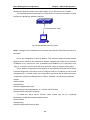
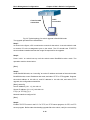
Connected with cable
Fig 1-6 Manage the switch by Telnet
Step 1: Configure the IP addresses for the switch and start the Telnet Server function on
the switch.
First is the configuration of host IP address. This should be within the same network
segment as the switch VLAN1 interface IP address. Suppose the switch VLAN1 interface
IP address is 10.1.128.251/24. Then, a possible host IP address is 10.1.128.252/24. Run
“ping 10.1.128.251” from the host and verify the result, check for reasons if ping failed.
The IP address configuration commands for VLAN1 interface are listed below. Before
in-band management, the switch must be configured with an IP address by out-of-band
management (i.e. Console mode), the configuration commands are as follows (All switch
configuration prompts are assumed to be “Switch” hereafter if not otherwise specified):
Switch>
Switch>enable
Switch#config
Switch(config)#interface vlan 1
Switch(Config-if-Vlan1)#ip address 10.1.128.251 255.255.255.0
Switch(Config-if-Vlan1)#no shutdown
To enable the Telnet Server function, users should type the CLI command
telnet-server enable in the global mode as below:
Switch>enable
Switch#config
Switch(config)# telnet-server enable
1-5
Basic Management Configuration
Chapter 1 Switch Management
Step 2: Run Telnet Client program.
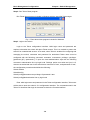
Run Telnet client program included in Windows with the specified Telnet target.
Fig 1-7 Run telnet client program included in Windows
Step 3: Login to the switch.
Login to the Telnet configuration interface. Valid login name and password are
required, otherwise the switch will reject Telnet access. This is a method to protect the
switch from unauthorized access. As a result, when Telnet is enabled for configuring and
managing the switch, username and password for authorized Telnet users must be
configured with the following command: username <username> privilege <privilege>
[password (0|7) <password>]. To open the local authentication style with the following
command: authentication line vty login local. Privilege option must exist and just is 15.
Assume an authorized user in the switch has a username of “test”, and password of “test”,
the configuration procedure should like the following:
Switch>enable
Switch#config
Switch(config)#username test privilege 15 password 0 test
Switch(config)#authentication line vty login local
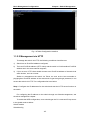
Enter valid login name and password in the Telnet configuration interface, Telnet user
will be able to enter the switch’s CLI configuration interface. The commands used in the
Telnet CLI interface after login is the same as that in the Console interface.
1-6
Basic Management Configuration
Chapter 1 Switch Management
Fig 1-8 Telnet Configuration Interface
1.1.2.2 Management via HTTP
To manage the switch via HTTP, the following conditions should be met:
1)
Switch has an IPv4/IPv6 address configured;
2)
The host IPv4/IPv6 address (HTTP client) and the switch’s VLAN interface IPv4/IPv6
address are in the same network segment;
3)
If 2) is not met, HTTP client should connect to an IPv4/IPv6 address of the switch via
other devices, such as a router.
Similar to management the switch via Telnet, as soon as the host succeeds to
ping/ping6 an IPv4/IPv6 address of the switch and to type the right login password, it can
access the switch via HTTP. The configuration list is as below:
Step 1: Configure the IP addresses for the switch and start the HTTP server function on
the switch.
For configuring the IP address on the switch through out-of-band management, see
the telnet management chapter.
To enable the WEB configuration, users should type the CLI command IP http server
in the global mode as below:
Switch>enable
Switch#config
1-7
Basic Management Configuration
Chapter 1 Switch Management
Switch(config)#ip http server
Step 2: Run HTTP protocol on the host.
Open the Web browser on the host and type the IP address of the switch, or run
directly the HTTP protocol on the Windows. For example, the IP address of the switch is
“10.1.128.251”;
Fig 1-9 Run HTTP Protocol
When accessing a switch with IPv6 address, it is recommended to use the Firefox
browser with 1.5 or later version. For example, if the IPv6 address of the switch is
3ffe:506:1:2::3. Input the IPv6 address of the switch is http://[3ffe:506:1:2::3] and the
address should draw together with the square brackets.
Step 3:
Login to the switch.
Login to the Web configuration interface. Valid login name and password are required,
otherwise the switch will reject HTTP access. This is a method to protect the switch from
unauthorized access. As a result, when Telnet is enabled for configuring and managing
the switch, username and password for authorized Telnet users must be configured with
the following command: username <username> privilege <privilege> [password (0|7)
<password>]. To open the local authentication style with the following command:
authentication line web login local. Privilege option must exist and just is 15. Assume
an authorized user in the switch has a username of “admin”, and password of “admin”, the
configuration procedure should like the following:
Switch>enable
Switch#config
Switch(config)#username admin privilege 15 password 0 admin
Switch(config)#authentication line web login local
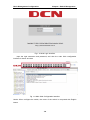
The Web login interface of DCRS-5750-52T is as below:
1-8
Basic Management Configuration
Chapter 1 Switch Management
Fig 1-10 Web Login Interface
Input the right username and password, and then the main Web configuration
interface is shown as below.
Fig 1-11 Main Web Configuration Interface
Notice: When configure the switch, the name of the switch is composed with English
letters.
1-9
Basic Management Configuration
Chapter 1 Switch Management
1.1.2.3 Manage the Switch via SNMP Network Management
Software
The necessities required by SNMP network management software to manage switches:
1) IP addresses are configured on the switch;
2) The IP address of the client host and that of the VLAN interface on the switch it
subordinates to should be in the same segment;
3) If 2) is not met, the client should be able to reach an IP address of the switch
through devices like routers;
4) SNMP should be enabled.
The host with SNMP network management software should be able to ping the IP
address of the switch, so that, when running, SNMP network management software will
be able to find it and implement read/write operation on it. Details about how to manage
switches via SNMP network management software will not be covered in this manual,
please refer to “Snmp network management software user manual”.
1.2 CLI Interface
The switch provides thress management interface for users: CLI (Command Line
Interface) interface, Web interface, Snmp netword management software. We will
introduce the CLI interface and Web configuration interface in details, Web interface is
familiar with CLI interface function and will not be covered, please refer to “Snmp network
management software user manual”.
CLI interface is familiar to most users. As aforementioned, out-of-band management
and Telnet login are all performed through CLI interface to manage the switch.
CLI Interface is supported by Shell program, which consists of a set of configuration
commands. Those commands are categorized according to their functions in switch
configuration and management. Each category represents a different configuration mode.
The Shell for the switch is described below:
Configuration Modes
Configuration Syntax
Shortcut keys
Help function
Input verification
Fuzzy match support
1.2.1 Configuration Modes
1-10
Basic Management Configuration
Chapter 1 Switch Management
Fig 1-12 Shell Configuration Modes
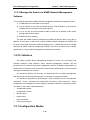
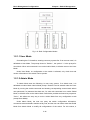
1.2.1.1 User Mode
On entering the CLI interface, entering user entry system first. If as common user, it is
defaulted to User Mode. The prompt shown is “Switch>“, the symbol “>“ is the prompt for
User Mode. When exit command is run under Admin Mode, it will also return to the User
Mode.
Under User Mode, no configuration to the switch is allowed, only clock time and
version information of the switch can be queries.
1.2.1.2 Admin Mode
To Admin Mode sees the following: In user entry system, if as Admin user, it is
defaulted to Admin Mode. Admin Mode prompt “Switch#” can be entered under the User
Mode by running the enable command and entering corresponding access levels admin
user password, if a password has been set. Or, when exit command is run under Global
Mode, it will also return to the Admin Mode. Switch also provides a shortcut key sequence
"Ctrl+z”, this allows an easy way to exit to Admin Mode from any configuration mode
(except User Mode).
Under Admin Mode, the user can query the switch configuration information,
connection status and traffic statistics of all ports; and the user can further enter the Global
Mode from Admin Mode to modify all configurations of the switch. For this reason, a
1-11
Basic Management Configuration
Chapter 1 Switch Management
password must be set for entering Admin mode to prevent unauthorized access and
malicious modification to the switch.
1.2.1.3 Global Mode
Type the config command under Admin Mode will enter the Global Mode prompt
“Switch(config)#”. Use the exit command under other configuration modes such as Port
Mode, VLAN mode will return to Global Mode.
The user can perform global configuration settings under Global Mode, such as MAC
Table, Port Mirroring, VLAN creation, IGMP Snooping start and STP, etc. And the user can
go further to Port Mode for configuration of all the interfaces.
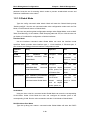
Interface Mode
Use the interface command under Global Mode can enter the interface mode
specified. Switch provides three interface type: 1. VLAN interface; 2. Ethernet port; 3.
port-channel, accordingly the three interface configuration modes.
Interface
Entry
Operates
Exit
Type
VLAN
Type
interface
Interface
<Vlan-id>
vlan
command
under
Configure
switch
IPs, etc
Global Mode.
Use
the
exit
command
to
return to Global
Mode.
Ethernet Port
Type
interface
Configure
Use
the
exit
supported duplex
command
to
mode, speed, etc.
return to Global
of Ethernet Port.
Mode.
Type interface port-channel
Configure
Use
the
exit
<port-channel-number>
port-channel
command
to
command under Global Mode.
related
return to Global
<interface-list>
ethernet
command
under Global Mode.
port-channel
such
settings
as
duplex
Mode.
mode, speed, etc.
VLAN Mode
Using the vlan <vlan-id> command under Global Mode can enter the corresponding
VLAN Mode. Under VLAN Mode the user can configure all member ports of the
corresponding VLAN. Run the exit command to exit the VLAN Mode to Global Mode.
DHCP Address Pool Mode
Type the ip dhcp pool <name> command under Global Mode will enter the DHCP
1-12
Basic Management Configuration
Chapter 1 Switch Management
Address Pool Mode prompt “Switch(Config-<name>-dhcp)#”. DHCP address pool
properties can be configured under DHCP Address Pool Mode. Run the exit command to
exit the DHCP Address Pool Mode to Global Mode.
Route Mode
Routing Protocol
Entry
Operates
RIP
Type router rip
Configure
command under
protocol parameters.
Routing
Protocol
Exit
RIP
Global Mode.
OSPF
Routing
Protocol
Routing
Protocol
Type router ospf
Configure
command under
protocol parameters.
OSPF
exit
command to return
Use
the
exit
command to return
to Global Mode.
Type router bgp
Configure
<AS
protocol parameters.
mumber>
the
to Global Mode.
Global Mode.
BGP
Use
command under
BGP
Use
the
exit
command to return
to Global Mode.
Global Mode.
ACL Mode
ACL type
Standard
Entry
IP
ACL Mode
Type
Operates
ip
access-list
standard
command
Configure
for
parameters
Standard IP ACL
under Global Mode.
Mode.
Extended IP
Type
ip
access-list
Configure
ACL Mode
extanded
command
under Global Mode.
Exit
Use
the
exit
command to return
to Global Mode.
parameters
Use
the
exit
for Extended IP ACL
command to return
Mode.
to Global Mode.
1.2.2 Configuration Syntax
Switch provides various configuration commands. Although all the commands are
different, they all abide by the syntax for Switch configuration commands. The general
commands format of Switch is shown below:
cmdtxt <variable> {enum1 | … | enumN } [option1 | … | optionN]
Conventions: cmdtxt in bold font indicates a command keyword; <variable> indicates a
variable parameter; {enum1 | … | enumN } indicates a mandatory parameter that should
be selected from the parameter set enum1~enumN; and the square bracket ([ ]) in
[option1 | … | optionN] indicate an optional parameter. There may be combinations of
“< >“, “{ }” and “[ ]” in the command line, such as [<variable>], {enum1 <variable>|
enum2}, [option1 [option2]], etc.
1-13
Basic Management Configuration
Chapter 1 Switch Management
Here are examples for some actual configuration commands:
show version, no parameters required. This is a command with only a keyword and
no parameter, just type in the command to run.
vlan <vlan-id>, parameter values are required after the keyword.
firewall {enable | disable}, user can enter firewall enable or firewall disable for this
command.
snmp-server community {ro | rw} <string>, the followings are possible:
snmp-server community ro <string>
snmp-server community rw <string>
1.2.3 Shortcut Key Support
Switch provides several shortcut keys to facilitate user configuration, such as up,
down, left, right and Blank Space. If the terminal does not recognize Up and Down keys,
ctrl +p and ctrl +n can be used instead.
Key(s)
Function
Back Space
Delete a character before the cursor, and the cursor moves back.
Up “↑”
Show previous command entered. Up to ten recently entered
commands can be shown.
Down “↓”
Show next command entered. When use the Up key to get
previously entered commands, you can use the Down key to return
to the next command
Left “←”
Right “→”
The cursor moves one character to
You can use the Left and
the left.
Right key to modify an
The cursor moves one character to
entered command.
the right.
Ctrl +p
The same as Up key “↑”.
Ctrl +n
The same as Down key “↓”.
Ctrl +b
The same as Left key “←”.
Ctrl +f
The same as Right key “→”.
Ctrl +z
Return to the Admin Mode directly from the other configuration
modes (except User Mode).
Ctrl +c
Break the ongoing command process, such as ping or other
command execution.
Tab
When a string for a command or keyword is entered, the Tab can
be used to complete the command or keyword if there is no
conflict.
1-14
Basic Management Configuration
Chapter 1 Switch Management
1.2.4 Help Function
There are two ways in Switch for the user to access help information: the “help”
command and the “?”.
Access to Help
Usage and function
Help
Under any command line prompt, type in “help” and press Enter will get
a brief description of the associated help system.
“?”
1. Under any command line prompt, enter “?” to get a command list of
the current mode and related brief description.
2. Enter a “?” after the command keyword with an embedded space.
If the position should be a parameter, a description of that
parameter type, scope, etc, will be returned; if the position should
be a keyword, then a set of keywords with brief description will be
returned; if the output is “<cr>“, then the command is complete,
press Enter to run the command.
3. A “?” immediately following a string. This will display all the
commands that begin with that string.
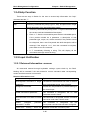
1.2.5 Input Verification
1.2.5.1 Returned Information: success
All commands entered through keyboards undergo syntax check by the Shell.
Nothing will be returned if the user entered a correct command under corresponding
modes and the execution is successful.
Returned Information: error
Output error message
Explanation
Unrecognized command or illegal
The entered command does not exist, or there is
parameter!
error in parameter scope, type or format.
Ambiguous command
At least two interpretations is possible basing on
the current input.
Invalid command or parameter
The command is recognized, but no valid
parameter record is found.
This command is not exist in current
The command is recognized, but this command
mode
can not be used under current mode.
Please
configure
precursor
The
command
is
recognized,
but
the
command "*" at first!
prerequisite command has not been configured.
syntax error : missing '"' before the
Quotation marks are not used in pairs.
1-15
Basic Management Configuration
Chapter 1 Switch Management
end of command line!
1.2.6 Fuzzy Match Support
Switch shell support fuzzy match in searching command and keyword. Shell will
recognize commands or keywords correctly if the entered string causes no conflict.
For example:
1) For command “show interfaces status ethernet1/0/1”, typing “sh in status
ethernet1/0/1” will work.
2) However, for command “show running-config”, the system will report a “> Ambiguous
command!” error if only “show r” is entered, as Shell is unable to tell whether it is
“show run” or “show running-config”. Therefore, Shell will only recognize the
command if “sh ru” is entered.
1-16
Basic Management Configuration
Chapter 2 Basic Switch Configuration
Chapter 2 Basic Switch Configuration
2.1 Basic Configuration
Basic switch configuration includes commands for entering and exiting the admin
mode, commands for entering and exiting interface mode, for configuring and displaying
the switch clock, for displaying the version information of the switch system, etc.
Command
Explanation
Normal User Mode/ Admin Mode
The User uses enable command to step into
enable [<1-15>]
admin mode from normal user mode or modify
disable
the privilege level of the users. The disable
command is for exiting admin mode.
Admin Mode
config [terminal]
Enter global mode from admin mode.
Various Modes
Exit current mode and enter previous mode,
such as using this command in global mode to
exit
go back to admin mode, and back to normal
user mode from admin mode.
show privilege
Show privilege of the current users.
Except User Mode/ Admin Mode
Quit current mode and return to Admin mode
end
when not at User Mode/ Admin Mode.
Admin Mode
clock
set
<HH:MM:SS>
[YYYY.MM.DD]
Set system date and time.
show version
Display version information of the switch.
set default
Restore to the factory default.
write
Save current configuration parameters to
Flash Memory.
reload
Hot reset the switch.
show cpu usage
Show CPU usage rate.
show cpu utilization
Show current CPU utilization rate.
show memory usage
Show memory usage rate.
2-1
Basic Management Configuration
Chapter 2 Basic Switch Configuration
Global Mode
banner motd <LINE>
no banner motd
Configure the information displayed when the
login authentication of a telnet or console user
is successful.
2.2 Telnet Management
2.2.1 Telnet
2.2.1.1 Introduction to Telnet
Telnet is a simple remote terminal protocol for remote login. Using Telnet, the user
can login to a remote host with its IP address of hostname from his own workstation.
Telnet can send the user’s keystrokes to the remote host and send the remote host output
to the user’s screen through TCP connection. This is a transparent service, as to the user,
the keyboard and monitor seems to be connected to the remote host directly.
Telnet employs the Client-Server mode, the local system is the Telnet client and the
remote host is the Telnet server. Switch can be either the Telnet Server or the Telnet client.
When switch is used as the Telnet server, the user can use the Telnet client program
included in Windows or the other operation systems to login to switch, as described earlier
in the In-band management section. As a Telnet server, switch allows up to 5 telnet client
TCP connections.
And as Telnet client, using telnet command under Admin Mode allows the user to
login to the other remote hosts. Switch can only establish TCP connection to one remote
host. If a connection to another remote host is desired, the current TCP connection must
be dropped.
2.2.1.2 Telnet Configuration Task List
1. Configure Telnet Server
2. Telnet to a remote host from the switch.
1. Configure Telnet Server
Command
Explanation
Global Mode
Enable the Telnet server function in the
telnet-server enable
switch: the no command disables the
no telnet-server enable
Telnet function.
2-2
Basic Management Configuration
username
<user-name>
<privilege>]
Chapter 2 Basic Switch Configuration
[privilege
[password
[0
|
7]
<password>]
Configure user name and password of
the telnet. The no form command
deletes the telnet user authorization.
no username <username>
Configure the secure IP address to
authentication securityip <ip-addr>
login to the switch through Telnet: the
no authentication securityip <ip-addr>
no command deletes the authorized
Telnet secure address.
authentication securityipv6 <ipv6-addr>
no
authentication
securityipv6
<ipv6-addr>
Configure IPv6 security address to
login to the switch through Telnet; the
no command deletes the authorized
Telnet security address.
authentication
ip
access-class
Binding standard IP ACL protocol to
{<num-std>|<name>}
login with Telnet/SSH/Web; the no form
no authentication ip access-class
command will cancel the binding ACL.
authentication
Binding standard IPv6 ACL protocol to
ipv6
access-class
{<num-std>|<name>}
login with Telnet/SSH/Web; the no form
no authentication ipv6 access-class
command will cancel the binding ACL.
authentication line {console | vty | web}
login method1 [method2 …]
Configure authentication method list
no authentication line {console | vty |
with telnet.
web} login
authentication
enable
method1
[method2 …]
Configure the enable authentication
method list.
no authentication enable
authorization line {console | vty | web}
exec method1 [method2 …]
Configure the authorization method list
no authorization line {console | vty |
with telnet.
web} exec
accounting
line
{console
|
vty}
command <1-15> {start-stop | stop-only |
none} method1 [method2…]
Configure the accounting method list.
no accounting line {console | vty}
command <1-15>
Admin Mode
Display debug information for Telnet
terminal monitor
client login to the switch; the no
terminal no monitor
command
2-3
disables
the
debug
Basic Management Configuration
Chapter 2 Basic Switch Configuration
information.
2. Telnet to a remote host from the switch
Command
Explanation
Admin Mode
telnet
[vrf
<ipv6-addr>
<vrf-name>]
{<ip-addr>
|
| host <hostname>} [<port>]
Login to a remote host with the Telnet
client included in the switch.
2.2.2 SSH
2.2.2.1 Introduction to SSH
SSH (Secure Shell) is a protocol which ensures a secure remote access connection
to network devices. It is based on the reliable TCP/IP protocol. By conducting the
mechanism such as key distribution, authentication and encryption between SSH server
and SSH client, a secure connection is established. The information transferred on this
connection is protected from being intercepted and decrypted. The switch meets the
requirements of SSH2.0. It supports SSH2.0 client software such as SSH Secure Client
and putty. Users can run the above software to manage the switch remotely.
The switch presently supports RSA authentication, 3DES cryptography protocol and
SSH user password authentication etc.
2.2.2.2 SSH Server Configuration Task List
Command
Explanation
Global Mode
ssh-server enable
Enable SSH function on the switch; the
no ssh-server enable
no command disables SSH function.
username
<privilege>]
<username>
[password
[privilege
[0
|
7]
Configure the username and password of
SSH client software for logging on the
<password>]
switch; the no command deletes the
no username <username>
username.
Configure
timeout
value
for
SSH
ssh-server timeout <timeout>
authentication; the no command restores
no ssh-server timeout
the
default
timeout
authentication.
2-4
value
for
SSH
Basic Management Configuration
ssh-server
Chapter 2 Basic Switch Configuration
authentication-retires
<authentication-retires>
host-key
create
SSH authentication; the no command
restores the default number of times for
no ssh-server authentication-retries
ssh-server
Configure the number of times for retrying
retrying SSH authentication.
rsa
modulus <moduls>
Generate the new RSA host key on the
SSH server.
Admin Mode
Display SSH debug information on the
terminal monitor
SSH client side; the no command stops
terminal no monitor
displaying SSH debug information on the
SSH client side.
2.2.2.3 Example of SSH Server Configuration
Example1:
Requirement: Enable SSH server on the switch, and run SSH2.0 client software such
as Secure shell client or putty on the terminal. Log on the switch by using the username
and password from the client.
Configure the IP address, add SSH user and enable SSH service on the switch.
SSH2.0 client can log on the switch by using the username and password to configure the
switch.
Switch(config)#ssh-server enable
Switch(config)#interface vlan 1
Switch(Config-if-Vlan1)#ip address 100.100.100.200 255.255.255.0
Switch(Config-if-Vlan1)#exit
Switch(config)#username test privilege 15 password 0 test
In IPv6 networks, the terminal should run SSH client software which support IPv6,
such as putty6. Users should not modify the configuration of the switch except allocating
an IPv6 address for the local host.
2.3 Configure Switch IP Addresses
All Ethernet ports of switch are default to Data Link layer ports and perform layer 2
forwarding. VLAN interface represent a Layer 3 interface function which can be assigned
an IP address, which is also the IP address of the switch. All VLAN interface related
configuration commands can be configured under VLAN Mode. Switch provides three IP
address configuration methods:
Manual
2-5
Basic Management Configuration
BOOTP
DHCP
Chapter 2 Basic Switch Configuration
Manual configuration of IP address is assign an IP address manually for the switch.
In BOOTP/DHCP mode, the switch operates as a BOOTP/DHCP client, send
broadcast packets of BOOTPRequest to the BOOTP/DHCP servers, and the
BOOTP/DHCP servers assign the address on receiving the request. In addition, switch
can act as a DHCP server, and dynamically assign network parameters such as IP
addresses, gateway addresses and DNS server addresses to DHCP clients DHCP Server
configuration is detailed in later chapters.
2.3.1 Switch IP Addresses Configuration Task List
1. Enable VLAN port mode
2. Manual configuration
3. BOOTP configuration
4. DHCP configuration
1. Enable VLAN port mode
Command
Explanation
Global Mode
Create VLAN interface (layer 3 interface);
interface vlan <vlan-id>
the
no interface vlan <vlan-id>
no
command
deletes
the
VLAN
interface.
2. Manual configuration
Command
Explanation
VLAN Interface Mode
ip
address
<ip_address>
<mask>
Configure IP address of VLAN interface;
[secondary]
the no command deletes IP address of
no ip address <ip_address> <mask>
VLAN interface.
[secondary]
ipv6
address
<ipv6-address
/
prefix-length> [eui-64]
no
ipv6
address
Configure
IPv6
address,
including
aggregation global unicast address, local
<ipv6-address
prefix-length>
/
site address and local link address. The no
command deletes IPv6 address.
3. BOOTP configuration
2-6
Basic Management Configuration
Chapter 2 Basic Switch Configuration
Command
Explanation
VLAN Interface Mode
Enable the switch to be a BootP client and
obtain IP address and gateway address
ip bootp-client enable
through
no ip bootp-client enable
BootP
command
negotiation;
disables
the
the
BootP
no
client
function.
4. DHCP configuration
Command
Explanation
VLAN Interface Mode
Enable the switch to be a DHCP client and
obtain IP address and gateway address
ip bootp-client enable
through
no ip bootp-client enable
command
DHCP
negotiation;
disables
the
the
DHCP
no
client
function.
2.4 SNMP Configuration
2.4.1 Introduction to SNMP
SNMP (Simple Network Management Protocol) is a standard network management
protocol widely used in computer network management. SNMP is an evolving protocol.
SNMP v1 [RFC1157] is the first version of SNMP which is adapted by vast numbers of
manufacturers for its simplicity and easy implementation; SNMP v2c is an enhanced
version of SNMP v1, which supports layered network management; SNMP v3 strengthens
the security by adding USM (User-based Security Mode) and VACM (View-based Access
Control Model).
SNMP protocol provides a simple way of exchange network management information
between two points in the network. SNMP employs a polling mechanism of message
query, and transmits messages through UDP (a connectionless transport layer protocol).
Therefore it is well supported by the existing computer networks.
SNMP protocol employs a station-agent mode. There are two parts in this structure:
NMS (Network Management Station) and Agent. NMS is the workstation on which SNMP
client program is running. It is the core on the SNMP network management. Agent is the
server software runs on the devices which need to be managed. NMS manages all the
managed objects through Agents. The switch supports Agent function.
The communication between NMS and Agent functions in Client/Server mode by
2-7
Basic Management Configuration
Chapter 2 Basic Switch Configuration
exchanging standard messages. NMS sends request and the Agent responds. There are
seven types of SNMP message:
Get-Request
Get-Response
Get-Next-Request
Get-Bulk-Request
Set-Request
Trap
Inform-Request
NMS
sends
queries
to
the
Agent
with
Get-Request,
Get-Next-Request,
Get-Bulk-Request and Set-Request messages; and the Agent, upon receiving the
requests, replies with Get-Response message. On some special situations, like network
device ports are on Up/Down status or the network topology changes, Agents can send
Trap messages to NMS to inform the abnormal events. Besides, NMS can also be set to
alert to some abnormal events by enabling RMON function. When alert events are
triggered, Agents will send Trap messages or log the event according to the settings.
Inform-Request is mainly used for inter-NMS communication in the layered network
management.
USM ensures the transfer security by well-designed encryption and authentication.
USM encrypts the messages according to the user typed password. This mechanism
ensures that the messages can’t be viewed on transmission. And USM authentication
ensures that the messages can’t be changed on transmission. USM employs DES-CBC
cryptography. And HMAC-MD5 and HMAC-SHA are used for authentication.
VACM is used to classify the users’ access permission. It puts the users with the
same access permission in the same group. Users can’t conduct the operation which is
not authorized.
2.4.2 Introduction to MIB
The network management information accessed by NMS is well defined and
organized in a Management Information Base (MIB). MIB is pre-defined information which
can be accessed by network management protocols. It is in layered and structured form.
The pre-defined management information can be obtained from monitored network
devices. ISO ASN.1 defines a tree structure for MID. Each MIB organizes all the available
information with this tree structure. And each node on this tree contains an OID (Object
Identifier) and a brief description about the node. OID is a set of integers divided by
periods. It identifies the node and can be used to locate the node in a MID tree structure,
shown in the figure below:
2-8
Basic Management Configuration
Chapter 2 Basic Switch Configuration
Fig 2-1 ASN.1 Tree Instance
In this figure, the OID of the object A is 1.2.1.1. NMS can locate this object through
this unique OID and gets the standard variables of the object. MIB defines a set of
standard variables for monitored network devices by following this structure.
If the variable information of Agent MIB needs to be browsed, the MIB browse
software needs to be run on the NMS. MIB in the Agent usually consists of public MIB and
private MIB. The public MIB contains public network management information that can be
accessed by all NMS; private MIB contains specific information which can be viewed and
controlled by the support of the manufacturers.
MIB-I [RFC1156] is the first implemented public MIB of SNMP, and is replaced by
MIB-II [RFC1213]. MIB-II expands MIB-I and keeps the OID of MIB tree in MIB-I. MIB-II
contains sub-trees which are called groups. Objects in those groups cover all the
functional domains in network management. NMS obtains the network management
information by visiting the MIB of SNMP Agent.
The switch can operate as a SNMP Agent, and supports both SNMP v1/v2c and
SNMP v3. The switch supports basic MIB-II, RMON public MIB and other public MID such
as BRIDGE MIB. Besides, the switch supports self-defined private MIB.
2.4.3 Introduction to RMON
RMON is the most important expansion of the standard SNMP. RMON is a set of MIB
definitions, used to define standard network monitor functions and interfaces, enabling the
communication between SNMP management terminals and remote monitors. RMON
provides a highly efficient method to monitor actions inside the subnets.
MID of RMON consists of 10 groups. The switch supports the most frequently used
group 1, 2, 3 and 9:
2-9
Basic Management Configuration
Chapter 2 Basic Switch Configuration
Statistics: Maintain basic usage and error statistics for each subnet monitored by the
Agent.
History: Record periodical statistic samples available from Statistics.
Alarm: Allow management console users to set any count or integer for sample
intervals and alert thresholds for RMON Agent records.
Event: A list of all events generated by RMON Agent.
Alarm depends on the implementation of Event. Statistics and History display some
current or history subnet statistics. Alarm and Event provide a method to monitor any
integer data change in the network, and provide some alerts upon abnormal events
(sending Trap or record in logs).
2.4.4 SNMP Configuration
2.4.4.1 SNMP Configuration Task List
1.
Enable or disable SNMP Agent server function
2.
Configure SNMP community string
3.
Configure IP address of SNMP management base
4.
Configure engine ID
5.
Configure user
6.
Configure group
7.
Configure view
8.
Configuring TRAP
9.
Enable/Disable RMON
1. Enable or disable SNMP Agent server function
Command
Explanation
Global Mode
Enable the SNMP Agent function on the
snmp-server enabled
switch; the no command disables the
no snmp-server enabled
SNMP Agent function on the switch.
2. Configure SNMP community string
Command
Explanation
Global Mode
snmp-server community {ro | rw} {0 | 7}
<string> [access {<num-std>|<name>}]
Configure the community string for the
[ipv6-access
{<ipv6-num-std>|<ipv6-name>}]
configured community string.
[read
switch; the no command deletes the
2-10
Basic Management Configuration
<read-view-name>]
<write-view-name>]
Chapter 2 Basic Switch Configuration
[write
no snmp-server community <string>
[access
{<num-std>|<name>}]
[ipv6-access
{<ipv6-num-std>|<ipv6-name>}]
3. Configure IP address of SNMP management station
Command
Explanation
Global Mode
snmp-server securityip { <ipv4-addres
Configure IPv4/IPv6 security address which
s> | <ipv6-address> }
is allowed to access the switch on the NMS;
no
snmp-server
securityip
the no command deletes the configured
{ <ipv4-address> | <ipv6-address> }
security address.
snmp-server securityip enable
Enable or disable secure IP address check
snmp-server securityip disable
function on the NMS.
4. Configure engine ID
Command
Explanation
Global Mode
snmp-server engineid <engine-string>
Configure the local engine ID on the switch.
no snmp-server engineid
This command is used for SNMP v3.
5. Configure user
Command
Explanation
Global Mode
snmp-server
user
<use-string>
<group-string> [{authPriv | authNoPriv}
auth {md5 | sha} <word>] [access
{<num-std>|<name>}]
[ipv6-access
Add a user to a SNMP group. This
{<ipv6-num-std>|<ipv6-name>}]
command is used to configure USM for
no
SNMP v3.
snmp-server
[access
user
<user-string>
{<num-std>|<name>}]
[ipv6-access
{<ipv6-num-std>|<ipv6-name>}]
6. Configure group
Command
Explanation
2-11
Basic Management Configuration
Chapter 2 Basic Switch Configuration
Global Mode
snmp-server
group
<group-string>
{noauthnopriv|authnopriv|authpriv}
[[read
<read-string>]
[write
<write-string>] [notify <notify-string>]]
[access
{<num-std>|<name>}]
[ipv6-access
Set the group information on the switch.
This command is used to configure VACM
{<ipv6-num-std>|<ipv6-name>}]
no snmp-server group <group-string>
for SNMP v3.
{noauthnopriv|authnopriv|authpriv}
[access
{<num-std>|<name>}]
[ipv6-access
{<ipv6-num-std>|<ipv6-name>}]
7. Configure view
Command
Explanation
Global Mode
snmp-server
view
<view-string>
<oid-string> {include|exclude}
Configure
no
command is used for SNMP v3.
snmp-server
view
<view-string>
view
on
the
switch.
This
[<oid-string>]
8. Configuring TRAP
Command
Explanation
Global Mode
snmp-server enable traps
Enable the switch to send Trap message.
no snmp-server enable traps
This command is used for SNMP v1/v2/v3.
snmp-server host { <host-ipv4-address>
| <host-ipv6-address> } {v1 | v2c | {v3
{noauthnopriv | authnopriv | authpriv}}}
<user-string>
no
{
snmp-server
<host-ipv4-address>
host
|
<host-ipv6-address> } {v1 | v2c | {v3
{noauthnopriv | authnopriv | authpriv}}}
<user-string>
snmp-server
trap-source
{<ipv4-address> | <ipv6-address>}
Set the host IPv4/IPv6 address which is
used to receive SNMP Trap information.
For SNMP v1/v2, this command also
configures Trap community string; for
SNMP v3, this command also configures
Trap user name and security level. The
“no” form of this command cancels this
IPv4 or IPv6 address.
Set the source IPv4 or IPv6 address which
is used to send trap packet, the no
2-12
Basic Management Configuration
no
snmp-server
Chapter 2 Basic Switch Configuration
trap-source
command deletes the configuration.
{<ipv4-address> | <ipv6-address>}
9. Enable/Disable RMON
Command
Explanation
Global mode
rmon enable
Enable/disable RMON.
no rmon enable
2.4.5 Typical SNMP Configuration Examples
The IP address of the NMS is 1.1.1.5; the IP address of the switch (Agent) is 1.1.1.9.
Scenario 1: The NMS network administrative software uses SNMP protocol to obtain data
from the switch.
The configuration on the switch is listed below:
Switch(config)#snmp-server enable
Switch(config)#snmp-server community rw private
Switch(config)#snmp-server community ro public
Switch(config)#snmp-server securityip 1.1.1.5
The NMS can use private as the community string to access the switch with read-write
permission, or use public as the community string to access the switch with read-only
permission.
Scenario 2: NMS will receive Trap messages from the switch (Note: NMS may have
community string verification for the Trap messages. In this scenario, the NMS uses a
Trap verification community string of usertrap).
The configuration on the switch is listed below:
Switch(config)#snmp-server enable
Switch(config)#snmp-server host 1.1.1.5 v1 usertrap
Switch(config)#snmp-server enable traps
Scenario 3: NMS uses SNMP v3 to obtain information from the switch.
The configuration on the switch is listed below:
Switch(config)#snmp-server
Switch(config)#snmp-server user tester UserGroup authPriv auth md5 hellotst
Switch(config)#snmp-server group UserGroup AuthPriv read max write max notify max
Switch(config)#snmp-server view max 1 include
2-13
Basic Management Configuration
Chapter 2 Basic Switch Configuration
Scenario 4: NMS wants to receive the v3Trap messages sent by the switch.
The configuration on the switch is listed below:
Switch(config)#snmp-server enable
Switch(config)#snmp-server host 10.1.1.2 v3 authpriv tester
Switch(config)#snmp-server enable traps
Scenario 5: The IPv6 address of the NMS is 2004:1:2:3::2; the IPv6 address of the switch
(Agent) is 2004:1:2:3::1. The NMS network administrative software uses SNMP protocol
to obtain data from the switch.
The configuration on the switch is listed below:
Switch(config)#snmp-server enable
Switch(config)#snmp-server community rw private
Switch(config)#snmp-server community ro public
Switch(config)#snmp-server securityip 2004:1:2:3::2
The NMS can use private as the community string to access the switch with read-write
permission, or use public as the community string to access the switch with read-only
permission.
Scenario 6: NMS will receive Trap messages from the switch (Note: NMS may have
community string verification for the Trap messages. In this scenario, the NMS uses a
Trap verification community string of usertrap).
The configuration on the switch is listed below:
Switch(config)#snmp-server host 2004:1:2:3::2 v1 usertrap
Switch(config)#snmp-server enable traps
2.4.6 SNMP Troubleshooting
When users configure the SNMP, the SNMP server may fail to run properly due to
physical connection failure and wrong configuration, etc. Users can troubleshoot the
problems by following the guide below:
Good condition of the physical connection.
Interface and datalink layer protocol is Up (use the “show interface” command), and
the connection between the switch and host can be verified by ping (use “ping”
command).
The switch enabled SNMP Agent server function (use “snmp-server” command)
Secure IP for NMS (use “snmp-server securityip” command) and community string
(use “snmp-server community” command) are correctly configured, as any of them
fails, SNMP will not be able to communicate with NMS properly.
2-14
Basic Management Configuration
Chapter 2 Basic Switch Configuration
If Trap function is required, remember to enable Trap (use “snmp-server enable traps”
command). And remember to properly configure the target host IP address and
community string for Trap (use “snmp-server host” command) to ensure Trap
message can be sent to the specified host.
If RMON function is required, RMON must be enabled first (use “rmon enable”
command).
Use “show snmp” command to verify sent and received SNMP messages; Use “show
snmp status” command to verify SNMP configuration information; Use “debug snmp
packet” to enable SNMP debugging function and verify debug information.
If users still can’t solve the SNMP problems, Please contact our technical and service
center.
2.5 Switch Upgrade
Switch provides two ways for switch upgrade: BootROM upgrade and the TFTP/FTP
upgrade under Shell.
2.5.1 Switch System Files
The system files includes system image file and boot file. The updating of the switch
is to update the two files by overwrite the old files with the new ones.
The system image files refers to the compressed files of the switch hardware drivers,
and software support program, etc, namely what we usually call the IMG update file. The
IMG file can only be saved in the FLASH with a defined name of nos.img
The boot file is for initiating the switch, namely what we usually call the ROM update
file (It can be compressed into IMG file if it is of large size). In switch, the boot file is
allowed to save in ROM only. Switch mandates the path and the name of two boot files to
be flash:/boot.rom and flash:/config.rom.
The update method of the system image file and the boot file is the same. The switch
supplies the user with two modes of updating: 1. BootROM mode; 2. TFTP and FTP
update at Shell mode. This two update method will be explained in details in following two
sections.
2.5.2 BootROM Upgrade
There are two methods for BootROM upgrade: TFTP and FTP, which can be selected
at BootROM command settings.
2-15
Basic Management Configuration
Chapter 2 Basic Switch Configuration
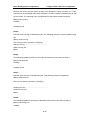
cable
connection
Console cable
connection
Fig 2-2 Typical topology for switch upgrade in BootROM mode
The upgrade procedures are listed below:
Step 1:
As shown in the figure, a PC is used as the console for the switch. A console cable is used
to connect PC to the management port on the switch. The PC should have FTP/TFTP
server software installed and has the image file required for the upgrade.
Step 2:
Press “ctrl+b” on switch boot up until the switch enters BootROM monitor mode. The
operation result is shown below:
[Boot]:
Step 3:
Under BootROM mode, run “setconfig” to set the IP address and mask of the switch under
BootROM mode, server IP address and mask, and select TFTP or FTP upgrade. Suppose
the switch address is 192.168.1.2, and PC address is 192.168.1.66, and select TFTP
upgrade, the configuration should like:
[Boot]: setconfig
Host IP Address: [10.1.1.1] 192.168.1.2
Server IP Address: [10.1.1.2] 192.168.1.66
FTP(1) or TFTP(2): [1] 2
Network interface configure OK.
[Boot]
Step 4:
Enable FTP/TFTP server in the PC. For TFTP, run TFTP server program; for FTP, run FTP
server program. Before start downloading upgrade file to the switch, verify the connectivity
2-16
Basic Management Configuration
Chapter 2 Basic Switch Configuration
between the server and the switch by ping from the server. If ping succeeds, run “load”
command in the BootROM mode from the switch; if it fails, perform troubleshooting to find
out the cause. The following is the configuration for the system update image file.
[Boot]: load nos.img
Loading...
Loading file ok!
Step 5:
Execute write nos.img in BootROM mode. The following saves the system update image
file.
[Boot]: write nos.img
File nos.img exists, overwrite? (Y/N)?[N] y
Writing nos.img.....................................................
Write nos.img OK.
[Boot]:
Step 6:
The following update file boot.rom, the basic environment is the same as Step 4.
[Boot]: load boot.rom
Loading…
Loading file ok!
Step 7:
Execute write boot.rom in BootROM mode. The following saves the update file.
[Boot]: write boot.rom
File boot.rom exists, overwrite? (Y/N)?[N] y
Writing boot.rom………………………………………
Write boot.rom OK.
[Boot]:
Step 8:
The following update file config.rom, the basic environment is the same as Step 4.
[Boot]: load config.rom
Loading...
2-17
Basic Management Configuration
Chapter 2 Basic Switch Configuration
Loading file ok!
Step 9:
Execute write flash:/config.rom in BootROM mode. The following saves the update file.
[Boot]: write flash:/config.rom
[Boot]: write flash:/config.rom
File exists, overwrite? (Y/N)[N] y
Writing flash:/config.rom...
Write flash:/config.rom OK.
[Boot]:
Step 10:
After successful upgrade, execute run or reboot command in BootROM mode to return to
CLI configuration interface.
[Boot]:run (or reboot)
Other commands in BootROM mode
1. DIR command
Used to list existing files in the FLASH.
[Boot]: dir
config.rom
405,664 1980-01-01 00:00:00 --SH
boot.rom
2,608,352 1980-01-01 00:00:00 --SH
boot.conf
256 1980-01-01 00:00:00 ----
nos.img
8,071,910 1980-01-01 00:00:00 ----
startup.cfg
1,590 1980-01-01 00:00:00 ----
2.5.3 FTP/TFTP Upgrade
2.5.3.1 Introduction to FTP/TFTP
FTP(File Transfer Protocol)/TFTP(Trivial File Transfer Protocol) are both file transfer
protocols that belonging to fourth layer(application layer) of the TCP/IP protocol stack,
2-18
Basic Management Configuration
Chapter 2 Basic Switch Configuration
used for transferring files between hosts, hosts and switches. Both of them transfer files in
a client-server model. Their differences are listed below.
FTP builds upon TCP to provide reliable connection-oriented data stream transfer
service. However, it does not provide file access authorization and uses simple
authentication mechanism (transfers username and password in plain text for
authentication). When using FTP to transfer files, two connections need to be established
between the client and the server: a management connection and a data connection. A
transfer request should be sent by the FTP client to establish management connection on
port 21 in the server, and negotiate a data connection through the management
connection.
There are two types of data connections: active connection and passive connection.
In active connection, the client transmits its address and port number for data
transmission to the server, the management connection maintains until data transfer is
complete. Then, using the address and port number provided by the client, the server
establishes data connection on port 20 (if not engaged) to transfer data; if port 20 is
engaged, the server automatically generates some other port number to establish data
connection.
In passive connection, the client, through management connection, notify the server
to establish a passive connection. The server then creates its own data listening port and
informs the client about the port, and the client establishes data connection to the
specified port.
As data connection is established through the specified address and port, there is a
third party to provide data connection service.
TFTP builds upon UDP, providing unreliable data stream transfer service with no user
authentication or permission-based file access authorization. It ensures correct data
transmission by sending and acknowledging mechanism and retransmission of time-out
packets. The advantage of TFTP over FTP is that it is a simple and low overhead file
transfer service.
Switch can operate as either FTP/TFTP client or server. When switch operates as a
FTP/TFTP client, configuration files or system files can be downloaded from the remote
FTP/TFTP servers (can be hosts or other switches) without affecting its normal operation.
And file list can also be retrieved from the server in ftp client mode. Of course, switch can
also upload current configuration files or system files to the remote FTP/TFTP servers
(can be hosts or other switches). When switch operates as a FTP/TFTP server, it can
provide file upload and download service for authorized FTP/TFTP clients, as file list
service as FTP server.
Here are some terms frequently used in FTP/TFTP.
ROM: Short for EPROM, erasable read-only memory. EPROM is repalced by FLASH
2-19
Basic Management Configuration
Chapter 2 Basic Switch Configuration
memory in switch.
SDRAM: RAM memory in the switch, used for system software operation and
configuration sequence storage.
FLASH: Flash memory used to save system file and configuration file.
System file: including system image file and boot file.
System image file: refers to the compressed file for switch hardware driver and software
support program, usually refer to as IMAGE upgrade file. In switch, the system image file
is allowed to save in FLASH only. Switch mandates the name of system image file to be
uploaded via FTP in Global Mode to be nos.img, other IMAGE system files will be
rejected.
Boot file: refers to the file initializes the switch, also referred to as the ROM upgrade file
(Large size file can be compressed as IMAGE file). In switch, the boot file is allowed to
save in ROM only. Switch mandates the path and the name of two boot files to be
flash:/boot.rom and flash:/config.rom.
Configuration file: including start up configuration file and running configuration file. The
distinction between start up configuration file and running configuration file can facilitate
the backup and update of the configurations.
Start up configuration file: refers to the configuration sequence used in switch startup.
Startup configuration file stores in nonvolatile storage, corresponding to the so-called
configuration save. If the device does not support CF, the configuration file stores in
FLASH only, if the device supports CF, the configuration file stores in FLASH or CF, if the
device supports multi-config file, names the configuration file to be .cfg file, the default is
startup.cfg. If the device does not support multi-config file, mandates the name of startup
configuration file to be startup-config.
Running configuration file: refers to the running configuration sequence use in the
switch. In switch, the running configuration file stores in the RAM. In the current version,
the running configuration sequence running-config can be saved from the RAM to FLASH
by write command or copy running-config startup-config command, so that the
running configuration sequence becomes the start up configuration file, which is called
configuration save. To prevent illicit file upload and easier configuration, switch mandates
the name of running configuration file to be running-config.
Factory configuration file: The configuration file shipped with switch in the name of
factory-config. Run set default and write, and restart the switch, factory configuration file
will be loaded to overwrite current start up configuration file.
2.5.3.2 FTP/TFTP Configuration
The configurations of switch as FTP and TFTP clients are almost the same, so the
2-20
Basic Management Configuration
Chapter 2 Basic Switch Configuration
configuration procedures for FTP and TFTP are described together in this manual.
2.5.3.2.1 FTP/TFTP Configuration Task List
1. FTP/TFTP client configuration
(1) Upload/download the configuration file or system file.
(2) For FTP client, server file list can be checked.
2. FTP server configuration
(1)Start FTP server
(2)Configure FTP login username and password
(3)Modify FTP server connection idle time
(4)Shut down FTP server
3. TFTP server configuration
(1)Start TFTP server
(2)Configure TFTP server connection idle time
(3)Configure
retransmission
times
before
timeout
for
packets
without
acknowledgement
(4)Shut down TFTP server
1. FTP/TFTP client configuration
(1)FTP/TFTP client upload/download file
Command
Explanation
Admin Mode
copy <source-url> <destination-url>
[ascii | binary]
FTP/TFTP client upload/download file.
(2)For FTP client, server file list can be checked.
Admin Mode
For FTP client, server file list can be
ftp-dir <ftpServerUrl>
checked. FtpServerUrl format looks like:
ftp: //user: password@IPv4|IPv6 Address.
2. FTP server configuration
(1)Start FTP server
Command
Explanation
Global Mode
ftp-server enable
no ftp-server enable
Start FTP server, the no command shuts down
FTP server and prevents FTP user from
logging in.
(2)Configure FTP login username and password
2-21
Basic Management Configuration
Command
Chapter 2 Basic Switch Configuration
Explanation
Global Mode
ip
ftp
username
<username>
Configure FTP login username and password;
password [0 | 7] <password>
this no command will delete the username
no ip ftp username<username>
and password.
(3)Modify FTP server connection idle time
Command
Explanation
Global Mode
ftp-server timeout <seconds>
Set connection idle time.
3. TFTP server configuration
(1)Start TFTP server
Command
Explanation
Global Mode
tftp-server enable
no tftp-server enable
Start TFTP server, the no command shuts
down TFTP server and prevents TFTP user
from logging in.
(2)Modify TFTP server connection idle time
Command
Explanation
Global Mode
tftp-server
retransmission-timeout
<seconds>
Set maximum retransmission time within
timeout interval.
(3)Modify TFTP server connection retransmission time
Command
Explanation
Global Mode
tftp-server
retransmission-number
Set the retransmission time for TFTP server.
<number>
2.5.3.3 FTP/TFTP Configuration Examples
The configuration is same for IPv4 address or IPv6 address. The example only for
IPv4 address.
2-22
Basic Management Configuration
Chapter 2 Basic Switch Configuration
10.1.1.2
10.1.1.1
Fig 2-3 Download nos.img file as FTP/TFTP client
Scenario 1: The switch is used as FTP/TFTP client. The switch connects from one of its
ports to a computer, which is a FTP/TFTP server with an IP address of 10.1.1.1; the switch
acts as a FTP/TFTP client, the IP address of the switch management VLAN is 10.1.1.2.
Download “nos.img” file in the computer to the switch.
FTP Configuration
Computer side configuration:
Start the FTP server software on the computer and set the username “Switch”, and the
password “superuser”. Place the “12_30_nos.img” file to the appropriate FTP server
directory on the computer.
The configuration procedures of the switch are listed below:
Switch(config)#interface vlan 1
Switch(Config-if-Vlan1)#ip address 10.1.1.2 255.255.255.0
Switch(Config-if-Vlan1)#no shut
Switch(Config-if-Vlan1)#exit
Switch(config)#exit
Switch#copy ftp: //Switch:[email protected]/12_30_nos.img nos.img
With the above commands, the switch will have the “nos.img” file in the computer
downloaded to the FLASH.
TFTP Configuration
Computer side configuration:
Start TFTP server software on the computer and place the “12_30_nos.img” file to the
appropriate TFTP server directory on the computer.
The configuration procedures of the switch are listed below:
Switch(config)#interface vlan 1
2-23
Basic Management Configuration
Chapter 2 Basic Switch Configuration
Switch(Config-if-Vlan1)#ip address 10.1.1.2 255.255.255.0
Switch(Config-if-Vlan1)#no shut
Switch(Config-if-Vlan1)#exit
Switch(config)#exit
Switch#copy tftp: //10.1.1.1/12_30_nos.img nos.img
Scenario 2: The switch is used as FTP server. The switch operates as the FTP server
and connects from one of its ports to a computer, which is a FTP client. Transfer the
“nos.img” file in the switch to the computer and save as 12_25_nos.img.
The configuration procedures of the switch are listed below:
Switch(config)#interface vlan 1
Switch(Config-if-Vlan1)#ip address 10.1.1.2 255.255.255.0
Switch(Config-if-Vlan1)#no shut
Switch(Config-if-Vlan1)#exit
Switch(config)#ftp-server enable
Switch(config)# username Admin password 0 superuser
Computer side configuration:
Login to the switch with any FTP client software, with the username “Switch” and
password “superuser”, use the command “get nos.img 12_25_nos.img” to download
“nos.img” file from the switch to the computer.
Scenario 3: The switch is used as TFTP server. The switch operates as the TFTP server
and connects from one of its ports to a computer, which is a TFTP client. Transfer the
“nos.img” file in the switch to the computer.
The configuration procedures of the switch are listed below:
Switch(config)#interface vlan 1
Switch(Config-if-Vlan1)#ip address 10.1.1.2 255.255.255.0
Switch(Config-if-Vlan1)#no shut
Switch(Config-if-Vlan1)#exit
Switch(config)#tftp-server enable
Computer side configuration:
Login to the switch with any TFTP client software, use the “tftp” command to download
“nos.img” file from the switch to the computer.
Scenario 4: Switch acts as FTP client to view file list on the FTP server. Synchronization
conditions: The switch connects to a computer by an Ethernet port, the computer is a FTP
server with an IP address of 10.1.1.1; the switch acts as a FTP client, and the IP address
2-24
Basic Management Configuration
Chapter 2 Basic Switch Configuration
of the switch management VLAN1 interface is 10.1.1.2.
FTP Configuration:
PC side:
Start the FTP server software on the PC and set the username “Switch”, and the password
“superuser”.
Switch:
Switch(config)#interface vlan 1
Switch(Config-if-Vlan1)#ip address 10.1.1.2 255.255.255.0
Switch(Config-if-Vlan1)#no shut
Switch(Config-if-Vlan1)#exit
Switch#copy ftp: //Switch: [email protected]
220 Serv-U FTP-Server v2.5 build 6 for WinSock ready...
331 User name okay, need password.
230 User logged in, proceed.
200 PORT Command successful.
150 Opening ASCII mode data connection for /bin/ls.
recv total = 480
nos.img
nos.rom
parsecommandline.cpp
position.doc
qmdict.zip
…(some display omitted here)
show.txt
snmp.TXT
226 Transfer complete.
2.5.3.4 FTP/TFTP Troubleshooting
2.5.3.4.1 FTP Troubleshooting
When upload/download system file with FTP protocol, the connectivity of the link
must be ensured, i.e., use the “Ping” command to verify the connectivity between the FTP
client and server before running the FTP program. If ping fails, you will need to check for
appropriate troubleshooting information to recover the link connectivity.
The following is what the message displays when files are successfully transferred.
Otherwise, please verify link connectivity and retry “copy” command again.
2-25
Basic Management Configuration
Chapter 2 Basic Switch Configuration
220 Serv-U FTP-Server v2.5 build 6 for WinSock ready...
331 User name okay, need password.
230 User logged in, proceed.
200 PORT Command successful.
nos.img file length = 1526021
read file ok
send file
150 Opening ASCII mode data connection for nos.img.
226 Transfer complete.
close ftp client.
The following is the message displays when files are successfully received.
Otherwise, please verify link connectivity and retry “copy” command again.
220 Serv-U FTP-Server v2.5 build 6 for WinSock ready...
331 User name okay, need password.
230 User logged in, proceed.
200 PORT Command successful.
recv total = 1526037
************************
write ok
150 Opening ASCII mode data connection for nos.img (1526037 bytes).
226 Transfer complete.
If the switch is upgrading system file or system start up file through FTP, the switch
must not be restarted until “close ftp client” or “226 Transfer complete.” is displayed,
indicating upgrade is successful, otherwise the switch may be rendered unable to
start. If the system file and system start up file upgrade through FTP fails, please try
to upgrade again or use the BootROM mode to upgrade.
2.5.3.4.2 TFTP Troubleshooting
When upload/download system file with TFTP protocol, the connectivity of the link
must be ensured, i.e., use the “Ping” command to verify the connectivity between the
TFTP client and server before running the TFTP program. If ping fails, you will need to
check for appropriate troubleshooting information to recover the link connectivity.
The following is the message displays when files are successfully transferred.
Otherwise, please verify link connectivity and retry “copy” command again.
nos.img file length = 1526021
read file ok
begin to send file, wait...
file transfers complete.
2-26
Basic Management Configuration
Chapter 2 Basic Switch Configuration
Close tftp client.
The following is the message displays when files are successfully received.
Otherwise, please verify link connectivity and retry “copy” command again.
begin to receive file, wait...
recv 1526037
************************
write ok
transfer complete
close tftp client.
If the switch is upgrading system file or system start up file through TFTP, the switch
must not be restarted until “close tftp client” is displayed, indicating upgrade is successful,
otherwise the switch may be rendered unable to start. If the system file and system start
up file upgrade through TFTP fails, please try upgrade again or use the BootROM mode to
upgrade.
2-27
Basic Management Configuration
Chapter 3 File System Operations
Chapter 3 File System Operations
3.1 Introduction to File Storage Devices
File storage devices used in switches mainly include FLASH cards. As the most
common storage device, FLASH is usually used to store system image files (IMG files),
system boot files (ROM files) and system configuration files (CFG files).
Flash can copy, delete, or rename files under Shell or Bootrom mode.
3.2 File System Operation Configuration Task list
1. The formatting operation of storage devices
2. The creation of sub-directories
3. The deletion of sub-directory
4. Changing the current working directory of the storage device
5. The display operation of the current working directory
6. The display operation of information about a designated file or directory
7. The deletion of a designated file in the file system
8. The renaming operation of files
9. The copying operation of files
1. The formatting operation of storage devices
Command
Explanation
Admin Configuration Mode
format <device>
Format the storage device.
2. The creation of sub-directories
Command
Explanation
Admin Configuration Mode
mkdir <directory>
Create a sub-directory in a designated
directory on a certain device.
3. The deletion of sub-directory
Command
Explanation
Admin Configuration Mode
3-1
Basic Management Configuration
rmdir <directory>
Chapter 3 File System Operations
Delete a sub-directory in a designated
directory on a certain device.
4. Changing the current working directory of the storage device
Command
Explanation
Admin Configuration Mode
cd <directory>
Change the current working directory of the
storage device.
5. The display operation of the current working directory
Command
Explanation
Admin Configuration Mode
pwd
Display the current working directory.
6. The display operation of information about a designated file or directory
Command
Explanation
Admin Configuration Mode
dir [WORD]
Display information about a designated file
or directory on the storage device.
7. The deletion of a designated file in the file system
Command
Explanation
Admin Configuration Mode
delete <file-url>
Delete the designated file in the file system.
8. The renaming operation of files
Command
Explanation
Admin Configuration Mode
rename <source-file-url> <dest-file>
Change the name of a designated file on
the switch to a new one.
9. The copy operation of files
Command
Explanation
Admin Configuration Mode
copy <source-file-url > <dest-file-url>
Copy a designated file one the switch and
store it as a new one.
3-2
Basic Management Configuration
Chapter 3 File System Operations
3.3 Typical Applications
Copy an IMG file flash:/nos.img stored in the FLASH on the boardcard, to
cf:/nos-6.1.11.0.img.
The configuration of the switch is as follows:
Switch#copy flash:/nos.img flash:/nos-6.1.11.0.img
Copy flash:/nos.img to flash:/nos-6.1.11.0.img? [Y:N] y
Copyed file flash:/nos.img to flash:/nos-6.1.11.0.img.
3.4 Troubleshooting
If errors occur when users try to implement file system operations, please check
whether they are caused by the following reasons
Whether file names or paths are entered correctly.
When renaming a file, whether it is in use or the new file name is already used by an
existing file or directory.
3-3
Basic Management Configuration
Chapter 4 Cluster Configuration
Chapter 4 Cluster Configuration
4.1 Introduction to cluster network management
Cluster network management is an in-band configuration management. Unlike CLI,
SNMP and Web Config which implement a direct management of the target switches
through a management workstation, cluster network management implements a direct
management of the target switches (member switches) through an intermediate switch
(commander switch). A commander switch can manage multiple member switches. As
soon as a Public IP address is configured in the commander switch, all the member
switches which are configured with private IP addresses can be managed remotely. This
feature economizes public IP addresses which are short of supply. Cluster network
management can dynamically discover cluster feature enabled switches (candidate
switches). Network administrators can statically or dynamically add the candidate
switches to the cluster which is already established. Accordingly, they can configure and
manage the member switches through the commander switch. When the member
switches are distributed in various physical locations (such as on the different floors of the
same building), cluster network management has obvious advantages. Moreover, cluster
network management is an in-band management. The commander switch can
communicate with member switches in existing network. There is no need to build a
specific network for network management.
Cluster network management has the following features:
Save IP addresses
Simplify configuration tasks
Indifference to network topology and distance limitation
Auto detecting and auto establishing
With factory default settings, multiple switches can be managed through cluster
network management
The commander switch can upgrade and configure any member switches in the
cluster
4.2 Cluster Network Management Configuration
Sequence
Cluster Network Management Configuration Sequence:
4-1
Basic Management Configuration
Chapter 4 Cluster Configuration
1. Enable or disable cluster function
2. Create cluster
1) Configure private IP address pool for member switches of the cluster
2) Create or delete cluster
3) Add or remove a member switch
3. Configure attributes of the cluster in the commander switch
1) Enable or disable automatically adding cluster members
2) Set automatically added members to manually added ones
3) Set or modify the time interval of keep-alive messages on switches in the cluster.
4) Set or modify the max number of lost keep-alive messages that can be tolerated
5) Clear the list of candidate switches maintained by the switch
4. Configure attributes of the cluster in the candidate switch
1) Set the time interval of keep-alive messages of the cluster
2) Set the max number of lost keep-alive messages that can be tolerated in the
cluster
5. Remote cluster network management
1) Remote configuration management
2) Remotely upgrade member switch
3) Reboot member switch
6. Manage cluster network with web
1) Enable http
7. Manage cluster network with snmp
1) Enable snmp server
1. Enable or disable cluster
Command
Explanation
Global Mode
cluster run [key <WORD>] [vid <VID>]
Enable or disable cluster function
no cluster run
in the switch.
2. Create a cluster
Command
Explanation
Global Mode
cluster ip-pool <commander-ip>
Configure the private IP address
no cluster ip-pool
pool for cluster member devices.
cluster commander [<cluster_name>]
Create or delete a cluster.
no cluster commander
4-2
Basic Management Configuration
cluster
member
Chapter 4 Cluster Configuration
{candidate-sn
<candidate-sn> | mac-address <mac-addr>
[id <member-id> ]}
Add or remove a member switch.
no cluster member {id <member-id> |
mac-address <mac-addr>}
3. Configure attributes of the cluster in the commander switch
Command
Explanation
Global Mode
Enable or disable adding newly
cluster auto-add
discovered candidate switch to the
no cluster auto-add
cluster.
cluster member auto-to-user
Change
automatically
added
members
into manually added
ones.
cluster keepalive interval <second>
Set the keep-alive interval of the
no cluster keepalive interval
cluster.
Set the max number
cluster keepalive loss-count <int>
of
lost
keep-alive messages that can be
no cluster keepalive loss-count
tolerated in the cluster.
Admin mode
clear
cluster
<candidate-sn-list>
nodes
|
[nodes-sn
mac-address
<mac-addr>]
Clear nodes in the list of candidate
switches maintained by the switch.
4. Configure attributes of the cluster in the candidate switch
Command
Explanation
Global Mode
cluster keepalive interval <second>
Set the keep-alive interval of the
no cluster keepalive interval
cluster.
Set the max number
cluster keepalive loss-count <int>
of
lost
keep-alive messages that can be
no cluster keepalive loss-count
tolerated in the clusters.
5. Remote cluster network management
Command
Explanation
4-3
Basic Management Configuration
Chapter 4 Cluster Configuration
Admin Mode
In the commander switch, this
rcommand member <member-id>
command is used to configure and
manage member switches.
In
rcommand commander
the
member
switch,
this
command is used to configure the
commander switch.
cluster reset member [id <member-id> |
mac-address <mac-addr>]
In the commander switch, this
command is used to reset the
member switch.
In the commander switch, this
cluster
update
member
<member-id>
<src-url> <dst-filename>[ascii | binary]
command is used to remotely
upgrade the member switch. It can
only upgrade nos.img file.
6. Manage cluster network with web
Command
Explanation
Global Mode
Enable http function in commander
switch and member switch.
Notice:
must
insure
the
http
function be enabled in member
ip http server
switch when commander switch
visiting member switch by web.
The
commander
switch
visit
member switch via beat member
node in member cluster topology.
7. Manage cluster network with snmp
Command
Explanation
Global Mode
4-4
Basic Management Configuration
Chapter 4 Cluster Configuration
Enable snmp server function in
commander switch and member
switch.
Notice: must insure the snmp
server function be enabled in
member switch when commander
snmp-server enable
switch visiting member switch by
snmp. The commander switch visit
member
switch
via
configure
character
string
<commander-community>@sw<m
ember id>.
4.3 Examples of Cluster Administration
Scenario:
The four switches SW1-SW4, amongst the SW1 is the command switch and other
switches are member switch. The SW2 and SW4 is directly connected with the command
switch, SW3 connects to the command switch through SW2.
E1
E2
SW1
E1
E2
SW2
E1
SW3
Fig 4-1 Examples of Cluster
Configuration Procedure
1. Configure the command switch
Configuration of SW1:
Switch(config)#cluster run
Switch(config)#cluster ip-pool 10.2.3.4
Switch(config)#cluster commander 5526
Switch(config)#cluster auto-add
2. Configure the member switch
Configuration of SW2-SW4
Switch(config)#cluster run
4-5
E1
SW4
Basic Management Configuration
Chapter 4 Cluster Configuration
4.4 Cluster Administration Troubleshooting
When encountering problems in applying the cluster admin, please check the
following possible causes:
If the command switch is correctly configured and the auto adding function (cluster
auto-add) is enabled. If the ports connected the command switch and member switch
belongs to the cluster vlan.
After cluster commander is enabled in VLAN1 of the command switch, please don’t
enable a routing protocol (RIP, OSPF, BGP) in this VLAN in order to prevent the
routing protocol from broadcasting the private cluster addresses in this VLAN to other
switches and cause routing loops.
Whether the connection between the command switch and the member switch is
correct. We can use the debug cluster packets to check if the command and the
member switches can receive and process related cluster admin packets correctly.
4-6