1
3 IN THREE STEPS TO A VISUALISATION
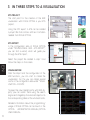
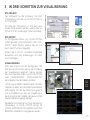
ETS PROJECT
The start point for the creation of the KNX
visualisation with DIVUS OPTIMA is your ETS
project.
Using the OPC export in ETS can be created
a project file that contains all the in-formation
needed from DIVUS OPTIMA.
ETS IMPORT
In the configuration area of DIVUS OPTIMA
under “TECHNOLOGIES - KNX – ETS IMPORT”,
you can find a wizard, which will guide you
through the ETS-Import.
Select the project file created in step 1 and
follow the steps on the screen.
EN
VISUALISATION
After the import and the configuration of the
KNX functions, you can start to create the
visualisation. For this you can create several
rooms in the configuration area under “VISUALISATION – ROOMS”.
To equip the new created rooms with KNX objects, you can search them using the search
engine and drag&drop the whished objects into
the corresponding tables of the whished rooms.
Detailed information about the programming/
usage of DIVUS OPTIMA can be found in the
OPTIMA
ADMINSTRATOR-MANUAL/OPTIMA
USER-MANUAL.
10