1
Chapter 4
Operation and Troubleshooting
The Cat. No. 150-SM6 module has four diagnostic/status LEDs to display an
LED code for each fault/alarm. When the SMC-50 controller’s Status LED
indicates the control module has faulted, the Cat. No. 150-SM6 module displays
a specific fault code. If the unit is not faulted but in an alarm condition, the Cat.
No. 150-SM6 module displays the alarm code. If the unit is neither faulted or in
an alarm condition, all 150-SM6 module LEDs will not be illuminated.
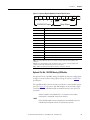
The Cat. No. 150-SM6 module > (<) LED indicates whether the fault/alarm is a
SMC-50 controller device fault/alarm or a motor fault/alarm. The on/off status
of the other three LEDs indicate the actual fault/alarm codes.
Depending on which SMC-50 controller port the Cat. No. 150-SM6 module is
installed into, the position of the LEDs (e.g., >, III, II, and I versus I, II, III, and
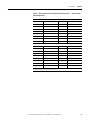
<) change. The table below displays the LED order when the Cat. No. 150-SM6
module is installed in port 7. When the Cat. No. 150-SM6 module is installed in
port 8 or 9, the order is reversed, but the LED diagnostic code is the same.
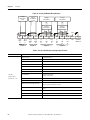
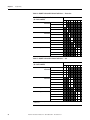
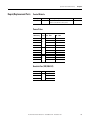
Table 22 - LED Order When Cat. No. 150-SM6 module is Installed in Port 7 of the
SMC-50
LED On/Off State
LED Error Code
III
II
I
0
Off
Off
Off
1
Off
Off
On
2
Off
On
Off
Off
On
On
On
Off
Off
5
On
Off
On
6
On
On
Off
7
On
On
On
3
4
>
Red = SMC
Yellow = Motor
Off = No Fault or Alarm
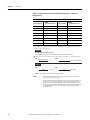
The displayed LED error code is either a fault or an alarm source. For example, if
the LED code is 1, Line Loss A is either a fault or an alarm. If a more detailed
display of the error code source is desired, a human interface module (HIM) or
configuration software is recommended.
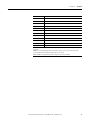
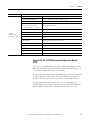
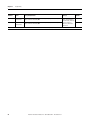
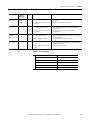
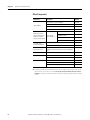
The following table provides a list of fault and LED fault/alarm codes for the
SMC-50 controller and Cat. No. 150-SM6 Parameter Configuration Module.
46
Rockwell Automation Publication 150-QS003C-EN-P - November 2012