1
Introduction
The RevIntegrator for Imaging is a software application that installs and runs on PCs to integrate
RevolutionEHR to Optos optomap®. This software is designed to work behind-the-scenes to retrieve
data from RevolutionEHR and send it to optomap. Once this software is configured you generally won’t
have to interact with it. The software should be installed and configured on every PC in the practice.
Three quick steps to get it working:
1) Install
2) Configure
3) Run
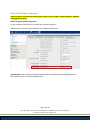
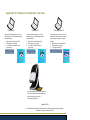
Appendix D: Software installation overview is a graphical representation of the information below. To
utilize the export of patient demographics from RevolutionEHR into Optos optomap or the V2 Vantage
Pro system, the Scheduler or Capture software must be installed along with the RevIntegrator for
Imaging.
To utilize the review of a particular patient record from inside RevolutionEHR, the patient id in Optos
optomap or the V2 Vantage Pro system must match the patient id in RevolutionEHR. Additionally the PC
must run the V2 Vantage Pro Review software along with the RevIntegrator for Imaging.
Contact Information
For help with installation and configuration of this software contact:
Customer Support at 1-877-738-3471 extension 2
Page 3 of 29
All information contained in this document is confidential and solely the property
of Health Innovation Technologies, Inc.